My First Bug Bounty: How I Found Leaked Credentials in NASA’s Git History
Hardcoded GitLab CI/CD tokens were committed to a public repository's history in 2023. An attacker with the tokens could register a rogue runner or access the Kubernetes cluster, though the tokens were already revoked when tested.

infosecwriteups.com
Published on infosecwriteups.com
Bug Bounty
The full write-up lives on its author's site
It belongs to its author, so we link to it rather than copy it. The other two tabs are our own rewrites, checked against it.
Context
HelioCloud is a NASA cloud platform that gives researchers access to geospace data and notebooks. The project ships a lot of infrastructure-as-code, and its code lives on a public GitLab instance at git.smce.nasa.gov. One of the repositories there is heliocloud/heliocloud-docker-images, which holds Kubernetes and Helm values files. Those values files are exactly the kind of place where configuration secrets end up.
The feature that mattered here is not an endpoint or a form. It is Git itself: the full commit history of a public repository. Removing a secret from the current version of a file does not remove it from the commits that came before, so anyone who clones the repository gets the old bytes too.
Setup
No account, role or special access was needed. The GitLab instance and the repository were publicly reachable, and the only tool used was Gitleaks, a widely used open-source secret scanner that walks an entire commit history and matches it against hundreds of rules for known credential formats.
The precondition is simply that the repository can be cloned anonymously and that its history is intact.
Finding it
The researcher was deliberately looking for publicly accessible infrastructure belonging to a large organisation that is easy to overlook: public Git servers, self-hosted DevOps tooling, and internal-ish repositories that were never really meant to be browsed. Public bug bounty programs are picked clean by thousands of people, so this kind of surface is a better starting point.
The mental shift behind the finding is that developers think in terms of files while attackers think in terms of history. When a token leaks, the usual response is to remove it from the file and rotate it, and the current version of the repository then looks clean. But every commit is preserved, so a token deleted last year is still sitting in an old commit, byte for byte. Instead of reading files, the researcher decided to read the timeline.
Exploitation
Step 1: clone the repository
git clone https://git.smce.nasa.gov/heliocloud/heliocloud-docker-images
This pulls down the repository together with its full history. The clone took eleven seconds to run.
Step 2: scan the full commit history with Gitleaks
# Scan the full commit historygitleaks detect --source heliocloud-docker-images/ \ --report-format json \ --report-path result.json# Read the findingscat result.json
gitleaks detect scans the whole timeline rather than the current state of the files, writes the findings as JSON to result.json, and the file is then read directly. There was no exploitation, no fuzzing and no clever payloads: just looking at what history had left behind.
Gitleaks came back with results.
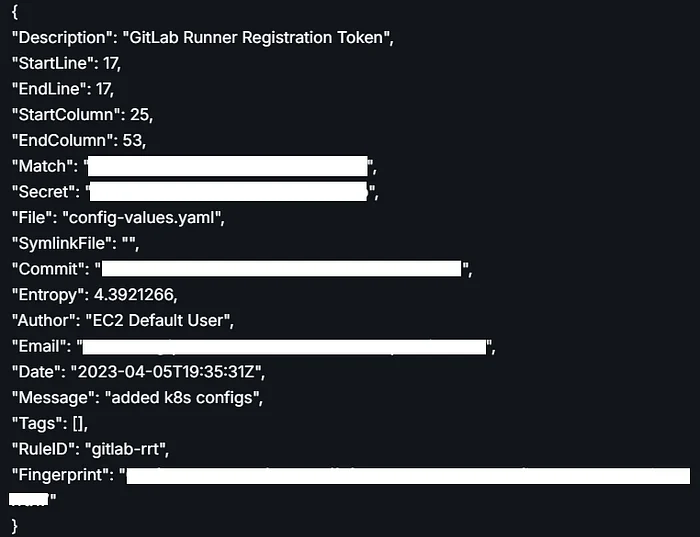
Step 3: read the findings
The findings were hardcoded credentials committed in April and May 2023, across a couple of Kubernetes/Helm values files. The values are masked in the write-up because a public article does not need to republish secrets.
A GitLab Runner Registration Token in config-values.yaml:
runnerRegistrationToken: "GR1348941••••••••••••••••••••"
A GitLab Agent Access Token in gitlab-agent-values.yaml:
token: "PjRn5hrx••••••••••••••••••••••••••••••"
A trimmed version of the Gitleaks report looked like this:
[ { "Description": "GitLab Runner Registration Token", "File": "config-values.yaml", "Commit": "113e0ebb••••••••", "Author": "••••••••@nasa.gov", "Date": "2023-05-04T22:37:50Z", "RuleID": "gitlab-rrt" }, { "Description": "Generic API Key", "File": "gitlab-agent-values.yaml", "Commit": "e5b934f6••••••••", "Author": "••••••••@nasa.gov", "Date": "2023-04-06T16:03:00Z", "RuleID": "generic-api-key" }]
Each entry gives the rule that matched, the file, the commit hash, the author and the commit date. The runner registration token matched the gitlab-rrt rule; the agent token matched the generic API key rule.
Step 4: confirm the secrets are real, not placeholders
To confirm each secret was real and not a placeholder, the exact file contents were pulled straight out of the historical commits:
git show 113e0ebb:config-values.yamlgit show e5b934f6:gitlab-agent-values.yaml
git show <commit>:<file> prints the file as it existed at that commit, so the values could be read in black and white, dated 2023.
Step 5: validate the token state, non-destructively
Nothing was abused. The only validation performed stays within authorised, non-destructive bounds: a single API call to see whether the token was still active.
curl --header "Authorization: Bearer PjRn5hrx••••••••••••" \ "https://git.smce.nasa.gov/api/v4/projects"
The request sends the recovered agent token as a bearer token to the GitLab API's projects endpoint. The response was 401 Unauthorized.

That told the researcher the token had already been revoked or had expired since 2023, and the report said so plainly rather than pretending the token was live. The honest framing was that the credential is currently inactive, but its presence in version history is still a security risk: it violates secure-coding practice (CWE-798), it shows that secrets were being committed to the repository, and the history needs to be scrubbed so this cannot bite the project in the future.
Root cause
The mistake is CWE-798, use of hardcoded credentials: a GitLab Runner Registration Token and a GitLab Agent Access Token were committed into Kubernetes/Helm values files in April and May 2023. The interesting part is not the category but what the two tokens do.
A GitLab Runner Registration Token is used to register a runner with GitLab. If it is live, anyone holding it can register a rogue runner to the project. That runner then picks up CI/CD jobs, which means it can end up executing pipeline code, touching build artefacts, and reading CI/CD environment variables, which is usually where more secrets live. That is a software supply chain risk: you are not just compromising a box, you are inserting yourself into the assembly line that produces the software.
A GitLab Agent token, for the GitLab agent for Kubernetes, is used by the cluster's agent to authenticate to GitLab. Depending on how it is configured and scoped, it is a foothold aimed at cluster-side access.
Cleaning the files did not remove the tokens from the old commits. Unless someone explicitly revokes them in GitLab, they may still be valid years later.
Impact
Under the conditions described, the exposure is the ability to register a rogue runner against the project and receive CI/CD jobs, with the pipeline execution, artefact access and environment-variable exposure that follows, plus a cluster-side foothold through the agent token depending on its configuration and scope. In this instance the agent token returned 401 Unauthorized, so it had already been revoked or had expired, and the report stated that plainly. The residual risk is the one the researcher emphasised: the credentials remain in version history, and unless they are explicitly revoked in GitLab they may still be valid years later.
Fix
The timeline records the issue as retested and resolved on 25 Jun 2026. The write-up does not describe the specific remediation steps taken by NASA. What it does say is that the history needs to be scrubbed so the committed secrets cannot bite the project in the future, and that unless tokens are explicitly revoked in GitLab they may still be valid years later.
Variants to test
The same approach generalises to any public Git host. Concrete things to try, and what a positive result looks like:
- Clone and scan history on other public GitLab or GitHub organisations. Run
gitleaks detectagainst the full history. A positive result is a JSON report entry with a rule ID, file, commit hash and date for a credential format you recognise. - Check CI/CD configuration files specifically. Kubernetes/Helm values files,
.gitlab-ci.yml, pipeline variable files and deployment manifests are where runner registration tokens and agent tokens tend to land. A positive result is a token-shaped value in a file that is not a placeholder. - Confirm the value is real with
git show <commit>:<file>. A positive result is the full value printed from the historical commit, matching the scanner's finding. - Validate state with one non-destructive authenticated request. A 401 suggests the credential is dead; a live credential would make the finding far more serious. Stay within authorised, non-destructive bounds and never register a rogue runner to prove a point.
- Look at the places that are easy to forget. The history, the backup, the config, the thing someone deleted a year ago. A positive result is any credential that is absent from the current tree but present in an older commit.
On the reporting side, the lesson from this submission is worth repeating: the first version had the finding but not the storytelling, and triage asked for consolidated steps, full URLs where possible, and raw HTTP requests in Markdown format. The rewrite used three numbered, copy-pasteable steps (discovery with exact commands, manual verification with git show <commit>:<file>, and the scoped validation check with an explicit note to only test systems you own or are authorised to test), plus a walkthrough video and screenshots so the reproduction matched the written steps one to one. The submission moved to Triaged the same day, with severity set to P1.
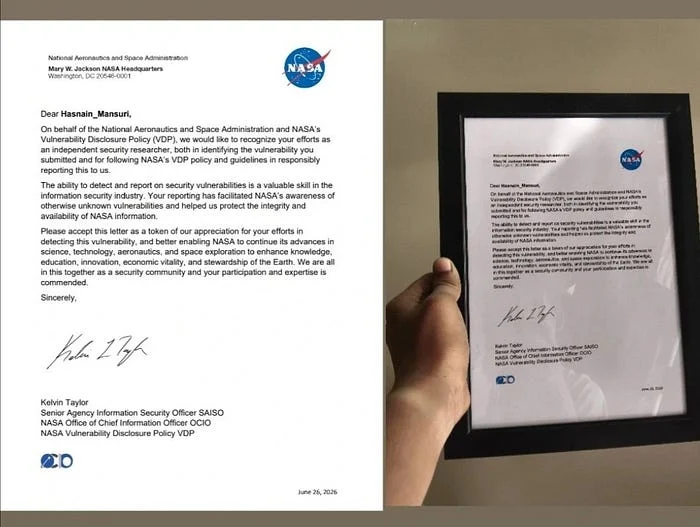
The timeline was: submitted 06 Apr 2026, triaged as P1 on 17 Apr 2026, retested and resolved on 25 Jun 2026, with a Letter of Recognition from NASA as recognition. NASA's team asked researchers to allow 90 days before publishing anything publicly, and that window was respected.
What happened, in plain words
A security researcher found passwords and access keys that a NASA project had accidentally left inside the history of a public code repository. The keys were old, from 2023, and one of them had already stopped working by the time it was tested. The researcher reported the problem through NASA's Vulnerability Disclosure Program on Bugcrowd, the report was triaged as P1, the issue was retested and resolved, and the researcher received a Letter of Recognition.
No hacking in the film sense took place. The researcher downloaded a public code repository, ran a free tool that looks for secret-looking strings in its history, and wrote a clear report. This article walks through the same steps in the same order, explaining every term from scratch.
The background you need first
Before the steps make sense, a few everyday ideas.
A repository is a folder of code plus a complete record of every change ever made to it. Think of a shared document with "track changes" turned on forever: you can always go back and see what the document looked like on any past day.
Git is the tool that keeps that record. GitLab is a website that hosts Git repositories, a bit like a shared drive for code, with extra features for building and deploying software. NASA runs a GitLab instance at git.smce.nasa.gov, and the project in question, HelioCloud, is a cloud platform that gives researchers access to geospace data and notebooks. Its code includes many configuration files.
A configuration file (or config file) holds settings for software: addresses, options, and sometimes passwords or keys. Kubernetes and Helm are tools for running software across many servers; their config files are called values files. These are exactly the kind of file where people accidentally paste secrets.
A secret here means a credential: a password, a token, or a key that proves to a computer that you are allowed to do something. A token is a long random string that works like a temporary password issued by a system. If someone else gets your token, they can act as you until it is cancelled (revoked) or expires.
A commit is one saved change in a repository, with a timestamp, an author, and a unique ID called a commit hash (a string like 113e0ebb).
Cloning a repository means downloading it, including its full history, to your own computer.
A secret scanner is a program that reads text and flags anything that looks like a credential. Gitleaks is a free, widely used one.
An API is a way for one program to talk to another over the internet, like a service counter: you send a request in a fixed format and get a structured answer back. curl is a command-line tool for sending such requests.
**A vulnerability disclosure programme is a scheme where an organisation invites outsiders to report security problems, often through a platform such as Bugcrowd; a bug bounty is similar but offers rewards.
CWE-798 is the catalogue number for one specific class of mistake: "Use of Hardcoded Credentials", meaning a password or key written directly into a file instead of being stored safely elsewhere.
Finding something worth looking at
Every beginner asks where to start. Public bug bounty programmes are crowded: thousands of people test the obvious websites. So the researcher looked instead at publicly reachable infrastructure belonging to a large organisation that is easy to overlook: public Git servers, self-hosted developer tooling, and repositories that were never really meant to be browsed.
That is how the researcher found HelioCloud's GitLab instance at git.smce.nasa.gov and, inside it, the repository heliocloud/heliocloud-docker-images, which holds Kubernetes and Helm values files.
Why commit history is the real attack surface
The key idea: developers think in terms of files, attackers think in terms of history.
When someone realises they have leaked a token, they usually do the right thing: delete it from the file, cancel it, and move on. The current version of the repository then looks clean. But Git keeps every commit. The token deleted last year is still sitting in an old commit, character for character, for anyone who thinks to look. So instead of reading the current files, the researcher read the timeline.
Step 1: clone the repository
git clone https://git.smce.nasa.gov/heliocloud/heliocloud-docker-images
Line by line:
git clonetells Git to make a local copy of a repository.- The address is the public location of the repository on NASA's GitLab server.
Why this step: you cannot scan a history you have not downloaded. The clone took eleven seconds. No account or special access was needed, because the repository was publicly reachable.
Step 2: scan the full commit history with Gitleaks
# Scan the full commit historygitleaks detect --source heliocloud-docker-images/ \ --report-format json \ --report-path result.json# Read the findingscat result.json
Line by line:
- The first line is a comment (it starts with
#) describing what the command does. gitleaks detectruns Gitleaks in its detection mode. Crucially, it walks the whole history, not just the current files.--source heliocloud-docker-images/points it at the folder that was just cloned.--report-format jsonasks for the findings in JSON, a plain-text format that both people and programs can read.--report-path result.jsonsays where to save that report.cat result.jsonprints the saved report to the screen so it can be read.
Why this step: a scanner reads thousands of commits far faster than a person, and it knows hundreds of patterns for known credential formats. There was no exploitation, no fuzzing (automatically throwing malformed input at a system) and no clever payloads. It was just looking at what history had left behind.
Gitleaks came back with results.
Step 3: read the findings
The findings were hardcoded credentials committed in April and May 2023, in a couple of Kubernetes/Helm values files. The values are masked in the write-up, because a public article does not need to republish secrets.
A GitLab Runner Registration Token in config-values.yaml:
runnerRegistrationToken: "GR1348941••••••••••••••••••••"
A GitLab Agent Access Token in gitlab-agent-values.yaml:
token: "PjRn5hrx••••••••••••••••••••••••••••••"
Each line is a setting in a config file: the name of the setting on the left of the colon, and the secret value on the right, in quotes. The dots replace the real characters.
A trimmed version of the Gitleaks report looked like this:
[ { "Description": "GitLab Runner Registration Token", "File": "config-values.yaml", "Commit": "113e0ebb••••••••", "Author": "••••••••@nasa.gov", "Date": "2023-05-04T22:37:50Z", "RuleID": "gitlab-rrt" }, { "Description": "Generic API Key", "File": "gitlab-agent-values.yaml", "Commit": "e5b934f6••••••••", "Author": "••••••••@nasa.gov", "Date": "2023-04-06T16:03:00Z", "RuleID": "generic-api-key" }]
What each field means:
Descriptionis the scanner's label for what it thinks it found.Fileis the file the value appeared in.Commitis the ID of the saved change where it appeared.Authoris who made that commit.Dateis when the commit was made.RuleIDis the name of the scanner rule that matched. The runner registration token matchedgitlab-rrt; the agent token matched the generic API key rule.
Why this step: the report tells you exactly where to look next, so you do not have to read the whole history by hand.
Step 4: confirm the secrets are real, not placeholders
A scanner can be fooled by example values such as changeme or your-token-here. To confirm each secret was real, the exact file contents were pulled straight out of the historical commits:
git show 113e0ebb:config-values.yamlgit show e5b934f6:gitlab-agent-values.yaml
Line by line:
git showprints something from the repository's history.113e0ebb:config-values.yamlmeans: the fileconfig-values.yamlas it existed at the commit whose ID starts with113e0ebb. The second command does the same for the other file and commit.
Why this step: this is the difference between "a scanner thinks this looks like a token" and "here is the token, in black and white, dated 2023". The values could then be read directly.
Step 5: check whether the token still works, without abusing it
This is where beginners often get themselves, and their reports, into trouble. Nothing was abused. The only check was a single, non-destructive request to see whether the token was still active.
curl --header "Authorization: Bearer PjRn5hrx••••••••••••" \ "https://git.smce.nasa.gov/api/v4/projects"
Line by line:
curlsends a web request from the command line.--header "Authorization: Bearer ..."attaches an authorisation header.Beareris a standard way of saying "the token that follows proves who I am".- The address is the GitLab API endpoint that lists projects. An endpoint is simply a specific address on a server that answers a particular kind of request.
Why this step: it answers one question, is the credential still live, with the smallest possible action. The response was 401 Unauthorized.
A 401 means the request was not authenticated, so the credential was not accepted. It told the researcher the token had already been revoked or had expired since 2023. The report said so plainly rather than pretending the token was live. The honest framing was that the credential is currently inactive, but its presence in version history is still a security risk: it violates secure-coding practice (CWE-798), it shows that secrets were being committed to the repository, and the history needs to be scrubbed so this cannot bite the project in the future.
Why this actually matters
The category is CWE-798, use of hardcoded credentials. The interesting part is what the two tokens do.
A GitLab Runner Registration Token is used to register a runner with GitLab. A runner is a machine that executes a project's automated CI/CD (continuous integration and continuous delivery) jobs. If the token is live, anyone holding it can register their own rogue runner to the project. That runner then picks up CI/CD jobs, which means it can end up running pipeline code, touching build artefacts (the files produced by a build), and reading CI/CD environment variables, which is usually where more secrets live. That is a software supply chain risk: you are not just compromising one machine, you are inserting yourself into the assembly line that produces the software.
A GitLab Agent token, for the GitLab agent for Kubernetes, is used by the cluster's agent to authenticate to GitLab. Depending on how it is configured and scoped, it is a foothold aimed at cluster-side access.
And the important part: all of this lives in history. Even after the files were cleaned up, the tokens stayed in the old commits. Unless someone explicitly revokes them in GitLab, they may still be valid years later.
The report, and the part that was wrong at first
The finding was submitted through NASA's Vulnerability Disclosure Program on Bugcrowd.
The first version had the finding but not the storytelling. The triage team (the people who read incoming reports and decide what to do with them) came back almost immediately:
"Your steps are unclear. Could you please consolidate all the steps… use full URLs where possible… provide the raw HTTP requests in Markdown format."
That feedback was the single most useful thing in the whole journey. The researcher had assumed that because the problem could be reproduced, everyone else could reproduce it too. That was wrong. A report is not a diary; it is an instruction manual for a stranger.
So it was rewritten into three clean, numbered, copy-pasteable steps:
- Discovery: clone and Gitleaks scan, with exact commands.
- Manual verification:
git show <commit>:<file>for each secret. - Proof of Concept: the scoped validation check, with an explicit note to only test systems you own or are authorised to test.
A walkthrough video and screenshots were attached so the reproduction matched the written steps one to one. The submission moved to Triaged the same day, with severity set to P1.
The outcome
- Submitted: 06 Apr 2026
- Triaged as P1: 17 Apr 2026
- Retested and resolved: 25 Jun 2026
- Recognition: Letter of Recognition from NASA
NASA's team also asked researchers to allow 90 days before publishing anything publicly. That is a reasonable norm, and it is exactly what was done. That waiting period is why the article appeared later rather than in April.
No fancy trophy. Just a PDF letter and the quiet satisfaction of knowing a real team changed something real because of work that was done.
What to do differently, and what you should do
- Scan history, not just files.
gitleaks detectwalked the whole timeline. That is where the value was. - Write for a stranger. Numbered steps, full URLs, raw requests, copy-pasteable commands. The report was triaged the day the steps were fixed.
- Be honest about impact. Saying "the token is already revoked" did not weaken the report, it strengthened it. Reviewers can tell when you are padding.
- Never test beyond your authorisation. A one-line, non-destructive check confirmed the token's state, and that was plenty. You do not need to register a rogue runner to prove a point.
- Respect the disclosure window. Let the organisation fix it first.
Other places to try the same approach
The same method works on any public code host:
- Clone and scan history on other public GitLab or GitHub organisations. Run
gitleaks detectagainst the full history. A positive result is a report entry with a rule ID, file, commit hash and date for a credential format you recognise. - Check CI/CD configuration files specifically. Kubernetes/Helm values files,
.gitlab-ci.yml, pipeline variable files and deployment manifests are where runner registration tokens and agent tokens tend to land. A positive result is a token-shaped value in a file that is not a placeholder. - Confirm the value is real with
git show <commit>:<file>. A positive result is the full value printed from the historical commit, matching the scanner's finding. - Check whether it is still live with one non-destructive authenticated request. A 401 suggests the credential is dead; a live credential would make the finding far more serious. Stay within authorised, non-destructive bounds and never register a rogue runner to prove a point.
- Look at the places that are easy to forget. The history, the backup, the config, the thing someone deleted a year ago. A positive result is any credential that is absent from the current files but present in an older commit.
Closing thoughts
When starting out, it is easy to think a "real" bug means exploitation: some clever chain, some flashy payload. This first accepted finding was a git command and a bit of curiosity about what people leave behind.
The secret was not a secret at all. It was just sitting in the past, waiting for someone to look.
If you are chasing your first bug, go and look at the places that are easy to forget: the history, the backup, the config, the thing someone deleted a year ago. And write it down as if the person reading it has never seen your screen.
Glossary
- API: a fixed way for one program to ask another program for something over the internet, like a service counter with set request forms.
- Artefact: a file produced by a build process, such as a packaged program or container image.
- Bearer token: a credential sent in a request header to prove identity; whoever holds it is treated as the owner.
- Bug bounty / vulnerability disclosure programme: a scheme where an organisation invites outsiders to report security problems, often through a platform such as Bugcrowd.
- CI/CD: the automated process that builds, tests and deploys software whenever code changes.
- Clone: to download a copy of a repository, including its full history.
- Commit: one saved change in a repository, with an ID, author and date.
- Commit hash: the unique ID of a commit, such as
113e0ebb. - Config file: a file holding settings for software, sometimes including secrets.
- Credential: a password, token or key that proves you are allowed to do something.
- curl: a command-line tool for sending web requests.
- CWE-798: the catalogue entry for "Use of Hardcoded Credentials", a password or key written directly into a file.
- Endpoint: a specific address on a server that answers a particular kind of request.
- Environment variable: a named value passed to a running program, often used to supply settings and secrets.
- Fuzzing: automatically sending malformed or random input to a system to see how it reacts.
- Git: the tool that records every change to a set of files.
- GitLab: a website that hosts Git repositories and adds build and deployment features.
- Gitleaks: a free secret scanner that reads a repository's full history looking for credential patterns.
- Helm / Kubernetes: tools for running software across many servers; their settings live in values files.
- JSON: a plain-text format for structured data that both people and programs can read.
- P1: the highest priority level in a bug bounty programme's severity scale.
- Repository: a folder of code plus the complete record of every change made to it.
- Revoke: to cancel a credential so it no longer works.
- Runner: a machine that executes a project's automated CI/CD jobs.
- Secret scanner: a program that flags text that looks like a password, token or key.
- Software supply chain: everything and everyone involved in producing and delivering software; compromising it means tampering with the assembly line, not just one machine.
- Token: a long random string issued by a system that works like a temporary password.
- Triage: the process of reading an incoming report and deciding its validity and priority.
- 401 Unauthorized: the web response meaning the credential supplied was not recognised.
- Values file: a configuration file used by Helm and Kubernetes to supply settings.




