My First Valid Bug “Bypass the Admin Panel”
The author found that authenticated URLs on a university portal redirected to a login page, but the base domain did not, allowing access to student and professor information and the ability to add oneself as a student. The text does not clearly explain the underlying vulnerability, but claims an admin panel bypass.
 Published on medium.com
Hey everyone, I am Digant Prajapati. Cyber Security Enthusiast and currently focusing on bug bounty💸.
The full write-up lives on its author's site
It belongs to its author, so we link to it rather than copy it. The other two tabs are our own rewrites, checked against it.
Context
Digant Prajapati's first valid bug was an authentication bypass on the portal of a university, which he refers to throughout as redacted.com for privacy. The portal is a web application whose entry point is a login panel: opening the domain redirects the visitor to that login page, and the authenticated pages behind it hold student and staff records. The researcher's stated interest in education and university sites is that they hold internal information, sometimes the full record of professors and students including private email addresses, contact numbers and departments.
The bug itself is simple: the login redirect could be avoided by requesting the bare domain, after which the portal's administrative interface was reachable without authenticating.
Setup
No accounts, roles or special tooling are described. The work was done in a browser, with Google dorks for discovery and a notepad to collect URLs. The only precondition was a reachable portal host, found through a dork for education sites:
portal.target.com
Finding it
Opening the discovered domain redirected straight to the login panel, at a URL of this shape:
https://portal.redacted.com/example/(filename*).jsp
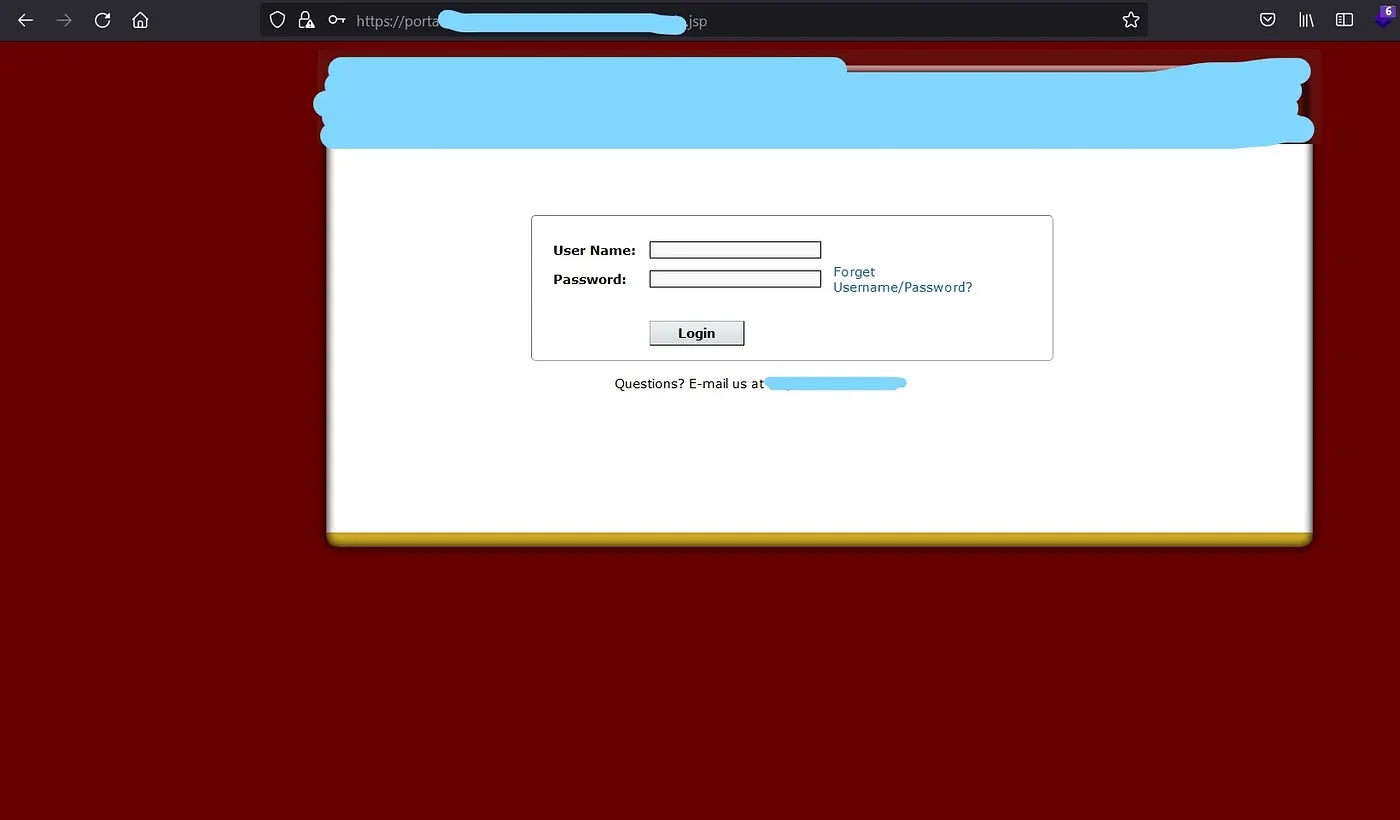
Default credentials were tried first and did not work. A SQL payload was tried next and also did not work. The researcher then turned to reconnaissance and ran a Google dork restricted to the portal host and excluding the www host:
site:"portal.target.com" -www
Results came back within seconds. Every URL was opened in a new tab, and every one of them redirected to the login page. The researcher noticed that all of the discovered URLs were authenticated pages, which he took to be why each one bounced to login. The authenticated URLs were copied into a notepad, for example:

Exploitation
Step 1: request the bare domain
Instead of any of the authenticated .jsp pages, the researcher entered the domain name alone, with no path and no redirect extension:
https://portal.redacted.com
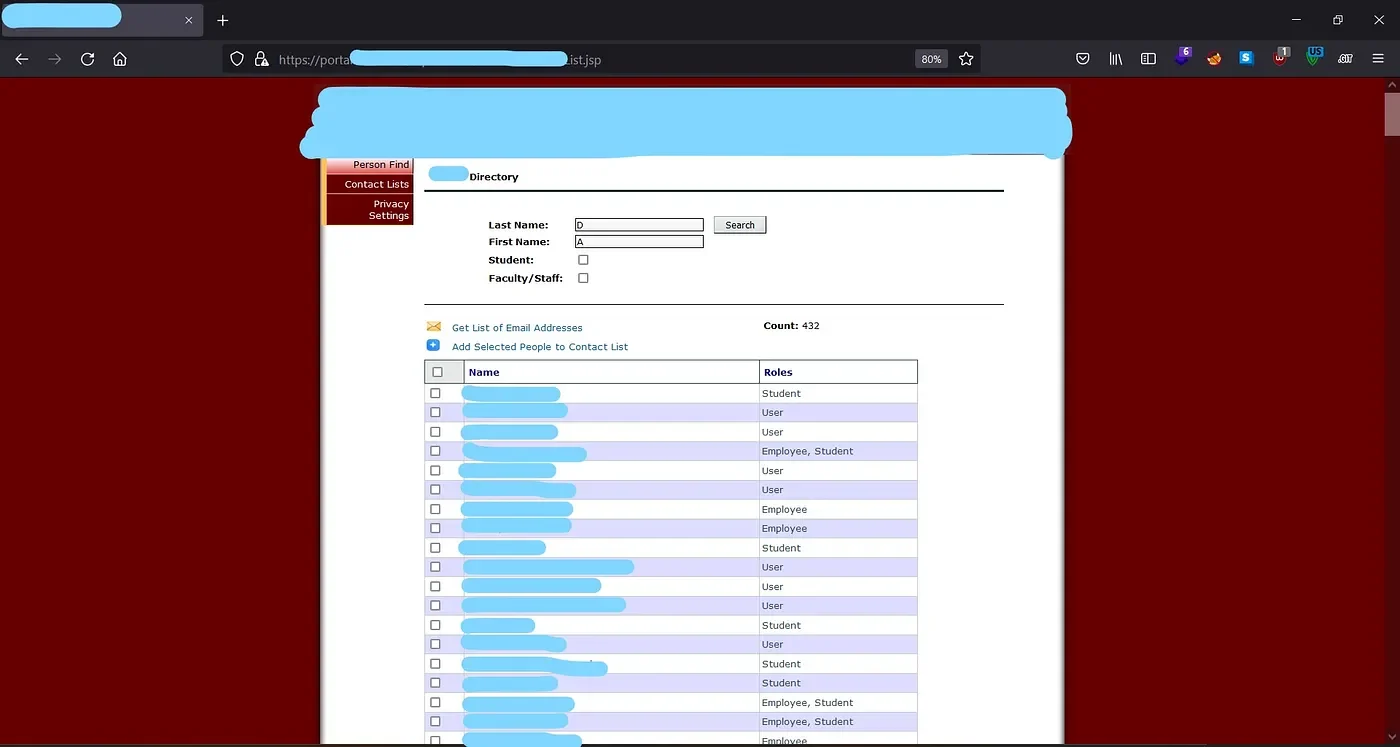
This time there was no redirect to the login page. In the researcher's words, that meant the admin panel was bypassed.
Step 2: read and modify records
From that point the portal exposed all of the information it held, including name, email ID, number and other details. Beyond reading, the researcher was also able to add himself as a student of the university.

Step 3: report
A proof of concept video was recorded and sent to the university's security team. They took more than two months to see the mail, and then, one night, replied to appreciate the report and award a $50 bounty, the researcher's first.

Root cause
The report does not describe the server-side code or configuration, so the exact mistake is not stated. What the behaviour shows is that the authenticated .jsp pages under /example/ redirected to login, while the bare host did not redirect and showed the administrative interface. The report does not explain why the bare host behaved differently from the authenticated pages.
Impact
After the bypass, the researcher could reach the administrative interface and read the personal data held there: names, email IDs, phone numbers and other information. The researcher also demonstrated write access by enrolling himself as a student. The report does not quantify how many records were exposed or who else could reach the same interface.
Fix
Based on the behaviour, the fix should be to enforce authentication centrally on every request to the portal, including the bare host and any path that is not explicitly public, rather than relying on redirects from individual pages.
Variants to test
- Request the bare host of any portal found through a dork such as
site:"portal.target.com" -www, without a path. A positive result is the administrative interface loading instead of a login page. - Compare a protected page with its parent directory, for example
/example/(secret*)PersonList.jspagainst/example/. A positive result is the directory listing or interface appearing without a session. - Try the same host over both
wwwand non-wwwnames, since the dork here deliberately excludedwww. A positive result is one hostname enforcing login and the other not. - Strip the file name and extension from each authenticated URL collected during recon and request the remaining path. A positive result is content served without a redirect to login.
Credit for the original post: https://medium.com/@ratnadip1998
What happened, in plain words
A security researcher found that a university portal's admin panel could be reached without logging in. The portal was supposed to show a login page first, but by typing just the main web address (without any extra path), the researcher could see the administrative interface. That interface contained personal information such as names, email IDs, phone numbers and other details. The researcher could also add himself as a student. He reported the issue and received a $50 bounty.
This article explains how he found it, step by step, for someone who has never done security testing before. You only need a browser and a computer to follow along.
Background
The researcher, Digant Prajapati, likes to check education and university websites because they often hold internal information: records of professors and students, including private email addresses, contact numbers and departments. During the pandemic, he became curious about how hackers break into systems and earn money. He watched a video called “A Day with a Hacker” and then learned about bug bounty programmes, where companies pay people for finding security problems in their websites.


Finding the target
One day he searched Google for education sites using a technique called a Google dork. A Google dork is a special search query that uses advanced operators to find specific pages. For example, site: limits results to one website, and -www excludes the www version of the site. He used:
portal.target.com
This is not a full dork; it is just the domain name he was interested in. He calls the real target redacted.com to protect privacy.
He opened the domain and was redirected to a login panel. The URL looked like this:
https://portal.redacted.com/example/(filename*).jsp
A login panel is the page where you enter a username and password. The .jsp extension means the page is built with JavaServer Pages, a technology for creating web pages that run on the server. The (filename*) part is a placeholder for a file name.
First attempts
He first tried default credentials, common username and password combinations set by default on many systems. They did not work. Then he tried a SQL payload, which is a piece of code meant to trick a database into letting you in. That also did not work. A SQL payload is part of an attack called SQL injection, where you insert database commands into input fields to manipulate the database. It did not work here.
Reconnaissance
After those failures, he turned to reconnaissance (recon). Recon means gathering information about a target before attacking. He used another Google dork to find pages on the portal host, excluding the www version:
site:"portal.target.com" -www
This query tells Google: show me all pages on portal.target.com but not on www.portal.target.com. The -www part excludes results that contain www. Within seconds, Google returned some URLs.
He opened each URL in a new tab, but every one redirected to the login page. He was confused: why did every URL go to login? He noticed that all those URLs were authenticated pages. Authenticated means they require you to be logged in. That is why they redirected to login. He copied all the authenticated URLs into a notepad. Examples:
These URLs contain (secret*) as a placeholder for some secret part of the path. ServAuthorization.jsp and PersonList.jsp are page names. PersonList.jsp sounds like a page that lists people.
The bypass
Instead of requesting any of those authenticated pages, he entered just the domain name, with no path and no extra characters:
https://portal.redacted.com
This time, there was no redirect to the login page, and he could access the information behind it. In his words, that meant he bypassed the admin panel. Bypass means to get around a security control without breaking it.
What he could do
Once inside, he could see all the information the portal held: names, email IDs, phone numbers and other details. He could also add himself as a student of the university. That means he had write access, not just read access. Read access means viewing data; write access means changing or adding data.
Reporting
He recorded a proof of concept (POC) video showing the steps and sent it to the university's security team. A POC is a demonstration that a vulnerability is real. The security team took more than two months to see his email. Then, one night, he received a reply: they thanked him and awarded him $50. It was his first bounty.
Why did this happen?
The report does not describe the server-side code or configuration, so the exact mistake is not stated. What the behaviour shows is that the authenticated .jsp pages under /example/ redirected to login, while the bare host did not redirect and showed the administrative interface. A session is a period of interaction between a user and a system; after you log in, the server remembers you, often using a cookie. A cookie is a small piece of data stored in your browser and sent with each request to the same site. The report does not explain why the bare host behaved differently from the authenticated pages.
Impact
After the bypass, the researcher could reach the administrative interface and read personal data: names, email IDs, phone numbers and other information. The researcher also demonstrated write access by enrolling himself as a student. The report does not quantify how many records were exposed or who else could reach the same interface.
Fix
Based on the behaviour, the fix should be to enforce authentication centrally on every request to the portal, including the bare host and any path that is not explicitly public, rather than relying on redirects from individual pages.
Variants to test
- Request the bare host of any portal found through a dork such as
site:"portal.target.com" -www, without a path. A positive result is the administrative interface loading instead of a login page. - Compare a protected page with its parent directory, for example
/example/(secret*)PersonList.jspagainst/example/. A positive result is the directory listing or interface appearing without a session. - Try the same host over both
wwwand non-wwwnames, since the dork here deliberately excludedwww. A positive result is one hostname enforcing login and the other not. - Strip the file name and extension from each authenticated URL collected during recon and request the remaining path. A positive result is content served without a redirect to login.
Credit for the original post: https://medium.com/@ratnadip1998
Glossary
- Authentication: The process of verifying who you are, usually with a username and password.
- Bypass: Getting around a security control without breaking it.
- Cookie: A small piece of data stored in your browser and sent with requests to the same site, often used to maintain a session.
- Default credentials: Common username and password combinations that are set by default on many systems, like
admin/admin. - Google dork: A search query that uses advanced Google operators to find specific information, such as pages on a particular site.
- JSP: JavaServer Pages, a technology for building web pages that run on the server.
- Payload: The part of an attack that actually does something, like a piece of code or data.
- POC (Proof of Concept): A demonstration that a vulnerability exists, often a video or screenshots.
- Recon (reconnaissance): The information-gathering phase of an attack.
- Redirect: When a web server tells your browser to go to a different URL.
- Session: A period of interaction between a user and a system, often tracked with a cookie after login.
- SQL injection: An attack where you insert database commands into input fields to manipulate the database.
- SQL payload: A piece of code used in a SQL injection attack.
- Unauthenticated: Not logged in; without a verified identity.
- Vulnerability: A weakness in a system that can be exploited to cause harm.

