Hay Hunters , Hello Infosec Community
An Oracle E-Business Suite login panel allowed self-registration through a separate registration endpoint, and the resulting account could list all employees' names, usernames and emails. On some panels a diagnostic console also let the user run SQL that returned user records including encrypted foundation passwords.
 Published on orwaatyat.medium.com
The Best Part Here It Is Not Common Vulnerability And Exposure (CVE) It Is New Vulnerability Due To This Security Issue, I Was Looking & Test It On Companies Deal With This Panel And It Work 100%
The full write-up lives on its author's site
It belongs to its author, so we link to it rather than copy it. The other two tabs are our own rewrites, checked against it.
Context
Oracle E-Business Suite exposes a login panel at OA_HTML/AppsLocalLogin.jsp. The panel is meant for employees of the organisation that runs the suite. Next to it sits a registration page, OA_HTML/ibeCAcpSSOReg.jsp, which the author describes as intended for employees only.
The finding is that the registration page can be reached and used to create an account, and that the resulting account gives access to employee data inside the panel: emails, first and last names and usernames. On some panels, a Diagnostic Console is also reachable and exposes database content, including encrypted foundation passwords. The author states the issue is not a CVE and that it worked on every panel he tested, and that it was reported and fixed on about 15 bounty programmes, naming Uber, Amazon and Mastercard among them.
Setup
No special tooling is required for the first part. The researcher used a browser against the target, created an account through the registration endpoint, logged in through the normal login page, and then used the panel's own proxy features to read employee records. For finding targets at scale he used a Shodan dork. The password path depends on the Diagnostic Console being present, which the author notes is not enabled on all panels.
Finding it
Visiting the login panel shows the standard Oracle E-Business login page:
Target/OA_HTML/AppsLocalLogin.jsp
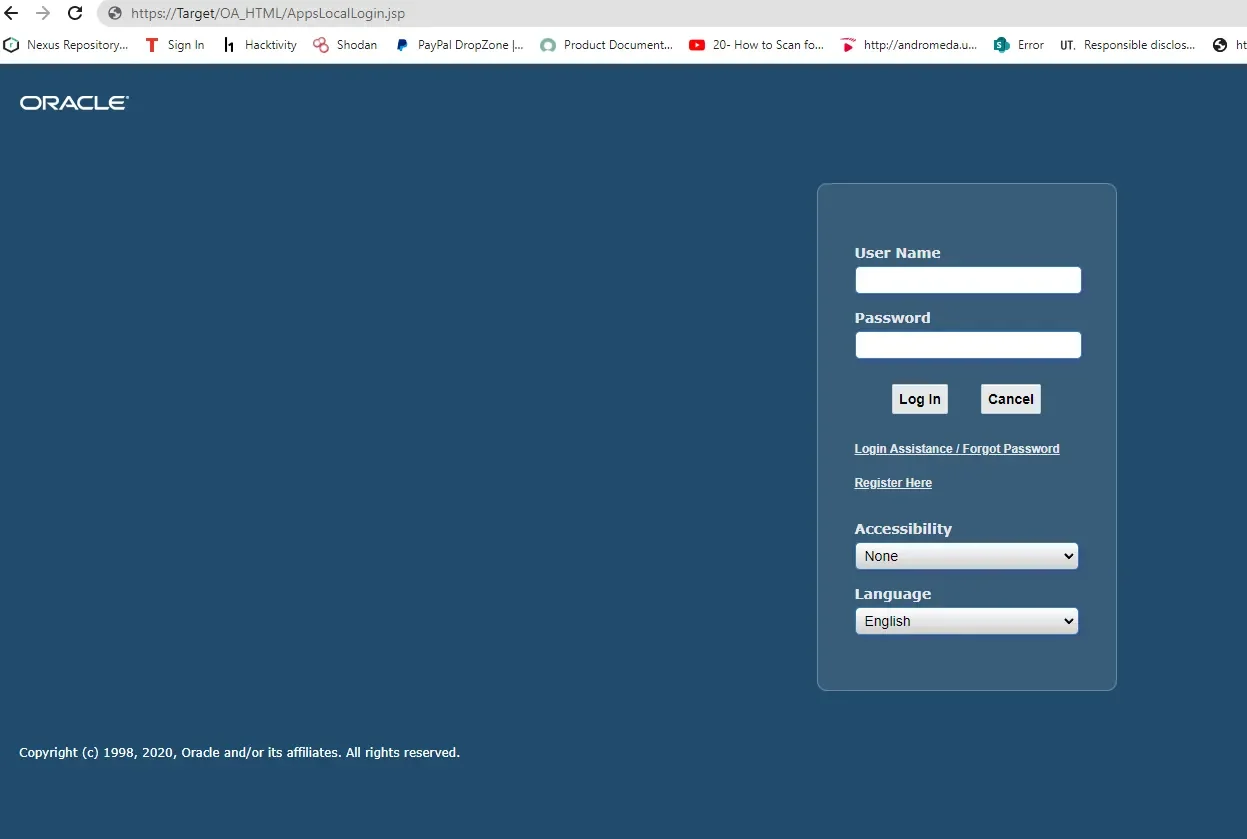
The registration link on that page does not work as an employee registration, but the registration endpoint itself is reachable and accepts a new account:
Target/OA_HTML/ibeCAcpSSOReg.jsp
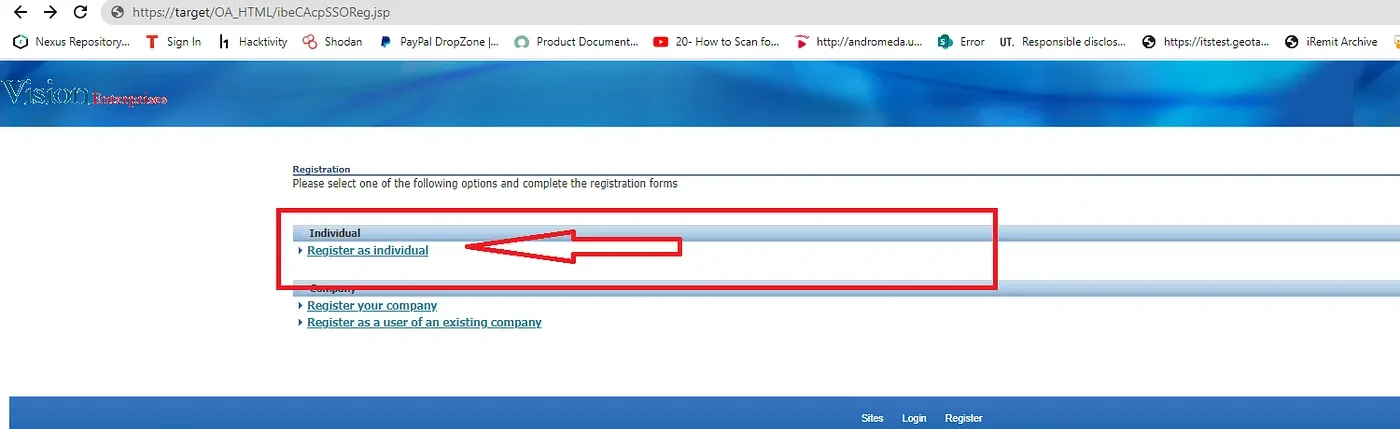
The author stresses that the registration page being reachable was already a known issue at the time; what he found is what happens after the account is created and used to log in. To locate other installations he used a Shodan query for Oracle E-Business login pages:
“X-ORACLE-DMS-ECID” http.title:”Login” 200
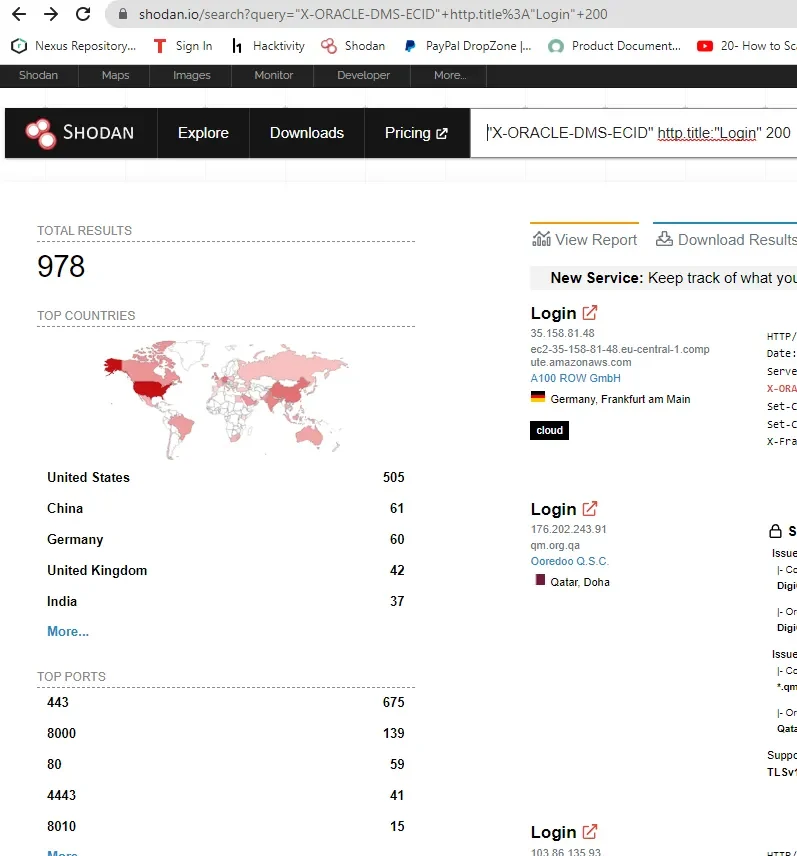
The dork searches for Oracle E-Business login panels.
Exploitation
Step 1: create an account
Visit the target and register through the registration endpoint:
Target/OA_HTML/ibeCAcpSSOReg.jsp
Step 2: log in
Return to the login page and sign in with the credentials just created:
Target/OA_HTML/AppsLocalLogin.jsp

Step 3: open the proxy tools
Inside the authenticated panel, move to Manage Proxies.
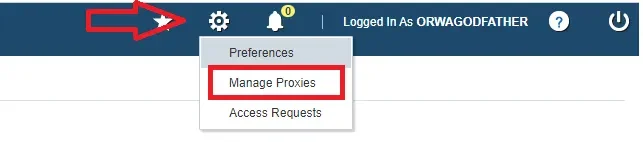
Step 4: run the proxy report
Run the proxy report from that screen.
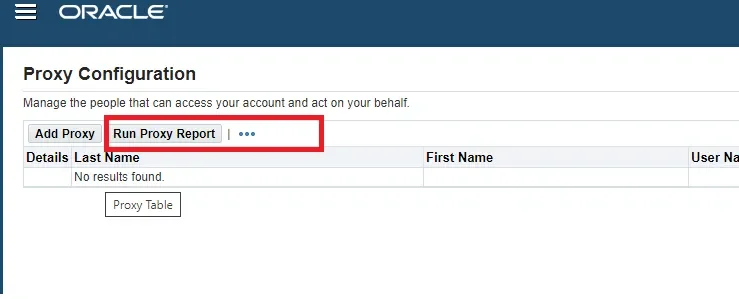
Step 5: read employee records
The report returns employee information: emails, first name, last name and username. Searching for employees whose name starts with a, for example, lists them.

Step 6: enumerate the directory
Search for a, b, c and so on. The search accepts username, first name, last name or email, and returns all matching employee results.
The author notes there is more data available but that he did not dig deeper.
Step 7: reach the Diagnostic Console
This path is not enabled on every panel. From the home page, check whether a Diagnostic Console is available. If it is, open it.

Step 8: query the user table
In the console, go to SQL, then SQL Statements, select the FND_USER table and run the query:
Visit SQL===>In SQL Statements===>select * from FND_USER===>RUN SQL
The result includes the following columns:
USER_IDs,USER_NAMEs,LAST_UPDATE_DATE,LAST_UPDATED_BYCREATION_DATE,CREATED_BY,LAST_UPDATE_LOGIN,ENCRYPTED_FOUNDATION_PASSWORDs
That is user identifiers, usernames, audit columns and the encrypted foundation password values for the accounts in the table.
Root cause
The registration endpoint ibeCAcpSSOReg.jsp is reachable and lets an unauthenticated visitor create an account, even though the visible registration flow is presented as employee-only. The account created this way is then treated as a valid panel user, so the panel's own features, including Manage Proxies and its reports, are available to it. The author's framing is that the registration page being exposed was already known, and that the real problem is the level of access such an account receives after login. The report does not describe the server-side check that is missing, so the exact defect in the registration logic is not stated. The Diagnostic Console, where present, adds a second layer: it allows running SQL against FND_USER and returning password hashes to the same low-trust account.
Impact
An unauthenticated attacker can create an account on a reachable Oracle E-Business login panel and, after logging in, read employee information: emails, first and last names and usernames. Because the search accepts partial values and can be iterated over the alphabet, the whole employee directory can be enumerated. Where the Diagnostic Console is enabled, the attacker can also read FND_USER rows, including encrypted foundation passwords. The author states the issue affects more than 1000 companies using the panel, and that it was fixed on about 15 bounty programmes. The password path is explicitly conditional: it is not enabled on all panels.
Fix
The report does not describe the fix applied by the vendors or by Oracle. What the finding calls for is to stop unauthenticated account creation through ibeCAcpSSOReg.jsp, or to restrict it to genuinely authorised employees, and to ensure that an account created through registration does not inherit access to the proxy reports or to the Diagnostic Console. Where the console is not needed, it should not be exposed to panel users at all.
Variants to test
- Enumerate other Oracle E-Business panels with the same Shodan dork and check whether
OA_HTML/ibeCAcpSSOReg.jspaccepts a registration. A positive result is a created account that can log in atOA_HTML/AppsLocalLogin.jsp. - After logging in with a self-registered account, look for Manage Proxies and run the proxy report. A positive result is a list of employee names, usernames and emails.
- Try partial searches on the report, one letter at a time, and by username, first name, last name and email. A positive result is results returned for each field and each letter.
- Check the home page for a Diagnostic Console. A positive result is a console that offers SQL Statements and can run a query against
FND_USER, returning the columns listed above. - Test the same registration endpoint on panels that do not expose the console, to separate the account-creation issue from the SQL access issue.
What happened, in plain words
Oracle E-Business Suite is a large piece of business software that many companies use to run things like finance, purchasing and HR. It comes with a web page where staff log in, and the address of that page ends in OA_HTML/AppsLocalLogin.jsp. Think of it as the staff entrance of a building: you are supposed to need a badge to get past it.
Next to that entrance there is a second page, a registration page at OA_HTML/ibeCAcpSSOReg.jsp. The author says this page is meant for employees only. The problem he found is that anyone on the internet can open that registration page and create an account, and once that account is created it can log in at the normal staff entrance. The account is then treated like a real staff account, so the features inside the panel open up for it.
What can that account see? Employee information: email addresses, first and last names and usernames. On some installations there is also a feature called the Diagnostic Console, and where it is switched on, the same low-trust account can run a database query that returns rows from the FND_USER table, including encrypted foundation passwords.
The author says this is not a CVE. A CVE is a public catalogue number given to a known, catalogued vulnerability, so saying "not a CVE" means this was a fresh issue without an existing public entry. He says it worked on every panel he tested, that he reported it and it was fixed on about 15 bounty programmes, and he names Uber, Amazon and Mastercard among them. He also says it affected more than 1000 companies that use this login panel.
He stresses one point: the registration page being reachable was already a known issue before him. What he found is what happens after you create an account and log in with it.
Finding the login panel
When you visit the login panel, you get the standard Oracle E-Business login page:
Target/OA_HTML/AppsLocalLogin.jsp
In that address, Target stands for the company's website, and the rest is the path to the login page on the server. The screenshot shows what that page looks like when you open it in a browser.
The registration link on that page does not work as an employee registration, but the registration page itself can still be reached directly, and it accepts a new account:
Target/OA_HTML/ibeCAcpSSOReg.jsp
So the visible flow is broken or restricted, but the page behind it is still live and still lets you sign up. That is the first half of the bug: a door that is supposed to be for staff only is standing open.
To find other companies running the same software, the author used a search engine called Shodan. Shodan is not a normal web search engine: instead of indexing page text, it scans the internet and records what devices and servers answer, so you can search for servers by the headers they send back or the title of their pages. The query he used was:
“X-ORACLE-DMS-ECID” http.title:”Login” 200
Line by line, in plain words:
“X-ORACLE-DMS-ECID”asks for servers whose responses carry a header with that name. A header is a small piece of information a server sends along with a page, a bit like the label on a parcel telling you what is inside and where it came from. This particular header is characteristic of Oracle E-Business installations.http.title:”Login”asks for pages whose title isLogin, which is what these panels are called.200asks for servers that answered with HTTP status 200, which means "OK, here is the page".
Put together, the query lists servers that look like Oracle E-Business login panels and are answering normally.
Getting in and reading employee data
The first path needs nothing more than a browser. Here is the sequence, step by step.
Step 1: create an account
Visit the target and register through the registration page:
Target/OA_HTML/ibeCAcpSSOReg.jsp
Why this step: the registration page is the way in. If it accepts a new account from someone who is not an employee, the rest of the chain follows from there.
Step 2: log in
Go back to the login page and sign in with the credentials you just created:
Target/OA_HTML/AppsLocalLogin.jsp
Why this step: creating an account proves nothing on its own. The question is whether the panel accepts that account as a real user. Logging in answers that question.
Step 3: open the proxy tools
Inside the panel, once you are logged in, go to Manage Proxies.
The report does not explain what Manage Proxies does; it is simply the screen the author moves to next. The Manage Proxies screen is where those settings are administered. It is a normal administrative feature of the product, and the point is that a freshly self-registered account can reach it.
Step 4: run the proxy report
Run the proxy report from that screen.
Why this step: the report is the feature that actually prints out the records. Reaching the screen is one thing; getting it to produce data is the proof.
Step 5: read employee records
The report returns employee information: emails, first name, last name and username. For example, searching for employees whose name starts with a lists them.
Step 6: walk the whole directory
Search for a, b, c and so on. The search accepts a username, a first name, a last name or an email address, and returns every matching employee.
Why this step: a single search only shows a slice. Because the search accepts partial values, you can go letter by letter through the alphabet and collect the whole employee directory. This is called enumeration: listing things one by one until you have them all, like reading a phone book page by page instead of asking for one name.
The author notes there is more data available, but he did not dig deeper.
Step 7: look for the Diagnostic Console
This second path is not available on every panel. From the home page, check whether a Diagnostic Console is there. If it is, open it.
A console here means a built-in screen for running technical commands against the system, normally something an administrator uses for troubleshooting. Finding one reachable from a self-registered account is the second problem.
Step 8: query the user table
In the console, go to SQL, then SQL Statements, choose the FND_USER table and run the query:
Visit SQL===>In SQL Statements===>select * from FND_USER===>RUN SQL
Line by line, in plain words:
Visit SQLmeans open the SQL section of the console. SQL is the language used to ask a database questions.In SQL Statementsmeans go to the part of that section where statements are written and run.select * from FND_USERis the question itself.FND_USERis the name of the table that holds user accounts, andselect *means "give me every column of every row". A table is like a spreadsheet: rows are records, columns are the fields in each record.RUN SQLmeans execute it.
The result includes these columns:
USER_IDs,USER_NAMEs,LAST_UPDATE_DATE,LAST_UPDATED_BYCREATION_DATE,CREATED_BY,LAST_UPDATE_LOGIN,ENCRYPTED_FOUNDATION_PASSWORDs
In plain words, that is: user identifiers, usernames, a set of audit columns (when each row was last updated, who updated it, when it was created, who created it, and the last login reference), and the encrypted foundation password values for the accounts in the table. Encrypted here means the passwords are stored in a scrambled form rather than as readable text. That is what "attacked offline" means.
Why this works
The registration page ibeCAcpSSOReg.jsp can be reached by someone who is not logged in, and it lets that person create an account, even though the visible registration flow is presented as employee-only. The account created this way is then treated as a valid panel user, so the panel's own features, including Manage Proxies and its reports, are open to it.
The author's framing is that the exposed registration page was already known, and that the real problem is how much access such an account gets after login. The report does not describe the server-side check that is missing, so the exact defect in the registration logic is not stated. The Diagnostic Console, where it exists, adds a second layer: it lets the same low-trust account run SQL against FND_USER and get password values back.
What it means in practice
Someone who has never logged in before can create an account on a reachable Oracle E-Business login panel and, after logging in, read employee information: emails, first and last names and usernames. Because the search accepts partial values and can be walked through the alphabet, the whole employee directory can be listed. Where the Diagnostic Console is switched on, the same person can also read FND_USER rows, including encrypted foundation passwords. The author says the issue affects more than 1000 companies using the panel, and that it was fixed on about 15 bounty programmes. The password path is conditional: it is not enabled on all panels.
What a fix would look like
What the finding calls for is to stop unauthenticated account creation through ibeCAcpSSOReg.jsp, or to restrict it to genuinely authorised employees, and to make sure an account created through registration does not inherit access to the proxy reports or to the Diagnostic Console. Where the console is not needed, it should not be exposed to panel users at all.
Things to try on other panels
- Find other Oracle E-Business panels with the same Shodan query and check whether
OA_HTML/ibeCAcpSSOReg.jspaccepts a registration. A positive result is a created account that can log in atOA_HTML/AppsLocalLogin.jsp. - After logging in with a self-registered account, look for Manage Proxies and run the proxy report. A positive result is a list of employee names, usernames and emails.
- Try partial searches on the report, one letter at a time, and by username, first name, last name and email. A positive result is results returned for each field and each letter.
- Check the home page for a Diagnostic Console. A positive result is a console that offers SQL Statements and can run a query against
FND_USER, returning the columns listed above. - Test the same registration page on panels that do not expose the console, to separate the account-creation issue from the SQL access issue.
Glossary
- Oracle E-Business Suite: a large set of business applications from Oracle that companies use for finance, purchasing, HR and similar work.
- Login panel: the web page where staff type their username and password to get into a system.
- Registration page: a web page that lets someone create a new account.
- Endpoint: a specific address on a server that does one job, such as a login page or a registration page.
- URL / path: the address you type in a browser; the path is the part after the site name that points to a page.
- Header: a small piece of information a server sends with a response, like a label describing the reply.
- HTTP status 200: the code a server sends when it successfully returns the page you asked for.
- Shodan: a search engine that indexes internet-connected servers by what they send back, rather than by page text.
- Shodan dork: a search query written for Shodan to find a particular kind of server.
- CVE: a public catalogue number given to a known, catalogued vulnerability.
- Vulnerability: a weakness in software that lets someone do something they should not be able to do.
- Bounty programme: a scheme where a company pays researchers for reporting security problems to it.
- Credentials: the username and password used to log in.
- Authenticated / unauthenticated: logged in versus not logged in.
- Proxy (in this product): a setting inside the business software that says who may act on behalf of whom.
- Report (in this product): a screen that prints out records from the system.
- Enumeration: listing items one by one until you have them all, such as walking the alphabet to collect every employee record.
- Diagnostic Console: a built-in technical screen for running commands against the system, normally used by administrators for troubleshooting.
- SQL: the language used to ask a database questions.
- Database: the organised store where an application keeps its data.
- Table: a set of records in a database, laid out like a spreadsheet with rows and columns.
- Row / column: one record in a table, and one field within each record.
FND_USER: the table in this product that holds user accounts.select *: a SQL instruction meaning "return every column of every row".- Audit columns: fields that record when a row was created or last changed, and by whom.
- Encrypted: scrambled so it cannot be read directly; it can be unscrambled with the right key.
- Offline attack: taking copied scrambled data away and trying to unscramble it on your own machines, without touching the company's server again.
- PII: personal information, such as names, usernames and email addresses.
- Root cause: the underlying reason a weakness exists, as opposed to its visible symptom.

