Nestlé — Unauthenticated Access to AWS QuickSight BI Dashboard
The NestPay staging portal's endpoint for generating AWS QuickSight embed URLs did not enforce authentication, so an unauthenticated GET request returned a signed, time-limited dashboard URL. Anyone with that URL could open internal payment analytics without logging in to the portal.
 Published on medium.com
Unauthenticated Access
The full write-up lives on its author's site
It belongs to its author, so we link to it rather than copy it. The other two tabs are our own rewrites, checked against it.
Context
Nestlé runs a payment portal called NestPay, and the report concerns its staging environment. The affected asset is the endpoint https://something.stg.nestpay.nestle.com/portal/quicksight-url, which sits on the staging host and is meant to hand out an AWS QuickSight dashboard embed URL for the portal's business intelligence views.
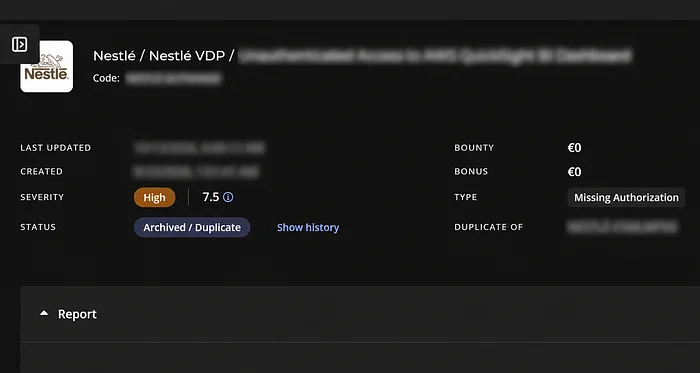
QuickSight embedding normally works like this: a backend service that has already authenticated the user calls the QuickSight API to generate a short-lived, signed embed URL for a specific dashboard, and the browser then loads that URL inside the portal. The security of the whole arrangement depends on the backend only generating the URL for a user who is allowed to see the dashboard. The report classifies the issue as Missing Authorization / Broken Access Control, with a severity of High (7.5).
Setup
The report does not describe any account, role or special tooling. The proof of concept is a single unauthenticated HTTP request made with curl, using a desktop Chrome user agent string. No session cookie, token or login to the NestPay portal is used at any point, which is the whole point of the finding.
Finding it
The researcher found that the /portal/quicksight-url endpoint on the staging portal did not enforce authentication or authorization. A GET request to it returned a valid, time-limited AWS QuickSight dashboard embed URL. Because the endpoint is supposed to serve an already-authenticated portal user, returning an embed URL to an anonymous caller looked wrong: the URL is a credential in its own right, and anyone holding it can load the dashboard.
Exploitation
Step 1: Request the QuickSight embed URL
The user agent is set in a shell variable and then used for the request:
UA='Mozilla/5.0 (X11; Linux x86_64) AppleWebKit/537.36 (KHTML, like Gecko) Chrome/[redacted] Safari/537.36'
curl -sS -A "$UA" \-H 'Accept: application/json' \https://something.stg.nestpay.nestle.com/portal/quicksight-url
The request is a plain GET with Accept: application/json and no authentication material of any kind. The user agent only makes the request look like an ordinary browser.
Step 2: Retrieve the embed URL
The endpoint answered with HTTP 200 OK and a JSON body containing a signed QuickSight embedUrl:
{"embedUrl":"https://eu-central-1.quicksight.aws.amazon.com/embed/[redacted]/dashboards/500f835f1-61a5-4215-a167-70068b4see8857?code=[redacted]-[redacted]-Ak3Bn_5-[redacted]-[redacted]-[redacted]-NpYAZTBcfgoKrJ-0ENr3eR3zc_EknTLiCo-[redacted]-owDsp4JR6efTwABxU7sA%3D%3D&identityprovider=quicksight&isauthcode=true"}
The URL points at the eu-central-1 QuickSight embed service and carries a code parameter, plus identityprovider=quicksight and isauthcode=true. The dashboard identifier is part of the path. The embed URL is time-limited, so the exposure window is bounded by its lifetime.
Step 3: Access the dashboard
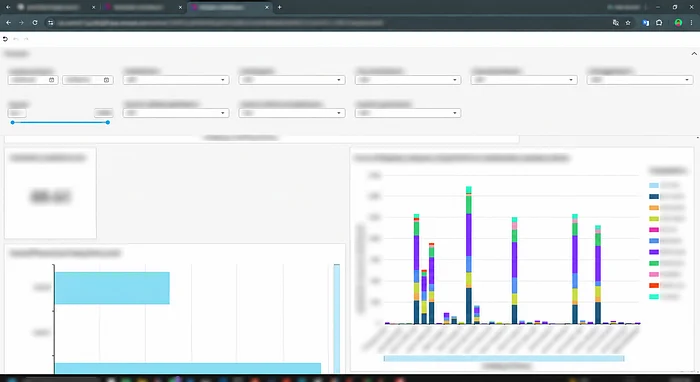
Opening the generated embed URL in a browser loads the dashboard without any prior authentication to the NestPay portal. The dashboard loads without any prior authentication to the NestPay portal.
Step 4: Identify infrastructure metadata
The generated URL exposes AWS infrastructure information. The report highlights the KMS key ARN embedded in the signed code:
arn:aws:kms:eu-central-1:6299225578235445:key/776c137e-a354-49ae-9cf-97f617a234849b13
This reveals the AWS region, the AWS account identifier and the KMS key, and the report says the exposed metadata may assist infrastructure reconnaissance.
Root cause
The endpoint that mints QuickSight embed URLs was reachable anonymously and returned a signed URL to any caller. In a correct design, the backend would check the caller's session and permissions before calling QuickSight to generate the embed URL; The endpoint returned a signed URL to any caller, and the report does not describe the server-side code.
Impact
An unauthenticated user may gain access to internal payment analytics, including transaction volumes and payment acceptance statistics. The exposed AWS account and KMS metadata may also assist infrastructure reconnaissance. The report hedges this with "may". The embed URL is time-limited, so the exposure window is bounded by the lifetime of the signed code.
Fix
The report recommends:
- Enforce authentication and authorization on the
/portal/quicksight-urlendpoint. - Verify user permissions before generating QuickSight embed URLs.
- Restrict dashboard access to authorized users and roles.
- Review QuickSight sharing and embedding configurations.
- Rotate or invalidate exposed embed sessions where applicable.
Variants to test
- Look for other endpoints on staging or production hosts that mint signed URLs for third-party services (QuickSight, Grafana, Metabase, Looker, Tableau) and request them without a session. A positive result is HTTP 200 with a signed URL in the body.
- Try the same route with different HTTP methods (POST, PUT) and with no
Acceptheader, to see whether the authorisation check is applied inconsistently across methods. A positive result is a signed URL returned to an anonymous caller. - Check whether the embed URL can be replayed after logout or after the portal session expires. A positive result is the dashboard still loading with no valid portal session.
- Inspect the signed code for account identifiers, regions and KMS key ARNs, as in Step 4, to map the cloud account behind the feature. A positive result is a decodable payload naming an AWS account and key.
- Test whether the endpoint accepts parameters that select a different dashboard or user identity. A positive result is a signed URL for a dashboard the anonymous caller should not see.
What happened, in plain words
Nestlé runs a payment portal called NestPay. Like many large companies, Nestlé keeps a separate copy of its systems for testing, called a staging environment, so that new features can be tried out before they reach real customers. The report is about that staging copy, not the live one.
On the staging portal there is a web address (an endpoint) that is supposed to hand out a special link to an internal business dashboard. That dashboard is built with a service called AWS QuickSight, which is Amazon's tool for making charts and reports from company data. The link the endpoint hands out is called an embed URL: a web address that lets a dashboard be shown inside another website, here inside the NestPay portal.
The problem: that endpoint gave the link to anyone who asked, without checking who they were. No login, no password, no session. The researcher sent a single request and received a working link to the dashboard. The report rates this as High severity, 7.5, and calls it Missing Authorization / Broken Access Control.
To understand why that matters, a few ideas first.
- An API (Application Programming Interface) is a way for one piece of software to talk to another. Think of it as a service counter: you ask for something in a fixed format, and you get an answer back in a fixed format. A web endpoint like the one in this report is a small API: you send a request to a web address, and it sends data back.
- A GET request is the simplest kind of request a browser makes. When you type a web address and press Enter, your browser sends a GET request and the server sends back a page. GET requests are meant for fetching things, not for changing them.
- A JSON response is a common text format for data, made of names and values in curly brackets, like
{"name":"value"}. Software uses it because both humans and machines can read it. - A token or signed URL is like a cloakroom ticket. Whoever holds the ticket can collect the coat; the cloakroom does not ask for your name. A signed URL is a web address with a secret code attached, and the server that receives it trusts the code rather than asking you to log in. If the ticket falls into the wrong hands, the coat goes with it.
- Authentication means proving who you are (logging in). Authorization means deciding what you are allowed to do once you are known. This report is about missing authorization: the endpoint did not even ask who the caller was.
- Broken Access Control is the general name for bugs where a system lets someone reach something they should not be able to reach, because a permission check is missing or wrong.
- AWS is Amazon Web Services, a cloud platform where companies rent computers and services. QuickSight is one of those services, used for dashboards and reports. KMS (Key Management Service) is another AWS service that stores encryption keys, the secret values used to lock and unlock data. An ARN (Amazon Resource Name) is AWS's naming format for identifying a resource, a bit like a full postal address for one item in the cloud.
- A user agent is a short line of text your browser sends with every request to say what browser and operating system it is. It is like a return address on an envelope: it describes the sender but proves nothing.
- curl is a command-line tool for sending web requests. It is useful for testing because it shows you exactly what was sent and what came back, without a browser in the way.
The affected address
The report names this endpoint as the affected asset:
https://something.stg.nestpay.nestle.com/portal/quicksight-url
Reading it from left to right: https means the connection is encrypted; something.stg.nestpay.nestle.com is the staging host for the NestPay portal (stg is short for staging); /portal/quicksight-url is the specific path on that host that produces the QuickSight link.
How QuickSight embedding is supposed to work
Normally the flow is this. A user logs in to the NestPay portal. The portal's backend, the server-side software that the user never sees, checks that this user is allowed to see a particular dashboard. Only then does it ask QuickSight to create a short-lived, signed embed URL for that dashboard. The browser receives the link and loads the dashboard inside the portal.
The whole security of this arrangement rests on one condition: the backend must only create the link for a user who is allowed to see the dashboard. The link itself is a credential. Anyone holding it can load the dashboard until it expires.
Finding it
The researcher found that the /portal/quicksight-url endpoint on the staging portal did not enforce authentication or authorization. A GET request to it returned a valid, time-limited QuickSight dashboard embed URL. Since the endpoint is meant to serve an already-logged-in portal user, handing a link to an anonymous caller was clearly wrong.
No account, role or special tool was needed. The proof of concept is a single unauthenticated request made with curl, dressed up to look like an ordinary desktop Chrome browser. No session cookie, token or login to the NestPay portal was used at any point, which is the whole point of the finding.
Step 1: Request the QuickSight embed URL
First the researcher stores a browser user agent string in a shell variable called UA:
UA='Mozilla/5.0 (X11; Linux x86_64) AppleWebKit/537.36 (KHTML, like Gecko) Chrome/[redacted] Safari/537.36'
Line by line: UA= creates a variable named UA. Everything between the single quotes is its value, a standard Chrome user agent string. A shell variable is just a named box holding a piece of text, so it can be reused without retyping.
Then the request itself:
curl -sS -A "$UA" \-H 'Accept: application/json' \https://something.stg.nestpay.nestle.com/portal/quicksight-url
Line by line:
curlis the tool sending the request.-sStells curl to stay quiet about progress but still show errors.-smeans silent,-Smeans show errors even when silent.-A "$UA"sets the user agent header to the value stored inUA. The$tells the shell to substitute the variable's contents.-H 'Accept: application/json'adds a header saying the caller would like JSON back. A header is a small piece of extra information attached to a request, like a note on the outside of an envelope.- The backslashes are line continuations, letting one command span several lines.
- The final part is the web address being requested.
This is a plain GET with Accept: application/json and no authentication material of any kind. No cookie, no token, no login. The user agent only makes the request look like an ordinary browser; it proves nothing.
Step 2: Retrieve the embed URL
The endpoint answered with HTTP 200 OK and a JSON body containing a signed QuickSight embedUrl:
{"embedUrl":"https://eu-central-1.quicksight.aws.amazon.com/embed/[redacted]/dashboards/500f835f1-61a5-4215-a167-70068b4see8857?code=[redacted]-[redacted]-Ak3Bn_5-[redacted]-[redacted]-[redacted]-NpYAZTBcfgoKrJ-0ENr3eR3zc_EknTLiCo-[redacted]-owDsp4JR6efTwABxU7sA%3D%3D&identityprovider=quicksight&isauthcode=true"}
Line by line: the whole response is one JSON object with a single name, embedUrl, whose value is a long web address. That address points at the eu-central-1 QuickSight embed service, which is AWS's data centre region in Frankfurt. The path contains a long identifier. The ? starts the query string, the part of a URL that carries parameters. The URL carries a code parameter, identityprovider=quicksight and isauthcode=true. The embed URL is time-limited, so the exposure window is bounded by its lifetime.
Step 3: Access the dashboard
Opening the generated embed URL in a browser loads the dashboard without any prior authentication to the NestPay portal. The dashboard loads without any prior authentication to the NestPay portal. This is the cloakroom ticket in action: the browser presents the code, QuickSight accepts it, and the dashboard appears.
Step 4: Identify infrastructure metadata
The generated URL exposes AWS infrastructure information. The report highlights the KMS key ARN embedded in the signed code:
arn:aws:kms:eu-central-1:6299225578235445:key/776c137e-a354-49ae-9cf-97f617a234849b13
Line by line: arn says this is an Amazon Resource Name. aws is the cloud. kms is the Key Management Service. eu-central-1 is the region. 6299225578235445 is a number in the ARN. key/776c137e-a354-49ae-9cf-97f617a234849b13 names the specific encryption key used in the embedding flow. This reveals the AWS region, the account number and the KMS key, and the report says the exposed metadata may assist infrastructure reconnaissance.
Root cause
The endpoint that mints QuickSight embed URLs was reachable anonymously and returned a signed URL to any caller. In a correct design, the backend would check the caller's session and permissions before calling QuickSight to generate the embed URL. The endpoint returned a signed URL to any caller, and the report does not describe the server-side code. The report does not describe the server-side code, so the exact reason the check was absent is not stated;
Impact
An unauthenticated user may gain access to internal payment analytics, including transaction volumes and payment acceptance statistics. The exposed AWS account and KMS metadata may also assist infrastructure reconnaissance. The report hedges this with "may". The embed URL is time-limited, so the exposure window is bounded by the lifetime of the signed code.
Fix
The report recommends:
- Enforce authentication and authorization on the
/portal/quicksight-urlendpoint. - Verify user permissions before generating QuickSight embed URLs.
- Restrict dashboard access to authorized users and roles.
- Review QuickSight sharing and embedding configurations.
- Rotate or invalidate exposed embed sessions where applicable.
Variants to test
- Look for other endpoints on staging or production hosts that mint signed URLs for third-party services (QuickSight, Grafana, Metabase, Looker, Tableau) and request them without a session. A positive result is HTTP 200 with a signed URL in the body.
- Try the same route with different HTTP methods (POST, PUT) and with no
Acceptheader, to see whether the authorisation check is applied inconsistently across methods. A positive result is a signed URL returned to an anonymous caller. - Check whether the embed URL can be replayed after logout or after the portal session expires. A positive result is the dashboard still loading with no valid portal session.
- Inspect the signed code for account identifiers, regions and KMS key ARNs, as in Step 4, to map the cloud account behind the feature. A positive result is a decodable payload naming an AWS account and key.
- Test whether the endpoint accepts parameters that select a different dashboard or user identity. A positive result is a signed URL for a dashboard the anonymous caller should not see.
Glossary
- API: a fixed way for one piece of software to ask another for data or actions, like a service counter with set rules.
- ARN (Amazon Resource Name): AWS's naming format that identifies one specific resource, like a full postal address.
- Authentication: proving who you are, usually by logging in.
- Authorization: deciding what a known user is allowed to do.
- AWS: Amazon Web Services, a cloud platform where companies rent computers and services.
- Broken Access Control: a bug class where a system lets someone reach something they should not, because a permission check is missing or wrong.
- Cookie: a small piece of data a website stores in your browser to remember your session; it is one way a site recognises you.
- curl: a command-line tool for sending web requests and showing the responses.
- Embed URL: a web address that lets a dashboard or other content be shown inside another website.
- Endpoint: a specific web address on a server that performs a particular function.
- GET request: the basic request a browser makes to fetch something from a server.
- Header: extra information attached to a web request or response, like a note on an envelope.
- HTTP 200 OK: the standard status code meaning the request succeeded.
- JSON: a text format for data made of names and values in curly brackets.
- KMS (Key Management Service): an AWS service that stores encryption keys.
- Query string: the part of a URL after the
?that carries parameters. - Reconnaissance: gathering information about a target's systems, often to plan further attacks.
- Session: the period during which a website remembers that you are logged in.
- Severity: a rating of how serious a vulnerability is; here High, 7.5.
- Signed URL: a web address carrying a secret code that the server trusts in place of a login.
- Staging environment: a separate copy of a system used for testing before changes reach real customers.
- Token: a secret value that stands in for a login, like a cloakroom ticket.
- User agent: a line of text a browser sends to describe itself; it proves nothing.
- Vulnerability: a weakness in a system that can be misused.

