No Portals Needed
The GlobalProtect VPN portal enforced multi-factor authentication, but the gateway component did not, allowing an attacker with valid domain credentials to bypass MFA by connecting directly to the gateway. This gave the attacker a foothold in the internal network.
 Published on medium.com
The adversary mindset is a must-have quality for offensive operators in a Red Team. Every assessment brings its own limitations and “trophies.” The operators have to align with the environment’s limitations such as: secure tiering models, cutting-edge endpoint detection and response solutions, etc.
The full write-up lives on its author's site
It belongs to its author, so we link to it rather than copy it. The other two tabs are our own rewrites, checked against it.
Context
Palo Alto's GlobalProtect VPN is built on HTTPS requests and responses carrying XML data sets of configuration. Two components are involved for the end user: the portal and the gateway. The portal acts as a web server that hosts the GlobalProtect client for Windows and macOS, and it provides the official client's configuration together with the list of available gateways. The gateway provides the raw SSLVPN tunnel that secures the end user's session to the enterprise.
The official client's flow is:
- Login to the portal
- Get a configuration and a list of gateways
- The gateway is selected automatically or by the user's manual selection
- Login to the gateway
- Provide a Host Information Profile (HIP) report
- If all goes right, connect to VPN and secure session
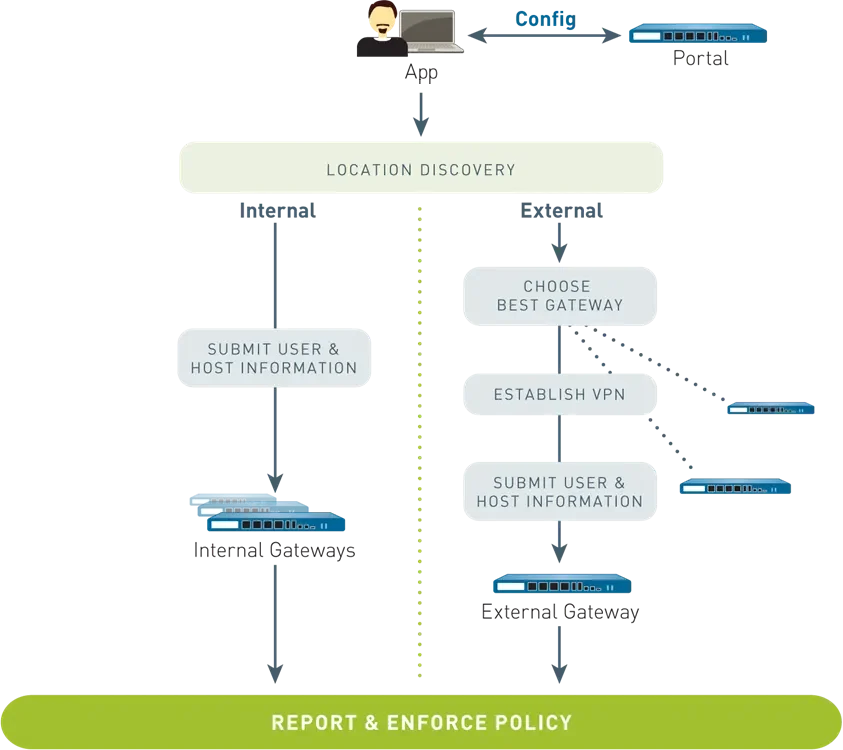
GlobalProtect connection flow (Source: docs.paloaltonetworks.com)
The point that matters for everything below is that the portal and the gateway are independent components with separate authentication flows. Enforcing MFA on one does not enforce it on the other.
Setup
This came out of a Red Team assessment. Reconnaissance produced a narrow attack surface: no exploitable versions of internet-facing software, and social engineering was held back as a last resort. Some of the assets found were GlobalProtect VPN portals. After repeated connection and authentication attempts, the team determined that authentication to the portal was enforced with multi-factor authentication. Since this was the only route to a foothold in the internal environment, the GlobalProtect interfaces were investigated further.
The tool used for the bypass is the open-source OpenConnect client, which supports multiple VPN vendors including Palo Alto GlobalProtect. The researcher credits the InfraDead research done while developing OpenConnect as having saved expensive research and coding time.
Finding it
Connecting with the official client prompted for an MFA token. The question that opened the investigation was simple: what happens if you connect to the gateway while bypassing the portal?
The authentication flow of the official client was mapped first. The first POST request goes to the portal URL at /global-protect/prelogin.esp, with the client's environment variables appended, such as kerberos-support, client-os, os-version and ipv6-support. The server responds with a PHPSESSID cookie and an XML data set with the status of the request; if successful it also attaches the login labels for the client, such as "Enter MFA token" or "Enter Password."
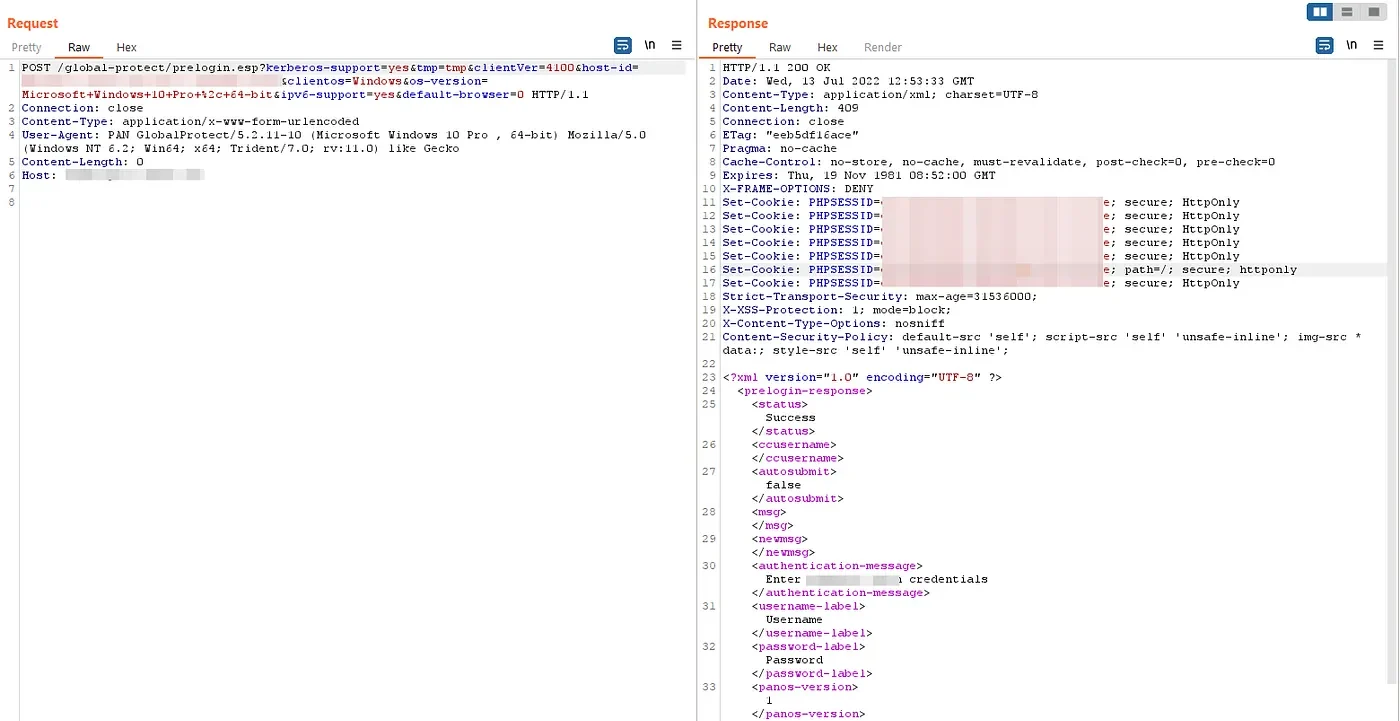
First request made by the official GlobalProtect client
After the user enters credentials, the client sends the next request to /global-protect/getconfig.esp, with the same information as before plus the credentials. On success the server returns an XML data set containing the server configuration, version, the client host information to collect, and, if it exists, custom checks to perform. Custom checks are compliance checks created by the VPN administrators, such as special registry keys the machine has to set to be compliant. The response also includes the list of gateways and their configurations.
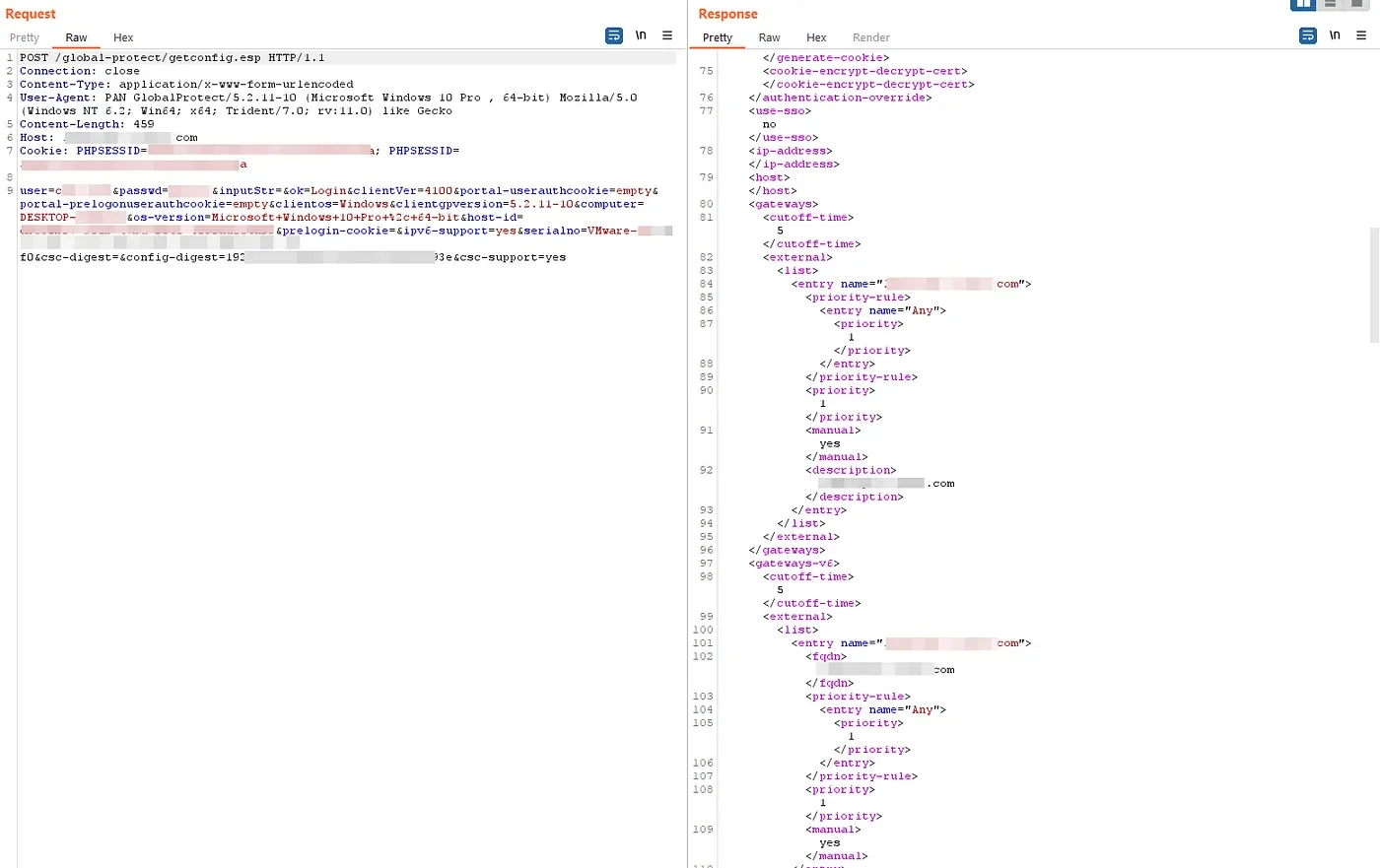
The server's response to the second request results in a list of gateways and other configuration variables
The next request targets the gateway, and the authentication sequence starts again, this time at /ssl-vpn/prelogin.esp. The pre-login phase is the same as with the portal: the client's environment variables go to the server, and the server responds with a status, the authentication form's labels and a PHPSESSID cookie.
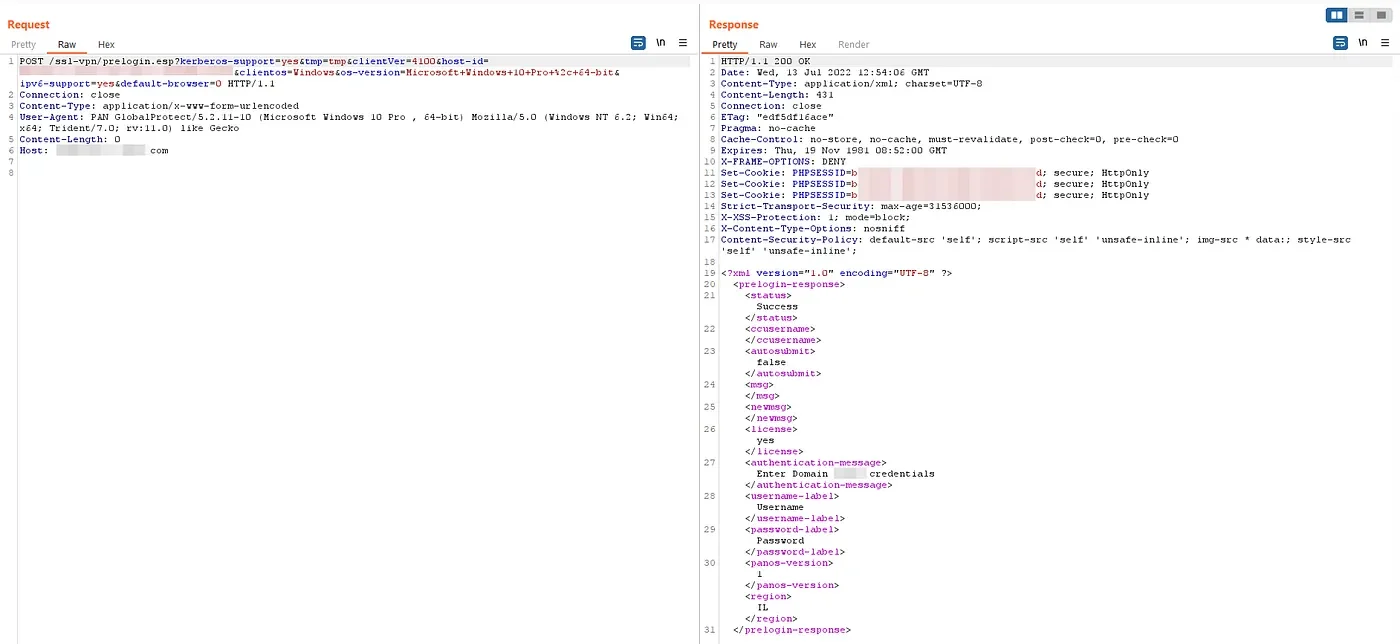
A successful request to the gateway yields a Success status and login labels
After receiving a session ID and authenticating, the next request is where portal and gateway authentication diverge. It goes to /ssl-vpn/login.esp with the user's credentials appended. The server responds with multiple untitled arguments that look like MTU, DNS domain, the authcookie that will be used in the next request, and more configuration variables.
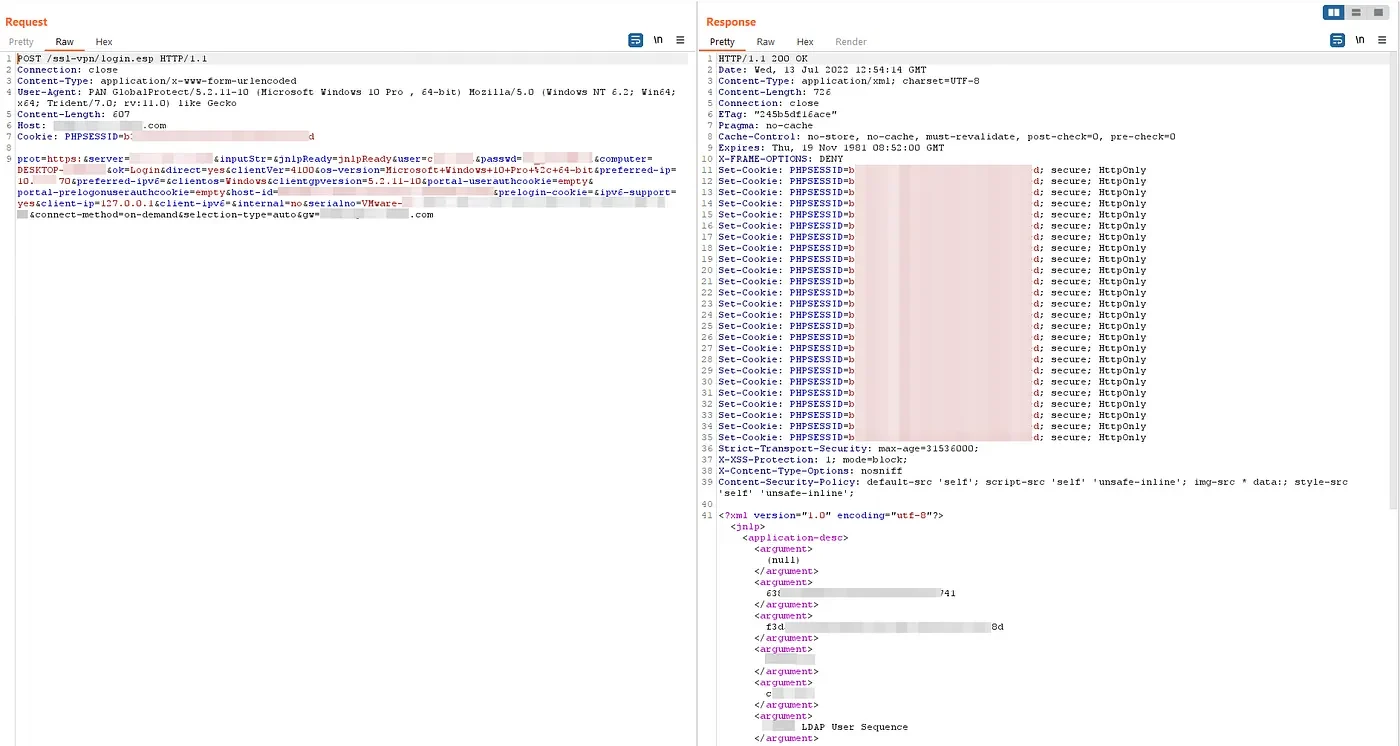
The login request to the gateway results in the server responding in multiple unknown arguments
The client parses the XML data set and appends these variables, including the authcookie, to its next request to /ssl-vpn/getconfig.esp. The server responds with a status and more configuration variables, this time all titled, and more of them: ciphers to use, protocols of the gateway, preferred tunnel IP to use, and so on.
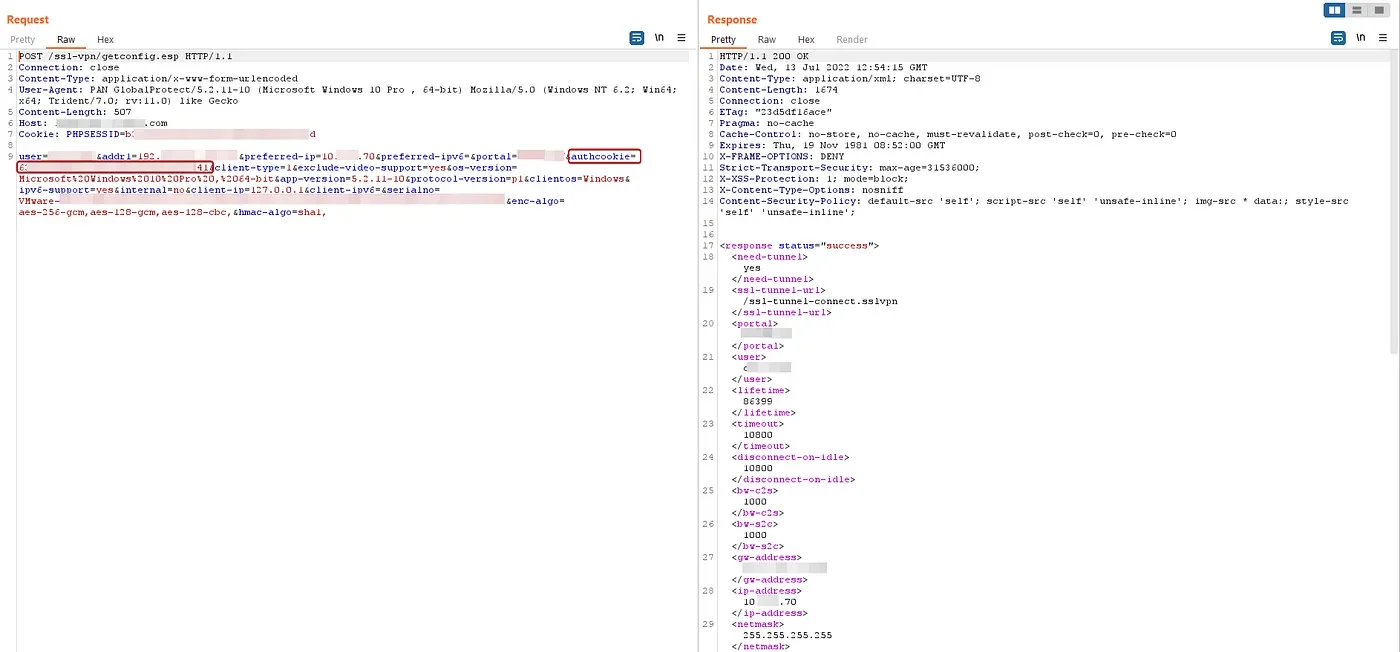
The request contains the "authcookie" received in the last server response (in red) and results in multiple configuration arguments
The final phase is a GET request to /ssl-tunnel-connect.sslvpn with the user name and authcookie appended. This initiates the VPN session, and the server responds with START_TUNNEL.

A successful connection was made and a tunnel interface was set up
Because the two components are independent, each authentication sequence can be engaged manually. If the gateway's information is already known, there is no need to pass through the portal to obtain the list of gateways: you can authenticate once, with valid credentials, and still get a VPN connection.
In this assessment, the MFA token was requested by the portal only, while the gateway asked for domain credentials. The IT department and the GlobalProtect developers had counted on in-house use of the official client, with no external adaptation in mind. Not enforcing MFA at the gateway is safe when the official client is the only client, but it is not safe when other open-source or self-built clients are used. The researcher is explicit that this is caused by a misconfiguration only, not by a vulnerability in Palo Alto's VPN solution.
The OpenConnect documentation describes the relevant behaviour: GlobalProtect VPNs contain two different server interfaces, portals and gateways; the server hosting the portal interface often hosts a gateway interface as well, but not always; the only information sent by the portal that is clearly useful to a client like OpenConnect is the list of gateways; some VPNs require the client to authenticate to the portal before it can access the gateway, while with others no interaction with the portal is necessary. OpenConnect first attempts the portal interface to replicate the official clients, but if --usergroup=gateway is specified (equivalently, /gateway is appended to the server URL, e.g. https://vpn.company.com/gateway), it skips the portal and connects immediately to the gateway interface. The documentation notes this is useful when the portal is misconfigured, such as by not offering the desired gateway in the list it provides.
Exploitation
Step 1: Skip the portal with OpenConnect
Because the portal and the gateway were running on the same interface, there was no need to find other gateways, such as other ports on the same server or other external assets. The client was pointed at the gateway directly:
openconnect --protocol=gp --user=user_name https://vpn.company.com/gateway
The /gateway endpoint probably does not exist on the server. It is discarded while the client runs and only serves as a flag so the client starts communicating with the /ssl-vpn/ endpoint rather than the /global-protect/ ones.
The VPN client then prompts for domain credentials only:

Connecting to the GlobalProtect gateway, prompts us with domain credentials only
No MFA token is requested, because the gateway does not ask for one. The connection to the internal network succeeds:
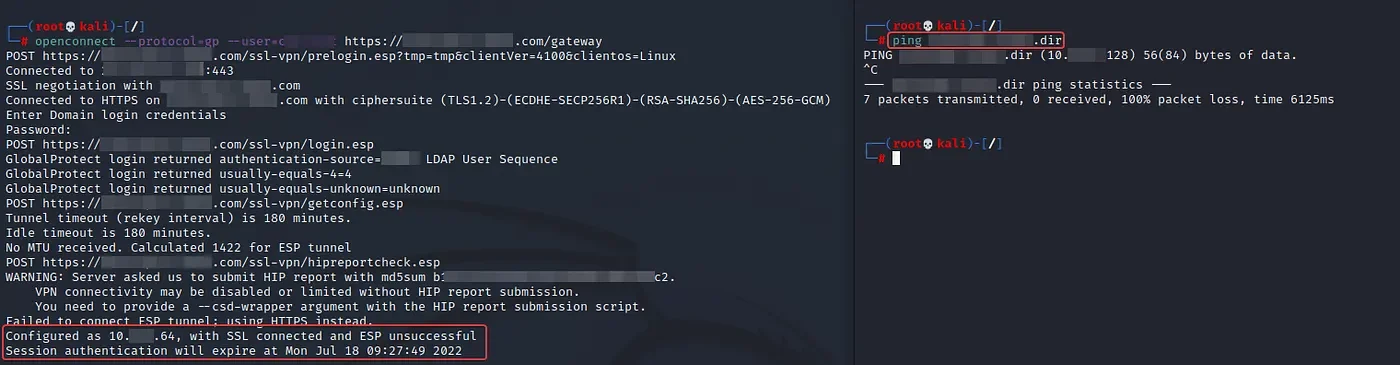
Connection to the VPN is successful, though there is no connection to some internal machines
Step 2: Deal with the missing HIP report
Although it was possible to connect and communicate with the organisation's domain controllers, many services and domain machines were unreachable compared with what the official client allowed. Comparing behaviour across operating systems and clients showed that a valid HIP report had to be submitted.
The OpenConnect developers automated a shell script that creates a fake HIP report. The researcher copied a benign report from a Windows machine: in the settings pane of the official client, on the Troubleshooting tab, clicking "Collect Logs" creates a GlobalProtectLogs.zip file in the User directory, and inside the compressed folder the HIP report is found as pan_gp_hrpt.xml. That file was copied to ../openconnect/trojans/hipreport.sh.
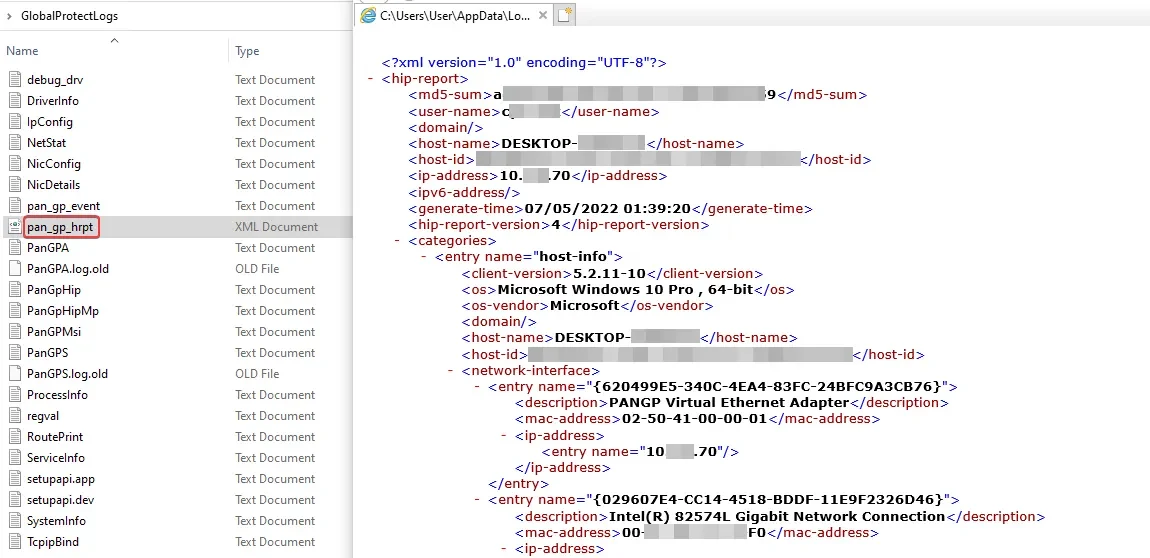
Copied a benign HIP report from a Windows machine
Step 3: Submit the fake report and reach segmented resources
The connection was repeated with the CSD wrapper pointing at the script:
openconnect --protocol=gp --user=username --csd-wrapper=trojans/hipreport.sh https://vpn.company.com/gateway
With the HIP report submitted successfully, the segmented service became reachable:
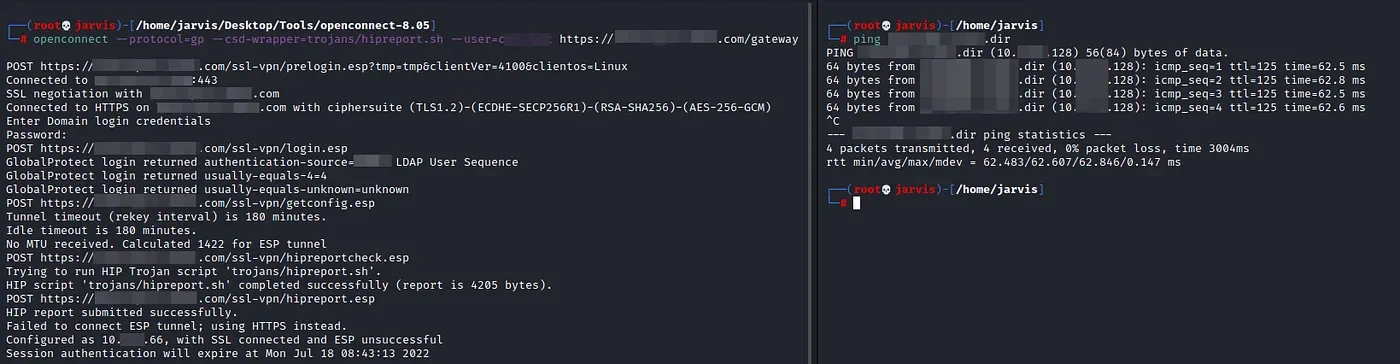
HIP report was submitted successfully and connection to segmented resources is now available
Both MFA and machine segregation were bypassed. From there, connecting to Active Directory and further exploitation of the internal environment was possible.
Root cause
MFA was enforced on the portal but not on the gateway. The two are independent components with independent authentication flows, so a client that talks to the gateway directly never sees the portal's MFA challenge. The official client always goes through the portal first, which is why the configuration looked safe in normal use; the assumption that clients behave that way is the design mistake, and it is a configuration issue rather than a flaw in the product. The HIP report was a separate obstacle: a copied, benign report from a Windows machine was submitted to reach segmented resources.
Impact
In this assessment, valid domain credentials were enough to obtain a VPN session to the internal network without an MFA token, because the gateway did not enforce MFA. In this assessment that gave communication with domain controllers and, after submitting a copied HIP report, access to segmented resources that were otherwise unreachable, opening the way to Active Directory and further exploitation. The bypass depended on the gateway not enforcing MFA; the report recommends enforcing MFA on both the portal and the gateway.
Fix
The mitigation is described as easy:
- MFA should be enforced on both the portal AND gateway(s)
- Monitor direct SSLVPN connections to the gateway
- Separate the portal and gateway(s) to different interfaces and ports
- If possible, allow SAML authentication only
Variants to test
What happened, in plain words
A security team was hired to break into a company's network, the way a burglar might be hired to test a house's locks. They looked at everything the company exposed to the internet and found almost nothing to attack. The one door they could see was a VPN: a service that lets employees connect to the company's internal network from home, as if they were sitting in the office.
The company had protected that door with multi-factor authentication (MFA). MFA means you need more than a password: usually a password plus a one-time code from your phone. So even if someone stole a password, they could not get in without the phone.
But the VPN was made of two separate pieces, a portal and a gateway, and the company had only put the MFA lock on the portal. The gateway, the piece that actually lets you into the network, only asked for a normal username and password. The official VPN app always walks through the portal first, so in everyday use nobody noticed. The security team used a different, free VPN app, OpenConnect, that can talk to the gateway directly, skipping the portal, and got in with domain credentials. They then had to solve a second, smaller obstacle (a health check called a HIP report) by copying a report from a normal company laptop. After that they could reach parts of the network that were supposed to be off limits.
This was not a bug in the VPN product. It was a configuration mistake by the company: they assumed everyone would use the official app, which always goes through the portal.
The pieces of the VPN, explained from zero
Palo Alto's GlobalProtect is a VPN product. A VPN is a private tunnel over the public internet: your computer sends data to the company's VPN server, and that server forwards it into the company network. To your computer it feels like being plugged into the office network.
GlobalProtect is built on HTTPS, the same technology your browser uses when the address bar shows a padlock. Underneath, the client and the server exchange requests (messages asking for something) and responses (the answers). The answers carry XML data sets: XML is just a text format for structured data, a bit like a very formal shopping list with labels and values. Think of it as a form filled in with settings.
Two components are involved for the end user:
- The portal acts as a web server. It hosts the GlobalProtect client installer for Windows and macOS, and it hands the official client its configuration plus the list of available gateways. Think of the portal as the reception desk of a building: it tells you which floor to go to and gives you the visitor badge.
- The gateway provides the raw SSLVPN tunnel that secures the end user's session to the enterprise. Think of the gateway as the actual door into the office floor, the one that opens and lets you walk in.
The official client's flow is:
- Login to the portal
- Get a configuration and a list of gateways
- The gateway is selected automatically or by the user's manual selection
- Login to the gateway
- Provide a Host Information Profile (HIP) report
- If all goes right, connect to VPN and secure session
GlobalProtect connection flow (Source: docs.paloaltonetworks.com)
The point that matters for everything below is that the portal and the gateway are independent components with separate authentication flows. Enforcing MFA on one does not enforce it on the other. In the building comparison: the reception desk checks your ID, but the door on the office floor has its own lock, and if nobody locked it, the reception check does not help.
How the team got there
This came out of a Red Team assessment. A Red Team is a group of security specialists hired by a company to attack it on purpose, with permission, so the company can find and fix weaknesses before real criminals do. The work starts with reconnaissance: gathering information about what the company exposes on the internet, like walking around a building and noting every door and window.
Reconnaissance produced a narrow attack surface: no exploitable versions of internet-facing software, and social engineering (tricking employees into revealing information or clicking something, for example by phone or email) was held back as a last resort. Some of the assets found were GlobalProtect VPN portals. After repeated connection and authentication attempts, the team determined that authentication to the portal was enforced with multi-factor authentication. Since this was the only route to a foothold in the internal environment, the GlobalProtect interfaces were investigated further.
The tool used for the bypass is the open-source OpenConnect client. Open source means the program's source code is public and anyone can read, use or modify it. OpenConnect supports multiple VPN vendors including Palo Alto GlobalProtect. The researcher credits the InfraDead research done while developing OpenConnect as having saved expensive research and coding time.
Finding it
Connecting with the official client prompted for an MFA token. A token here means the one-time code from an authenticator app or a text message. The question that opened the investigation was simple: what happens if you connect to the gateway while bypassing the portal?
The authentication flow of the official client was mapped first. Mapping the flow means watching every message the app sends and receives, like following a recipe step by step to see what each ingredient does.
The first POST request goes to the portal URL at /global-protect/prelogin.esp, with the client's environment variables appended, such as kerberos-support, client-os, os-version and ipv6-support. A POST request is a message that carries data to the server, as opposed to a GET request, which mostly asks the server to return something. Environment variables here are small pieces of information about the client machine: which operating system it runs, which version, whether it supports IPv6 (the newer version of the internet's addressing system), and so on. The server uses them to decide what to send back.
The server responds with a PHPSESSID cookie and an XML data set with the status of the request; if successful it also attaches the login labels for the client, such as "Enter MFA token" or "Enter Password."
A cookie is a small piece of text a server asks your browser (or VPN client) to keep and send back with every following request. It works like a cloakroom ticket: the server gives you a number, and when you come back with that number it knows who you are without asking again. PHPSESSID is simply the name this particular server gives its session cookie. Login labels are the words the server wants the client to display on the login screen, for example "Enter MFA token". The server is effectively telling the app what to ask the user.
First request made by the official GlobalProtect client
After the user enters credentials, the client sends the next request to /global-protect/getconfig.esp, with the same information as before plus the credentials. On success the server returns an XML data set containing the server configuration, version, the client host information to collect, and, if it exists, custom checks to perform. Custom checks are compliance checks created by the VPN administrators, such as special registry keys the machine has to set to be compliant. A registry key is a settings entry in Windows, a named value stored in a central database of configuration. The idea is that the company can say "only machines with this setting may connect", to keep out personal or unmanaged computers. The response also includes the list of gateways and their configurations.
The server's response to the second request results in a list of gateways and other configuration variables
The next request targets the gateway, and the authentication sequence starts again, this time at /ssl-vpn/prelogin.esp. Notice the different path: /global-protect/ for the portal, /ssl-vpn/ for the gateway. The pre-login phase is the same as with the portal: the client's environment variables go to the server, and the server responds with a status, the authentication form's labels and a PHPSESSID cookie.
A successful request to the gateway yields a Success status and login labels
After receiving a session ID and authenticating, the next request is where portal and gateway authentication diverge. It goes to /ssl-vpn/login.esp with the user's credentials appended. The server responds with multiple untitled arguments that look like MTU, DNS domain, the authcookie that will be used in the next request, and more configuration variables.
MTU (maximum transmission unit) is the largest chunk of data the tunnel will carry at once. A DNS domain is the name suffix used to find internal machines by name, for example corp.example.com. The authcookie is a second kind of ticket: proof that you logged in successfully, which you show on the following requests instead of sending your password again.
The login request to the gateway results in the server responding in multiple unknown arguments
The client parses the XML data set and appends these variables, including the authcookie, to its next request to /ssl-vpn/getconfig.esp. The server responds with a status and more configuration variables, this time all titled, and more of them: ciphers to use, protocols of the gateway, preferred tunnel IP to use, and so on.
A cipher is the mathematical method used to scramble the traffic so nobody in the middle can read it. A protocol here is a rule set for how the two sides talk. The tunnel IP is the address your computer will appear to have inside the company network while connected.
The request contains the "authcookie" received in the last server response (in red) and results in multiple configuration arguments
The final phase is a GET request to /ssl-tunnel-connect.sslvpn with the user name and authcookie appended. This initiates the VPN session, and the server responds with START_TUNNEL.
START_TUNNEL is a fixed word the server sends back to say "the tunnel is now open". At that point the client can send normal network traffic through it.
A successful connection was made and a tunnel interface was set up
Because the two components are independent, each authentication sequence can be engaged manually. If the gateway's information is already known, there is no need to pass through the portal to obtain the list of gateways: you can authenticate once, with valid credentials, and still get a VPN connection.
In this assessment, the MFA token was requested by the portal only, while the gateway asked for domain credentials. Domain credentials are the ordinary company username and password used to log in to the corporate Windows network. The IT department and the GlobalProtect developers had counted on in-house use of the official client, with no external adaptation in mind. Not enforcing MFA at the gateway is safe when the official client is the only client, but it is not safe when other open-source or self-built clients are used. The researcher is explicit that this is caused by a misconfiguration only, not by a vulnerability in Palo Alto's VPN solution.
The OpenConnect documentation describes the relevant behaviour: GlobalProtect VPNs contain two different server interfaces, portals and gateways; the server hosting the portal interface often hosts a gateway interface as well, but not always; the only information sent by the portal that is clearly useful to a client like OpenConnect is the list of gateways; some VPNs require the client to authenticate to the portal before it can access the gateway, while with others no interaction with the portal is necessary. OpenConnect first attempts the portal interface to replicate the official clients, but if --usergroup=gateway is specified (equivalently, /gateway is appended to the server URL, e.g. https://vpn.company.com/gateway), it skips the portal and connects immediately to the gateway interface. The documentation notes this is useful when the portal is misconfigured, such as by not offering the desired gateway in the list it provides.
Exploitation
Step 1: Skip the portal with OpenConnect
Because the portal and the gateway were running on the same interface, there was no need to find other gateways, such as other ports on the same server or other external assets. An interface here means the network address and port where the service listens. A port is a numbered channel on a server, like an extension number on a phone line. The client was pointed at the gateway directly:
openconnect --protocol=gp --user=user_name https://vpn.company.com/gateway
Line by line:
openconnectis the name of the program being run.--protocol=gptells it to speak the GlobalProtect protocol,gpbeing the short name for it.--user=user_namesupplies the username to log in with. The report usesuser_nameas a placeholder for the real one.https://vpn.company.com/gatewayis the address of the server, with/gatewayadded at the end. That suffix is the flag that tells OpenConnect to go straight to the gateway instead of the portal.
The /gateway endpoint probably does not exist on the server. It is discarded while the client runs and only serves as a flag so the client starts communicating with the /ssl-vpn/ endpoint rather than the /global-protect/ ones. In other words, the word /gateway is not a real page the server serves; it is a signal to the client, like writing "back door" on an envelope so the mailroom knows to route it differently.
The VPN client then prompts for domain credentials only:
Connecting to the GlobalProtect gateway, prompts us with domain credentials only
No MFA token is requested, because the gateway does not ask for one. The connection to the internal network succeeds:
Connection to the VPN is successful, though there is no connection to some internal machines
Step 2: Deal with the missing HIP report
Although it was possible to connect and communicate with the organisation's domain controllers, many services and domain machines were unreachable compared with what the official client allowed. A domain controller is the central server that manages logins and permissions in a Windows corporate network; reaching it is already a significant step. Comparing behaviour across operating systems and clients showed that a valid HIP report had to be submitted.
A HIP report (Host Information Profile) is a description of the computer that is connecting: its operating system, whether antivirus is running, which patches are installed, and so on. The company uses it to decide whether the machine is healthy enough to be let in, and which parts of the network it may reach. Think of it as a health certificate you show at the door.
The OpenConnect developers automated a shell script that creates a fake HIP report. A shell script is a small text file of commands that the computer runs in order, like a recipe. The researcher copied a benign report from a Windows machine: in the settings pane of the official client, on the Troubleshooting tab, clicking "Collect Logs" creates a GlobalProtectLogs.zip file in the User directory, and inside the compressed folder the HIP report is found as pan_gp_hrpt.xml. That file was copied to ../openconnect/trojans/hipreport.sh.
GlobalProtectLogs.zip is a compressed archive, a single file holding several files, like a box with compartments. pan_gp_hrpt.xml is the HIP report inside it. The path ../openconnect/trojans/hipreport.sh means: go up one folder (..), into openconnect, into trojans, and use the file hipreport.sh. The word "benign" matters: the report was taken from a normal, healthy machine, so it describes a machine that looks compliant.
Copied a benign HIP report from a Windows machine
Step 3: Submit the fake report and reach segmented resources
The connection was repeated with the CSD wrapper pointing at the script:
openconnect --protocol=gp --user=username --csd-wrapper=trojans/hipreport.sh https://vpn.company.com/gateway
Line by line:
openconnectruns the client again.--protocol=gpselects the GlobalProtect protocol.--user=usernamesupplies the username, again a placeholder.--csd-wrapper=trojans/hipreport.shis the new part. CSD stands for the endpoint-check component of the VPN, the part that collects the HIP report. The wrapper is a script that OpenConnect runs to produce that report. Here it points at the script built from the copied report, so the server receives a report describing a healthy machine.https://vpn.company.com/gatewayis the same gateway address with the flag suffix as before.
With the HIP report submitted successfully, the segmented service became reachable:
HIP report was submitted successfully and connection to segmented resources is now available
Segmentation means splitting the internal network into zones so that a connection to one zone does not automatically give access to another. The HIP report was the key to the zone that had been closed off.
Both MFA and machine segregation were bypassed. From there, connecting to Active Directory and further exploitation of the internal environment was possible. Active Directory is Microsoft's directory service: the database of users, computers and permissions that a Windows company network runs on. Getting to it is like finding the master key cabinet.
Root cause
MFA was enforced on the portal but not on the gateway. The two are independent components with independent authentication flows, so a client that talks to the gateway directly never sees the portal's MFA challenge. The official client always goes through the portal first, which is why the configuration looked safe in normal use; the assumption that clients behave that way is the design mistake, and it is a configuration issue rather than a flaw in the product. The HIP report was a separate obstacle: a copied, benign report from a Windows machine was submitted to reach segmented resources.
Impact
In this assessment, valid domain credentials were enough to obtain a VPN session to the internal network without an MFA token, because the gateway did not enforce MFA. In this assessment that gave communication with domain controllers and, after submitting a copied HIP report, access to segmented resources that were otherwise unreachable, opening the way to Active Directory and further exploitation. The bypass depended on the gateway not enforcing MFA; the report recommends enforcing MFA on both the portal and the gateway.
Fix
The mitigation is described as easy:
- MFA should be enforced on both the portal AND gateway(s)
- Monitor direct SSLVPN connections to the gateway
- Separate the portal and gateway(s) to different interfaces and ports
- If possible, allow SAML authentication only
SAML is a standard way for one service to hand off login to a central identity provider, so that all the login rules, including MFA, live in one place instead of being configured separately on each component.
Variants to test
Glossary
- Active Directory: Microsoft's directory service, the database of users, computers and permissions in a Windows company network.
- Attack surface: everything a company exposes to the internet that an attacker could try to use.
- authcookie: a value the VPN server hands out after a successful login, used as proof of login on later requests instead of resending the password.
- Cipher: the mathematical method used to scramble traffic so it cannot be read in transit.
- Cookie: a small piece of text a server asks a client to keep and send back with later requests, so the server can recognise the client.
- CSD: the endpoint-check component of the VPN that collects the HIP report.
- Custom checks: compliance rules set by VPN administrators, such as required registry keys, that a connecting machine must satisfy.
- DNS domain: the name suffix used to find machines by name inside a network.
- Domain controller: the central server that manages logins and permissions in a Windows corporate network.
- Domain credentials: the ordinary company username and password used to log in to the corporate Windows network.
- Environment variables (in this context): small pieces of information about the client machine, such as its operating system and version, sent to the server.
- Gateway: the GlobalProtect component that provides the actual VPN tunnel into the enterprise network.
- GET request: a message that mainly asks a server to return something.
- HIP report: Host Information Profile, a description of the connecting computer's health and configuration, used to decide what it may access.
- HTTPS: the encrypted protocol browsers and VPN clients use to talk to servers over the internet.
- Interface: the network address and port where a service listens.
- Login labels: the words the server tells the client to display on the login screen, such as "Enter MFA token".
- MFA: multi-factor authentication, requiring more than one proof of identity, usually a password plus a one-time code.
- Misconfiguration: a setting left wrong by the organisation running the service, as opposed to a flaw in the software itself.
- MTU: maximum transmission unit, the largest chunk of data the tunnel carries at once.
- Open source: software whose source code is public and can be read, used and modified by anyone.
- OpenConnect: a free, open-source VPN client that supports several VPN products, including GlobalProtect.
- PHPSESSID: the name of the session cookie this server uses to recognise a client between requests.
- Portal: the GlobalProtect component that hosts the client installer and hands out configuration and the list of gateways.
- Port: a numbered channel on a server where a service listens, like an extension number on a phone line.
- POST request: a message that carries data to a server.
- Protocol: a set of rules for how two sides communicate.
- Reconnaissance: the information-gathering phase of an assessment, finding what a company exposes.
- Red Team: security specialists hired to attack a company on purpose, with permission, to find weaknesses before criminals do.
- Registry key: a named settings entry in Windows, stored in a central configuration database.
- Request / response: a message asking a server for something, and the server's answer.
- SAML: a standard for handing login off to a central identity provider, so login rules live in one place.
- Segmentation: splitting an internal network into zones so access to one does not automatically grant access to another.
- Shell script: a small text file of commands the computer runs in order.
- Social engineering: tricking people into revealing information or taking actions, for example by phone or email.
- SSLVPN tunnel: the encrypted connection that carries the user's traffic into the company network.
- Token: here, the one-time code from an authenticator app or text message used as a second login factor.
- Tunnel IP: the address the user's computer appears to have inside the company network while connected.
- XML: a text format for structured data, with labelled values.
- Wrapper: a script a client runs to produce something the server expects, here the HIP report.

