No RCE? Then SSH to the box!
The CMS had an unauthenticated file upload vulnerability via a template update endpoint that allowed path traversal, enabling an attacker to write files anywhere on the server. Because the service ran as root, the attacker could upload an SSH key and log in to the server, achieving remote code execution.
 Published on blog.jr0ch17.com
This blog post is about my first RCE shell (or whatever you want to call it) that I got in a bug bounty program back in summer 2017. There’s absolutely nothing special about it and you might not even learn anything new, but if you do, I’m glad I was able to help!
The full write-up lives on its author's site
It belongs to its author, so we link to it rather than copy it. The other two tabs are our own rewrites, checked against it.
Context
This is a write-up of the author's first remote code execution shell in a bug bounty program, obtained in summer 2017. The target was an open-source CMS that the author had never heard of, deployed on a host inside a scope of *.domain.com. The feature that mattered was template editing: an endpoint that updated template files, taking a path parameter that decided where the file was written. Normally that endpoint writes template content into the CMS's /config folder. The author turned it into an arbitrary file write and then used it to place an SSH key on the box.
Setup
- Regular recon on the in-scope domain with Sublist3r, Aquatone and Nmap produced a list of hundreds of subdomains.
- EyeWitness was used to screenshot the web pages and pick likely targets. One application ran on port 8080 and served the default home page of a CMS the author did not recognise.
- Browsing to it revealed a login page that accepted the default credentials
admin:admin. The admin panel itself was empty, with no useful information in it. - The author reported the default credentials as "Default credentials in admin panel" and the program rewarded it as a critical bug even though no sensitive information was accessed.
- Because the CMS was open source, the author spun up an EC2 instance on AWS and installed it there to test locally. The service had to run with sudo privileges, which the author notes is not a best practice and which becomes relevant later.
- A Google search for existing CVEs for the software found nothing, suggesting no one had audited it publicly.
Finding it
About 30 minutes to an hour of browsing was enough to understand how the CMS worked. During that time the author found two XSS, one stored and one reflected. Reviewing all requests in Burp Suite then turned up an LFD (local file disclosure, i.e. directory traversal) and two XXEs.
The CMS exposed many API endpoints. Reading their documentation showed that every possible action had improper access controls: an unauthenticated remote attacker could exploit the stored XSS, the LFD and both XXEs without logging in to the admin panel. There was also no CSRF protection at all, so an attacker who preferred not to exploit the bugs directly could build CSRF exploits and have the admin perform the actions instead.
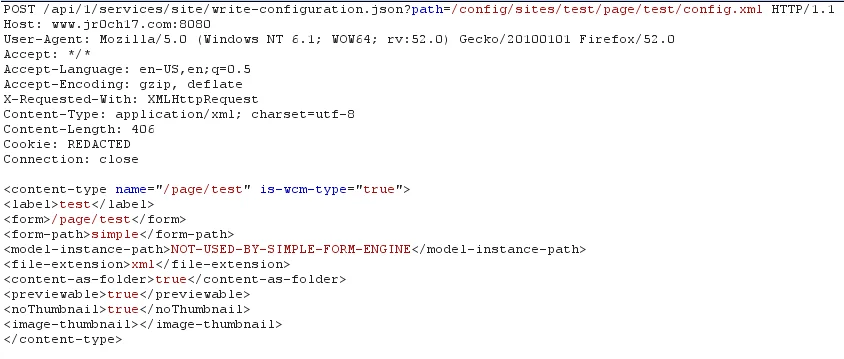
One endpoint identified during this review allowed updating template files. What drew attention was the parameter used to update the template. The request looked like this, with sensitive information redacted:
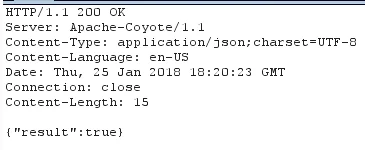
On a successful update, the response looked like this:
Exploitation
Step 1: move the write target with directory traversal
The next logical test was to change the path so the file would land somewhere other than /config. The author supplied the path /../../../../../../../../../../../../tmp/test.txt and replaced the POST body with This is a test.. The response was the same as the previous successful update.
Step 2: confirm the write with the LFD
The testing was done on the author's own server, so the file could simply have been checked on disk. Instead the author took the black-box route and used the LFD/directory traversal already found to confirm that the file had just been uploaded. It was there.
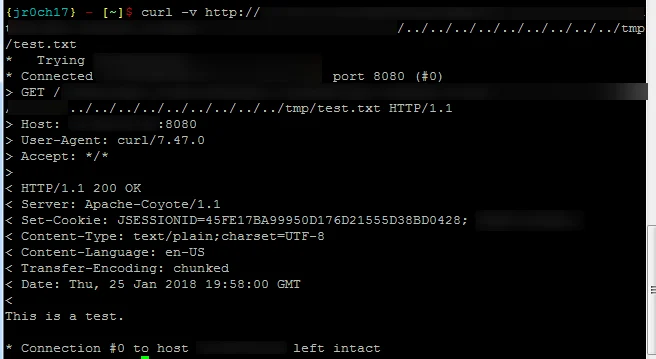
At this point arbitrary file write anywhere on the server was confirmed, and because the service ran as root, the write was not restricted by file ownership.
Step 3: look for code execution and hit a wall
The obvious next step was to execute an uploaded file, but that did not work. The service was deployed as a war file in Tomcat, so there was no specific path where an uploaded file could be placed and executed. The author notes that someone more familiar with that setup might have found a way, but at that point it was not possible.
Step 4: try cron, then change plan
Recalling notes from working on the OSCP, the author first uploaded a bash script into the cron.hourly folder. With the default OS configuration it never worked, and assuming the bug bounty program used the same default settings, it probably would not have worked there either. The alternative was to use the root-level write to place an SSH key on the box.
Step 5: upload the SSH key
This was simple: configure the path parameter accordingly and put the SSH key in the body of the POST request.
Step 6: log in with the key
The last step was to log in with the newly uploaded SSH key. It worked.

Root cause
The template update endpoint took a path parameter that decided where the file was written; changing it to a traversal path wrote the file outside the /config folder. The traversal sequence in the path escaped that folder, and because the service ran as root, the write succeeded anywhere on the filesystem. The API layer had improper access controls on every possible action, so the stored XSS, the LFD and both XXEs could be exploited without logging in to the admin panel, and there was no CSRF protection either. The author describes the access-control gap as applying to every possible action on the CMS; the exact code path behind the path parameter is not shown in the report.
Impact
An unauthenticated remote attacker could exploit the stored XSS, the LFD and both XXEs directly, without admin panel access, and could also use CSRF to make an admin perform actions. Through the template endpoint, an attacker could write files anywhere on the server as root. In this case that was enough to install an SSH key and log in to the box, which the author counts as the first "RCE" in a bug bounty program. Code execution through uploaded files was not achieved because of the Tomcat war deployment, and the cron approach did not work under default OS configuration. The author did not test anything on the bug bounty program's own site, providing a clear PoC for all findings and asking them to test on their end instead.
Fix
The author contacted the CMS's development team, who replied immediately and invited the author to their Slack team to discuss the reports. A few calls clarified points, and the team asked the author to test their new version before release. The report does not describe the specific code changes made.
Variants to test
- Template, theme and config editors that accept a path or filename parameter: try traversal sequences such as
/../../../../../../../../../../../../tmp/test.txtand check whether the response matches a normal successful update, then confirm the write through a separate file-read primitive. - Services that run as root: after confirming an arbitrary write, try placing an SSH key in the relevant
authorized_keyslocation and logging in with it. - Scheduled-task folders: upload a script into
cron.hourlyand watch whether it runs; a positive result is execution under the scheduler's account. - API endpoints documented for admin actions: replay them without a session and with a low-privilege session; a positive result is a successful action response rather than an authentication error.
- State-changing requests with no anti-CSRF token: build a cross-site form that performs the action; a positive result is the action completing when triggered from another origin.
- Default credentials on admin panels: try
admin:adminand similar pairs; a positive result is access to the panel, even if it appears empty, since the panel may expose further endpoints.
What happened, in plain words
A security researcher spent some time in the summer of 2017 looking at a website that belonged to a bug bounty program. A bug bounty program is a scheme where a company says: if you find a security problem in our systems and tell us about it privately, we will reward you. The researcher ended up with their first "RCE", which stands for remote code execution: the ability to make a computer that belongs to someone else run commands or accept a login from you, from a distance, over the internet.
The route there was unusual. The researcher did not find a clever programming flaw that runs code directly. Instead, they found a feature in a content management system (CMS, software for building and editing websites) that let an administrator save template files to a folder chosen by the person using the feature. By putting a special sequence of characters in that folder name, the researcher made the software save files anywhere on the server, not just in the folder it was meant to use. The service also ran with sudo privileges, the highest level of permission on the machine. From there, the researcher saved their own SSH key (a kind of digital key used to log in to a server without a password) onto the machine and simply logged in.
This article walks through the whole story in the order it happened, explains every term as it comes up, and shows the exact requests and values that were used.
The always fun recon
Recon, short for reconnaissance, is the information-gathering phase at the start of any security test. Before touching anything, you work out what exists: which servers, which websites, which addresses. The researcher had a scope of *.domain.com. A scope is the list of systems a program allows you to test; the * is a wildcard meaning "anything", so every subdomain of domain.com was fair game. A subdomain is a name like shop.domain.com or blog.domain.com that sits under the main domain.
To find those subdomains, the researcher used several tools:
- Sublist3r, which collects subdomain names from public sources.
- Aquatone, which takes screenshots of many web hosts at once.
- Nmap, a classic tool for discovering which services are running on a machine.
The result was a list of hundreds of subdomains. Hundreds is too many to look at one by one, so the researcher used EyeWitness, a tool that opens each web page in a browser and saves a picture of it. Looking through those pictures is much faster than visiting every site: you scan the screenshots and pick the ones that look interesting or out of date.
One screenshot showed an application running on port 8080. A port is a numbered door on a computer; the normal web port is 80 (or 443 for encrypted traffic), and 8080 is a common alternative used by applications that are not the main website. This one served the default home page of a CMS the researcher had never heard of, so it became the first target.
Browsing to it quickly revealed a login page. The researcher tried the default credentials admin:admin, meaning the username admin and the password admin, and they worked. Default credentials are the username and password a product ships with before anyone changes them; they are published in the manual, so anyone who knows the product can try them. The admin panel behind the login turned out to be completely empty: no useful information, nothing at all.
Even so, the researcher reported it to the bug bounty program as "Default credentials in admin panel". The program treated it as a critical bug and rewarded it, even though no sensitive information had been accessed. That is worth remembering: a finding does not have to lead to stolen data to be valuable.
Looking at the default home page and the empty admin panel, the researcher felt there was more to the product. A quote from Jobert stuck with them: If it looks old and vulnerable, then it probably is! So they went to the CMS's own website to learn more. It was open-source software, meaning its source code is published and anyone can download it. That gave the researcher an idea: install it on a machine they controlled and experiment there, where breaking things costs nothing.
They spun up an EC2 instance on AWS. An EC2 instance is simply a rented virtual computer in Amazon's cloud; you can create one in minutes, install software on it, and delete it afterwards. On that machine, the researcher noticed the service had to run with sudo privileges. Sudo means "run as the superuser", the all-powerful account on a Linux machine that can read, change or delete anything. Requiring sudo to run a web service is not a best practice, and the researcher filed that detail away for later; it is exactly what made the later file write so powerful.
A quick Google search for existing CVEs for the software found nothing. A CVE is a public catalogue entry for a known security flaw, with an ID like CVE-2017-1234, so a search that returns nothing suggests nobody has publicly documented a flaw in this product. That in turn suggested nobody had ever done a security audit or penetration test of it. Penetration testing is deliberately attacking your own systems, with permission, to find problems before criminals do. For the researcher, this was an opportunity.
Quick and easy findings
About 30 minutes to an hour of browsing was enough to understand how the CMS worked. During that time the researcher found two XSS issues. XSS, cross-site scripting, is a flaw where an attacker gets their own code (usually JavaScript, the language browsers run) into a page that other people view, so the code runs in those visitors' browsers. One was stored XSS, where the malicious content is saved on the server and shown to everyone who opens the page, and one was reflected XSS, where the content bounces straight back in the response to a single request.
Next, the researcher reviewed all the requests in Burp Suite. Burp Suite is a tool that sits between your browser and the website and records every request and response, so you can read exactly what was sent and what came back. That review turned up an LFD and two XXEs.
- LFD stands for local file disclosure: a flaw that lets an attacker read files on the server that they should not be able to read. It usually works through directory traversal, which is the trick of putting
../sequences in a file path. On a computer,..means "the folder above this one", so a path full of../climbs out of the folder the application intended and reaches elsewhere on the disk. - XXE stands for XML External Entity. XML is a text format for structured data, and its entity feature lets a document refer to other content. If a server processes XML carelessly, an attacker can use an entity to make the server fetch or reveal something it should not.
The CMS also exposed many API endpoints. An API is a set of addresses a program offers so other programs can talk to it, rather than pages meant for a human to click. An endpoint is one specific address in that API, for example one that lists users or one that saves a setting. The researcher read the API documentation and found that every possible action on the CMS had improper access controls. Access control is the part of a system that decides who is allowed to do what; "improper" here means the API did not check properly, so an unauthenticated remote attacker, someone with no login at all, sitting anywhere on the internet, could use the stored XSS, the LFD and both XXEs by themselves, without ever logging in to the admin panel.
On top of that, there was no CSRF protection at all. CSRF stands for cross-site request forgery. It exploits the fact that your browser automatically sends your session cookie with every request to a site. A session cookie is a small piece of data the server gives your browser after you log in, and the browser shows it on every later request so the server knows who you are; it works like a wristband at an event, proving you already checked in. In a CSRF attack, the attacker builds a page that quietly sends a request to the victim site while the logged-in administrator visits it, and because the browser attaches the cookie automatically, the site thinks the admin made the request. So an attacker who did not want to exploit the bugs directly could have created a few CSRF exploits and tried to get the admin to perform the actions for them.
LFD/Directory traversal to the rescue!
At this point the researcher was confident an RCE was only a matter of time: keep poking around and one would turn up. One of the interesting endpoints identified earlier allowed updating template files. A template is the file that controls how a page of the CMS looks; editing it is a normal admin feature, like changing the layout of a shop window. What was interesting was the parameter being used to update the template. A parameter is a named value sent along with a request, for example ?path=/config in a URL or a field in the body of a form submission. This is what the request looked like, with all sensitive information redacted:
The screenshot shows the request that updates a template file, with the parameter that decides where the file is written. Sensitive values in it have been blacked out.
On a successful update, the response looked like this:
The screenshot shows the reply the server sends when the template update succeeds. The researcher kept this normal reply in mind, because matching it later would be the sign that a modified request had also succeeded.
Step 1: move the write target with directory traversal
The next logical test was to change the path so the file would land somewhere other than the /config folder. /config is the folder the CMS uses for its configuration, and the endpoint was only ever meant to write there. The researcher supplied this path:
/../../../../../../../../../../../../tmp/test.txt
and replaced the body of the POST with:
This is a test.
A POST request is the kind of request a browser sends when you submit a form: it carries data to the server, as opposed to a GET request, which just asks for a page. The body is the part of the request that holds that data.
Reading the path from left to right: it starts with /, the root of the filesystem, the very top of the disk. Then comes .. repeated many times, each one meaning "go up one folder". Starting from the /config folder the application intended, each .. climbs one level higher, and enough of them climb all the way to the top of the disk. From there, tmp/test.txt goes into the tmp folder, a scratch area on Linux systems, and names the new file test.txt. The body, This is a test., is the content that gets written into that file.
The response was the same as the previous successful update. In other words, the server did not complain; it behaved exactly as if the researcher had saved a normal template.
Step 2: confirm the write with the LFD
The testing was done on the researcher's own server, so the file could simply have been checked on disk. Instead the researcher took the black-box route. Black-box means testing only from the outside, the way a real attacker would, without looking at the machine's own files or logs. The reason is practical: what you can see on your own test machine is not proof of what an attacker could confirm on someone else's. So the researcher used the LFD and directory traversal already found to check whether the file had just been uploaded. It was there.
The screenshot shows the LFD being used to confirm that the file had just been uploaded. That confirmed the upload had really happened, not just that the server had replied politely.
At this point arbitrary file write anywhere on the server was confirmed. Arbitrary means "any file, any location". And because the service ran as root, the write was not restricted by file ownership: on Linux, every file belongs to a user and has permissions saying who may change it, but root ignores those restrictions.
Step 3: look for code execution and hit a wall
The obvious next step was to execute an uploaded file: save a program on the server and ask the server to run it. That did not work. The service was deployed as a war file in Tomcat. Tomcat is a program that runs Java web applications, and a war file is a packaged bundle of such an application, like a sealed box that Tomcat unpacks and runs in its own way. Because of that packaging, there was no specific path where an uploaded file could be placed and then executed. The researcher notes that someone more familiar with that setup might have found a way, but at that point it was not possible.
Step 4: try cron, then change plan
Recalling notes from working on the OSCP, the researcher first tried a different route. The OSCP is a well-known practical certification exam for penetration testers, and its notes are full of standard tricks. One of them is cron: the Linux scheduler, a built-in service that runs commands at set times. It has folders such as cron.hourly, and any script placed in that folder is supposed to run once an hour. The idea was to upload a bash script there. A bash script is a text file of commands for the Linux shell, the program that reads and runs typed commands.
With the default OS configuration it never worked. Default configuration means the settings a system has before anyone changes them, and on many systems the scheduler is set up so that this trick does not fire. Assuming the bug bounty program used the same default settings, it probably would not have worked there either.
So the researcher changed plan. They had root-level write access, meaning they could create files anywhere with the highest permission. Why not use that to log in to the machine directly over SSH? SSH, Secure Shell, is the standard way to open a command line on a remote Linux machine. Normally you log in with a password, but SSH also supports keys: a pair of files, one public and one private. You place the public key on the server in a list of trusted keys, and then the server lets you in if you can prove you hold the matching private key. It is like leaving a copy of your padlock on someone's door: only your key opens it.
Step 5: upload the SSH key
This was simple: configure the path parameter accordingly and put the SSH key in the body of the POST request.
The screenshot shows the same template update request, with the path parameter configured accordingly and the SSH key placed in the body of the request. In plain words: the feature meant for saving templates was used to save a key that grants login.
Step 6: log in with the key
The last step was to log in with the newly uploaded SSH key. It worked.
The screenshot shows the successful SSH login using the uploaded key. That login is the moment the researcher counts as their first "RCE" in a bug bounty program.
Root cause
The template update endpoint took a path parameter controlled by the client and used it to decide where the file was written; changing it to a traversal path wrote the file outside the /config folder. The traversal sequence in the path escaped that folder, and because the service ran as root, the write succeeded anywhere on the filesystem. The API layer had improper access controls on every possible action, so the stored XSS, the LFD and both XXEs could be exploited without logging in to the admin panel, and there was no CSRF protection either. The researcher describes the access-control gap as applying to every possible action on the CMS; the exact code path behind the path parameter is not shown in the report.
Impact
An unauthenticated remote attacker could exploit the stored XSS, the LFD and both XXEs directly, without admin panel access, and could also use CSRF to make an admin perform actions. Through the template endpoint, an attacker could write files anywhere on the server as root. In this case that was enough to install an SSH key and log in to the box, which the researcher counts as the first "RCE" in a bug bounty program. Code execution through uploaded files was not achieved because of the Tomcat war deployment, and the cron approach did not work under default OS configuration. The researcher did not test anything on the bug bounty program's own site, providing a clear PoC for all findings and asking them to test on their end instead. A PoC, proof of concept, is a minimal demonstration that a flaw is real, usually a request or a short set of steps the defender can repeat themselves.
Fix
The researcher contacted the CMS's development team, who replied immediately and invited the researcher to their Slack team to discuss the reports. A few calls clarified points, and the team asked the researcher to test their new version before release. The report does not describe the specific code changes made.
Variants to test
These are the same ideas generalised, so you can look for similar problems elsewhere. Each one states what to try and what a positive result looks like.
- Template, theme and config editors that accept a path or filename parameter: try traversal sequences such as
/../../../../../../../../../../../../tmp/test.txtand check whether the response matches a normal successful update, then confirm the write through a separate file-read primitive. A file-read primitive is any feature that lets you read a file, such as the LFD used here. - Services that run as root: after confirming an arbitrary write, try placing an SSH key in the relevant
authorized_keyslocation and logging in with it.authorized_keysis the file where SSH keeps the list of public keys allowed to log in. - Scheduled-task folders: upload a script into
cron.hourlyand watch whether it runs; a positive result is execution under the scheduler's account. - API endpoints documented for admin actions: replay them without a session and with a low-privilege session; a positive result is a successful action response rather than an authentication error. Replaying means sending the same request again yourself, and a session is the logged-in state the server tracks for you.
- State-changing requests with no anti-CSRF token: build a cross-site form that performs the action; a positive result is the action completing when triggered from another origin. An origin is the combination of scheme, host and port that a page comes from, and an anti-CSRF token is a secret value the site expects in each form so that a page from elsewhere cannot forge the request.
- Default credentials on admin panels: try
admin:adminand similar pairs; a positive result is access to the panel, even if it appears empty, since the panel may expose further endpoints.
Glossary
- Access control: the part of a system that decides who is allowed to do what.
- Anti-CSRF token: a secret value a site expects in each state-changing form, so a page from another site cannot forge the request.
- API: a set of addresses a program offers so other programs can talk to it.
- Arbitrary file write: the ability to create or change a file at any location on a machine.
- AWS: Amazon Web Services, a cloud provider where you can rent virtual computers.
- Bash script: a text file of commands for the Linux shell.
- Black-box testing: testing only from the outside, without looking at the machine's own files or logs.
- Bug bounty program: a scheme where a company rewards people for privately reporting security problems in its systems.
- Burp Suite: a tool that sits between your browser and a website and records every request and response.
- CMS: content management system, software for building and editing websites.
- Cookie (session cookie): a small piece of data the server gives your browser after login, sent back automatically on later requests so the server knows who you are.
- Cron: the Linux scheduler, a built-in service that runs commands at set times.
- CSRF: cross-site request forgery, an attack that makes a logged-in user's browser send a request the user did not intend.
- CVE: a public catalogue entry for a known security flaw, with an ID.
- Default configuration: the settings a system has before anyone changes them.
- Default credentials: the username and password a product ships with before anyone changes them.
- Directory traversal: putting
../sequences in a file path to climb out of the intended folder. - EC2 instance: a rented virtual computer in Amazon's cloud.
- Endpoint: one specific address in an API.
- EyeWitness: a tool that opens many web pages and saves screenshots of them.
- GET request: a request that asks for a page or resource.
- JavaScript: the language browsers run to make pages interactive.
- LFD: local file disclosure, a flaw that lets an attacker read files on the server they should not be able to read.
- Nmap: a tool for discovering which services are running on a machine.
- Open source: software whose source code is published and can be downloaded by anyone.
- Origin: the combination of scheme, host and port a page comes from.
- OSCP: a well-known practical certification exam for penetration testers.
- Parameter: a named value sent along with a request.
- Penetration test: deliberately attacking your own systems, with permission, to find problems first.
- PoC: proof of concept, a minimal demonstration that a flaw is real.
- Port: a numbered door on a computer through which a service is reached.
- POST request: a request that carries data to the server, as when you submit a form; the data is in the body.
- Recon: reconnaissance, the information-gathering phase at the start of a security test.
- RCE: remote code execution, the ability to make someone else's computer run commands or accept a login from a distance.
- Replay: sending the same request again yourself.
- Root: the all-powerful account on a Linux machine that can read, change or delete anything.
- Scope: the list of systems a program allows you to test.
- Session: the logged-in state the server tracks for you.
- Sublist3r: a tool that collects subdomain names from public sources.
- Subdomain: a name like
shop.domain.comthat sits under a main domain. - Sudo: running a command as the superuser, the all-powerful account.
- SSH: Secure Shell, the standard way to open a command line on a remote Linux machine, with a password or a key.
- SSH key: a pair of files, one public and one private, used to log in to a server without a password.
- Stored XSS: cross-site scripting where the malicious content is saved on the server and shown to everyone who opens the page.
- Reflected XSS: cross-site scripting where the malicious content bounces straight back in the response to a single request.
- Template: the file that controls how a page of a CMS looks.
- Tomcat: a program that runs Java web applications.
- Unauthenticated: without any login.
warfile: a packaged bundle of a Java web application that Tomcat unpacks and runs.- Wildcard: a
*character meaning "anything", as in*.domain.com. - XSS: cross-site scripting, a flaw where an attacker gets their own code into a page other people view.
- XXE: XML External Entity, a flaw where a careless XML parser can be made to fetch or reveal something it should not.
- XML: a text format for structured data that supports entities referring to other content.
authorized_keys: the file where SSH keeps the list of public keys allowed to log in.




