Obtained a bunch of sensitive data in just few steps — Hacking
An AWS S3 bucket belonging to an e-commerce company was publicly accessible, allowing anyone to list and download files. The files contained sensitive customer invoice data and monthly sales reports.
Airlangga Visnhu Murthi Follow
 Published on medium.com
During my hacking activity, I always try to learn the Apps business process / flow. I’ll start with the flow one by one.
The full write-up lives on its author's site
It belongs to its author, so we link to it rather than copy it. The other two tabs are our own rewrites, checked against it.
Context
The target was an e-commerce platform, referred to in the report as Company XYZ. The researcher's usual approach is to learn an application's business process and then walk its flows one by one, for example the checkout flow of an e-commerce platform from selecting goods through to a successful checkout. When nothing turns up inside the application, the next step is to look at the outside: other services or third-party applications the system relies on.
The outside service in question here is Amazon Web Services (AWS), which the report describes as a subsidiary of Amazon providing on-demand cloud computing platforms and APIs to individuals, companies and governments on a metered pay-as-you-go basis. Companies commonly use it to store user data without investing in real server hardware, and sometimes forget to configure the environment properly, which can let unauthorised users into their bucket, folder or cloud storage.
The feature at issue is the platform's cloud storage: a bucket that allowed anyone to list and download its files.
Setup
No accounts, roles or tool versions are described. The work was manual reconnaissance followed by the AWS CLI. The report lists the AWS commands relevant to S3 and gives generic examples of each:
- LS, to list all files stored:
aws s3 ls s3://infosec-startup.com/
- CP, to download sensitive files from the bucket to your system:
aws s3 cp s3://infosec-startup.com/credenitals.txt
- RM, to remove or delete contents from the bucket:
aws s3 rm s3://infosec-startup.com/credenitals.txt
- SYNC, to download all files to your system:
aws s3 sync s3://infosec-startup.com/
The report also mentions "etc", so the list is not exhaustive. The example bucket name above is the report's own illustrative placeholder, not the target.
Finding it
After a week of testing the platform's API by following the application flow one by one, the researcher had found nothing. A friend who also acts as a mentor suggested looking outside the application instead, with the clue that the system was probably using AWS.
The researcher then tested the company's AWS services. During the first scanning pass, three URLs representing the company's cloud storage were found. The mentor confirmed he had already tested those. Looking again in case something had been missed, the researcher found one further URL after a few hours. The mentor confirmed he had never tested that one.
The test is simple: hit the URL and see whether it returns all the files stored in the bucket. Done manually, the URL allowed anyone into the bucket.
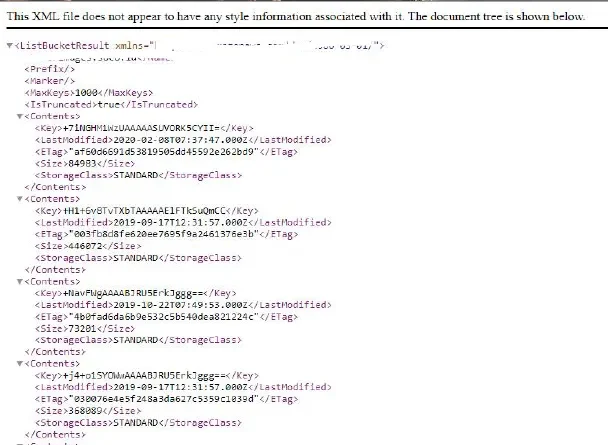
The screenshot shows the URL returning all files stored in the bucket.
Exploitation
Step 1: Confirm public listing
Requesting the bucket URL directly returned all the files stored in the bucket. That alone is an information disclosure: the names and structure of the stored files are visible to anyone.
Step 2: Enumerate the allowed operations
With the URL confirmed, the researcher ran the AWS CLI commands against it. Of the operations tried, only three were permitted:
lscpsync
Deletion (rm) was not among the allowed operations, so the bucket contents could be read and copied but not removed.
Step 3: Download the files
The next step was to download whatever was inside and check whether it contained sensitive data.
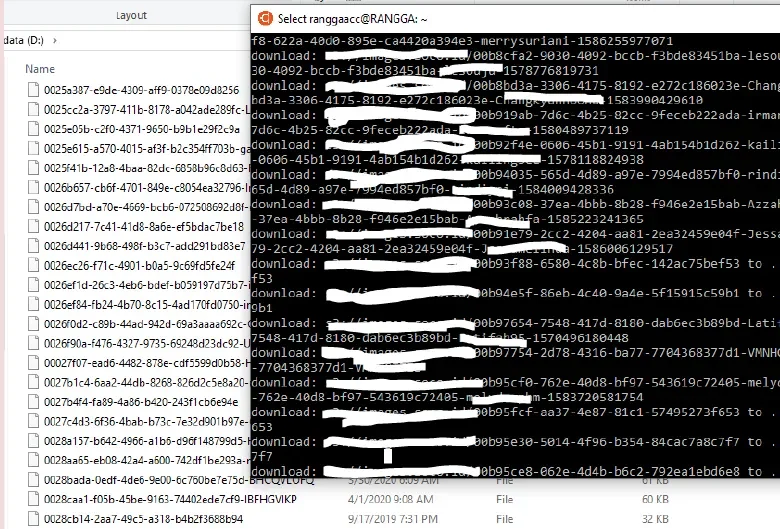
The screenshot shows the files being downloaded from the bucket.
Step 4: Open the extensionless files
All the stored files had no extension. Opening them with a file opener such as a PDF reader revealed their contents.

The screenshot shows the contents of one of the downloaded files after opening it.
The bucket held all invoice transactions, including full name, email, user address, amount and phone number. The researcher rates this as critical, since the data could be downloaded by anyone who found the URL.
Step 5: Filter with sync for more sensitive data
Using the sync command, the researcher filtered for a certain extension, which returned further sensitive data: the company's monthly report sales data.

The screenshot shows the AWS command used to filter for a certain file type.
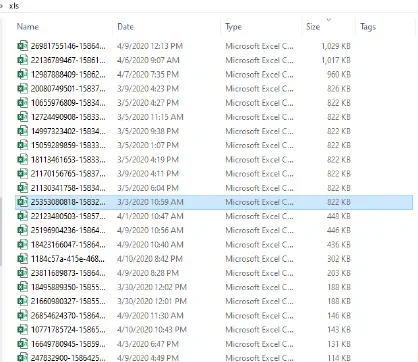
The screenshot shows the monthly report data that the filtered sync returned. It contains sales data broken down by channel, order type, region and similar dimensions.
Root cause
The bucket allowed anyone who hit the URL to see and download its files. The report does not state how the bucket was configured. Because the bucket was publicly listable, the object names were enumerable, and because the objects were publicly readable, cp and sync worked without credentials. The only limit observed was that rm was not permitted; the allowed commands were ls, cp and sync.
The files themselves had no extension, which is an obstacle to casual inspection but not a security control, since a file opener reads them regardless.
Impact
Anyone who knew or found the bucket URL could list every stored file and download it. The exposed data included all invoice transactions with full name, email, user address, amount and phone number, plus monthly sales reports broken down by channel, order type and region. The researcher classifies the exposure as critical. The report does not describe how many records were affected or whether the data was used by anyone else.
Fix
The report states that the bug was fixed and re-tested on 15/04/2020, but does not say what was changed.
Timeline
| Date | Event |
|---|---|
| 25/03/2020 | Findings |
| 01/04/2020 | Report created and submitted |
| 02/04/2020 | Management validated and confirmed |
| 15/04/2020 | Bug fixed and re-tested |
| 27/04/2020 | Award of $550 |
Variants to test
- Guess bucket names from the application's hostnames, product names and JavaScript references, then request each bucket URL directly. A positive result is an XML listing of objects returned without credentials.
- Run
aws s3 ls s3://<bucket>/against each candidate bucket without configuring credentials. A positive result is a file listing rather than an access denied error. - Run
aws s3 sync s3://<bucket>/ ./out/and inspect what lands on disk. A positive result is any object downloaded anonymously. - Try
aws s3 cpon individual object keys found in a listing. A positive result is the object contents arriving without authentication. - Check whether anonymous delete or write is possible with
aws s3 rmor an upload. A positive result is a successful modification, which turns information disclosure into data destruction or content injection. - Look for extensionless files in any listing and open them with several readers (PDF, archive, text). A positive result is readable business documents such as invoices or reports.
- Use
syncwith filters for common extensions to pull specific document types in bulk. A positive result is additional sensitive files beyond what a plain listing suggested.
Closing note
The researcher reported the findings to the company's management, which was aware of security vulnerabilities and appreciated the work. The report closes with thanks to them.
What happened, in plain words
A security researcher spent a week testing an online shop (called Company XYZ in the report) by following the normal paths a customer takes through the app, and found nothing. A friend who also acts as a mentor suggested looking outside the app instead, at the other services the shop depends on, and hinted that the company was probably using Amazon Web Services (AWS).
AWS is a service that rents out computers and storage over the internet. Many companies use it to keep files and data without buying their own servers. When the settings on that storage are wrong, anyone on the internet can open it, the way a filing cabinet left unlocked in a public corridor can be opened by anyone who walks past.
The researcher found a web address that pointed at the company's cloud storage. Opening it in a browser showed every file stored there. From there, using AWS commands, the researcher downloaded the files and found invoices with customers' names, emails, addresses, amounts and phone numbers, and then monthly sales reports. The company fixed the problem and later awarded a $550 bounty.
This article walks through the same steps in the same order, explaining each idea from scratch. You only need a browser and a computer to follow the story; the commands shown are the ones from the report, copied exactly.
Background: how the researcher works
The researcher's habit is to learn how an application works as a business, then walk its flows one by one. For an online shop, a flow is the journey a customer takes: choose a product, add it to a basket, enter an address, pay, and see a confirmation. Bugs often hide in the joins between those steps, so testing each step in order is a sensible starting point.
If nothing turns up inside the application, the next move is to look at the outside: other services or third-party applications the system relies on. Think of a shop that rents a storage room in a separate building. You can inspect the shop floor all day and find nothing, but the storage room next door may have its door open.
The outside service here is AWS. The report describes it as a subsidiary of Amazon that provides on-demand cloud computing platforms and APIs to individuals, companies and governments on a metered pay-as-you-go basis. In plain words: you rent computing power and storage by the hour or by the gigabyte, and you pay only for what you use. Companies use it so they do not have to buy and maintain physical servers.
Because the setup is done by people, and people are busy, the permissions on that rented storage are sometimes left too open. The result can be that an unauthorised user gets into the company's bucket, folder or cloud storage. A bucket is simply a container for files in Amazon's storage service, called S3. Picture a labelled box in a warehouse: everything the company uploads goes into that box, and the box has a lock setting that decides who can open it.
The feature at issue in this report is exactly that: a cloud storage bucket that allowed anyone to list and download its files.
The tools involved
No accounts, roles or tool versions are described in the report. The work was manual reconnaissance, meaning looking around by hand, followed by the AWS CLI. The CLI is a command-line interface: a program you type commands into, instead of clicking buttons in a browser. Amazon provides one so that people can manage their storage from a terminal.
The report lists the AWS commands relevant to S3 and gives a generic example of each. The bucket name in these examples, infosec-startup.com, is the report's own illustrative placeholder, not the target company's real bucket.
- LS, to list all files stored:
aws s3 ls s3://infosec-startup.com/
Line by line: aws is the name of the program. s3 says which Amazon service you want, here the storage service. ls is short for list, the same idea as the ls command on Linux or macOS that shows the files in a folder. s3://infosec-startup.com/ is the address of the bucket, written in the style Amazon uses, with s3:// in front instead of https://. Running this asks Amazon to show everything inside that bucket.
- CP, to download sensitive files from the bucket to your system:
aws s3 cp s3://infosec-startup.com/credenitals.txt
Line by line: cp is short for copy. The first address is the file inside the bucket, here a file called credenitals.txt (the spelling is as it appears in the report). The command copies that file from the bucket down to your own computer. The report does not show a destination path, so the file lands wherever the tool puts it by default.
- RM, to remove or delete contents from the bucket:
aws s3 rm s3://infosec-startup.com/credenitals.txt
Line by line: rm is short for remove, the same as the delete command on many systems. This asks Amazon to delete the named file from the bucket. It is a destructive command; the report lists it among the AWS commands relevant to S3.
- SYNC, to download all files to your system:
aws s3 sync s3://infosec-startup.com/
Line by line: sync is short for synchronise. Instead of copying one named file, it compares the bucket with a folder on your computer and copies across whatever is missing, so the local folder ends up matching the bucket. The report does not show the destination folder in this example.
The report also mentions "etc", so the list is not exhaustive: Amazon's tool has many more commands than these four.
Finding the open bucket
After a week of testing the platform's API by following the application flow one by one, the researcher had found nothing. An API is the set of doors a program offers to other programs: when a shop's app shows you a product, it is asking the shop's API for that product's details. Testing an API means knocking on those doors in different ways to see whether one opens when it should not.
A friend who also acts as a mentor suggested looking outside the application instead, with the clue that the system was probably using AWS.
The researcher then tested the company's AWS services. During the first scanning pass, three URLs representing the company's cloud storage were found. A URL is a web address, the thing you type into a browser's address bar. The mentor confirmed he had already tested those three. Looking again in case something had been missed, the researcher found one further URL after a few hours. The mentor confirmed he had never tested that one. This is a useful habit: a list of addresses someone else has already checked is not proof that the list is complete.
The test is simple: hit the URL and see whether it returns all the files stored in the bucket. Done manually, the URL allowed anyone into the bucket.
The screenshot shows the URL returning all files stored in the bucket.
Exploitation
Step 1: Confirm public listing
Requesting the bucket URL directly returned all the files stored in the bucket. The address answered anyone who asked.
That alone is an information disclosure. Information disclosure is a class of bug where data that should be private becomes visible to someone who should not see it. Even if the files themselves were unreadable, the names and structure of the stored files would already be visible, and file names often reveal a lot: customer lists, backups, reports, internal project names.
Step 2: Enumerate the allowed operations
With the URL confirmed, the researcher ran the AWS CLI commands against it. Enumerating means listing out what is possible, one option at a time, rather than guessing. Of the operations tried, only three were permitted:
lscpsync
Deletion (rm) was not among the allowed operations, so the bucket contents could be read and copied but not removed. This distinction matters: reading someone's files is bad, but being able to delete them would be worse, because it could destroy the company's data. The report shows that anonymous visitors could read but not delete.
Step 3: Download the files
The next step was to download whatever was inside and check whether it contained sensitive data. Downloading is the only way to know what a file really holds; a name in a listing is just a label.
The screenshot shows the files being downloaded from the bucket.
Step 4: Open the extensionless files
All the stored files had no extension. A file extension is the short suffix after the dot in a name, such as .pdf or .jpg, which tells your computer which program should open the file. Without one, double-clicking a file may do nothing useful, because the computer does not know what it is looking at.
Opening them with a file opener such as a PDF reader revealed their contents. A PDF reader is a program for viewing documents in the PDF format. The lesson is that a missing extension is an obstacle to casual inspection, not a security control: the file's contents are still there, and a program that reads the format will show them.
The screenshot shows the contents of one of the downloaded files after opening it.
The bucket held all invoice transactions, including full name, email, user address, amount and phone number. An invoice is the bill a shop sends a customer after a purchase, so this is a record of who bought what, where they live, how to contact them and how much they paid. The researcher rates this as critical, since the data could be downloaded by anyone who found the URL. Personal data like this is valuable to criminals for fraud and phishing, which is why it is treated so seriously.
Step 5: Filter with sync for more sensitive data
Using the sync command, the researcher filtered for a certain extension, which returned further sensitive data: the company's monthly report sales data. Filtering means telling the tool to copy only files matching a pattern, for example only files of one type, instead of everything.
The screenshot shows the AWS command used to filter for a certain file type.
The screenshot shows the monthly report data that the filtered sync returned. It contains sales data broken down by channel, order type, region and similar dimensions. In plain words: how much the company sold, split by where the sale came from, what kind of order it was and which region the customer was in. That is commercially sensitive: it tells a competitor how the business is doing and where.
Why it was possible
The bucket allowed anyone who hit the URL to see and download its files.
Because the bucket was publicly listable, the object names were enumerable, and because the objects were publicly readable, cp and sync worked without credentials. Credentials here means the keys or login details that prove you are allowed in; none were needed. The only limit observed was that rm was not permitted; the allowed commands were ls, cp and sync.
The files themselves had no extension, which is an obstacle to casual inspection but not a security control, since a file opener reads them regardless.
What was exposed
Anyone who knew or found the bucket URL could list every stored file and download it. The exposed data included all invoice transactions with full name, email, user address, amount and phone number, plus monthly sales reports broken down by channel, order type and region. The researcher classifies the exposure as critical.
The fix
The report states that the bug was fixed and re-tested on 15/04/2020, but does not say what was changed. In everyday terms: lock the storage room, keep the key with the staff, and turn on the setting that stops anyone accidentally leaving the door open again.
Timeline
| Date | Event |
|---|---|
| 25/03/2020 | Findings |
| 01/04/2020 | Report created and submitted |
| 02/04/2020 | Management validated and confirmed |
| 15/04/2020 | Bug fixed and re-tested |
| 27/04/2020 | Award of $550 |
Other things worth trying
These are the same checks, written as a checklist you could follow on a target you are allowed to test:
- Guess bucket names from the application's hostnames, product names and JavaScript references, then request each bucket URL directly. A positive result is an XML listing of objects returned without credentials. XML is a text format that machines use to exchange structured data; a listing in that format means the bucket answered a stranger.
- Run
aws s3 ls s3://<bucket>/against each candidate bucket without configuring credentials. A positive result is a file listing rather than an access denied error. - Run
aws s3 sync s3://<bucket>/ ./out/and inspect what lands on disk. A positive result is any object downloaded anonymously. - Try
aws s3 cpon individual object keys found in a listing. A positive result is the object contents arriving without authentication. - Check whether anonymous delete or write is possible with
aws s3 rmor an upload. A positive result is a successful modification, which turns information disclosure into data destruction or content injection. - Look for extensionless files in any listing and open them with several readers (PDF, archive, text). A positive result is readable business documents such as invoices or reports.
- Use
syncwith filters for common extensions to pull specific document types in bulk. A positive result is additional sensitive files beyond what a plain listing suggested.
Closing note
The researcher reported the findings to the company's management, which was aware of security vulnerabilities and appreciated the work. The report closes with thanks to them. Reporting a problem you find, rather than using it, is what separates a security researcher from an attacker.
Glossary
- API: the set of doors a program offers to other programs, so they can ask it for data or actions.
- Authentication: proving who you are, usually by logging in, before being allowed in.
- AWS: Amazon Web Services, a service that rents out computing power and storage over the internet, paid by use.
- AWS CLI: Amazon's command-line interface, a program where you type commands instead of clicking buttons.
- Bucket: a container for files in Amazon's S3 storage service, like a labelled box in a warehouse.
- Bucket policy: a set of rules attached to a bucket saying who may do what with it.
- Command-line interface (CLI): a program you control by typing text commands.
- Credentials: the keys or login details that prove you are allowed to access something.
- Critical: a severity label meaning the problem is very serious and should be fixed urgently.
- E-commerce platform: an online shop, a website where goods are sold and paid for.
- Enumerate: to list out the possible options one by one, rather than guessing.
- Extension: the short suffix after the dot in a file name, such as
.pdf, which tells the computer which program opens it. - File opener: a program that displays a file's contents, such as a PDF reader.
- Filter: a rule that selects only some files, for example only one type, instead of all of them.
- Flow: the sequence of steps a user takes to complete a task, such as choosing a product and checking out.
- Information disclosure: a bug where data that should be private becomes visible to someone who should not see it.
- Invoice: the bill a shop sends a customer after a purchase, listing what was bought and how much was paid.
- Mentor: a more experienced person who gives hints and guidance.
- Object: a single stored file inside a bucket.
- PDF: a common document format, opened with a PDF reader.
- Public access block: an Amazon setting that stops a bucket from being made public, even by accident.
- Reconnaissance: looking around a target by hand to learn what exists before testing anything.
- S3: Amazon's storage service, where files live in buckets.
- Sensitive data: information that would harm someone if it leaked, such as names, addresses, phone numbers or sales figures.
- Sync: to make two places match, copying across whatever is missing.
- URL: a web address, the text you type into a browser's address bar.
- XML: a text format machines use to exchange structured data, often used for listings.



