Official extension spoofing attacks: when trusted add-ons are not so trusted
A third-party extension could be installed with the same name as an official extension, overwriting the official extension's URL. An attacker could then inject malicious code that executes when a user opens the official extension, and by manipulating the install request, obtain a token with parent company privileges, leading to account takeover.
 Published on strike.sh
Many applications have official extensions; these are pieces of software that allow users to add new functionalities and features to improve interaction with the rest of the company's products.
The full write-up lives on its author's site
It belongs to its author, so we link to it rather than copy it. The other two tabs are our own rewrites, checked against it.
Context
Many applications ship official extensions: pieces of software that let users add functionality and improve how they interact with the rest of a company's products. Products regularly allow the integration of official and third-party extensions from their websites or desktop applications.
This write-up describes a vulnerability found while auditing a widely used software solution. The author deliberately does not name the solution or the objects it interacts with, and instead uses an illustrative model: the application lets you create a parent company and subsidiary companies. A super administrator has access to the parent company and can create subsidiary companies, access them, and create users for each subsidiary company. For each subsidiary company it is possible to create users with different roles, such as administrators, configuration editors and viewers.
The application has a section to install official extensions and third-party extensions, available to the parent company and to subsidiary companies.
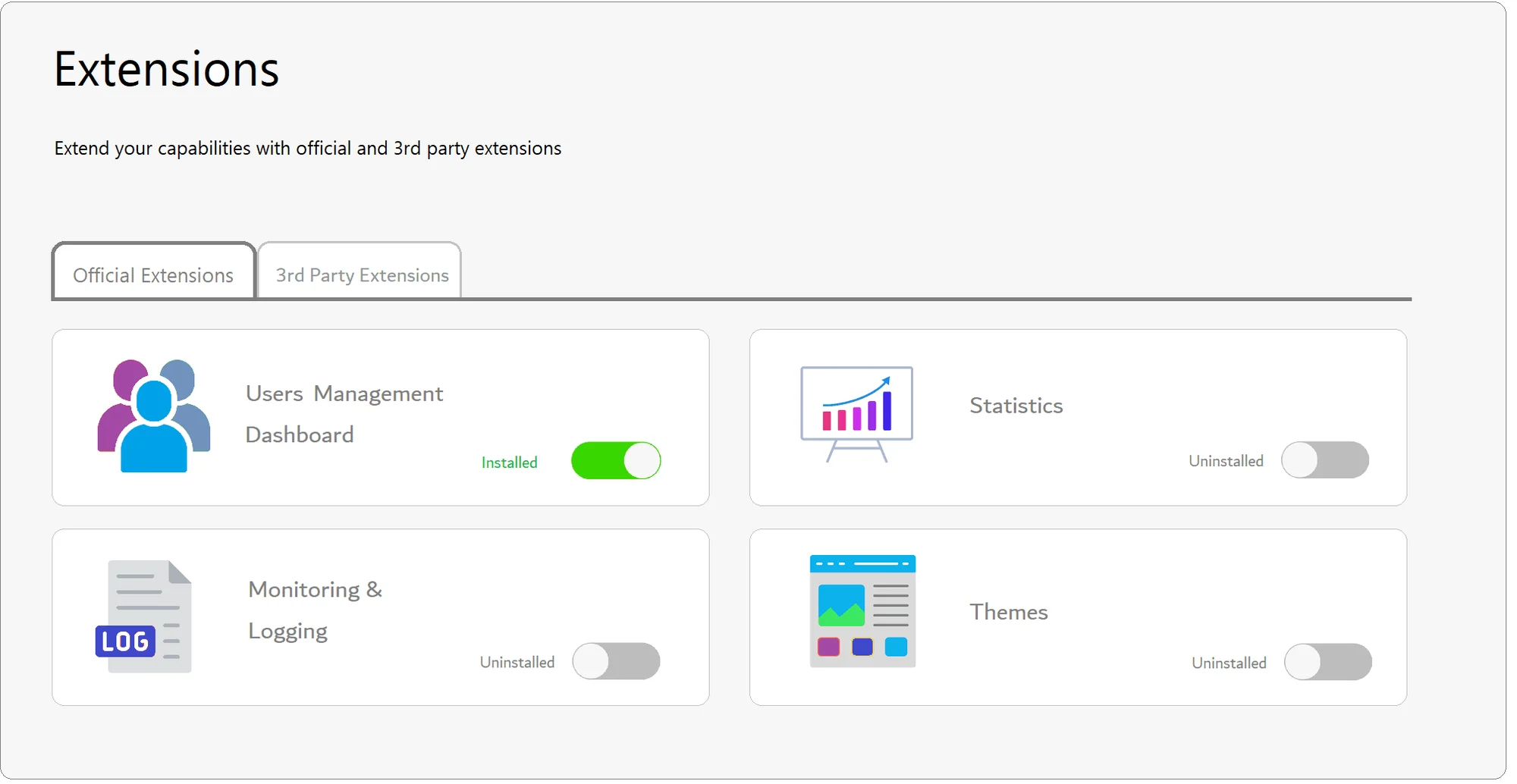
Figure 1. Official extensions tab
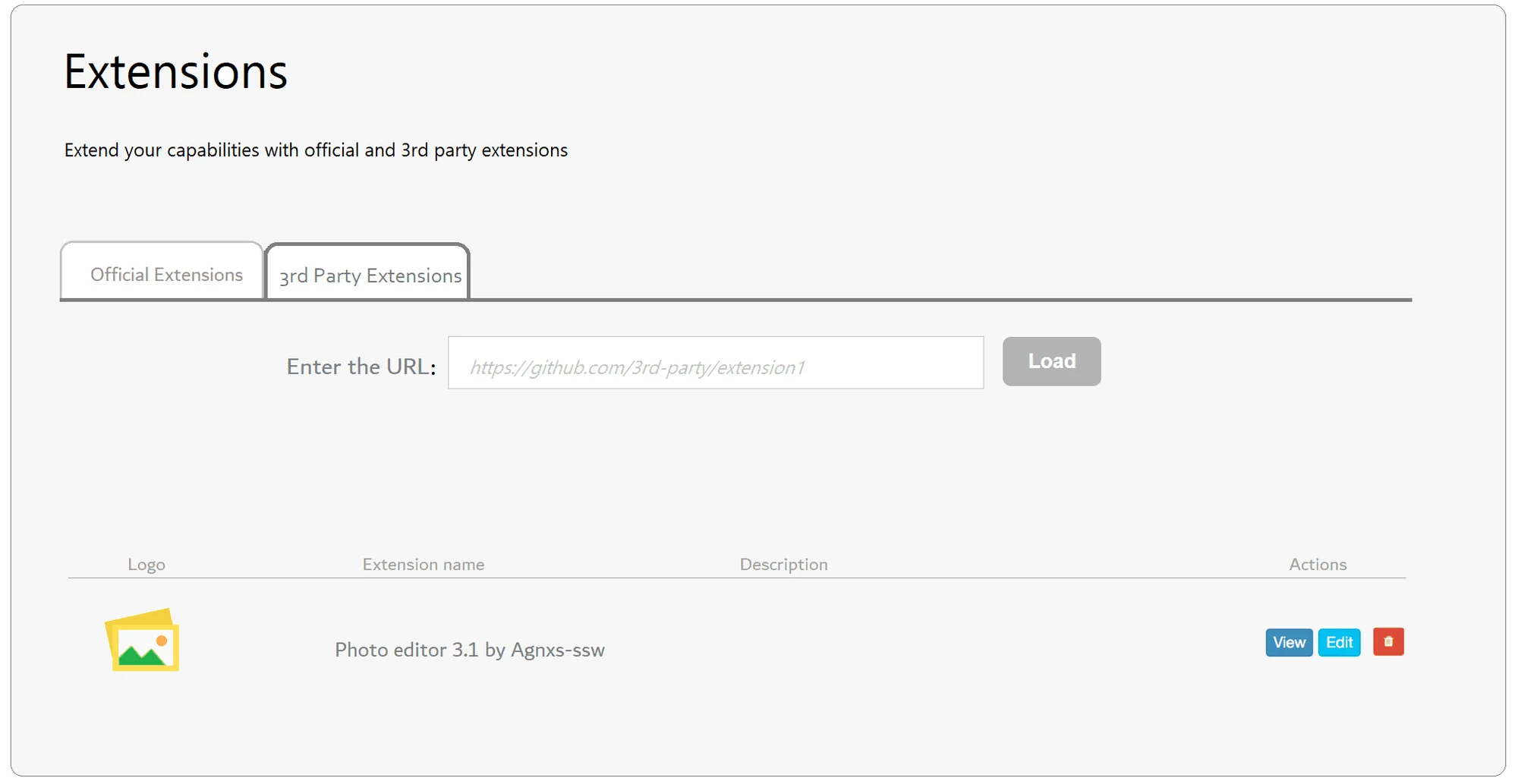
Figure 2. Third-Party extensions tab
Setup
Two users and roles matter for the article:
- A super administrator, who had access to the parent company and to subsidiary A, subsidiary B and subsidiary C.
- A config publisher account that only had access to subsidiary company A.
During testing the author noticed two things about how extensions work:
- All official extensions are hosted on GitHub.
- Third-party extensions must contain a file called
extension.jsonand follow specific code requirements to load correctly on the platform.
Finding it
The author first tried to load third-party extensions from the configuration editor account of subsidiary company A, but could not, because they did not meet the requirements. So the author created a GitHub account, cloned one of the official extensions, Users Management Dashboard, and hosted it in a personal repository:
https://github.com/my_account/User-Mgmt-Dashboard-Clone
Exploitation
Step 1: load the cloned extension
The cloned extension URL was loaded in the 3rd Party Extensions section.
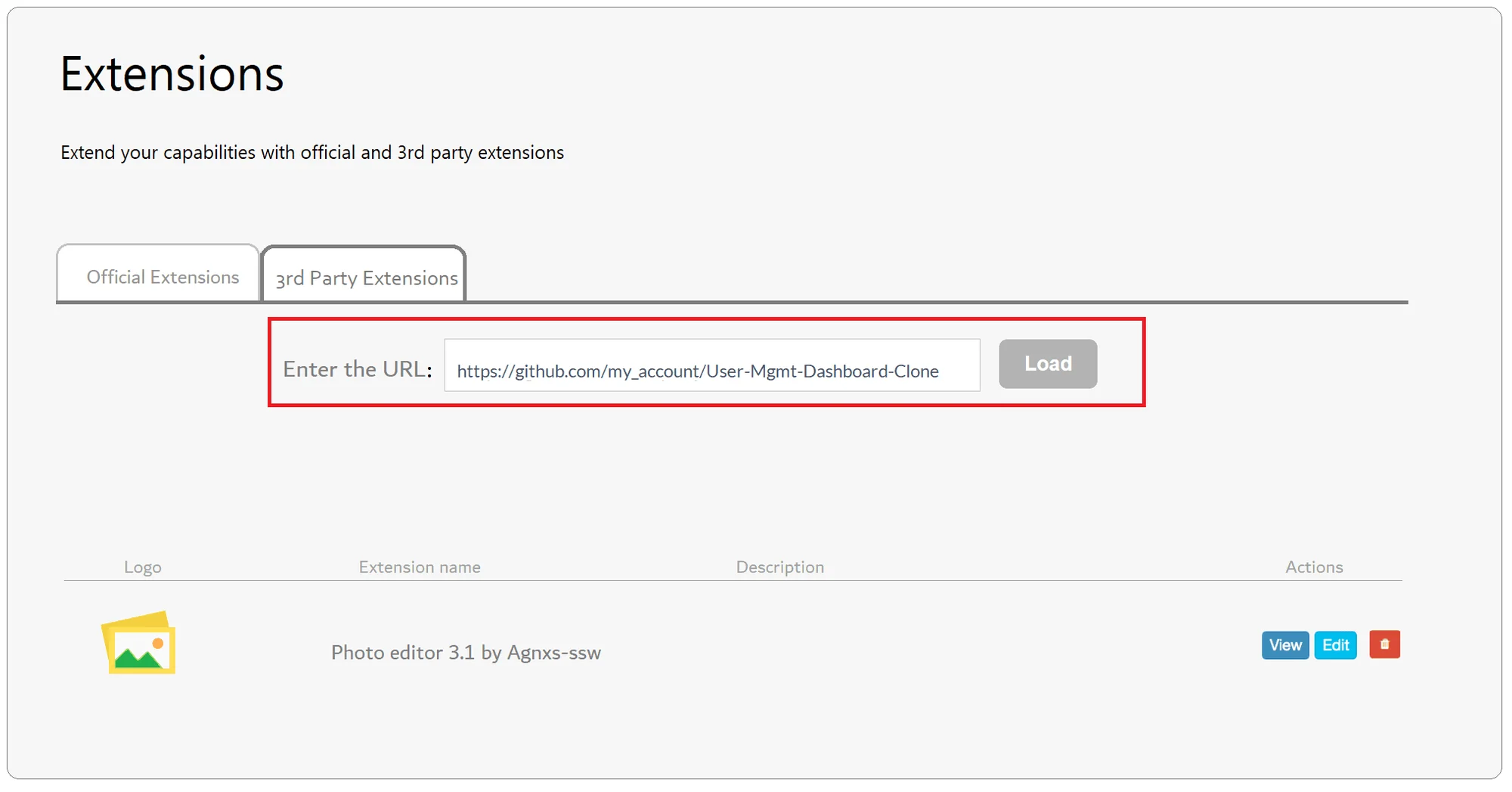
Figure 3. Loading the cloned extension
The extension did not appear in the Third Party Extensions tab, even though the server returned that the cloned extension was loaded through a 200 OK response.
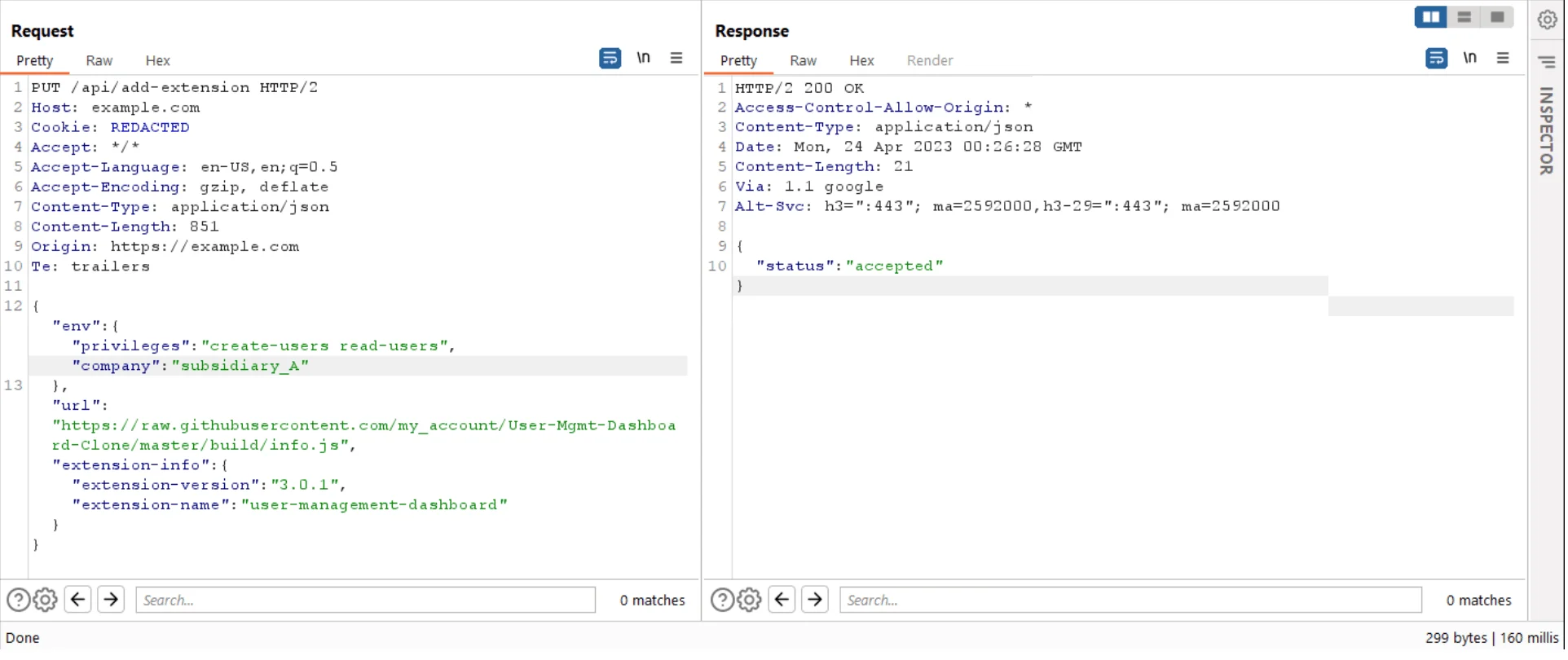
Figure 4. A response confirming that the cloned extension was loaded successfully
Step 2: rename the extension to make it visible
The author opened the repository, opened the file extension.json and changed the extension name from user-management-dashboard to user-management-dashboard-clone. Back in the 3rd Party Extensions tab, the cloned extension URL was reloaded, and this time the extension was visible in the tab.
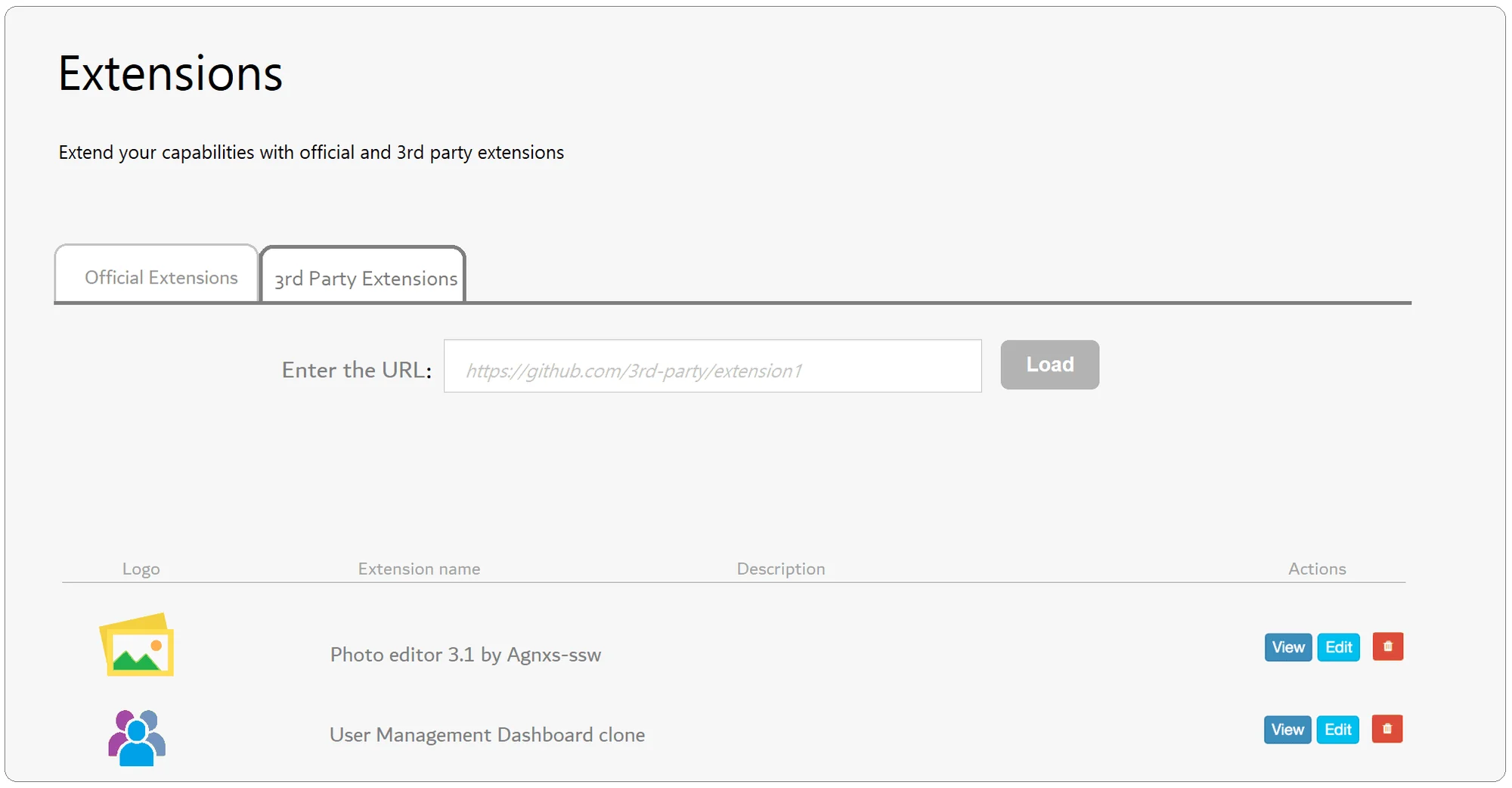
Figure 5. The renamed cloned extension is visible in the Third Party Extensions tab.
At that point the author suspected that the first load had in fact succeeded, but that, because the clone had the same name as the official extension, it had overwritten the official extension URL.
Step 3: confirm the overwrite with XSS
To confirm the suspicion, the author edited extension.json again, changed the extension name back to the original name (user-management-dashboard), reviewed the code and added some XSS inside so that an alert would be displayed when a user opens the dashboard.
After saving all changes in the repository, the author went to the 3rd Party Extensions tab, deleted the extension that had been loaded previously, and loaded the modified cloned extension URL again.
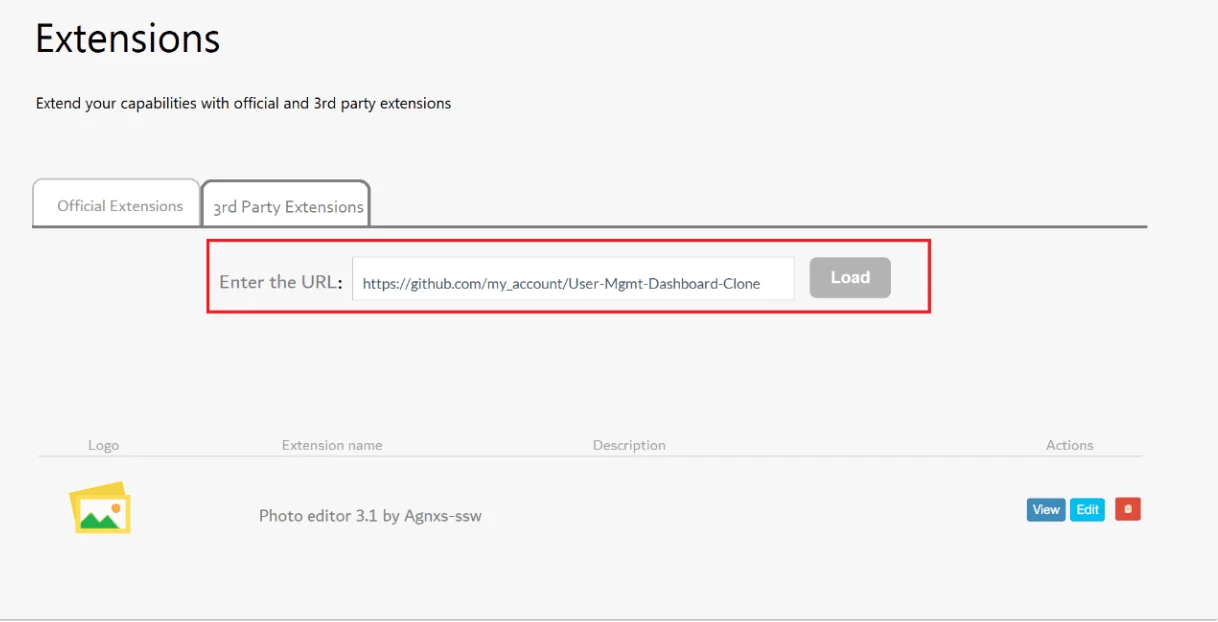
Figure 6. Loading the modified cloned extension
As before, the extension was not loaded in the 3rd Party Extensions tab. This time, however, the author went to the Official Extensions tab and opened the Users Management Dashboard extension. As soon as the extension was opened, the XSS executed.
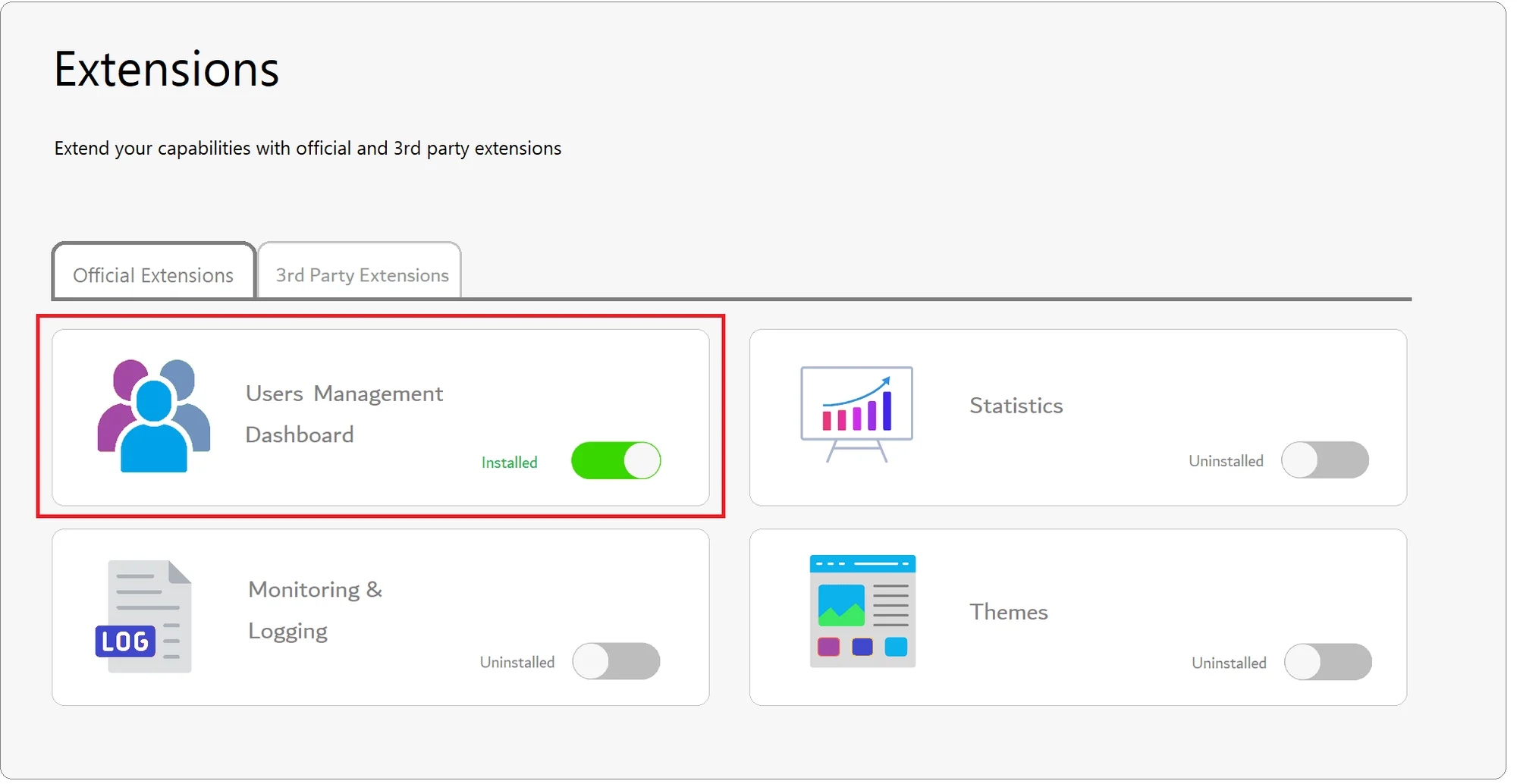
Figure 7. Opening the Users Management Dashboard
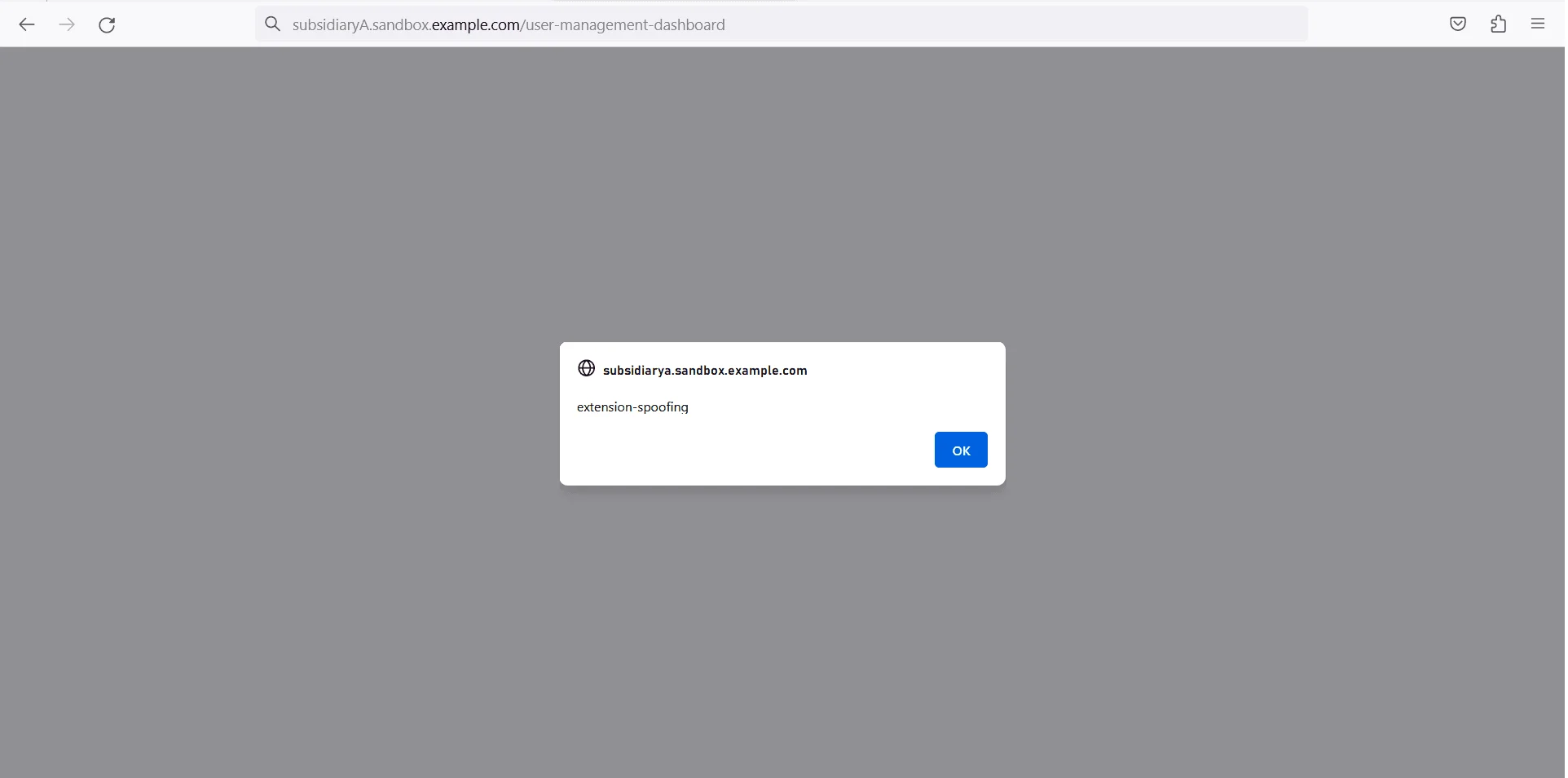
Figure 8. XSS is triggered when a user opens the fake official extension
Step 4: understand the token model
With the overwrite confirmed, the author set out to raise the impact as high as possible. After analysing the solution, the author realised that every time a user opens an extension, it generates a token so that the extension can consume company information.
The extension may have the privileges requested at the time of installation, but these are also subject to the role of the user who visits it. If a viewer user opens the extension, the extension can only be assigned a token with user read privileges, regardless of whether the extension requires additional privileges, such as editing users, to work fully.
Step 5: tamper with the install request
The cloned extension URL was reloaded and the request was intercepted at install time. The author changed the company name to partner_company and increased the privileges, taking those privileges from the developer documentation that the solution provides to third parties who want to create extensions.
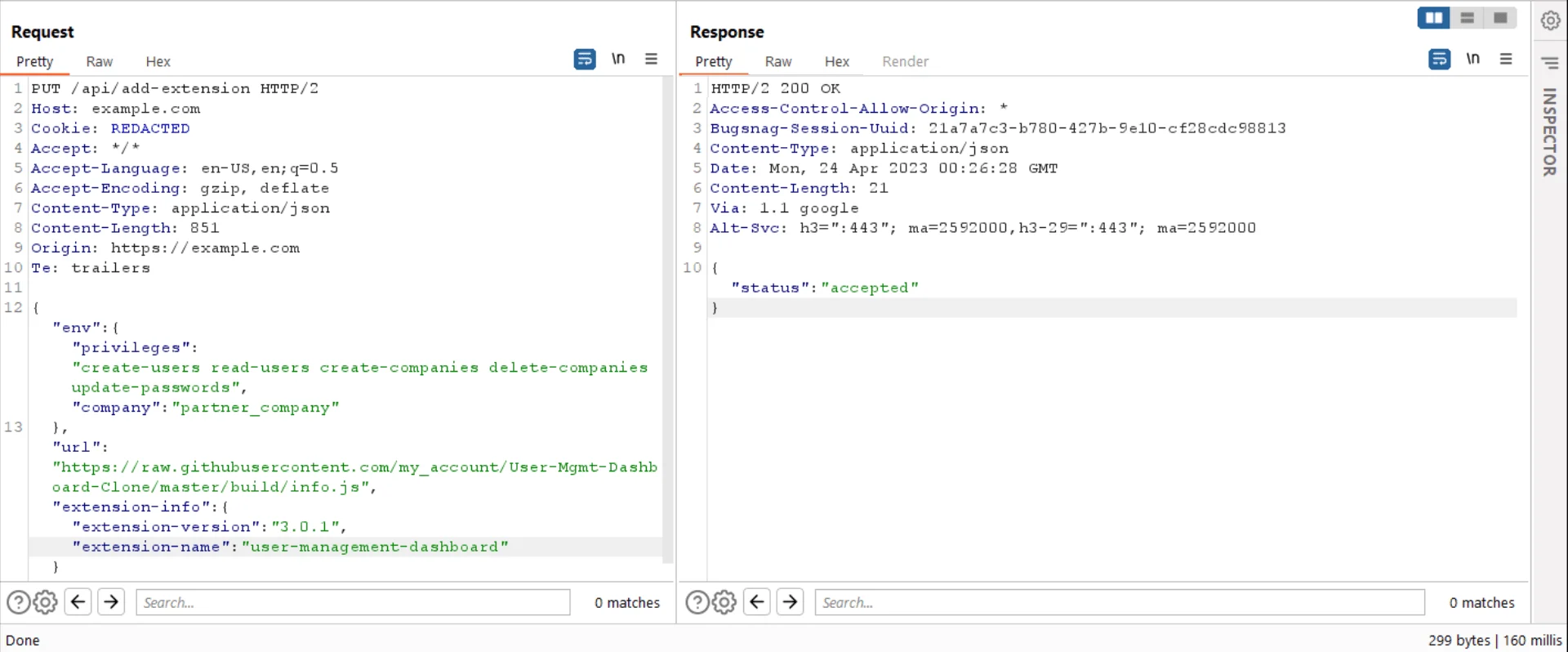
Figure 9. Edited request to install a fake official extension with full access to the parent company
When the editor user tried to open the extension, the application immediately returned an error message: Forbidden, since the editor user did not have access to the parent company. However, when the super admin user opened the extension from subsidiary company A, the solution generated a token for the extension with all permissions on the parent company. Instead of loading information from subsidiary company A, it loaded information from the parent company: the environments are not as isolated as the author had assumed.
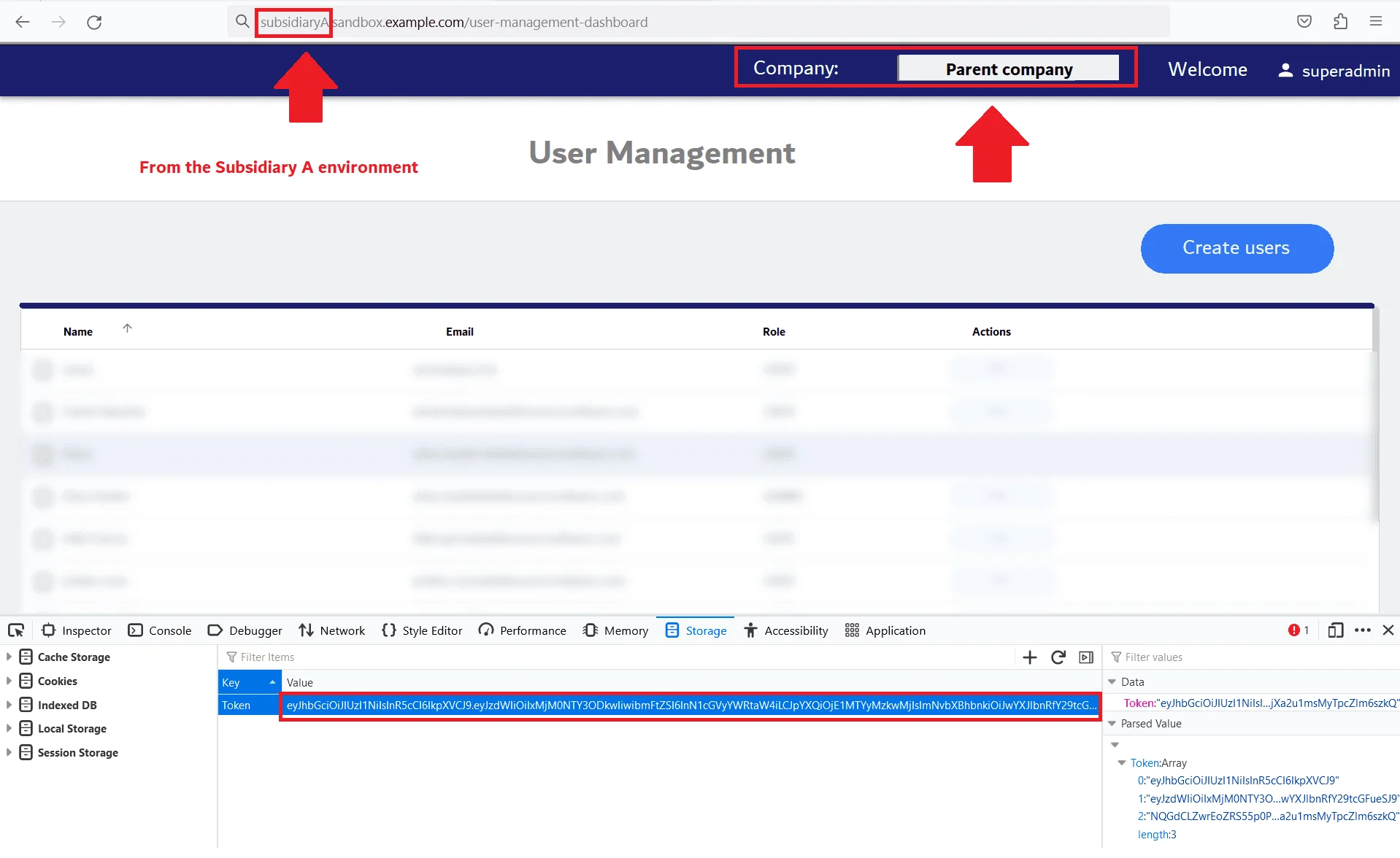
Figure 10. Parent company information is loaded from the Subsidiary A environment
Step 6: steal the token and take over the account
Since the source of the extension is the cloned malicious extension and the author has access to its source code, the next step was to steal the token via XSS and perform an account takeover attack on the parent company's super admin account.
Root cause
The author suspected that the extension name is used as the identity of an extension, and that loading a third-party extension whose name matches an official extension overwrites the official extension URL. Opening the Users Management Dashboard from the Official Extensions tab executed the attacker's XSS. The 200 OK response on the first load, followed by the extension not appearing in the Third Party Extensions tab, was the visible symptom of that overwrite.
A second weakness is that the install request carries the company name and the requested privileges, and the author was able to tamper with both. When the super admin opened the extension from subsidiary A, the solution generated a token with all permissions on the parent company. The environments are not as isolated as the author had assumed.
Impact
In this test, installing a third-party extension under an official extension's name appeared to replace the official extension's URL with the author's code. Any user who opens the extension from the Official Extensions tab executes that code. Combined with the token model, the next step was to steal the token via XSS and perform an account takeover attack on the parent company's super admin account. The editor user without access to the parent company was refused with Forbidden, so the outcome depends on which user opens the extension: the higher the role and the broader the company access, the greater the impact.
Fix
The report does not describe a fix. Based on the behaviour shown, the platform should treat official and third-party extensions as separate namespaces so that a third-party extension cannot overwrite an official extension URL, and it should bind the token issued when an extension is opened to the company the extension was installed for, rather than allowing a token scoped to the parent company to be issued from a subsidiary environment.
Variants to test
- Name collision on install: install a third-party extension whose name matches an official one and check whether the official tab serves the attacker's URL. A positive result is the official extension executing attacker-controlled code.
- Silent success: look for a
200 OKon install while the extension does not appear in the third-party list. A positive result suggests the install succeeded but was hidden or overwritten. - Install request tampering: intercept the install request and change the company identifier and requested privileges. A positive result is the server accepting the modified values.
- Cross-tenant token issuance: open the extension as a high-privilege user from a subsidiary and inspect the token scope. A positive result is a token carrying parent company permissions.
- Role-based token limits: open the extension as a low-privilege user and confirm the token is restricted. A positive result for the attacker is a token that exceeds the user's role.
What happened, in plain words
Imagine a company that sells software which, like a phone, lets you install extra apps. Some of those apps are made by the company itself (official extensions) and some are made by outside developers (third-party extensions). The company keeps its official apps in a trusted shop window, and users assume anything in that window is safe.
A security researcher found that this trust could be broken. By installing a third-party extension whose name was identical to an official one, she suspected she had replaced the official extension with her own code, and the XSS that ran from the official tab supported this. When a user opened the official extension, they were really running her code. Because of how the platform handed out access tokens, the next step was to steal the token via XSS and perform an account takeover attack on the parent company's super admin account.
This article walks through the whole story from zero. It explains what extensions are, what a token is, what cross-site scripting (XSS) means, and why a small naming mistake turned into a full account takeover. No prior security knowledge is needed: if you can use a browser, you can follow along.
Background: extensions, companies and roles
Many applications ship official extensions: pieces of software that let users add functionality and improve how they interact with the rest of a company's products. Products regularly allow the integration of official and third-party extensions from their websites or desktop applications.
Think of a browser: you install an ad blocker or a password manager, and suddenly the browser does more than it did before. Extensions work the same way inside business software. They are small programs that plug into the main product.
This write-up describes a vulnerability found while auditing a widely used software solution. The author deliberately does not name the solution or the objects it interacts with, and instead uses an illustrative model: the application lets you create a parent company and subsidiary companies. A super administrator has access to the parent company and can create subsidiary companies, access them, and create users for each subsidiary company. For each subsidiary company it is possible to create users with different roles, such as administrators, configuration editors and viewers.
A useful comparison is a group of companies: a head office (the parent) and several branches (the subsidiaries). The head office can see everything; each branch sees only its own paperwork. Inside each branch, different staff have different permissions: a manager can change settings, a viewer can only read.
The application has a section to install official extensions and third-party extensions, available to the parent company and to subsidiary companies.
Figure 1. Official extensions tab
Figure 2. Third-Party extensions tab
The two screenshots show the two tabs a user sees: one for extensions made by the software vendor, one for extensions made by outside developers. The distinction matters because users trust the first tab far more than the second.
The two accounts used in the test
Two users and roles matter for the article:
- A super administrator, who had access to the parent company and to subsidiary A, subsidiary B and subsidiary C.
- A config publisher account that only had access to subsidiary company A.
Having two accounts with very different power levels is a standard testing technique. If something works for the super administrator but not for the limited account, you learn where the permission checks live. If something works for the limited account that should not, you have found a privilege problem.
How extensions are loaded
During testing the author noticed two things about how extensions work:
- All official extensions are hosted on GitHub.
- Third-party extensions must contain a file called
extension.jsonand follow specific code requirements to load correctly on the platform.
GitHub is a website where developers store and share code. Hosting official extensions there means the platform simply points at a GitHub address and downloads the code from it. The extension.json file is a small description file: it tells the platform the extension's name, what it does, and what permissions it needs. Think of it as the label on a jar: the platform reads the label to decide what is inside.
Finding it
The author first tried to load third-party extensions from the configuration editor account of subsidiary company A, but could not, because they did not meet the requirements. So the author created a GitHub account, cloned one of the official extensions, Users Management Dashboard, and hosted it in a personal repository:
https://github.com/my_account/User-Mgmt-Dashboard-Clone
Cloning means making an exact copy. The author took the official Users Management Dashboard extension, copied it into her own GitHub account, and now controlled every line of that copy. The URL above is the address of her copy. The plan was simple: see whether the platform could be tricked into treating her copy as the real thing.
Exploitation
Step 1: load the cloned extension
The cloned extension URL was loaded in the 3rd Party Extensions section.
Figure 3. Loading the cloned extension
The screenshot shows the form where a user pastes the address of a third-party extension. The author pasted her own GitHub address.
The extension did not appear in the Third Party Extensions tab, even though the server returned that the cloned extension was loaded through a 200 OK response.
Figure 4. A response confirming that the cloned extension was loaded successfully
A 200 OK is the standard web response meaning "everything went fine". So the server said the install worked, yet the extension was nowhere to be seen in the list. That mismatch is the interesting part: something happened behind the scenes that the interface did not show.
Step 2: rename the extension to make it visible
The author opened the repository, opened the file extension.json and changed the extension name from user-management-dashboard to user-management-dashboard-clone. Back in the 3rd Party Extensions tab, the cloned extension URL was reloaded, and this time the extension was visible in the tab.
Figure 5. The renamed cloned extension is visible in the Third Party Extensions tab.
Changing the name in extension.json is like changing the label on the jar. With a new, unique name, the platform had no reason to hide it, so it appeared in the list. That told the author the name itself was the key.
At that point the author suspected that the first load had in fact succeeded, but that, because the clone had the same name as the official extension, it had overwritten the official extension URL.
In other words, the author suspected the platform stores extensions by name, so a new extension with an existing name may replace the old entry. So the author suspected the first install had quietly swapped the official extension's address for her GitHub address.
Step 3: confirm the overwrite with XSS
To confirm the suspicion, the author edited extension.json again, changed the extension name back to the original name (user-management-dashboard), reviewed the code and added some XSS inside so that an alert would be displayed when a user opens the dashboard.
XSS stands for cross-site scripting. It means putting code into a place where another user's browser will run it. A simple example is a pop-up alert: harmless on its own, but proof that the attacker's code is executing inside someone else's session. If an attacker can run code in your browser while you are logged in, they can often act as you.
After saving all changes in the repository, the author went to the 3rd Party Extensions tab, deleted the extension that had been loaded previously, and loaded the modified cloned extension URL again.
Figure 6. Loading the modified cloned extension
As before, the extension was not loaded in the 3rd Party Extensions tab. This time, however, the author went to the Official Extensions tab and opened the Users Management Dashboard extension. As soon as the extension was opened, the XSS executed.
Figure 7. Opening the Users Management Dashboard
Figure 8. XSS is triggered when a user opens the fake official extension
The alert appearing from the Official Extensions tab is the proof. The user clicked something that looked official, and the author's code ran. The overwrite was real.
Step 4: understand the token model
With the overwrite confirmed, the author set out to raise the impact as high as possible. After analysing the solution, the author realised that every time a user opens an extension, it generates a token so that the extension can consume company information.
A token is a short string of characters that acts like a temporary pass. When you log in somewhere, the server gives your browser a token, and every later request carries that token so the server knows who you are without asking for your password again. If someone steals your token, they can often act as you until it expires.
The extension may have the privileges requested at the time of installation, but these are also subject to the role of the user who visits it. If a viewer user opens the extension, the extension can only be assigned a token with user read privileges, regardless of whether the extension requires additional privileges, such as editing users, to work fully.
This is a sensible safety rule: an extension can never be more powerful than the person using it. A viewer opening an extension gets a read-only pass, even if the extension asked for more.
Step 5: tamper with the install request
The cloned extension URL was reloaded and the request was intercepted at install time. The author changed the company name to partner_company and increased the privileges, taking those privileges from the developer documentation that the solution provides to third parties who want to create extensions.
Intercepting a request means pausing the message your browser sends to the server before it leaves, so you can read and edit it. It is like intercepting a letter at the post office, opening it, changing a line, and sealing it again. The developer documentation is the public manual the vendor gives to outside developers; it lists the exact names of permissions, which is why the author knew what to type.
Figure 9. Edited request to install a fake official extension with full access to the parent company
When the editor user tried to open the extension, the application immediately returned an error message: Forbidden, since the editor user did not have access to the parent company. However, when the super admin user opened the extension from subsidiary company A, the solution generated a token for the extension with all permissions on the parent company. Instead of loading information from subsidiary company A, it loaded information from the parent company: the environments are not as isolated as the author had assumed.
This is the most serious finding. The editor was correctly blocked, which shows the platform does check the user's role. But the super administrator, opening the extension from inside subsidiary A, received a token that reached the parent company. The boundary between branch and head office was not as isolated as the author had assumed.
Figure 10. Parent company information is loaded from the Subsidiary A environment
Step 6: steal the token and take over the account
Since the source of the extension is the cloned malicious extension and the author has access to its source code, the next step was to steal the token via XSS and perform an account takeover attack on the parent company's super admin account.
Account takeover means logging in as someone else without their password. Here the next step was to steal the token via XSS and perform an account takeover attack on the parent company's super admin account. With that token, the author can act as the super admin on the parent company.
Why it worked
The author suspected that the extension name is used as the identity of an extension, and that loading a third-party extension whose name matches an official extension overwrites the official extension URL. The platform then serves the attacker's code from the Official Extensions tab, so users who trust the official tab run attacker-controlled JavaScript. The 200 OK response on the first load, followed by the extension not appearing in the Third Party Extensions tab, was the visible symptom of that overwrite.
A second weakness is that the install request carries the company name and the requested privileges, and the author was able to tamper with both. When the super admin opened the extension from subsidiary A, the solution generated a token with all permissions on the parent company. The environments are not as isolated as the author had assumed.
In everyday terms: the platform used the label on the jar as the jar's identity, so anyone could relabel their own jar and put it on the trusted shelf. And the pass handed out when the jar was opened was stamped with the opener's rank but not with the building they were standing in.
What an attacker could do
In this test, installing a third-party extension under an official extension's name appeared to replace the official extension's URL with the author's code. Any user who opens the extension from the Official Extensions tab executes that code. Combined with the token model, the next step was to steal the token via XSS and perform an account takeover attack on the parent company's super admin account. The editor user without access to the parent company was refused with Forbidden, so the outcome depends on which user opens the extension: the higher the role and the broader the company access, the greater the impact.
How to fix it
The report does not describe a fix. Based on the behaviour shown, the platform should treat official and third-party extensions as separate namespaces so that a third-party extension cannot overwrite an official extension URL, and it should bind the token issued when an extension is opened to the company the extension was installed for, rather than allowing a token scoped to the parent company to be issued from a subsidiary environment.
A namespace is simply a separate drawer for names. If official extensions live in one drawer and third-party extensions in another, a name in one drawer can never collide with a name in the other.
Things to test in your own product
- Name collision on install: install a third-party extension whose name matches an official one and check whether the official tab serves the attacker's URL. A positive result is the official extension executing attacker-controlled code.
- Silent success: look for a
200 OKon install while the extension does not appear in the third-party list. A positive result suggests the install succeeded but was hidden or overwritten. - Install request tampering: intercept the install request and change the company identifier and requested privileges. A positive result is the server accepting the modified values.
- Cross-tenant token issuance: open the extension as a high-privilege user from a subsidiary and inspect the token scope. A positive result is a token carrying parent company permissions.
- Role-based token limits: open the extension as a low-privilege user and confirm the token is restricted. A positive result for the attacker is a token that exceeds the user's role.
Glossary
- Extension: a small add-on program that gives an application extra features, like an app on a phone.
- Official extension: an extension made and published by the software vendor itself.
- Third-party extension: an extension made by an outside developer, not the vendor.
- Parent company / subsidiary: a head office and its branches; the parent can see and manage the subsidiaries.
- Super administrator: the most powerful user account, with access to the parent company and all subsidiaries.
- Role: a set of permissions given to a user, such as administrator, configuration editor or viewer.
- GitHub: a website where developers store and share code.
- Repository: a project folder on GitHub that holds code and its history.
- Clone: an exact copy of a repository or extension.
extension.json: a description file inside an extension that states its name, purpose and required permissions.200 OK: the standard web response meaning the request succeeded.- XSS (cross-site scripting): tricking a website into running an attacker's code inside another user's browser.
- Token: a temporary pass, issued by a server, that proves who you are on later requests.
- Privilege: a specific permission, such as reading users or editing users.
- Account takeover: gaining control of someone else's account without their password.
- Intercepting a request: pausing and editing the message a browser sends to a server before it arrives.
- Forbidden: an error response meaning the server understood the request but refused it because you lack permission.
- Namespace: a separate space for names, so identical names in different spaces do not collide.
- Tenant: one isolated customer or company inside a shared platform; here, the parent and each subsidiary.
- Isolation: keeping one tenant's data and permissions separate from another's.



