One Checkbox Too Many: How a Contacts Permission Turned Into Admin Access
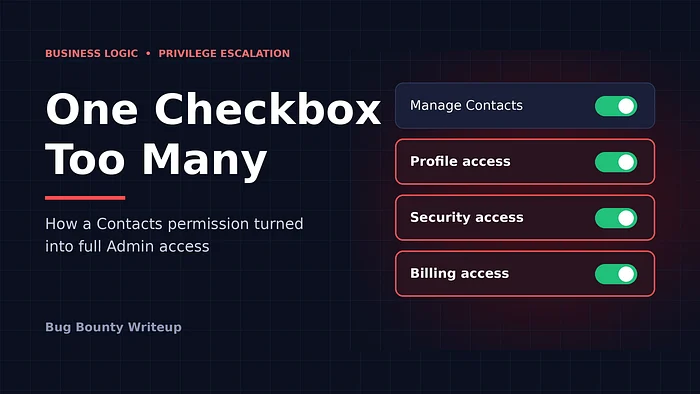
A sub-account user with only the 'View & Manage Contacts' permission could modify their own permissions through the standard UI, granting themselves admin-equivalent privileges. The admin was not notified of the change, making the escalation silent.

Bug Bounty
The full write-up lives on its author's site
It belongs to its author, so we link to it rather than copy it. The other two tabs are our own rewrites, checked against it.
Context
The target, referred to throughout as "example.com", is a web hosting and domain registration platform. Beyond hosting and domains, it lets an account owner build teams by inviting multiple users and assigning each of them a privilege level. That team and role model is the feature the whole bug lives in.
When you add a user to your team you simply enter their email address. They receive an invitation to join, and you pick a role for them: Admin, Read-only, View and Manage Admin Profile, and so on. The roles are granular, which is exactly what makes the permission model worth testing.
Setup
The researcher tested almost every privilege level offered by the platform. Two accounts were used:
- Account A (Admin): the parent account, which controls everything, including what access each user gets and what they can do.
- Account B (Sub-Account): the invited user whose permissions are set by the Admin.
The goal was to test whether a user could gain access the Admin had never granted, and escalate their privileges. No tools were used: testing was done entirely through the browser. The precondition for the attack is that the Admin has granted the sub-account the View & Manage Contacts permission.
Finding it
Of all the privilege levels tested, one stood out: Manage Contacts. That feature is only meant to let a user view and manage contacts, meaning the members of the team. There should not be a permissions section inside it that lets that user change their own permissions, and that mismatch is what made it look wrong.
Exploitation
Step 1: grant the minimum permission
The Admin (Account A) invites Account B and assigns it only the View & Manage Contacts permission. Nothing else is granted.
Step 2: open the contacts feature as the sub-account
Logged in as Account B, the researcher opened the contacts management area of the standard UI. Inside it, the sub-account can reach a permissions section for its own sub-account.
Step 3: change your own permissions
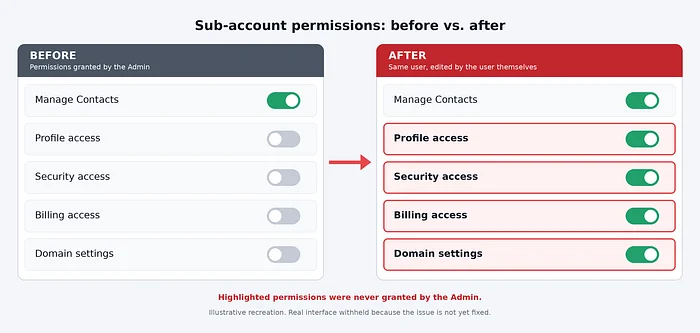
From that section, the sub-account modifies its own permissions and adds ones the Admin never granted, for example:
- Modify Admin Profile
- View & Manage Security
- View & Pay Invoices
- Manage Domain Settings
This is done directly through the standard UI, without any request tampering. No intercepted request is edited and no payload is crafted; the application itself offers the controls.
Step 4: use the escalated access
After saving, the sub-account holds admin-equivalent privileges. The Admin can see the changed permissions if they check, but is never notified, so the escalation is effectively silent.
Root cause
The flaw is a business logic error in the access control around the contacts feature. The Manage Contacts capability was scoped to viewing and managing team members, but the same area also exposes a permissions section that lets the user edit their own permissions. The contacts area, meant only for viewing and managing team members, also exposes a permissions section that lets the user edit their own permissions. The change is made directly through the standard UI, without any request tampering.
Impact
A low-privilege sub-user who has only been granted View & Manage Contacts can escalate their own access to admin-equivalent privileges, including permissions the Admin never granted. The escalation is silent: the Admin is not notified and would only notice by checking the permissions themselves. The researcher rated the issue P4, because the Admin must first grant the View & Manage Contacts permission for the attack to work. The report was marked as a duplicate.
Fix
The report does not describe a fix.
Takeaway
- Other delegated features with embedded settings. A positive result is a sub-account that can add a permission the Admin never granted.
- Self-service profile pages. Look for profile or account settings reachable by a low-privilege user that include role, permission or team-membership fields.
- Invitation flows. A positive result is an accepted invitation with a role different from the one the Admin selected.
- Silent changes. For any accepted escalation, confirm whether the Admin receives a notification. A positive result is a permission change that the Admin can only discover by manually checking.
What happened, in plain words
A web hosting company lets you build a team: you invite people by email and give each of them a role, such as Admin or Read-only. One of those roles, called View & Manage Contacts, is supposed to do one small thing: let the person see and manage the list of team members. But inside that same area, the application also showed a page where the person could edit their own permissions. So a user who had been given only that small role could tick extra boxes and give themselves powers the team owner never granted, such as managing security settings or paying invoices. They did it through the normal screens, with no special tools. The owner can see the change if they look, but is never told about it. The researcher rated it P4 (a low severity) because the owner has to grant that one role first, and the report was later marked as a duplicate of something already reported.
This article walks through the same story step by step, explaining every term along the way. You only need a browser to follow it.
The application
The target is called "example.com" throughout. It is a web hosting and domain registration platform. Web hosting means the company runs servers that store and serve other people's websites; domain registration means it sells the names those websites live at, like example.com itself. Think of hosting as renting space in a building and a domain as the street address on the door.
On top of that, the platform lets one account owner build a team. You invite several people, and each one gets a privilege level, meaning a set of things they are allowed to do. This team-and-role model is where the whole bug lives.
Adding someone is simple: you type their email address, they get an invitation to join, and you pick a role for them. The roles are granular, which just means they are cut into many small pieces rather than being one big "admin or not" switch. Examples named in the report are Admin, Read-only, and View and Manage Admin Profile. Because there are so many small pieces, it is worth testing whether the pieces stay separate.
Setting up the test
The researcher tested almost every privilege level the platform offered. Two accounts were used:
- Account A (Admin): the parent account. It controls everything, including what access each user gets and what they can do. Think of it as the owner of the building who hands out keys.
- Account B (Sub-Account): the invited user. A sub-account is simply a second account that lives under the first one and has only the permissions the owner gave it. Think of it as a tenant who was given one key, to one room.
The goal was to answer one question: can a user gain access the Admin never granted, and escalate their privileges? Privilege escalation means moving yourself up to a higher level of access than you were given, like a tenant copying the master key.
No tools were used. All testing happened in an ordinary browser, clicking through the normal screens. The one precondition for the attack is that the Admin has granted the sub-account the View & Manage Contacts permission.
Finding it
Of all the privilege levels tested, one stood out: Manage Contacts. That feature is only meant to let a user view and manage contacts, meaning the members of the team. In other words, it should let you see who is on the team and perhaps edit their details, and nothing more.
There should not be a permissions section inside it that lets that same user change their own permissions. That mismatch, a small feature that quietly contains a much bigger control, is what made it look wrong. This is the moment to slow down and ask the beginner's question: should this person be able to do this?
Exploitation
Step 1: grant the minimum permission
The Admin (Account A) invites Account B and assigns it only the View & Manage Contacts permission. Nothing else is granted. This step matters because it recreates the real-world situation: a careful owner giving a new team member the smallest useful role.
Step 2: open the contacts feature as the sub-account
Logged in as Account B, the researcher opened the contacts management area of the standard UI. UI stands for user interface, the buttons and pages you see in the browser. Inside that area, the sub-account can reach a permissions section for its own sub-account. That is the surprise: a page about team members also contains a page about what this user is allowed to do.
Step 3: change your own permissions
From that section, the sub-account modifies its own permissions and adds ones the Admin never granted, for example:
- Modify Admin Profile
- View & Manage Security
- View & Pay Invoices
- Manage Domain Settings
This is done directly through the standard UI, without any request tampering. A request is the message your browser sends to the server when you click something, for example "save these settings". Tampering means intercepting that message and editing it before it is sent, which usually needs special tools. Here nothing was intercepted and no payload was crafted: the application itself offered the controls, and the user simply ticked boxes.
Step 4: use the escalated access
After saving, the sub-account holds admin-equivalent privileges, meaning it can do roughly what an admin can do. The Admin can see the changed permissions if they check, but is never notified, so the escalation is effectively silent. Silent here means no email, no alert, no banner: the only way to find out is to go and look.
Root cause
The flaw is a business logic error in the access control around the contacts feature. Two terms to unpack:
- Access control is the part of an application that decides who is allowed to do what. It is the bouncer at the door checking your name against the list.
- Business logic means the rules of how the product is supposed to work, as opposed to technical bugs like a crash. A business logic bug is a case where the software runs perfectly but follows the wrong rule, like a bouncer who checks your ticket but not which door it is for.
The Manage Contacts capability was scoped to viewing and managing team members, but the same area also exposes a permissions section that lets the user edit their own permissions. The contacts area, meant only for viewing and managing team members, also exposes a permissions section that lets the user edit their own permissions. The change is made directly through the standard UI, without any request tampering.
Impact
A low-privilege sub-user who has only been granted View & Manage Contacts can escalate their own access to admin-equivalent privileges, including permissions the Admin never granted. The escalation is silent: the Admin is not notified and would only notice by checking the permissions themselves.
The researcher rated the issue P4. Severity ratings like P1 to P5 are a rough scale where P1 is the most serious and P5 the least. P4 here reflects a real limitation: the Admin must first grant the View & Manage Contacts permission for the attack to work, so the attacker cannot start from nothing. The report was marked as a duplicate, meaning the platform had already received a report of the same issue, so it did not count as a new finding.
Fix
The report does not describe a fix. In everyday terms: the tenant's key should open the room, not the key cupboard.
Variants to test
If you want to look for similar bugs yourself, these are directions worth trying. Each one is a place where a small role might hide a bigger control.
- Other delegated features with embedded settings. A positive result is a sub-account that can add a permission the Admin never granted.
- Self-service profile pages. Look for profile or account settings reachable by a low-privilege user that include role, permission or team-membership fields.
- Invitation flows. A positive result is an accepted invitation with a role different from the one the Admin selected.
- Silent changes. For any accepted escalation, confirm whether the Admin receives a notification. A positive result is a permission change that the Admin can only discover by manually checking.
Glossary
- Access control: the part of an application that decides who is allowed to do what.
- Admin: the parent account that controls the team and hands out permissions.
- Admin-equivalent privileges: access roughly equal to what an admin can do.
- Authorisation: the decision about whether a user is allowed to perform an action.
- Browser: the program you use to visit websites, such as Chrome or Firefox.
- Business logic: the rules of how a product is supposed to work, as opposed to technical failures.
- Domain registration: selling the names websites live at, like
example.com. - Duplicate: a report of an issue the platform has already received.
- Granular roles: roles cut into many small separate permissions rather than one all-or-nothing switch.
- Invitation flow: the sequence of steps when a team owner invites someone by email and the person accepts.
- P4: a severity rating on a scale where P1 is most serious and P5 least; P4 is low.
- Parent account: the main account under which sub-accounts are created.
- Payload: the data sent in a request, often crafted by an attacker.
- Permission: a specific thing a user is allowed to do.
- Privilege escalation: gaining a higher level of access than you were given.
- Privilege level: the set of things a user is allowed to do.
- Request: the message a browser sends to a server when you click something.
- Request tampering: intercepting a request and editing it before it is sent.
- Role: a named bundle of permissions, such as Admin or Read-only.
- Root cause: the underlying reason a bug exists.
- Severity: how serious an issue is judged to be.
- Silent: happening without any notification to the person who could notice.
- Sub-account: a second account under a parent account, with only the permissions it was given.
- UI (user interface): the buttons and pages you see and click in the browser.
- View & Manage Contacts: the small role that lets a user see and manage team members.
- Web hosting: a service that runs servers storing and serving other people's websites.

