One Hidden JSON Field Turned My User Ticket into an Admin Ticket
A ticket creation endpoint accepted a client-supplied boolean field that indicated whether the ticket was created by an operator. By adding this field to the request, a regular user could make the system treat the ticket as if it had been created by an administrator.

Cybersecurity
The full write-up lives on its author's site
It belongs to its author, so we link to it rather than copy it. The other two tabs are our own rewrites, checked against it.
Context
The target here is a ticket creation endpoint: the API call an application makes when a user submits a support or work ticket. Normally the server records who created the ticket, assigns identifiers, and stores the title and description. The researcher, ArshiaHex, was testing this endpoint as a normal user, not hunting for a specific class of bug.
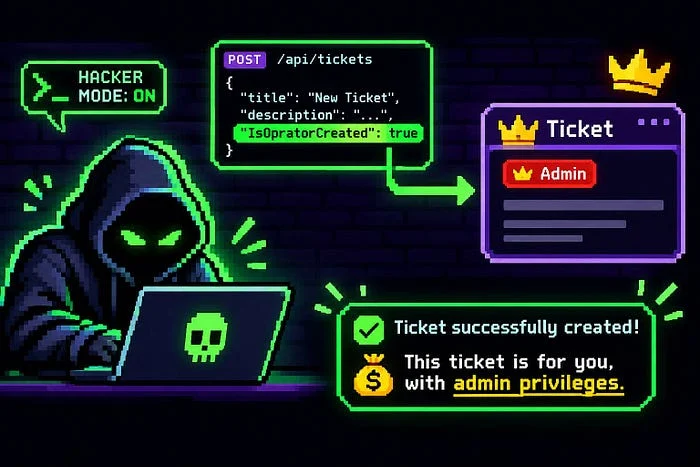
The write-up does not name the application, the program or the endpoint path, so the only concrete artefact is the JSON body exchanged with the server.
Setup
The report describes no special accounts, roles, tooling versions or preconditions beyond a normal user account able to create tickets. Burp Suite is used for interception and response manipulation. The researcher's own user identifier appears in the captured response as 123, and the ticket identifier as 2222.
Finding it
A ticket was created as a normal user and the API response was reviewed field by field. Among the returned fields was this object:
{ "UserID":"123", "TicketID":"2222", "Title":"Test", "Description":"Hello From HEX", "IsOperatorCreate": false}
IsOperatorCreate looked like an informational flag recording whether the ticket had been created by an operator, meaning an administrator. The question the researcher asked was whether the server actually trusts this value rather than generating it internally. That question was the starting point: a security-sensitive boolean was echoed back to the client, which suggested it might also be accepted from the client.
Exploitation
Step 1: try response manipulation
The first attempt was to intercept the response in Burp Suite and change IsOperatorCreate from false to true. Nothing happened. This is expected: editing the response only changes what the browser sees and has no effect on server-side logic.
Step 2: move the field into the request
Instead of altering the response, the researcher tested whether the application would accept the field in the request itself. The ticket creation request was intercepted and the following JSON property was added:
"IsOperatorCreate": True
The resulting request body was:
{ "Title":"Test", "Description":"Hello From HEX", "IsOperatorCreate": True}
After forwarding the request, the ticket was no longer created as a normal user's ticket. It was created as if it had been submitted by an administrator (operator). The application was trusting a security-sensitive value supplied by the client.
Root cause
This is a classic mass assignment issue. Mass assignment occurs when an application automatically maps client-supplied input to internal object properties without restricting which fields users are allowed to modify.
IsOperatorCreate should have been a server-controlled attribute. Whether a ticket is created by an administrator should be derived from the authenticated user's role, not from a value inside a JSON request. Because the backend accepted the field from the client, a regular user could influence internal application logic simply by adding an extra JSON property. The report does not describe any validation, allowlist or schema that was in place and failed.
Impact
The exact impact depends on how the application uses this flag internally. The report lists the following possible consequences:
- Administrator impersonation during ticket creation.
- Privilege escalation if administrator-only workflows rely on this field.
- Corrupted audit logs and inaccurate activity records.
- Bypassing business logic that differentiates between administrator-created and user-created tickets.
- Discovery of additional mass assignment vulnerabilities affecting other sensitive properties.
Even a single vulnerable boolean field often indicates that the backend binds user input directly to internal models without proper restrictions.
Fix
Applications should never trust client-controlled values for privileged attributes. The report recommends:
- Ignoring fields like
IsOperatorCreatewhen they are supplied by users. - Determining privileged values entirely on the server based on the authenticated user's permissions.
- Using allowlists (mass assignment protection) so that only intended properties can be updated.
- Reviewing similar endpoints for other sensitive fields that may also be client-controlled.
Variants to test
A positive result is a resource created with the elevated attribute set.
One boolean value in an API response was enough to raise a question, and one extra JSON field in the request was enough to confirm the vulnerability. Not every interesting finding needs a complex payload; sometimes paying attention to an overlooked field and asking what happens if you control it is all it takes.
What happened, in plain words
A security researcher was testing a website that lets people create support tickets. A support ticket is a short message you send to a company when something is wrong or you need help, like a note you drop into a suggestion box. When you fill in the form and press send, your browser does not just show a thank you page: it quietly sends a message to the company's computer, and that computer replies with a small package of data describing what it just saved.
That package contained a field called IsOperatorCreate, which looked like a little label saying whether the ticket had been created by an "operator", meaning an administrator, a member of staff with extra powers. The researcher asked a simple question: what if the server believes whatever value I put in that label, instead of deciding it itself? So they tried adding the field to the message they sent, with the value set to true, and the server created the ticket as though an administrator had made it.
That is the whole story. No clever trick, no special software beyond a tool that lets you look at and edit the messages going back and forth. The lesson is that a field you can see in a reply may also be a field you can send, and if the server trusts it, you can change how the server behaves.
The pieces you need to know first
Before walking through the steps, here is the vocabulary, explained from scratch.
A server and a client. The server is the computer that owns the data and does the real work. The client is your browser, the thing asking for things. Think of a restaurant: you (the client) order from a menu, the kitchen (the server) cooks and sends back a plate. You never walk into the kitchen yourself.
An API. API stands for Application Programming Interface. It is the set of rules for how the client asks the server to do something and what the server sends back. In the restaurant comparison, the menu and the waiter are the API: they define what you can order and how the order is phrased. Websites use APIs constantly, often without you noticing, because the page you see is built from data the API returns.
A request and a response. A request is the message your browser sends: "please create a ticket with this title and this description". A response is the message the server sends back: "done, here is the ticket I saved, with these details". Every interaction on the web is a pair of these.
JSON. JSON is a way of writing data as text so both sides can read it. It uses curly braces { } to group things and pairs of a name and a value, separated by a colon. For example "Title":"Test" means "the field called Title has the value Test". It is like a labelled form: each label has a box next to it with something written in.
A field. A field is one labelled entry in that JSON, such as Title or Description. Some fields hold text, some hold numbers, and some hold true or false, which is called a boolean, a value that can only be one of those two things.
An endpoint. An endpoint is one specific address on the server that does one specific job. The ticket creation endpoint is the address that handles "make a new ticket". Other endpoints might handle "list my tickets" or "delete a ticket".
A flag. A flag is a field that simply records a yes or no fact, such as "was this created by an administrator?". It is a switch, not a description.
An administrator, or operator. An administrator is a user account with extra permissions, able to do things ordinary users cannot. The report uses "operator" to mean the same thing.
Intercepting. Intercepting means catching a message between your browser and the server so you can read it, and optionally change it before letting it continue. Normally this traffic is invisible; a tool lets you pause it.
Burp Suite. Burp Suite is a well known tool for exactly that: it sits between your browser and the server, shows you each request and response, and lets you edit them. The report uses it for both intercepting and for changing a response.
Response manipulation. This means editing the response on its way back to your browser. It is worth understanding why this is usually useless for attacking a server: the server has already done its work and saved its data before the response is sent. Changing the response only changes what your own browser displays, like editing a receipt after you have already paid. The shop's records are untouched.
Mass assignment. This is the vulnerability class at the heart of the story. It happens when a server takes the whole bundle of fields a client sends and copies them straight into its internal record, without checking which fields the client is allowed to set. Imagine a form where you are supposed to write only your name, but the form secretly also has a box labelled "staff member?" and the clerk copies whatever you wrote in it into the official file. You were never supposed to see that box, but because the clerk copies everything, filling it in works.
Privilege escalation. Privilege escalation means getting powers you were not given, such as a normal user's actions being treated as an administrator's. It is the difference between a visitor badge and a staff badge.
An allowlist. An allowlist is a list of things that are permitted, and everything not on the list is refused. The opposite, a blocklist, lists what is forbidden. Allowlists are safer because you only have to think of what should be allowed, not every possible bad thing.
Audit logs. Audit logs are the records a company keeps of who did what and when. If those records say an administrator created a ticket when really an ordinary user did, the logs are wrong, and investigations later become unreliable.
The setup
The researcher had an ordinary user account on the application and used it to create tickets. The report does not name the application, the bug bounty program or the exact address of the endpoint, so the only concrete thing we have is the JSON exchanged with the server. No special accounts or unusual preconditions are described.
Finding it
The first step was simply to create a ticket as a normal user and then read the response carefully, field by field. This is deliberate: the response tells you what the server considers important enough to store and report back, and that list of fields is a map of the server's internal record. If a field appears in the response, the server has a place for it in its data, and that place may also be writable.
The response looked like this:
{ "UserID":"123", "TicketID":"2222", "Title":"Test", "Description":"Hello From HEX", "IsOperatorCreate": false}
Line by line, in plain words:
- The outer
{and}wrap the whole record, the way a folder holds papers. "UserID":"123"is the identifier of the user who created the ticket. The report shows the researcher's own identifier as123."TicketID":"2222"is the identifier the server assigned to this new ticket. The report shows it as2222."Title":"Test"is the title that was submitted."Description":"Hello From HEX"is the description that was submitted."IsOperatorCreate": falseis the interesting one: a boolean flag that appears to record whether the ticket was created by an operator, that is, an administrator. Here it isfalse, because an ordinary user created it.
Most people would read that last field and move on. The researcher instead asked: what if the server does not compute this value itself, but simply trusts whatever value arrives? That single question was the starting point. A field that describes a security decision, echoed back to the client, is a hint that the server may also accept it from the client.
Trying the obvious thing first: editing the response
The first attempt was to intercept the response in Burp Suite and change IsOperatorCreate from false to true. The reasoning is natural: the field says false, so make it say true and see what happens.
Nothing happened.
This is exactly what should be expected, and understanding why is important. Editing the response changes only what your browser receives and displays. The server has already finished its work: it decided the value, saved the ticket, and sent the reply. Changing the reply afterwards is like altering the printout of a receipt after the payment has gone through. The shop's books still show the original amount. Server-side logic, the rules the server follows when it does its work, is untouched by anything you do to the response on its way back.
So the response is a dead end for changing behaviour. But it was still useful: it told the researcher the name of the field and the kind of value it holds.
Moving the field into the request
The next idea follows directly from the first failure. If the server decides the value itself, the field is useless to an attacker. But if the server instead reads the value from the incoming request, then the place to put it is the request, not the response.
So the researcher intercepted the ticket creation request and added this JSON property:
"IsOperatorCreate": True
In plain words: a field name in quotes, a colon, and the value True. The name matches exactly the field seen in the response, which matters because servers usually match field names precisely. The value is the boolean true, meaning yes.
The full request body then looked like this:
{ "Title":"Test", "Description":"Hello From HEX", "IsOperatorCreate": True}
Line by line:
- The outer
{and}wrap the request body, the bundle of data being sent to the server. "Title":"Test"is the title of the ticket, the same kind of value a normal form submission would send."Description":"Hello From HEX"is the description, again a normal value."IsOperatorCreate": Trueis the extra field the researcher added. It was not part of the normal form; it was inserted by hand into the request.
Notice what is absent: there is no UserID and no TicketID in the request. Those are values the server assigns, and the researcher did not try to supply them here. The only addition is the flag.
The request was then forwarded, meaning it was let through to the server unchanged apart from the added field.
The result was not what a normal user would expect. The ticket was no longer created as an ordinary user's ticket. It was created as if it had been submitted by an administrator, an operator. That confirmed the suspicion: the application was trusting a security-sensitive value supplied by the client. The server had a field for "was this made by an administrator?" and it filled that field from the request rather than from the identity of the logged-in user.
Why this happens
This is a textbook mass assignment issue. The definition is worth repeating slowly: mass assignment occurs when an application automatically maps client-supplied input to internal object properties without restricting which fields users are allowed to modify.
Unpack that. The server has an internal object, a record with a fixed set of properties such as title, description, user identifier, ticket identifier and the operator flag. When a request arrives, a piece of software called a binder takes the incoming JSON and copies each field into the matching property of that object. It is convenient for developers: they do not have to write code for every field by hand. But convenience cuts both ways. If the binder copies everything it is given, then anything the client sends becomes a property, including properties the client was never meant to control.
IsOperatorCreate should have been a server-controlled attribute. Whether a ticket was created by an administrator is a fact about the person making the request, and the server already knows that fact because the user is logged in. It should be derived from the authenticated user's role, the permissions attached to the account, not read from a value inside a JSON request. Because the backend accepted the field from the client, a regular user could influence internal application logic simply by adding an extra JSON property.
The report does not describe any validation, allowlist or schema that was in place and failed.
What could go wrong because of it
It lists the following possible consequences:
- Administrator impersonation during ticket creation. The ticket carries the mark of an administrator even though an ordinary user made it.
- Privilege escalation if administrator-only workflows rely on this field. If later steps treat operator-created tickets differently, an ordinary user has reached a staff-only path.
- Corrupted audit logs and inaccurate activity records. The company's history of who did what becomes wrong, which matters when someone later investigates an incident.
- Bypassing business logic that differentiates between administrator-created and user-created tickets. Rules that were supposed to apply only to staff tickets, or only to user tickets, can be sidestepped.
- Discovery of additional mass assignment vulnerabilities affecting other sensitive properties. One accepted field suggests the same binder is used elsewhere, and other fields may be just as trusting.
Even a single vulnerable boolean field often indicates that the backend binds user input directly to internal models without proper restrictions. In other words, the one flag is a symptom of a general habit, and habits repeat across an application.
How to prevent it
Applications should never trust client-controlled values for privileged attributes. The report recommends four things:
- Ignore fields like
IsOperatorCreatewhen they are supplied by users. If the field arrives in a request, drop it rather than storing it. - Determine privileged values entirely on the server based on the authenticated user's permissions. The server already knows who is logged in, so it should decide the flag from that, not from the request.
- Use allowlists, that is mass assignment protection, so that only intended properties can be updated. The binder should be given an explicit list of fields it may copy, and refuse everything else.
- Review similar endpoints for other sensitive fields that may also be client-controlled. If one endpoint trusts the client, its neighbours probably do too.
Other places to look for the same mistake
A positive result is a resource created with the elevated attribute set.
A positive result is the nested value being persisted, that is, actually saved.
PATCH and PUT are request types used to change an existing record rather than create a new one. A positive result is a stored change to the privileged field after a subsequent read.
5. Case and type variation. Try alternate casing or types for the same key, such as true as a string or a number, to see whether the binding layer coerces it, meaning converts it to the expected type. A positive result is the flag being set despite the type mismatch.
Final thoughts
One boolean value in an API response was enough to raise a question, and one extra JSON field in the request was enough to confirm the vulnerability. Not every interesting finding needs a complex payload. Sometimes paying attention to an overlooked field and asking what happens if you control it is all it takes.
Glossary
- Administrator (operator): a user account with extra permissions, able to do things ordinary users cannot.
- Allowlist: a list of things that are permitted, with everything not on the list refused.
- API: the set of rules for how a client asks a server to do something and what the server sends back.
- Audit log: a record a company keeps of who did what and when.
- Authenticated user: a user the server has identified, usually because they logged in.
- Binding layer: the part of the server software that copies incoming request fields into the server's internal record.
- Boolean: a value that can only be true or false.
- Burp Suite: a tool that sits between your browser and a server so you can read and edit the requests and responses.
- Client: the program asking for things, usually your browser.
- Coerce: to convert a value from one type to another, for example a string into a boolean.
- Endpoint: one specific address on a server that performs one specific job.
- Field: one labelled entry in a JSON object, such as
TitleorDescription. - Flag: a field that records a simple yes or no fact.
- Forward (a request): to let an intercepted request continue on to the server.
- Identifier (ID): a value that uniquely names a record, such as a user or a ticket.
- Intercept: to catch a message between browser and server so you can read or change it before it continues.
- JSON: a text format for writing data as labelled name and value pairs, grouped with curly braces.
- Mass assignment: a vulnerability where a server copies all client-supplied fields into its internal record without restricting which fields the client may set.
- Nested object: a JSON object placed inside another object, rather than at the top level.
- PATCH / PUT: request types used to change an existing record rather than create a new one.
- Privilege escalation: gaining powers you were not given, such as ordinary actions being treated as an administrator's.
- Property / attribute: one named piece of data belonging to a record on the server.
- Request: the message a client sends to a server asking it to do something.
- Response: the message a server sends back after handling a request.
- Response manipulation: editing a response on its way back to the browser, which changes only what the browser sees and not what the server did.
- Role: the set of permissions attached to a user account.
- Server: the computer that owns the data and does the real work.
- Server-side logic: the rules the server follows when processing a request, which the client cannot change by editing replies.
- Ticket: a message a user submits to a company to report a problem or ask for help.
- Validation: checking that incoming data is acceptable before using it.


