Open Redirection - QR Code Magic
The Android app's QR code scanner accepted any QR code containing a URL and opened it, rather than limiting scans to consignment tracking. An attacker could craft a QR code that redirects a user to an arbitrary external site, aiding phishing.
 Published on shahjerry33.medium.com
Open redirection vulnerabilities arise when an application incorporates user-controllable data into the target of a redirection in an unsafe way. By modifying untrusted URL input to a malicious site, an attacker may successfully launch a phishing scam and steal user credentials.
The full write-up lives on its author's site
It belongs to its author, so we link to it rather than copy it. The other two tabs are our own rewrites, checked against it.
Context
The target was a public bug bounty program on YesWeHack, and the product involved was an Android mobile application whose QR code scanner was used to track consignments and check package details. The scanner is the feature under discussion: an optical reader that decodes QR codes, which many applications use for browsing websites, checking address details, payments or adding users.
An open redirection vulnerability arises when an application incorporates user-controllable data into the target of a redirection in an unsafe way. By modifying untrusted URL input to point at a malicious site, an attacker may launch a phishing scam and steal user credentials. The report notes that the security community tends not to emphasise open redirects because they are considered a simple flaw commonly connected to phishing and social engineering.
Setup
The only precondition was a registered account on the target's Android application. No special role, tooling or version is described. The researcher used the application's built-in QR code scanner and an external QR code generator, https://www.the-qrcode-generator.com/, to produce a custom code.
Finding it
While doing research, the researcher came across a blog describing how a QR code functionality can be exploited. In that blog the outcome was XSS; in this case the researcher was only able to escalate it to an open redirection.
The reasoning was that the company had not restricted the scanner to its intended function. The report draws an analogy with Google Pay, where the scanner is used only for sending and receiving payments and cannot be used to surf the internet, and with a browser, where the feature lets you surf the internet but not make payments. Here the scanner was meant to track consignments, but nothing stopped it from acting on a URL encoded in a QR code, and that is what led to the open redirection.
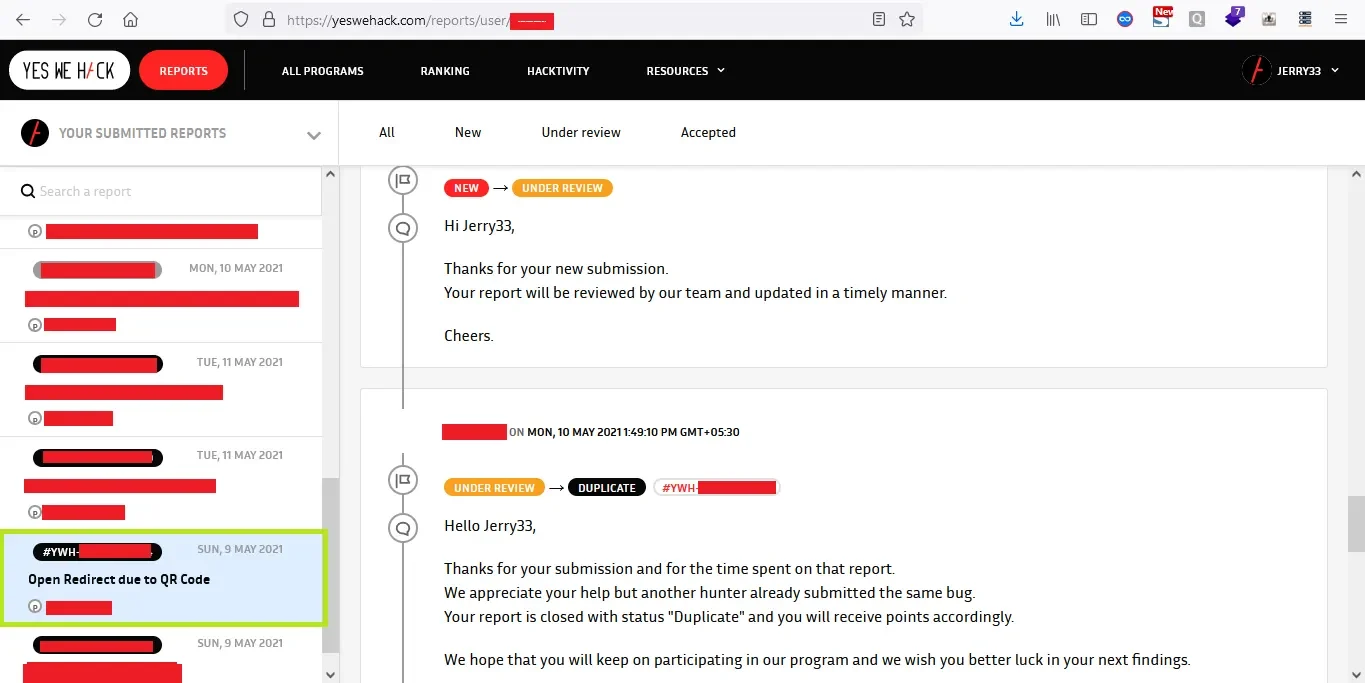
The submission was closed as a duplicate.
Exploitation
Step 1: Register on the application
The researcher registered on the target's Android application.
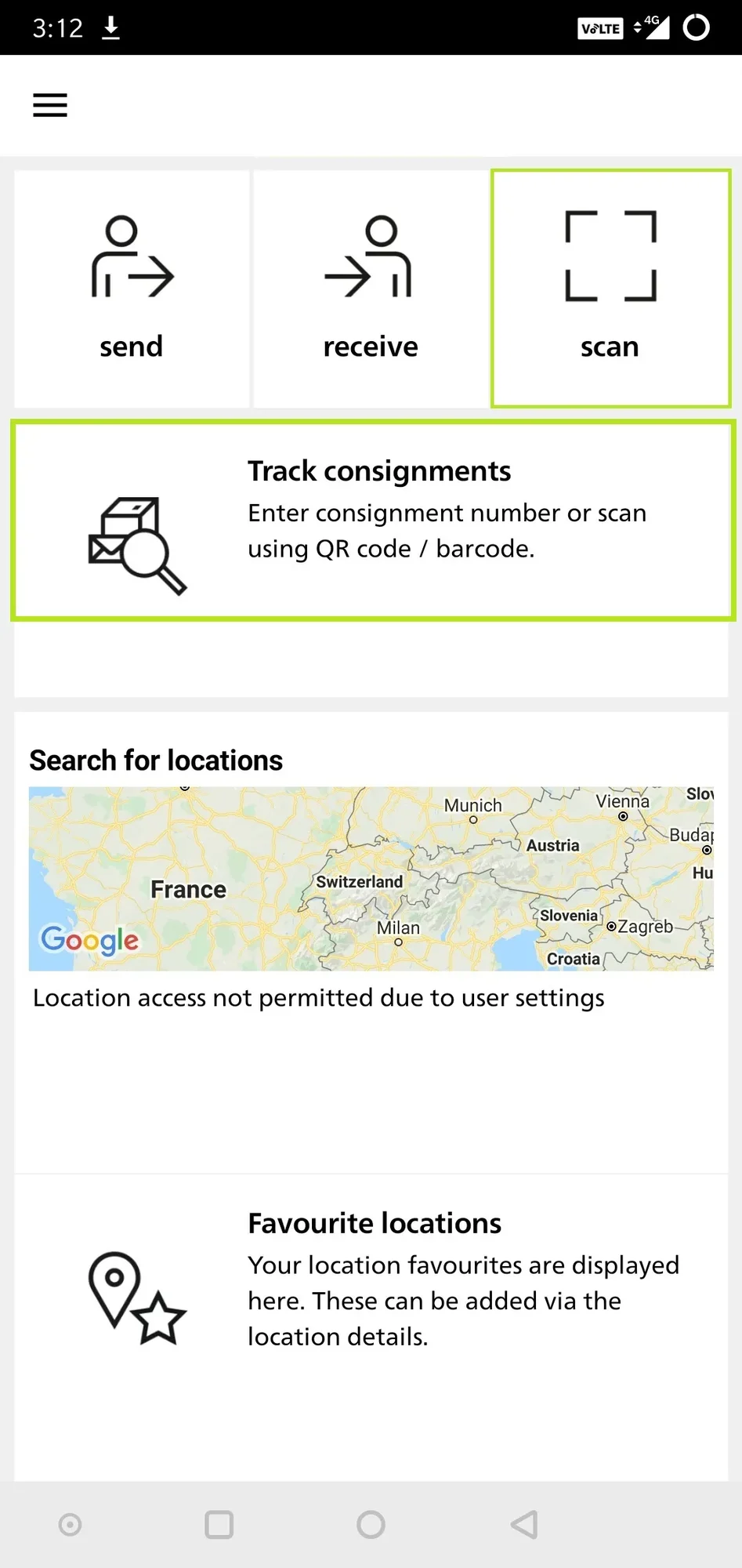
Step 2: Locate the scanner
The QR code scanner feature was available in the application.
Step 3: Generate a custom QR code
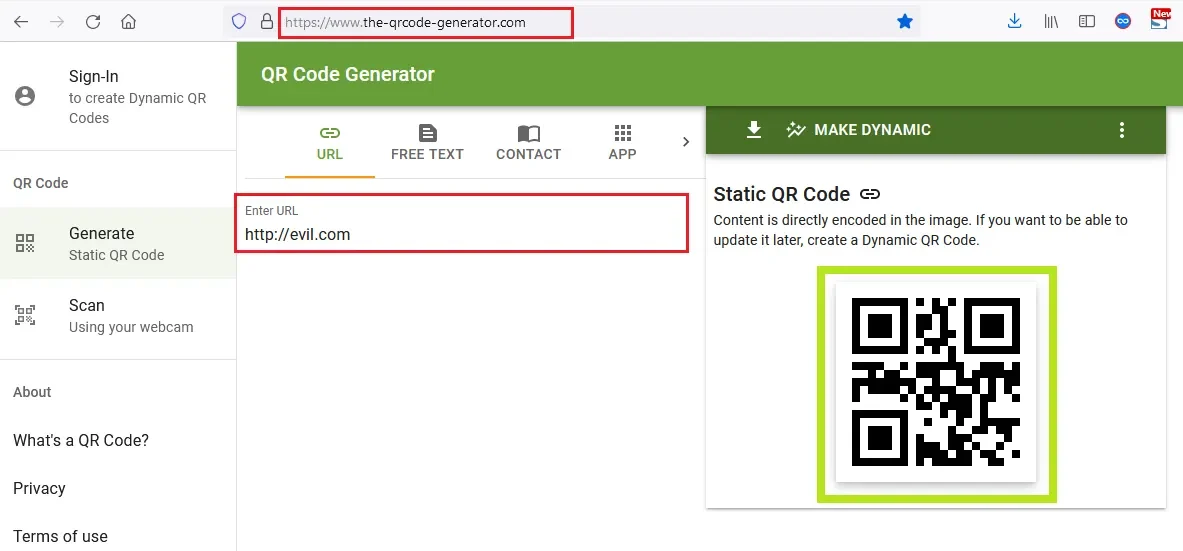
The researcher went to https://www.the-qrcode-generator.com/ and generated a custom QR code encoding a URL for the open redirection.
Step 4: Scan it
Scanning the generated code with the target application's scanner caused the application to redirect. The report includes a proof of concept video: https://drive.google.com/file/d/[redacted]/view?usp=sharing.
Root cause
In the researcher's opinion, the issue came from there being no restriction on what could be scanned. The scan should have been limited to tracking consignments and not to scanning URLs. The XSS did not occur because the application did not support a javascript URI, which is why the escalation stopped at open redirection.
The report lists the following as related escalation paths:
- Open Redirection
- XSS (https://payatu.com/blog/nikhil-mittal/firefox-ios-qr-code-reader-xss-%28cve-2019-17003%29)
- SQLi (https://www.irongeek.com/xss-sql-injection-fuzzing-barcode-generator.php)
Impact
An attacker can construct a URL within the application that causes a redirection to an arbitrary external domain. This behaviour can be leveraged to facilitate phishing attacks against users of the application. The report frames the impact in terms of phishing attacks against users of the application.
Fix
A proper fix, in the researcher's view, would be to place the company's symbol in the QR code, as WhatsApp and Instagram do, so that custom QR codes are not scanned. A further fix would be to restrict the scan to its function only, which in this case is tracking consignments.

Variants to test
- Any scanner that opens decoded URLs. Generate a QR code containing an external URL and scan it in an application whose scanner is meant for a narrow purpose, such as tracking consignments. A positive result is the application navigating to the external domain instead of rejecting the code.
- Scheme handling. Try codes with non-HTTP schemes, including a
javascriptURI, to see whether the scanner passes them to a web view. A positive result is script execution; the report notes the application did not supportjavascriptURIs. - Redirect parameters reached from the scanner. A positive result is a redirect to a domain you control.
- Branded versus custom codes. Check whether the application validates the QR code's origin or format.
What happened, in plain words
A security researcher found a way to make a mobile phone app send its user to a website of the attacker's choosing, simply by scanning a QR code. The app was an Android application for tracking consignments (parcels) and checking package details. It had a QR code scanner built in, and that scanner was supposed to be used only for reading parcel codes. Instead, it would happily read any QR code, including one that contained a web address, and then open that web address.
This kind of flaw is called an open redirection. The word "redirect" means "send somewhere else". When you click a link or scan a code, the app decides where to take you. In an open redirect, the app takes its destination from data that an outsider controls, and it does not check whether that destination is safe. So an attacker can prepare a QR code that points at a fake website, and the app will open it as if it were legitimate.
The researcher submitted the finding to a public bug bounty program on YesWeHack, a platform where companies offer rewards for security reports. The submission was closed as a duplicate, meaning the same issue had already been reported. The report was still published as a write-up so others could learn from it.
The idea behind the flaw
The report starts with a definition worth unpacking slowly. An open redirection vulnerability arises when an application incorporates user-controllable data into the target of a redirection in an unsafe way. Let us take that apart.
- User-controllable data is any input that a person using the app can supply. A search box, a form field, a scanned QR code: all of these carry data from the outside into the app.
- The target of a redirection is the place the app decides to send you next, such as a web address it opens.
- Unsafe way means the app takes that outside data and uses it as the destination without checking it.
By modifying untrusted URL input to point at a malicious site, an attacker may launch a phishing scam and steal user credentials. Phishing is the everyday trick of pretending to be a trusted party so that someone hands over a password or a payment. Credentials are the things that prove who you are: a username and password, usually.
The report also notes that the cybersecurity community does not put enough emphasis on open redirect vulnerabilities, because they are considered a simple flaw commonly connected to phishing scams and social engineering. Social engineering means manipulating people rather than machines: convincing someone to do something unsafe because they trust the request.
Why does a simple redirect matter? Imagine a receptionist who will forward any caller to any extension, no questions asked. If a stranger calls and says "put me through to the finance desk", the receptionist does it, and the person on the finance desk hears a call that appears to come from inside the building. The redirect itself is not the crime; it is the disguise that makes the next step believable.
Setting up
The only precondition described was a registered account on the target's Android application. No special role, tooling or version is mentioned. The researcher used two things:
- The application's built-in QR code scanner.
- An external QR code generator, https://www.the-qrcode-generator.com/, to produce a custom code.
A QR code is a square pattern of black and white blocks that a camera can read. It is a way of storing text, most often a web address, in a form a machine can scan quickly. A QR code generator is a website or program that turns text you type into that pattern. The point of using an outside generator is that you, not the company, decide what the code contains.
Finding it
While doing research, the researcher came across a blog describing how a QR code functionality can be exploited. In that blog the outcome was XSS. XSS stands for cross-site scripting: a way of getting a website or app to run code written by an attacker, usually inside a page the victim is viewing. In this case the researcher was only able to escalate it to an open redirection. "Escalate" here means "push the finding as far as it would go"; the XSS step did not work, but the redirect did.
The reasoning was that the company had not restricted the scanner to its intended function. The report draws two comparisons to make this clear:
- Google Pay: the scanner there is used only for sending and receiving payments. You cannot use it to surf the internet.
- A browser: the feature lets you surf the internet, but not make payments.
In the target app, the scanner was meant to track consignments. Nothing stopped it from acting on a URL encoded in a QR code, and that is what led to the open redirection. A URL is simply a web address, the text you type in a browser's address bar. "Encoded in a QR code" means the address was stored inside the pattern.
The submission was closed as a duplicate.
Exploitation, step by step
Step 1: Register on the application
The researcher registered on the target's Android application. This is the ordinary sign-up any user would do.
Step 2: Locate the scanner
The QR code scanner feature was available in the application.
Step 3: Generate a custom QR code
The researcher went to https://www.the-qrcode-generator.com/ and generated a custom QR code encoding a URL for the open redirection. In plain terms: they typed a web address into the generator, the site turned it into a square pattern, and they saved or displayed that pattern so the phone could scan it.
Step 4: Scan it
Scanning the generated code with the target application's scanner caused the application to redirect. That is the whole proof: the app read the code, treated the text inside as a destination, and went there. The report includes a proof of concept video: https://drive.google.com/file/d/[redacted]/view?usp=sharing. A proof of concept is a small demonstration that shows the flaw is real rather than theoretical.
Why it happened
In the researcher's opinion, the issue came from there being no restriction on what could be scanned. The scan should have been limited to tracking consignments and not to scanning URLs. The scan was not restricted to tracking consignments, so a URL in a QR code was followed.
The XSS did not occur because the application did not support a javascript URI, which is why the escalation stopped at open redirection. A URI is a general name for an address or identifier; a javascript URI is a special kind of address that starts with the word javascript and tells a browser to run code instead of loading a page. Because the app refused that kind of address, the researcher could not get code to run, and the finding stayed at the level of a redirect.
The report lists the following as related escalation paths, that is, other ways the same kind of feature has been pushed further:
- Open Redirection
- XSS (https://payatu.com/blog/nikhil-mittal/firefox-ios-qr-code-reader-xss-%28cve-2019-17003%29)
- SQLi (https://www.irongeek.com/xss-sql-injection-fuzzing-barcode-generator.php)
SQLi stands for SQL injection: a way of slipping database commands into input so that the database does what the attacker wants. The report only lists it as a related path; it does not claim it was found here.
Impact
An attacker can construct a URL within the application that causes a redirection to an arbitrary external domain. "Arbitrary external domain" means any website on the internet, chosen by the attacker. This behaviour can be leveraged to facilitate phishing attacks against users of the application. The report frames the impact in terms of phishing attacks against users of the application.
Why does the app's involvement matter? A user who scans a code inside a trusted parcel-tracking app has a reason to trust what opens next. If the app sends them to a lookalike login page, they may type their password there. The redirect supplies the credibility; the fake page does the stealing.
Fix
A proper fix, in the researcher's view, would be to place the company's symbol in the QR code, as WhatsApp and Instagram do, so that custom QR codes are not scanned.
A further fix would be to restrict the scan to its function only, which in this case is tracking consignments. In other words, check what the code contains before acting on it: if it is not a parcel code, do not follow it.
Variants to test
- Any scanner that opens decoded URLs. Generate a QR code containing an external URL and scan it in an application whose scanner is meant for a narrow purpose, such as tracking consignments. A positive result is the application navigating to the external domain instead of rejecting the code.
- Scheme handling. Try codes with non-HTTP schemes, including a
javascriptURI, to see whether the scanner passes them to a web view. A positive result is script execution; the report notes the application did not supportjavascriptURIs. A scheme is the first part of an address, such ashttp,httpsorjavascript, which tells the software what kind of address it is. A web view is a small browser built into an app for showing web pages. - Redirect parameters reached from the scanner. A positive result is a redirect to a domain you control. A parameter is a named value attached to a URL, the part after a question mark, used to pass information to a page.
- Branded versus custom codes. Check whether the application validates the QR code's origin or format.
Glossary
- Android application: a program that runs on phones and tablets using Google's Android operating system.
- Bug bounty program: an arrangement where a company invites outsiders to report security flaws, often paying for valid ones.
- Consignment: a batch of goods sent for delivery; in this report, a parcel being tracked.
- Credentials: the information that proves who you are, typically a username and password.
- Cross-site scripting (XSS): a flaw that lets an attacker get code of their choosing to run inside a page or app that a victim is using.
- Duplicate: a report closed because the same issue had already been submitted by someone else.
- Escalate: to push a finding further, for example from a redirect to code execution.
- External domain: a website on the internet that is not the application's own.
- JavaScript URI: an address beginning with
javascriptthat tells a browser to run code rather than load a page. - Open redirection: a flaw where an app sends the user to a destination taken from outside input without checking it.
- Parameter: a named value attached to a URL, usually after a question mark, used to pass information to a page.
- Phishing: pretending to be a trusted party to trick someone into giving up a password, payment or other sensitive information.
- Proof of concept: a small demonstration showing that a flaw is real.
- QR code: a square pattern of black and white blocks that stores text, often a web address, for a camera to read.
- QR code generator: a website or program that turns text into a QR code pattern.
- QR code scanner: a camera-based feature that reads QR codes and decodes the text inside them.
- Scheme: the first part of an address, such as
http,httpsorjavascript, which tells software what kind of address it is. - Social engineering: manipulating people, rather than machines, into doing something unsafe.
- SQL injection (SQLi): a flaw where attacker-supplied input is treated as database commands.
- URI: a general term for an address or identifier, of which a URL is one kind.
- URL: a web address, the text you type in a browser's address bar.
- User-controllable data: any input a person using the app can supply, such as text in a form or the contents of a scanned code.
- Web view: a small browser built into an app for displaying web pages.
- YesWeHack: a bug bounty platform where companies publish programs and researchers submit reports.





