Pardus-ETAP eta-register CVE-2026–92886 Kodlu Zafiyet
The eta-register privileged helper accepted a user-supplied systemd service file and executed its command as root. An attacker with a local session could run arbitrary commands with root privileges.

medium.com
Published on medium.com
Cybersecurity
The full write-up lives on its author's site
It belongs to its author, so we link to it rather than copy it. The other two tabs are our own rewrites, checked against it.
Context
Pardus ETAP is a Linux distribution, and eta-register is a component of it. The report describes a local privilege escalation in eta-register: the opr.py helper exposes a start-service operation that accepts a path to a systemd service file. When the file is supplied by an ordinary user, the command inside it is executed in the root context.
The finding is registered as CVE-2026-92886, notification TR-26-1440, classified as CWE-862 (missing authorisation) with a CVSS v3.1 score of 7.8 (High). The affected version range given in the record is 2.0.8 ≤ version < 2.0.9.
The author frames the whole exercise around two outputs placed side by side: which user starts the operation, and which identity the executed command runs under. In this test the first answer was uid=1000(pardus) and the second was uid=0(root).
The goal was not an interactive root shell. It was enough to show, with a small output file, that a command inside a user-prepared service file runs with root privileges.
Setup
The test was run from a local, non-root session. The account used is pardus, with user and primary group ID 1000. One detail the author stresses is that this account is in the sudo group. The session itself is not root, but this evidence alone does not show that the same result would be obtained by every user who is not in the sudo group; the assessment in the write-up is deliberately kept within this test condition.
The screenshots do not show the installed package version, so the exact eta-register version on the test machine is not derived from them. The affected range comes from the CVE record. Likewise, the date shown in the file listing is not used as a discovery or notification date.
Finding it
The starting point is the identity check. The author first confirmed who the session belongs to. The whoami output is pardus, and id shows the user and primary group ID as 1000.

The interesting part is not the non-root session by itself, but what happens when a user-controlled service file is handed to the privileged helper. A helper that runs a command defined in a file the user prepared is only safe if it authorises that input properly. The report treats the boundary between the privilege check and the user-controlled service content as the centre of the PoC.
Exploitation
Step 1: prepare a small, measurable service file
In the home directory, a systemd service file named etap-poc.service was created:
cat > ~/etap-poc.service <<'EOF' [Service] Type=oneshot ExecStart=/bin/sh -c 'id > /tmp/etap_root_poc; echo MARKER_ETAP_LPE >> /tmp/etap_root_poc' [Install] WantedBy=multi-user.target EOF
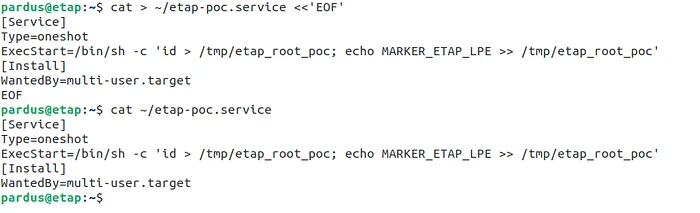
The command in the file does two things: it writes the identity it runs under to /tmp/etap_root_poc, and immediately below that it appends a test-specific marker. That way the check is not limited to whether a file appeared; the content can be inspected too.
Type=oneshot selects a service type that runs a short job and exits. The actual test payload is on the ExecStart line: the shell redirects the id output into the file, then appends the MARKER_ETAP_LPE line. The marker line makes the link between the later output and this PoC visible. The service file has no User= definition. For a system-level systemd service, that makes the default root context significant, assuming no other restriction applies. The conclusion here does not rest on that assumption alone, because the last step checks the identity output of the command directly. The WantedBy=multi-user.target line on its own does not prove the service was enabled at boot either; the screenshots contain no enable operation and no reboot test.
Step 2: hand the file to eta-register
The prepared service file was passed as an argument to the start-service operation of the opr.py helper inside eta-register. The call shown in the screenshot is:
eta-register/src/opr.py start-service \ /home/pardus/etap-poc.service
The critical point of this step is that the file was prepared by the user. Which authorisation conditions allow a privileged helper to run a command defined in that file is what determines the security boundary. The command returning silently is not proof of success on its own, so the output file was checked immediately. No password prompt appears in the screenshot. Even so, that single frame is not enough to draw firm conclusions about the prior authentication state or the full set of active Polkit rules. Generalising this to "unconditional, passwordless root for every user" would not be correct.
Step 3: read the output file
cat /tmp/etap_root_poc ls -la /tmp/etap_root_poc
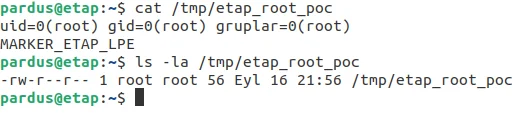
The first line of the file is uid=0(root) gid=0(root) gruplar=0(root). The second line is the marker that was added. The file's ownership also shows as root:root. Together these three findings support that the command inside the service ran in the root context. The result is not a screenshot of a root shell; it is proof of command execution with root privileges. The command chosen for the PoC only writes the identity information and the marker line.
Root cause
The CVE record classifies the finding as missing authorisation, and the title points to the Polkit configuration. The flow visible in the screenshots is concrete: the user prepares a service file, gives its path to the privileged helper, and the command in the file runs as root.
From a security point of view the issue is not only that pkexec is used. Who can reach the privileged entry point, and which operations can be executed through it with which user inputs, have to be assessed together. When service content under the user's control is carried into the root context, the ExecStart line of that file can run with those privileges too.
The screenshots do not contain the content of the Polkit rule, the source code of the helper, or the fix diff, so the author does not tie the bug to a specific rule line. Keeping the distinction between the demonstrated behaviour and the classification in the record matters as much as not overstating the finding.
Impact
The test shows that a command can be executed with root privileges from a local session. Such a privilege boundary crossing can affect the integrity, confidentiality and availability of system files and services. In the PoC itself, no data reading, data exfiltration or service disruption was attempted. Remote exploitability is also outside the scope of this evidence.
The demonstrated condition is a local session, with the caveat noted above about the test account's sudo group membership. The report does not claim the result generalises to every local user.
Fix
According to the published record and advisory, eta-register must be upgraded to version 2.0.9 or newer. After the version update, the same user and authorisation conditions should be checked to confirm that a user-controlled service file can no longer be run without authorisation. The write-up does not include the result of a retest on the patched version.
The main lesson drawn is that the existence of a trusted helper does not make the input given to it trusted. The boundary between the authorisation check and user-controlled service content is what this PoC is about.
Variants to test
- Other operations of the same helper. Enumerate the subcommands of
opr.pyand pass user-controlled files or paths to each. A positive result is a command from the supplied file appearing in an output file withuid=0(root). - Accounts outside the
sudogroup. Repeat the exact flow with a plain local user. A positive result is the sameuid=0(root)output without any password prompt, which would show the issue is not limited to the test account's group membership. - Other service-file fields. Try
User=,Environment=,ExecStartPre=and similar directives in the user-supplied unit. A positive result is any of these influencing execution in the root context, which would widen the attack surface beyondExecStart. - Polkit rule coverage. Inspect which actions the helper's Polkit policy declares and whether
allow_anyorallow_inactiveis set for them. A positive result is a rule that permits the action for an unprivileged, non-interactive session. - Patched version retest. Run the same PoC against 2.0.9 or newer with identical conditions. A positive result for the fix is the service file being rejected or the command not running as root.
What happened, in plain words
Imagine a school computer that many people share. Normally, a student can only do student things: open files, run programs, change their own settings. There is a separate, all-powerful account called root that can change anything on the machine, including system files and the programs the whole computer depends on. If an ordinary student could somehow make the computer run a command as root, they could take over the machine. That is exactly the kind of problem this report is about.
The computer in question runs Pardus ETAP, a version of the Linux operating system. On top of it sits a piece of software called eta-register. Think of eta-register as a small administrative assistant. It contains a helper script called opr.py with a start-service operation.
A service (in the Linux world, a systemd service) is a background job that the computer runs, often automatically, without anyone sitting in front of it. A printer helper, a network manager, a login screen: these are all services. Each service is described by a small text file, called a service file or unit file, which says what command to run and how. If you can write your own service file and get the computer to run it with high privileges, you can make the computer do whatever you like.
That is the heart of this finding. The assistant program inside eta-register, a helper script called opr.py, has an operation named start-service. You give it the path to a service file, and it starts that service. The problem: it accepted a service file that the test user wrote, and ran the command inside that file as root. In security language, this is a local privilege escalation: a normal user on the machine can climb up to the highest level of power. "Local" means the attacker already has a login on the machine; they are not coming in over the network.
The finding was given an official identifier, CVE-2026-92886. A CVE is a public catalogue number for a known security flaw, so that everyone (vendors, defenders, researchers) can refer to the same bug by the same name. It was also reported to the Turkish cybersecurity authority under the notification number TR-26-1440. It is classified as CWE-862, which is a standard label meaning "missing authorisation": the program did not check whether the person asking was allowed to do the thing they asked for. Its CVSS v3.1 score is 7.8 (High). CVSS is a common scoring system that rates how serious a vulnerability is, from 0 to 10; 7.8 is in the "High" band. The affected version range in the record is 2.0.8 ≤ version < 2.0.9, which is a mathematical way of saying "version 2.0.8 and anything newer than 2.0.8 but older than 2.0.9".
The author frames the whole exercise around two outputs placed side by side: which user starts the operation, and which identity the executed command runs under. In this test the first answer was uid=1000(pardus) and the second was uid=0(root). In plain terms: the person who kicked things off was an ordinary user called pardus with the number 1000, and the command that actually ran was executed as the all-powerful root user with the number 0. The gap between those two numbers is the vulnerability.
The goal was not to open an interactive root shell (a live command prompt where you can type anything as root). It was enough to show, with a small output file, that a command inside a user-prepared service file runs with root privileges. That is a much smaller, cleaner, easier-to-verify demonstration.
Setup
The test was run from a local, non-root session. "Local" means the tester was sitting at the machine with a normal login, not attacking from elsewhere. The account used is pardus, with user and primary group ID 1000. Every user on a Linux system has a numeric user ID (uid) and belongs to one or more groups, each with a numeric group ID (gid). The root user is always uid 0; ordinary users typically start at 1000.
One detail the author stresses is that this account is in the sudo group. The sudo group is a special group whose members are allowed to run commands as root, usually by typing their own password first. So the test account is not a completely powerless user; it has some elevated rights already. The session itself is not root, but this evidence alone does not show that the same result would be obtained by every user who is not in the sudo group. The assessment in the write-up is deliberately kept within this test condition. In other words: the author is honest that they have not proven the bug works for a user with no special group membership at all.
The screenshots do not show the installed package version, so the exact eta-register version on the test machine is not derived from them. The affected range comes from the CVE record. Likewise, the date shown in the file listing is not used as a discovery or notification date. This is a small but important point about evidence discipline: don't read more into a screenshot than it actually shows.
Finding it
The starting point is the identity check. The author first confirmed who the session belongs to. This is basic hygiene: you cannot claim "an ordinary user escalated to root" unless you first prove you started as an ordinary user. The whoami output is pardus, and id shows the user and primary group ID as 1000.
whoami is a tiny command that prints the name of the user you are currently logged in as. id prints more detail: your user ID, your primary group ID, and any extra groups you belong to. Seeing pardus and 1000 confirms the session is not root. The screenshot shows exactly that.
The interesting part is not the non-root session by itself, but what happens when a user-controlled service file is handed to the privileged helper. A helper that runs a command defined in a file the user prepared is only safe if it authorises that input properly. "Authorises" here means: checks that this particular user is allowed to do this particular thing. If the helper just trusts whatever file it is given, the user's file becomes the user's command, and the user's command becomes root's command. The report treats the boundary between the privilege check and the user-controlled service content as the centre of the PoC.
Exploitation
Step 1: prepare a small, measurable service file
In the home directory, a systemd service file named etap-poc.service was created:
cat > ~/etap-poc.service <<'EOF' [Service] Type=oneshot ExecStart=/bin/sh -c 'id > /tmp/etap_root_poc; echo MARKER_ETAP_LPE >> /tmp/etap_root_poc' [Install] WantedBy=multi-user.target EOF
Line by line, in plain words:
cat > ~/etap-poc.service <<'EOF'starts writing a new file calledetap-poc.servicein your home directory (~is shorthand for your home folder). The<<'EOF'part means "everything until the next line that says EOF goes into the file". This is a standard way to create a text file from the command line without opening an editor.[Service]opens a section of the file that describes how the service behaves.Type=oneshotselects a service type that runs a short job and exits. It is not a long-running daemon; it just does its thing and stops.ExecStart=/bin/sh -c '...'is the actual command the service will run. It launches a shell (/bin/sh) and gives it a small script to execute.- Inside that script,
id > /tmp/etap_root_pocruns theidcommand and writes its output into a file called/tmp/etap_root_poc. The>symbol means "send the output here, overwriting whatever was there". echo MARKER_ETAP_LPE >> /tmp/etap_root_pocappends the textMARKER_ETAP_LPEto the same file. The>>symbol means "add to the end, do not overwrite".[Install]opens a section that says when the service should be installed or enabled.WantedBy=multi-user.targetsays the service belongs to the normal multi-user boot stage. It is a hint about when the service would be started if it were enabled.EOFcloses the file.
The command in the file does two things: it writes the identity it runs under to /tmp/etap_root_poc, and immediately below that it appends a test-specific marker. That way the check is not limited to whether a file appeared; the content can be inspected too. If the file contains uid=0(root) and the marker, we know the command ran as root and that it was our command, not something else.
The actual test payload is on the ExecStart line: the shell redirects the id output into the file, then appends the MARKER_ETAP_LPE line. The marker line makes the link between the later output and this PoC visible. The service file has no User= definition. For a system-level systemd service, that makes the default root context significant, assuming no other restriction applies. In plain terms: if you do not say which user the service should run as, a system service defaults to root. The conclusion here does not rest on that assumption alone, because the last step checks the identity output of the command directly. The WantedBy=multi-user.target line on its own does not prove the service was enabled at boot either; the screenshots contain no enable operation and no reboot test. So the author is careful: the file was created, but nothing in the evidence shows it was installed to start at boot. The proof comes from running it through the helper, not from boot behaviour.
Step 2: hand the file to eta-register
The prepared service file was passed as an argument to the start-service operation of the opr.py helper inside eta-register. The call shown in the screenshot is:
eta-register/src/opr.py start-service \ /home/pardus/etap-poc.service
Line by line:
eta-register/src/opr.pyis the path to the helper script.srcis just a folder name;opr.pyis a Python script.start-serviceis the operation being requested. It tells the helper what to do.\at the end of a line is a line continuation: it tells the shell "the command continues on the next line". It is a formatting convenience, not part of the logic./home/pardus/etap-poc.serviceis the path to the service file we just created. This is the user-controlled input.
The critical point of this step is that the file was prepared by the user. Which authorisation conditions allow a privileged helper to run a command defined in that file is what determines the security boundary. If the helper checks "is this user allowed to start services?" and the answer is yes for everyone, then the check is meaningless. If it checks "is this file safe?" and the answer is "we trust whatever the user gives us", then the file is the attack.
The command returning silently is not proof of success on its own, so the output file was checked immediately. A command that prints nothing might have worked, or might have failed quietly. The only way to know is to look at the result. No password prompt appears in the screenshot. Even so, that single frame is not enough to draw firm conclusions about the prior authentication state or the full set of active Polkit rules. Polkit is the Linux component that decides whether a user is allowed to perform a privileged action, and it can be configured with rules that say "this user may do this without a password" or "this user must type a password". The screenshot shows no prompt, but it does not show the full Polkit configuration, so we cannot say for sure why no prompt appeared. Generalising this to "unconditional, passwordless root for every user" would not be correct.
Step 3: read the output file
cat /tmp/etap_root_poc ls -la /tmp/etap_root_poc
Line by line:
cat /tmp/etap_root_pocprints the contents of the file.catis short for "concatenate" and is the standard way to dump a text file to the screen.ls -la /tmp/etap_root_poclists details about the file.lslists files,-lmeans "long format" (permissions, owner, size, date), and-ameans "show all, including hidden files". The result tells us who owns the file and what permissions it has.
The first line of the file is uid=0(root) gid=0(root) gruplar=0(root). gruplar is Turkish for "groups". So the command ran as root, in the root group, with root as its only group. The second line is the marker that was added. The file's ownership also shows as root:root. Together these three findings support that the command inside the service ran in the root context. The result is not a screenshot of a root shell; it is proof of command execution with root privileges. The command chosen for the PoC only writes the identity information and the marker line. That is deliberate: a minimal, harmless payload is enough to prove the point, and it avoids damaging the test machine.
Root cause
The CVE record classifies the finding as missing authorisation, and the title points to the Polkit configuration. The flow visible in the screenshots is concrete: the user prepares a service file, gives its path to the privileged helper, and the command in the file runs as root.
From a security point of view the issue is not only that pkexec is used. pkexec is a small program that lets an authorised user run a command as another user (usually root), typically after Polkit has approved it. The problem is not that pkexec exists; the problem is how it is used here. Who can reach the privileged entry point, and which operations can be executed through it with which user inputs, have to be assessed together. When service content under the user's control is carried into the root context, the ExecStart line of that file can run with those privileges too.
The screenshots do not contain the content of the Polkit rule, the source code of the helper, or the fix diff, so the author does not tie the bug to a specific rule line. Keeping the distinction between the demonstrated behaviour and the classification in the record matters as much as not overstating the finding. In plain terms: we know what happened (a user file ran as root), and we know how the record labels it (missing authorisation), but we do not have the exact line of configuration that allowed it. Saying so honestly is part of good reporting.
Impact
The test shows that a command can be executed with root privileges from a local session. Such a privilege boundary crossing can affect the integrity, confidentiality and availability of system files and services. Those three words are the standard security triad: integrity means data and programs are not tampered with, confidentiality means secrets stay secret, and availability means the system keeps working. A root-level attacker can break all three.
In the PoC itself, no data reading, data exfiltration or service disruption was attempted. Remote exploitability is also outside the scope of this evidence. The demonstrated condition is a local session, with the caveat noted above about the test account's sudo group membership. The report does not claim the result generalises to every local user. This is the honest scope: local, on this machine, with this account, and no attempt to prove remote or universal impact.
Fix
According to the published record and advisory, eta-register must be upgraded to version 2.0.9 or newer. Upgrading means installing the newer package from the vendor, which replaces the vulnerable helper with a fixed one. After the version update, the same user and authorisation conditions should be checked to confirm that a user-controlled service file can no longer be run without authorisation. In other words: re-run the same test on the patched machine and confirm the file is rejected or the command does not run as root. The write-up does not include the result of a retest on the patched version, so we do not know from this report whether the fix fully closes the issue.
The main lesson drawn is that the existence of a trusted helper does not make the input given to it trusted. A helper is only as safe as its checks. The boundary between the authorisation check and user-controlled service content is what this PoC is about.
Variants to test
- Other operations of the same helper. Enumerate the subcommands of
opr.pyand pass user-controlled files or paths to each. A positive result is a command from the supplied file appearing in an output file withuid=0(root). - Accounts outside the
sudogroup. Repeat the exact flow with a plain local user. A positive result is the sameuid=0(root)output without any password prompt, which would show the issue is not limited to the test account's group membership. - Other service-file fields. Try
User=,Environment=,ExecStartPre=and similar directives in the user-supplied unit. A positive result is any of these influencing execution in the root context, which would widen the attack surface beyondExecStart. - Polkit rule coverage. Inspect which actions the helper's Polkit policy declares and whether
allow_anyorallow_inactiveis set for them. A positive result is a rule that permits the action for an unprivileged, non-interactive session. - Patched version retest. Run the same PoC against 2.0.9 or newer with identical conditions. A positive result for the fix is the service file being rejected or the command not running as root.
Glossary
- Root: the all-powerful administrator account on a Linux system, with user ID 0. It can change anything on the machine.
- Local privilege escalation: a security flaw where a user who already has a login on a machine can gain higher privileges, usually root.
- Pardus ETAP: a Linux distribution.
- eta-register: a component of Pardus ETAP that contains the
opr.pyhelper. - Service / systemd service: a background job the computer runs, described by a text file called a service file or unit file.
- Service file / unit file: a small text file that tells systemd what command to run for a service and how.
- systemd: the standard service manager on most Linux systems; it starts and stops services.
- Helper program: a small program that performs a privileged action on behalf of another program or user.
opr.py: the helper script inside eta-register that exposes thestart-serviceoperation.start-service: the operation ofopr.pythat starts a service from a given service file path.- CVE: a public catalogue number for a known security vulnerability, so everyone can refer to the same bug by the same name.
- CWE-862: a standard label meaning "missing authorisation": the program did not check whether the person asking was allowed to do the thing they asked for.
- CVSS v3.1: a common scoring system that rates the severity of a vulnerability from 0 to 10.
- uid / gid: numeric user ID and group ID. Root is uid 0; ordinary users typically start at 1000.
- sudo group: a group whose members are allowed to run commands as root, usually after typing their own password.
- Polkit: the Linux component that decides whether a user is allowed to perform a privileged action, based on configured rules.
- pkexec: a small program that lets an authorised user run a command as another user (usually root), typically after Polkit has approved it.
whoami: a command that prints the name of the user you are currently logged in as.id: a command that prints your user ID, group ID and group memberships.cat: a command that prints the contents of a file to the screen.ls -la: a command that lists files in long format, including hidden files, showing permissions, owner, size and date.ExecStart: the line in a service file that defines the command the service runs.Type=oneshot: a service type that runs a short job and exits, rather than staying running.User=: an optional line in a service file that says which user the service should run as. If absent for a system service, it defaults to root.WantedBy=multi-user.target: a line in a service file that says the service belongs to the normal multi-user boot stage.>and>>: shell redirection symbols.>overwrites a file with the output;>>appends to the end of a file.<<'EOF': a shell construct that feeds everything up to the nextEOFline into a command, commonly used to create a file.\(line continuation): a shell symbol at the end of a line that says the command continues on the next line.- Integrity, confidentiality, availability: the three standard security goals: data is not tampered with, secrets stay secret, and the system keeps working.
- PoC (proof of concept): a small, safe demonstration that proves a vulnerability exists without causing harm.
- Payload: the part of an attack that actually does the work, such as the command inside a service file.
- Marker: a unique string added to output so you can tell that a particular test produced it.
- Remote exploitability: whether an attacker can trigger the flaw from another machine over the network, rather than needing a local login.
- Retest: running the same test again after a fix, to confirm the fix works.

