Part 2: Dive into Zoom Applications
The report describes multiple vulnerabilities in Zoom applications, including a blind XSS that could steal API keys, an API endpoint that disclosed ZAK tokens leading to account compromise, and a signature bypass that allowed stealing PagerDuty API keys of any Zoom user.

rakesh-thodupunoori.medium.com
Published on rakesh-thodupunoori.medium.com
Bug Bounty Writeup
The full write-up lives on its author's site
It belongs to its author, so we link to it rather than copy it. The other two tabs are our own rewrites, checked against it.
Context
This is the second part of a series on testing Zoom applications. The first part covered a CSRF fix that added a wp-nonce and an analyst account compromise; this part moves into out-of-scope (OOS) applications and the Zoom API, the developer portal at developer.zoom.us, and the integration marketplace at marketplace.zoom.us, where users install third-party integrations such as PagerDuty and configure them with an API key.
The report covers five findings, numbered #7 to #11. The researcher first asked the Zoom team for permission to test out-of-scope applications. The team initially declined, then agreed to accept reports only if the vulnerability fell under the P1 or P2 category. After a few days the team added all subdomains to scope and increased the reward.
Setup
The researcher worked with logged-in Zoom users, a Zoom account owner, a user whose privileges were removed, and a PagerDuty integration installed from the marketplace and configured with a PagerDuty API key. Tools mentioned are Burp (the request was replayed in Repeater and the history was reviewed), XSS Hunter for blind XSS payloads, JWT.io to decode tokens, and the Zoom API playground to act with stolen API keys. The user-id needed for several steps was obtained with the technique from Part 1 #3.
Finding it
#7: CSRF bypass and blind XSS for API keys
Part 1 #2 described a CSRF fixed by adding wp-nonce. The researcher bypassed it by taking the wp-nonce token of another logged-in Zoom user and using it in the attack, which made the CSRF succeed again. On its own this would not reach P1 or P2.
There were also fields where an XSS payload could be injected, but cookies could not be stolen because the HTTPOnly flag was set to TRUE. Instead of cookies, the researcher went after API keys: a blind XSS payload from XSS Hunter read the source page of api/* endpoints. With the API keys, any action can be performed through the Zoom API playground.
The final proof of concept:
<html>
<body>
<script>history.pushState(‘’, ‘’, ‘/’)</script>
<form action=”https://developer.zoom.us/me/" method=”POST”>
<input type=”hidden” name=”company-name” value=”test” />
<input type=”hidden” name=”developer-contact” value=”[redacted]” />
<input type=”hidden” name=”app-name” value=”test” />
<input type=”hidden” name=”app-description” value=”****</textarea><BLIND XSS PAYLOAD>****” />
<input type=”hidden” name=”platforms[]” value=”web” />
<input type=”hidden” name=”****wp_nonce****” value=”****914fbb3bb0****" />
<input type=”submit” value=”Submit request” />
</form>
</body>
</html>
The form posts to https://developer.zoom.us/me/ with the fields company-name, developer-contact, app-name, app-description, platforms[] and wp_nonce. The blind XSS payload sits inside app-description, after a closing </textarea>. Sending the page to any user, when the attack succeeds, steals that user's API key and secret. The same issue was found in two more endpoints, and the researcher was rewarded.
#8: Stealing zak tokens to compromise Zoom accounts
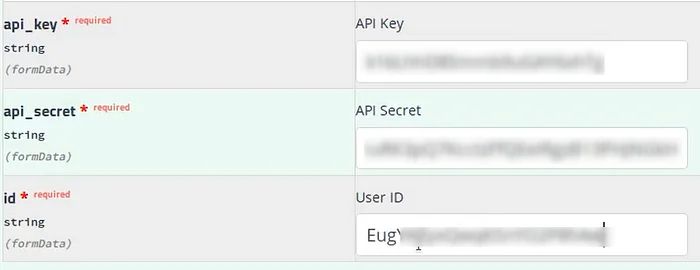
The researcher moved on to the APIs. The endpoint /user/get returns all user information when given a user-id.
Request

Response
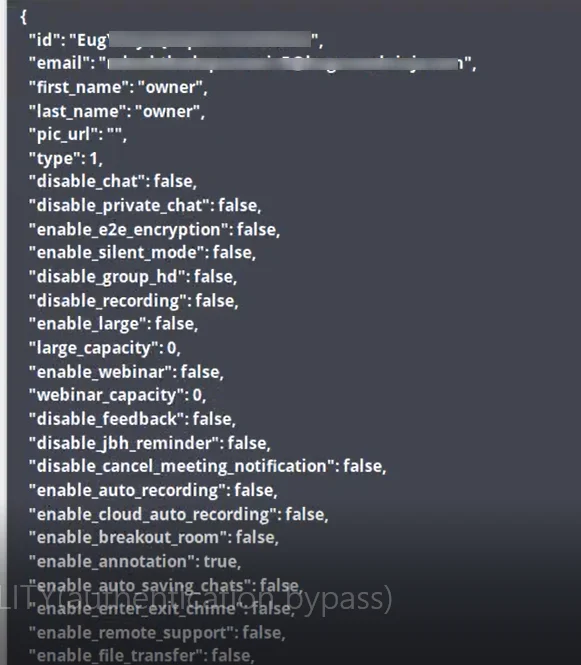
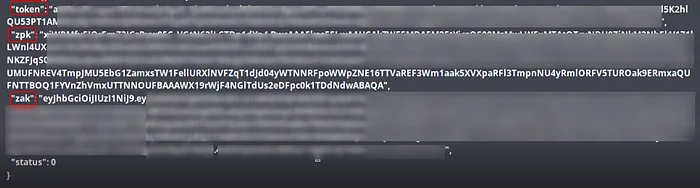
The response contained token, zpk and zak. The researcher recognised zak and zpk as JWT tokens, which was unexpected because Zoom does not use JWT for authentication, and decoded zak with JWT.io.
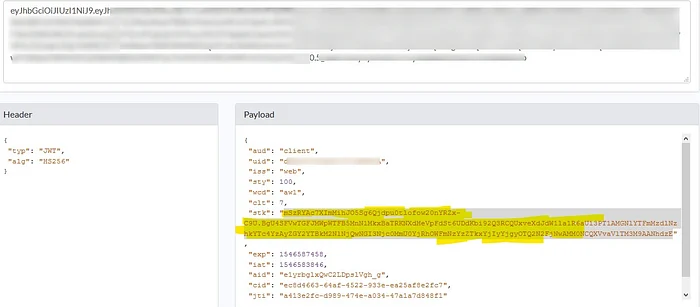
The decode gave no further information and the exploitation path was still unclear. The next day the researcher applied the technique used to compromise the analyst account in Part 1 #5, with this crafted URL:
With the zak token in the URL, the researcher was able to log in to the owner account directly.
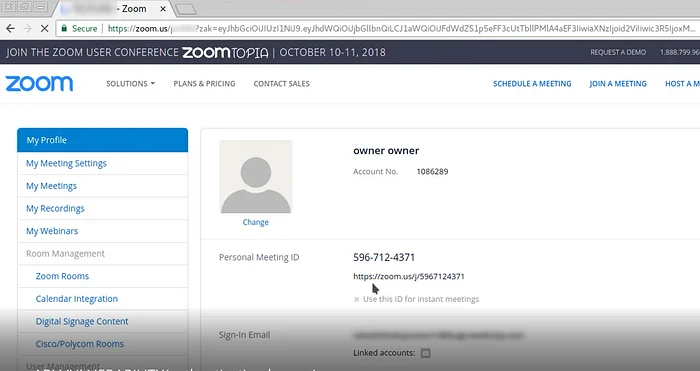
Multiple API endpoints were found that disclose zak tokens. The report was rewarded.
#9: Privilege removal does not revoke developer portal access
All privileges were removed from one user within the account. Logging in to the zoom.us account failed as expected.
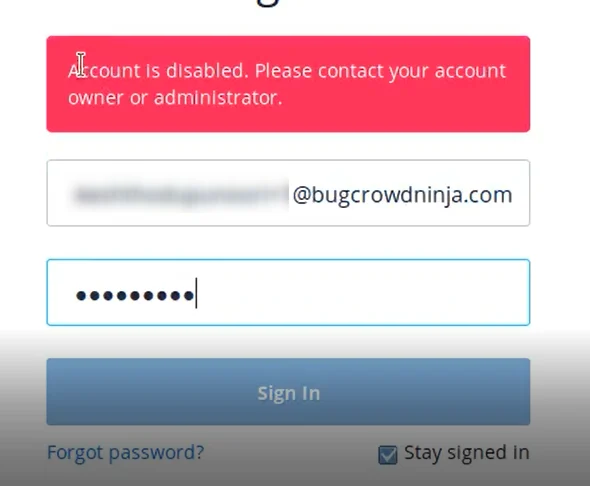
However, the same user could still access the developer.zoom.us account, where API keys can be obtained and any action performed through API endpoints. Reported and rewarded.
#10: v2 API keys do not expire
Zoom stated that the v1 API would be deprecated and had already started the v2 API. The v2 documentation says API keys are valid only for 10 minutes, but the researcher found they were not expiring after 10 minutes. Reported and rewarded.
#11: Bypassing the signature and stealing PagerDuty API keys
marketplace.zoom.us lets anyone create an integration, which the Zoom team later verifies and approves. The researcher installed the PagerDuty integration and configured it with a PagerDuty API key.
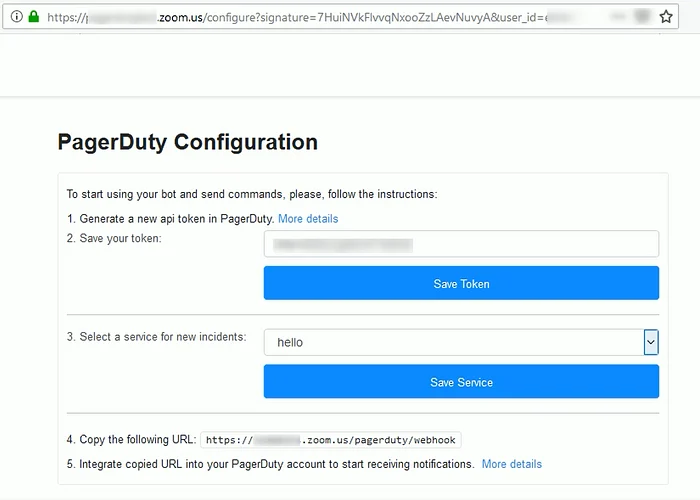
After several rounds of testing, the Burp history showed that a <REDUCTED>.zoom.us host manages the PagerDuty API keys configured earlier.
Request
GET /pagerduty/config?[redacted]&user_id=M4u<REDUCTED> HTTP/1.1Host: <REDUCTED>.zoom.usUser-Agent: Mozilla/5.0 (Windows NT 10.0; Win64; x64; rv:68.0) Gecko/20100101 Firefox/68.0Accept: */*Accept-Language: en-US,en;q=0.5Accept-Encoding: gzip, deflateOrigin: https://<REDUCTED>.zoom.usConnection: close
There are no cookies in the request, so it was replayed directly in Repeater.
Response
HTTP/1.1 200 OKDate: Mon, 29 Jul 2019 20:08:26 GMTContent-Type: application/json; charset=utf-8Content-Length: 80Connection: closex-amzn-RequestId: a048105e-b23c-11e9-8381-6d6d62790a0eaccess-control-allow-origin: *access-control-allow-headers: Content-Type, Authorizationx-amzn-Remapped-content-length: 80x-amz-apigw-id: dmnJMFymoAMF6Nw=access-control-allow-methods: OPTIONS, GET, POST, PUT, PATCH, DELETEetag: W/"50-pySbe+m76pCbniLaJ/LRkpJvylU"x-powered-by: ExpressX-Amzn-Trace-Id: Root=1-5d3f523a-696bd7c04ada12240312a370;Sampled=0{"is_admin":true,"platform_token":"<REDUCTED>","service_id":"P9ZRCKP"}
The response is JSON containing is_admin, platform_token and service_id. The absence of cookies is not the vulnerability. The URL carries two parameters, signature and user_id:
https://<REDUCTED>.zoom.us/pagerduty/config?[redacted]&user_id=M4u<REDUCTED>
Finding a user-id is easy (Part 1 #3). The signature acts as the authentication. The researcher tried multiple bypasses and then simply removed the value of the signature, which gave access to the PagerDuty API key. Changing user_id to another user's id then showed that user's PagerDuty API key.
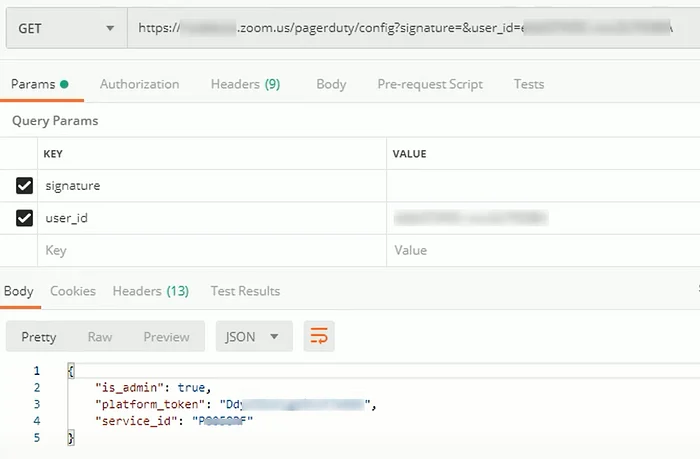
Reported and rewarded.
Root cause
- #7: the CSRF defence relied on a
wp-nonce, and a token from another logged-in user was accepted. XSS injection was possible in fields such asapp-description, andHTTPOnlyonly protected cookies, not API keys readable from the page source ofapi/*endpoints. - #8: API responses exposed
zaktokens, and azaktoken placed in a URL was enough to log in as the token's owner, including the account owner. - #9: removing privileges from a user did not revoke access to
developer.zoom.us, so authorisation was enforced on one product but not the other. - #10: the documented 10-minute lifetime of v2 API keys was not enforced.
- #11: the
signatureparameter was meant to authenticate the request, but an empty signature value was accepted, so the check could be skipped and anyuser_idqueried.
Impact
- #7: an attacker who gets a victim to load the crafted page can steal that user's API key and secret and then act through the Zoom API playground. The report notes the same issue in two more endpoints.
- #8: disclosure of
zaktokens through multiple API endpoints allows direct login to the token owner's account, demonstrated against the owner account. - #9: a user stripped of all privileges keeps access to the developer portal, including API keys and API actions.
- #10: API keys remain valid beyond the documented 10 minutes.
- #11: anyone who knows a user-id can read that user's configured PagerDuty API key, provided the integration is configured.
Fix
The report does not describe the fixes applied by Zoom. Based on the findings, the changes needed are: bind CSRF nonces to the acting user and stop rendering user input such as app-description as HTML; stop returning zak tokens in API responses and stop accepting them as a login credential in a URL; enforce privilege checks on developer.zoom.us when privileges are removed; enforce the documented key lifetime; and reject requests where the signature is empty or invalid.
Variants to test
- Take a CSRF nonce from a second account and replay it in a cross-site form against the first account. A positive result is the action succeeding for the wrong user.
- Inject a blind XSS payload into profile or application fields and watch for callbacks. A positive result is a callback containing page content with API keys.
- Request user objects from API endpoints and look for tokens such as
zakorzpk. A positive result is a JWT that can be placed in a login URL and grants the owner's session. - Remove all privileges from a user, then try each related subdomain. A positive result is access to a portal the user should have lost.
- Reuse an API key after its documented expiry. A positive result is a successful call after the stated lifetime.
- Send an authenticated request with the signature parameter emptied, then change the user identifier. A positive result is another user's stored secret in the response.
What happened, in plain words
This is the second part of a series about testing Zoom's web applications. In the first part, the researcher found a way to make a logged-in user's browser perform an unwanted action (a CSRF), which Zoom fixed by adding a wp-nonce value, and also found a way to take over an analyst account. This part moves on to applications that were outside the official bug bounty scope (OOS), plus the Zoom API, the developer portal at developer.zoom.us, and the integration marketplace at marketplace.zoom.us, where users install third-party integrations such as PagerDuty and configure them with an API key.
Before starting, the researcher asked the Zoom team for permission to test out-of-scope applications. The team first said no, then agreed to accept reports only if the vulnerability fell under the P1 or P2 category (the two most serious severity levels). A few days later the team added all subdomains to scope and increased the reward.
The report describes five findings, numbered #7 to #11. Each one is a different way of getting hold of something secret (an API key, a login token, or access to an account) that the owner did not intend to share.
The setup
The researcher worked with several things:
- logged-in Zoom users, including a Zoom account owner;
- a user whose privileges were removed;
- a PagerDuty integration installed from the marketplace and configured with a PagerDuty API key.
The tools mentioned are Burp (used to replay a request in its Repeater feature and to review its history), XSS Hunter for blind XSS payloads, JWT.io to decode tokens, and the Zoom API playground to act with stolen API keys. The user-id needed for several steps was obtained with the technique from Part 1 #3.
A few words before we start, because they come up constantly:
- An API (Application Programming Interface) is a way for one program to talk to another. Think of a restaurant: you do not walk into the kitchen, you give your order to a waiter, and food comes back. The API is the waiter. A request goes to a specific address (an endpoint, like
/user/get), and a response comes back, usually as structured text called JSON. - A cookie is a small piece of data a website stores in your browser so it can recognise you on the next request, like a cloakroom ticket. A token is similar but is usually passed in the URL or in a header rather than stored by the browser.
- HTTPOnly is a setting on a cookie that stops JavaScript on the page from reading it. It protects the cookie, but only the cookie.
- XSS (Cross-Site Scripting) means getting your own JavaScript to run inside someone else's page, in their browser, as them. Blind XSS is when the script runs somewhere you cannot see directly (for example, in an admin panel), so you use a service like XSS Hunter to be told when and where it fired.
- CSRF (Cross-Site Request Forgery) means tricking a logged-in user's browser into sending a request the user did not intend, using the fact that the browser automatically attaches their credentials.
- A nonce is a one-time value a server hands out and later checks, to prove a request really came from a page the server generated.
- JWT (JSON Web Token) is a compact, signed token format. It looks like three chunks of text separated by dots. You can decode the contents without a key, but you cannot forge a valid signature without the key.
Finding it
#7: CSRF bypass and blind XSS for API keys
Part 1 #2 described a CSRF that Zoom fixed by adding a wp-nonce. The researcher bypassed the fix by taking the wp-nonce token of another logged-in Zoom user and using it in the attack. Using another logged-in user's wp-nonce token, the CSRF worked again. On its own, though, this would not reach the P1 or P2 bar.
There were also fields where an XSS payload could be injected. The obvious next step would be to steal the victim's cookies, but that was blocked: the cookies had the HTTPOnly flag set to TRUE, so JavaScript could not read them. Is that the end? No. Instead of cookies, the researcher went after API keys. A blind XSS payload from XSS Hunter read the source page of api/* endpoints. With the API keys, any action can be performed through the Zoom API playground.
The final proof of concept:
<html>
<body>
<script>history.pushState(‘’, ‘’, ‘/’)</script>
<form action=”https://developer.zoom.us/me/" method=”POST”>
<input type=”hidden” name=”company-name” value=”test” />
<input type=”hidden” name=”developer-contact” value=”[redacted]” />
<input type=”hidden” name=”app-name” value=”test” />
<input type=”hidden” name=”app-description” value=”****</textarea><BLIND XSS PAYLOAD>****” />
<input type=”hidden” name=”platforms[]” value=”web” />
<input type=”hidden” name=”****wp_nonce****” value=”****914fbb3bb0****" />
<input type=”submit” value=”Submit request” />
</form>
</body>
</html>
Line by line:
<html>and<body>open a normal web page.<script>history.pushState(‘’, ‘’, ‘/’)</script>changes the address bar to show/without reloading the page. This is a cosmetic trick so the victim sees a harmless-looking URL.<form action=”https://developer.zoom.us/me/" method=”POST”>starts a form that will send its contents to the developer portal's/me/address using the POST method (a request that carries data in its body).- The
<input type=”hidden” ...>lines are fields the victim never sees. They fill incompany-name,developer-contact,app-name,app-description,platforms[]andwp_nonce. - The
app-descriptionfield contains****</textarea><BLIND XSS PAYLOAD>****. - The
wp_noncefield carries****914fbb3bb0****, the token taken from another logged-in user. This is the token taken from another logged-in user. <input type=”submit” value=”Submit request” />is the button that sends the form.
Sending the page to any user, when the attack succeeds, steals that user's API key and secret. The same issue was found in two more endpoints, and the researcher was rewarded.
#8: Stealing zak tokens to compromise Zoom accounts
The researcher moved on to the APIs. The endpoint /user/get returns all user information when given a user-id.
Request
Response
The response contained token, zpk and zak. The researcher recognised zak and zpk as JWT tokens, which was unexpected because Zoom does not use JWT for authentication, and decoded zak with JWT.io.
The decode gave no further information and the exploitation path was still unclear. The next day the researcher applied the technique used to compromise the analyst account in Part 1 #5, with this crafted URL:
What this URL does, piece by piece:
https://zoom.us/is the main Zoom site.<reducted>stands for a page path that was removed from the public write-up.?zak=<zak token>adds a parameter namedzakwhose value is the token taken from the API response. The parameter carries the token taken from the API response.
With the zak token in the URL, the researcher was able to log in to the owner account directly.
Multiple API endpoints were found that disclose zak tokens. The report was rewarded.
#9: Privilege removal does not revoke developer portal access
All privileges were removed from one user within the account. Logging in to the zoom.us account failed as expected.
However, the same user could still access the developer.zoom.us account, where API keys can be obtained and any action performed through API endpoints. Reported and rewarded.
#10: v2 API keys do not expire
Zoom stated that the v1 API would be deprecated and had already started the v2 API. The v2 documentation says API keys are valid only for 10 minutes, but the researcher found they were not expiring after 10 minutes. Reported and rewarded.
#11: Bypassing the signature and stealing PagerDuty API keys
marketplace.zoom.us lets anyone create an integration, which the Zoom team later verifies and approves. The researcher installed the PagerDuty integration and configured it with a PagerDuty API key.
After several rounds of testing, the Burp history showed that a <REDUCTED>.zoom.us host manages the PagerDuty API keys configured earlier.
Request
GET /pagerduty/config?[redacted]&user_id=M4u<REDUCTED> HTTP/1.1Host: <REDUCTED>.zoom.usUser-Agent: Mozilla/5.0 (Windows NT 10.0; Win64; x64; rv:68.0) Gecko/20100101 Firefox/68.0Accept: */*Accept-Language: en-US,en;q=0.5Accept-Encoding: gzip, deflateOrigin: https://<REDUCTED>.zoom.usConnection: close
Line by line:
GET /pagerduty/config?signature=...&user_id=...is the request line.GETasks the server to return something. The path/pagerduty/configis the endpoint. After the?come two parameters:signature, a value that is supposed to prove the request is authorised, anduser_id, which says whose configuration is being asked for.HTTP/1.1is the version of the protocol being spoken.Host: <REDUCTED>.zoom.ustells the server which site the request is for. The subdomain was removed from the public write-up.User-Agent: ...identifies the browser that made the request.Accept: */*says the client will accept any response type.Accept-Language: en-US,en;q=0.5says the client prefers English.Accept-Encoding: gzip, deflatesays the client can handle compressed responses.Origin: https://<REDUCTED>.zoom.ussays which site the request came from.Connection: closeasks the server to close the connection after the response.
There are no cookies in the request, so it was replayed directly in Repeater (a Burp feature that lets you resend a captured request and edit it first).
Response
HTTP/1.1 200 OKDate: Mon, 29 Jul 2019 20:08:26 GMTContent-Type: application/json; charset=utf-8Content-Length: 80Connection: closex-amzn-RequestId: a048105e-b23c-11e9-8381-6d6d62790a0eaccess-control-allow-origin: *access-control-allow-headers: Content-Type, Authorizationx-amzn-Remapped-content-length: 80x-amz-apigw-id: dmnJMFymoAMF6Nw=access-control-allow-methods: OPTIONS, GET, POST, PUT, PATCH, DELETEetag: W/"50-pySbe+m76pCbniLaJ/LRkpJvylU"x-powered-by: ExpressX-Amzn-Trace-Id: Root=1-5d3f523a-696bd7c04ada12240312a370;Sampled=0{"is_admin":true,"platform_token":"<REDUCTED>","service_id":"P9ZRCKP"}
Line by line:
HTTP/1.1 200 OKis the status line.200means the request succeeded.Date: ...is when the server answered.Content-Type: application/json; charset=utf-8says the body is JSON text.Content-Length: 80is the size of the body in bytes.Connection: closesays the connection will be closed after this response.x-amzn-RequestId,x-amz-apigw-idandX-Amzn-Trace-Idare identifiers added by Amazon's infrastructure, useful for tracing a request on the server side.access-control-allow-origin: *and the otheraccess-control-*lines are CORS headers, which tell browsers which other sites are allowed to read the response. The*means any site.etag: ...is a version tag for the content, used for caching.x-powered-by: Expressreveals the server-side framework.- The body
{"is_admin":true,"platform_token":"<REDUCTED>","service_id":"P9ZRCKP"}is JSON. It says the caller is treated as an admin, includes a platform token (removed from the write-up), and gives a service id.
The response is JSON containing is_admin, platform_token and service_id. The absence of cookies is not the vulnerability. The URL carries two parameters, signature and user_id:
https://<REDUCTED>.zoom.us/pagerduty/config?[redacted]&user_id=M4u<REDUCTED>
https://<REDUCTED>.zoom.usis the host that manages the PagerDuty configuration./pagerduty/configis the endpoint.- `[redacted] is the value that is supposed to act as the authentication, like a wax seal on a letter proving who sent it.
user_id=M4u<REDUCTED>says whose configuration to return.
Finding a user-id is easy (Part 1 #3). The signature acts as the authentication. The researcher tried multiple bypasses and then simply removed the value of the signature, which gave access to the PagerDuty API key. Changing user_id to another user's id then showed that user's PagerDuty API key.
Reported and rewarded.
Why it worked
- #7: the CSRF defence relied on a
wp-nonce, and a token from another logged-in user was accepted. XSS injection was possible in fields such asapp-description, andHTTPOnlyonly protected cookies, not API keys readable from the page source ofapi/*endpoints. - #8: API responses exposed
zaktokens, and azaktoken placed in a URL was enough to log in as the token's owner, including the account owner. - #9: removing privileges from a user did not revoke access to
developer.zoom.us, so authorisation was enforced on one product but not the other. - #10: the documented 10-minute lifetime of v2 API keys was not enforced.
- #11: the
signatureparameter was meant to authenticate the request, but an empty signature value was accepted, so the check could be skipped and anyuser_idqueried.
What an attacker could do with it
- #7: an attacker who gets a victim to load the crafted page can steal that user's API key and secret and then act through the Zoom API playground. The report notes the same issue in two more endpoints.
- #8: disclosure of
zaktokens through multiple API endpoints allows direct login to the token owner's account, demonstrated against the owner account. - #9: a user stripped of all privileges keeps access to the developer portal, including API keys and API actions.
- #10: API keys remain valid beyond the documented 10 minutes.
- #11: anyone who knows a user-id can read that user's configured PagerDuty API key, provided the integration is configured.
How to fix it
The report does not describe the fixes applied by Zoom. Based on the findings, the changes needed are: bind CSRF nonces to the acting user and stop rendering user input such as app-description as HTML; stop returning zak tokens in API responses and stop accepting them as a login credential in a URL; enforce privilege checks on developer.zoom.us when privileges are removed; enforce the documented key lifetime; and reject requests where the signature is empty or invalid.
Things to try yourself
- Take a CSRF nonce from a second account and replay it in a cross-site form against the first account. A positive result is the action succeeding for the wrong user.
- Inject a blind XSS payload into profile or application fields and watch for callbacks. A positive result is a callback containing page content with API keys.
- Request user objects from API endpoints and look for tokens such as
zakorzpk. A positive result is a JWT that can be placed in a login URL and grants the owner's session. - Remove all privileges from a user, then try each related subdomain. A positive result is access to a portal the user should have lost.
- Reuse an API key after its documented expiry. A positive result is a successful call after the stated lifetime.
- Send an authenticated request with the signature parameter emptied, then change the user identifier. A positive result is another user's stored secret in the response.
Glossary
- API: a way for one program to talk to another, like a waiter carrying orders between you and the kitchen.
- Endpoint: a specific address on a server that accepts a particular kind of request, such as
/user/get. - JSON: a text format for structured data, made of names and values in curly braces.
- Cookie: a small piece of data a site stores in your browser so it can recognise you next time.
- Token: a value that stands in for your identity or permission, usually passed in a URL or a header.
- HTTPOnly: a cookie setting that stops JavaScript on the page from reading that cookie.
- XSS (Cross-Site Scripting): getting your own JavaScript to run inside someone else's page, in their browser, as them.
- Blind XSS: XSS that fires somewhere you cannot see, so you use a service to be notified when it happens.
- XSS Hunter: a service for catching blind XSS callbacks.
- CSRF (Cross-Site Request Forgery): tricking a logged-in user's browser into sending a request they did not intend.
- Nonce: a one-time value a server hands out and checks later to prove a request came from a page it generated.
- JWT (JSON Web Token): a signed token format made of three dot-separated chunks; readable by anyone, forgeable only with the key.
- JWT.io: a website for decoding JWT tokens.
- API key: a secret string that identifies and authorises a program using an API, like a password for software.
- API secret: the second half of an API credential pair, used to sign requests.
- Zoom API playground: a Zoom tool for sending API requests using a key.
- Burp: a tool for capturing, inspecting and replaying web requests.
- Repeater: a Burp feature that lets you resend a captured request after editing it.
- Out of scope (OOS): parts of a target that a bug bounty programme does not officially cover.
- P1 / P2: the two highest severity categories in a bug bounty programme.
- Privileges: the permissions a user account has.
- Developer portal: the site where developers create applications and obtain API keys.
- Marketplace: a site where users install third-party integrations.
- Integration: a connection between two services, here Zoom and PagerDuty.
- PagerDuty: a third-party alerting service used as the example integration.
- Signature: a value meant to prove a request is authorised, like a wax seal on a letter.
- Parameter: a name and value pair added to a URL after the
?, such asuser_id=.... - CORS: browser rules, set by response headers, that say which other sites may read a response.
- Header: a line of metadata in an HTTP request or response.
- GET / POST: HTTP methods; GET asks for something, POST sends data.
- Status code: the number at the start of a response, such as
200for success. - Deprecated: officially discouraged and scheduled for removal.
- v1 / v2 API: two versions of the same API, the newer replacing the older.
- Expiry: the point after which a credential stops being accepted.
- Authorisation: checking whether a user is allowed to do something.
- Authentication: checking who a user is.
- Root cause: the underlying reason a vulnerability exists.
- Proof of concept (POC): a minimal demonstration that a vulnerability is real.



