[PART II]
The banking app's API identified users only by a phone number in the request body, with no token or session check, so changing that number returned another customer's details and transactions. The author also notes the money-transfer PIN is only four digits and can be brute-forced because the new-device registration endpoint lacks rate limiting.

medium.com
Published on medium.com
Abdelhak Kharroubi
The full write-up lives on its author's site
It belongs to its author, so we link to it rather than copy it. The other two tabs are our own rewrites, checked against it.
Context
This is the second part of a write-up about a broken access control vulnerability in a banking mobile application. Part I covered finding the vulnerability; this part covers how the obfuscated JavaScript was debugged with Chrome DevTools to extract request parameters before encryption, how the vulnerability was confirmed, and how a Python exploit was built.
The feature under examination is the app's client-side request and response encryption layer. The app generates a random SWK (symmetric wrapping key) and sends it alongside the request parameters. Before a request leaves the client, the encryptRequest function encrypts the parameters with RSA using a stored public key. After the request is sent, the server encrypts the response with the DES3 algorithm using the SWK as the key, and the decryptResponse function decrypts it in the browser.
The API calls examined are the get user details API, which should return account information such as name, email and balance, and the get transaction API, which returns a transaction list.
Setup
- Tooling: Chrome DevTools, specifically the Sources tab for searching and breakpoints and the Console for overwriting values at runtime.
- A logged-in session in the banking application.
- A Python script for the standalone exploitation, which reimplements the RSA request encryption, the signature creation and the DES3 response decryption.
- A victim phone number (MSISDN). The author obtained the phone number of a bank employee through LinkedIn to ensure the target had an account.
Finding it
Locating the crypto functions
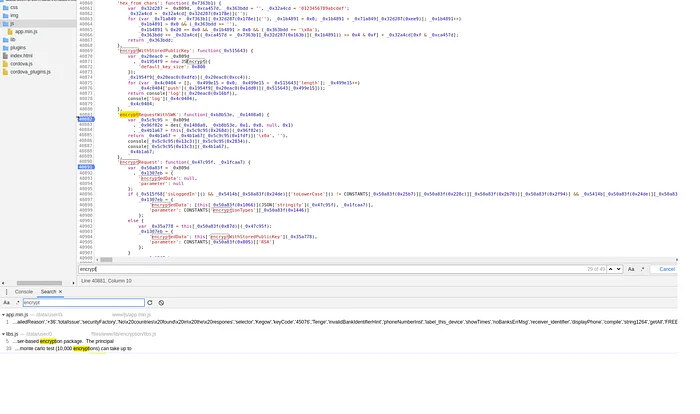
In the Sources tab, the author searched all loaded files for keywords such as encrypt, decrypt, AES, RSA, key and crypto. This surfaced the encrypt and decrypt functions. Breakpoints were then set on the interesting functions by clicking the line number, specifically encryptRequestWithSWK and encryptRequest.
After sending the login request from the app, execution pauses at the selected breakpoint (encryptRequest).
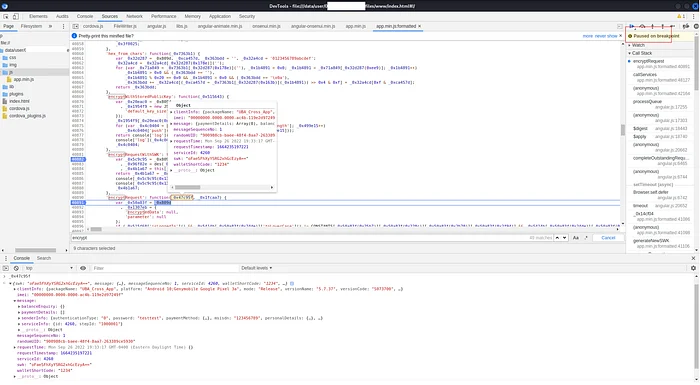
With breakpoints set in both encryptRequest and decryptResponse, both the request and the response can be read as clear text.
The request and response encryption mechanism
- The app generates SWK at random and puts it with the request parameters.
- Before sending,
encryptRequestencrypts the parameters with RSA using a stored public key. - After sending, the server encrypts the response with DES3 using SWK as the key, and
decryptResponsedecrypts it.
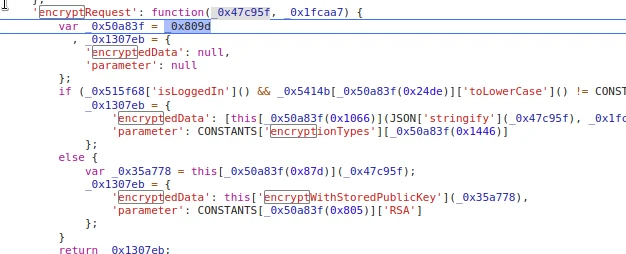
Encrypt request
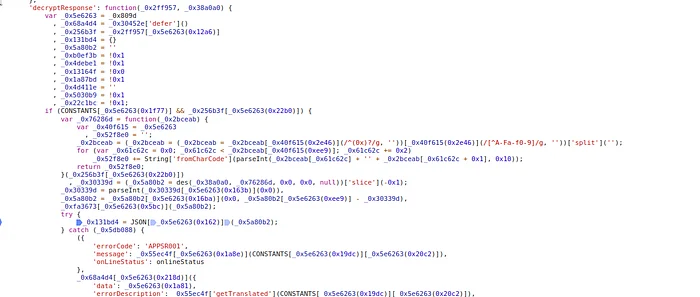
Decrypt response
The access control gap
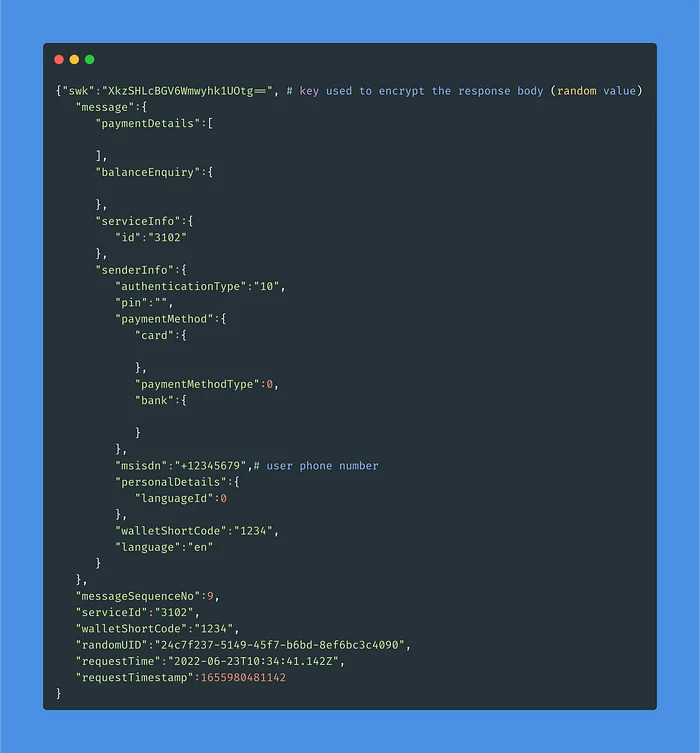
After logging in, the author inspected the get user details API call. The request contains no JWT, API keys, cookies or token values in the body or headers that would determine whether the user is authorised. The clear text request body contains:
The headers:
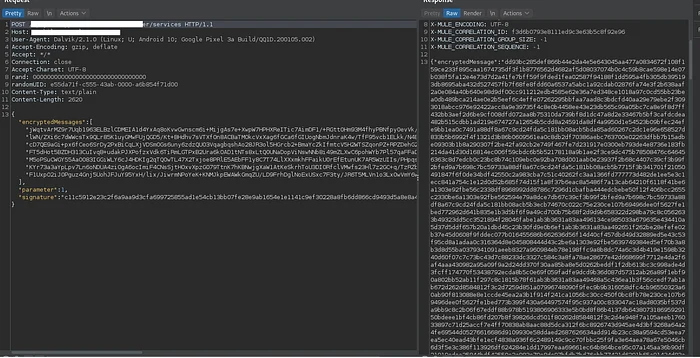
The obvious thing to try is changing the MSISDN. The author used LinkedIn to obtain the phone number of a bank employee, to ensure the target had an account.
Exploitation
Step 1: Intercept the request before encryption
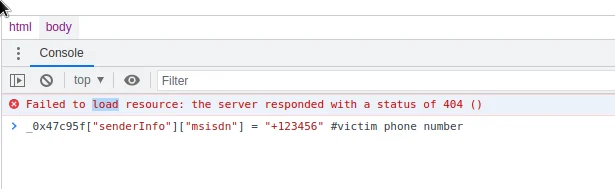
With breakpoints set in both encryptRequest and decryptResponse, the home page was refreshed to re-call the get user details API. The browser pauses at encryptRequest. Using the console, the phone number was overwritten before the request was encrypted, and execution was resumed to send the request.
Step 2: Read the response at the decrypt breakpoint
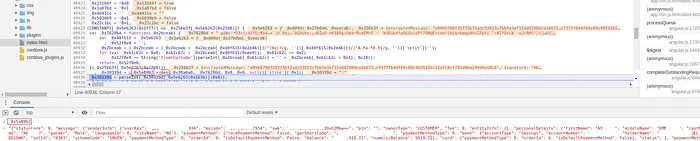
Resuming jumps to the next breakpoint, the return value of decryptResponse. The response contained the victim's information: full name, email and balance.
Step 3: Repeat against the transaction API
The get transaction API was tested the same way. Changing only the phone number produced a valid response containing the victim's transaction list.

According to the author, the full API was vulnerable to broken access control.
Step 4: Standalone exploitation in Python
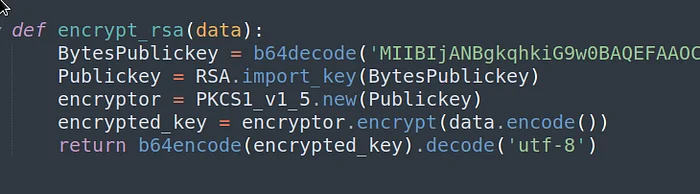
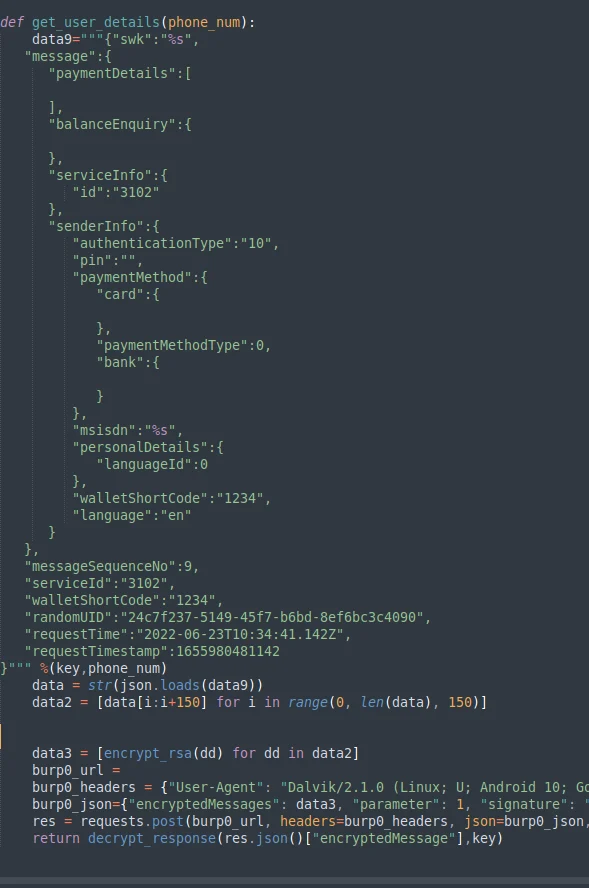
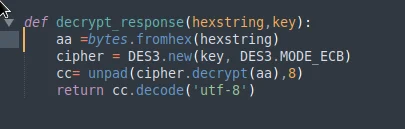
The author wrote a Python script that performs the following:
- Generate a random value SWK.
- Encrypt the request with the RSA public key and create the signature.
- Send the request to the get user details API.
- Decrypt the response with DES3 using SWK as the key.
The output:

Root cause
The request carries no token, cookie or key tying it to a user, and changing only the MSISDN returned another customer's data. The client-side RSA/DES3 encryption provides confidentiality on the wire but no authorisation: the parameters are encrypted, yet the server trusts the decrypted MSISDN as the subject of the query. Because the encryption keys and logic live in the client, an attacker can reproduce the encryption and craft requests directly, as the Python script does.
Impact
With only the victim's phone number, an attacker can obtain full account information, including balance and transaction list. The author also notes that the Sending Money API is protected by a 4-digit PIN that can be easily brute-forced in the register a new device API, which the author describes as a rate limit vulnerability. The write-up does not state whether these issues were fixed or how.
Fix
The conclusion states that applications need to verify access control checks on the server when each function is accessed. If requests are not verified, attackers can forge requests to reach critical data without proper authorisation.
Variants to test
- Encrypted request bodies with client-side keys. Set breakpoints on encrypt/decrypt functions, read the clear text, and change an identifier such as a phone number, account number or user ID. A positive result is a response containing another user's data.
- Identifier-only APIs. Look for endpoints where the only subject selector is a parameter in the body or headers, with no token or cookie tying the request to a user. A positive result is a valid response for an identifier you do not own.
- Reimplemented client crypto. If the encryption keys and algorithm are shipped to the client, rebuild the request flow outside the app, as the Python script does. A positive result is a server response to a request that never came from the official client.
- Secondary APIs on the same session. After confirming one vulnerable endpoint, test related endpoints such as transaction history with the same substitution. A positive result is any endpoint returning victim data on the same pattern.
- PIN and device registration flows. Where a short PIN protects a sensitive action, check whether the registration or verification endpoint enforces rate limiting. A positive result is many PIN attempts accepted without lockout.
What happened, in plain words
A banking app tried to protect the data travelling between your phone and its servers by scrambling it. The app scrambled each request before sending it, and the server scrambled each reply before sending it back. The author of this write-up opened the app's own code inside the browser's developer tools, paused the app at the exact moment it was about to scramble a request, and read the request in plain text. Inside that request was a phone number that told the server whose account to look up. Nothing else in the request proved who the person sending it was. So the author changed the phone number to someone else's, let the app scramble and send the request as normal, and the server replied with that other person's name, email and bank balance. The same trick worked on the transaction history. This is called a broken access control vulnerability: the server never checked whether the person asking was allowed to see the account they asked for.
This is part two of the story. Part one covered how the vulnerability was found. This part covers how the app's scrambled code was read with Chrome DevTools, how the request was changed before it was scrambled, and how the whole thing was then rebuilt as a Python script that does not need the app at all.
Background: what the app does and what an API is
A banking app on your phone does not keep your balance on the phone. It asks the bank's server. Each of those questions is a request to an API (Application Programming Interface). Think of an API as a service counter: you hand over a slip of paper with your request written on it, and the clerk behind the counter hands back an answer. The app is the customer, the server is the clerk, and the slip of paper is the request.
Two API calls matter here:
- The get user details API, which should return account information such as name, email and balance.
- The get transaction API, which returns a list of transactions.
To stop anyone reading those slips of paper on the way to the counter, the app scrambles them. Encryption is the scrambling: it turns readable text into unreadable text using a key, and only someone with the right key can turn it back. The app uses two different schemes:
- RSA is asymmetric encryption. It uses a pair of keys: a public key that anyone can have, and a private key that only the server keeps. Data scrambled with the public key can only be unscrambled with the private key. The app has the public key built in, so it can scramble a request that only the bank can read.
- DES3 (Triple DES) is symmetric encryption. The same key both scrambles and unscrambles. It is faster, so it is used for the replies.
The app generates a random SWK (symmetric wrapping key) and sends it along with the request parameters. The server uses that SWK as the DES3 key for the reply, so the app can unscramble the reply with the same SWK it generated.
Step 1: Finding the encrypt and decrypt functions
A modern web app ships a lot of JavaScript, the programming language browsers run. The banking app's JavaScript is obfuscated, meaning the names and structure have been deliberately made hard for a human to read, a bit like handing someone a recipe with every ingredient written in code. The browser still has to run it, so the browser has a copy of it, and Chrome's developer tools can show you that copy.
Chrome DevTools is a panel built into Chrome, opened with F12 or by right-clicking a page and choosing Inspect. It has tabs for looking at the page's structure, its network traffic, and its code. The Sources tab is the one that lists every file the page has loaded and lets you read and pause them.
In the Sources tab, the author searched all loaded files for keywords such as encrypt, decrypt, AES, RSA, key and crypto. Searching for words like these is the standard way to find the part of a large codebase that handles scrambling, because even obfuscated code usually keeps the names of well-known algorithms. This surfaced the encrypt and decrypt functions.
A breakpoint is a marker you put on a line of code that tells the browser: when you reach this line, stop and wait for me. It is like putting a bookmark in a book and asking someone to stop reading there so you can look at the page. Breakpoints were set on the interesting functions by clicking the line number, specifically encryptRequestWithSWK and encryptRequest.
After sending the login request from the app, execution pauses at the selected breakpoint (encryptRequest).
With breakpoints set in both encryptRequest and decryptResponse, both the request and the response can be read as clear text. This is the key idea of the whole technique: the app has to hold the readable version of the data for a moment before it scrambles it, and a breakpoint freezes the app at exactly that moment.
Step 2: Understanding the request and response encryption mechanism
The author then described the flow in three steps:
- The app generates SWK at random and puts it with the request parameters.
- Before sending,
encryptRequestencrypts the parameters with RSA using a stored public key. - After sending, the server encrypts the response with DES3 using SWK as the key, and
decryptResponsedecrypts it.
Encrypt request
Decrypt response
Why does this matter? Because the scrambling happens in the browser, on the customer's own machine. The public key and the code that uses it are shipped to every user. Anyone who can read the code can also reproduce the scrambling, which is exactly what the Python script later does.
Step 3: The access control gap
After logging in, the author inspected the get user details API call. A cookie is a small piece of data a website stores in your browser and sends back with every request, commonly used to remember that you are logged in. A token (such as a JWT, JSON Web Token) is a similar idea: a signed string that proves who you are. A header is the part of a request that carries metadata, like the label on an envelope, as opposed to the body, which is the letter inside.
The request contains no JWT, API keys, cookies or token values in the body or headers that would determine whether the user is authorised. In other words, the slip of paper handed to the clerk has no signature on it. The clear text request body contains:
The headers:
The only thing identifying whose account is being asked for is the phone number, also called the MSISDN (Mobile Station International Subscriber Directory Number, the technical name for a mobile phone number).
The obvious thing to try is changing the MSISDN. The author used LinkedIn to obtain the phone number of a bank employee, to ensure the target had an account. This is a practical detail: to prove the bug, you need a phone number that you know belongs to a real customer, otherwise a failed response could just mean the account does not exist.
Step 4: Intercept the request before encryption
With breakpoints set in both encryptRequest and decryptResponse, the home page was refreshed to re-call the get user details API. Refreshing is a way to trigger the request again on demand. The browser pauses at encryptRequest. Using the console (the DevTools tab where you can type JavaScript and run it in the page), the phone number was overwritten before the request was encrypted, and execution was resumed to send the request.
Why do it this way? Because the app would normally scramble the phone number immediately. By pausing first, the author gets to change the value while it is still readable, and then lets the app's own code do the scrambling and sending. The server receives a perfectly well-formed, correctly scrambled request. It has no way to tell that the phone number inside was changed by hand.
Step 5: Read the response at the decrypt breakpoint
Resuming jumps to the next breakpoint, the return value of decryptResponse. The response contained the victim's information: full name, email and balance.
This is the proof. The server did not just accept the request; it answered it with data belonging to someone else. The author calls the person whose data was returned the victim.
Step 6: Repeat against the transaction API
The get transaction API was tested the same way. Changing only the phone number produced a valid response containing the victim's transaction list.
According to the author, the full API was vulnerable to broken access control. Testing a second endpoint matters because it shows the problem is not a one-off mistake in a single function but a pattern across the service.
Step 7: Standalone exploitation in Python
The author wrote a Python script that performs the following:
- Generate a random value SWK.
- Encrypt the request with the RSA public key and create the signature.
- Send the request to the get user details API.
- Decrypt the response with DES3 using SWK as the key.
The output:
Why write a script at all, when the browser trick already worked? Because the browser trick needs a human sitting there with DevTools open. A script shows that the protection can be bypassed entirely outside the app: the same public key and the same algorithms are enough to build a valid request from scratch. That is what makes the impact clear. The encryption protects the data from being read on the network, but it does not prove who is asking.
Why it worked
The request carries no token, cookie or key tying it to a user, and changing only the MSISDN returned another customer's data. The client-side RSA/DES3 encryption provides confidentiality on the wire but no authorisation: the parameters are encrypted, yet the server trusts the decrypted MSISDN as the subject of the query. Because the encryption keys and logic live in the client, an attacker can reproduce the encryption and craft requests directly, as the Python script does.
A useful comparison: encryption is like putting your letter in a sealed envelope. A seal stops the postman reading it. It does not stop someone writing a different name on the front of the envelope. Authorisation is the separate question of whether the person asking is allowed to have what they asked for, and that check has to happen on the server.
Impact
With only the victim's phone number, an attacker can obtain full account information, including balance and transaction list. The author also notes that the Sending Money API is protected by a 4-digit PIN that can be easily brute-forced in the register a new device API, which the author describes as a rate limit vulnerability. Brute-forcing means trying every possible value until one works; with only four digits there are ten thousand possibilities, which a computer can work through quickly. A rate limit is a cap on how many attempts a server accepts in a period, and its absence is what makes the guessing practical. The write-up does not state whether these issues were fixed or how.
Fix
The conclusion states that applications need to verify access control checks on the server when each function is accessed. If requests are not verified, attackers can forge requests to reach critical data without proper authorisation.
Variants to test
- Encrypted request bodies with client-side keys. Set breakpoints on encrypt/decrypt functions, read the clear text, and change an identifier such as a phone number, account number or user ID. A positive result is a response containing another user's data.
- Identifier-only APIs. Look for endpoints where the only subject selector is a parameter in the body or headers, with no token or cookie tying the request to a user. A positive result is a valid response for an identifier you do not own.
- Reimplemented client crypto. If the encryption keys and algorithm are shipped to the client, rebuild the request flow outside the app, as the Python script does. A positive result is a server response to a request that never came from the official client.
- Secondary APIs on the same session. After confirming one vulnerable endpoint, test related endpoints such as transaction history with the same substitution. A positive result is any endpoint returning victim data on the same pattern.
- PIN and device registration flows. Where a short PIN protects a sensitive action, check whether the registration or verification endpoint enforces rate limiting. A positive result is many PIN attempts accepted without lockout.
Glossary
- API: the set of requests a server accepts from an app, and the answers it gives back.
- Access control: the rules that decide whether a given user is allowed to do or see a given thing.
- Broken access control: when those rules are missing or not enforced, so a user can reach data or actions they should not.
- Authorisation: checking that the person making a request is allowed to make it.
- Authentication: checking who the person making a request is.
- Encryption: scrambling readable data so that only someone with the right key can read it.
- Key: the secret value used to scramble and unscramble data.
- RSA: asymmetric encryption using a public key to scramble and a private key to unscramble.
- Public key: the half of an RSA key pair that can be shared freely.
- Private key: the half of an RSA key pair that must stay secret.
- DES3 (Triple DES): symmetric encryption where the same key scrambles and unscrambles.
- Symmetric encryption: encryption where one key does both jobs.
- SWK (symmetric wrapping key): a random key the app generates and uses to unscramble the server's replies.
- MSISDN: the technical name for a mobile phone number.
- JavaScript: the programming language browsers run to make pages and apps interactive.
- Obfuscation: deliberately making code hard for a human to read while keeping it runnable.
- Chrome DevTools: the inspection panel built into Chrome, opened with F12 or Inspect.
- Sources tab: the DevTools tab that lists and shows the page's code files.
- Breakpoint: a marker on a line of code that pauses execution there so you can inspect the state.
- Console: the DevTools tab where you can type and run JavaScript in the page.
- Request: the message an app sends to a server asking for something.
- Response: the message a server sends back.
- Header: the metadata part of a request or response, like the label on an envelope.
- Body: the main content of a request or response, like the letter inside the envelope.
- Cookie: a small piece of data stored in the browser and sent back with requests, often used to remember a login.
- Token: a string that proves who you are, sent with requests.
- JWT (JSON Web Token): a common signed token format used to prove identity.
- Endpoint: one specific API address that performs one specific job.
- Brute-forcing: trying every possible value until one works.
- Rate limit: a cap on how many attempts a server accepts in a period.
- Victim: the person whose data is returned without permission in a test like this.
- Confidentiality: keeping data secret from people who should not read it.
- Exploit: a script or procedure that abuses a vulnerability to prove it works.

