Pass-Back Attack on WPA Enterprise to Get Creds
The default non-admin account on a Yealink VP59 desk phone could edit the 802.1X Wi-Fi settings, including the RADIUS server address, without any re-authentication. An attacker with that low-privileged access could point the phone at a rogue RADIUS server and capture the enterprise Wi-Fi username and password.

medium.com
Published on medium.com
Cve
The full write-up lives on its author's site
It belongs to its author, so we link to it rather than copy it. The other two tabs are our own rewrites, checked against it.
Context
The target is a Yealink VP59 desk phone running firmware 91.15.0.147. The feature in question is the Wi-Fi configuration under Network → Wi-Fi → Edit Wi-Fi, specifically the 802.1X/RADIUS settings for an enterprise SSID. On a managed deployment this form is where the phone is told which EAP method to use, which identity and password to present, and which authentication server to trust. The researcher's stated impact is enterprise Wi-Fi credential disclosure via a rogue RADIUS server or Evil Twin access point.

The screenshot sits with the target details as the researcher recorded them.
Setup
The only precondition was the default non-admin account. The researcher states that VP59 phones ship with default credentials of user / user, and that this is the regular non-admin account, not the admin one. No other tooling is described beyond eaphammer, which the researcher ran on their own machine, and a wireless interface used to stand up an Evil Twin AP.
The test was performed on a VP59 "sitting on our bench" during internal testing, against a corporate SSID.
Finding it
Logging in with the non-admin account, the researcher expected read-only Wi-Fi settings, perhaps a signal strength page. Instead the account had full edit access to the 802.1X parameters, with no prompt to enter an admin password and no re-authentication step.
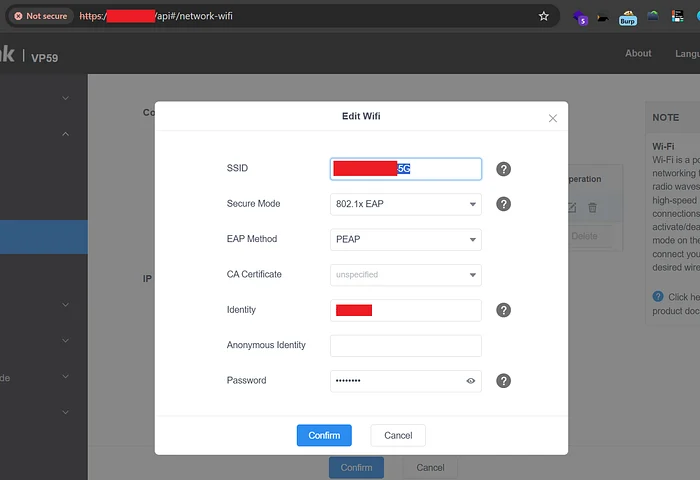
That access is the core of the finding: a non-privileged account can rewrite where the phone sends its enterprise credentials.
Opening Network → Wi-Fi → Edit Wi-Fi on the corporate SSID, the edit form exposes the following fields:
- Secure Mode: 802.1X EAP
- EAP Method: PEAP
- CA Certificate: unspecified (the researcher flags this as the part that matters)
- Identity / Password (pre-provisioned; the researcher did not need to know them)
- RADIUS / authentication server IP
There is no certificate pinning, no validation step and no confirmation dialog: the settings are simply saved.
Exploitation
Step 1: Point the phone at an attacker-controlled RADIUS server
The researcher changed the RADIUS server field to their own box running eaphammer, then stood up an Evil Twin AP with a stronger signal than the legitimate corporate SSID and waited.
└─# eaphammer -i wlan0 --channel 6 --auth wpa-eap --essid CorpWiFi --creds
The phone saw the attacker AP, preferred it on signal strength, and attempted to authenticate straight into the listener.
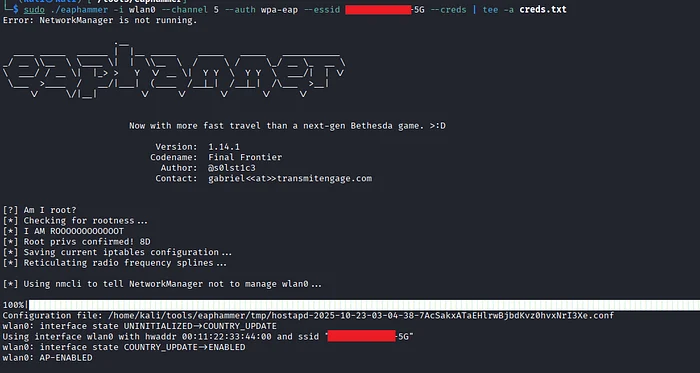
Step 2: Capture the credentials
The captured EAP-GTC identity response came back as follows:
[*] New EAP-GTC identity response captured: username: jdoe password: P@ssw0rd123!
Because the phone was configured for PEAP with EAP-GTC, the inner tunnel carried the credentials in cleartext, since the client did not validate the server certificate. It could not: no CA certificate was ever configured.
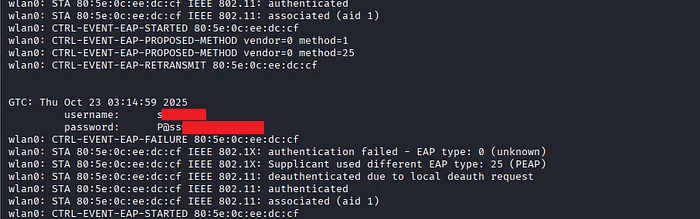

The researcher notes a fallback case: if GTC is not in play and the phone falls back to MS-CHAPv2, the result is hashes rather than cleartext, which can be cracked offline instead of read directly off the wire.
Root cause
Two things combine here. First, the Wi-Fi/802.1X edit form is reachable by the default non-admin account, so any holder of the shipped user / user credentials can redirect the phone's enterprise authentication. Second, the CA Certificate field can be left unspecified, and the client performs no server certificate validation. With PEAP and EAP-GTC, the inner authentication then exposes the username and password to whatever RADIUS server answers.
The existing defences did not stop this: there was no admin re-authentication before saving, no confirmation dialog, and no certificate pinning or validation step. The researcher compares the root cause to CVE-2024-12510, describing it as a different protocol with the same story: insecure redirect plus no validation lets credentials walk out the door.
Impact
- Credential disclosure: the enterprise Wi-Fi username and password are handed to an attacker-controlled RADIUS server.
- Lateral movement: the same credentials usually work for VPN, SSO and email, since people reuse passwords.
- Zero privilege required: this is not an admin misconfiguration; the default non-admin account can do it out of the box.
The cleartext outcome depends on the client using PEAP with EAP-GTC and not validating the server certificate; in an MS-CHAPv2 fallback the attacker obtains hashes for offline cracking instead.
Fix
The researcher addresses the vendor with two recommendations:
- Make Wi-Fi/802.1X edits admin-only, using RBAC rather than relying on the current behaviour.
- Require re-authentication, ideally 2FA, before applying any change that touches the RADIUS host, CA certificate, EAP type, or identity/password.
The report does not state that any fix was implemented.
Timeline
- 2025-10-20: issue found during internal testing
- 2025-10-28: reported to Yealink
- 2026-11-05: CVE-2026-122116 assigned
Variants to test
- Other Yealink models and firmware: log in with the default non-admin account and check whether Network → Wi-Fi → Edit Wi-Fi allows editing the RADIUS server, EAP method, CA certificate and identity/password. A positive result is an editable form that saves without an admin password prompt.
- Other enterprise phones and VoIP devices: look for 802.1X configuration reachable from a low-privileged web account. A positive result is the ability to point the device at an arbitrary RADIUS server and save the change without re-authentication.
- CA certificate handling: on any device that accepts an unspecified CA certificate for PEAP, stand up a rogue RADIUS server and check whether the client completes authentication. A positive result is an EAP-GTC identity response containing cleartext credentials, or an MS-CHAPv2 exchange yielding hashes.
- Evil Twin preference: verify whether the device prefers a stronger-signal AP with the same SSID over the legitimate one. A positive result is the phone associating with the attacker AP and attempting authentication against the rogue RADIUS server.
What happened, in plain words
A security researcher found a way to steal the username and password that a desk phone uses to join a company's Wi-Fi network. The phone is a Yealink VP59, a business desk phone that connects to Wi-Fi like a laptop or a mobile phone does. The researcher logged in to the phone's settings page with the factory default login that every one of these phones ships with, and discovered that this ordinary, non-administrator login could change the settings that tell the phone which Wi-Fi authentication server to trust. By pointing the phone at a fake server that the researcher controlled, the phone handed over the real company username and password in plain text. No administrator password was needed, no special tool beyond one free program, and the phone never checked whether the server it was talking to was genuine.
This article explains the whole thing from scratch: what the phone is, what the settings mean, what each term means, and why each step of the attack worked. If you can use a browser and a computer, you can follow it.
The target and the feature
The target is a Yealink VP59 desk phone running firmware [redacted]. Firmware is the software built into a device, the same way a phone or a router has software inside it that you occasionally update. The version number matters because a bug in one version may be fixed in the next.
The feature involved is the Wi-Fi configuration, found in the phone's settings menu under Network → Wi-Fi → Edit Wi-Fi. On a company-managed phone, this form is where the phone is told:
- which authentication method to use when joining the company Wi-Fi,
- which username and password to present,
- and which authentication server to trust.
A quick word on the concepts, because they come up constantly below.
Wi-Fi is the wireless network your devices join. At home you probably type one password and you are in. Companies do it differently: instead of one shared password for everyone, each person has their own username and password, and a central server checks them. That system is called 802.1X, and the server that does the checking is called a RADIUS server. Think of a RADIUS server as a bouncer at a club door: the phone walks up, says who it is, and the bouncer checks the list and either lets it in or turns it away.
The method the phone uses to talk to that bouncer is called an EAP method. EAP stands for Extensible Authentication Protocol, which is just the set of rules for that conversation. PEAP is one particular set of rules: it first builds an encrypted tunnel between the phone and the server, and then sends the username and password inside that tunnel. The tunnel protects the conversation from anyone listening nearby, which sounds safe, and it is, as long as the phone is sure it built the tunnel with the real server and not an impostor.
That last point is the heart of this bug. To know it is talking to the real server, the phone needs a certificate. A certificate is a digital ID card that a server presents to prove it is who it claims to be. The phone needs to be told which certificate to expect, in a setting called the CA Certificate (CA stands for Certificate Authority, the organisation that issues these ID cards). If that setting is left blank, the phone has no way to check the ID card, so it will trust anyone who shows up claiming to be the server.
The researcher's stated impact is enterprise Wi-Fi credential disclosure via a rogue RADIUS server or Evil Twin access point. In plain words: the company Wi-Fi username and password can be stolen by putting a fake authentication server, or a fake Wi-Fi access point, in the phone's path. An access point is the box that broadcasts a Wi-Fi network; an Evil Twin is a fake access point that copies the name of the real one to trick devices into joining it.
The screenshot shows the target details as the researcher recorded them: the phone model, the firmware version, the settings menu involved, and the impact.
The setup
The only thing needed to start was the phone's default login. The researcher states that VP59 phones ship with default credentials of user / user, and that this is the regular non-admin account, not the administrator one. Default credentials are the username and password a device leaves the factory with, before anyone changes them. Many devices never have them changed, which is why they are a classic way in.
An admin account is the powerful login that can change everything on a device. A non-admin account is a limited login, meant for everyday use with fewer permissions. The whole point of having two is that the limited one should not be able to do dangerous things. Here, it could.
The only tool described is eaphammer, a free program the researcher ran on their own computer, plus a wireless network interface (the Wi-Fi hardware in that computer) used to broadcast the fake access point. The test was done on a VP59 "sitting on our bench" during internal testing, against a corporate SSID. An SSID is simply the name of a Wi-Fi network, the one you see in the list when you go to connect.
Finding the gap
Logging in with the non-admin account, the researcher expected read-only Wi-Fi settings, perhaps a page showing signal strength. Read-only means you can look but not change anything. Instead, the account had full edit access to the 802.1X parameters, with no prompt to enter an admin password and no re-authentication step. Re-authentication means being asked to prove who you are again before a sensitive change is accepted, for example by retyping your password.
The screenshot sits at the point where the researcher describes the edit access found with the non-admin login.
That access is the core of the finding: a non-privileged account can rewrite where the phone sends its enterprise credentials. In everyday terms, it is like a hotel guest room key that not only opens the room but also lets you redirect the hotel's mail to any address you like.
Opening Network → Wi-Fi → Edit Wi-Fi on the corporate SSID, the edit form exposes these fields:
- Secure Mode: 802.1X EAP
- EAP Method: PEAP
- CA Certificate: unspecified (the researcher flags this as the part that matters)
- Identity / Password (pre-provisioned; the researcher did not need to know them)
- RADIUS / authentication server IP
Pre-provisioned means the company has already filled in the username and password on the phone, so the user never types them. The researcher did not need to know them, because the phone would send them on its own. The IP address of the RADIUS server is the numeric address of the bouncer, the way a street address locates a building.
There is no certificate pinning, no validation step and no confirmation dialog: the settings are simply saved. Certificate pinning means hard-coding which certificate the device must accept, so it refuses anything else. A confirmation dialog is the pop-up that asks "are you sure?" before a change takes effect. None of these defences were present.
Exploitation
Step 1: Point the phone at an attacker-controlled RADIUS server
The researcher changed the RADIUS server field to their own computer running eaphammer, then stood up an Evil Twin access point with a stronger signal than the legitimate corporate SSID, and waited. The phone preferred the attacker's access point because of its stronger signal.
└─# eaphammer -i wlan0 --channel 6 --auth wpa-eap --essid CorpWiFi --creds
Line by line, in plain words:
└─#is just the command prompt shown in the terminal, the text before you type a command. It is not part of the command.eaphammeris the name of the program being run.-i wlan0tells it which wireless interface to use.wlan0is the name the operating system gives to the first Wi-Fi adapter, the same way a computer names its drives.--channel 6tells it which Wi-Fi channel to broadcast on. Channels are like radio frequencies; devices and access points have to be on the same one to hear each other.--auth wpa-eapsets the authentication type to WPA-EAP, the enterprise style of Wi-Fi login described earlier.--essid CorpWiFisets the network name being broadcast.CorpWiFiis the name of the corporate network being imitated.--credsturns on credential capture, so the program records the usernames and passwords that arrive.
The phone saw the attacker's access point, preferred it because of signal strength, and tried to authenticate straight into the listener. A listener here means the program waiting to receive the phone's login attempt.
The screenshot sits at the step where the researcher pointed the phone at their own RADIUS server and waited.
Step 2: Capture the credentials
The captured EAP-GTC identity response came back as follows:
[*] New EAP-GTC identity response captured: username: jdoe password: P@ssw0rd123!
Line by line:
[*]is just a marker the program prints to show a new event.New EAP-GTC identity response captured:says what was received. EAP-GTC is another EAP method, one that sends the username and password as readable text rather than in a scrambled form.username: jdoeis the account name the phone presented.password: P@ssw0rd123!is the password the phone presented.
Because the phone was configured for PEAP with EAP-GTC, the inner tunnel carried the credentials in cleartext, since the phone did not validate the server certificate. It could not: no CA certificate was ever configured. Cleartext means readable, not scrambled or encrypted. The credentials travelled inside the tunnel in cleartext, straight to the attacker's server.
The screenshots sit at the step where the credentials were captured and the missing certificate check is explained.
The researcher notes a fallback case: if GTC is not in play and the phone falls back to MS-CHAPv2, the result is hashes rather than cleartext, which can be cracked offline instead of read directly off the wire. A hash is a scrambled fingerprint of a password: you cannot read the password from it directly, but a computer can try guesses until one produces the same fingerprint. Cracking offline means doing that guessing on your own machine, without touching the victim's network, so it is harder to notice.
Root cause
The design flaw is twofold. First, the Wi-Fi/802.1X edit form is reachable by the default non-admin account, so any holder of the shipped user / user credentials can redirect the phone's enterprise authentication. Second, the CA Certificate field can be left unspecified, and the phone performs no server certificate validation. With PEAP and EAP-GTC, the inner authentication then exposes the username and password to whatever RADIUS server answers.
The existing defences did not stop this: there was no admin re-authentication before saving, no confirmation dialog, and no certificate pinning or validation step. The researcher compares the root cause to CVE-2024-12510, describing it as a different protocol with the same story: insecure redirect plus no validation lets credentials walk out the door. A CVE is a public catalogue number given to a known security flaw, so people can refer to it unambiguously.
Impact
- Credential disclosure: the enterprise Wi-Fi username and password are handed to an attacker-controlled RADIUS server.
- Lateral movement: the same credentials usually work for VPN, SSO and email, since people reuse passwords. Lateral movement means using one stolen key to open other doors. VPN is a private tunnel into a company network from outside. SSO, single sign-on, is a system where one login gets you into many services.
- Zero privilege required: this is not an admin misconfiguration; the default non-admin account can do it out of the box. A misconfiguration would be a setting someone got wrong; here the problem is the design itself.
The cleartext outcome depends on the phone using PEAP with EAP-GTC and not validating the server certificate; in an MS-CHAPv2 fallback the attacker obtains hashes for offline cracking instead.
Fix
The researcher addresses the vendor with two recommendations:
- Make Wi-Fi/802.1X edits admin-only, using RBAC rather than relying on the current behaviour. RBAC, role-based access control, means deciding what each type of account is allowed to do based on its role, so a limited account simply cannot reach dangerous settings.
- Require re-authentication, ideally 2FA, before applying any change that touches the RADIUS host, CA certificate, EAP type, or identity/password. 2FA, two-factor authentication, means proving who you are in two different ways, for example a password plus a code from your phone.
The report does not state that any fix was implemented.
Timeline
- 2025-10-20: issue found during internal testing
- 2025-10-28: reported to Yealink
- 2026-11-05: CVE-2026-122116 assigned
Variants to test
- Other Yealink models and firmware: log in with the default non-admin account and check whether Network → Wi-Fi → Edit Wi-Fi allows editing the RADIUS server, EAP method, CA certificate and identity/password. A positive result is an editable form that saves without an admin password prompt.
- Other enterprise phones and VoIP devices: look for 802.1X configuration reachable from a low-privileged web account. A positive result is the ability to point the device at an arbitrary RADIUS server and save the change without re-authentication. VoIP means voice calls carried over the internet rather than a traditional phone line.
- CA certificate handling: on any device that accepts an unspecified CA certificate for PEAP, stand up a rogue RADIUS server and check whether the client completes authentication. A positive result is an EAP-GTC identity response containing cleartext credentials, or an MS-CHAPv2 exchange yielding hashes.
- Evil Twin preference: verify whether the device prefers a stronger-signal access point with the same SSID over the legitimate one. A positive result is the phone associating with the attacker access point and attempting authentication against the rogue RADIUS server.
Glossary
- 802.1X: the standard companies use to give each person their own Wi-Fi username and password, checked by a central server.
- Access point: the box that broadcasts a Wi-Fi network.
- Admin account: the powerful login that can change every setting on a device.
- CA Certificate: the digital ID card a device is told to expect from an authentication server, used to prove the server is genuine.
- Certificate: a digital ID card that proves a server is who it claims to be.
- Certificate pinning: hard-coding which certificate a device must accept, so it refuses anything else.
- Cleartext: readable, not scrambled or encrypted.
- Confirmation dialog: a pop-up asking "are you sure?" before a change takes effect.
- Cracking offline: guessing passwords against stolen hashes on your own machine, without touching the victim's network.
- CVE: a public catalogue number given to a known security flaw.
- Default credentials: the username and password a device leaves the factory with.
- EAP: Extensible Authentication Protocol, the set of rules for the login conversation between a device and an authentication server.
- EAP-GTC: an EAP method that sends the username and password as readable text.
- Evil Twin: a fake access point that copies the name of a real one to trick devices into joining it.
- Firmware: the software built into a device.
- Hash: a scrambled fingerprint of a password that can be guessed at but not read directly.
- IP address: the numeric address of a device on a network.
- Lateral movement: using one stolen key to open other doors on a network.
- Listener: a program waiting to receive a connection or login attempt.
- Misconfiguration: a setting someone got wrong, as opposed to a flaw in the design.
- MS-CHAPv2: an authentication method that yields hashes rather than readable passwords.
- Non-admin account: a limited login meant for everyday use with fewer permissions.
- PEAP: an EAP method that builds an encrypted tunnel and sends the username and password inside it.
- Pre-provisioned: already filled in on the device by the company, so the user never types it.
- RADIUS server: the central server that checks Wi-Fi usernames and passwords.
- RBAC: role-based access control, deciding what each type of account may do based on its role.
- Read-only: you can look but not change anything.
- Re-authentication: being asked to prove who you are again before a sensitive change is accepted.
- SSID: the name of a Wi-Fi network.
- SSO: single sign-on, a system where one login gets you into many services.
- 2FA: two-factor authentication, proving who you are in two different ways.
- VoIP: voice calls carried over the internet rather than a traditional phone line.
- VPN: a private tunnel into a company network from outside.
- WPA-EAP: the enterprise style of Wi-Fi login that uses EAP and a central server.

