Path Traversal on multilingual feature
The multilingual feature of a website allowed path traversal, letting an attacker access files outside the intended language directory. The report shows only that a traversal was achieved after fuzzing, without detailing the exact impact or data exposed.

medium.com
Published on medium.com
Hi everyone, this time I’ll share something interesting, which I found during a WEB pentest. Due to company policy, I will call the website of https://www.foo.pt.
The full write-up lives on its author's site
It belongs to its author, so we link to it rather than copy it. The other two tabs are our own rewrites, checked against it.
Context
During a web penetration test, the researcher came across a site that supported several languages through URL prefixes. The site is referred to as https://www.foo.pt because of company policy. The multilingual feature works by putting the language code in the first path segment, so the same page is served in different languages depending on that segment:
https://www.foo.pt/fr/home/ -> this would be translated to French
https://www.foo.pt/en/home/ -> translated to English
and so on. The researcher suspected the language code from the URL might be used to load translation resources for the page.
Setup
The report does not describe any accounts, roles, tools or versions. The only precondition is access to the public multilingual site, which the researcher reached during the footprint phase of the engagement.
Finding it
Seeing the language prefix in the URL, the researcher asked how the translation is implemented and looked up the concepts behind it, searching for "internationalization" and "multilingual". That led to a Google article on multilingual sites:
https://support.google.com/webmasters/answer/182192
The reasoning was that if the application needs a file when the language changes, the language value might be used to build a file path. If that value is taken from the URL without proper validation, a path traversal could be possible. The researcher imagined the server-side translation call looking something like this:
echo $this->translate(“Home”);
That is, a translation function that resolves a string such as Home against a language-specific resource file.
Exploitation
Step 1: Fuzz the language segment
With that hypothesis in mind, the researcher fuzzed the language portion of the URL. The report does not list the payloads used. After some fuzzing the traversal worked, and the researcher describes the result as a path traversal being obtained.
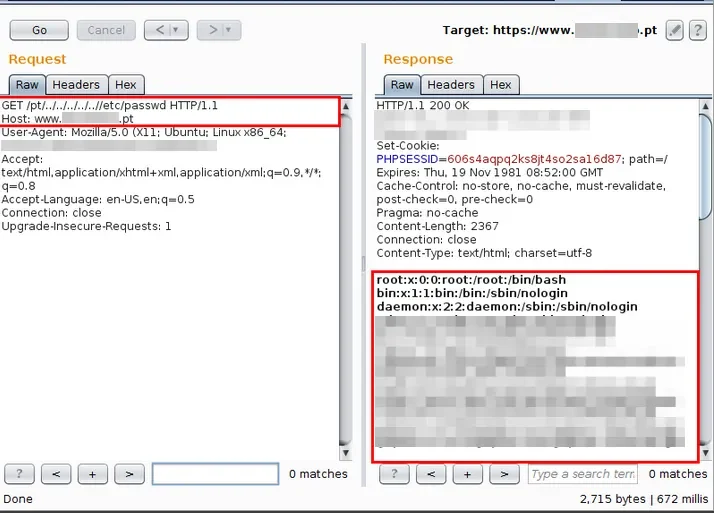
The image illustrates the successful traversal. The report does not show the request, the response or the exact payload that produced it.
Root cause
The report does not analyse the code. Based on the behaviour described, the language value taken from the URL is likely passed into the translation mechanism and used to build the path of the resource file that is loaded, without the value being restricted to the set of supported language codes.
Impact
The researcher demonstrates that a path traversal is reachable through the multilingual feature. The impact therefore depends on what the traversal can reach on the affected server.
Fix
A reasonable approach would be to accept only known language codes and map them to fixed resource paths, rather than using the URL value directly in a file path.
Variants to test
- Try traversal sequences in the language segment of a multilingual URL, for example in place of
froren, and look for content from outside the intended translation directory in the response. - Try encoded and double-encoded traversal sequences in the same segment, and check whether the response differs from the normal translated page.
- Try traversal sequences in other parameters that select a locale, template or resource file, and look for file contents or error messages that reveal paths outside the intended directory.
What happened, in plain words
A security researcher was hired to test a website for weaknesses. The site is called https://www.foo.pt here, but that is a stand-in name: the real company asked not to be named, so the report uses a fake address instead. This kind of paid testing is called a penetration test, or pentest: someone is given permission to attack a system on purpose, so the owners can find and fix problems before a real attacker does.
While looking around the site early on (a stage called footprinting, which just means getting to know the target), the researcher noticed something simple. The site could be shown in several languages, and the language was chosen by a short code in the web address. For example, the same home page appeared in French or in English depending on whether the address contained fr or en.
That raised a question: how does the site actually produce the translated page? If it has to fetch a file of translations from its own disk when the language changes, maybe the language code in the address is used to build the name of that file. And if the site trusts whatever is in the address, perhaps a cleverly crafted language code could make it fetch a file it was never meant to show. That idea is called path traversal, and it is exactly what the researcher found after trying a range of inputs.
The feature: languages in the address
The site supported several languages. The report gives these two examples:
https://www.foo.pt/fr/home/ -> this would be translated to French
https://www.foo.pt/en/home/ -> translated to English
Line by line:
https://www.foo.pt/fr/home/is the address of the home page, withfrsitting in the first part of the path after the site name.fris the standard short code for French.https://www.foo.pt/en/home/is the same page withenin that spot.enis the standard short code for English.- The arrow and the text after it are just the report explaining what each address produces: the French version and the English version of the same page.
Think of a hotel reception with a rack of leaflets, one per language. You say "French" at the desk and the receptionist pulls the French leaflet from the rack. The language code in the address is you saying which leaflet you want. Normally the receptionist only reaches into the rack. The question the researcher asked was whether you could say something other than a language and make the receptionist walk to a different cupboard entirely.
Getting curious about how it works
Seeing the language code in the address, the researcher wanted to understand how such translation is normally built. The report says the researcher searched for the ideas behind it, using the terms "internationalization" and "multilingual".
- Internationalization (often shortened to i18n, because there are 18 letters between the i and the n) is the general name for designing software so it can be adapted to many languages and regions.
- Multilingual simply means supporting more than one language.
That search led to a Google article about multilingual websites:
https://support.google.com/webmasters/answer/182192
This is a public help page from Google aimed at people who run websites. Reading background material like this is a normal first step: before you can guess how something might break, you need a rough picture of how it is put together.
The hypothesis
The reasoning in the report goes like this. If the site needs to load a file whenever the language changes, then the language value probably ends up being used to build a file path on the server. A file path is the address of a file on the computer's disk, something like a folder name followed by a file name. If the language value comes straight from the URL and is not checked, then a value containing special characters could steer that path somewhere else.
The researcher pictured the server-side code looking roughly like this:
echo $this->translate(“Home”);
What this snippet means, in plain words:
echois a common instruction in server-side programming languages meaning "print this out", so the result ends up in the page sent to the visitor.$this->translate(...)is a call to a translation function, a piece of code whose job is to take a word and return its equivalent in the current language. The$this->part just means the function belongs to the current object, a programming construct; you do not need to know more than that to follow the story.“Home”is the word being translated. The report shows it in curly quotes, which is how it appears in the write-up.
So the imagined flow is: the page asks for the translation of the word "Home", the translation function looks up which language is active, and it loads the matching file of translations from disk. The language is the part an attacker can influence, because it comes from the address bar.
What path traversal is
Path traversal (also called directory traversal) is a class of bug where a program builds a file path from input the user controls, and the user can slip in characters that climb out of the intended folder. On many systems, two dots in a row (..) mean "go up one folder". Chain a few together and you can walk from the folder the program meant to use up to the top of the disk, then back down into somewhere else, such as a folder holding configuration files or other users' data.
A simple everyday comparison: a library assistant is told "fetch the book from shelf 3". If you can whisper the instruction, you might say "fetch the book from shelf 3, then go up the stairs, then into the manager's office". The assistant follows the whole instruction literally, and comes back with something you were never allowed to see. The fix in real software is to accept only a fixed list of allowed values, so "shelf 3" is fine but anything else is refused.
Trying it out
With that idea in mind, the researcher tried a range of inputs in the language part of the address. This trial-and-error process is called fuzzing: sending many variations automatically and watching for one that behaves differently. The report does not list the individual inputs that were tried.
After some fuzzing, the traversal worked. The researcher describes the moment as a surprise and a success: a path traversal had been obtained through the multilingual feature. The image below illustrates the result.
The image includes a pointer to further reading on path traversal at https://portswigger.net/web-security/file-path-traversal. The report does not show the request that was sent, the response that came back, or the exact input that triggered the behaviour, so those details are not available here.
Why it works
The report does not examine the site's code, so the explanation below is reasoning from the observed behaviour rather than a confirmed reading of the source.
The likely cause is that the language value is taken from the URL and passed into the translation mechanism, which uses it to build the path of the resource file to load. Nothing appears to restrict that value to the set of languages the site actually supports.
What it means in practice
The researcher showed that a path traversal is reachable through the multilingual feature. That is the confirmed finding. The report does not say which files could be read, what data was exposed, or under what conditions the issue can be exploited beyond the site that was tested. How serious it is therefore depends on what the traversal can reach on that particular server: reading a harmless template is very different from reading a file full of credentials.
How it could be fixed
A sensible approach, in general terms, is to accept only known language codes and map each one to a fixed resource path, instead of putting the URL value directly into a file path. In the library comparison, the assistant should only accept the names of shelves that exist, and look up the location on a list kept at the desk, rather than following whatever route the visitor describes.
Other places to look
A few variations worth testing on similar features:
- Put traversal sequences in the language segment of a multilingual URL, in place of
froren, and look in the response for content from outside the intended translation folder. - Try encoded and double-encoded traversal sequences in the same segment. Encoding is a way of writing special characters so they survive being carried in a URL; double encoding wraps that process twice, and sometimes gets past filters that only decode once. Check whether the response differs from the normal translated page.
- Try traversal sequences in other parameters that select a locale, a template or a resource file, and look for file contents or error messages that reveal paths outside the intended folder. Error messages are often more talkative than the site owners would like.
Glossary
- Pentest (penetration test): an authorised attempt to break into a system, done to find weaknesses before criminals do.
- Footprinting: the early stage of a test where you gather basic information about the target, such as what it does and how it is structured.
- URL: the address you type in a browser, made of a site name and a path, for example
https://www.foo.pt/en/home/. - Path: the part of a URL after the site name, or the location of a file on a disk; both are sequences of folder names.
- Language code: a short standard label for a language, such as
frfor French orenfor English. - Internationalization (i18n): designing software so it can support many languages and regions.
- Multilingual: supporting more than one language.
- Server: the computer that holds a website and sends pages to visitors.
- Server-side code: programs that run on the server, not in your browser, and produce the page you receive.
- Function: a named block of code that performs a task when called.
echo: an instruction that prints a value out, so it appears in the page.- Path traversal (directory traversal): a bug where user input is used to build a file path, letting the user climb out of the intended folder and reach other files.
..: on many systems, a shorthand meaning "the folder above this one".- Fuzzing: sending many varied inputs automatically to see whether any produces unexpected behaviour.
- Payload: the specific input an attacker sends to try to trigger a bug.
- Encoding: a way of writing characters so they can travel safely inside a URL; double encoding applies it twice.
- Root cause: the underlying reason a bug exists in the code or design.
- Impact: the real-world harm a bug could cause if someone abused it.
- Remediation: the fix that removes the bug.



