Poisoning your Cache for 1000$ - Approach to Exploitation Walkthrough
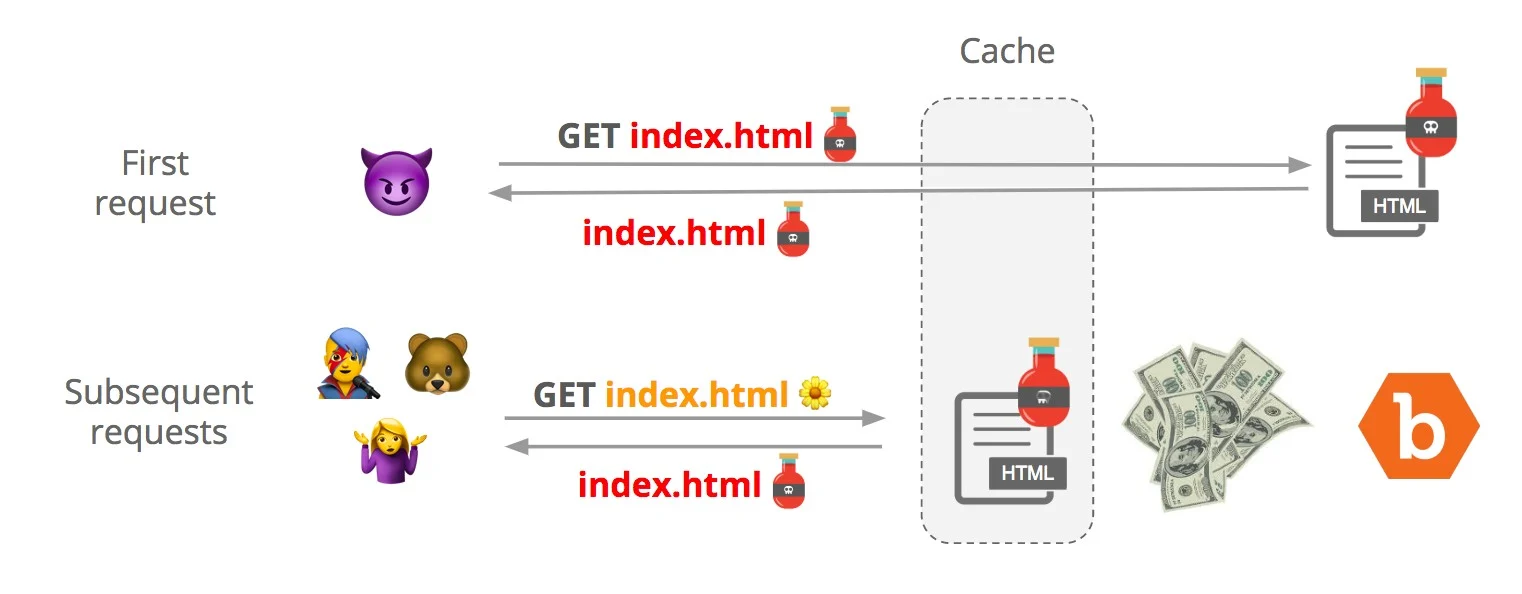
A page reflected the X-Forwarded-For header without sanitisation, and because Cloudflare caches responses, an attacker could inject a script that would be served from the cache to other users. This allowed stored cross-site scripting on a subdomain, potentially leading to account takeover.

Cache Poisoning BugCrowd Bug Bounty
The full write-up lives on its author's site
It belongs to its author, so we link to it rather than copy it. The other two tabs are our own rewrites, checked against it.
Context
In February 2021 I received a private program invite from Bugcrowd. The program was fairly new: the invite arrived two days after its official launch, so a first sweep by the first batch of researchers had already happened. I had a good feeling about it because I could find a Reflected XSS in roughly two minutes of work: the login page had a vulnerable returnTo parameter that looked like this:
https://example.com/login?returnTo=javascript:alert(document.domain)
I spent a few hours on the program and reported a few Reflected XSS and Stored XSS issues, which were eventually closed as duplicates. One of those duplicates led me to a Web Cache Poisoning vulnerability that escalated to a zero-interaction stored XSS. This is the walkthrough of how I got there.
The whole approach is based on the Practical Web Cache Poisoning research by albinowax, which introduced me to the bug class. I was a little sceptical at the time and did not really think I would meet one in the wild.
Setup
The work was done against a subdomain of one of the program's main targets, a page that reflected several headers from the request back to the user. The tools mentioned in the report were:
- Burp Suite, for intercepting and replaying requests (the reproduction steps reference the Repeater).
- ParamMiner, run with the Guess Everything option, to discover query parameters.
- The target itself, sitting behind CloudFlare.
No account or special role is described in the report.
Finding it
After the duplicate notifications I decided to dig deeper into the application. Even though I had been invited two days after most hackers, I believed there were more bugs to find given the variety of functionality. That turned out to be true: I found two IDORs which rewarded me nicely, and they pushed me deeper into a "weird" looking page for which I had been duped on a Reflected XSS a day earlier.

The page reflected some of the headers from my request, including the referer header, the user agent, a timestamp and an IP address field which I could confirm was mine. It was served on one of the main target's subdomains, and I had reached the specific endpoint by navigating through some Wayback Machine endpoints, so my initial request to it had no query parameters.
Because the page reflected parameters and looked like something that definitely should not be public, I ran ParamMiner with the Guess Everything option to look for query parameters. When the scan finished there were some newly discovered parameters which eventually led me to duplicate Reflected XSS, since it was possible to guess those parameters by inspecting the page contents.
A few minutes later the scan returned a Cache poisoning 3 flag, a firm indication that there was a Web Cache Poisoning issue on the page.
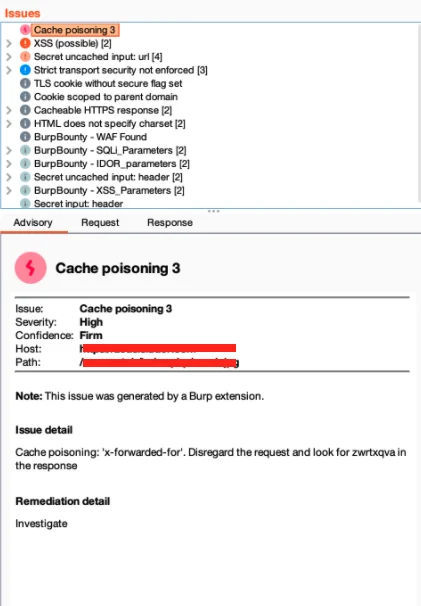
I started with quick fingerprinting checks and saw that the target runs on CloudFlare, and that my requests were indeed returned with the CF-Cache-Status: HIT response header, meaning the response to the page would be served from the cache.
Why did the scanner raise the Cache Poisoning alert? CloudFlare supports the X-Forwarded-For header in requests, and appends the input inserted in that header to the existing IP addresses of the client. The scanner identified that the cache was being interpreted and evaluated with the HIT response, and that there were unkeyed parameters which could be used to differentiate requests, so the same page could be served with additional context to victims querying the specific cached endpoint.
Exploitation
At this point I had a strong indication that the page was vulnerable to Web Cache Poisoning, but I still needed to show impact. The earlier request had reflected a few headers from my original request, such as the referer header and the IP addresses that made the request to the frontend proxy.
Step 1: inject into X-Forwarded-For
The first thing that came to mind was what would happen if I added the following to the X-Forwarded-For header, and whether it would be reflected in the response:
"><script>alert("nagli")</script>
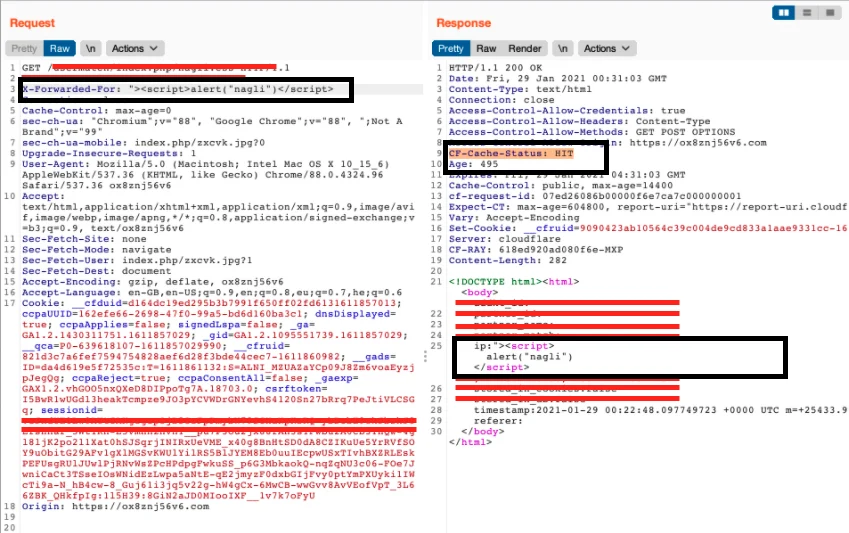
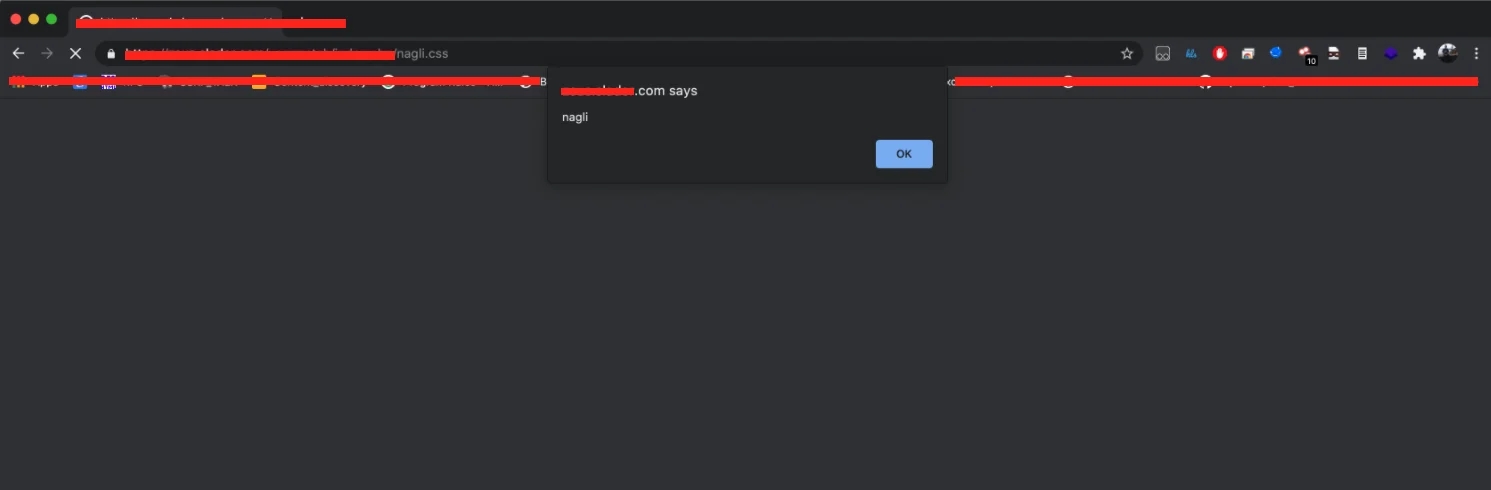
It was the case: I managed to inject the XSS payload from my request header, it got reflected in the page, and the response carried the HIT indication in the CF-Cache-Status header.
Step 2: confirm the cache serves the payload to a clean request
To verify that the content was being served from the cache, I initiated a second request without the X-Forwarded-For header and checked whether the response remained the same.
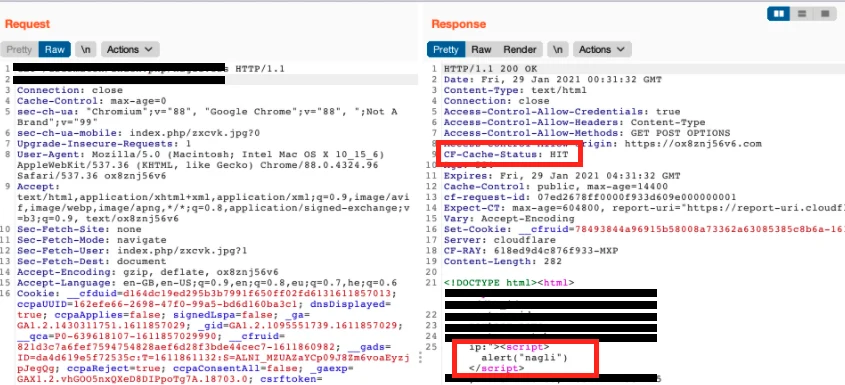
It was a success: I had managed to cache the XSS for other participants, in this case on my WAN, which means every device connected to my router at that time was infected with stored XSS when it navigated to the infected endpoint.
Step 3: move the payload to a cacheable file type
One crucial thing that took me some time to understand is that not every extension on the page gets cached by CloudFlare. My original endpoint was an HTML one, which looked like this:
https://subdomains.example.com/somefolder/someendpoint.html
CloudFlare will never serve that from its cache. In my particular case the endpoints were the same on all requests within the subdomain, so I decided to craft the payload on an endpoint that would eventually be cached, like this:
https://subdomains.example.com/somefolder/someendpoint/nagli.css
CloudFlare happily caches CSS files, so it had no problem with my exploitation payload.
Step 4: what the result gives an attacker
Eventually I had a stored XSS vulnerability that could be used to exfiltrate cookies from the main domain, which would lead to account takeover on the main site when a user navigates to the cached endpoint.
Root cause
The page reflects request headers, including X-Forwarded-For, into its HTML output. CloudFlare appends the value supplied in X-Forwarded-For to the client's existing IP addresses and forwards it, so the header is an unkeyed input: it changes the response body but is not part of the cache key. The cache therefore stores a response containing attacker-controlled markup and serves it to every subsequent visitor of the same cached endpoint.
The CDN cache is what turns a reflected value into a stored one. CloudFlare's caching rules limited which responses could be poisoned: the original .html endpoint was never served from cache, so the payload only became persistent once it was placed on a .css path that CloudFlare caches.
Impact
An attacker can poison a cached endpoint so that any user who requests it receives the injected script, with no interaction beyond visiting the page. In my test the victims were the devices connected to my own router, since the cache region I could reach was my local network. The stored XSS can be used to exfiltrate cookies from the main domain, which would lead to account takeover on the main site upon navigating to the cached endpoint. The report does not establish how far beyond that local region the poisoned response propagated.
Submitting the report
I submitted the report to Bugcrowd as Web Cache Poisoning via X-Forwarded-For Header to Stored XSS on subdomain.example.com.
My first submission did not take into account the file types that CloudFlare caching accepts, which made my reproduction steps not reproducible at first. Also, since the issue only affected my nearby area and the devices connected to my Wi-Fi spot, I could not just craft a PoC and send it to the triager with an alert box popping.
Reading a well-known Cache Poisoning report gave me ideas for explaining the nature of the problem more clearly and for presenting the reproduction steps in the best way.

I included lines explaining the idea behind CDN "regions" and where, as attackers, we can craft a PoC to attack and target other regions. We should not guess the region of our triager, though, so it should be enough to demonstrate the impact within our local network, with the following clear reproduction steps:
Steps to Reproduce:
1. Intercept the request to the following page https://subdomain.example.com/somefolder/someendpoint/nagli.css using burpsuite or any other tool.
2. Add the X-Forwarded-For header: "><script>alert(1)</script>
3. Get the request to the Burp repeater and send requests until you get "CF-Cache-Status: HIT" from the server
4. Remove the X-Forwarded-For header and send the request again, note that XSS payload is still being served from the cache
5. Navigate to the cached endpoint from different browser and note that alert will execute.
Those steps did the job, and the report was triaged as P2.

Timeline
| Event | Date |
|---|---|
| Web Cache Poisoning issue submitted | 29/01/2021 |
| Triager could not reproduce the issue | 06/02/2021 |
| Clearer reproduction steps submitted | 07/02/2021 |
| Triaged as P2 | 09/02/2021 |
| 1000$ reward | 09/02/2021 |
Fix
The report does not describe any fix applied by the program. The underlying problem is that an unkeyed header is reflected into a cacheable response; the general remedy is to stop reflecting X-Forwarded-For (and similar client-controlled headers) into the body, or to include every reflected input in the cache key, and to restrict caching to the file types that are actually meant to be cached.
Variants to test
- Other unkeyed headers. Send candidate headers such as
X-Forwarded-Host,X-Forwarded-SchemeorX-Original-URLwith a marker value and look for the marker in the response body. A positive result is the marker appearing in a response that also carriesCF-Cache-Status: HIT. - Cacheable extensions. Take any reflected value and request it under paths ending in
.css,.jsor other static extensions the CDN caches. A positive result is the payload being served from cache on a second request without the header. - Parameter discovery on reflective pages. Run ParamMiner with Guess Everything against pages that echo request data. A positive result is a newly discovered parameter that reflects, or a Cache poisoning flag from the scanner.
- Cache key behaviour. Repeat the same request with and without the injected header and compare
CF-Cache-Statusand the body. A positive result is aHITwith the injected content still present after the header is removed.
Conclusion
I did not go deep into Web Cache Poisoning as a concept, because there are many great resources for that knowledge. The point of this post is to show how I approached and practically exploited what is considered a rare vulnerability, and to write it down in friendlier steps.

What happened, in plain words
A security researcher was invited to a private bug bounty program on Bugcrowd. A bug bounty program is a deal offered by a company: if you find a security problem in their website and report it responsibly, they pay you a reward instead of calling the police. "Private" means only invited researchers can take part.
The researcher found a page on one of the company's websites that copied information from the visitor's request back into the page it showed. That page sat behind CloudFlare, a service that sits in front of a website and keeps copies of pages so it can hand them out faster to the next visitor. Because the page copied a value the visitor controls, and because CloudFlare stored that copy, the researcher could make CloudFlare hand out a page containing a small script to anyone who asked for it afterwards. A script running inside someone else's page is called cross-site scripting, or XSS. Because the bad copy was stored and served to later visitors, it became a stored XSS with no interaction needed from the victim: they only had to open the page.
The report was triaged (accepted as a real, valid issue) at priority P2 and paid 1000 USD.
Background: the invitation and the first bugs
In February 2021 the researcher received a private program invite from Bugcrowd. The program was fairly new: the invite arrived two days after its official launch, so a first sweep by the first batch of researchers had already happened.
The researcher had a good feeling about the program because a Reflected XSS turned up in roughly two minutes of work. Reflected XSS means the malicious script is not stored on the server; it travels in the request and is echoed straight back in the response, so it only affects the person who sends that particular request. The login page had a vulnerable returnTo parameter, a parameter being a named value attached to a web address after a question mark. It looked like this:
https://example.com/login?returnTo=javascript:alert(document.domain)
Line by line:
https://example.com/loginis the address of the login page.?starts the list of parameters.returnTo=is the parameter name. The site presumably uses it to know where to send you after you log in.javascript:alert(document.domain)is the value.javascript:tells the browser "run what follows as code instead of treating it as a web address".alert(...)opens a pop-up box.document.domainis the current site's name. So if the site later sends the browser to this value, the browser runs the pop-up instead of navigating.
A few hours on the program produced a few Reflected XSS and Stored XSS reports, which were eventually closed as duplicates: someone else had reported the same thing first, so no reward. Stored XSS means the malicious script is saved on the server and served to everyone who later loads that page.
One of those duplicates led to the Web Cache Poisoning vulnerability that escalated to a zero-interaction stored XSS. "Zero interaction" means the victim does nothing except open the page: no clicking, no typing.
The whole approach is based on the Practical Web Cache Poisoning research by albinowax, which introduced the bug class. The researcher was a little sceptical at the time and did not really think one would be met in the wild.
Setup: the tools and the target
The work was done against a subdomain of one of the program's main targets. A subdomain is a site that belongs to a bigger site, like shop.example.com under example.com. The page reflected several headers from the request back to the user. A header is a small labelled line of extra information that a browser or server attaches to every request and response, such as which page you came from or what browser you use.
The tools mentioned in the report were:
- Burp Suite, for intercepting and replaying requests. Intercepting means catching a request between your browser and the server so you can read and edit it; replaying means sending the same request again, possibly changed. The reproduction steps reference the Repeater, the part of Burp that lets you resend a request as many times as you like.
- ParamMiner, run with the Guess Everything option, to discover query parameters. Query parameters are the
name=valuepairs after the?in a web address. ParamMiner is an extension that tries many candidate parameter names and watches whether the response changes. - The target itself, sitting behind CloudFlare.
No account or special role is described in the report. An endpoint is simply a specific address on a site that does one thing.
Finding it
After the duplicate notifications the researcher decided to dig deeper. Even though the invite had come two days after most hackers, there was a belief that more bugs existed given the variety of functionality. That turned out to be true: two IDORs were found and rewarded nicely. IDOR stands for Insecure Direct Object Reference: the site lets you reach someone else's record just by changing an identifier in the address, because it never checks that the record is yours. Those two bugs pushed the researcher deeper into a "weird" looking page for which a Reflected XSS had been marked as a duplicate a day earlier.
The page reflected some of the headers from the request, including the referer header (the address of the page you came from), the user agent (the name of your browser and system), a timestamp and an IP address field which the researcher could confirm was theirs. An IP address is the numeric label a network uses to identify a device.
It was served on one of the main target's subdomains, and the specific endpoint had been reached by navigating through some Wayback Machine endpoints. The Wayback Machine is an archive that keeps old copies of web pages. Because of that route, the initial request to the endpoint had no query parameters.
Because the page reflected parameters and looked like something that definitely should not be public, ParamMiner was run with the Guess Everything option to look for query parameters. When the scan finished there were some newly discovered parameters which eventually led to duplicate Reflected XSS, since it was possible to guess those parameters by inspecting the page contents.
A few minutes later the scan returned a Cache poisoning 3 flag, a firm indication that there was a Web Cache Poisoning issue on the page.
Quick fingerprinting checks followed. Fingerprinting means working out what software and services a site uses, from small clues in its responses. The target runs on CloudFlare, and the requests were indeed returned with the CF-Cache-Status: HIT response header. That header is CloudFlare's own note telling you whether the answer came from its stored copy. HIT means yes, it came from the cache; MISS would mean it was fetched fresh from the real server. So the response to the page would be served from the cache.
Why did the scanner raise the Cache Poisoning alert? CloudFlare supports the X-Forwarded-For header in requests, and appends the input inserted in that header to the existing IP addresses of the client. In plain words: X-Forwarded-For is a header that proxies (middlemen servers) use to tell the next server "this request really came from this address". CloudFlare takes whatever you put there and adds it to the list of addresses it already knows about, then passes it on. The scanner identified that the cache was being interpreted and evaluated with the HIT response, and that there were unkeyed parameters which could be used to differentiate requests, so the same page could be served with additional context to victims querying the specific cached endpoint.
Two ideas need unpacking here. The cache key is the set of things the cache uses to decide which stored copy to hand out, usually just the address. An unkeyed input is something that changes the response but is not part of that key. If a header is unkeyed, two visitors asking for the same address get the same stored copy, even though one of them sent a header that changed what the page contains. That is the whole seed of cache poisoning: you slip something into a stored copy that other people will receive.
Exploitation
At this point there was a strong indication that the page was vulnerable to Web Cache Poisoning, but impact still had to be shown. Impact means a concrete harm a real attacker could cause, not just a strange behaviour. The earlier request had reflected a few headers from the original request, such as the referer header and the IP addresses that made the request to the frontend proxy. A frontend proxy is the server that first receives your request before passing it inward.
Step 1: inject into X-Forwarded-For
The first thing that came to mind was what would happen if the following were added to the X-Forwarded-For header, and whether it would be reflected in the response:
"><script>alert("nagli")</script>
Line by line:
">closes whatever HTML attribute the page was building around the reflected value, and closes the tag. If the page wrote something like<input value="...">, this breaks out of the quotes and the tag.<script>opens a script element.alert("nagli")is the code inside it: a pop-up showing the word nagli.</script>closes the script element.
The language label on that block is written javsascript in the report; it is only a label on the code block and does not change what the payload does.
It was the case: the XSS payload was injected from the request header, it got reflected in the page, and the response carried the HIT indication in the CF-Cache-Status header. In other words, CloudFlare had stored a copy of the page containing the script.
Step 2: confirm the cache serves the payload to a clean request
To verify that the content was being served from the cache, a second request was made without the X-Forwarded-For header, to check whether the response remained the same. This is the crucial test: if the script still appears when you send nothing unusual, then the cache is handing out the poisoned copy to ordinary visitors.
It was a success: the XSS had been cached for other participants, in this case on the researcher's WAN. A WAN is a wide area network; here it refers to the researcher's own network. Every device connected to the router at that time was infected with stored XSS when it navigated to the infected endpoint.
Step 3: move the payload to a cacheable file type
One crucial thing that took some time to understand is that not every extension on the page gets cached by CloudFlare. An extension is the ending of a file name, like .html or .css, which hints at what kind of file it is. The original endpoint was an HTML one, which looked like this:
https://subdomains.example.com/somefolder/someendpoint.html
Line by line:
https://is the secure web protocol.subdomains.example.comis the subdomain./somefolder/someendpoint.htmlis the path, ending in.html, meaning a web page.
CloudFlare will never serve that from its cache. In this particular case the endpoints were the same on all requests within the subdomain, so the payload was crafted on an endpoint that would eventually be cached, like this:
https://subdomains.example.com/somefolder/someendpoint/nagli.css
Line by line:
- The address is the same up to
/somefolder/someendpoint. /nagli.cssis an extra path segment ending in.css, the extension for a stylesheet, the file that tells a browser how a page should look.
CloudFlare happily caches CSS files, so it had no problem with the exploitation payload.
Step 4: what the result gives an attacker
Eventually there was a stored XSS vulnerability that could be used to exfiltrate cookies from the main domain, which would lead to account takeover on the main site when a user navigates to the cached endpoint. A cookie is a small piece of data a site stores in your browser so it can recognise you on the next request; for a logged-in user it often acts like a temporary pass. Exfiltrate means steal and send elsewhere. Account takeover means using that stolen pass to act as the victim.
Root cause
The page reflects request headers, including X-Forwarded-For, into its HTML output. CloudFlare appends the value supplied in X-Forwarded-For to the client's existing IP addresses and forwards it, so the header is an unkeyed input: it changes the response body but is not part of the cache key. The cache therefore stores a response containing attacker-controlled markup and serves it to every subsequent visitor of the same cached endpoint.
The CDN cache is what turns a reflected value into a stored one. A CDN, or content delivery network, is a network of servers spread around the world that keep copies of content close to visitors. CloudFlare's caching rules limited which responses could be poisoned: the original .html endpoint was never served from cache, so the payload only became persistent once it was placed on a .css path that CloudFlare caches.
Impact
An attacker can poison a cached endpoint so that any user who requests it receives the injected script, with no interaction beyond visiting the page. In this test the victims were the devices connected to the researcher's own router, since the cache region reachable was the local network. A cache region is one of the separate copies of a cache that a CDN keeps in different places. The stored XSS can be used to exfiltrate cookies from the main domain, which would lead to account takeover on the main site upon navigating to the cached endpoint. The report does not establish how far beyond that local region the poisoned response propagated.
Submitting the report
The report went to Bugcrowd as Web Cache Poisoning via X-Forwarded-For Header to Stored XSS on subdomain.example.com.
The first submission did not take into account the file types that CloudFlare caching accepts, which made the reproduction steps not reproducible at first. Reproduction steps are the numbered instructions a triager follows to see the bug for themselves. Also, since the issue only affected the nearby area and the devices connected to the Wi-Fi spot, a PoC could not just be crafted and sent to the triager with an alert box popping. A PoC, or proof of concept, is the smallest working demonstration that the bug is real.
Reading a well-known Cache Poisoning report gave ideas for explaining the nature of the problem more clearly and for presenting the reproduction steps in the best way.
Lines were included explaining the idea behind CDN "regions" and where, as attackers, a PoC can be crafted to attack and target other regions. The triager's region should not be guessed, though, so it should be enough to demonstrate the impact within the local network, with the following clear reproduction steps:
Steps to Reproduce:
1. Intercept the request to the following page https://subdomain.example.com/somefolder/someendpoint/nagli.css using burpsuite or any other tool.
2. Add the X-Forwarded-For header: "><script>alert(1)</script>
3. Get the request to the Burp repeater and send requests until you get "CF-Cache-Status: HIT" from the server
4. Remove the X-Forwarded-For header and send the request again, note that XSS payload is still being served from the cache
5. Navigate to the cached endpoint from different browser and note that alert will execute.
Line by line:
- Catch the request for the
.cssaddress in Burp or a similar tool, so it can be edited before it reaches the server. - Add the
X-Forwarded-Forheader with the payload as its value. The payload here is the shorter"><script>alert(1)</script>, which pops a box showing 1. - Send the request repeatedly from the Repeater until the response says
CF-Cache-Status: HIT, meaning CloudFlare has now stored the poisoned copy. - Remove the header and send again. The script still comes back, which proves the cache, not the header, is now the source.
- Open the same address in a different browser and watch the pop-up run, which proves an ordinary visitor is affected.
Those steps did the job, and the report was triaged as P2. Priority levels are the program's own scale of severity; P2 is a serious issue, below the most critical.
Timeline
| Event | Date |
|---|---|
| Web Cache Poisoning issue submitted | 29/01/2021 |
| Triager could not reproduce the issue | 06/02/2021 |
| Clearer reproduction steps submitted | 07/02/2021 |
| Triaged as P2 | 09/02/2021 |
| 1000$ reward | 09/02/2021 |
Fix
The report does not describe any fix applied by the program. The underlying problem is that an unkeyed header is reflected into a cacheable response; the general remedy is to stop reflecting X-Forwarded-For (and similar client-controlled headers) into the body, or to include every reflected input in the cache key, and to restrict caching to the file types that are actually meant to be cached.
Variants to test
- Other unkeyed headers. Send candidate headers such as
X-Forwarded-Host,X-Forwarded-SchemeorX-Original-URLwith a marker value and look for the marker in the response body. A positive result is the marker appearing in a response that also carriesCF-Cache-Status: HIT. - Cacheable extensions. Take any reflected value and request it under paths ending in
.css,.jsor other static extensions the CDN caches. A positive result is the payload being served from cache on a second request without the header. - Parameter discovery on reflective pages. Run ParamMiner with Guess Everything against pages that echo request data. A positive result is a newly discovered parameter that reflects, or a Cache poisoning flag from the scanner.
- Cache key behaviour. Repeat the same request with and without the injected header and compare
CF-Cache-Statusand the body. A positive result is aHITwith the injected content still present after the header is removed.
Conclusion
Web Cache Poisoning as a concept was not explored deeply here, because there are many great resources for that knowledge. The point of this post is to show how a rare vulnerability was approached and practically exploited, written down in friendlier steps.
Glossary
- Bug bounty program: a company's offer to pay researchers who report security problems responsibly.
- Private program: a bounty program open only to invited researchers.
- Bugcrowd: the platform that hosted this program and handled the report.
- Triaged: accepted by the program as a valid issue and given a priority.
- P2: a priority level on the program's scale, serious but below the most critical.
- XSS (cross-site scripting): getting a site to run code written by an attacker inside a victim's browser.
- Reflected XSS: the malicious script travels in the request and is echoed straight back; it affects only the person who sends it.
- Stored XSS: the malicious script is saved on the server and served to everyone who later loads the page.
- Zero-interaction: the victim only has to open the page; no clicking or typing.
- Parameter: a
name=valuepair attached to a web address after a?. - Query parameter: a parameter in the address itself.
- Endpoint: a specific address on a site that performs one function.
- Subdomain: a site that belongs to a larger site, like
shop.example.comunderexample.com. - Header: a labelled line of extra information attached to a request or response.
- Referer header: the header that says which page you came from.
- User agent: the header that names your browser and system.
- IP address: the numeric label a network uses to identify a device.
- Burp Suite: a tool for intercepting, editing and replaying web requests.
- Repeater: the part of Burp that resends a request as many times as you like.
- ParamMiner: an extension that guesses parameter names and watches for changes in the response.
- Guess Everything: a ParamMiner option that tries a very large set of candidate names.
- IDOR: Insecure Direct Object Reference; reaching someone else's record by changing an identifier because the site never checks ownership.
- Wayback Machine: an archive that keeps old copies of web pages.
- Fingerprinting: working out what software a site uses from small clues in its responses.
- CloudFlare: a CDN and proxy service that sits in front of a site.
- CDN (content delivery network): servers spread around the world that keep copies of content close to visitors.
- Cache: a stored copy of a response, kept so it can be handed out again quickly.
- Cache key: the set of things a cache uses to decide which stored copy to hand out, usually just the address.
- Unkeyed input: something that changes the response but is not part of the cache key.
- Cache region: one of the separate copies of a cache that a CDN keeps in different places.
- CF-Cache-Status: CloudFlare's response header saying whether the answer came from cache.
- HIT: the answer came from the cache.
- MISS: the answer was fetched fresh from the real server.
- X-Forwarded-For: a header proxies use to pass on the real client address; CloudFlare appends its value to the existing addresses.
- Frontend proxy: the server that first receives your request before passing it inward.
- Web Cache Poisoning: slipping attacker-controlled content into a stored copy so later visitors receive it.
- Extension: the ending of a file name, like
.htmlor.css, hinting at the file type. - CSS: the file type that tells a browser how a page should look.
- Cookie: a small piece of data a site stores in your browser to recognise you on later requests.
- Exfiltrate: steal data and send it elsewhere.
- Account takeover: using stolen credentials or passes to act as the victim.
- Impact: the concrete harm a real attacker could cause.
- PoC (proof of concept): the smallest working demonstration that a bug is real.
- Reproduction steps: numbered instructions a triager follows to see the bug for themselves.
- WAN: a wide area network; here, the wider network beyond the local router.
- Duplicate: a report of a bug someone else already reported, so no reward.






