Privilege escalation leads to deleting other user’s account and company Workspace [Access Control]
A normal user could access the subscription endpoint and downgrade the workspace plan, which permanently deleted the entire workspace, all APIs, and all user accounts including the admin's. The admin received no notification, so the organisation suffered data loss without warning.
 Published on medium.com
Interesting heading?? It took me 15 minutes to think about the heading.
The full write-up lives on its author's site
It belongs to its author, so we link to it rather than copy it. The other two tabs are our own rewrites, checked against it.
Context
The target was a web application that lets teams create a shared workspace and manage APIs, including payment APIs. The workspace has an owner (admin) and invited members (normal users), and it carries a subscription plan that can be changed from a page at the endpoint /account/subscription. The report does not name the product or the program; the only asset listed is medium.com, which is where the write-up was published.
The bug is a broken access control problem: a normal user could reach the plan management function and downgrade the workspace, which destroyed the workspace's data and permanently deleted the other members' accounts.
Setup
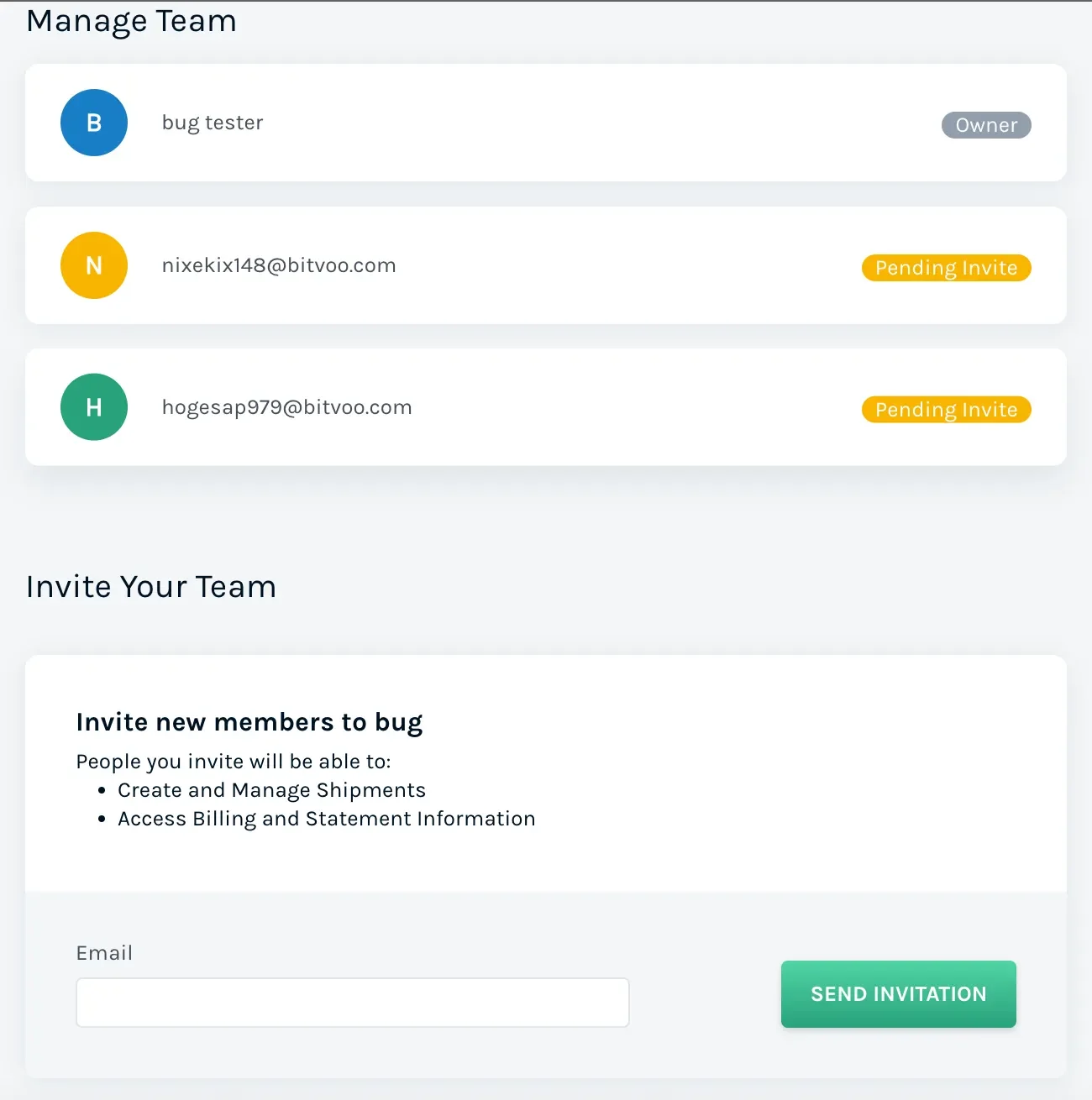
The researcher worked with two accounts, referred to as A and B, and tested the login and logout flow first. While browsing manually, he noted the extra functionalities of the application so he could come back to them later. He then created a workspace, created a few important APIs inside it, and used the Invite Your Team feature to invite his other email address into the same workspace.
That produced a team of three members:
- Owner (Admin)
- Account A (Normal User)
- Account B (Normal User)
Before the manual work, the researcher ran reconnaissance with Nuclei looking for low-hanging fruit (XSS, SQLi, information disclosure) and did visual recon with aquatone, without finding anything suspicious. The finding came from manual browsing, not from automation.
Finding it
While testing the normal user flow, the researcher visited the current plan endpoint /account/subscription. On that page there was a function called Change plan. The application allowed normal users, not just the owner, to change their workspace plans. That alone was unexpected.
The page also had a button called Downgrade a plan.
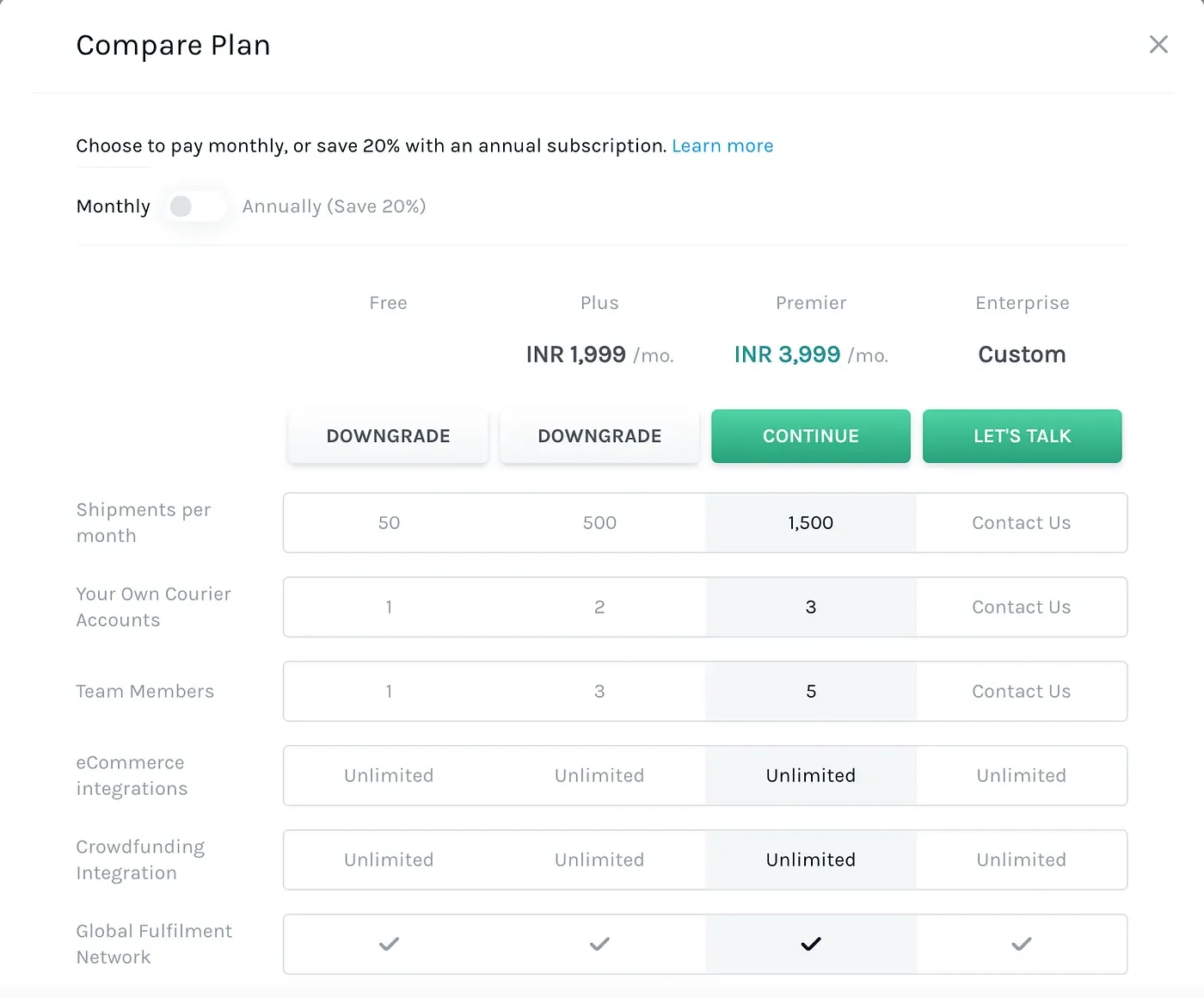
Clicking Downgrade produced a warning saying you will lose your entire work. The warning also stated that Account B and the other teammates would be permanently deleted. So the destructive consequence was described in the interface before the action was taken, but nothing prevented a normal user from taking it.
Exploitation
Step 1: Reach the plan page as a normal user
Logged in as Account A (a normal user), the researcher opened:
/account/subscription
This is the current plan endpoint. It rendered the plan management UI, including the Change plan function and the Downgrade a plan button, to a user who was not the workspace owner.
Step 2: Read the warning
The downgrade flow displayed a warning that the user would lose their entire work, and that Account B and the other teammates would be permanently deleted. The researcher proceeded anyway.
Step 3: Click Downgrade
Clicking Downgrade as the normal user executed the downgrade on the whole workspace. The result, in the researcher's words:
- The entire work was deleted.
- All the APIs were deleted, including important payment APIs.
- Account A and Account B were permanently deleted, not only from the workspace but also as their main accounts.

Step 4: Check the admin dashboard
Still logged in as the admin, the researcher went to the admin dashboard. All the work was gone, including the other teammates, from the admin's view as well. The admin had been downgraded to the normal plan, and the admin's one-month free trial had ended, all from a single click by a normal user.
Root cause
The plan management function at /account/subscription was reachable by normal users, and the downgrade action was authorised for them. The application did not restrict plan changes, and in particular the destructive downgrade, to the workspace owner or admin role. The warning text shows the developers knew the downgrade would delete the work and the other members' accounts, but the action was still exposed to every member.
A second business logic issue made it worse: after deleting, creating or modifying workspace settings, the admin received no email notification. The admin therefore had no idea what had happened to the workspace until he looked at the dashboard himself. The report does not describe the server-side code, so the exact check that was missing is not shown; likely the endpoint relied on the user being authenticated and a member of the workspace rather than on the owner role.
Impact
A normal user could destroy an entire organisation's workspace: all work and all APIs, including payment APIs, were deleted, and the other members, including another normal user, lost their main accounts permanently. The owner was downgraded to the normal plan and lost the remaining free trial. Because no notification email was sent for workspace changes, the admin had no warning while it happened. The report frames this as data loss for an entire organisation caused by a normal user.
Fix
Based on the finding, plan changes, and above all the destructive downgrade, should be restricted to the workspace owner or admin role, and the endpoint should enforce that role server-side rather than relying on the UI. Workspace changes, especially deletions, should also trigger a notification to the admin, which the report explicitly calls out as missing.
Variants to test
- Role checks on billing endpoints. As a normal member, request the plan and subscription endpoints directly and try changing or cancelling the plan. A positive result is a successful plan change or a destructive action performed without the owner role.
- Destructive actions behind warnings. Look for delete, downgrade, transfer or archive actions that show a warning but do not check the caller's role. A positive result is the action completing for a non-owner.
- Missing notifications. Perform create, modify and delete operations on a workspace as a member and watch the admin's inbox. A positive result is a change with no notification to the owner.
- Cascading deletions. Check whether removing a member or downgrading a plan deletes the member's main account rather than only their workspace membership. A positive result is the account itself becoming unusable.
Timeline
| Event | Date |
|---|---|
| Report | Thu, 25 Nov 2021 5:09:55 PM GMT+05:30 |
| Accepted | Fri, 26 Nov 2021 7:51:24 AM GMT+05:30 |
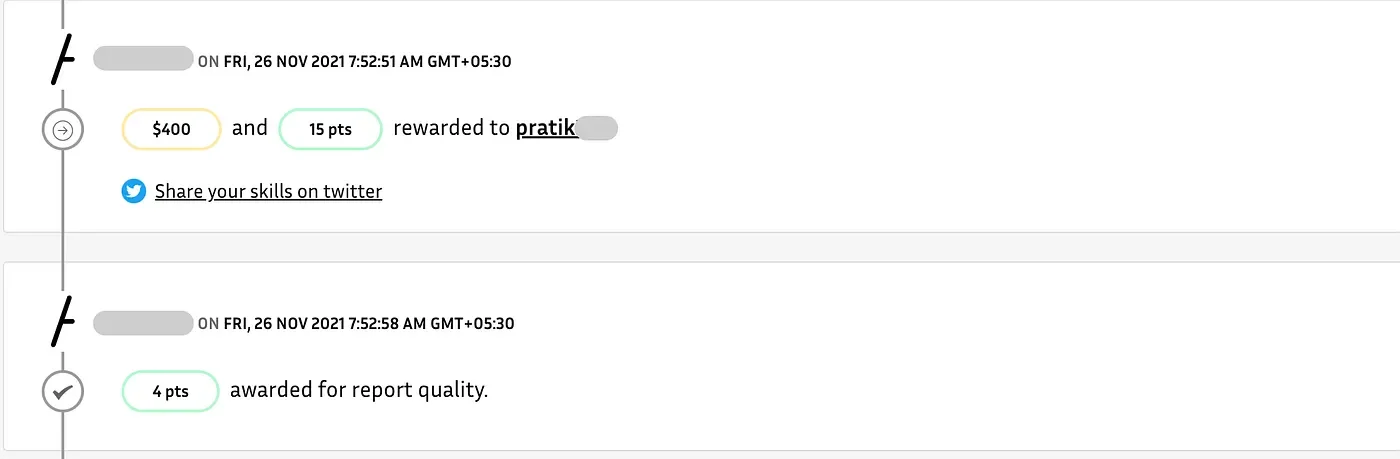
| Bounty | $400 |
What happened, in plain words
A website let teams work together in a shared space. Inside that space a team could create and manage "APIs", which are the connections that let one piece of software talk to another. Some of those APIs handled payments, so they were important.
Every shared space has an owner (the admin) and invited members (normal users). The space also has a subscription plan, which is the paid package that says what the team is allowed to use. There was a page where the plan could be changed.
The problem: a normal user, not just the owner, could open that plan page and press a button called Downgrade a plan. Downgrading means moving to a cheaper or smaller package. On this site, downgrading did far more than change a price: it wiped the whole workspace, deleted every API inside it, and permanently deleted the other members' accounts, including their main accounts on the site. The owner was moved down to the normal plan too, and a one-month free trial ended.
This kind of bug is called broken access control. Access control is the set of rules about who is allowed to do what. When those rules are missing or too loose, someone gets to do something they should not be allowed to do. A related term is privilege escalation: a user with low privileges (a normal member) manages to perform an action that should need high privileges (the owner).
The researcher who found it was paid a $400 bounty. A bounty is a reward a company pays to someone who reports a security problem responsibly instead of abusing it.
The setup: two accounts and a shared workspace
Before any of this, the researcher did some automated scanning. He ran a tool called Nuclei, which sends a large set of known test requests at a site to look for common weaknesses. The weaknesses he was hunting for were:
- XSS (cross-site scripting): tricking a site into running an attacker's JavaScript in another user's browser.
- SQLi (SQL injection): slipping database commands into input so the site's database does something it should not.
- Information disclosure: the site accidentally revealing data it should keep private.
None of that found anything. He also used a tool called aquatone, which takes screenshots of many subdomains of a site so you can flick through them visually and spot something odd. Nothing suspicious there either.
So he switched to browsing the site by hand. This is a useful lesson in itself: automated tools only find what they already know how to look for, and a human clicking around can notice things a scanner cannot.
He created two accounts, called A and B, and first tested the login and logout flow. The point of that step is to understand how the site identifies you: when you log in, the site usually gives your browser a session cookie or token, a small piece of data that your browser sends back with every request so the site knows who you are. Testing login and logout tells you whether that identity is handled correctly.
While browsing, he made a note of the extra features the site offered, so he could come back to them later. One of those features was creating a workspace. Inside the workspace you could create and manage APIs, including payment APIs.
An API (application programming interface) is, in everyday terms, a waiter between two programs: one program asks for something, the API carries the request to the system that can do it, and brings back the answer. A payment API is one that moves money or payment information, which is why deleting one matters so much.
He created a workspace, created a few important APIs inside it, and used a feature called Invite Your Team to invite his other email address into the same workspace. Inviting a second account is a standard way to test what a normal member can see and do compared with the owner.
That gave him a team of three members:
- Owner (Admin)
- Account A (Normal User)
- Account B (Normal User)
Finding the problem
He then tried various attack scenarios, switching between the admin account and the normal user accounts. While testing the normal user flow, he visited the current plan page. The address of that page is an endpoint, which simply means a specific URL on the site that does a specific job:
/account/subscription
On that page there was a function called Change plan. This was surprising: the site was letting normal users, not only the owner, change the workspace's plan. A plan is a billing and permission decision, so normally only the person paying, the owner, should be able to touch it.
On the same page there was a button called Downgrade a plan.
He clicked Downgrade and got a warning saying:
you will lose your entire work.
The warning also said that Account B and the other teammates would be permanently deleted. So the site itself told the user that this action destroys everything. That is important: the developers clearly knew what the button did. The mistake was not that they did not understand the consequence, it was that they let any member press it.
Carrying out the attack, step by step
Step 1: Open the plan page as a normal user
Logged in as Account A, a normal user, he opened:
/account/subscription
Line by line, there is only one line here, and it is a path, not a full web address. The first slash means "start from the site's main address". account is a section of the site about the user's account. subscription is the page about the paid plan. The point of this step is to check whether a normal member is allowed to load a page that belongs to billing and plan management. If the page loads and shows working buttons, the site is already trusting him too much.
Step 2: Read the warning
The downgrade flow showed a warning that the user would lose their entire work, and that Account B and the other teammates would be permanently deleted. He read it and went ahead anyway. The reason to read warnings during testing is that they tell you what the developers expect the action to do. A warning that describes destruction is a strong hint that the button is dangerous, and dangerous buttons should be behind a permission check.
Step 3: Click Downgrade
Clicking Downgrade as the normal user ran the downgrade on the whole workspace. The results, in the researcher's words:
- The entire work was deleted.
- All the APIs were deleted, including important payment APIs.
- Account A and Account B were permanently deleted, not only from the workspace but also as their main accounts.
Notice the last point carefully. Removing someone from a workspace should, at most, take away their access to that workspace. Here it also destroyed their main account on the site, which is a much bigger loss. This is sometimes called a cascading deletion: one action triggers deletions of things that should not have been touched.
Step 4: Check the admin dashboard
Still logged in as the admin, he went to the admin dashboard. All the work was gone, including the other teammates, from the admin's view as well. The admin had been moved down to the normal plan, and the admin's one-month free trial had ended, all from a single click by a normal user.
This step matters because it confirms the damage was real and global, not just a display glitch on the normal user's screen. The owner saw the same destruction.
Why it worked
The plan management function at /account/subscription could be reached by normal users, and the downgrade action was allowed for them. The site did not limit plan changes, and especially the destructive downgrade, to the workspace owner or admin role.
A role is a label attached to a user that says what they may do, for example owner, admin or member. Authorisation is the act of checking that label before performing an action. Authentication is different: it is checking who you are, for example with a password. A useful everyday comparison is a hotel. Authentication is showing your key card at the door. Authorisation is whether that card opens only your room or every room in the building. Here, every member's card opened the room with the self-destruct button.
The warning text shows the developers knew the downgrade would delete the work and the members' accounts, but the action was still offered to every member.
A second business logic issue made it worse. Business logic means the rules of how the product is supposed to work, as opposed to low-level technical bugs. After deleting, creating or modifying workspace settings, the admin received no email notification. So the admin had no idea what had happened to the workspace until he looked at the dashboard himself.
The report does not show the server-side code, so the exact missing check is not visible. Most likely the endpoint only checked that the caller was logged in and was a member of the workspace, rather than checking that the caller was the owner.
Impact
A normal user could destroy an entire organisation's workspace. All work and all APIs, including payment APIs, were deleted. The other members, including another normal user, lost their main accounts permanently. The owner was moved to the normal plan and lost the remaining free trial. Because no notification email was sent for workspace changes, the admin had no warning while it happened. The report describes this as data loss for an entire organisation caused by a normal user.
Fix
The report does not say what the vendor changed. Based on the finding, plan changes, and above all the destructive downgrade, should be limited to the workspace owner or admin role, and the endpoint should enforce that role on the server rather than relying on the interface. Hiding a button in the browser is not enough, because a determined user can send the request directly. Workspace changes, especially deletions, should also trigger a notification to the admin, which the report explicitly calls out as missing.
Variants to test
These are the same kinds of checks, written so you can try them on a site you are allowed to test:
- Role checks on billing endpoints. As a normal member, request the plan and subscription endpoints directly and try changing or cancelling the plan. A positive result is a successful plan change or a destructive action performed without the owner role.
- Destructive actions behind warnings. Look for delete, downgrade, transfer or archive actions that show a warning but do not check the caller's role. A positive result is the action completing for a non-owner.
- Missing notifications. Perform create, modify and delete operations on a workspace as a member and watch the admin's inbox. A positive result is a change with no notification to the owner.
- Cascading deletions. Check whether removing a member or downgrading a plan deletes the member's main account rather than only their workspace membership. A positive result is the account itself becoming unusable.
Timeline
| Event | Date |
|---|---|
| Report | Thu, 25 Nov 2021 5:09:55 PM GMT+05:30 |
| Accepted | Fri, 26 Nov 2021 7:51:24 AM GMT+05:30 |
| Bounty | $400 |
Glossary
- Access control: the rules that decide who is allowed to do what on a site.
- Admin: the owner of a workspace, with the highest level of permission.
- API: a defined way for one piece of software to ask another for something and get an answer back.
- aquatone: a tool that takes screenshots of many subdomains so you can review them visually.
- Authentication: proving who you are, for example with a password.
- Authorisation: checking whether the person who is already identified is allowed to perform a particular action.
- Bounty: a reward paid by a company for a responsibly reported security problem.
- Broken access control: a bug where the permission rules are missing or too loose, so someone can do more than they should.
- Business logic: the intended rules of how a product works, as opposed to low-level technical flaws.
- Cascading deletion: one action causing other, unrelated things to be deleted as a side effect.
- Cookie / token: a small piece of data your browser stores and sends back so the site can recognise your session.
- Downgrade: moving a subscription to a cheaper or smaller plan.
- Endpoint: a specific URL on a site that performs a specific job.
- Information disclosure: a bug where a site reveals data it should keep private.
- Nuclei: a scanner that sends a large set of known test requests to look for common weaknesses.
- Normal user: a regular member of a workspace without owner permissions.
- Privilege escalation: a low-privilege user managing to perform an action that should require high privileges.
- Reconnaissance: the information-gathering phase before attacking, such as mapping pages and features.
- Role: a label on a user, such as owner, admin or member, that defines what they may do.
- Session: the period during which a site remembers that you are logged in.
- Subscription plan: the paid package that defines what a team may use.
- Workspace: a shared area where a team keeps its work, members and settings.

