Privilege Escalation: Modeler Can Grant Administrator Access to Any User
A user with the Modeler role could call the collaborator-invite API endpoint directly and add another account with Administrator access to the model. The added account could then remove the original owner.
 Published on medium.com
Bug Bounty
The full write-up lives on its author's site
It belongs to its author, so we link to it rather than copy it. The other two tabs are our own rewrites, checked against it.
Context
The target was a web application in which users collaborate on a model. Access to a model is governed by three roles: Admin (Owner), Modeler and Viewer. The feature at the centre of the report is the collaborator invitation flow, which lets a user add another account to a model and assign it a role. According to the report, inviting new users to collaborate on a model is an action that is supposed to be available only to an Admin.
The researcher's stated interest was the boundary between roles: with several roles and a lot of code behind them, mistakes in authorisation checks are common.
Setup
The researcher created two accounts inside the same model: one with Admin privileges and one with a lower privilege, either Viewer or Modeler. A third account was later used as the invitee. Requests were captured and replayed with Burp Suite.
The testing method was consistent throughout:
- Perform an Admin-only action using the Admin account and capture the request in Burp Suite.
- Replace the Admin session with the lower-privileged account's session.
- Send the same request again.
The expectation was simple: if the backend checks the user's role properly, the replayed request should be rejected.
Finding it
The researcher set three goals for the testing:
- Making a Viewer perform a Modeler task
- Making a Viewer perform an Admin task
- Making a Modeler perform an Admin task
The first two were tested by replaying Admin and Modeler actions with a Viewer session. Both Viewer → Modeler and Viewer → Admin looked secure: the requests were rejected.
The Modeler role was different. A Modeler has more privileges than a Viewer, but the invitation of new users to a model was supposed to be reserved for an Admin. The user interface did not offer a Modeler any way to do this, so the researcher went directly to the backend to see what would happen.
Exploitation
Step 1: identify the invitation endpoint
The application invites a new collaborator to a model with the following request:
POST /api/models/{MODEL_ID}/collaborators
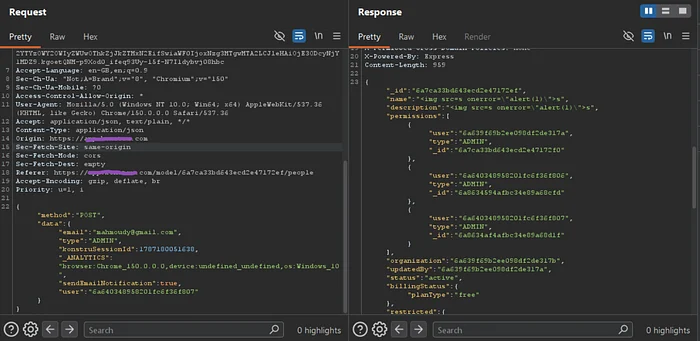
The report shows the request line used to invite a new collaborator to a model. The report does not show the request body as captured.
Step 2: capture the request as Admin
The researcher captured the invitation request using the Admin account in Burp Suite.
Step 3: swap the session and add the parameters
The Admin session was replaced with the Modeler session. The researcher then supplied the email and user ID of another account, set the type to ADMIN, and sent the request.
The request was accepted. The Modeler had performed an action that was supposed to be restricted to Admins.
Step 4: confirm the result
To confirm the effect, the researcher logged into the third account that had been added by the Modeler. That account had Administrator access to the model, including the ability to remove the original owner.
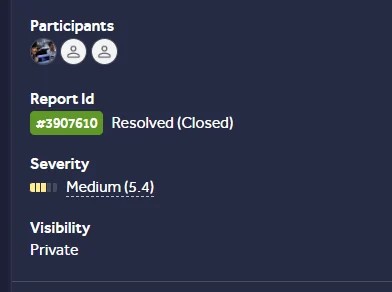
The triager scored the issue as follows:
CVSS:3.0/AV:N/AC:L/PR:L/UI:N/S:U/C:N/I:L/A:L
Root cause
The invitation request from a Modeler session was accepted, and the invited account had Administrator access to the model. The report does not include the server-side code, so the exact mistake is not shown.
The Viewer tests looked secure, so the actions tested with a Viewer session were rejected. The invitation path accepted a Modeler session even though the UI offered no invitation option to a Modeler.
Impact
A Modeler, a role below Admin, could grant Administrator access on a model to any account whose email and user ID were supplied. The added account gained full Administrator access to the model, including the ability to remove the original owner. The added account could remove the original owner of the model.
The triager's vector reflects a network-reachable issue requiring low privileges (PR:L) with no user interaction, no confidentiality impact, and low integrity and availability impact (C:N/I:L/A:L).
Fix
The report does not describe a fix or a retest. Based on the behaviour shown, the server should enforce the role check on the collaborator invitation endpoint so that only an Admin of the model can invite collaborators, and it should validate the requested type against what the caller is permitted to assign rather than accepting ADMIN from a Modeler session.
Variants to test
- Role field in the body on other endpoints. Send a lower-privileged session to endpoints that accept a role or permission field and set it to the highest role. A positive result is a 2xx response and the target account actually receiving the elevated role.
- Invitation and membership endpoints on other models. Replay the invite request with a Modeler session against a model the Modeler belongs to, and against a model it does not. A positive result is a created collaborator on either model.
- Owner-removal and ownership-transfer actions. Replay these with a Modeler session. A positive result is the owner being removed or replaced.
- UI-hidden actions generally. For every action the interface hides from a role, replay the corresponding request with that role's session. A positive result is the action succeeding on the backend despite being unavailable in the UI.
- Role downgrade and upgrade combinations. Try assigning
ADMINfrom a Viewer session and assigning roles to accounts outside the model. A positive result is any accepted request that changes effective permissions.
What happened, in plain words
A web application lets several people work together on the same "model". Think of a model as a shared document, like a spreadsheet that a team edits together. The application gives each person a role, and the role decides what they are allowed to do. There were three roles: Admin (Owner), Modeler and Viewer.
Only an Admin was supposed to be able to invite new people to a model. A Modeler, a role one step below Admin, was not supposed to be able to do it. The application's screens did not show a Modeler any button for inviting people, so on the surface it looked fine.
The researcher found that the screens hid the action, but the server accepted the request anyway. If a Modeler sent the invitation request directly to the server, the server accepted it. Worse, the Modeler could say in that request that the invited person should be an Admin. The invited account then had full Administrator access to the model, including the power to remove the original owner.
This kind of mistake is called privilege escalation: a user with lower permissions manages to gain, or to hand out, higher permissions than they should have. The specific flavour here is a missing authorisation check on the server side.
Background: the pieces you need to know
Before walking through the test, here are the concepts the report relies on, explained from zero.
Roles and permissions
A role is a label attached to a user account that says what that account may do. A permission is a single allowed action, such as "invite a collaborator" or "remove the owner". Roles are just bundles of permissions given friendly names. In this application:
- Viewer: the lowest role. Can look at the model but not change much.
- Modeler: can do more than a Viewer, for example edit the model.
- Admin (Owner): the highest role. Can do everything, including managing who else has access.
Every time you click something in a web application, your browser sends a request to a server, and the server decides whether to carry it out. The decision "is this user allowed to do this?" is called an authorisation check. When that check is missing or wrong, you get the kind of bug described here.
The user interface and the backend
The user interface (UI) is what you see in the browser: buttons, menus, forms. The backend is the program running on the server that actually does the work and stores the data. A common beginner mistake is to think that hiding a button hides the ability. It does not. The button is only a convenience; the real gatekeeper must be the backend. If the backend does not check, anyone who can craft the request by hand can do the action, whether or not a button exists.
A useful comparison: a shop might keep the door to the stockroom locked and also not put a sign pointing to it. Removing the sign does not lock the door. Here, the application removed the sign (no invite button for a Modeler) but left the door unlocked (the server accepted the request anyway).
APIs and endpoints
An API (Application Programming Interface) is the set of addresses and rules a program exposes so that other programs, including the JavaScript running in your browser, can ask it to do things. In a web application, the browser talks to the backend through the API all the time, even when you just click a button.
An endpoint is one specific address in that API, usually a URL path plus a method. The method (also called the HTTP verb) says what kind of action you want: GET to read something, POST to create something, and so on. So POST /api/models/{MODEL_ID}/collaborators means "create a collaborator on the model whose identifier is MODEL_ID".
Sessions, cookies and tokens
When you log in, the server needs a way to recognise you on every following request. Browsers do not resend your password each time. Instead, after a successful login the server gives your browser a session: a short random value, stored in a cookie (a small piece of data the browser keeps for a site and attaches to every request to that site) or sometimes in a token kept by the page's JavaScript. The server looks up that value and knows which account is making the request.
This matters for the test: if you copy a request made by one account and simply swap the session value for another account's session value, you are asking the server "do this action, but as this other user". That is exactly how the researcher tested each role boundary.
Burp Suite
Burp Suite is a tool that sits between your browser and the server. It records every request your browser sends and every response the server returns, and it lets you edit a request and send it again. Security testers use it because the browser normally hides all of this; Burp shows the raw requests and gives you a place to change them. A simpler comparison: it is like a recording of a phone call that you can edit before replaying it to the other side.
The vulnerability class
Privilege escalation means reaching permissions you were not granted. It comes in two broad shapes:
- Vertical: a lower role gains the powers of a higher role, for example a Modeler doing an Admin action.
- Horizontal: a user gains access to another user's resources at the same level, for example reading someone else's model.
The report is about vertical escalation. It is also an example of broken access control, the general family of bugs where the server fails to enforce who may do what. The specific failure here is often called a missing function-level authorisation check: the endpoint exists and works, but it does not verify that the caller holds the role required for it.
The setup
The researcher created two accounts inside the same model: one with Admin privileges and one with a lower privilege, either Viewer or Modeler. A third account was later used as the person being invited. Requests were captured and replayed with Burp Suite.
The testing method was the same throughout:
- Perform an Admin-only action using the Admin account and capture the request in Burp Suite.
- Replace the Admin session with the lower-privileged account's session.
- Send the same request again.
The expectation was simple: if the backend checks the user's role properly, the replayed request should be rejected.
Why this method works: the request that the Admin's browser sends is a complete description of the action, including the address, the method, the session and any data in the body. Nothing in it is secret from the server's point of view. If you keep everything the same and change only the session, you are testing one question: does the server look at who is asking before it acts? If the answer comes back as a success instead of a refusal, the check is missing.
Finding it
The researcher set three goals for the testing:
- Making a Viewer perform a Modeler task
- Making a Viewer perform an Admin task
- Making a Modeler perform an Admin task
These three goals are a small map of the role ladder. Each one asks: can the lower rung reach the rung above it? Testing them one by one tells you where the boundary actually holds and where it does not.
The first two were tested by replaying Admin and Modeler actions with a Viewer session. Both Viewer → Modeler and Viewer → Admin looked secure: the requests were rejected.
That result is important. It shows the application did have authorisation checks in place for the actions tested with a Viewer session. The bug is therefore not "the application has no access control at all"; it is "one particular path was missed".
The Modeler role was different. A Modeler has more privileges than a Viewer, but the invitation of new users to a model was supposed to be reserved for an Admin. The user interface did not offer a Modeler any way to do this, so the researcher went directly to the backend to see what would happen.
This is the key move of the whole report. The absence of a button is not evidence of security; it is only evidence that the developers remembered to hide the button. The only way to know whether the backend enforces the rule is to send the request yourself.
Exploitation
Step 1: identify the invitation endpoint
The application invites a new collaborator to a model with the following request:
POST /api/models/{MODEL_ID}/collaborators
Line by line:
POSTis the method. It tells the server "create something new". Inviting a collaborator creates a new collaborator record on the model, soPOSTfits./api/models/is the start of the path. The/api/part marks this as a program-facing address rather than a human-facing page.{MODEL_ID}is a placeholder for the identifier of the specific model. In a real request it would be replaced by the model's actual ID, which the application uses to know which model you mean. The report shows it as a placeholder./collaboratorssays which kind of thing is being created: a collaborator on that model.
The endpoint takes the model identifier in the path and creates a collaborator on that model. The report does not show the request body as captured.
Step 2: capture the request as Admin
The researcher captured the invitation request using the Admin account in Burp Suite.
Why start with the Admin: the Admin is allowed to do this action, so the request is guaranteed to be a valid, working example. You are not guessing at the format; you are taking a request the application itself produced and using it as a template. Everything in it, the address, the method, the shape of the body, is known to be correct.
Step 3: swap the session and add the parameters
The Admin session was replaced with the Modeler session. The researcher then supplied the email and user ID of another account, set the type to ADMIN, and sent the request.
The request was accepted. The Modeler had performed an action that was supposed to be restricted to Admins.
What each change does:
- Replacing the session changes who the server thinks is asking. Everything else about the request stays as the Admin's browser sent it. If the server refuses, the role check works. If it accepts, the check is missing.
emailanduser IDidentify the account being invited. The server needs to know which person to add to the model.typeset toADMINis the role the invited account will receive. This is the part that turns a small bug into a serious one. Even if a Modeler were allowed to invite a Viewer, being able to chooseADMINmeans the Modeler can create a new Admin, which is effectively the same as being an Admin.
The acceptance of the request shows that the server did not stop a Modeler from inviting an account with Administrator access.
Step 4: confirm the result
To confirm the effect, the researcher logged into the third account that had been added by the Modeler. That account had Administrator access to the model, including the ability to remove the original owner.
This step matters because a successful response is not proof on its own. A server can return a success message and still not have done anything useful. Logging in as the invited account and seeing real Administrator powers, including the ability to remove the original owner, confirms that the escalation actually happened and is not just a misleading response.
Removing the original owner is the strongest demonstration of impact. The owner is the person who created the model and holds the highest role. If a lower role can create an account that can remove the owner, then the lower role can take the model away from its owner entirely.
The triager scored the issue as follows:
CVSS:3.0/AV:N/AC:L/PR:L/UI:N/S:U/C:N/I:L/A:L
CVSS (Common Vulnerability Scoring System) is a standard way of describing how serious a security issue is, using a short string of codes. Each part of this string answers one question:
AV:Nmeans Attack Vector: Network. The attacker reaches the application over the network, as a normal web user would, rather than needing physical access to a machine.AC:Lmeans Attack Complexity: Low. No special conditions or lucky timing are needed; the attack works reliably.PR:Lmeans Privileges Required: Low. The attacker needs an account, but only a low-privileged one, here a Modeler.UI:Nmeans User Interaction: None. Nobody else has to click anything or be tricked; the attacker acts alone.S:Umeans Scope: Unchanged. The impact stays within the same security boundary; the attacker does not break out into a different component.C:Nmeans Confidentiality Impact: None. The issue as scored does not expose secret data.I:Lmeans Integrity Impact: Low. Data can be changed, but the scorer rated the change as limited.A:Lmeans Availability Impact: Low. The scorer rated the effect on the service's availability as limited.
Root cause
The invitation request from a Modeler session was accepted, and the invited account had Administrator access to the model. The report does not include the server-side code, so the exact mistake is not shown. Likely the endpoint checked that the caller was authenticated and a collaborator on the model, but did not check that the caller held the Admin role before processing the invitation, and it trusted the role supplied in the request body rather than constraining which roles a given caller may assign.
In plain words: the server accepted an invitation request from a Modeler and the invited account ended up with Administrator access.
The Viewer tests looked secure, so the actions tested with a Viewer session were rejected. The invitation path accepted a Modeler session even though the UI offered no invitation option to a Modeler.
This is a very common pattern. Access control is usually implemented action by action, and each new endpoint is a new chance to forget the check. Hiding the button in the interface feels like protection, but it only protects against users who never look at the raw requests.
Impact
A Modeler, a role below Admin, could grant Administrator access on a model to any account whose email and user ID were supplied. The added account gained full Administrator access to the model, including the ability to remove the original owner. The added account could remove the original owner of the model.
The triager's vector reflects a network-reachable issue requiring low privileges (PR:L) with no user interaction, no confidentiality impact, and low integrity and availability impact (C:N/I:L/A:L).
The scorer rated integrity and availability as low, but the added account had Administrator access to the model, including the ability to remove the original owner.
Fix
The report does not describe a fix or a retest. Based on the behaviour shown, the server should enforce the role check on the collaborator invitation endpoint so that only an Admin of the model can invite collaborators, and it should validate the requested type against what the caller is permitted to assign rather than accepting ADMIN from a Modeler session.
In everyday terms: the stockroom door needs a lock, not just a missing sign. The server must check the caller's role on every request, and it must decide which roles a caller may hand out, rather than letting the request choose.
Variants to test
Once you have found one missing check, the natural next question is where else the same mistake might be. These are follow-up tests in the same spirit:
- Role field in the body on other endpoints. Send a lower-privileged session to endpoints that accept a role or permission field and set it to the highest role. A positive result is a 2xx response and the target account actually receiving the elevated role. A 2xx response is any HTTP status code in the 200s, which means success.
- Invitation and membership endpoints on other models. Replay the invite request with a Modeler session against a model the Modeler belongs to, and against a model it does not. A positive result is a created collaborator on either model.
- Owner-removal and ownership-transfer actions. Replay these with a Modeler session. A positive result is the owner being removed or replaced.
- UI-hidden actions generally. For every action the interface hides from a role, replay the corresponding request with that role's session. A positive result is the action succeeding on the backend despite being unavailable in the UI.
- Role downgrade and upgrade combinations. Try assigning
ADMINfrom a Viewer session and assigning roles to accounts outside the model. A positive result is any accepted request that changes effective permissions.
Glossary
- Admin (Owner): the highest role in the application; can do everything on a model, including managing collaborators and removing the owner.
- API: the set of addresses and rules a program exposes so other programs, such as the JavaScript in your browser, can ask it to do things.
- Attack Complexity (AC): a CVSS field describing how hard the attack is to carry out;
Lmeans low. - Attack Vector (AV): a CVSS field describing how the attacker reaches the target;
Nmeans over the network. - Authorisation: the server's decision about whether a given user is allowed to perform a given action.
- Availability Impact (A): a CVSS field describing how much the issue can affect the service being available;
Lmeans low. - Backend: the program on the server that does the real work and stores the data, as opposed to the user interface in the browser.
- Broken access control: the general family of bugs where the server fails to enforce who may do what.
- Burp Suite: a tool that records, edits and replays the requests between a browser and a server.
- Collaborator: a user account that has been added to a model and given a role on it.
- Confidentiality Impact (C): a CVSS field describing how much secret data the issue can expose;
Nmeans none. - Cookie: a small piece of data a browser stores for a site and attaches to every request to that site, often used to carry a session.
- CVSS: Common Vulnerability Scoring System, a standard way of describing the severity of a security issue with a short string of codes.
- Endpoint: one specific address in an API, usually a URL path plus a method.
- Horizontal privilege escalation: gaining access to another user's resources at the same permission level.
- Integrity Impact (I): a CVSS field describing how much data the issue can change;
Lmeans low. - Method (HTTP verb): the part of a request that says what kind of action is wanted, such as
GETto read orPOSTto create. - Missing function-level authorisation: a bug where an endpoint works but does not check that the caller holds the role required for it.
- Model: the shared object in this application that users collaborate on, comparable to a shared document.
- Modeler: the middle role; can do more than a Viewer but is not an Admin.
- Permission: a single allowed action, such as inviting a collaborator.
- Privilege escalation: reaching permissions you were not granted, either by gaining a higher role or by handing one out.
- Privileges Required (PR): a CVSS field describing how much access the attacker needs beforehand;
Lmeans low. - Role: a label on an account that bundles the permissions it has.
- Scope (S): a CVSS field describing whether the impact stays within one security boundary;
Umeans unchanged. - Session: the server's way of recognising you after login, carried by a cookie or token instead of your password.
- Token: a value, similar to a session cookie, that a page keeps and sends to identify the logged-in user.
- UI (user interface): the buttons, menus and forms you see in the browser.
- User Interaction (UI): a CVSS field describing whether another person must do something for the attack to work;
Nmeans none. - Vertical privilege escalation: a lower role gaining the powers of a higher role.
- Viewer: the lowest role; can look at a model but has the fewest permissions.
- 2xx: any HTTP status code in the 200s, meaning the server reports success.

