Privilege Escalation — Playing with the various stages of a session state
An internal customer-listing API accepted a half-completed login session (after the password step but before the second factor was verified) and returned sensitive customer records. An attacker with a self-registered account could read names, phone numbers, emails and personal identification numbers of many customers.
 Published on medium.com
A few months ago I came across an interesting find on a self-registration application in a Blackbox testing approach. As always, I will keep it as brief as possible and focus more on the concept itself.
The full write-up lives on its author's site
It belongs to its author, so we link to it rather than copy it. The other two tabs are our own rewrites, checked against it.
Context
The target was a self-registration application tested in a blackbox approach. The application exposed a Swagger UI listing its API endpoints, and one endpoint in that listing did not appear in the customer-facing application at all. Its name suggested it returned customer information, so it most likely belonged to an internal admin portal. That endpoint is the subject of this write-up: a customer listing API that should only be reachable by an authenticated, fully signed-in administrator.
Setup
The testing was blackbox: no source code, no credentials beyond what the researcher could register. The only tooling described is directory enumeration with dirsearch and a wordlist from SecLists aimed at API endpoints. The researcher registered a normal user account on the application, which was protected by two-factor authentication: a first factor login (1FA) followed by a one-time password (2FA OTP) sent to the registered user.
Finding it
Enumeration was the entry point. The researcher ran dirsearch against the service path with the API endpoint wordlist:
dirsearch -w /usr/share/seclists/Discovery/Web-Content/api/api-endpoints-res.txt -u https://redacted.com/svc-path/
This discovered the Swagger endpoint. Reviewing the endpoints exposed in the Swagger UI, one stood out: it did not show up in the customer application, and its name implied retrieval of customers' information, most likely for use by the internal admin portal.
Exploitation
Test 1: no auth session token
The first request was sent with an empty Authorization header:
POST /svc-path/account/customers/list HTTP/2Host: redacted.comAuthorization: [blank]Content-Type: application/json
Without a session token the server returned Forbidden. This is the expected behaviour and confirms the endpoint is not simply open.
Test 2: 2FA session token
The researcher signed up for a user account, logged in, and completed the 2FA process. The endpoint was then called with the fully authenticated 2FA session token:
POST /svc-path/account/customers/list HTTP/2Host: redacted.comAuthorization: [2FA Authenticated Session] Content-Type: application/json
The server returned status code 200, but no data was retrieved. A registered, fully authenticated user was accepted by the session check but was not authorised to see the customer list.
Test 3: 1FA session token
The researcher logged in again with the same registered account and received the 2FA OTP, but did not submit it. The endpoint was called with the resulting 1FA session token:
Again the server returned status code 200, and again no data was retrieved. At this point the natural conclusion would be to stop, but the responses were suspicious: unlike Test 1, neither of these requests produced a 403. The server was clearly validating the session token of a registered user in some way, just not in a way the researcher could yet predict.
The researcher then tried a range of header injection techniques, none of which worked.
Test 4: 1FA session token with the 2FA OTP request dropped
The difference in this test was the state of the session at the moment of the request. The researcher logged in again with the registered account. After the 1FA login the server issued a 1FA session token, and the application sent the 2FA OTP request to the server to trigger the OTP to the registered user. This time that 2FA OTP request was dropped, so the OTP was never delivered and the 2FA step was never completed.
The endpoint was then called with the 1FA session token again:
This time sensitive customer account information was returned. The internal API would have allowed an attacker to query entries of thousands of customer records, including customer names, mobile numbers, email addresses and personal identification numbers.
The diagram below summarises the testing described above:
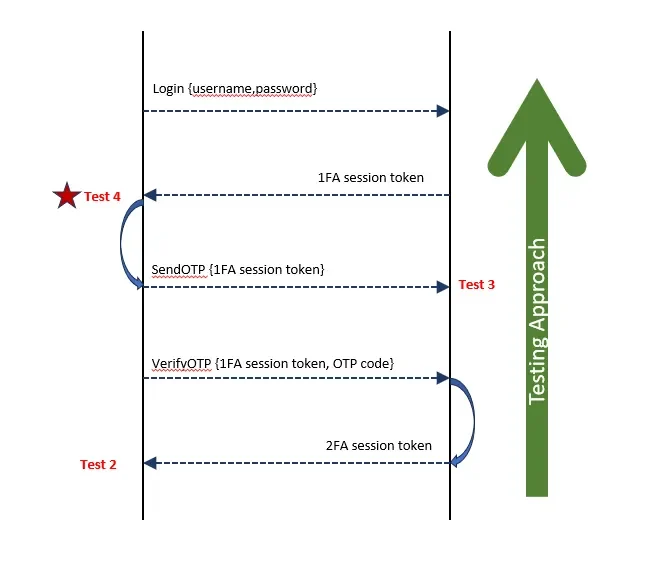
Test Map
The key difference between Test 3 and Test 4 is not the token itself but the session state. The key difference between Test 3 and Test 4 is the session state at the moment of the request, though the report does not explain how the two states differed.
Root cause
The researcher's hypothesis is that the session token validation is implemented as nested if/else statements, and that the 1FA session in Test 4 was an unexpected state: a limbo session that the logic allowed to escalate to super admin privileges. In other words, the authorisation decision depends on the stage of the session state machine, and one reachable intermediate state is mapped to the wrong privilege level. The endpoint did check the token (Test 1 was rejected), so the flaw is in how the check classifies a partially authenticated session, not in a missing check.
Impact
The internal API would have allowed an attacker to query entries of thousands of customer records with only first-factor authentication. The API would have exposed entries of thousands of customer records, including names, mobile numbers, email addresses and personal identification numbers.
Fix
Variants to test
- Enumerate API documentation paths (Swagger UI, OpenAPI JSON) with API-focused wordlists and look for endpoints absent from the customer application. A positive result is an endpoint whose name implies internal or admin use.
- Replay a 1FA token against privileged endpoints at each stage of the login flow, including after the OTP request is sent and after it is dropped. A positive result is a 200 with data rather than an empty body or a 403.
- Compare responses across session states for status code and body differences; a 200 with an empty body where a 403 is expected indicates the authorisation logic is state-dependent.
- Try dropping or replaying the OTP request itself to hold the session in intermediate states. A positive result is any state that returns privileged data.
What happened, in plain words
A security researcher was testing a website that lets people sign up for their own account, without being given any inside information about how the site is built. This is called blackbox testing: you only see the site the way any visitor does, and you have to work out how it behaves by poking at it.
While exploring, the researcher found a hidden doorway into the site's back office: a way of asking the site for a list of all its customers. That doorway was never meant to be used by ordinary customers. It was meant for staff, probably administrators using an internal admin portal. The researcher then tried to open that doorway in several different ways, each time changing one small thing about how they were logged in. The first few attempts returned no data. The last one worked, and the site handed over sensitive details about thousands of customers.
The interesting part is not a clever trick with passwords or encryption. It is a logic mistake: the site checked whether you were logged in, but it got confused about how far through the login process you were, and in one particular half-finished state it may have treated an ordinary customer as if they were a super administrator.
This article walks through the same steps the researcher took, in the same order, explaining every idea from scratch along the way.
The setting: an app, an API and a hidden list of endpoints
What an API is
When you use a website, your browser shows you pages: buttons, forms, pictures. Behind those pages, the browser is often quietly sending small messages to the server and getting answers back. Those messages are the API (Application Programming Interface). Think of a restaurant: the menu and the waiter are the API. You do not walk into the kitchen yourself; you tell the waiter what you want, and the waiter brings back a plate. The kitchen is the server, the waiter is the API, and you are the browser.
Some of these messages are meant for the public website. Others are meant only for internal tools, such as the screens that staff use to manage customer accounts. Those internal messages still travel over the same internet connection, and if you know the exact address of one, you can try to send it yourself.
What Swagger is
Modern applications often publish a page that lists all their API messages, like a restaurant putting its full menu, including staff-only dishes, on a noticeboard. That page is usually called Swagger UI. It is meant to help developers, but if it is reachable from the internet, it also helps anyone else who finds it.
What enumeration is
Enumeration means trying lots of likely names to see which ones exist. Imagine walking down a street of identical doors and gently trying each handle. You are not breaking anything; you are just finding out which doors are unlocked. On a website, enumeration means sending requests to many possible addresses (paths) and watching which ones answer differently.
To do this at scale, people use a wordlist: a long text file full of common names, one per line. A tool reads the list and tries each name against the site. The researcher used a tool called dirsearch with a wordlist from SecLists, a well-known public collection of such lists. The particular list used here is aimed at API addresses.
Finding the hidden doorway
The researcher ran this command:
dirsearch -w /usr/share/seclists/Discovery/Web-Content/api/api-endpoints-res.txt -u https://redacted.com/svc-path/
Line by line, in plain words:
dirsearchis the name of the tool being run. It tries many possible addresses against a website.-w /usr/share/seclists/Discovery/Web-Content/api/api-endpoints-res.txttells the tool which wordlist to use. The-wstands for wordlist, and the long path is simply where that file lives on the researcher's computer. The file contains common API endpoint names.-u https://redacted.com/svc-path/tells the tool which website to test.-ustands for URL.redacted.comis a placeholder: the real site name has been removed to protect it./svc-path/is a folder-like part of the address where the service lives.
This enumeration discovered the Swagger endpoint. In other words, one of the names in the wordlist turned out to exist, and it led to the page that lists the application's API messages.
After examining all the endpoints exposed in the Swagger UI, one particular endpoint stood out. It did not show up anywhere in the customer application, and its name suggested it was for retrieving customers' information, so it most likely belonged to the internal admin portal.
Think of it this way: the public website is the shop front, and this endpoint is the staff room door at the back. The shop front never links to it, but the noticeboard (Swagger) mentions it.
The login process: 1FA, 2FA and session tokens
Before following the tests, three ideas need explaining.
What a session token is
Websites do not remember you between requests by magic. When you log in, the server gives your browser a small piece of text called a session token (or just token). Your browser sends it back with every later request, like a wristband at a festival: the staff at each door check the wristband instead of asking for your ID again. In the requests below, the token travels in a line called the Authorization header. A header is a small labelled line attached to a request, carrying extra information such as who you are or what format you are sending.
What 1FA and 2FA mean
1FA means first factor authentication: the first step of logging in, usually your username and password. 2FA means second factor authentication: a second proof, here a one-time password (OTP), a short code sent to the registered user. You are only fully logged in once you have completed both steps.
What the tests are looking for
Each test sends the same request to the same endpoint, changing only the token. The question is always: what does the server answer, and does it hand over data? A server that refuses says 403 Forbidden. A server that accepts says 200 OK. A 200 with an empty body means "I recognise you, but there is nothing for you here", which is a very different message from a flat refusal.
Test 1: no session token at all
The first request was sent with an empty Authorization header:
POST /svc-path/account/customers/list HTTP/2Host: redacted.comAuthorization: [blank]Content-Type: application/json
Line by line:
POST /svc-path/account/customers/list HTTP/2means "send a POST request to this address using version 2 of the HTTP protocol". POST is the kind of request used when you are asking the server to do something or return a list, rather than just fetch a page. HTTP/2 is simply the version of the language browsers and servers speak.Host: redacted.comtells the server which website you are asking for. One server can host many sites, so it needs to know which one you mean.Authorization: [blank]is the line where the token normally goes. Here it is deliberately empty: the researcher is pretending to be a complete stranger with no wristband at all.Content-Type: application/jsonsays what format the body of the request is in. JSON is a common way of writing structured data as text, using curly brackets and labels. Here it mainly tells the server what to expect.
Without a session token the server returned Forbidden. This is the expected behaviour, and it confirms the endpoint is not simply open to anyone. The door is locked, at least for people with no wristband.
Test 2: a fully logged-in token
Next, the researcher signed up for a normal user account, logged in, and completed the 2FA process. Then the endpoint was called with the fully authenticated 2FA session token:
POST /svc-path/account/customers/list HTTP/2Host: redacted.comAuthorization: [2FA Authenticated Session] Content-Type: application/json
Line by line:
- The first line is the same request to the same address as before.
Host: redacted.comis unchanged.Authorization: [2FA Authenticated Session]is where the difference lies. The placeholder stands for the token the server issued after both login steps were completed. In the real request this would be the actual token text; it has been replaced here so it cannot be reused.Content-Type: application/jsonis unchanged.
The server returned status code 200, but no data was retrieved. In plain words: the server accepted the request as coming from a real, fully logged-in user, but that user was not allowed to see the customer list. It did not slam the door (no 403); it opened the door and showed an empty room.
Test 3: a half-finished login token
The researcher logged in again with the same registered account and received the 2FA OTP, but did not submit it. The endpoint was then called with the resulting 1FA session token:
Line by line:
- The request line and
Hostare the same as before. Authorization: [1FA Authenticated Session]now holds the token issued after only the first login step. The second step, entering the OTP, was never completed.
Again the server returned status code 200, and again no data was retrieved. At this point the natural conclusion would be to stop. But the responses were suspicious: unlike Test 1, neither of these requests produced a 403. The server was clearly checking the token of a registered user in some way, just not in a way the researcher could yet predict.
This is worth pausing on. A locked door that says "no" is easy to understand. A door that opens, lets you in, and then shows you an empty room is odd. It suggests the door is not checking whether you are allowed in, but rather which stage of a process you are at.
The researcher then tried a range of header injection techniques, none of which worked. Header injection means adding or altering extra header lines in a request to try to influence how the server decides who you are. None of these attempts changed the outcome.
Test 4: the half-finished login, with the OTP request dropped
The difference in this test was the state of the session at the moment of the request. The researcher logged in again with the registered account. After the 1FA login the server issued a 1FA session token, and the application sent the 2FA OTP request to the server to trigger the OTP to the registered user. This time that 2FA OTP request was dropped, so the OTP was never delivered and the 2FA step was never completed.
The endpoint was then called with the 1FA session token again:
Line by line:
- The request line and
Hostare the same as in every previous test. Authorization: [1FA Authenticated Session (half-way)]holds a token that looks like the one in Test 3, but the session behind it is in a different state. The label "half-way" is the researcher's note that this session was left mid-process.
This time sensitive customer account information was returned. The internal API would have allowed an attacker to query entries of thousands of customer records, including customer names, mobile numbers, email addresses and personal identification numbers.
The diagram below summarises the testing described above:
Test Map
The key difference between Test 3 and Test 4 is not the token itself but the session state. The key difference between Test 3 and Test 4 is the session state at the moment of the request, though the report does not explain how the two states differed.
A useful comparison is a hotel key card. Normally you get a card that opens your room. Here, the front desk also has a card that opens every room. The mistake is that one particular moment during check-in, before your card is fully activated, produces a card that the system mistakes for the master key.
Why it happened
The researcher's hypothesis is that the session token validation is implemented as nested if/else statements, and that the 1FA session in Test 4 was an unexpected state: a limbo session that the logic allowed to escalate to super admin privileges.
In plain words: the code that decides who you are is a series of questions, one inside another. "Is there a token? If yes, is it a registered user? If yes, has the user finished 2FA? If yes, do this; otherwise do that." The researcher's hypothesis is that when a session is left in a state the programmer did not think about, the code may fall through to a branch that was meant for administrators. The authorisation decision depends on the stage of the session state machine, and one reachable intermediate state is mapped to the wrong privilege level.
The endpoint did check the token, since Test 1 was rejected. So the flaw is in how the check classifies a partially authenticated session, not in a missing check.
What an attacker could have done
The internal API would have allowed an attacker to query entries of thousands of customer records with only first-factor authentication. The API would have exposed entries of thousands of customer records, including names, mobile numbers, email addresses and personal identification numbers.
How it should be fixed
In everyday terms: if you have not finished showing your second proof, you should be treated exactly like someone who has shown nothing at all. There should be no in-between state that quietly counts as staff.
Things to try on your own targets
- Enumerate API documentation paths (Swagger UI, OpenAPI JSON) with API-focused wordlists and look for endpoints absent from the customer application. A positive result is an endpoint whose name implies internal or admin use.
- Replay a 1FA token against privileged endpoints at each stage of the login flow, including after the OTP request is sent and after it is dropped. A positive result is a 200 with data rather than an empty body or a 403.
- Compare responses across session states for status code and body differences. A 200 with an empty body where a 403 is expected indicates the authorisation logic is state-dependent.
- Try dropping or replaying the OTP request itself to hold the session in intermediate states. A positive result is any state that returns privileged data.
Glossary
- API: the set of messages a website's browser sends to its server behind the scenes, like a waiter carrying orders to a kitchen.
- Authorization header: a labelled line attached to a request that carries proof of who you are, usually a session token.
- Blackbox testing: testing a system with no inside knowledge of its code or configuration, only what any visitor can see.
- Content-Type: a header that says what format the body of a request or response is in, such as JSON.
- dirsearch: a tool that tries many possible addresses against a website to discover which ones exist.
- Endpoint: one specific address on a server that accepts a particular kind of request, such as a customer list.
- Enumeration: trying many likely names or addresses to find out which ones exist.
- 1FA (first factor authentication): the first step of logging in, usually username and password.
- 2FA (second factor authentication): a second proof of identity, here a one-time password sent to the registered user.
- 403 Forbidden: the server's answer meaning "I know who you are, and you are not allowed to do this".
- 200 OK: the server's answer meaning the request was accepted.
- Header: a small labelled line attached to a request or response carrying extra information.
- Header injection: adding or altering header lines in a request to try to influence how the server decides who you are.
- HTTP/2: a version of the language browsers and servers use to exchange requests and responses.
- JSON: a common text format for structured data, using curly brackets and labels.
- OTP (one-time password): a short code, valid once, used as a second proof of identity.
- POST: a kind of request used when asking the server to do something or return a list, rather than just fetch a page.
- Privilege escalation: gaining a higher level of access than you are supposed to have, such as an ordinary customer acting like an administrator.
- SecLists: a public collection of wordlists used for security testing.
- Session token: a piece of text issued by a server after login and sent back with later requests, like a wristband that proves you are allowed in.
- State machine: a way of describing a process as a set of stages and the allowed moves between them; a login flow is one.
- Swagger UI: a page that lists and documents a website's API endpoints, often meant for developers.
- Wordlist: a text file full of likely names, one per line, used by tools to guess addresses.

