QRCDR ZeroDay Path Traversal Vulnerability
The QRCDR QR-code generator did not sanitise the POST parameter optionlogo, allowing directory path traversal. An attacker could read arbitrary server files such as /etc/passwd, and in some cases escalate to remote code execution.
 Published on n0lsec.medium.com
This post is about CVE-2022–24992 which refers to vulnerability in QRCDR's widely used QR-Code generator script.
The full write-up lives on its author's site
It belongs to its author, so we link to it rather than copy it. The other two tabs are our own rewrites, checked against it.
This post covers CVE-2022-24992, a directory path traversal vulnerability in the QRCDR QR-Code generator script. I found it while working on a bug bounty program, reported it to the vendor, and the vendor patched it within a few hours.
Context
QRCDR is a popular PHP and JavaScript QR-Code generator, widely used for creating customised QR codes in easy steps. It is also used by a few WordPress QR Code Generator plugins and mobile applications, which this article does not cover.
QRCDR, a responsive QR Code generator
The feature at the centre of the finding is the custom logo option: the generator ships with some predefined logos, and the user can select one of them to be loaded into the QR code. The logo selection is submitted to the server, which then builds the final image.
Setup
I was working on a specific bug bounty program, referred to here as REDACTED.COM because of its information disclosure policy. While exploring it I found an interesting endpoint that lets customers create customised QR codes with extra options. The only tooling involved was the browser inspector: I opened it and watched the requests and responses. No account details, roles or special preconditions are described in the report.
Finding it
Watching the traffic, I realised that part of the script lets users add a custom logo to their QR code. The main file of the script is process.php, located at the path /ajax/process.php. Intercepting the POST request and its body parameters, the optionlogo parameter looked like this:
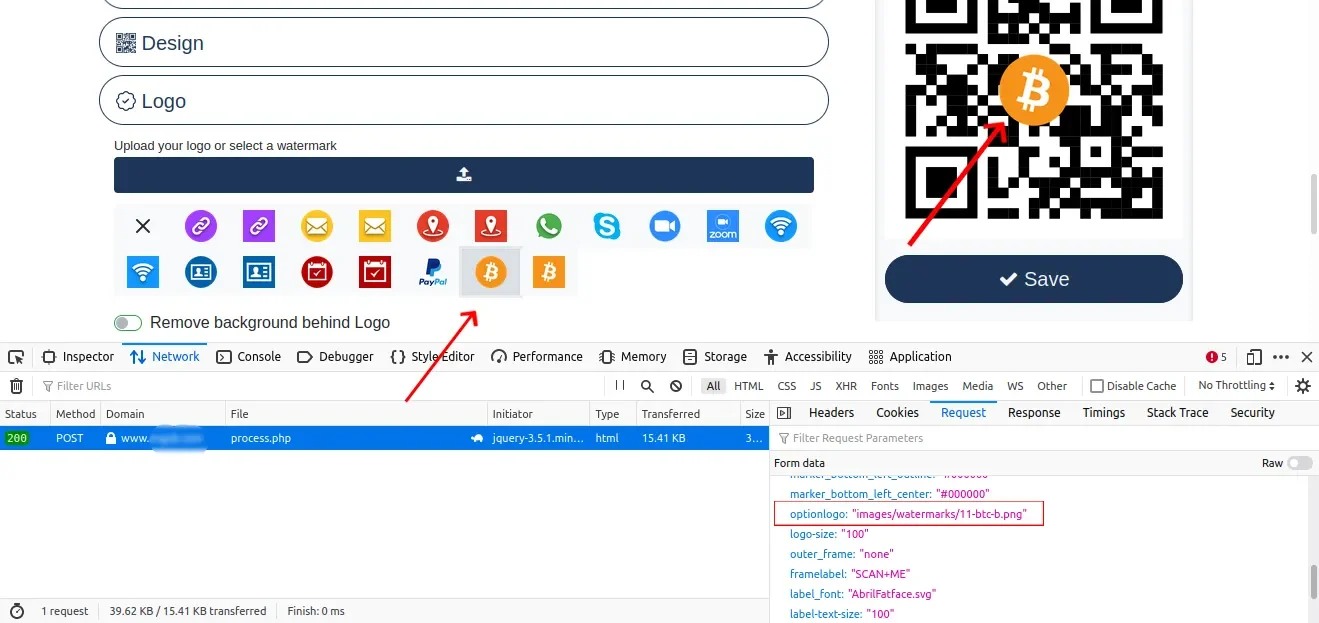
The key part of the vulnerability is here: a user-controlled value that names a logo file, which may let us find something interesting such as path traversal, LFI, or maybe SSRF. So I decided to check.
Exploitation
Step 1: try a plain traversal payload
After some work I tried path traversal. I tried the first payload without encoding or any bypass method, and I received the /etc/passwd file content, base64-encoded. That was it.
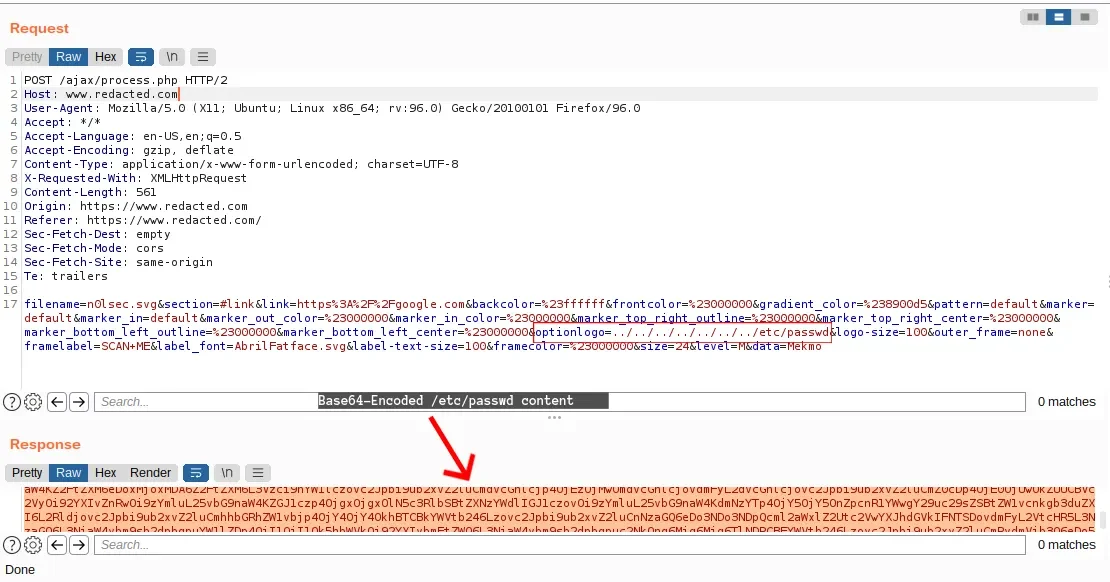
Because of the severity, I sent a report to the vendor immediately and I got rewarded.
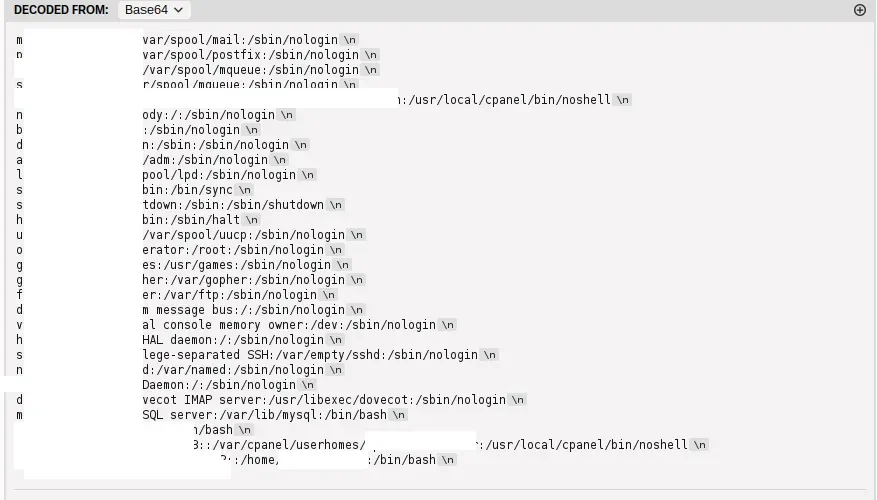
REDACTED.COM's base64-decoded contents of /etc/passwd
Step 2: report to the dev team
After checking the code I found out that the script is part of the QRCDR script, so I found the Dev-Team email and sent the details of the vulnerability. They responded quickly and fixed it after a few hours. Considering that the script is popular and widely used, I decided to write this post.
Root cause
I searched the internet for the QRCDR script and found the null version, then checked the code. The script does not completely clear the POST value of the optionlogo parameter and uses the code directly in the QR code.
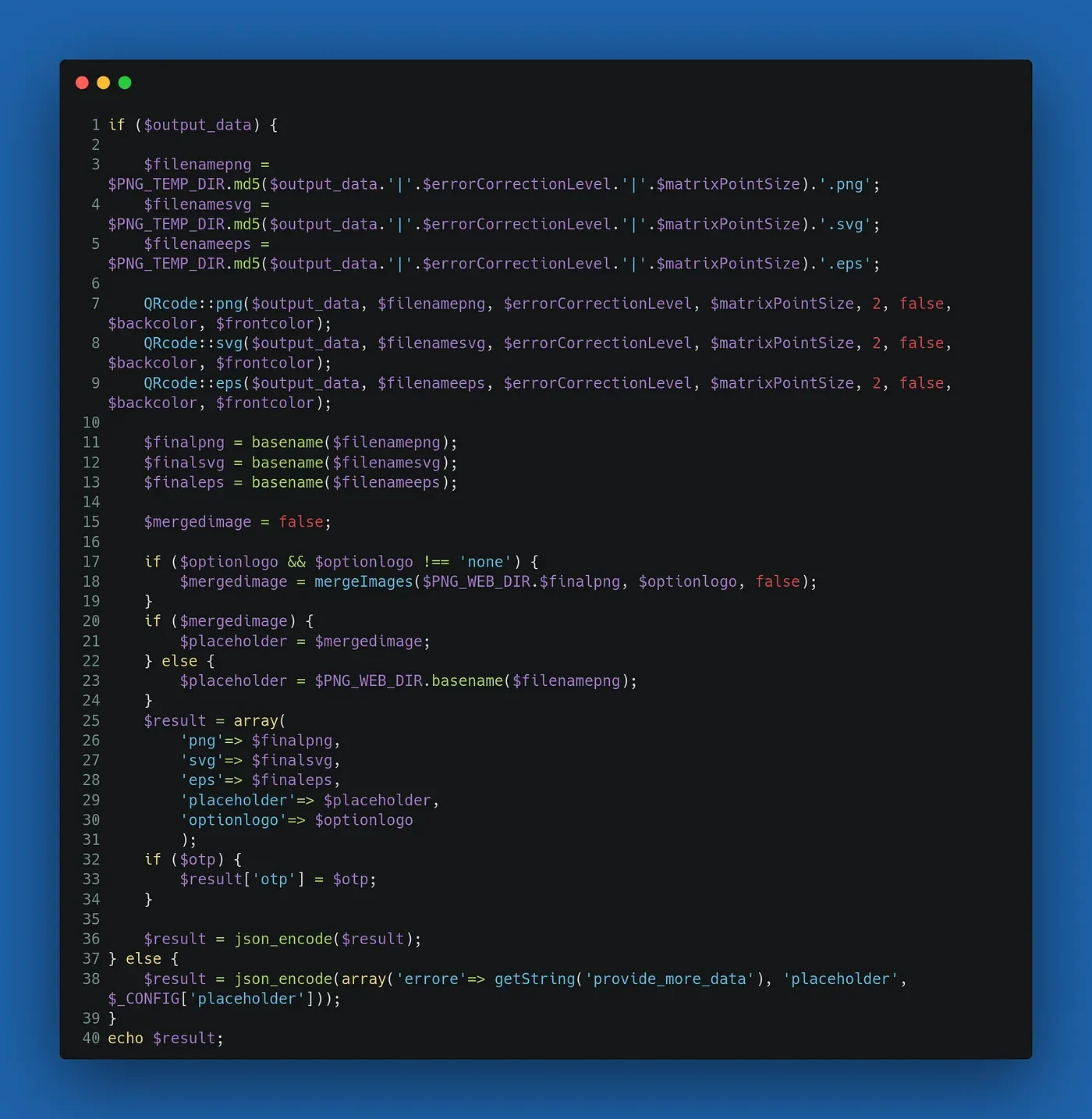
Part of the process.php file; line 17 has no kind of sanitisation
The mergeImage() function creates an image with our injected payload, and when it comes to the SVG format we have some directory path traversal magic like this:
<image xlink:href="/etc/passwd(base64-encode)" >
which brings the content of any files to us.
In other words, the unsanitised optionlogo value ends up inside an SVG image element's xlink:href, and the referenced file content is brought back to the attacker. Because the value is not cleared, a path can be substituted for a logo name, and the referenced file is read and returned base64-encoded.
Impact
According to the server security configuration, an attacker can read arbitrary sensitive server files, configurations and similar data. In some cases the path traversal can be escalated to RCE. The report does not give further detail on the escalation path.
Fix
The vulnerability is fixed in QRCDR: updating to the latest version resolves it, and at the time of writing the post that version is 5.2.9. Versions 5.2.7 and all prior versions are vulnerable.
If you want to fix it manually, the guidance is to remove any malicious content that can help an attacker change the directory file name and directory name:
- Remove any special characters in file and directory names:
[. / \ ]. - Think about cross-platform directory traversal characters.
- After all that, configuring the server with something like a
chroot-jailorcloudflareto prevent escalation may be a good choice. Even then, hackers always find their ways.
Variants to test
Feel free to contact me on Twitter; I would appreciate any problems, feedback or opinions you send.
What happened, in plain words
A security researcher found a bug in a piece of software called QRCDR. QRCDR is a script that makes QR codes: those square black-and-white patterns you scan with a phone camera to open a link, read a message or connect to Wi-Fi. The bug let anyone who used the QR code generator ask the server to hand back files that live on the server itself, including files the public should never see. The researcher found it while testing a company's website, reported it to the company, and also reported it to the people who make QRCDR. The makers fixed it within a few hours.
The bug has an official identifier, CVE-2022-24992. A CVE is a public catalogue number for a known security flaw, so that everyone talking about the same bug can refer to it by one name instead of describing it each time.
The class of bug here is called path traversal, sometimes also called directory traversal. Imagine a hotel receptionist who keeps a folder of room-service menus and hands one out whenever a guest asks for "menu". Now imagine a guest asks for "../../staff/payroll". The .. means "go up one folder", so instead of staying inside the menu folder, the receptionist walks up out of it and hands over something private. That is path traversal: a program is given a file name, trusts it, and lets the name climb out of the folder it was supposed to stay in.
This article walks through the whole story the way the researcher told it: what QRCDR is, how the feature that caused the bug works, how the researcher spotted it in a browser, what was sent to the server, what came back, what the code got wrong, and how it was fixed.
About QRCDR
QRCDR is described as a popular PHP and JavaScript QR-Code generator, widely used for creating customised QR codes in easy steps. It is also used by a few WordPress QR Code Generator plugins and mobile applications, which this article does not cover.
Two terms there are worth unpacking. PHP and JavaScript are programming languages. JavaScript usually runs inside your browser, making pages interactive; PHP usually runs on the web server, building the page or the image before it is sent to you. A WordPress plugin is an add-on for WordPress, a very common system for building websites, so if a plugin bundles QRCDR, every site using that plugin inherits QRCDR's behaviour, good or bad.
QRCDR, a responsive QR Code generator
The feature at the centre of the finding is the custom logo option. The generator ships with some predefined logos, and the user can pick one of them to be placed inside the QR code, for example a company logo in the middle of the square. The choice of logo is sent to the server, and the server then builds the final image with that logo in it.
That is the important mental model for everything that follows: the browser sends the server a name of a logo, and the server goes and fetches that logo file to paste into the picture. Whenever a server fetches a file based on something the user typed, the question to ask is: what happens if the user types something that is not a logo name?
Setup
The researcher was working on a specific bug bounty program. A bug bounty program is a scheme where a company invites outside people to look for security problems in its systems and pays them for valid findings, instead of punishing them. The company is referred to here as REDACTED.COM because of its information disclosure policy, meaning the program's rules require the researcher not to name the company publicly.
While exploring the program, the researcher found an interesting endpoint that lets customers create customised QR codes with extra options. An endpoint is simply a specific address on a website that does one job, like a counter in a shop: you go to that address, you ask for that thing. The only tooling involved was the browser inspector. Every modern browser has one: you press a key or open a menu, and a panel appears showing the requests the page makes and the responses it gets back. It is the browser's own window into the conversation between your computer and the server.
No account details, roles or special preconditions are described in the report, so there is nothing to say about who could reach the feature beyond what is written.
Finding it
While watching the traffic in the inspector, the researcher realised that part of the script lets users add a custom logo to their QR code. The main file of the script is process.php, located at the path /ajax/process.php. Intercepting the POST request and its body parameters, the optionlogo parameter looked like this:
A few concepts in that paragraph need explaining from scratch.
A request is the message your browser sends to a server when it wants something. A response is the server's reply. When you load a page, your browser fires off many requests: one for the page itself, one for each image, one for each script.
POST is one of the methods a request can use. A GET request is like asking a shop assistant "can I see the blue one?" and the answer is the thing itself. A POST request is like handing over a filled-in form: you are sending data to the server so it can act on it. Here, the form data is the settings for the QR code, including which logo to use.
A parameter is one named field in that form. If the form has fields for size, colour and logo, each field is a parameter with a name and a value. The parameter in question is called optionlogo, and its value is supposed to be the name of the chosen logo.
Intercepting a request means pausing it so you can read it before it goes out. The browser inspector lets you do exactly that: you see the request, you see the body (the part carrying the form data), and you can read every parameter and value.
The key part of the vulnerability is right here: a value that the user controls, and that names a file for the server to fetch. That combination is where bugs like path traversal, LFI and SSRF live. LFI stands for local file inclusion: tricking the server into including a file from its own disk in what it sends back. SSRF stands for server-side request forgery: tricking the server into making a request on your behalf, for example to another machine that only the server can reach. The researcher decided to check whether any of these were possible.
Exploitation
Step 1: try a plain traversal payload
After some work the researcher tried path traversal. The first payload was tried without encoding or any bypass method, and the response contained the /etc/passwd file content, base64-encoded. That was it.
A payload is the specific piece of input an attacker sends to try to trigger a bug. Here it is whatever was typed into the optionlogo field instead of a real logo name.
Encoding means rewriting characters in a different form so that a filter looking for the literal characters does not recognise them. For example, a dot can be written in a percent-encoded form, and a filter that only searches for a plain dot will miss it. A bypass method is any trick used to get past a filter. The point of trying the plain payload first is that if it works, there is no filter at all, and you have learned that in one step.
/etc/passwd is a file present on Unix-like systems, including most web servers. It lists user accounts. It does not normally contain passwords in a readable form, but it is the classic first file to request when testing file-reading bugs, because it is almost always there and its contents are instantly recognisable. Seeing it come back proves the server read a file of your choosing from its own disk.
Base64 is a way of writing arbitrary data using only ordinary text characters. It is not encryption and it hides nothing: anyone can decode it back. Servers often use it to carry file contents inside a response safely. So the response did not show the file as readable text; it showed a long string of letters and digits, which decodes back to the file.
Because of the severity, the researcher sent a report to the vendor immediately and got rewarded.
REDACTED.COM's base64-decoded contents of /etc/passwd
Step 2: report to the dev team
After checking the code, the researcher found out that the script is part of the QRCDR script, so the Dev-Team email was found and the details of the vulnerability were sent to them. They responded quickly and fixed it after a few hours. Considering that the script is popular and widely used, the researcher decided to write this post.
This step matters for anyone new to this world: the same bug had two owners. The website where it was found was one, and the software vendor whose code contained the flaw was the other. Fixing it at the vendor means every site running QRCDR gets the fix, not just the one site that was tested.
Root cause
The researcher searched the internet for the QRCDR script and found the null version, then checked the code. A null version here means a copy of the software obtained without paying for it. The script does not completely clear the POST value of the optionlogo parameter and uses the code directly in the QR code.
Part of the process.php file; line 17 has no kind of sanitisation
Sanitisation is the process of cleaning up user input before using it: removing or neutralising anything dangerous. If a field is supposed to contain the name of one of five logos, sanitisation means checking that the value really is one of those five names, and rejecting anything else. Line 17, as the caption says, has no kind of sanitisation.
The mergeImage() function creates an image with the injected payload, and when it comes to the SVG format there is some directory path traversal magic like this:
<image xlink:href="/etc/passwd(base64-encode)" >
which brings the content of any files to us.
Line by line, in plain words:
<image ...>is an SVG element. SVG is a picture format written as text, like HTML but for drawings. Because it is text, it can contain references to other files.xlink:href="/etc/passwd(base64-encode)"is the part that says where the picture's content comes from. In the real attack, the value placed here is the path the attacker chose, and the(base64-encode)in the report's illustration stands for the fact that the file's contents are base64-encoded when embedded.- The closing
>ends the element.
In other words, the unsanitised optionlogo value ends up inside an SVG image element's xlink:href, and the referenced file content is brought back to the attacker. Because the value is not cleared, a path can be substituted for a logo name, and the referenced file is read and returned base64-encoded.

Impact
According to the server security configuration, an attacker can read arbitrary sensitive server files, configurations and similar data. In some cases the path traversal can be escalated to RCE. RCE stands for remote code execution: getting the server to run code of the attacker's choosing, which is the most serious outcome a web bug can have. The report does not give further detail on the escalation path.
Fix
The vulnerability is fixed in QRCDR: updating to the latest version resolves it, and at the time of writing the post that version is 5.2.9. Versions 5.2.7 and all prior versions are vulnerable.
If you want to fix it manually, the guidance is to remove any malicious content that can help an attacker change the directory file name and directory name:
- Remove any special characters in file and directory names:
[. / \ ]. - Think about cross-platform directory traversal characters.
- After all that, configuring the server with something like a
chroot-jailorcloudflareto prevent escalation may be a good choice. Even then, hackers always find their ways.
A chroot jail is a way of confining a program to one folder on the server, so that even if it is tricked into reading a path, it cannot climb out to the rest of the disk. Cloudflare is a service that sits in front of a website and filters traffic before it reaches the server.
Variants to test
These are the follow-up checks the researcher suggests, each with what a positive result looks like:
Feel free to contact the researcher on Twitter; any problems, feedback or opinions are welcome.
Glossary
- API: a defined way for one piece of software to ask another for something, like a service counter with fixed rules about what you can request.
- Base64: a way of writing any data using only ordinary text characters; it hides nothing and can be decoded by anyone.
- Bug bounty program: a scheme where a company invites outsiders to find security problems and pays them for valid findings.
- Bypass method: any trick used to get past a security filter.
- chroot jail: a way of confining a program to one folder on a server so it cannot reach the rest of the disk.
- Cloudflare: a service that sits in front of a website and filters traffic before it reaches the server.
- CVE: a public catalogue number for a known security flaw, so everyone can refer to the same bug by one name.
- Encoding: rewriting characters in a different form so a filter looking for the literal characters does not recognise them.
- Endpoint: a specific address on a website that does one job.
- GET: a request method used to ask for something, with the details carried in the address.
- Intercept: pause a request so you can read it before it is sent.
- JavaScript: a programming language that usually runs inside your browser and makes pages interactive.
- LFI (local file inclusion): tricking a server into including a file from its own disk in what it sends back.
- Null version: a copy of software obtained without paying for it.
- Parameter: one named field in a form or request, with a name and a value.
- Payload: the specific piece of input an attacker sends to try to trigger a bug.
- PHP: a programming language that usually runs on the web server, building pages or images before they are sent to you.
- Path traversal (directory traversal): a bug where a program is given a file name, trusts it, and lets the name climb out of the folder it was supposed to stay in.
- POST: a request method used to send data to the server so it can act on it, like handing over a filled-in form.
- RCE (remote code execution): getting a server to run code of the attacker's choosing; the most serious outcome a web bug can have.
- Request: the message your browser sends to a server when it wants something.
- Response: the server's reply to a request.
- Sanitisation: cleaning up user input before using it, by removing or neutralising anything dangerous.
- SSRF (server-side request forgery): tricking a server into making a request on your behalf, for example to a machine only the server can reach.
- SVG: a picture format written as text, like HTML but for drawings, which can contain references to other files.
- WordPress plugin: an add-on for WordPress, a common system for building websites.
- xlink:href: the attribute in an SVG element that says where the picture's content comes from.



