RCE via Server-Side Template Injection
The application evaluated user input inside a Java Expression Language template, allowing an attacker to execute arbitrary system commands. The attacker confirmed remote code execution on a staging server and later bypassed a WAF to achieve the same on production.
 Published on cyc10n3.medium.com
Sometimes a bug does not look dangerous in the beginning. It looks like normal input reflection, maybe some formatting issue, and easy to ignore.
The full write-up lives on its author's site
It belongs to its author, so we link to it rather than copy it. The other two tabs are our own rewrites, checked against it.
Context
The target was a web application whose pages reflected a user-controlled value back in the response. That kind of reflection is routine in templated systems, and on its own it looks harmless: the value appears where the page expects it and nothing else happens. The question this write-up answers is whether the value is merely printed as data or interpreted by the server's template engine.
The application turned out to use a Java Expression Language (EL) based engine, the kind commonly found in JSP or Spring applications. The report does not name the product or the specific feature beyond the reflected input.
Setup
The report does not describe accounts, roles or application versions. The tools that appear in the narrative are:
- A local Python HTTP server on port 80, used to host a reverse shell script.
- Netcat, listening on port 443 to receive the reverse shell.
- Burp Collaborator, used on production to confirm outbound DNS resolution.
Two environments are involved: a staging server, where full command execution and a reverse shell were demonstrated, and a production environment protected by Akamai's WAF, where the same issue was validated under tighter constraints.
Finding it
The starting point was ordinary input reflection. What made it suspicious was how the application handled special characters: the input did not behave like plain data. To test whether the value was being evaluated, the researcher sent a simple arithmetic expression in the template syntax:
${191*7}
The response returned the evaluated result rather than the literal string. That is the classic sign that the server is interpreting the value inside a template. The $ character was required for the evaluation to happen, which is typical of engines that process expressions.
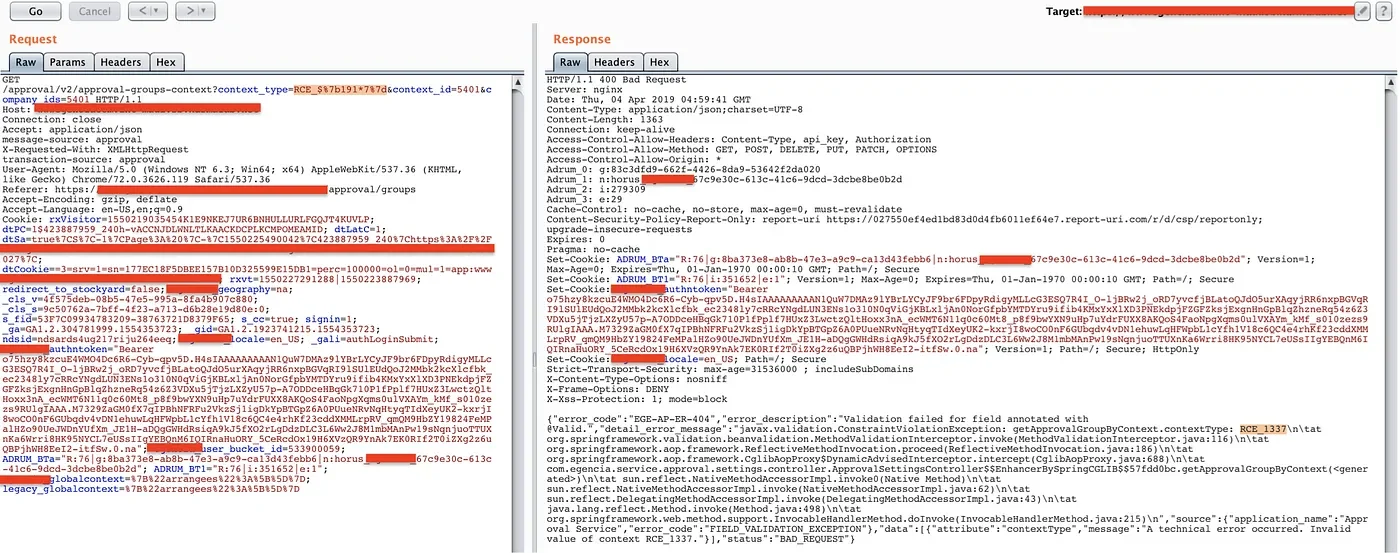
The screenshot shows the crafted input and the evaluated output.
This confirmed Server-Side Template Injection (SSTI) and set the direction for the rest of the work: identify the engine, build a payload, and validate whether expression evaluation could be escalated to code execution.
Exploitation
Step 1: Identify the template engine
The ${...} expression style and the ability to reach Java classes pointed to a Java Expression Language (EL) based engine. The usual shortcut, sending invalid syntax and reading the error message, did not work here because error messages were suppressed. The researcher instead relied on behaviour observed from controlled payloads and on publicly documented EL examples.
Step 2: Confirm command execution on staging
Rather than jumping to a complex payload, the next step was a minimal test that would show whether system commands could run. The technique uses accessible runtime classes to invoke a command through the template context:
${"".getClass().forName("java.lang.Runtime").getMethods()[6].invoke("".getClass().forName("java.lang.Runtime")).exec("ls")}
The injection is blind: no command output comes back in the HTTP response. What did come back was a Unix process reference in the response, which confirmed the command had executed on the server.
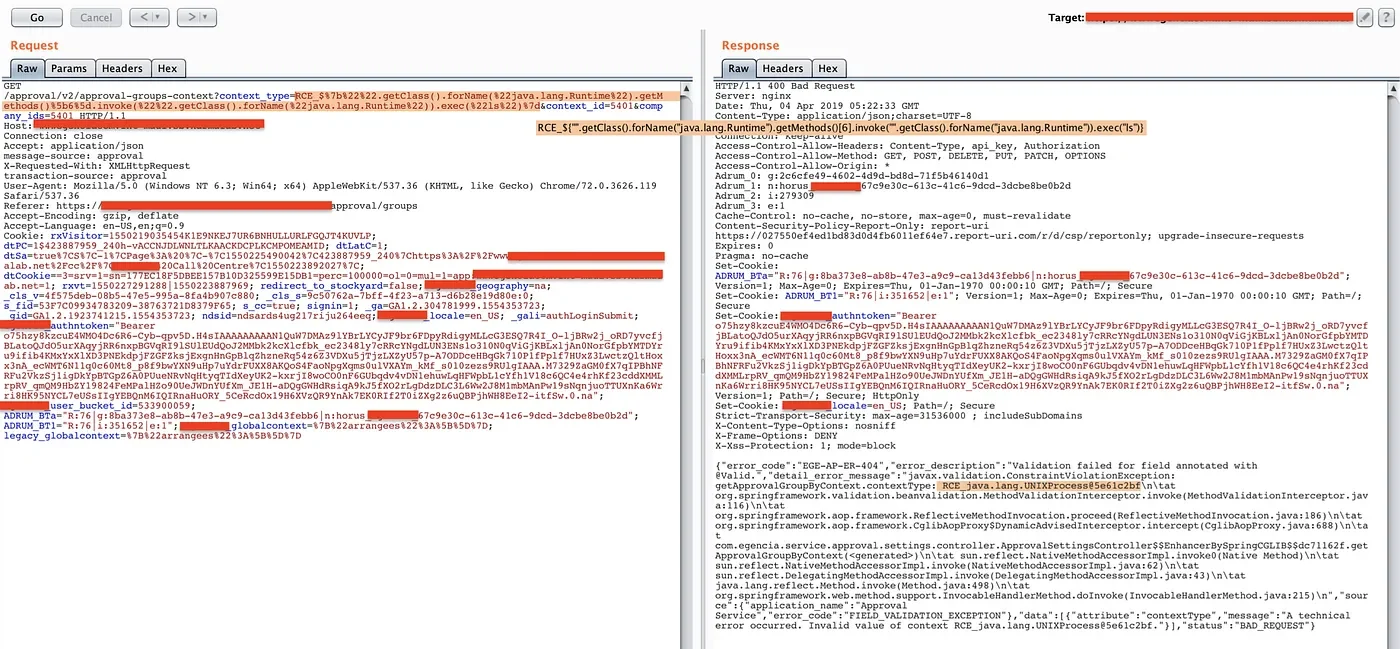
Step 3: Check available utilities
With execution confirmed, the next question was what tools the environment had. The researcher ran additional checks for common utilities such as python and wget, which are often used to download or run payloads. The responses again contained process references, confirming both binaries were installed, which is typical for Unix-based environments.
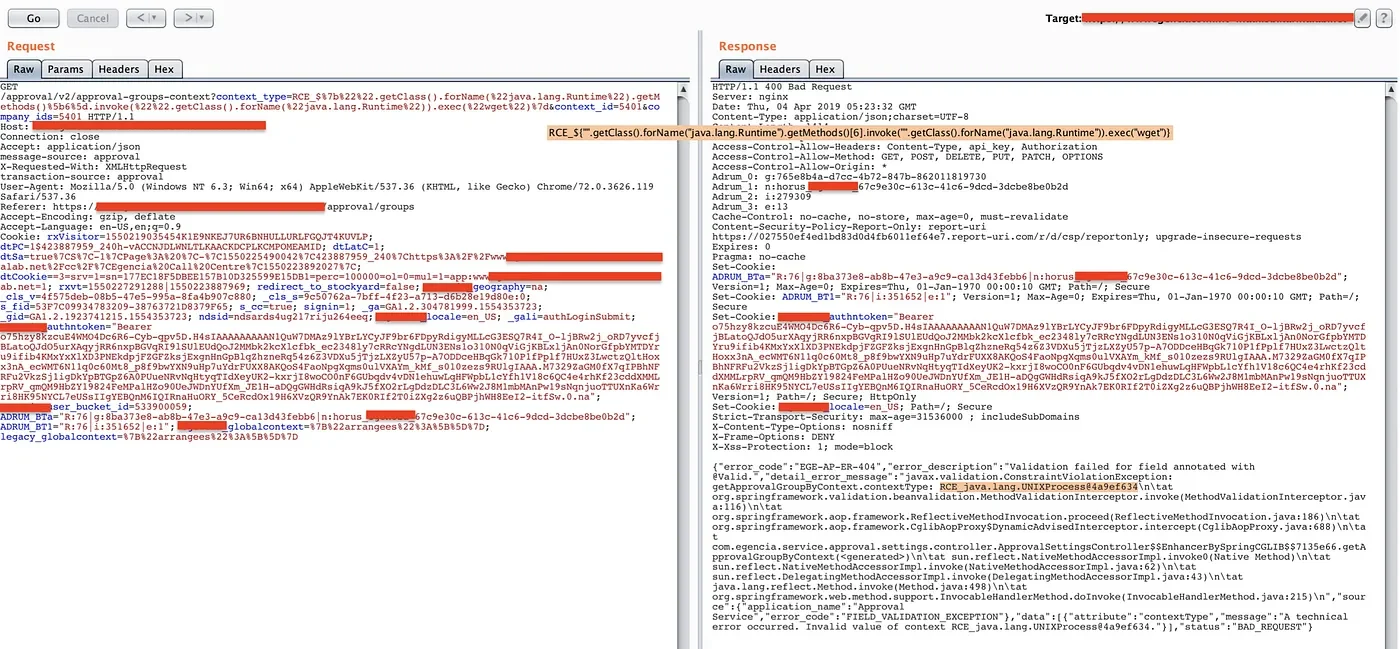
Step 4: Host a reverse shell script
A simple HTTP server was started locally on port 80 with Python, serving a reverse shell script.
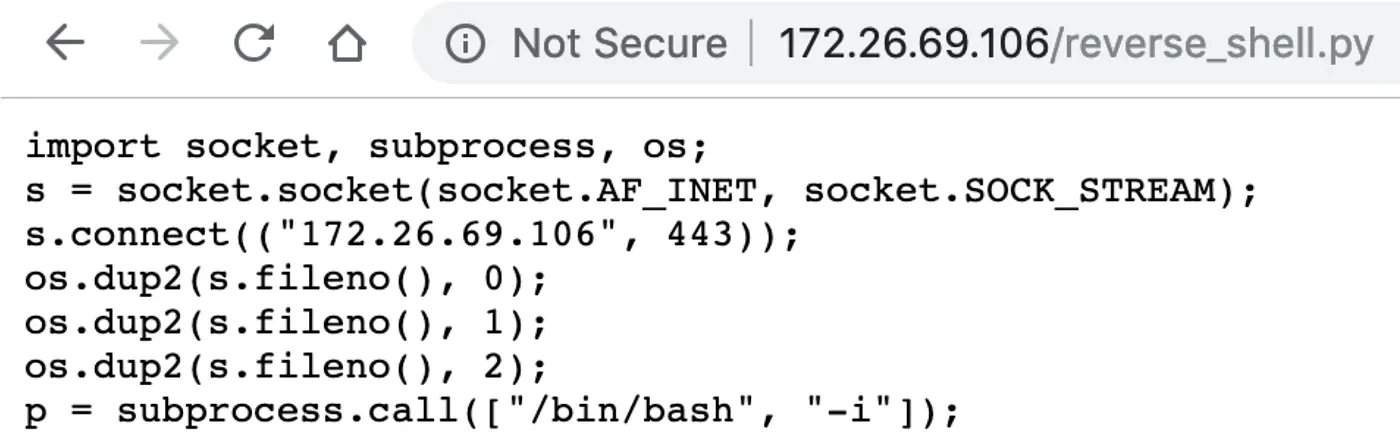
Step 5: Download the script onto staging
The script was then pulled onto the vulnerable staging server using the available utilities.
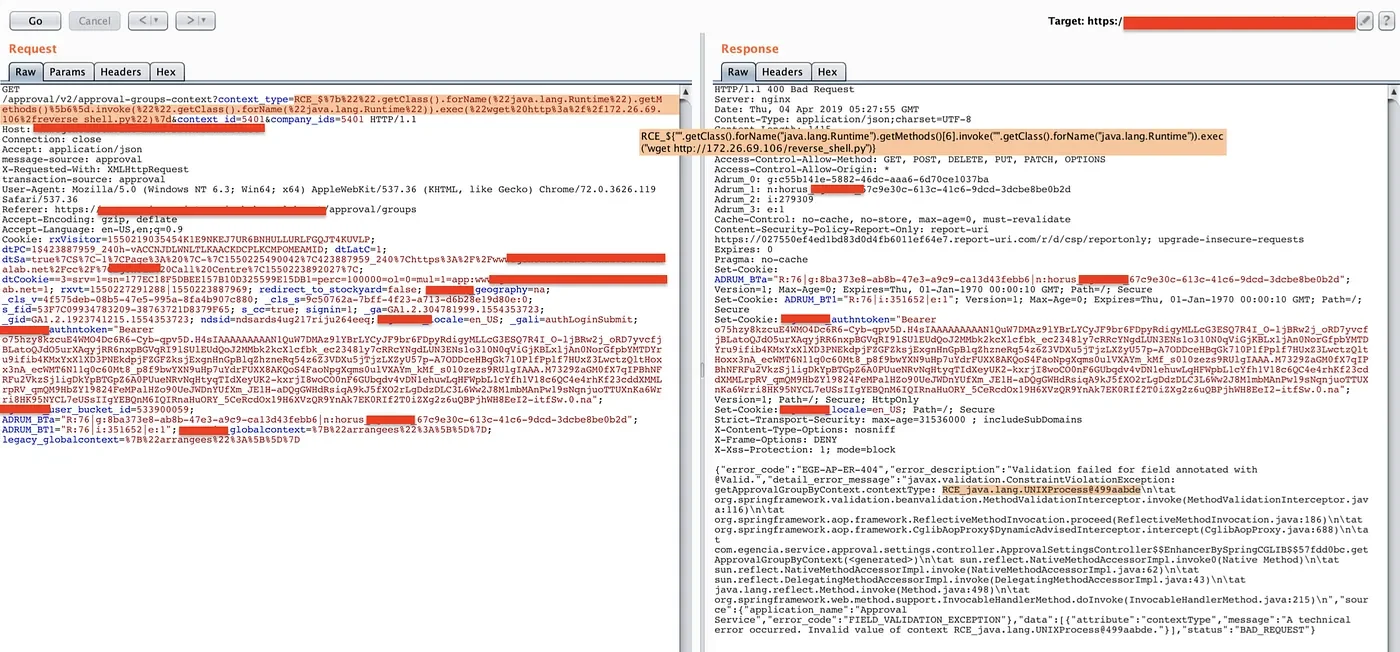
The response again returned a Unix process reference, which was enough to confirm the remote machine had retrieved the file.
Step 6: Catch the reverse shell
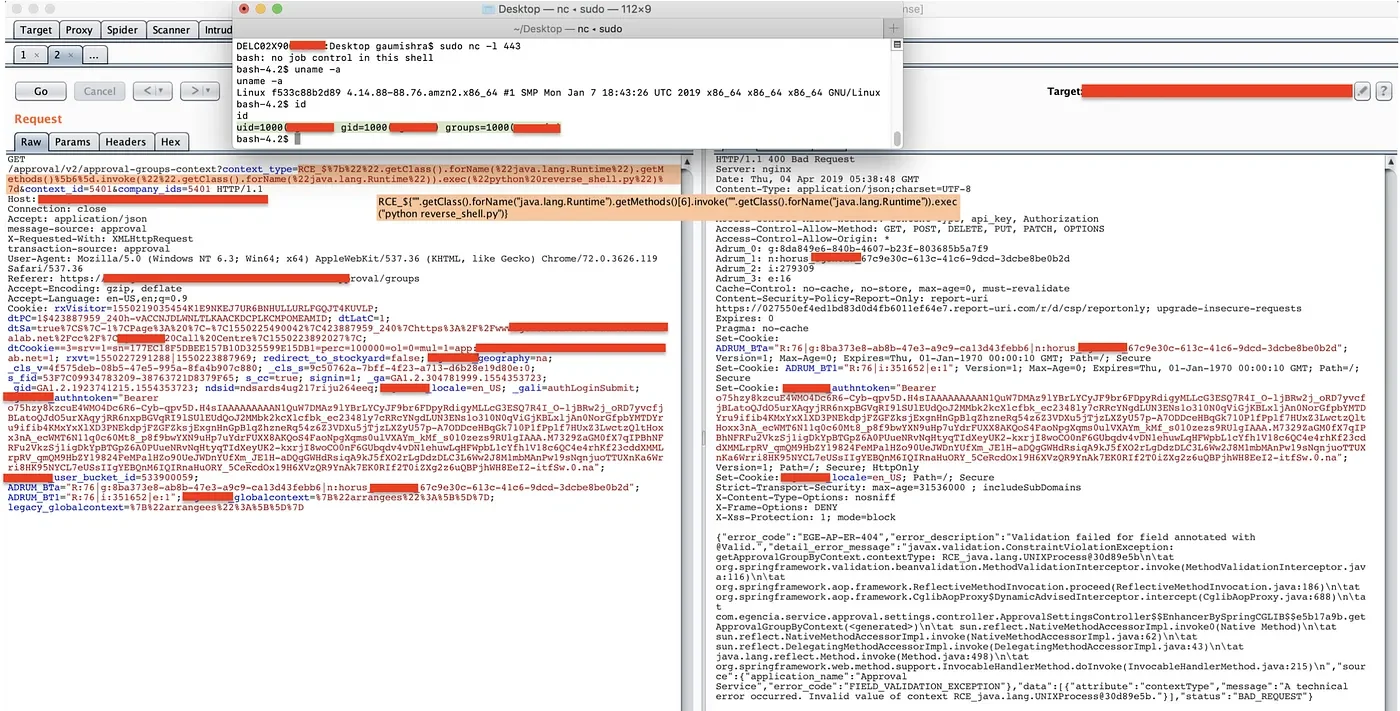
A Netcat listener was started on port 443, and the script was executed through the injection point. The staging server connected back, giving command execution and confirming full Remote Code Execution.

Step 7: Reproduce on production behind the WAF
The next challenge was to show the same issue on production while staying within the constraints of Akamai's WAF.

Simple arithmetic expressions (multiplication and division) returned the same evaluated responses as on staging, which confirmed the underlying vulnerability was present in production too. The full validation payload, however, was blocked and returned a 403 Access Denied page.
Step 8: Map the WAF signatures
Instead of resending the same request, the researcher broke the payload into smaller pieces and tested them individually to see which parts were flagged. Two strings consistently triggered blocking:
java.lang.Runtime().
The payload that was being blocked was:
${"".getClass().forName("java.lang.Runtime").getMethods()[6].invoke("".getClass().forName("java.lang.Runtime")).exec("wget")}
Step 9: Rebuild the blocked string with concatenation
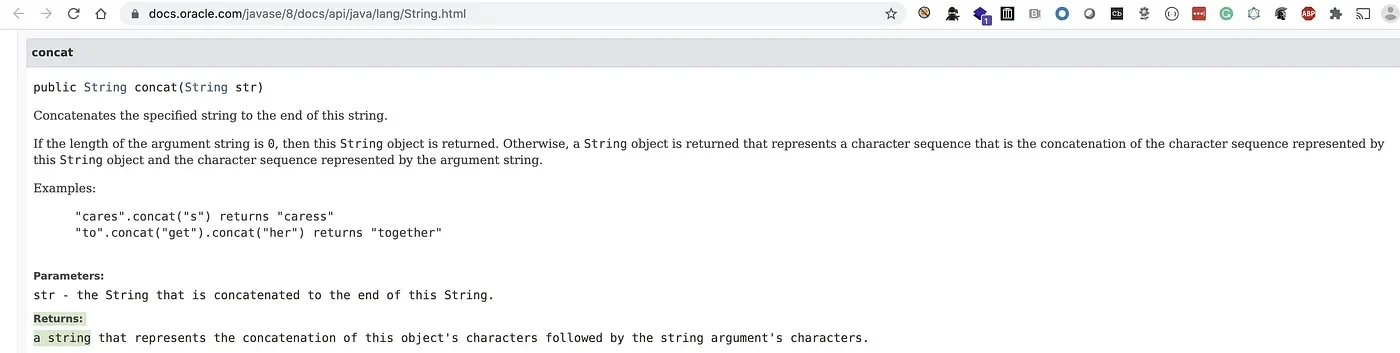
To avoid writing java.lang.Runtime literally, the researcher reconstructed it with Java's concat method:
"java.lang.Runtime" === "java.lang".concat(".Runtime")
This produces the same value without matching the WAF signature. The payload at this stage was:
${"".getClass().forName("java.lang".concat(".Runtime")).getMethods()[6].invoke("".getClass().forName("java.lang".concat(".Runtime"))).exec("wget")}

Step 10: Break the (). pattern
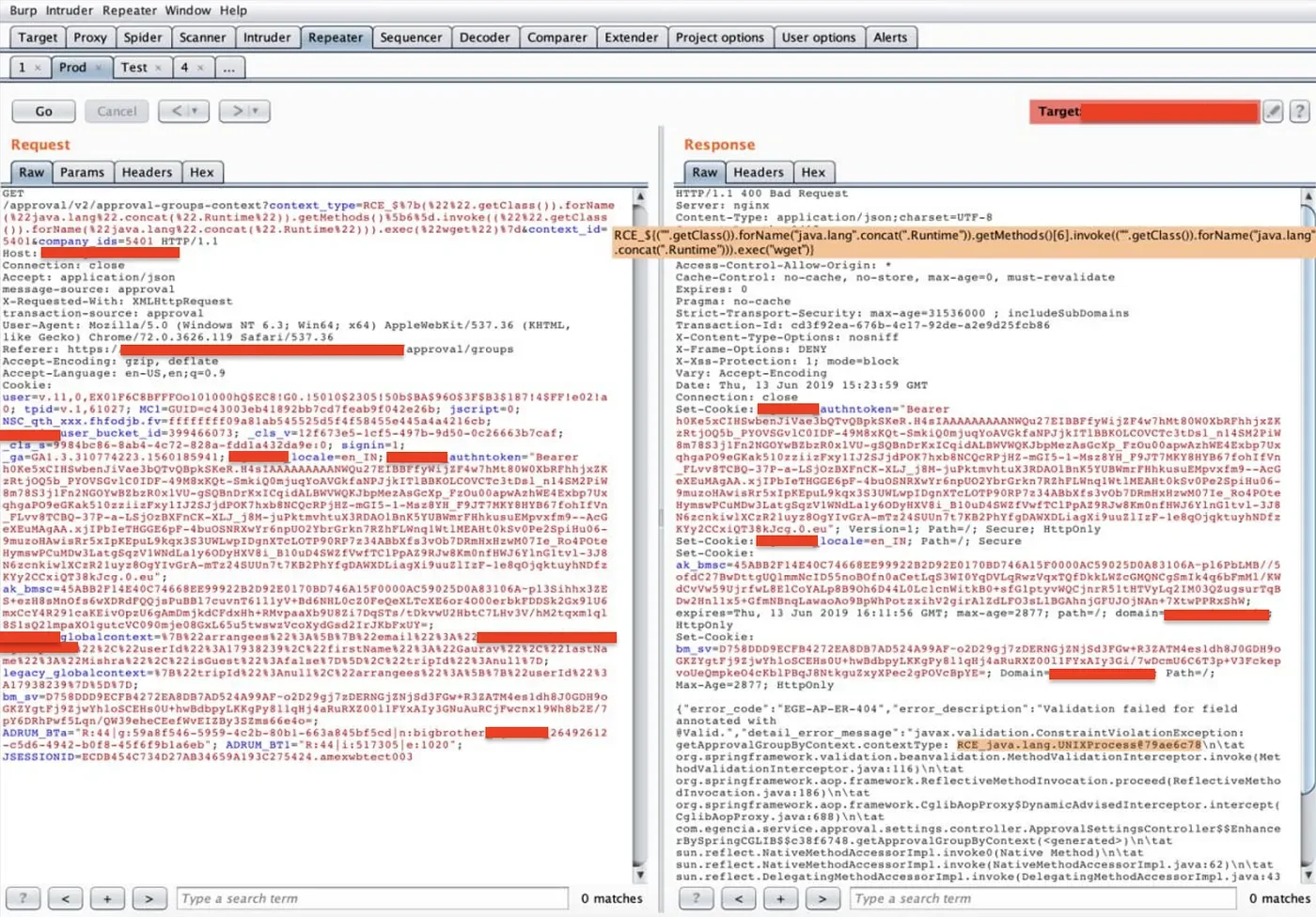
The second obstacle was the (). sequence. The WAF blocked requests containing that exact string, and the filtering appeared to rely on simple string matching rather than understanding Java evaluation. In Java, extra parentheses do not change how an expression is evaluated, so the researcher wrapped the getClass() call in an additional set of parentheses, turning getClass() into (getClass()). The WAF rule looked for (). but did not account for ()).. The final payload was:
${("".getClass()).forName("java.lang".concat("Runtime")).getMethods()[6].invoke(("".getClass()).forName("java.lang".concat("Runtime"))).exec("wget")}
After this payload ran, the response contained a Unix process reference similar to the one seen on staging. The injection was still blind, but the process identifier confirmed the command had executed on the production server, demonstrating remote code execution despite the WAF.
Step 11: Validate outbound access safely
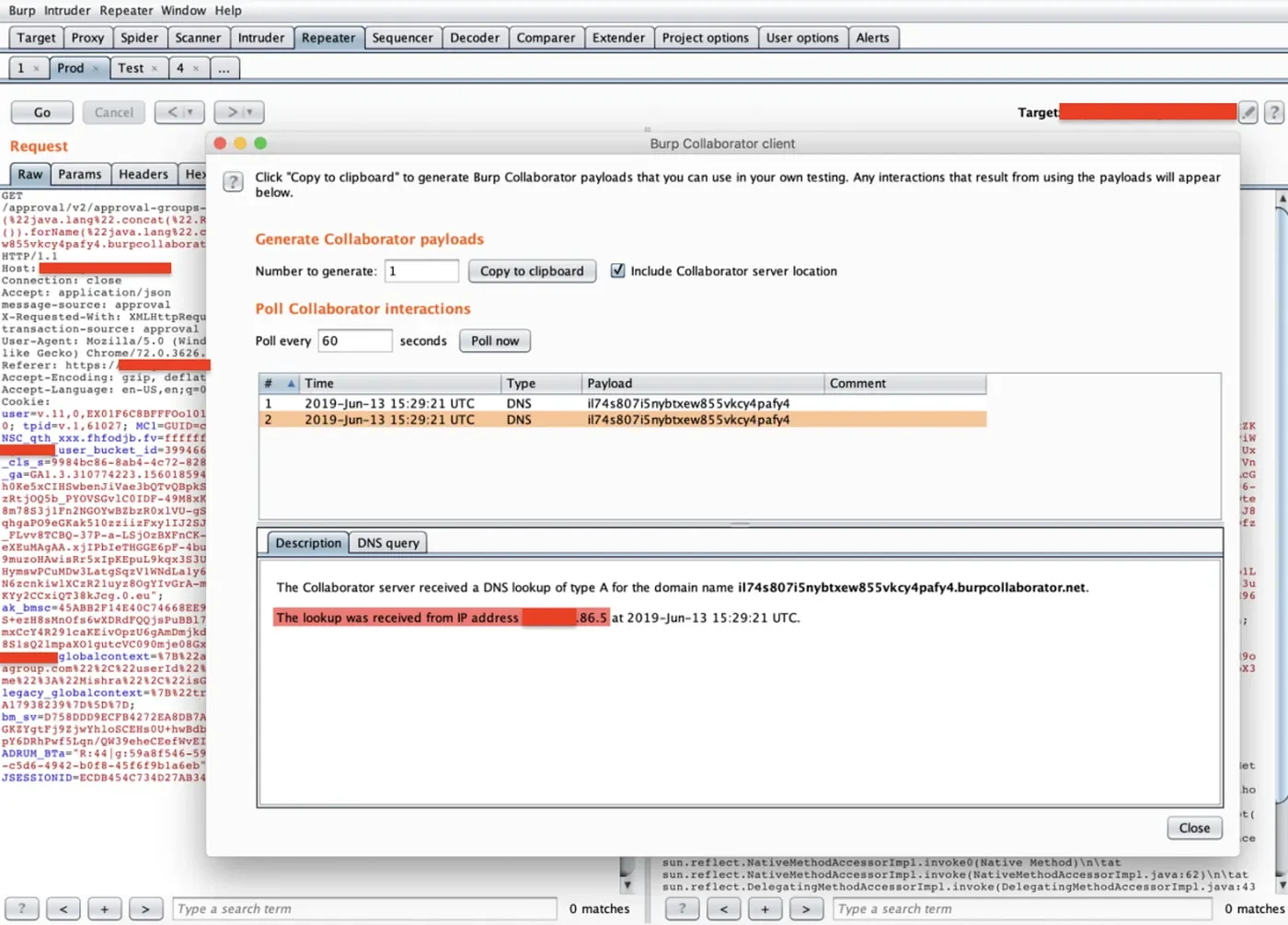
No shell or additional payloads were uploaded to production. Instead, the researcher used Burp Collaborator to check whether the production server could make outbound requests. A payload was sent to trigger a DNS lookup, and the Collaborator was monitored for interactions.
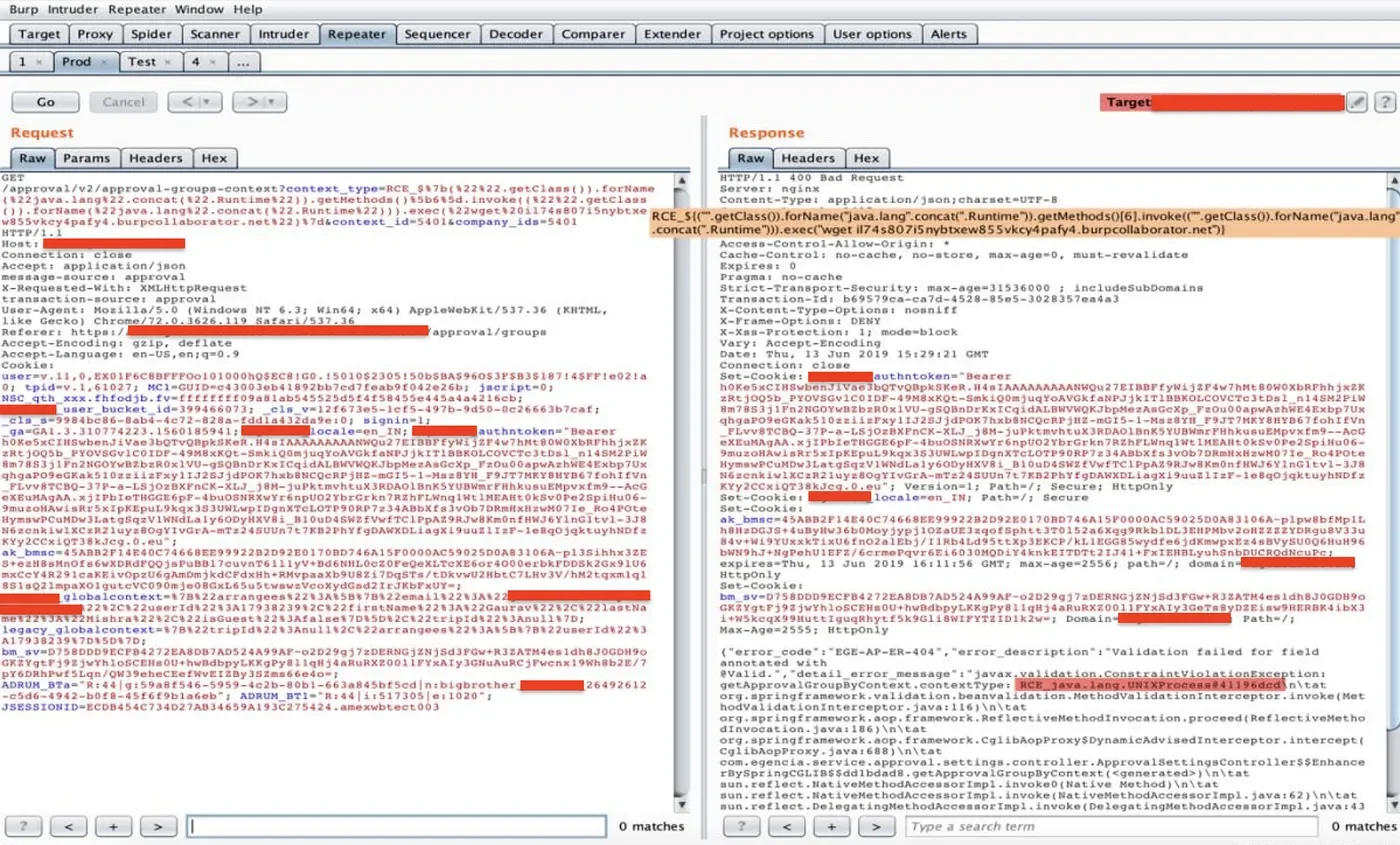
After a few seconds a DNS interaction appeared. The lookup revealed the actual IP address of the production origin server, confirming both that command execution had succeeded and that outbound network access was allowed from the target environment.

Root cause
User-controlled input was embedded into a template and evaluated by a Java EL engine instead of being treated as data. The ${...} syntax was processed server-side, which is why ${191*7} came back evaluated and why reflective access to java.lang.Runtime was possible from the template context.
The WAF did not prevent exploitation because its rules appeared to match literal strings (java.lang.Runtime and ().) rather than the semantics of the expression. String concatenation and an extra pair of parentheses produced the same behaviour without matching the signatures. Error messages were suppressed, which slowed engine identification but did not stop the attack.
Impact
On staging, the researcher obtained a reverse shell, which is full Remote Code Execution. On production, the same class of execution was confirmed through process references in the response and through a DNS interaction from the origin server, showing outbound network access was permitted. The researcher ran system commands on the server, subject to the WAF constraints described above.
Fix
The report gives general mitigations rather than a specific patch:
- Do not let end users supply or modify template content. Where business requirements make that unavoidable, minimise user influence over template structure.
- Prefer logic-less template engines such as Mustache, which limit code execution and enforce separation between presentation and logic.
- If user input must be processed in templates, run it in a restricted sandbox with dangerous classes, methods and modules removed. Sandboxing is complex and has a history of bypasses, so it should not be the only defence.
- Assume template injection may occur and design for containment: hardened, isolated containers (for example locked-down Docker environments) with minimal permissions, no outbound access by default, and strict filesystem controls.
- Enforce egress filtering and URL allowlisting so attackers cannot download secondary payloads or exfiltrate data after code execution.
Variants to test
- Arithmetic probe. Send
${191*7}(or another simple expression) in any reflected parameter. A positive result is the evaluated number in the response instead of the literal string. - A positive result is evaluation only for one syntax, which narrows the engine family.
- Reflective runtime access. Use the
getClass().forName(...)chain shown above with a harmless command such asls. A positive result is a process reference or other side effect in the response, even without command output. - Utility discovery. Run checks for
pythonandwgetthrough the same injection. A positive result is a process reference for each, indicating the binaries exist. - Concatenation bypass. Replace a blocked literal with
"part1".concat("part2"). A positive result is the payload executing where the literal version was blocked. - Parenthesis restructuring. Wrap a method call in extra parentheses, for example
(getClass())instead ofgetClass(). A positive result is execution where the original form was blocked. - Out-of-band confirmation. Trigger a DNS lookup to a Collaborator domain through the injection. A positive result is an interaction showing the origin's IP address, which confirms execution and outbound access without touching the target's data.
What happened, in plain words
A security researcher found a way to make a web server run commands of his choosing. It started with something that looked harmless: a page that showed back whatever you typed into it. That is common and usually fine. But here, the server did not just show the text; it treated it as a little program and ran it. That mistake is called Server-Side Template Injection, or SSTI. The researcher proved he could run commands on a staging server, then found a way around the protection on the production server and confirmed the same thing there. This article walks through each step in simple terms, including the exact code he sent and what it means.
Introduction
Sometimes a bug does not look dangerous at first. It might look like the site is just repeating your input, maybe with a formatting glitch. You might ignore it. In this case, the starting point was exactly that: a value the user controls was being shown back in the response.
But small oddities in how the application handled special characters suggested the input might not be treated as plain data. It looked like the server was putting the value inside a template and interpreting it, rather than just printing it.
This article explains how that observation led to finding a blind Server-Side Template Injection (SSTI), how the researcher validated it even with a Web Application Firewall (WAF) in the way, and how unsafe use of a template engine turned this into a Remote Code Execution (RCE) risk.
What is a template engine?
A template engine is a tool that helps a website build pages dynamically. Think of a template as a form letter: it has fixed text and blanks to fill in, like "Dear [name], your order [number] is ready." The template engine takes the template and the data (name, order number) and produces the final page. This is used for web pages and emails. If user input is placed into the template without care, an attacker can put special instructions in the blanks, and the engine will execute them. That is Server-Side Template Injection.
First Suspicion: Is the Application Evaluating Input?
The application reflected user input, which is common in templated systems. To check if the input was merely echoed or actually evaluated, the researcher started with a simple SSTI test payload:
${191*7}
This is a template expression. The ${...} syntax tells the template engine to evaluate what is inside. Here, it is a simple multiplication: 191 times 7. If the server just prints the text, you would see ${191*7} in the response. If the server evaluates it, you would see the result of the multiplication. When the response returned the evaluated result instead of the literal input, it became clear that the server was interpreting the value inside a template rather than treating it purely as data.
Screenshot showing crafted input and evaluated output.
The $ character in the expression was required for successful evaluation, which is typical for template engines that process expressions. This initial observation confirmed the presence of Server-Side Template Injection (SSTI), laying the groundwork for further analysis of the template engine, payload development, and eventual validation of Remote Code Execution.
Template engines are widely used by web applications to present dynamic data via web pages and emails. Unsafely embedding user input in templates enables Server-Side Template Injection.
Identifying the Template Engine
After confirming template evaluation, the next step was to understand which template engine was in use. Based on the ${...} expression style and the ability to access Java classes, the behaviour was consistent with a Java Expression Language (EL), based engine, as commonly seen in JSP or Spring-based applications.
In many cases, template engines can be identified by intentionally sending invalid syntax and observing error messages. Here, however, error messages were suppressed, so this approach provided limited information. Instead, the researcher relied on behaviour observed from controlled payloads and referenced publicly documented examples of EL implementations to guide further testing.
What is Java Expression Language (EL)?
Java Expression Language is a feature in Java web applications that allows embedding expressions in web pages. It is often used to access server-side data and call methods. If user input is evaluated as an EL expression, an attacker can call Java methods, potentially leading to code execution.
Understanding Impact
With a likely EL engine in mind, the focus shifted to determining whether this injection could be escalated from expression evaluation to code execution. Rather than jumping straight to complex payloads, the researcher aimed to identify a minimal and controlled test that could safely confirm whether system-level commands were executable.
Based on this research, he tested a known technique that leverages accessible runtime classes to invoke system commands through the template context. For example, the following payload executed a simple ls command:
${"".getClass().forName("java.lang.Runtime").getMethods()[6].invoke("".getClass().forName("java.lang.Runtime")).exec("ls")}
Let us break this down piece by piece:
""is an empty string. In Java, even an empty string is an object, and you can call methods on it..getClass()returns the class of that object (here, the String class)..forName("java.lang.Runtime")is a static method that loads a class by name.java.lang.Runtimeis a Java class that allows interaction with the environment, including running commands..getMethods()[6]gets an array of methods of the Runtime class and picks the one at index 6. The report does not specify which method that is..invoke(...)calls that method on an instance. The argument is another Runtime instance obtained the same way..exec("ls")runs thelscommand, which lists files in the current directory.
So the whole expression obtains a Runtime object and calls exec to run ls. Since this was a blind injection, no command output was returned in the HTTP response. However, the response included a Unix process reference (highlighted in the screenshot below), confirming that the command had been executed successfully on the server side.
What is a blind injection?
Blind means you cannot see the direct result of your action. In this case, the command output is not sent back in the response. You have to infer success from indirect signs, like a process reference appearing in the response.
Next Steps
At this stage, the researcher wanted to understand what tools were available on the environment. He ran a few additional checks to see whether common utilities like python and wget were present, as these are often used to download or execute payloads. The responses again returned process references, confirming that these binaries were already installed, which is typical for many Unix-based environments.
To validate this further, he set up a simple HTTP server locally on port 80 using Python and hosted a reverse shell script.
What is a reverse shell?
A reverse shell is a way to get command-line access to a machine from a remote location. Normally, you connect to a server (like SSH). In a reverse shell, the server connects back to you. The attacker sets up a listener on his machine, and the server runs a script that connects back, giving the attacker a shell.
The next step was to download this script onto the vulnerable (staging) server using the available utilities.
Once again, the response returned a Unix process reference, which was enough to confirm that the file had been successfully retrieved by the remote machine. After that, he started a Netcat listener on port 443 to receive the connection and executed the script through the injection point.
As shown in the screenshot below, the staging server established a reverse shell, allowing command execution and confirming full Remote Code Execution capability.
Enter the WAF: New Constraints
The next challenge was to determine whether the same issue could be demonstrated on the production environment while staying within the constraints enforced by Akamai’s WAF.
What is a WAF?
A Web Application Firewall (WAF) is a security tool that sits in front of a web application and inspects incoming requests. It tries to block malicious traffic based on patterns, like known attack signatures. It is like a security guard at a door who checks IDs and bags. But guards can be fooled if you disguise something.
Initial testing with simple arithmetic expressions (for example, multiplication and division) produced the same evaluated responses as seen in staging. This confirmed that the underlying vulnerability was present in production as well. However, when attempting to use the full validation payload, the request was blocked and returned a 403 Access Denied page.
At this point, the approach shifted to understanding how the WAF was interpreting the payload rather than repeatedly sending the same request. He began breaking the payload into smaller pieces and testing them individually to identify which parts were being flagged. This trial-and-error process made it possible to isolate specific patterns that the WAF considered unsafe. In particular, the following two strings consistently triggered blocking:
- “java.lang.Runtime”
- ().
Identifying these restrictions helped in understanding how the WAF signatures were structured and guided the next steps in safely restructuring the payload for validation.
The original payload he intended to use was:
${"".getClass().forName("java.lang.Runtime").getMethods()[6].invoke("".getClass().forName("java.lang.Runtime")).exec("wget")}
Since the WAF was clearly blocking direct references to certain strings, he started reviewing the Java documentation to see whether there were alternative ways to construct the same value without writing it explicitly in the request.
The idea was to achieve the same result while changing how the string was formed, so that it would not match the WAF signature.
After some experimentation, he found multiple possible approaches, but in this case using string concatenation turned out to be the most reliable method to rebuild the "java.lang.Runtime" value without triggering the filter.
To avoid using the blocked string directly, he reconstructed it using Java’s concat method:
"java.lang.Runtime" === "java.lang".concat(".Runtime")
This line shows that the string "java.lang.Runtime" is equivalent to "java.lang" concatenated with ".Runtime". In Java, the concat method joins two strings. So instead of writing the blocked string, he wrote it in two parts that, when joined, produce the same value. The WAF looks for the exact string java.lang.Runtime, but it does not see it because the request contains "java.lang".concat(".Runtime"). This allowed him to represent the same value without writing the exact pattern that the WAF was looking for, effectively bypassing the first restriction.
The payload at this stage looked like this:
${"".getClass().forName("java.lang".concat(".Runtime")).getMethods()[6].invoke("".getClass().forName("java.lang".concat(".Runtime"))).exec("wget")}
To address the next obstacle, he focused on the filtering of the (). pattern. During testing, he noticed that the WAF specifically blocked requests containing the exact (). sequence. However, the filtering appeared to rely on simple string matching rather than understanding how Java evaluates expressions.
He experimented with slightly restructuring the expression so that the exact blocked pattern no longer appeared, while keeping the logic unchanged. In Java, additional parentheses do not alter how the expression is evaluated, as the compiler/runtime still resolves the same method calls in the same order. By modifying the structure without changing the semantics, he was able to avoid the signature the WAF was detecting while maintaining valid method chaining.
To bypass the second filter, he modified the expression by wrapping the getClass() call in an additional set of parentheses, changing it from getClass() to (getClass()). The WAF rule was specifically looking for the (). pattern, but it did not account for the ()). sequence. This small syntactic adjustment preserved the original behaviour of the code while avoiding the signature the WAF was attempting to block.
The final payload became:
${("".getClass()).forName("java.lang".concat("Runtime")).getMethods()[6].invoke(("".getClass()).forName("java.lang".concat("Runtime"))).exec("wget")}
After executing this payload, the server response included a Unix process reference similar to the one observed in the staging environment. Although the injection remained blind, the presence of this process identifier confirmed that the command had been successfully executed on the production server, demonstrating remote code execution despite the WAF protections.
For obvious reasons, he did not attempt to upload any shell or additional payloads to the production environment. Instead, he chose a safer validation method to confirm the impact.
To verify whether outbound communication was possible, he tested if the production server could initiate a request to an external system using Burp Collaborator. He sent a payload designed to trigger a DNS lookup and monitored for any interaction.
This approach allowed him to validate that the server was capable of making outbound requests without introducing any harmful artifacts on the production system.
After a few seconds, he observed a DNS interaction on Burp Collaborator. The lookup request revealed the actual IP address of the production origin server, confirming that the command execution was successful and that outbound network access was allowed from the target environment.
Mitigations:
The most effective way to prevent Server-Side Template Injection (SSTI) is to ensure that end users are never allowed to supply or modify template content. While this is not always feasible due to business requirements, minimizing user influence over template structure significantly reduces risk.
Where dynamic rendering is required, prefer logic-less template engines such as Mustache. These engines intentionally limit the ability to execute code, enforcing a strict separation between presentation and application logic and thereby reducing the attack surface.
If user-controlled input must be processed within templates, execution should occur inside a restricted sandbox environment with dangerous classes, methods, and modules removed. However, it is important to recognise that sandboxing is complex and historically prone to bypasses, so it should not be relied upon as the sole defence.
A stronger defensive approach is to assume that template injection may eventually occur and design for containment. Running template-processing components inside hardened, isolated containers (e.g. locked-down Docker environments) with minimal permissions, no outbound access by default, and strict filesystem controls can significantly limit the blast radius of exploitation.
Additionally, enforce egress filtering and URL allowlisting to prevent attackers from downloading secondary payloads or exfiltrating data if code execution is achieved.
Key Takeaways:
- No WAF is 100% accurate, and signature-based protections can be bypassed with sufficient experimentation.
- Vulnerabilities must be fixed at the application code level, a WAF should only be considered a compensating control, not a primary defence.
- Seemingly low-impact issues (such as input reflection) can often be escalated; always test for maximum achievable impact.
- Understanding backend technologies, template engines, and framework behaviour greatly accelerates both detection and exploitation analysis.
References
- https://portswigger.net/web-security/server-side-template-injection
- https://portswigger.net/research/server-side-template-injection
- https://medium.com/server-side-template-injection/server-side-template-injection-faf88d0c7f34
- https://github.com/swisskyrepo/PayloadsAllTheThings/tree/master/Server%20Side%20Template%20Injection#expression-language-el---code-execution
Glossary
- Server-Side Template Injection (SSTI): A vulnerability where user input is embedded into a template and evaluated by the template engine, allowing an attacker to inject and execute code.
- Template engine: Software that combines templates with data to produce dynamic content, like web pages or emails.
- Payload: The malicious input sent to exploit a vulnerability.
- Java Expression Language (EL): A feature in Java web applications that allows embedding expressions in web pages, often used to access server-side data and call methods.
- Remote Code Execution (RCE): A vulnerability that allows an attacker to run arbitrary commands on a remote server.
- Blind injection: An attack where the attacker cannot see the direct result of the injection, so they infer success from indirect signs.
- Web Application Firewall (WAF): A security tool that inspects incoming requests and blocks those that match known attack patterns.
- Reverse shell: A connection initiated from the target server back to the attacker, giving the attacker command-line access.
- Netcat: A networking utility used to read and write data across network connections, often used to set up listeners for reverse shells.
- Burp Collaborator: A tool that provides a unique domain name to detect out-of-band interactions, such as DNS lookups, to confirm vulnerabilities.
- DNS lookup: The process of translating a domain name into an IP address.
- Egress filtering: Controlling outbound network traffic from a server to prevent unauthorized communication.
- Sandbox: A restricted environment where code can run with limited permissions, reducing the impact of exploitation.
- Logic-less template engine: A template engine that does not allow complex logic or code execution, such as Mustache.
- Docker: A platform for running applications in isolated containers.
- IP address: A unique number assigned to a device on a network, used to identify it.




