Scheduled Report Authorization Flaw Enables Cross-User Dashboard Data Disclosure
A scheduled report feature accepted a user-supplied rendering identity without restricting it to the requester's authorised scope. A lower-privileged user could therefore generate a report containing dashboard data outside their own visibility.
 Published on medium.com
Cybersecurity
The full write-up lives on its author's site
It belongs to its author, so we link to it rather than copy it. The other two tabs are our own rewrites, checked against it.
Context
During security research on an enterprise infrastructure monitoring platform, I looked at the authorization controls around scheduled dashboard reports. The feature lets a user create a scheduled report that renders dashboard content. The interesting question is not what the report contains, but whose permissions are applied when the platform renders it.
The platform separates two concepts:
- Report owner: the user who creates and manages a scheduled report.
- Rendering identity: the user whose permissions are applied when generating dashboard content.
That separation is legitimate on its own, but it means the rendering identity is a security boundary. If a requester can choose a rendering identity outside their own authorized scope, the report becomes a way to read data through someone else's eyes.
The affected product and identifying technical details are intentionally omitted while disclosure considerations remain unresolved, so this write-up stays at the level of the workflow and the authorization model rather than naming endpoints or parameters.
Setup
I reproduced the behaviour in a controlled, locally deployed environment. Two accounts with different permission levels were used:
- A restricted administrative account with limited host-group visibility.
- A higher-privileged account with broader dashboard visibility.
The restricted account was first exercised through the normal monitoring interface to establish its actual access boundaries. That baseline matters: without knowing exactly what the restricted account can see directly, a report containing extra data proves nothing.
Finding it
While examining the scheduled reporting workflow, I observed that the report creation workflow accepted a user-supplied rendering identity without adequately restricting the selected identity to the requester's authorized scope. In other words, the workflow accepted the identity from the request without adequately restricting it to the requester's authorised scope.
This looked wrong because the two roles are supposed to be independent. Owning a report should not imply the right to have it rendered as an arbitrary other user. The rendering identity is effectively a privilege selector, and a privilege selector controlled by the client is a classic escalation primitive.
Exploitation
Step 1: Establish the baseline
I used the restricted administrative account through the normal monitoring interface and recorded what it could see. Its visibility was limited to specific host groups, and the dashboards it could open reflected that limit.
Step 2: Create a scheduled report with a different rendering identity
Using the same restricted account, I went through the scheduled report creation workflow and supplied the identity of the higher-privileged account as the rendering identity. The workflow accepted it; the selected identity was not constrained to the requester's authorized scope.
Step 3: Compare the generated output
I generated the report and compared its dashboard output against the data available to the restricted account through its own normal dashboard permissions. The generated report contained monitoring information that the restricted account could not access directly.
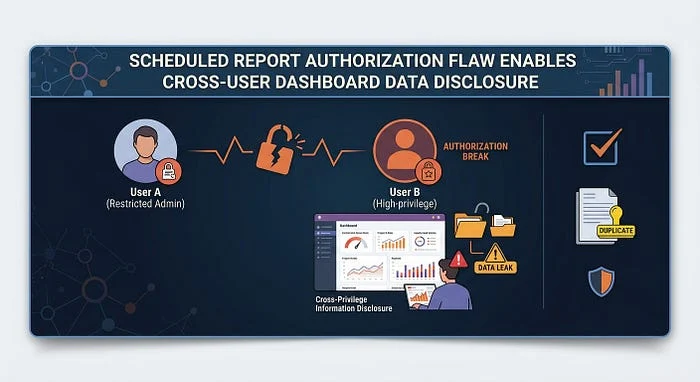
Step 4: Confirm the discrepancy
The difference between direct access and background-generated content is the finding. The restricted account's own dashboards were unchanged, but the scheduled report, rendered under the other identity, returned data outside the requester's authorized visibility. This demonstrated a potential cross-privilege information disclosure issue involving the scheduled reporting workflow.
Root cause
The design separates report ownership from rendering identity, and that separation requires careful authorization enforcement. The mistake is that the creation workflow trusted a user-supplied rendering identity and did not validate it against the requester's authorized scope on the server side.
The scheduled reporting path applies a different identity by design, and that is where the authorisation was missing. The feature executes actions under another user's permission context, so the authorization decision has to be made at the point where the identity is accepted, not inferred from the fact that the requester owns the report.
Impact
A lower-privileged user could specify another user's identity as the dashboard rendering context and receive a report containing data outside their authorized visibility. In the tested environment this exposed monitoring information the restricted account could not access directly. The report describes this as a potential privilege escalation and cross-privilege information disclosure scenario; the scope of what any given deployment would expose depends on which identities a requester can name and what those identities can see.
Fix
Report ownership and rendering permissions must be independently authorized. Concretely, the server should validate the requested rendering identity against the requester's authorized scope and reject identities the requester is not entitled to use, rather than accepting the value from the client. Automated reporting features that execute under another user's permission context need that check at the point of identity selection.
Disclosure status
The research was independently submitted through a vulnerability disclosure program. The report was marked as a duplicate.
Variants to test
- Other background execution features. Look for exports, digests, alerts and webhooks that render content under a stored or supplied identity. A positive result is output containing objects the requesting account cannot open directly.
- Identity fields in create and update requests. Try changing the rendering identity on an existing scheduled report, not just at creation. A positive result is the same cross-user data appearing after an update.
- Identifier substitution. Swap the identity value for another account's identifier and compare the generated output with the baseline. A positive result is data outside the requester's host-group or dashboard visibility.
- Ownership versus rendering separation. Create a report as a low-privileged user and set the rendering identity to a higher-privileged one. A positive result is a report whose contents exceed the owner's direct access.
- Direct versus generated comparison. For every reporting feature, compare what the account sees in the UI with what the generated artefact contains. Any divergence is worth reporting.
What happened, in plain words
A security researcher was looking at a piece of software that companies use to keep an eye on their computers and servers. This kind of software is called an enterprise infrastructure monitoring platform: it collects information about machines (how busy they are, whether they are running, how much disk space they use) and shows it on dashboards, which are screens full of charts and tables.
The platform had a feature called scheduled dashboard reports. You tell it, once, that you want a dashboard turned into a report, and it builds that report for you automatically on a schedule. You do not have to be sitting in front of the screen when it happens.
The researcher noticed something odd about how the platform decides what goes into that report. A report has an owner, the person who set it up. But the platform also has a second idea: the rendering identity, which is the user account whose permissions are used when the report is actually built. Permissions are the rules about what an account is allowed to see and do. So the report is built as if that second user were looking at the dashboard.
That second idea is where the problem was. A low-privileged user, someone who is only allowed to see a small part of the monitoring data, could create a scheduled report and tell the platform to build it as a different, more powerful user. The platform accepted that choice without adequately restricting it to the low-privileged user's authorised scope. The resulting report then contained information the low-privileged user could not see on their own dashboard.
This is a privilege escalation: using a feature to get more access than you are supposed to have. It is also an information disclosure: data leaking to someone who should not see it. The researcher reproduced it in a controlled, locally deployed environment, meaning a copy of the software set up on their own machine for testing, not a live customer system.
The research was submitted through a vulnerability disclosure program, a formal channel companies run so that people can report security problems safely. The report was marked as a duplicate, which usually means someone else had already reported the same issue. The affected product and the identifying technical details are deliberately left out while disclosure considerations remain unresolved, so the write-up stays at the level of the workflow and the permission model rather than naming specific web addresses or field names.
The two roles, and why the gap between them matters
To understand the bug you need to hold two ideas apart.
- Report owner: the user who creates and manages a scheduled report. Think of it as the person who filled in the form and whose name is on the subscription.
- Rendering identity: the user whose permissions are applied when the dashboard content is generated. Think of it as the person standing in front of the dashboard while the picture is taken.
Having these as two separate things is not wrong in itself. The separation is a legitimate design choice.
But the moment a feature lets one person choose whose eyes the report is built through, that choice becomes a security boundary. A boundary is simply a line that must not be crossed without permission. If the requester can pick a rendering identity that is outside their own authorised scope, meaning outside the set of things they are allowed to touch, then the report becomes a way to read data through someone else's eyes. The report is no longer just a convenience; it is a key.
Because the product and its technical details are withheld, this write-up does not name endpoints (the specific web addresses the browser talks to) or parameters (the named fields in a request). It describes the workflow and the permission model instead.
Setting up the test
The researcher reproduced the behaviour in a controlled, locally deployed environment. That phrase matters: it means the software was installed and run on a machine the researcher controlled, so no real customer data was involved and the test could be repeated safely.
Two accounts with different permission levels were used:
- A restricted administrative account with limited host-group visibility. A host group is a way of bundling monitored machines together, for example all the web servers in one office. Limited visibility means this account could only see some of those bundles.
- A higher-privileged account with broader dashboard visibility. This account could see more of the dashboards and therefore more of the monitoring data.
The restricted account was first exercised through the normal monitoring interface to establish its actual access boundaries. In plain terms: the researcher logged in as the low-privileged user and clicked around the ordinary screens, noting exactly what appeared and what did not.
That baseline matters. A baseline is a record of normal behaviour taken before you change anything. Without knowing exactly what the restricted account can see directly, a report containing extra data proves nothing: the extra data might simply be something the account was always allowed to see. The baseline is the ruler you measure the result against.
Finding it
While examining the scheduled reporting workflow, the researcher observed that the report creation workflow accepted a user-supplied rendering identity without adequately restricting the selected identity to the requester's authorised scope.
Unpack that sentence. A user-supplied value is one that comes from the person using the software, usually typed into a form or sent by the browser. The server, the computer that runs the application and stores the data, is supposed to treat such values with suspicion. Here, the server took the identity from the request and used it as the permission context for rendering, rather than checking that the requester was allowed to act as that identity.
A useful comparison is a hotel. The front desk can print a key card for any room, but it must check that the guest asking for room 412 is actually booked into room 412. If the desk simply prints whatever room number the guest writes on a slip of paper, the lock on the door means nothing. The lock is only as good as the check at the desk.
This looked wrong because the two roles are supposed to be independent. Owning a report should not imply the right to have it rendered as an arbitrary other user. The rendering identity is effectively a privilege selector, a control that decides how much power the action runs with, and a privilege selector controlled by the client, the browser side, is a classic escalation primitive. A primitive, in security writing, is a small building block that can be combined into a bigger attack.
Walking through the exploitation
Step 1: Establish the baseline
The researcher used the restricted administrative account through the normal monitoring interface and recorded what it could see. Its visibility was limited to specific host groups, and the dashboards it could open reflected that limit.
Why this step first? Because every later claim depends on it. If you cannot say precisely what the low-privileged account sees on its own, you cannot say that anything extra in the report is a leak. The baseline turns a vague feeling into a measurement.
Step 2: Create a scheduled report with a different rendering identity
Using the same restricted account, the researcher went through the scheduled report creation workflow and supplied the identity of the higher-privileged account as the rendering identity. The workflow accepted it; the selected identity was not constrained to the requester's authorised scope.
Why this step? Because it is the heart of the test. The researcher is not attacking the login screen or guessing a password. They are using a normal feature, in the normal way, and simply choosing a value the feature should have refused. If the server had checked the choice against the requester's permissions, the request would have been rejected and there would be no finding. It was not rejected, so the next question is what the report actually contains.
Step 3: Compare the generated output
The researcher generated the report and compared its dashboard output against the data available to the restricted account through its own normal dashboard permissions. The generated report contained monitoring information that the restricted account could not access directly.
Why this step? Because acceptance of a value is not the same as a leak. A form might accept a name and quietly ignore it. The comparison is what turns a suspicious input into evidence: the report, built under the other identity, shows things the requester's own screens do not.
The screenshot accompanies the write-up's title and byline; the report does not describe what it shows beyond that.
Step 4: Confirm the discrepancy
The difference between direct access and background-generated content is the finding. The restricted account's own dashboards were unchanged, but the scheduled report, rendered under the other identity, returned data outside the requester's authorised visibility. This demonstrated a potential cross-privilege information disclosure issue involving the scheduled reporting workflow.
Why this step? Because it rules out the boring explanations. If the low-privileged account's own dashboards had suddenly shown more data, the story would be about a broken dashboard, not about the reporting feature. They did not change. The only thing that changed was the report, and the only difference in how the report was made was the identity it was rendered under. That is the discrepancy, and the discrepancy is the bug.
Why it happened
The design separates report ownership from rendering identity, and that separation requires careful authorisation enforcement. Enforcement means actually applying the rule at the moment it matters, not just writing the rule down.
The mistake is that the creation workflow trusted a user-supplied rendering identity and did not validate it against the requester's authorised scope on the server side. Validation here means checking a value against a rule before using it. In other words, the software confused two questions: may this person create a report, and may this person act as that other user. They are different questions with different answers.
The scheduled reporting path applies a different identity by design, and that is where the authorisation was missing. When you open a dashboard in the browser, the software checks who you are and shows only what you may see. The scheduled reporting path applies a different identity by design, and that is exactly where the check was missing. The feature executes actions under another user's permission context, so the authorisation decision has to be made at the point where the identity is accepted, not inferred from the fact that the requester owns the report.
What an attacker could do with it
A lower-privileged user could specify another user's identity as the dashboard rendering context and receive a report containing data outside their authorised visibility. In the tested environment this exposed monitoring information the restricted account could not access directly.
The report describes this as a potential privilege escalation and cross-privilege information disclosure scenario. The scope of what any given deployment would expose depends on which identities a requester can name and what those identities can see. That last point is worth pausing on: the damage is not fixed. It grows with the power of the accounts whose names can be supplied. If the software lets a low-privileged user name a more privileged account, the report is built with that account's view.
How to fix it
Report ownership and rendering permissions must be independently authorised. Concretely, the server should validate the requested rendering identity against the requester's authorised scope and reject identities the requester is not entitled to use, rather than accepting the value from the client. Automated reporting features that execute under another user's permission context need that check at the point of identity selection.
In hotel terms: the front desk checks the booking before printing the key card, every time, no matter how confident the guest sounds.
Disclosure status
The research was independently submitted through a vulnerability disclosure program. The report was marked as a duplicate.
Other places to look for the same pattern
These are the variants the write-up suggests testing. They are useful because the same mistake, trusting a value that decides whose permissions are used, tends to appear in more than one feature.
- Other background execution features. Look for exports, digests, alerts and webhooks that render content under a stored or supplied identity. A positive result is output containing objects the requesting account cannot open directly. A webhook is an automatic message the software sends to another system when something happens; a digest is a summary email.
- Identity fields in create and update requests. Try changing the rendering identity on an existing scheduled report, not just at creation. A positive result is the same cross-user data appearing after an update. The reasoning: a fix or a check might exist on the create form but be missing on the edit form.
- Identifier substitution. Swap the identity value for another account's identifier and compare the generated output with the baseline. A positive result is data outside the requester's host-group or dashboard visibility. An identifier is the unique label the system uses internally for an account, such as a number.
- Ownership versus rendering separation. Create a report as a low-privileged user and set the rendering identity to a higher-privileged one. A positive result is a report whose contents exceed the owner's direct access.
- Direct versus generated comparison. For every reporting feature, compare what the account sees in the UI with what the generated artefact contains. Any divergence is worth reporting. The UI is the user interface, the screens you click; the artefact is the file or message the software produces.
Glossary
- API: the set of addresses and rules a program exposes so other programs (or a browser) can ask it to do things and get answers back.
- Artefact: a file or message produced by the software, such as a generated report.
- Authorisation: the decision about what an already identified user is allowed to do or see.
- Authorised scope: the set of data and actions a particular account is permitted to use.
- Baseline: a record of normal behaviour taken before a test, used as the ruler for comparison.
- Client: the side the user controls, usually the browser; the opposite of the server.
- Cross-privilege information disclosure: data becoming visible to an account with lower privileges than the account the data belongs to.
- Dashboard: a screen of charts and tables summarising monitoring data.
- Duplicate: a report marked as describing an issue that was already reported.
- Endpoint: a specific web address that an application responds to.
- Enterprise infrastructure monitoring platform: software companies use to watch their computers and servers and display their status.
- Host group: a bundle of monitored machines treated as one unit for permission purposes.
- Identifier: the unique label a system uses internally for an object, such as an account.
- Identity: the account whose permissions are in effect for an action.
- Information disclosure: data being revealed to someone who should not see it.
- Parameter: a named field in a request that carries a value.
- Permission: a rule saying what an account may see or do.
- Permission context: the set of permissions applied while an action runs.
- Privilege escalation: using a feature to gain more access than you are supposed to have.
- Privilege selector: a value that decides how much power an action runs with.
- Rendering: building the content of a report or dashboard from stored data.
- Rendering identity: the user account whose permissions are applied when a report is generated.
- Scheduled dashboard report: a report the software builds and delivers automatically on a timetable.
- Server: the computer that runs the application and holds the data; it makes the security decisions.
- Server-side validation: checking a value against a rule on the server, where the user cannot bypass it.
- User-supplied: a value that comes from the person using the software rather than from the software itself.
- Vulnerability disclosure program: a formal channel a company runs so people can report security problems safely.
- Webhook: an automatic message the software sends to another system when an event occurs.

