Secrets Exposure: Publicly Accessible `docker-compose.yml` Exposing MinIO Credentials
 Published on medium.com
Cybersecurity
The full write-up lives on its author's site
It belongs to its author, so we link to it rather than copy it. The other two tabs are our own rewrites, checked against it.
Context
This write-up covers a secrets exposure found during a security assessment of an application hosted on a domain ending in .co.id (redacted in the article). The application's web root served a docker-compose.yml file without any authentication. That file is a normal Docker Compose configuration, but in this case it described the application's connection to a MinIO/Maxio Object Storage service and carried the storage credentials in plaintext inside the environment section.
The same file also described Docker container settings that grant elevated privileges: the SYS_ADMIN capability, access to /dev/fuse, and apparmor:unconfined. All credentials, domains, bucket names and infrastructure details are redacted in the write-up.
Setup
The assessment required no account, role or special access. The only precondition was that the configuration file was reachable from the web root of the application. For validation, the researcher used the official MinIO Client (mc), invoked as ./mc from the local directory. The article does not give the client version.
Finding it
The researcher opened the publicly available docker-compose.yml directly. No authentication was required to retrieve it. At first the file looked like an ordinary Docker configuration, but inspecting its contents showed plaintext credentials for a MinIO/Maxio Object Storage service, plus the container privilege settings mentioned above.
The exposed configuration was similar to the following (values redacted in the article):
version:
The sensitive values of concern are:
MINIO_ACCESS_KEYMINIO_SECRET_KEY
They were stored directly in the publicly accessible file. The environment section is the part that matters:
environment: - MINIO_BUCKET=[REDACTED] - MINIO_URL=https://maxio.[REDACTED].id - MINIO_ACCESS_KEY=[REDACTED] - MINIO_SECRET_KEY=[REDACTED]
The actual Access Key and Secret Key are redacted from the write-up.
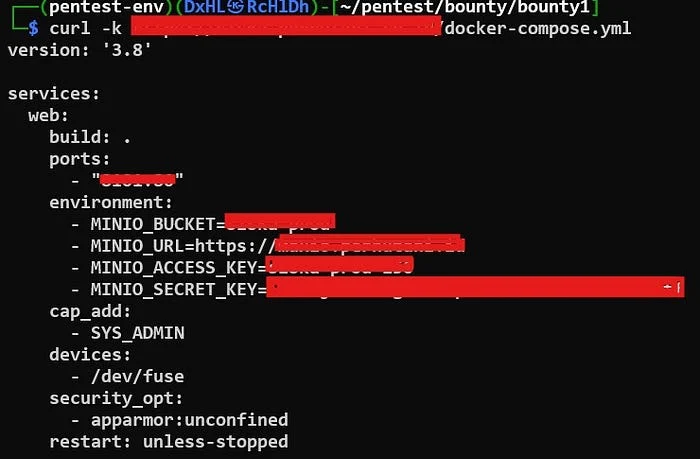
The screenshot shows the publicly accessible docker-compose.yml with the MinIO/Maxio credentials in plaintext.
Other sensitive Docker configuration
Besides the storage credentials, the file contained Docker security settings that weaken normal container isolation:
cap_add: - SYS_ADMIN
devices: - /dev/fusesecurity_opt: - apparmor:unconfined
The file contained cap_add: - SYS_ADMIN, devices: - /dev/fuse and security_opt: - apparmor:unconfined, which the researcher says weaken some normal container isolation mechanisms. As the researcher notes, these settings do not by themselves prove container escape or host compromise. Their relevance is that if another vulnerability allowed an attacker to compromise the application container, the excessive privileges could increase the impact of that compromise.
Exploitation
Step 1: Retrieve the configuration file
The file was fetched from the web root of the application without authentication. This is the whole of the discovery step: no request details beyond the URL are given in the article.
Step 2: Validate the credentials with the MinIO Client
To determine whether the exposed credentials were actually valid, the researcher configured an alias with the official MinIO Client:
./mc alias set TARGET MINIO_URL MINIO_ACCESS_KEY MINIO_SECRET_KEY
Where:
The command creates a local alias named TARGET pointing at the object-storage endpoint, authenticated with the exposed key pair. The terminal returned:
Added `TARGET` successfully.
That response means the credentials exposed in the public configuration file were accepted by the target MinIO/Maxio service.

The screenshot shows the exposed credentials being accepted by the associated object-storage service.
Step 3: Further verification with mc admin info
After the alias was configured, the researcher performed a limited verification of the target environment:
./mc admin info TARGET
According to the MinIO Client functionality, mc admin info is an administrative command that retrieves information about the status, health and resource usage of a MinIO deployment. The command returned information from the target environment.
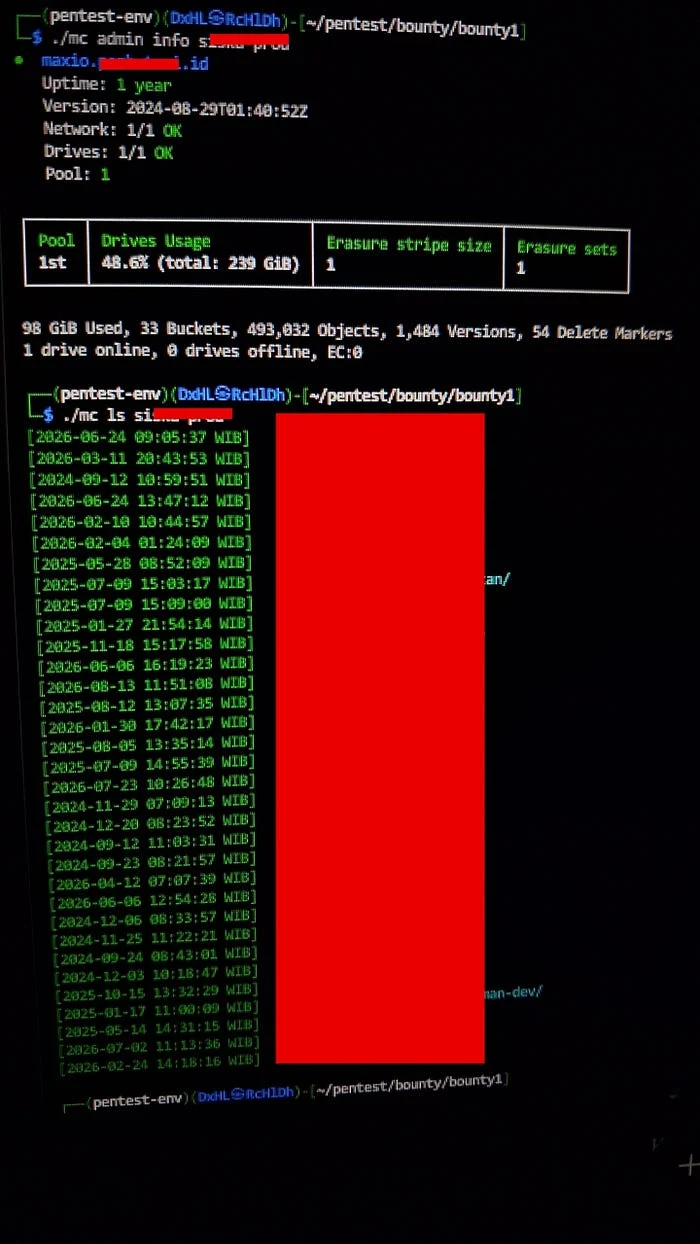
The screenshot shows mc admin info returning information from the target MinIO environment. The researcher notes that all sensitive infrastructure information in that screenshot should be redacted before publication.
Limits of the testing
The researcher explicitly did not attempt container escape, host compromise, destructive actions, or modification or deletion of production data. Testing was intentionally limited to validating the exposed credentials and confirming the level of access available.
Root cause
The mistake is that a configuration file containing authentication credentials was served from the application's web root. The credentials were not placeholders: they were live values that the MinIO/Maxio service accepted. The article does not describe the web server configuration that allowed the file to be served, so the exact reason it was reachable is not stated.
The Docker privilege settings (SYS_ADMIN, /dev/fuse, apparmor:unconfined) are a separate weakness in the same file: they weaken container isolation, though the article does not claim they were exploited.
Impact
The impact depends on the permissions assigned to the exposed credentials. Because the credentials were publicly exposed and successfully accepted by the object-storage service, an unauthorised party could potentially use them to interact with the associated storage infrastructure. Depending on the assigned permissions, possible consequences include:
- Unauthorised access to stored objects.
- Disclosure of sensitive files.
- Unauthorised upload or modification of objects.
- Unauthorised deletion of objects.
- Access to information about the storage infrastructure.
- Potential abuse of the storage service.
The additional Docker configuration also deserves attention because the container has elevated capabilities and access to /dev/fuse, which could increase the impact of a separate container compromise.
Fix
The article gives recommendations rather than describing changes that were made.
- Rotate the exposed credentials. Treat the Access Key and Secret Key as compromised: revoke them, generate new ones, review access logs for suspicious activity, and verify whether the credentials were used elsewhere.
- Remove credentials from publicly accessible configuration. Do not hardcode credentials in files that can be served by the web server; use a secrets-management mechanism or protected environment variables instead.
- Restrict access to configuration files. The web server should prevent public access to sensitive files such as:
docker-compose.yml.env.git/*.bak*.oldconfiguration filesbackup archives
- Apply least privilege. The MinIO credentials should only have the permissions the application requires; administrative permissions should not be granted to application credentials unless absolutely necessary.
- Review Docker privileges. Re-examine the
cap_add: - SYS_ADMIN,devices: - /dev/fuseandsecurity_opt: - apparmor:unconfinedsettings and minimise container privileges according to the application's actual requirements.
Variants to test
- Other configuration filenames in the web root. Request
docker-compose.yml,.env,.env.production,config.json,.git/config,*.bak,*.oldand backup archives. A positive result is a200response containing credentials, connection strings or other secrets. - Compose files in subdirectories and build contexts. Try paths such as
/docker/docker-compose.ymlor paths referenced by the application's build. A positive result is a served Compose file with anenvironmentsection. - Credential validation against the storage service. If MinIO credentials are found, configure an alias with
mc alias setand check whether it reports success. A positive result isAdded ... successfully., followed bymc admin inforeturning deployment information. - Privilege review of the container definition. Look for
cap_add,devicesandsecurity_optentries in any exposed Compose file. A positive result is a container definition with elevated capabilities or disabled confinement, which raises the impact of any separate application compromise. - Access-log review after exposure. Check whether the exposed keys were used from unexpected sources, which would indicate prior abuse.
What happened, in plain words
A website had a file sitting in the folder that its web server hands out to visitors. That file is called docker-compose.yml, and it is normally a set of instructions for starting up the pieces of an application. This one was not protected in any way: anyone who knew or guessed the file name could open it in a browser, with no login, no password and no special access.
Inside that file were two things. The first was a pair of credentials, an Access Key and a Secret Key, for a storage service called MinIO (also written Maxio in the article). Credentials are the username-and-password equivalent for software: one value identifies who is asking, the other proves it. They were written in plain text, not hidden or scrambled. The second was a set of Docker settings that give the application's container more power than it usually needs.
The researcher copied the credentials, used a free official tool called the MinIO Client to try them against the storage service, and the service accepted them. A follow-up command returned information about the storage environment. Nothing was deleted or changed. The credentials, domain names, bucket names and infrastructure details are redacted throughout the write-up.
This article walks through the same steps for someone who has never done security work: what each piece is, why the researcher did each step, and what the output means.
1. The background you need first
Before the steps make sense, a handful of ideas need to be clear. None of them require any prior security knowledge.
What a web server and a web root are
When you type a website address into your browser, your browser asks a computer somewhere for a page. That computer runs a program called a web server, whose job is to hand files back. The web root is the folder on that computer from which the web server is allowed to serve files. If a file sits inside the web root and nothing blocks it, then anyone on the internet can request it by its name, exactly as if it were a normal page.
A useful comparison: the web root is like a shop counter. Anything placed on the counter is available to any customer who walks in. Anything kept in the back office is not. The problem in this report is that a document meant for the back office was left on the counter.
What Docker and a container are
Docker is a tool for packaging an application together with everything it needs to run, so that it behaves the same on any machine. The package is called a container. Think of a container as a self-contained box: the application lives inside the box with its own libraries and settings, separated from the rest of the computer.
That separation is called isolation, and it is a safety feature. If something goes wrong inside the box, the damage should stay inside the box. The settings found in this file loosen that separation, which is why they matter.
What docker-compose.yml is
A container is rarely alone. A real application usually has several pieces: a web front end, a database, a storage service, and so on. Docker Compose is the tool that starts and connects all of those pieces together, and it reads its instructions from a file named docker-compose.yml.
The file is written in a simple indentation-based format called YAML. You do not need to learn YAML to follow this article; you only need to recognise that lines indented under a heading belong to that heading, and that a line starting with a dash is one item in a list.
Because this file describes how the application is wired together, it often contains addresses, ports, and the passwords the application uses to talk to its neighbours. That is exactly why it should never be public.
What object storage, MinIO and a bucket are
Object storage is a way of storing files where each file is kept as an independent item, called an object, inside a large pool, rather than in folders on a disk. It is the same idea that powers services like Amazon S3. You put objects in, you get objects out, and you refer to them by name.
MinIO is a piece of software that provides object storage, and it can be installed on your own servers. The article also writes it as Maxio, which is the name used in the exposed configuration. A bucket is the top-level container inside object storage: a named group that holds objects. If object storage is a warehouse, a bucket is one shelf in it.
What credentials, an Access Key and a Secret Key are
To use a storage service, software has to prove who it is. It does that with a pair of values:
- The Access Key is like a username. It says which identity is making the request.
- The Secret Key is like a password. It proves the request really comes from that identity.
Together they are called credentials. Anyone who has both can act as that identity, which is why finding them in a public file is serious.
What an environment variable is
Applications are often configured not by editing code but by setting environment variables: named values that the application reads when it starts. For example, an application might read a variable called MINIO_URL to learn where its storage service lives. In a Compose file, these are listed under a heading called environment.
Environment variables are a perfectly normal mechanism. The mistake here is not that they were used, but that the file listing them was readable by the public.
What a capability, /dev/fuse and AppArmor are
These three appear in the file and are worth understanding, because they are the second problem in the report.
- A capability in Linux is a specific permission to do something powerful.
SYS_ADMINis a Linux capability that the report lists among the container's elevated privileges. Granting it to a container is like giving a hotel guest a master key rather than a room key. /dev/fuseis a device file on Linux that lets a program implement its own filesystem. Some applications genuinely need it.- AppArmor is a Linux security feature that restricts what a program is allowed to do, using a profile. Setting
apparmor:unconfinedswitches that restriction off for the container.
Each of these weakens the box around the application. On its own, none of them means the box has been broken into. The researcher is careful to say that these settings do not by themselves prove a container escape or a compromised host. Their relevance is that if some other bug let an attacker get inside the container, these extra powers would make the consequences worse.
What the MinIO Client (mc) is
mc is the official command-line client for MinIO. A command-line client is a program you run by typing a command into a terminal, rather than clicking in a browser. It is the tool an administrator would use to manage a MinIO installation.
mc keeps a list of saved connections, each under a short nickname called an alias. Once an alias is set up, you can run commands against that target by name instead of retyping the address and credentials every time. Think of an alias as a contact saved in your phone: you type the name, and the phone knows the number.
2. Finding the exposed file
The researcher opened the publicly available docker-compose.yml directly from the web root of an application hosted on a domain ending in .co.id. The domain itself is redacted in the write-up.
No authentication was required. That is the whole discovery step: the file was simply there, reachable by anyone. The article does not give the exact request used beyond the fact that the file was fetched from the web root.
At first glance the file looked like an ordinary Docker configuration. Only after reading the contents did the credentials become visible. This is a common pattern in this kind of work: the interesting thing is not a clever attack, but a file that should have been private and was not.
3. What was inside the file
The exposed configuration looked similar to this, with values redacted in the article:
version:
Line by line, in plain words:
version:is the opening of the file, marking the start of the Compose configuration.services:begins the list of pieces that make up the application. Here there is one, namedweb.web:is the name of that piece, the web-facing part of the application.build: .tells Docker to build this piece from the files in the current directory, rather than downloading a ready-made image.ports:lists which network ports are opened."8101:80"means port 8101 on the outside is connected to port 80 inside the container. Ports are numbered doorways into a computer; this line says which doorway leads where.environment:is the list of settings handed to the application when it starts. This is the important part.MINIO_BUCKET=[REDACTED]names the bucket the application uses.MINIO_URL=https://maxio.[REDACTED].idis the address of the storage service. The domain is partly redacted.MINIO_ACCESS_KEY=[REDACTED]is the Access Key, the username-like value.MINIO_SECRET_KEY=[REDACTED]is the Secret Key, the password-like value.cap_add:lists extra Linux capabilities granted to the container.SYS_ADMINis the broad administrative one described earlier.devices:lists host devices passed into the container./dev/fuseis the filesystem device described earlier.security_opt:lists security options.apparmor:unconfinedturns off the AppArmor restriction for this container.restart: unless-stoppedtells Docker to restart the container automatically unless someone deliberately stopped it.
The two values that matter most are:
MINIO_ACCESS_KEYMINIO_SECRET_KEY
These are the credentials, and they were stored directly in a file anyone could read. The section that holds them is the environment block:
environment: - MINIO_BUCKET=[REDACTED] - MINIO_URL=https://maxio.[REDACTED].id - MINIO_ACCESS_KEY=[REDACTED] - MINIO_SECRET_KEY=[REDACTED]
Reading it again in plain words: the application is told which bucket to use, where the storage service is, and which key pair to authenticate with. All four values sit in the same list, in the same public file. The actual Access Key and Secret Key are redacted from the write-up, so nobody reading the article can use them.
The screenshot shows the publicly accessible docker-compose.yml with the MinIO/Maxio credentials visible in plain text. Seeing it in a browser, with no login prompt in front of it, is the moment the finding becomes concrete.
4. The other sensitive Docker settings
Besides the credentials, the file contained Docker security settings that weaken the normal isolation of the container:
cap_add: - SYS_ADMIN
devices: - /dev/fusesecurity_opt: - apparmor:unconfined
Line by line:
cap_add:is the heading for capabilities being added to the container. The single item under it,SYS_ADMIN, is the broad administrative capability.devices:is the heading for host devices made available inside the container. The item/dev/fuseis the device that allows a program to build its own filesystem.security_opt:is the heading for security options. The itemapparmor:unconfinedremoves the AppArmor profile, so the usual restrictions on what the program may do are not applied.
Why this matters, in everyday terms: a container is meant to be a locked room. These three lines do not unlock the door, but they remove some of the locks and hand the occupant a set of tools. If an attacker ever got into that room through some unrelated flaw, they would have far more freedom than they should.
The researcher is explicit that these settings do not by themselves prove a container escape or a host compromise. They are a risk multiplier, not a break-in.
5. Checking whether the credentials actually worked
Finding credentials in a file does not prove they are real. They could be old, fake, or placeholders that were never replaced. So the next step was to test them, carefully, against the storage service they were meant for.
For this, the researcher used the official MinIO Client, run as ./mc from the local directory. The article does not state which version of the client was used.
The command was:
./mc alias set TARGET MINIO_URL MINIO_ACCESS_KEY MINIO_SECRET_KEY
Line by line:
./mcruns the MinIO Client program located in the current directory. The./simply means "the file calledmcright here".alias setis the sub-command that creates a saved connection.aliasis the nickname system described earlier, andsetmeans create or update one.TARGETis the nickname being given to this connection. It is a label chosen by the researcher, not a real hostname.MINIO_URLstands for the address of the storage service, redacted in the article.MINIO_ACCESS_KEYstands for the Access Key found in the file, redacted.MINIO_SECRET_KEYstands for the Secret Key found in the file, redacted.
The article spells out what each placeholder means:
In plain words: TARGET is just a local nickname; MINIO_URL is the address of the storage service; MINIO_ACCESS_KEY is the username-like value; MINIO_SECRET_KEY is the password-like value. The credentials themselves are not published in the article.
Why this step was taken: the goal was to answer one question, are these credentials live? The command creates a local alias named TARGET for the target object-storage service.
6. What the service answered
The command successfully created an alias for the target object-storage service. The terminal returned:
Added `TARGET` successfully.
In plain words: the storage service accepted the Access Key and Secret Key from the public file. The credentials were not stale or fake. They were active.
The screenshot shows the exposed credentials being accepted by the associated object-storage service. This is the difference between a suspicious-looking file and a confirmed exposure.
7. Looking a little further
With the alias in place, the researcher ran one more command to see what level of access the credentials carried:
./mc admin info TARGET
Line by line:
./mcis the same MinIO Client program.adminselects the administrative group of commands, the ones used to inspect and manage a MinIO deployment rather than just move files.infoasks for information about the deployment.TARGETis the nickname created in the previous step, so the command knows which service to ask.
According to the MinIO Client's own documentation, mc admin info retrieves information about the status, health and resource usage of a MinIO deployment. In everyday terms, it is the dashboard view: is the service healthy, how much is it storing, how is it using its resources.
The command returned information from the target environment.
The screenshot shows mc admin info returning information from the target MinIO environment. The researcher notes that all sensitive infrastructure information in that screenshot should be redacted before publication, which is the same care taken with the credentials elsewhere in the article.
8. What the researcher deliberately did not do
The limits of the testing are as important as the testing itself. The researcher explicitly did not attempt a container escape, did not attempt to compromise the host, did not take destructive actions, and did not modify or delete production data.
Testing was intentionally limited to two things: confirming that the exposed credentials were valid, and confirming the level of access available. This is standard practice in responsible security work. The point is to demonstrate the risk without causing harm.
9. Why this happened
The root cause is straightforward: a configuration file containing authentication credentials was served from the application's web root. The credentials were not placeholders. They were live values that the storage service accepted.
The article does not describe the web server configuration that allowed the file to be served, so the exact reason it was reachable is not stated. In the shop-counter comparison, nobody had checked what was on the counter.
The Docker privilege settings are a separate weakness in the same file. They weaken container isolation, though the article does not claim they were exploited.
10. What the impact could be
The impact depends on the permissions assigned to the exposed credentials. Because they were publicly exposed and successfully accepted by the storage service, an unauthorised party could potentially use them to interact with the associated storage infrastructure. Depending on the permissions, possible consequences include:
- Unauthorised access to stored objects.
- Disclosure of sensitive files.
- Unauthorised upload or modification of objects.
- Unauthorised deletion of objects.
- Access to information about the storage infrastructure.
- Potential abuse of the storage service.
The Docker settings also deserve attention, because the container has elevated capabilities and access to /dev/fuse. If the container were compromised through some other flaw, those settings could increase the impact.
11. How to fix it
The article gives recommendations rather than describing changes that were made.
- Rotate the exposed credentials. Treat the Access Key and Secret Key as compromised: revoke them, generate new ones, review access logs for suspicious activity, and verify whether the credentials were used elsewhere. Rotating means replacing a key pair the way you would change a password that has been leaked.
- Remove credentials from publicly accessible configuration. Do not hardcode credentials in files that can be served by the web server. Use a secrets-management mechanism or protected environment variables instead. A secrets manager is a dedicated, access-controlled place for passwords and keys, rather than a text file.
- Restrict access to configuration files. The web server should prevent public access to sensitive files such as:
docker-compose.yml.env.git/*.bak*.oldconfiguration filesbackup archives
In plain words: the list covers the Compose file itself, .env files (which hold environment variables), the .git directory (which holds the project's version history), files ending in .bak or .old (backup copies), other configuration files, and backup archives. Any of these can contain secrets, so the web server should refuse to serve them.
4. Apply least privilege. The MinIO credentials should only have the permissions the application requires. Administrative permissions should not be granted to application credentials unless absolutely necessary. Least privilege means giving each identity the smallest set of powers it needs to do its job, and no more.
5. Review Docker privileges. Re-examine the cap_add: - SYS_ADMIN, devices: - /dev/fuse and security_opt: - apparmor:unconfined settings, and minimise container privileges according to the application's actual requirements.
12. Other things worth checking
Once you know this kind of mistake exists, it is worth looking for it in other places.
- Other configuration filenames in the web root. Request
docker-compose.yml,.env,.env.production,config.json,.git/config,*.bak,*.oldand backup archives. A positive result is a200response containing credentials, connection strings or other secrets. A200response is the web server's way of saying "here is the file you asked for". - Compose files in subdirectories and build contexts. Try paths such as
/docker/docker-compose.yml, or paths referenced by the application's build. A positive result is a served Compose file with anenvironmentsection. - Credential validation against the storage service. If MinIO credentials are found, configure an alias with
mc alias setand check whether it reports success. A positive result isAdded ... successfully., followed bymc admin inforeturning deployment information. - Privilege review of the container definition. Look for
cap_add,devicesandsecurity_optentries in any exposed Compose file. A positive result is a container definition with elevated capabilities or disabled confinement, which raises the impact of any separate application compromise. - Access-log review after exposure. Check whether the exposed keys were used from unexpected sources, which would indicate prior abuse.
13. Timeline
- Discovery: publicly accessible
docker-compose.yml. - Observation: plaintext MinIO/Maxio Access Key and Secret Key discovered.
- Validation: credentials successfully configured using the MinIO Client.
- Further verification:
mc admin inforeturned information from the target environment. - Disclosure: sensitive credentials and infrastructure information redacted from the write-up.
14. The takeaway
A publicly accessible docker-compose.yml exposed plaintext credentials belonging to a MinIO/Maxio Object Storage service. The credentials were validated with:
./mc alias set TARGET MINIO_URL MINIO_ACCESS_KEY MINIO_SECRET_KEY
which returned:
Added `TARGET` successfully.
Further verification with:
./mc admin info TARGET
returned information from the associated MinIO environment.
That sequence shows the credentials were active and usable, not leftover or invalid values. The affected credentials should be rotated immediately, public access to the configuration file should be removed, and the permissions attached to the storage credentials and the Docker container should be reviewed.
All credentials, domains, bucket names and sensitive infrastructure information were redacted from the article. No destructive actions, data modification or unauthorised deletion were performed during the verification.
Glossary
- Access Key: the username-like half of a credential pair; it identifies which identity is making a request.
- Alias (in
mc): a saved nickname for a storage connection, so commands can refer to it by name. - AppArmor: a Linux security feature that restricts what a program may do, using a profile.
apparmor:unconfined: a setting that switches AppArmor off for a container, removing those restrictions.- Bucket: a named top-level container inside object storage that holds objects.
- Capability (Linux): a specific permission to perform a powerful system operation.
- Command-line client: a program run by typing commands in a terminal rather than clicking in a browser.
- Container: a packaged, isolated environment holding an application and everything it needs to run.
- Credentials: the pair of values, such as an Access Key and Secret Key, that software uses to prove its identity.
- Docker: a tool for building and running applications in containers.
- Docker Compose: a tool that starts and connects several containers, reading its instructions from
docker-compose.yml. docker-compose.yml: the configuration file that describes a Compose application's containers, ports, settings and environment variables.- Environment variable: a named value an application reads at startup to configure itself.
- Host: the physical or virtual machine on which containers run.
- Isolation: the separation that keeps a container's activity from affecting the rest of the machine.
- Least privilege: the principle of giving each identity only the permissions it needs to do its job.
mc: the official MinIO Client, a command-line tool for managing MinIO storage.mc admin info: an administrativemccommand that retrieves status, health and resource-usage information about a MinIO deployment.- MinIO / Maxio: object-storage software that can be installed on your own servers; the article uses both spellings.
- Object: a single stored item in object storage, such as a file.
- Object storage: a way of storing files as independent named items in a large pool rather than in folders on a disk.
- Plain text: stored exactly as written, with no encryption or scrambling.
- Port: a numbered doorway on a computer through which network traffic arrives.
- Redacted: removed or replaced with a placeholder such as
[REDACTED]so it cannot be misused. - Rotate (credentials): revoke an exposed key pair and replace it with a new one.
- Secret Key: the password-like half of a credential pair; it proves the request comes from the claimed identity.
- Secrets management: storing passwords and keys in a dedicated, access-controlled system instead of in files.
SYS_ADMIN: a broad Linux capability covering many system administration operations./dev/fuse: a Linux device that lets a program implement its own filesystem.- Web root: the folder from which a web server is allowed to serve files to visitors.
- Web server: the program that answers browser requests and returns files or pages.
- YAML: the indentation-based text format used to write
docker-compose.yml. 200response: the web server's status code meaning the requested file was found and returned.



