Shodan Recon to $1000 bounty in 2 mins
An Airbyte instance was exposed without authentication, allowing anyone to change settings, add connectors, update the instance and redirect notifications. The author found it via a Shodan search and received a bounty.
 Published on medium.com
The internet is a vast and complex ecosystem, with millions of devices and services connected at any given time.
The full write-up lives on its author's site
It belongs to its author, so we link to it rather than copy it. The other two tabs are our own rewrites, checked against it.
Context
Shodan is a search engine for internet-connected devices and services. It indexes what services expose about themselves, such as TLS certificate fields, HTTP titles, response headers, favicon hashes and product banners, and lets you query that index with filters. Security researchers use it to map an organisation's external footprint and to spot services that should not be reachable or that are reachable without authentication.
The target in this write-up is described only as a domain, referred to throughout as ${target}. The exposed service the author found was an Airbyte instance. Airbyte is a data integration platform: it runs connectors that pull data from sources and push it to destinations, and it has a management interface where those connectors, settings and notifications are configured. That interface is meant to sit behind authentication.
Setup
The only tool described is Shodan, used through its web search at shodan.io. No accounts, roles, versions or other preconditions are given. The author's starting point was a domain belonging to the target, and the technique is to pivot from the domain to everything Shodan has indexed that is associated with it.
Finding it
The author used a single dork:
ssl:domain.com 200
The result set included an Airbyte instance that answered without asking for any authentication. That is the finding: a management service that is supposed to require a login was serving its interface to anyone who could reach it.
Exploitation
Step 1: locate the instance
Run the dork above in Shodan and review the hosts returned. A positive hit is an Airbyte interface that loads without any authentication.
Step 2: interact with the unauthenticated interface
Once the instance was open, the author reports being able to perform various actions against it: changing settings, adding connectors, updating the instance and redirecting notifications. No individual request, response, endpoint or parameter is shown for any of these actions, so the exact mechanics are not documented in the report. What matters is the class of action: configuration changes on a live data integration platform, made without credentials.
Step 3: widen the footprint with more dorks
The author then lists a large set of additional Shodan dorks that helped surface more sensitive information about the target, including SSL certificates and hostnames. They follow a repeating pattern: a service-specific fingerprint combined with one of three ways of tying a host to the target, namely the certificate subject CN, the certificate itself, or a wildcard hostname.
The three scoping clauses used throughout are:
ssl.cert.subject.cn:"${target}"
ssl:"${target}"
hostname:"*.${target}"
The full list, as published, is:
ssl.cert.fingerprint:"${target}"

ssl:"${target}"

org:"${target}"

hostname:"${target}"

ssl.cert.issuer.cn:"${target}"

ssl.cert.subject.cn:"${target}"

ssl.cert.expired:true hostname:".${target}"

ssl.cert.subject.commonName:".${target}"

http.title:"Index of /" hostname:"*.${target}"

http.title:"Index of /" ssl.cert.subject.cn:"${target}"
ftp port:"10000" hostname:"*.${target}"
ftp port:"10000" ssl.cert.subject.cn:"${target}"
"Authentication: disabled" port:445 product:"Samba" hostname:"*.${target}"
title:"Login — Adminer" hostname:"*.${target}"
title:"Login — Adminer" ssl.cert.subject.cn:"${target}"
http.title:"sign up" ssl.cert.subject.cn:"${target}"
http.title:"sign up" ssl:"${target}"
http.title:"sign up" hostname:"*.${target}"
"sign up" ssl.cert.subject.cn:"${target}"
"sign up" ssl:"${target}"
"sign up" hostname:"*.${target}"
http.title:"LogIn" ssl.cert.subject.cn:"${target}"
http.title:"LogIn" ssl:"${target}"
http.title:"LogIn" hostname:"*.${target}"
"LogIn" ssl.cert.subject.cn:"${target}"
"LogIn" ssl:"${target}"
"LogIn" hostname:"*.${target}"
http.status:"302" oauth ssl.cert.subject.cn:"${target}"
http.status:"302" oauth ssl:"${target}"
http.status:"302" oauth hostname:"*.${target}"
http.title:"log in with" ssl.cert.subject.cn:"${target}"
http.title:"log in with" ssl:"${target}"
http.title:"log in with" hostname:"*.${target}"
"log in with" ssl.cert.subject.cn:"${target}"
"log in with" ssl:"${target}"
"log in with" hostname:"*.${target}"
http.status:"302" sso ssl.cert.subject.cn:"${target}"
http.status:"302" sso ssl:"${target}"
http.status:"302" sso hostname:"*.${target}"
http.title:"login sso" ssl.cert.subject.cn:"${target}"
http.title:"login sso" ssl:"${target}"
http.title:"login sso" hostname:"*.${target}"
"login sso" ssl.cert.subject.cn:"${target}"
"login sso" ssl:"${target}"
"login sso" hostname:"*.${target}"
title:"401 Authorization Required" hostname:"*.${target}"
http.html:"403 Forbidden" ssl.cert.subject.cn:"${target}"
http.html:"403 Forbidden" ssl:"${target}"
http.html:"403 Forbidden" hostname:"*.${target}"
http.html:"500 Internal Server Error" ssl.cert.subject.cn:"${target}"
http.html:"500 Internal Server Error" ssl:"${target}"
http.html:"500 Internal Server Error" hostname:"*.${target}"
"500 Internal Server Error" ssl.cert.subject.cn:"${target}"
"500 Internal Server Error" ssl:"${target}"
"500 Internal Server Error" hostname:"*.${target}"
ssl.cert.subject.cn:*vpn* ssl.cert.subject.cn:"${target}"
ssl.cert.subject.cn:*vpn* ssl:"${target}"
ssl.cert.subject.cn:*vpn* hostname:"*.${target}"
title:"citrix gateway" ssl.cert.subject.cn:"${target}"
title:"citrix gateway" ssl:"${target}"
title:"citrix gateway" hostname:"*.${target}"
http.html:"JFrog" ssl.cert.subject.cn:"${target}"
http.html:"JFrog" ssl:"${target}"
http.html:"JFrog" hostname:"*.${target}"
"X-Jfrog" ssl.cert.subject.cn:"${target}"
"X-Jfrog" ssl:"${target}"
"X-Jfrog" hostname:"*.${target}"
http.title:"dashboard" hostname:"*.${target}"
http.title:"dashboard" ssl.cert.subject.cn:"${target}"
dashboard ssl.cert.subject.cn:"${target}"
http.title:"Openfire Admin Console" hostname:"*.${target}"
http.title:"control panel" hostname:"*.${target}"
http.title:"control panel" ssl.cert.subject.cn:"${target}"
control panel ssl.cert.subject.cn:"${target}"
http.html:"* The wp-config.php creation script uses this file" hostname:"*.${target}"
http.html:"* The wp-config.php creation script uses this file" ssl.cert.subject.cn:"${target}"
clockwork hostname:"*.${target}"
clockwork ssl.cert.subject.cn:"${target}"
"Server: Jetty" ssl.cert.subject.cn:"${target}"
"Server: Jetty" ssl:"${target}"
"Server: Jetty" hostname:"*.${target}"
X-Amz-Bucket-Region hostname:"*.${target}"
X-Amz-Bucket-Region ssl.cert.subject.cn:"${target}"
Cloudfront_AWS_ssl:"development" org:"Amazon.com" ssl.cert.subject.cn:"${target}"
"X-Jenkins" "Set-Cookie: JSESSIONID" http.title:"Jenkins [Jenkins]" hostname:"*.${target}"
"X-Jenkins" "Set-Cookie: JSESSIONID" http.title:"Jenkins [Jenkins]" ssl.cert.subject.cn:"${target}"
http.favicon.hash:81586312 200 hostname:"*.${target}"
http.favicon.hash:81586312 200 ssl.cert.subject.cn:"${target}"
product:"Kubernetes" port:"10250, 2379" ssl.cert.subject.cn:"${target}"
product:"Kubernetes" port:"10250, 2379" ssl:"${target}"
product:"Kubernetes" port:"10250, 2379" hostname:"*.${target}"
port:"9100" http.title:"Node Exporter" ssl.cert.subject.cn:"${target}"
port:"9100" http.title:"Node Exporter" ssl:"${target}"
port:"9100" http.title:"Node Exporter" hostname:"*.${target}"
http.title:"Grafana" ssl.cert.subject.cn:"${target}"
http.title:"Grafana" ssl:"${target}"
http.title:"Grafana" hostname:"*.${target}"
http.title:"RabbitMQ" ssl.cert.subject.cn:"${target}"
http.title:"RabbitMQ" ssl:"${target}"
http.title:"RabbitMQ" hostname:"*.${target}"
HTTP/1.1 307 Temporary Redirect "Location: /containers" ssl.cert.subject.cn:"${target}"
HTTP/1.1 307 Temporary Redirect "Location: /containers" ssl:"${target}"
HTTP/1.1 307 Temporary Redirect "Location: /containers" hostname:"*.${target}"
http.favicon.hash:1278323681 ssl.cert.subject.cn:"${target}"
http.favicon.hash:1278323681 ssl:"${target}"
http.favicon.hash:1278323681 hostname:"*.${target}"
"MongoDB Server Information" port:27017 "-authentication" hostname:"*.${target}"
"MongoDB Server Information" port:27017 "-authentication" ssl.cert.subject.cn:"${target}"
"Set-Cookie: mongo-express=" "200 OK" hostname:"*.${target}"
"Set-Cookie: mongo-express=" "200 OK" ssl.cert.subject.cn:"${target}"
all:"mongodb server information" all:"metrics" hostname:"*.${target}"
all:"mongodb server information" all:"metrics" ssl.cert.subject.cn:"${target}"
port:"9200" all:"elastic indices" hostname:"*.${target}"
port:"9200" all:"elastic indices" ssl.cert.subject.cn:"${target}"
"220" "230 Login successful." port:21 hostname:"*.${target}"
"220" "230 Login successful." port:21 ssl.cert.subject.cn:"${target}"
port:"11211" product:"Memcached" hostname:"*.${target}"
port:"11211" product:"Memcached" ssl.cert.subject.cn:"${
A few of these are worth reading closely, because they show the intent behind the list:
ssl.cert.fingerprint,ssl.cert.issuer.cn,ssl.cert.subject.cnandssl.cert.expired:truepivot on certificate metadata, which catches hosts whose hostname does not obviously belong to the target but whose certificate does.org:"${target}"searches by organisation rather than by name, which can surface hosts in the target's address space.http.title:"Index of /",http.title:"Directory Listing",http.title:"phpinfo()"andhtml:"secret_key_base"look for exposed files, debug pages and configuration artefacts."Authentication: disabled" port:445 product:"Samba","MongoDB Server Information" port:27017 "-authentication",port:"11211" product:"Memcached",port:2375 product:"Docker"andport:"2379" product:"etcd"target services that are commonly deployed without authentication."220" "230 Login successful." port:21looks for FTP servers that accept anonymous or otherwise unauthenticated logins."port: 53" Recursion: Enabledlooks for DNS servers that will resolve for anyone.- The
"-AkamaiGHost" "-GHost" "-Cloudflare" "-Cloudfront"variants exclude hosts sitting behind common CDNs and proxies, so that results point at origin infrastructure rather than edge infrastructure. http.favicon.hashvalues identify specific products by their favicon, which survives when titles and banners are customised.
Root cause
The report attributes the finding to an Airbyte instance reachable without authentication. In other words, the management interface was exposed to the internet and did not enforce a login before serving its functionality. The report does not describe the deployment, the configuration or the code path involved, so the precise reason the authentication check was absent is not stated. Likely explanations for this class of exposure are a deployment that was never placed behind the platform's authentication layer, or an interface bound to a public address by default.
Impact
Because the interface was open, the author could change settings, add connectors, update the instance and redirect notifications. On a data integration platform those capabilities matter: connectors define what data is pulled from where and delivered to where, and notification settings define where the platform sends messages. An unauthenticated party able to change them can influence data flows and the destinations that receive platform output. The report does not enumerate which connectors, settings or notifications were touched, nor what data the instance handled, so the concrete blast radius is not documented. The author also notes that the wider dork list surfaced SSL certificates, hostnames and other sensitive information about the target, which can be used to plan further targeted attacks.
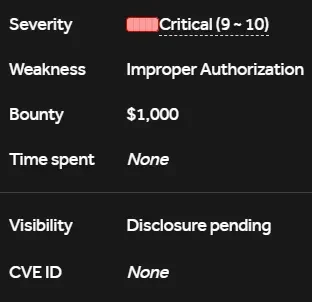
The bounty was 1000 USD. The report was reported on 20 March 2023 at 2:03pm UTC and triaged and resolved on 21 March.
Fix
The report does not say what change was made. The general fix for this class of exposure is to require authentication on the Airbyte interface before any functionality is served, and to restrict reachability of the management interface so that it is not exposed to the open internet. Which of these was applied is not stated.
Variants to test
The technique generalises: pick a product whose management interface is meant to be private, then search for it scoped to the target. A positive result is an interface that loads and lets you act without a login.
- Start with the broad scoping query and look for anything that answers 200 without a login prompt:
ssl:domain.com 200
- Repeat the same query with the other scoping clauses, since a host may be indexed under a certificate rather than a hostname:
ssl.cert.subject.cn:"${target}"
ssl:"${target}"
hostname:"*.${target}"
-
Search for orchestration and data platforms by title, for example
http.title:"dashboard",http.title:"control panel"andhttp.title:"Grafana", each combined with a scoping clause. A positive result is a dashboard that renders without a login. -
Search for services that are frequently deployed without authentication, such as
port:2375 product:"Docker",port:"2379" product:"etcd",port:"11211" product:"Memcached"and"MongoDB Server Information" port:27017 "-authentication". A positive result is a service banner or API response that confirms unauthenticated access. -
Search for exposed configuration and debug artefacts, such as
http.title:"phpinfo()",http.title:"Index of /"andhtml:"secret_key_base". A positive result is a page that discloses environment details, file listings or application secrets. -
Exclude CDN and proxy hosts with the
"-AkamaiGHost" "-GHost" "-Cloudflare" "-Cloudfront"variants so that results point at origin infrastructure, where an unauthenticated service is more likely to be the real thing.
Whatever you find, confirm it only within the programme's scope and rules, and report it rather than acting on it beyond what is needed to demonstrate the issue.
What happened, in plain words
A security researcher found a company's internal data-management tool sitting on the public internet with no password prompt at all. Anyone who knew the address could open it in a browser and start changing things. He used a search engine called Shodan, which is like Google but for internet-connected devices and services rather than web pages. which is like Google but for internet-connected devices and services rather than web pages. The company paid him a 1000 USD bounty: a reward for reporting a security problem responsibly instead of abusing it.
The tool was Airbyte, a piece of software that copies data from one place to another. Its control panel is supposed to be locked behind a login. It was not. The researcher could change settings, add data connections, update the software and redirect where notifications go, all without proving who he was.
This article walks through what he did and explains the terms from scratch. You only need to be comfortable using a browser.
Background: what Shodan is and why researchers use it
When a computer offers a service on the internet, it often announces a little about itself. A web server says which software it runs. A secure connection presents a certificate (explained below). A login page has a title.
Think of Shodan as a giant card catalogue of every machine that answers the phone, with a note on each card about what it said when it picked up. You can search those notes.
Researchers use Shodan to map what an organisation exposes to the outside world, and to spot services that should be private but are not. A search query in Shodan is called a dork: a combination of filters that narrows the catalogue down to machines matching a pattern.
A few concepts you will meet throughout:
- TLS certificate: when your browser connects to a site over HTTPS (the padlock), the server presents a certificate to prove its identity. The certificate contains fields such as who it was issued to (the subject), who issued it (the issuer), and a fingerprint (a unique hash of the certificate's contents).
- HTTP status code: a three-digit number a web server returns with every response.
200means OK, here is the page.302and307mean the page has moved, follow this other address.401means you must log in.403means forbidden.500means the server broke. - HTTP title: the text shown in your browser tab, taken from the page's HTML. Shodan records it, so you can search for pages whose tab says "dashboard" or "Grafana".
- Response header: extra information a server sends alongside the page, such as
Server: Jetty(which web server software it is) orSet-Cookie:(which sets a cookie, see below). - Favicon hash: the little icon next to a tab's title. Shodan computes a fingerprint of that icon, so you can find every instance of a particular product even if its page title has been customised.
- Product banner: the greeting a service gives when you connect, often naming the software and version.
- Authentication: proving who you are before being allowed in, usually with a username and password. "Missing authentication" means the service skipped that check entirely.
- API: Application Programming Interface, a way for one program to talk to another over the network. When you click a button in a web app, your browser usually sends a request to an API behind the scenes, and the API does the work. If the API does not check who is calling, anyone can call it.
- Cookie: a small piece of data a website stores in your browser so it can remember you between requests, for example that you have logged in. A token is similar: a string that proves your identity or permission. If a service hands out functionality without ever issuing or checking a cookie or token, it is not authenticating you.
The target and the product
The report refers to the target only as a domain, written throughout as ${target}. A domain is the part of a web address after the @ in an email or after https://, such as example.com. It identifies an organisation's presence on the internet.
The exposed service was an Airbyte instance. Airbyte is a data integration platform: it runs connectors, which are pre-built pieces that pull data from a source (say, a database or an app) and push it to a destination (say, a data warehouse). Airbyte has a management interface where you configure those connectors, change settings and set up notifications. That interface is meant to sit behind a login.
Setup
The only tool described is Shodan, used through its web search at shodan.io. The report gives no accounts, roles, versions or other preconditions. The starting point was a domain belonging to the target. The technique is to pivot from that domain to everything Shodan has indexed that is associated with it.
Finding it
The first query was a single dork:
ssl:domain.com 200
Line by line:
ssl:domain.comasks Shodan for hosts whose TLS certificate matchesdomain.com. In other words, machines that present a certificate for that domain, which is a strong hint they belong to the organisation.200asks for hosts whose HTTP service returned status code 200, meaning the page loaded successfully.- Together: show me machines that belong to this domain and are serving a working web page.
The result set included an Airbyte instance that answered without asking for any authentication. That is the finding: a management service that is supposed to require a login was serving its interface to anyone who could reach it.
Exploitation
Step 1: locate the instance
Run the dork above in Shodan and review the hosts returned. A positive hit is an Airbyte interface that loads without any authentication. A redirect is when the server sends your browser to a different address, often the login page; if there is no redirect, there is no login gate.
Step 2: interact with the unauthenticated interface
Once the instance was open, the researcher reports being able to perform various actions against it: changing settings, adding connectors, updating the instance and redirecting notifications. No individual request, response, endpoint or parameter is shown for any of these actions, so the exact mechanics are not documented. What matters is the class of action: configuration changes on a live data integration platform, made without credentials.
Why this matters: on a data platform, connectors decide what data is copied from where to where, and notification settings decide where the platform sends messages. Someone who can change those can influence data flows and the destinations that receive the platform's output.
Step 3: widen the footprint with more dorks
The researcher then lists a large set of additional Shodan dorks that helped surface more sensitive information about the target, including SSL certificates and hostnames. A hostname is the name of a specific machine, such as mail.example.com or vpn.example.com.
The dorks follow a repeating pattern: a service-specific fingerprint combined with one of three ways of tying a host to the target. The three scoping clauses used throughout are:
ssl.cert.subject.cn:"${target}"
ssl:"${target}"
hostname:"*.${target}"
Line by line:
ssl.cert.subject.cn:"${target}"looks at the certificate's subject common name (CN), the field naming who the certificate was issued to, and matches it against the target.ssl:"${target}"searches the whole certificate for the target's name, which catches mentions in any field.hostname:"*.${target}"matches any hostname ending in the target's domain. The*is a wildcard meaning "anything".
The full list, as published, is:
ssl.cert.fingerprint:"${target}"

ssl:"${target}"

org:"${target}"

hostname:"${target}"

ssl.cert.issuer.cn:"${target}"

ssl.cert.subject.cn:"${target}"

ssl.cert.expired:true hostname:".${target}"

ssl.cert.subject.commonName:".${target}"

http.title:"Index of /" hostname:"*.${target}"

http.title:"Index of /" ssl.cert.subject.cn:"${target}"
ftp port:"10000" hostname:"*.${target}"
ftp port:"10000" ssl.cert.subject.cn:"${target}"
"Authentication: disabled" port:445 product:"Samba" hostname:"*.${target}"
title:"Login — Adminer" hostname:"*.${target}"
title:"Login — Adminer" ssl.cert.subject.cn:"${target}"
http.title:"sign up" ssl.cert.subject.cn:"${target}"
http.title:"sign up" ssl:"${target}"
http.title:"sign up" hostname:"*.${target}"
"sign up" ssl.cert.subject.cn:"${target}"
"sign up" ssl:"${target}"
"sign up" hostname:"*.${target}"
http.title:"LogIn" ssl.cert.subject.cn:"${target}"
http.title:"LogIn" ssl:"${target}"
http.title:"LogIn" hostname:"*.${target}"
"LogIn" ssl.cert.subject.cn:"${target}"
"LogIn" ssl:"${target}"
"LogIn" hostname:"*.${target}"
http.status:"302" oauth ssl.cert.subject.cn:"${target}"
http.status:"302" oauth ssl:"${target}"
http.status:"302" oauth hostname:"*.${target}"
http.title:"log in with" ssl.cert.subject.cn:"${target}"
http.title:"log in with" ssl:"${target}"
http.title:"log in with" hostname:"*.${target}"
"log in with" ssl.cert.subject.cn:"${target}"
"log in with" ssl:"${target}"
"log in with" hostname:"*.${target}"
http.status:"302" sso ssl.cert.subject.cn:"${target}"
http.status:"302" sso ssl:"${target}"
http.status:"302" sso hostname:"*.${target}"
http.title:"login sso" ssl.cert.subject.cn:"${target}"
http.title:"login sso" ssl:"${target}"
http.title:"login sso" hostname:"*.${target}"
"login sso" ssl.cert.subject.cn:"${target}"
"login sso" ssl:"${target}"
"login sso" hostname:"*.${target}"
title:"401 Authorization Required" hostname:"*.${target}"
http.html:"403 Forbidden" ssl.cert.subject.cn:"${target}"
http.html:"403 Forbidden" ssl:"${target}"
http.html:"403 Forbidden" hostname:"*.${target}"
http.html:"500 Internal Server Error" ssl.cert.subject.cn:"${target}"
http.html:"500 Internal Server Error" ssl:"${target}"
http.html:"500 Internal Server Error" hostname:"*.${target}"
"500 Internal Server Error" ssl.cert.subject.cn:"${target}"
"500 Internal Server Error" ssl:"${target}"
"500 Internal Server Error" hostname:"*.${target}"
ssl.cert.subject.cn:*vpn* ssl.cert.subject.cn:"${target}"
ssl.cert.subject.cn:*vpn* ssl:"${target}"
ssl.cert.subject.cn:*vpn* hostname:"*.${target}"
title:"citrix gateway" ssl.cert.subject.cn:"${target}"
title:"citrix gateway" ssl:"${target}"
title:"citrix gateway" hostname:"*.${target}"
http.html:"JFrog" ssl.cert.subject.cn:"${target}"
http.html:"JFrog" ssl:"${target}"
http.html:"JFrog" hostname:"*.${target}"
"X-Jfrog" ssl.cert.subject.cn:"${target}"
"X-Jfrog" ssl:"${target}"
"X-Jfrog" hostname:"*.${target}"
http.title:"dashboard" hostname:"*.${target}"
http.title:"dashboard" ssl.cert.subject.cn:"${target}"
dashboard ssl.cert.subject.cn:"${target}"
http.title:"Openfire Admin Console" hostname:"*.${target}"
http.title:"control panel" hostname:"*.${target}"
http.title:"control panel" ssl.cert.subject.cn:"${target}"
control panel ssl.cert.subject.cn:"${target}"
http.html:"* The wp-config.php creation script uses this file" hostname:"*.${target}"
http.html:"* The wp-config.php creation script uses this file" ssl.cert.subject.cn:"${target}"
clockwork hostname:"*.${target}"
clockwork ssl.cert.subject.cn:"${target}"
"Server: Jetty" ssl.cert.subject.cn:"${target}"
"Server: Jetty" ssl:"${target}"
"Server: Jetty" hostname:"*.${target}"
X-Amz-Bucket-Region hostname:"*.${target}"
X-Amz-Bucket-Region ssl.cert.subject.cn:"${target}"
Cloudfront_AWS_ssl:"development" org:"Amazon.com" ssl.cert.subject.cn:"${target}"
"X-Jenkins" "Set-Cookie: JSESSIONID" http.title:"Jenkins [Jenkins]" hostname:"*.${target}"
"X-Jenkins" "Set-Cookie: JSESSIONID" http.title:"Jenkins [Jenkins]" ssl.cert.subject.cn:"${target}"
http.favicon.hash:81586312 200 hostname:"*.${target}"
http.favicon.hash:81586312 200 ssl.cert.subject.cn:"${target}"
product:"Kubernetes" port:"10250, 2379" ssl.cert.subject.cn:"${target}"
product:"Kubernetes" port:"10250, 2379" ssl:"${target}"
product:"Kubernetes" port:"10250, 2379" hostname:"*.${target}"
port:"9100" http.title:"Node Exporter" ssl.cert.subject.cn:"${target}"
port:"9100" http.title:"Node Exporter" ssl:"${target}"
port:"9100" http.title:"Node Exporter" hostname:"*.${target}"
http.title:"Grafana" ssl.cert.subject.cn:"${target}"
http.title:"Grafana" ssl:"${target}"
http.title:"Grafana" hostname:"*.${target}"
http.title:"RabbitMQ" ssl.cert.subject.cn:"${target}"
http.title:"RabbitMQ" ssl:"${target}"
http.title:"RabbitMQ" hostname:"*.${target}"
HTTP/1.1 307 Temporary Redirect "Location: /containers" ssl.cert.subject.cn:"${target}"
HTTP/1.1 307 Temporary Redirect "Location: /containers" ssl:"${target}"
HTTP/1.1 307 Temporary Redirect "Location: /containers" hostname:"*.${target}"
http.favicon.hash:1278323681 ssl.cert.subject.cn:"${target}"
http.favicon.hash:1278323681 ssl:"${target}"
http.favicon.hash:1278323681 hostname:"*.${target}"
"MongoDB Server Information" port:27017 "-authentication" hostname:"*.${target}"
"MongoDB Server Information" port:27017 "-authentication" ssl.cert.subject.cn:"${target}"
"Set-Cookie: mongo-express=" "200 OK" hostname:"*.${target}"
"Set-Cookie: mongo-express=" "200 OK" ssl.cert.subject.cn:"${target}"
all:"mongodb server information" all:"metrics" hostname:"*.${target}"
all:"mongodb server information" all:"metrics" ssl.cert.subject.cn:"${target}"
port:"9200" all:"elastic indices" hostname:"*.${target}"
port:"9200" all:"elastic indices" ssl.cert.subject.cn:"${target}"
"220" "230 Login successful." port:21 hostname:"*.${target}"
"220" "230 Login successful." port:21 ssl.cert.subject.cn:"${target}"
port:"11211" product:"Memcached" hostname:"*.${target}"
port:"11211" product:"Memcached" ssl.cert.subject.cn:"${
A few of these are worth reading closely, because they show the intent behind the list:
ssl.cert.fingerprint,ssl.cert.issuer.cn,ssl.cert.subject.cnandssl.cert.expired:truepivot on certificate metadata, which catches hosts whose hostname does not obviously belong to the target but whose certificate does.org:"${target}"searches by organisation rather than by name, which can surface hosts in the target's address space.http.title:"Index of /",http.title:"Directory Listing",http.title:"phpinfo()"andhtml:"secret_key_base"look for exposed files, debug pages and configuration artefacts."Authentication: disabled" port:445 product:"Samba","MongoDB Server Information" port:27017 "-authentication",port:"11211" product:"Memcached",port:2375 product:"Docker"andport:"2379" product:"etcd"target services that are commonly deployed without authentication."220" "230 Login successful." port:21looks for FTP servers that accept anonymous or otherwise unauthenticated logins."port: 53" Recursion: Enabledlooks for DNS servers that will resolve for anyone.- The
"-AkamaiGHost" "-GHost" "-Cloudflare" "-Cloudfront"variants exclude hosts sitting behind common CDNs and proxies, so that results point at origin infrastructure rather than edge infrastructure. http.favicon.hashvalues identify specific products by their favicon, which survives when titles and banners are customised.
Some of those terms deserve a plain explanation:
- FTP is an old protocol for transferring files. Port 21 is its usual door. A server that says
230 Login successfulwithout asking for credentials is letting anyone in. - Samba is software that lets Linux machines share files the way Windows does. Port 445 is its usual door.
Authentication: disabledmeans it is sharing without a password. - MongoDB is a database. Port 27017 is its usual door. A banner saying
MongoDB Server Informationwith no authentication means the database is open. - Memcached is a fast in-memory cache. Port 11211 is its usual door. An open one can be read and written by anyone.
- Docker is software for running containers (packaged applications). Port 2375 is its management door. An open one lets anyone start or stop containers.
- etcd is a small database used to store configuration for clusters. Port 2379 is its usual door.
- DNS is the internet's phone book, turning names into addresses. Port 53 is its usual door.
Recursion: Enabledmeans it will look up any name for anyone, which can be abused. - CDN stands for Content Delivery Network, a service that sits in front of a site and serves copies from many locations. Akamai, Cloudflare and CloudFront are CDN providers. Excluding them means you are looking at the organisation's own machines, not the CDN's.
- Kubernetes is software for running many containers across many machines. Ports 10250 and 2379 are two of its management doors.
- Grafana, Kibana, Prometheus, RabbitMQ, Jenkins, Confluence, SonarQube, JBoss, Tomcat, Splunk, Oracle WebLogic and phpinfo() are all products or pages whose presence on the public internet is worth knowing about, because they often hold sensitive data or powerful controls.
Root cause
The report attributes the finding to an Airbyte instance reachable without authentication. In other words, the management interface was exposed to the internet and did not enforce a login before serving its functionality. The report does not describe the deployment, the configuration or the code path involved, so the precise reason the authentication check was absent is not stated. Likely explanations for this class of exposure are a deployment that was never placed behind the platform's authentication layer, or an interface bound to a public address by default.
Impact
Because the interface was open, the researcher could change settings, add connectors, update the instance and redirect notifications. On a data integration platform those capabilities matter: connectors define what data is pulled from where and delivered to where, and notification settings define where the platform sends messages. An unauthenticated party able to change them can influence data flows and the destinations that receive platform output. The report does not enumerate which connectors, settings or notifications were touched, nor what data the instance handled, so the concrete blast radius is not documented. The researcher also notes that the wider dork list surfaced SSL certificates, hostnames and other sensitive information about the target, which can be used to plan further targeted attacks.
The bounty was 1000 USD. The report was reported on 20 March 2023 at 2:03pm UTC and triaged and resolved on 21 March.
Fix
The report does not say what change was made. The general fix for this class of exposure is to require authentication on the Airbyte interface before any functionality is served, and to restrict reachability of the management interface so that it is not exposed to the open internet. Which of these was applied is not stated.
Variants to test
The technique generalises: pick a product whose management interface is meant to be private, then search for it scoped to the target. A positive result is an interface that loads and lets you act without a login.
- Start with the broad scoping query and look for anything that answers 200 without a login prompt:
ssl:domain.com 200
- Repeat the same query with the other scoping clauses, since a host may be indexed under a certificate rather than a hostname:
ssl.cert.subject.cn:"${target}"
ssl:"${target}"
hostname:"*.${target}"
-
Search for orchestration and data platforms by title, for example
http.title:"dashboard",http.title:"control panel"andhttp.title:"Grafana", each combined with a scoping clause. A positive result is a dashboard that renders without a login. -
Search for services that are frequently deployed without authentication, such as
port:2375 product:"Docker",port:"2379" product:"etcd",port:"11211" product:"Memcached"and"MongoDB Server Information" port:27017 "-authentication". A positive result is a service banner or API response that confirms unauthenticated access. -
Search for exposed configuration and debug artefacts, such as
http.title:"phpinfo()",http.title:"Index of /"andhtml:"secret_key_base". A positive result is a page that discloses environment details, file listings or application secrets. -
Exclude CDN and proxy hosts with the
"-AkamaiGHost" "-GHost" "-Cloudflare" "-Cloudfront"variants so that results point at origin infrastructure, where an unauthenticated service is more likely to be the real thing.
Whatever you find, confirm it only within the programme's scope and rules, and report it rather than acting on it beyond what is needed to demonstrate the issue.
Glossary
- Airbyte: a data integration platform that runs connectors to copy data from sources to destinations, with a management interface for configuring them.
- Bounty: a reward paid by an organisation for a responsibly reported security problem.
- CDN: Content Delivery Network, a service that sits in front of a site and serves copies from many locations.
- Certificate: a file a server presents over HTTPS to prove its identity, containing fields such as subject, issuer and fingerprint.
- Connector: a pre-built piece of software that pulls data from a source or pushes it to a destination.
- Cookie: a small piece of data a website stores in your browser so it can remember you between requests.
- DNS: the internet's phone book, turning names into addresses.
- Domain: the part of a web address that identifies an organisation, such as
example.com. - Dork: a Shodan search query built from filters to find machines matching a pattern.
- Docker: software for running packaged applications called containers.
- etcd: a small database used to store configuration for clusters.
- Favicon hash: a fingerprint of a site's tab icon, used to identify a product even when its title is customised.
- FTP: an old protocol for transferring files, usually on port 21.
- Hostname: the name of a specific machine, such as
mail.example.com. - HTTP status code: a three-digit number a web server returns with every response, such as 200 (OK), 302 (moved), 401 (login required), 403 (forbidden) or 500 (server error).
- HTTP title: the text shown in a browser tab, taken from the page's HTML.
- Memcached: a fast in-memory cache, usually on port 11211.
- MongoDB: a database, usually on port 27017.
- Redirect: when a server sends your browser to a different address, often a login page.
- Response header: extra information a server sends alongside a page, such as which web server software it runs.
- Samba: software that lets Linux machines share files the way Windows does, usually on port 445.
- Shodan: a search engine for internet-connected devices and services, indexing what they announce about themselves.
- TLS: the encryption behind HTTPS, the padlock in your browser.
- Token: a string that proves your identity or permission, similar in purpose to a cookie.
- Wildcard: the
*symbol in a search, meaning "anything".
Happy hunting, and use what you learn ethically and responsibly.



