Small bugs are more dangerous than you think
The login page had an open redirect that only worked when a non-null character was in the Remote Page Layout URL field, and a stored XSS in the nickname field that fired only when returning to the login page. By chaining a login CSRF, the open redirect, and the stored XSS, an attacker could force a victim to log in and then execute the XSS, potentially stealing cookies or phishing credentials.

If you are familiar with Open Redirects vulnerability, it would be intriguing for you to see the Remote Page Layout URL Redirect input at first. Well… not so easy - I started testing by putting some URLs in the input to test the behavior of the functionality, is there a whitelist of approved URLs? or is it just…
The full write-up lives on its author's site
It belongs to its author, so we link to it rather than copy it. The other two tabs are our own rewrites, checked against it.
Context
The target was a stock marketing web application. The researcher, Liv Matan (@terminatorLM), describes it as looking strange at first glance on the login page. The login page showed a Remote Page Layout URL input and a Redirect field. The Remote Page Layout URL field looked, at first sight, like a classic open redirect candidate: a place where a URL is supplied and the application later sends the user there.

The application also used HTTP basic authentication, which becomes relevant to the final impact discussion.
Setup
No specific tooling, versions or account roles are described beyond the researcher working against the login page and the index page reached after logging in. The work was done together with Osher Zbadi, who is credited for the proof of concept. The only precondition that matters is the ability to reach the login page and to log in, since several of the behaviours below only appear after a successful login.
Finding it
The first thing that drew attention was the Remote Page Layout URL Redirect input on the login page. The natural question was whether the field had a whitelist of approved URLs or whether it redirected to any site without filtering.
Testing the redirect field alone
The researcher put URLs into the input and watched the behaviour. Nothing happened: the page was not redirected after logging in. On its own the field appeared to do nothing.
Combining the two fields
Testing the other parameters produced an odd behaviour. When any character that is not null was placed in the Remote Page Layout URL field, combined with the Redirect field, an open redirect occurred on login. The redirect fired when a non-null character was placed in the Remote Page Layout URL field together with the Redirect field.
Trying to escalate the redirect
With an open redirect in hand, the next step was to escalate. The application returned an error code in a GET parameter, shown below.
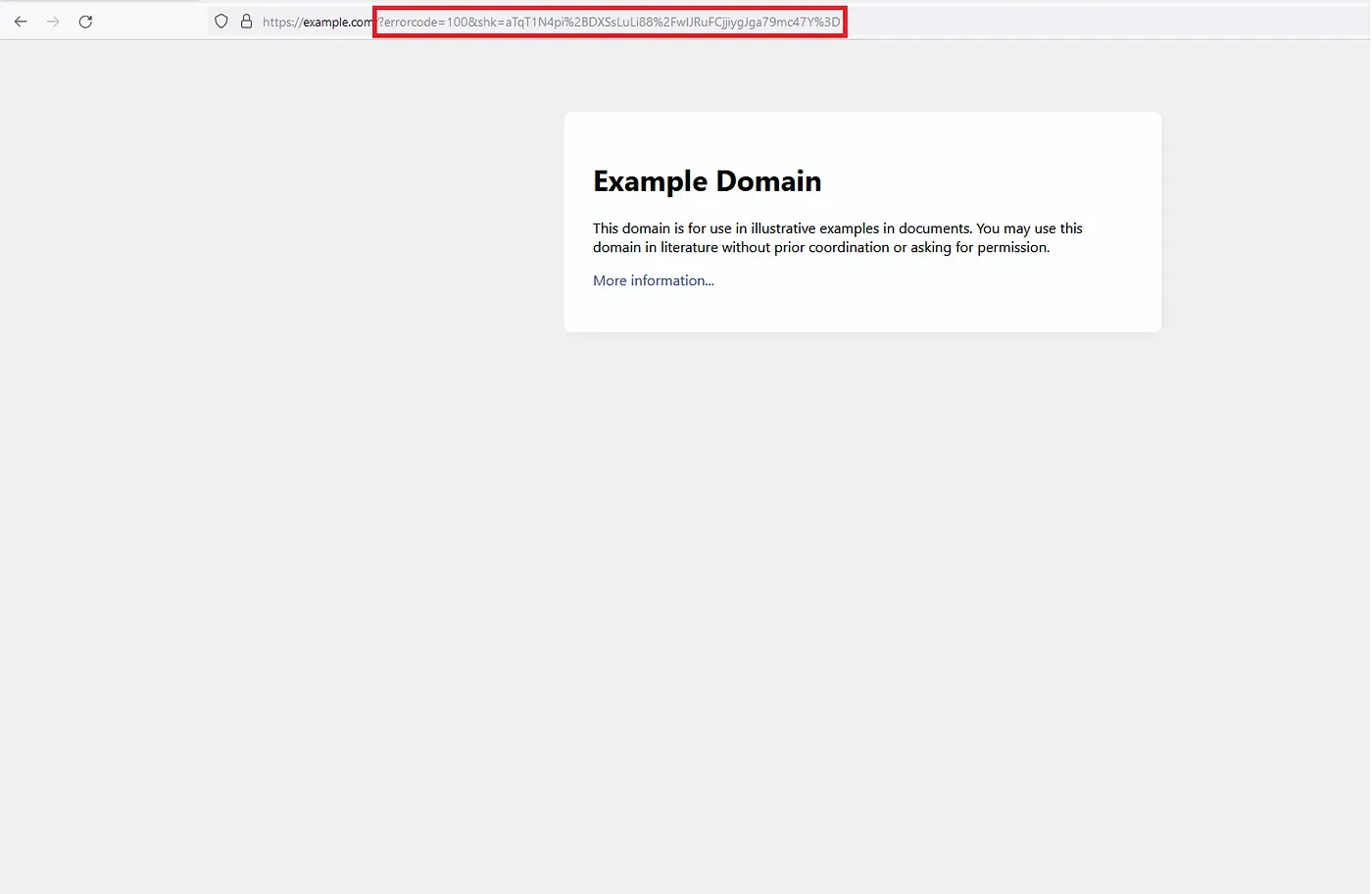
PII is not leaked
javascript:alert() did not work either :(
The javascript: scheme did not execute, and no personal data was exposed by the error response. The researcher then tried to place the variables with the payload in the URL to craft an open redirect phishing link that could be sent to other users. That failed too: the value from the GET parameter was not reflected into the HTML input, even after testing the JavaScript, the HTML and debugging it. At this point the open redirect looked useless, because there was no way to pass it to another user.
A stored XSS that only fires for the author
Attention moved to the nickname input field. GET parameters did not reflect on the login page, so the researcher injected a payload and looked for a second-order XSS on the index page after logging in. All the inputs there appeared filtered or HTML encoded. Going back to the login page for more testing revealed something interesting.
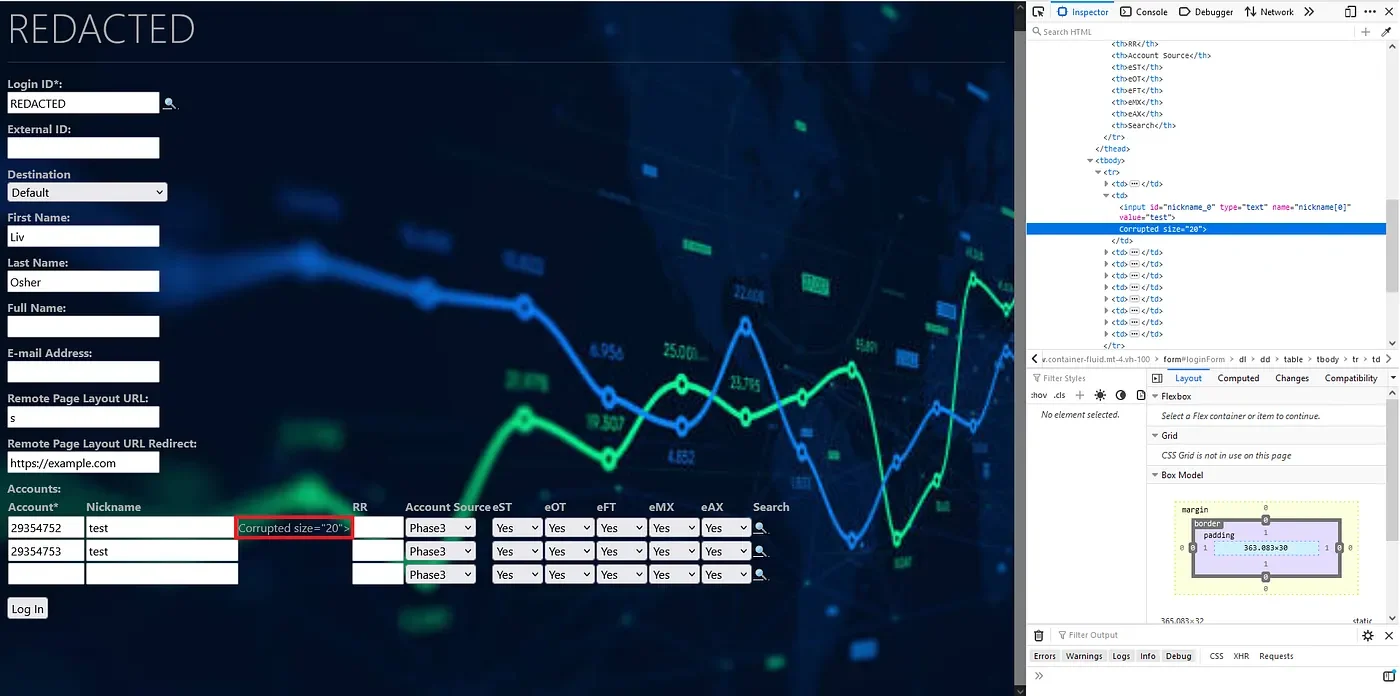
The nickname parameter was not sanitised, and better still, it was stored on the server after logging in. The payload was adjusted to execute XSS:
"><script>print()</script>
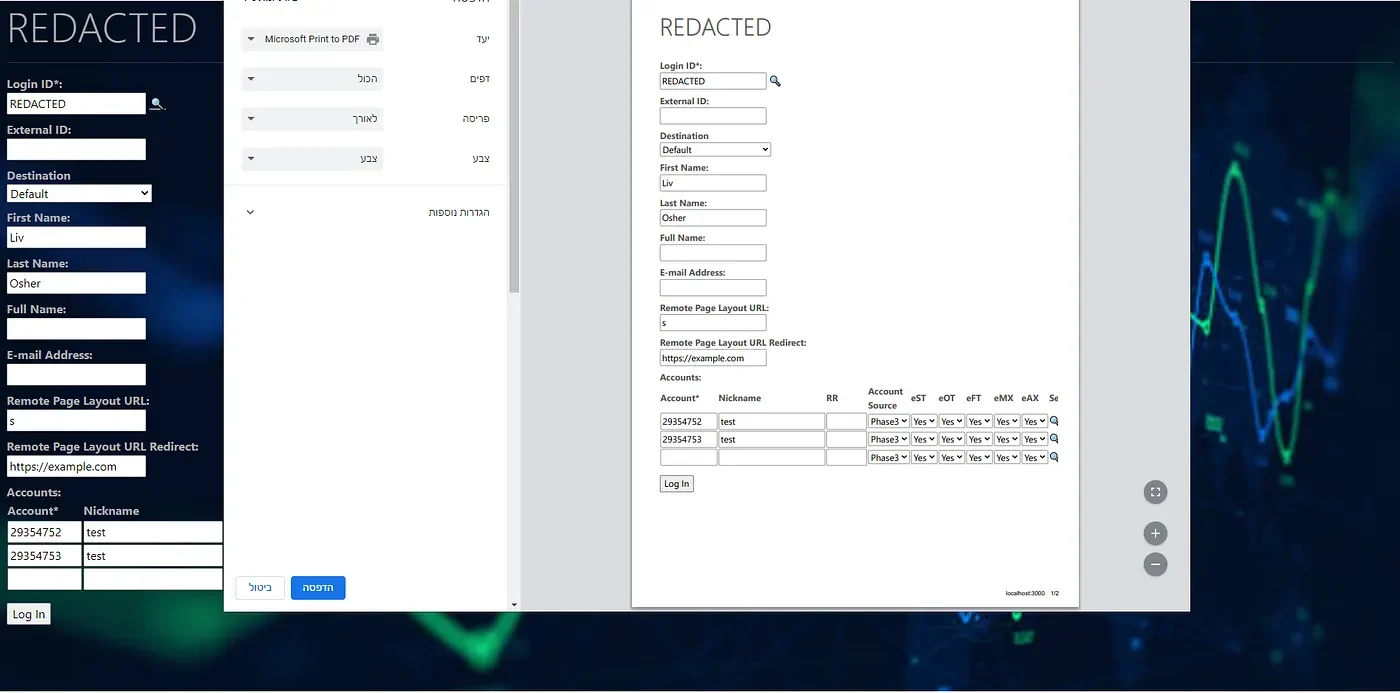
This gave a stored XSS, but a selfish one:
- It was self stored XSS: the payload only affected the person who submitted it.
- The XSS fired only when the user navigated back to the login page. That could be useful for stealing cookies after the victim logged in, but it was not practical to trigger.
Exploitation
The idea was to chain three separate issues: a login CSRF (the researcher notes this type of CSRF is usually not protected because of the nature of the attack), the open redirect found earlier, and the stored XSS.
Step 1: the intended chain
The plan was:
- The victim visits the attacker's website. A POST login CSRF fires automatically, carrying the open redirect payload and the XSS payload.
- The open redirect payload points at the login page of the website.
- The victim logs in to the website, is redirected after logging in back to the login page, and the XSS executes instantly.
A proof of concept was coded with Osher Zbadi. The error code from the redirect was still in play:

The attack failed.

Step 2: tricking the parser with a fragment
The error code was the obstacle. The key observation was that the redirect URL is under the attacker's control, and the error code is appended as a GET parameter. The question became: can the server be made to ignore the error code when parsing the URL? The answer was to add a fragment at the end of the open redirect URL.
A fragment is an internal page reference, sometimes called a named anchor. It usually appears at the end of a URL and begins with a hash (#) character followed by an identifier. The trick works because the browser ignores everything after the fragment is declared in the URL.
As a result, the server interprets the URL as a regular login URL, the saved parameters with the XSS are returned as a response from the server, and the XSS executes.
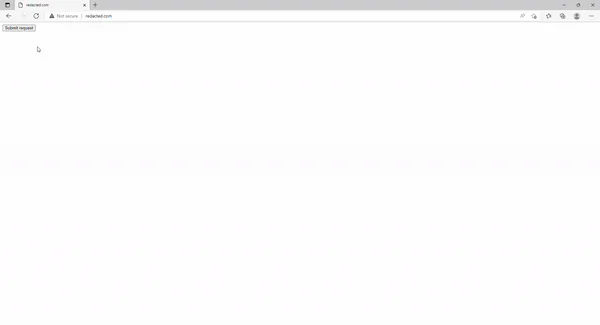
Note: The CSRF can be automatically executed by auto submit
The chain worked in the proof of concept. It was reported to the target and fixed quickly.
Root cause
The chain depended on several weaknesses lining up:
- The Remote Page Layout URL field combined with the Redirect field produced an open redirect on login, with no effective restriction on the destination.
- The nickname parameter was not sanitised and was stored server-side after login, producing stored XSS that fired when the login page was rendered again.
- The login flow was reachable through a POST that could be triggered cross-site (login CSRF), which the researcher notes is usually unprotected by design.
- The error code appended as a GET parameter blocked the chain, and appending a fragment made the server ignore it, because everything after the fragment is ignored by the browser.
The index page inputs appeared filtered or HTML encoded, while the nickname parameter was not sanitised and was stored on the server. The open redirect was not exploitable on its own because the GET value was not reflected into the HTML input, but it became useful once combined with the stored XSS and the CSRF.
Impact
Because the website uses HTTP basic authentication, the researcher notes that if the victim is logged in, an attacker could potentially:
- restrict the victim from logging in by redirecting them every time they enter the login page;
- steal the victim's cookies;
- pop up an iframe to perform a clickjacking attack;
- phish the HTTP basic auth credentials.
These outcomes depend on the victim being logged in and on the chain executing as described.
Fix
The report states that the issue was reported to the target and fixed quickly. It does not describe the specific code changes made.
Variants to test
- Two-field redirects. On login forms with a layout or template URL field plus a separate redirect field, try supplying a non-null value in both. A positive result is a redirect to an external site only after login.
- Error-code parameters on redirects. When a redirect appends an error code as a GET parameter, append a fragment (
#) to the redirect target. A positive result is that the server treats the URL as a normal page and the error code is ignored. - Stored values rendered on the login page. Submit a payload in a profile field such as a nickname, log in, then navigate back to the login page. A positive result is the payload executing on that page.
- Login CSRF. Check whether the login POST can be submitted cross-site without a token. A positive result is a login performed on behalf of the victim from an attacker-controlled page.
- Chaining low-severity bugs. Combine an open redirect, a stored XSS and a login CSRF. A positive result is the XSS firing automatically after the victim logs in via the crafted flow.
What happened, in plain words
A security researcher found a login page that looked odd. On it were two boxes: one called Remote Page Layout URL and one called Redirect. Neither box seemed to do anything useful on its own. By the end of the investigation, those two boxes, plus a nickname field and a trick with a # symbol, were combined into a chain that made a script run automatically in the proof of concept. Each individual bug was weak or useless alone. Together they worked.
This is the story of how that chain was built, step by step, and why each step was taken.
Some words you will need first
Before the steps, here are the ideas that come up again and again. Read them once; they will make the rest much easier.
- Web application: a program you use through your browser. When you type something into a form and press a button, your browser sends a message to a computer somewhere (the server), and the server sends a page back.
- Server: the computer that holds the website and answers your browser's requests. When we say something is "stored on the server", we mean the website saved it on its side, not just in your browser.
- GET parameter: extra information stuck onto the end of a web address after a
?. Inexample.com/page?colour=blue, the parameter iscolourand its value isblue. Websites use these to pass small pieces of information between pages. - POST: a way for a browser to send information to a server, usually when you submit a form. Unlike a GET parameter, the data is not visible in the address bar.
- Open redirect: a feature where a website takes a web address from the user and sends the browser there. If the site does not check where it is sending you, an attacker can make the site redirect to a page the attacker controls. That is useful for phishing, because the link starts with the real site's name.
- XSS (Cross-Site Scripting): a bug where an attacker manages to get their own small program (JavaScript) into a page that other people view. The browser cannot tell the difference between the site's own scripts and the attacker's, so it runs the attacker's code with the site's permissions.
- Stored XSS: XSS where the malicious input is saved on the server and shown later, to whoever loads the page. This is more dangerous than XSS that only appears in the moment.
- Self XSS: XSS that only affects the person who typed the payload in. It is much less useful, because the attacker has to trick the victim into typing the code themselves.
- CSRF (Cross-Site Request Forgery): a bug where an attacker's website makes your browser send a request to another site, using the fact that your browser is already logged in there. You do not notice it happening.
- Login CSRF: a specific kind of CSRF where the attacker makes your browser log in to a site as the attacker, or performs a login action on your behalf. The researcher notes this type is usually not protected, because of the nature of the attack.
- Cookie: a small piece of data a website asks your browser to keep and send back on every visit. It is how a site remembers that you are logged in. If an attacker steals your cookie, they can often act as you.
- HTTP basic authentication: a very simple login method built into the web itself. The browser shows a pop-up asking for a username and password, and sends them with every request.
- Fragment (also called a named anchor): the part of a web address after a
#symbol. It points to a place inside a page. Crucially, the browser ignores everything after the#when it decides which page to load. - HTML encoding / sanitising: turning dangerous characters (like
<and>) into harmless text so they cannot be interpreted as code. If a site forgets to do this, XSS becomes possible. - iframe: a small window inside a page that shows another page. Attackers use them for tricks like clickjacking, where you think you are clicking one thing but actually click another.
- POC (proof of concept): a small demonstration that a bug really works, usually built so the person receiving the report can see it happen.
The target and the strange login page
The researcher, Liv Matan, was looking at a stock marketing web application. On the login page, two fields stood out: Remote Page Layout URL and Redirect. The first one looked like a classic open redirect candidate: a place where you supply a web address and the application later sends you there.
The application also used HTTP basic authentication, which matters later when we talk about impact.
Finding it
Testing the redirect field alone
The first question was simple: does the Remote Page Layout URL field check where it sends you, or does it send you anywhere? The researcher put web addresses into the input and watched what happened.
Nothing happened. The page was not redirected after logging in. On its own, the field appeared to do nothing at all.
Combining the two fields
Next, the researcher tested the other parameters. That produced an odd behaviour. When any character that is not null was placed in the Remote Page Layout URL field, combined with the Redirect field, an open redirect occurred on login.
In plain words: the redirect fired when a non-null character was placed in the Remote Page Layout URL field together with the Redirect field. That is why the field looked useless when tested alone.
Trying to escalate the redirect
With an open redirect in hand, the natural next step is to make it more powerful. The application returned an error code in a GET parameter, shown below.
PII is not leaked
javascript:alert() did not work either :(
Two things to unpack here. First, PII means personally identifiable information, such as names or email addresses. The error response did not leak any. Second, the researcher tried a javascript: address, which is a way of telling a browser to run code instead of loading a page. It did not execute.
The researcher then tried to put the variables with the payload in the URL, to craft an open redirect phishing link that could be sent to other users. That failed too: the value from the GET parameter was not reflected into the HTML input, even after testing the JavaScript, the HTML and debugging it.
At this point the open redirect looked useless, because there was no way to pass it to another user. A redirect that only works when you type it yourself is not much of an attack.
A stored XSS that only fires for the author
Attention moved to the nickname input field. GET parameters did not reflect on the login page, so the researcher injected a payload and looked for a second-order XSS on the index page after logging in. Second-order means the payload is saved first and only shows up later, on a different page.
All the inputs on the index page appeared filtered or HTML encoded. Then the researcher went back to the login page for more testing and saw something interesting.
The nickname parameter was not sanitised, and better still, it was stored on the server after logging in. The payload was adjusted to execute XSS:
"><script>print()</script>
Line by line:
">closes an HTML attribute that the page had already opened. Think of it as finishing the site's own sentence so you can start your own.<script>opens a script tag. Everything until</script>is treated as code by the browser.print()is a simple instruction that asks the browser to open its print dialogue. It is a harmless way to prove that code ran.</script>closes the script tag.
This gave a stored XSS, but a selfish one:
- It was self stored XSS: the payload only affected the person who submitted it.
- The XSS fired only when the user navigated back to the login page. That could be useful for stealing cookies after the victim logged in, but it was not practical to trigger.
Exploitation
The idea was to chain three separate issues: a login CSRF, the open redirect found earlier, and the stored XSS.
Step 1: the intended chain
The plan was:
- The victim visits the attacker's website. A POST login CSRF fires automatically, carrying the open redirect payload and the XSS payload.
- The open redirect payload points at the login page of the website.
- The victim logs in to the website, is redirected after logging in back to the login page, and the XSS executes instantly.
The plan was to have the victim's browser fire the login CSRF automatically, carrying the open redirect payload and the XSS payload. The open redirect then brings the victim back to the login page after logging in, which is exactly where the payload fires.
A proof of concept was coded with Osher Zbadi. The error code from the redirect was still in play:
The attack failed.
Step 2: tricking the parser with a fragment
The error code was the obstacle. The key observation was that the redirect URL is under the attacker's control, and the error code is appended as a GET parameter. The question became: can the server be made to ignore the error code when parsing the URL? The answer was to add a fragment at the end of the open redirect URL.
A fragment is an internal page reference, sometimes called a named anchor. It usually appears at the end of a URL and begins with a hash (#) character followed by an identifier. The trick works because the browser ignores everything after the fragment is declared in the URL.
As a result, the server interprets the URL as a regular login URL, the saved parameters with the XSS are returned as a response from the server, and the XSS executes.
Note: The CSRF can be automatically executed by auto submit
The chain worked in the proof of concept. It was reported to the target and fixed quickly.
Root cause
The chain depended on several weaknesses lining up:
- The Remote Page Layout URL field combined with the Redirect field produced an open redirect on login, with no effective restriction on the destination.
- The nickname parameter was not sanitised and was stored server-side after login, producing stored XSS that fired when the login page was rendered again.
- The login flow was reachable through a POST that could be triggered cross-site (login CSRF), which the researcher notes is usually unprotected by design.
- The error code appended as a GET parameter blocked the chain, and appending a fragment made the server ignore it, because everything after the fragment is ignored by the browser.
The index page inputs appeared filtered or HTML encoded, while the nickname parameter was not sanitised and was stored on the server. The open redirect was not exploitable on its own because the GET value was not reflected into the HTML input, but it became useful once combined with the stored XSS and the CSRF.
Impact
Because the website uses HTTP basic authentication, the researcher notes that if the victim is logged in, an attacker could potentially:
- restrict the victim from logging in by redirecting them every time they enter the login page;
- steal the victim's cookies;
- pop up an iframe to perform a clickjacking attack;
- phish the HTTP basic auth credentials.
These outcomes depend on the victim being logged in and on the chain executing as described.
Fix
The report states that the issue was reported to the target and fixed quickly. It does not describe the specific code changes made.
Variants to test
- Two-field redirects. On login forms with a layout or template URL field plus a separate redirect field, try supplying a non-null value in both. A positive result is a redirect to an external site only after login.
- Error-code parameters on redirects. When a redirect appends an error code as a GET parameter, append a fragment (
#) to the redirect target. A positive result is that the server treats the URL as a normal page and the error code is ignored. - Stored values rendered on the login page. Submit a payload in a profile field such as a nickname, log in, then navigate back to the login page. A positive result is the payload executing on that page.
- Login CSRF. Check whether the login POST can be submitted cross-site without a token. A positive result is a login performed on behalf of the victim from an attacker-controlled page.
- Chaining low-severity bugs. Combine an open redirect, a stored XSS and a login CSRF. A positive result is the XSS firing automatically after the victim logs in via the crafted flow.
Glossary
- Web application: a program you use through your browser, where a server does the work and sends pages back.
- Server: the computer that holds a website and answers your browser's requests.
- GET parameter: extra information on the end of a web address after a
?, such as?colour=blue. - POST: a way for a browser to send form data to a server, not visible in the address bar.
- Open redirect: a feature that sends the browser to a web address supplied by the user, without checking where it goes.
- XSS (Cross-Site Scripting): getting attacker-written JavaScript into a page that other people view, so the browser runs it.
- Second-order XSS: XSS where the payload is saved first and only appears later, on a different page.
- CSRF (Cross-Site Request Forgery): an attacker's site making your browser send a request to another site where you are logged in.
- Login CSRF: a CSRF that performs a login action on your behalf, usually unprotected by design.
- Cookie: a small piece of data a site asks your browser to keep and send back, often used to remember that you are logged in.
- HTTP basic authentication: a simple built-in login method where the browser shows a pop-up and sends the username and password with every request.
- Fragment / named anchor: the part of a web address after a
#, pointing to a place inside a page; the browser ignores everything after it when choosing which page to load. - HTML encoding / sanitising: turning dangerous characters into harmless text so they cannot be run as code.
- Clickjacking: tricking a user into clicking something different from what they think they are clicking.
- Phishing: tricking someone into giving away credentials or other information by pretending to be a trusted site.
- PII (personally identifiable information): data that identifies a real person, such as a name or email address.
- POC (proof of concept): a small demonstration that a bug really works.
- Payload: the piece of code or data an attacker sends to trigger a bug.
- Parser: the part of a program that reads and interprets a web address or other input.
- Whitelist: a list of things that are allowed; anything not on the list is refused.
- Null character: a special character with no value, often used in programming to mark the end of text.
- Reflect: when a website takes a value you sent and shows it back on the page.
- Escalate: to turn a small bug into a bigger, more serious one.
- Chain: to combine several small bugs so that together they achieve more than any one alone.
- Auto submit: a form that submits itself automatically, without the user pressing a button.
- Bounty: a reward, often money, paid by a company for a responsibly reported security bug.