When Good APIs Go Bad: Uncovering 3 Azure API Management Vulnerabilities
Three vulnerabilities were found in Azure API Management: two server-side request forgery flaws in the CORS proxy and hosting proxy, and an unrestricted file upload with path traversal in the developer portal. An attacker could send requests to internal Azure services, bypass web application firewalls, deny service, and upload malicious files to the portal server, possibly leading to code execution.

Subscribe
The full write-up lives on its author's site
It belongs to its author, so we link to it rather than copy it. The other two tabs are our own rewrites, checked against it.
Context
The Azure API Management service is a fully managed platform for creating, managing, securing and analysing APIs across environments. It acts as a central hub for publishing APIs to external and internal developers, partners and employees. The research covered three separate issues in that service: two server-side request forgery (SSRF) bugs and an unrestricted file upload path traversal on an internal Azure workload. The SSRF issues were reached through URL formatting bypasses; the file upload issue lived in the API Management developer portal.
SSRF itself is the classic primitive: a crafted request is sent from a vulnerable server to a targeted external or internal server or service. Here the vulnerable servers were Azure's own proxies.
Setup
For the third issue the researcher cloned a self-hosted instance of the developer portal to test locally:
https://github.com/Azure/api-management-developer-portal
The preconditions differ per finding.
Finding it
The CORS Proxy and "Import from URL"
API Management lets organisations define schemas for the structure of data exchanged through the API, so that clients and servers stay compatible and data can be validated. Schemas can be created and managed through the Azure API Management portal or REST API. Azure also implements "Import from URL": the customer supplies a URL, and the Azure API Management CORS Proxy retrieves the schema from that URL by sending it an HTTP request.
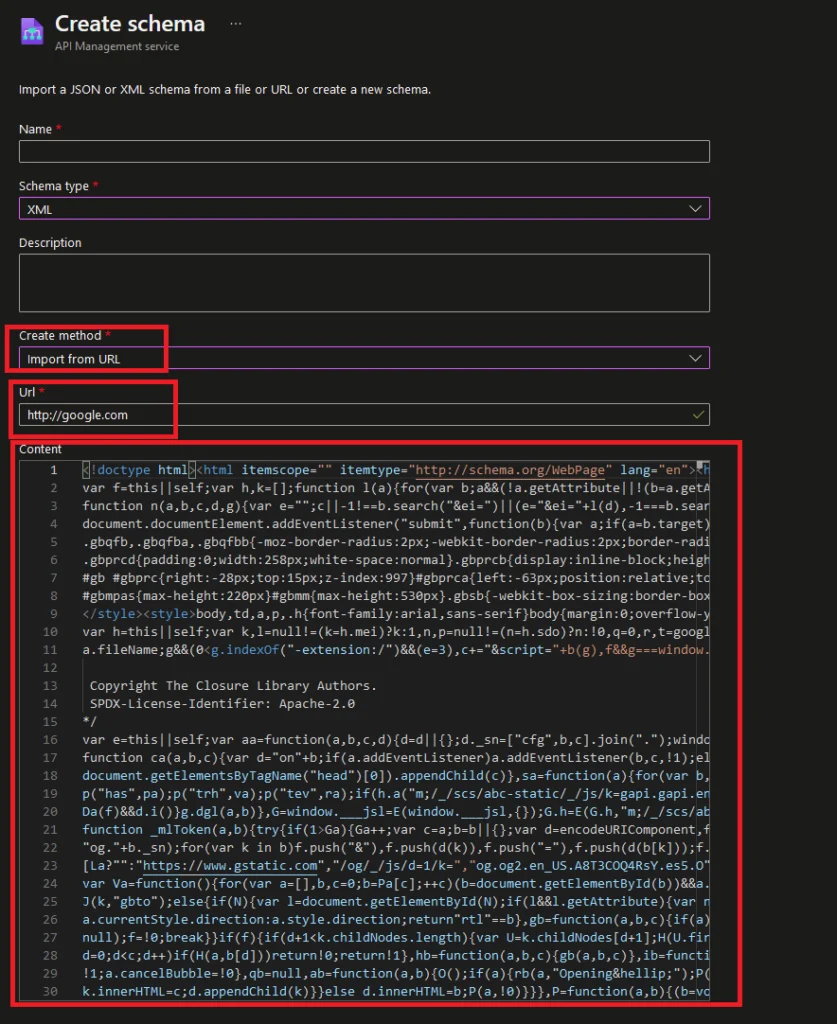
The CORS Proxy exists to allow seamless cross-domain communication by intercepting, modifying and adding CORS headers. A server-side fetch of a user-supplied URL is exactly the shape of an SSRF, which is what drew the researcher's attention.
The service sends those schema requests through the CORS Proxy at apimanagement-cors-proxy-prd.azure-api.net. Two headers stand out in the request: Ocp-Apim-Method and Ocp-Apim-Url.
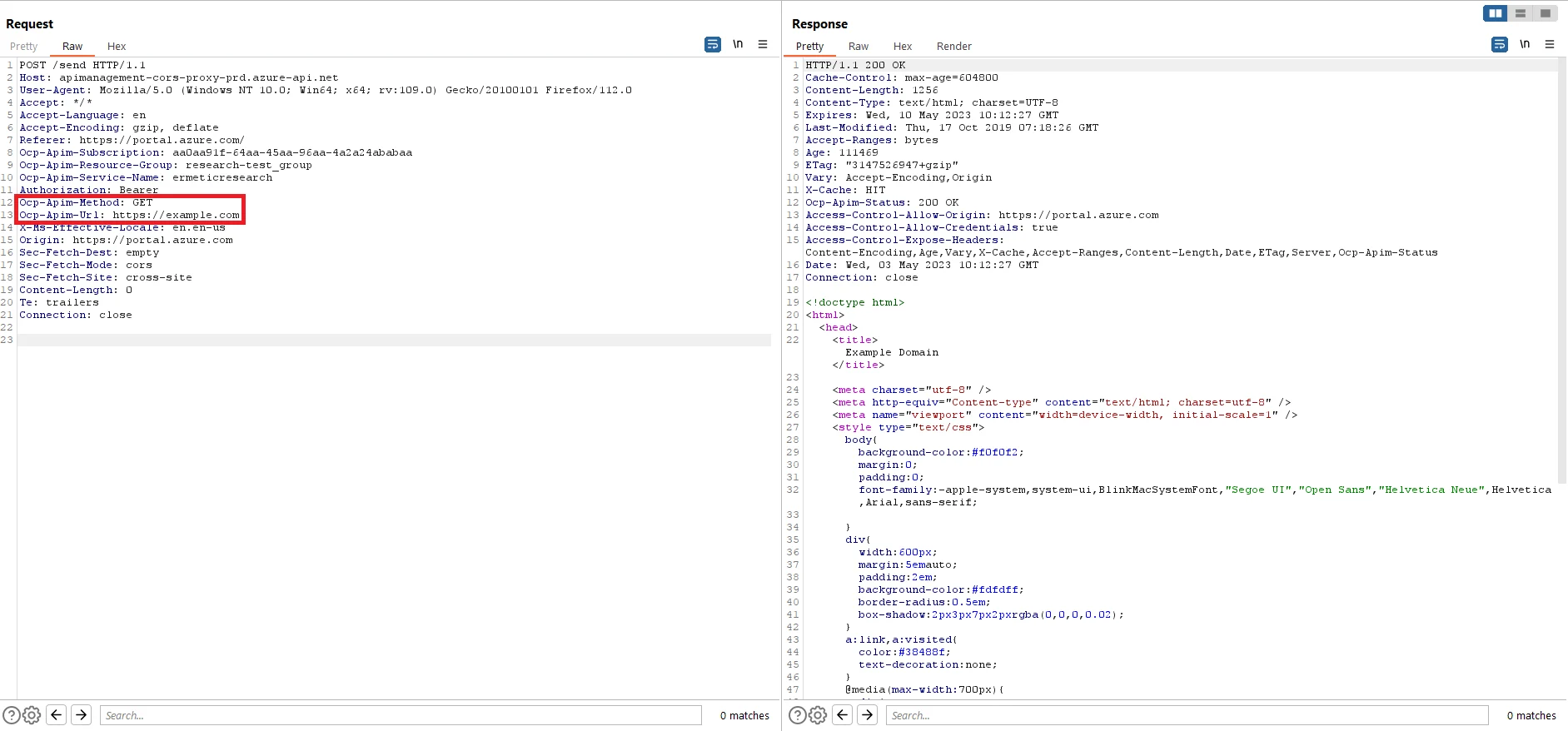
The obvious question was whether manipulating the Ocp-Apim-Url value could reach internal resources.
The hosting proxy and set-backend-service
When configuring an API, users configure frontend, backend, inbound and outbound processing.
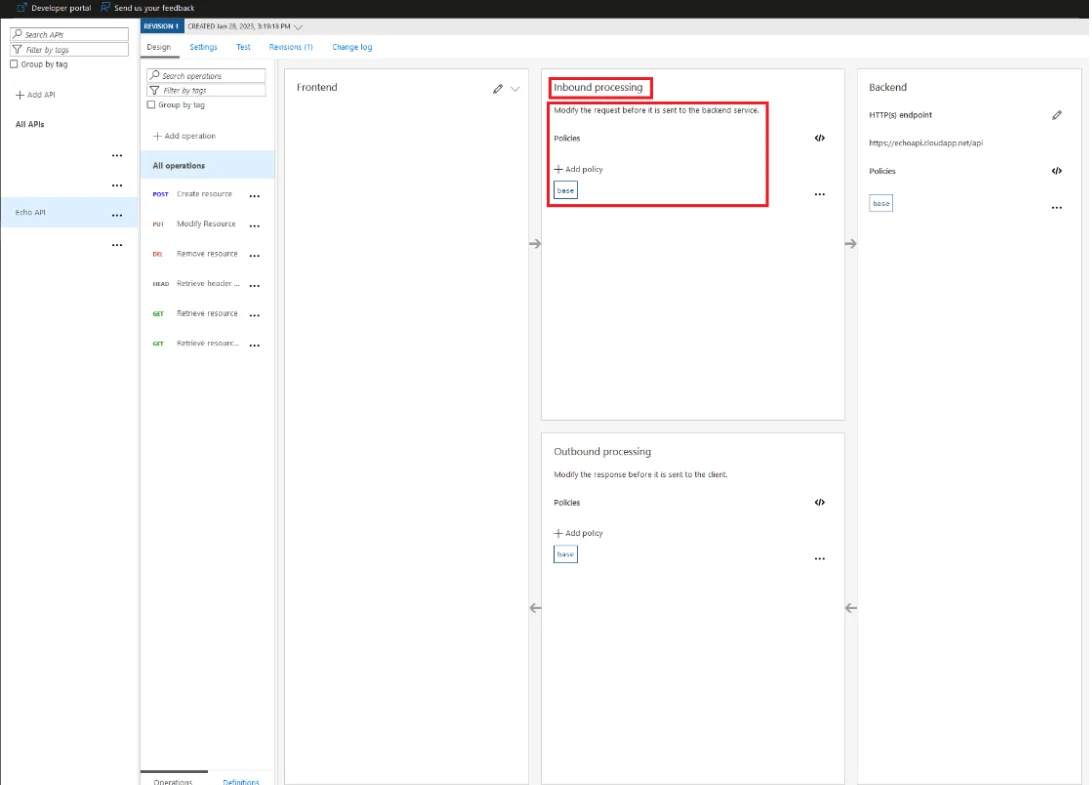
The interesting part is inbound processing. The set-backend-service policy dynamically configures the backend service URL for an API, taking the value from its base-url parameter. That lets the backend URL be changed in the policy rather than by editing the API configuration directly.
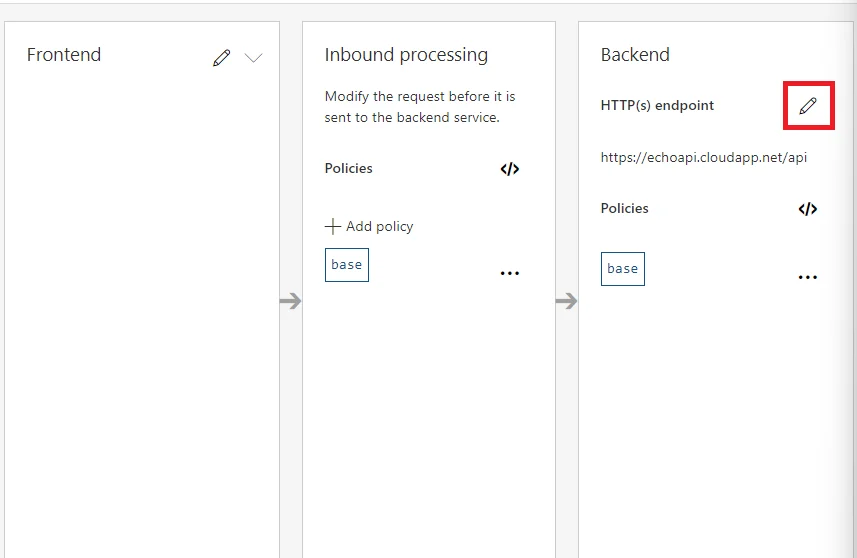
Something has to apply those request modifications according to the policies set in inbound and outbound processing, and the researcher assumed a proxy sits in that path. Researching the functionality showed the policies were set with the API Management proxy https://apimanagement.hosting.portal.azure.net/ in inbound and outbound processing. A request from the frontend the user specifies goes to the inbound processing proxy and then to the specified backend. A policy that sets the backend URL from user-controlled input is again an SSRF shape.
The developer portal upload
The developer portal's authenticated mode lets users upload static files and images to display on their dedicated portal. The self-hosting feature also drew attention because it expands the impact of any vulnerability: a finding affects not only Azure itself but also end-users who have deployed the developer portal themselves.
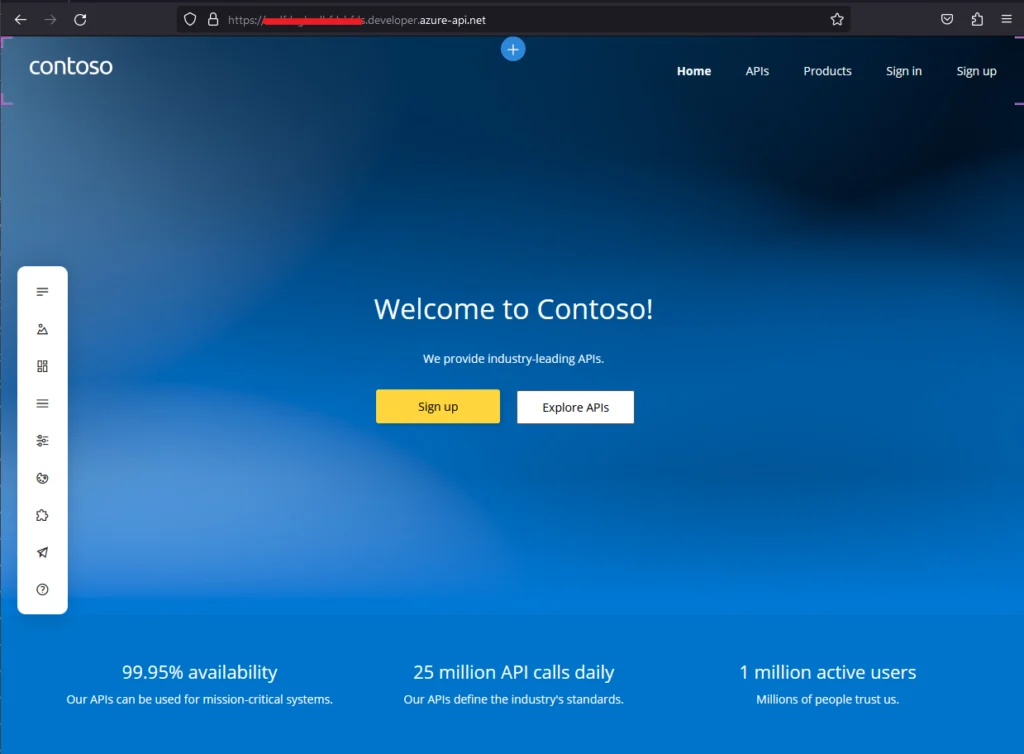
On a portal "publish", files are uploaded to a dedicated Azure blob and to the developer portal filesystem, which is inaccessible to Azure users and hosted by Azure. Users reach the files through the developer portal under the specified path, by default under:
/content/x.png.
Azure did not validate the file type or the path of uploaded files, which is what made the upload interesting.
Exploitation
Step 1: basic SSRF attempt against the CORS Proxy
The first basic payload was http://localhost in the Ocp-Apim-Url value. The CORS Proxy returned a 403 Forbidden, which indicated a defence mechanism against SSRF.
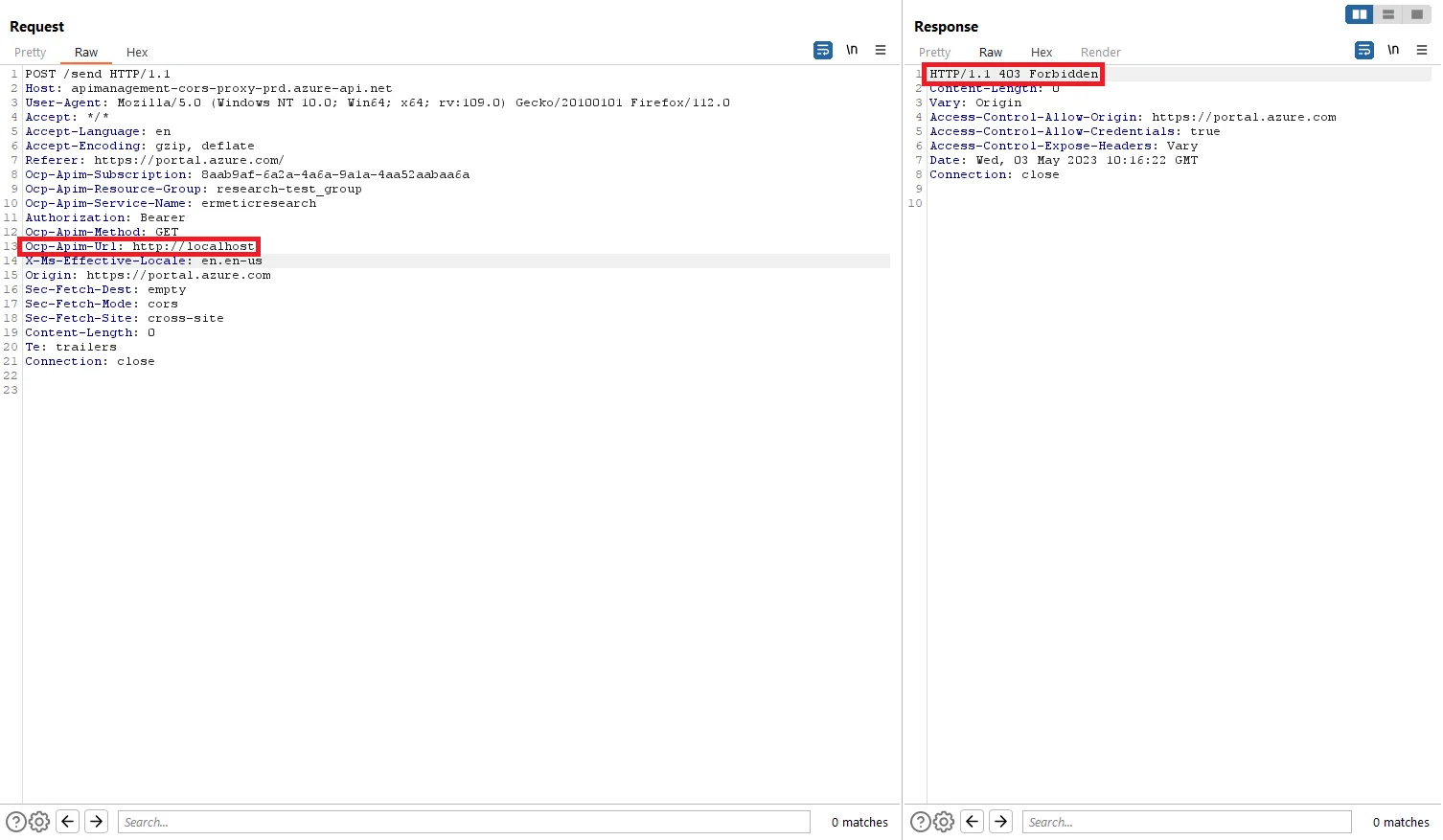
After a few test cases the researcher established that the server has a blacklist containing:
http://localhost
http://[redacted]
Step 2: bypass the blacklist with a DNS name
Many URL formatting bypasses defeat such a blacklist: octal, decimal and hexadecimal IP representations, different CIDRs and more. The researcher chose a DNS name that resolves to localhost, localtest.me. The CORS Proxy resolves localtest.me to [redacted] and returns the desired response.
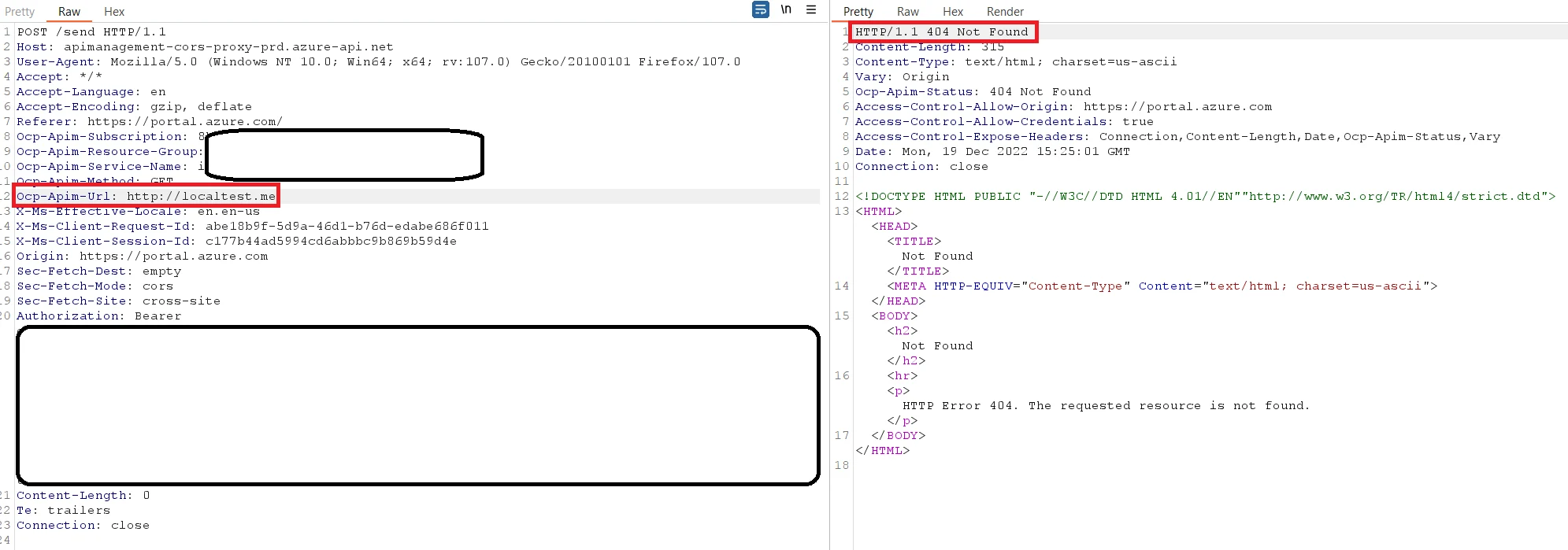
That produced a full SSRF with a reflected response on the CORS Proxy of the Azure API Management service. Because the method is taken from the Ocp-Apim-Method HTTP header, the SSRF can be sent with a chosen HTTP verb or method. Custom headers can also be sent simply by adding them to the request, since the CORS Proxy proxies the HTTP headers to the target server.
Step 3: map the port filter and bypass it with a redirect
While trying to access other ports, the researcher hit another 403 Forbidden. The 403 came back only when trying to access these ports:
300
3000
30000
A non-existent port such as 300000000 also returned 403 Forbidden. From this the researcher inferred that a regex checks whether the Ocp-Apim-Url header value contains the string 300. If a regex exists specifically for those ports, some important services must be listening on them. The regex works on the input from the Ocp-Apim-Url value, so the check can be bypassed by supplying a valid external server under the researcher's control and having it redirect the CORS Proxy to the desired internal SSRF location, for example http://localhost:30001.
With the redirect bypass, the following internal ports were reachable:
| Port | Service |
|---|---|
| 30001 | Authenticated view of the developer portal |
| 30004 | Azure's Management API |
| 30005 | Azure's Kudu API management |
| 30006 | Unpublished developer site (unauthenticated) |
Step 4: reach Kudu on port 30005
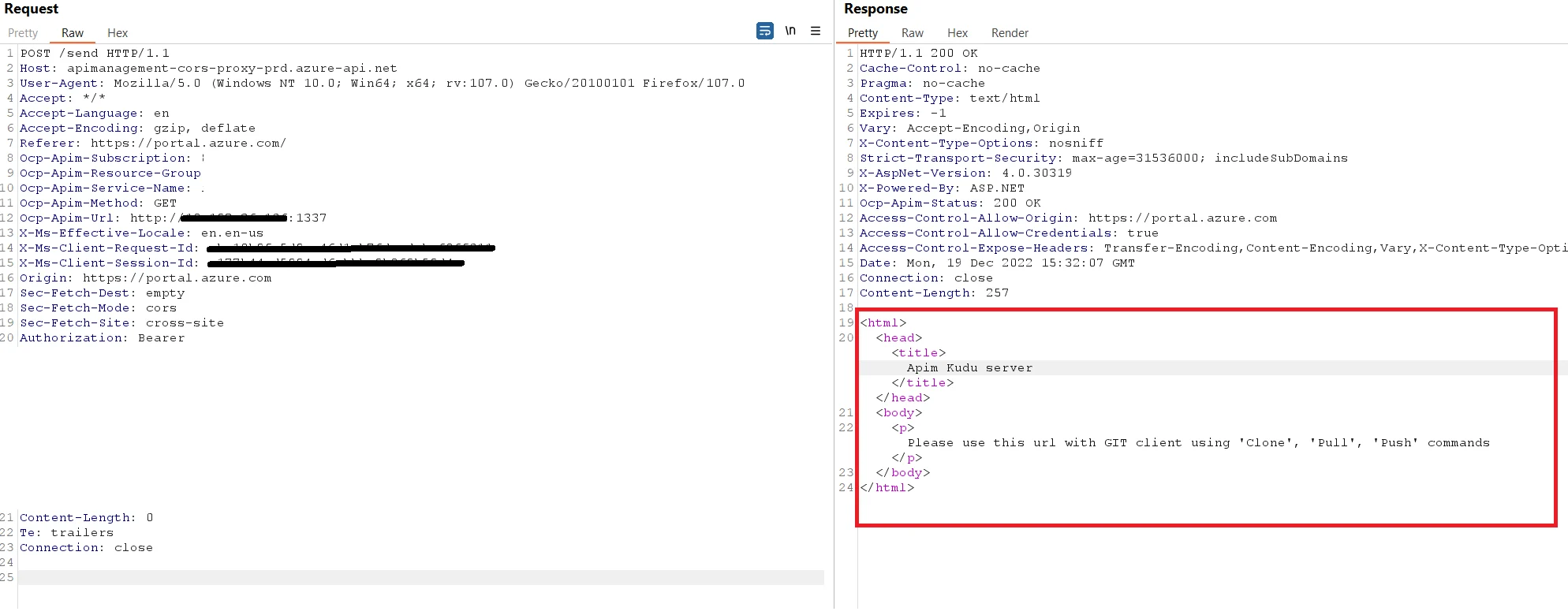
With the redirect server placed in the Ocp-Apim-Url input, the CORS Proxy followed the redirect to http://localhost:30005/test. The redirect server:

Request and response:
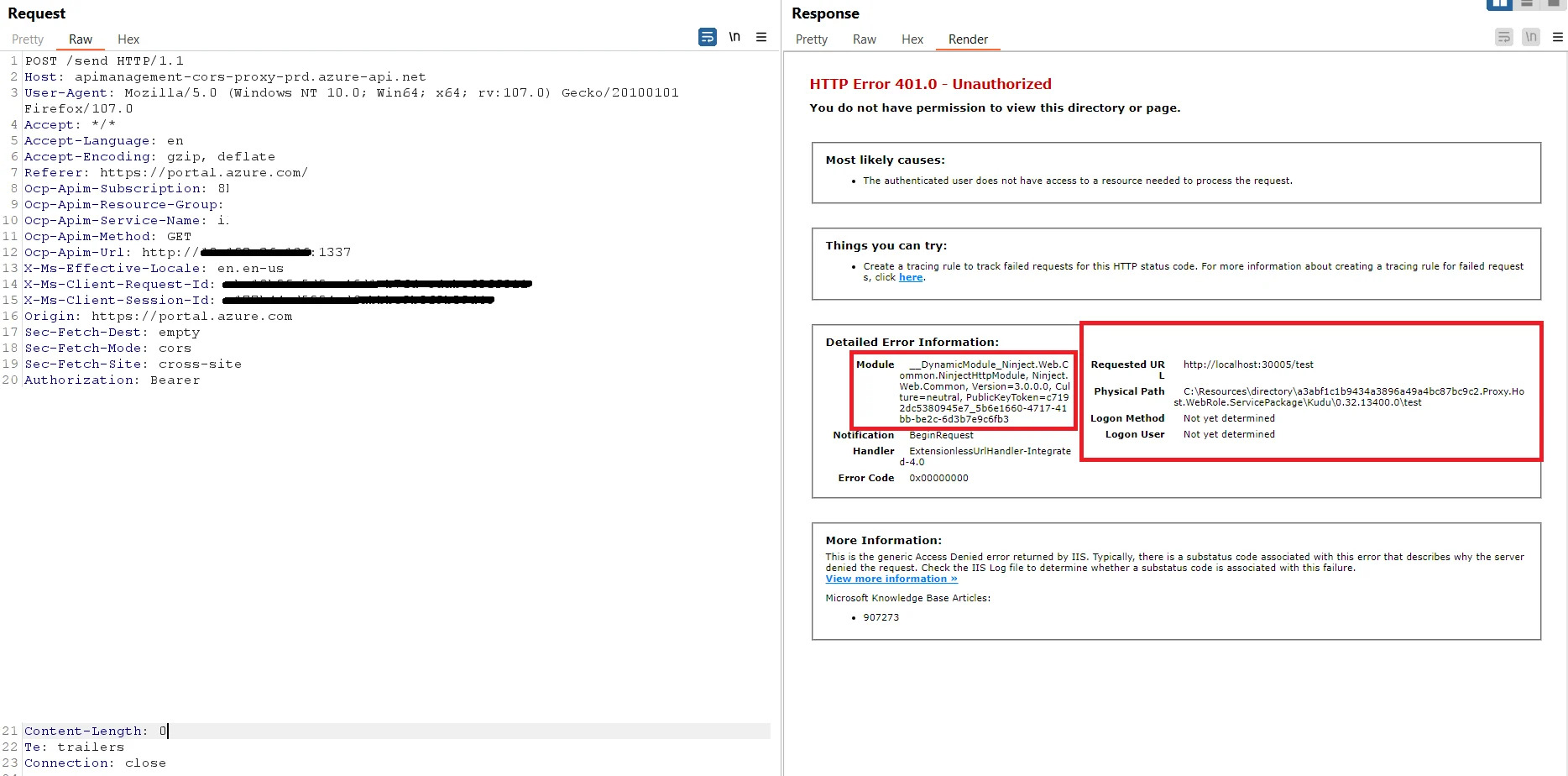
This reached the internal Kudu service.
Step 5: reach the developer portal on port 30001
The same technique was applied to port 30001. Request and response:
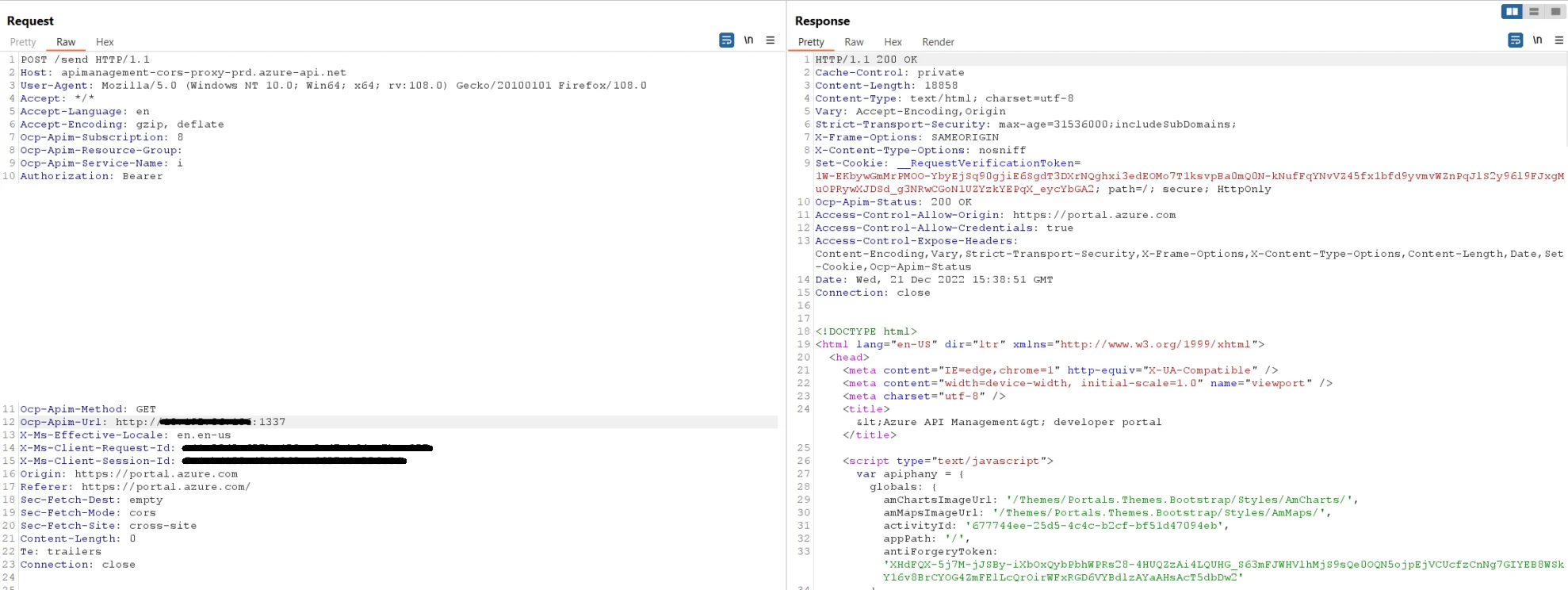
At this point the researcher stopped investigating to avoid possible harm to internal services and infrastructure.
Step 6: SSRF through set-backend-service on the hosting proxy
SSRF can be exploited by abusing the set-backend-service policy and setting it to the desired SSRF location, for example http://localhost.
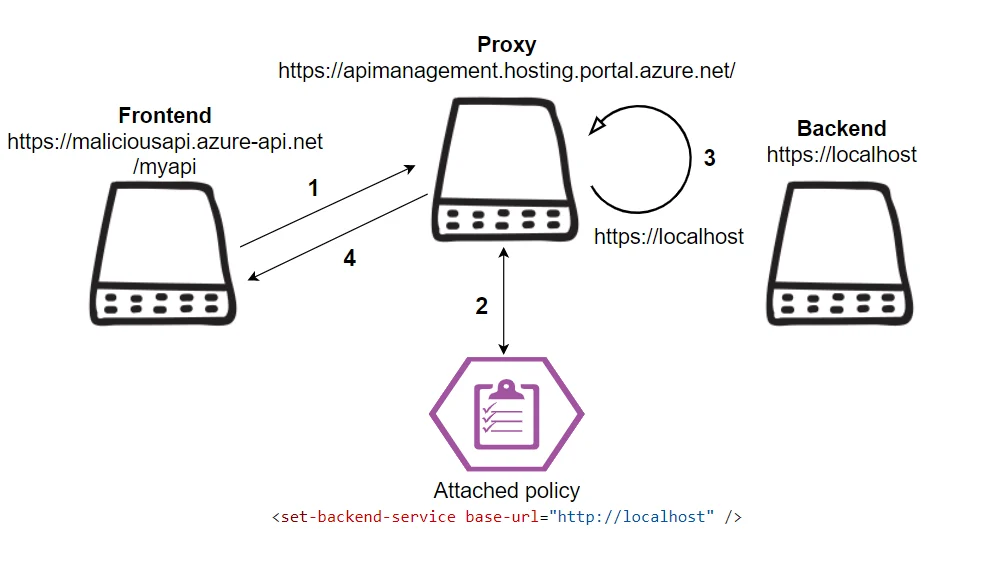
Because the researcher controlled the frontend and inbound processing policies, the SSRF could be sent with an HTTP verb or method and custom headers of the researcher's choosing. An internal HTTP port 80 was accessed as a proof of concept:
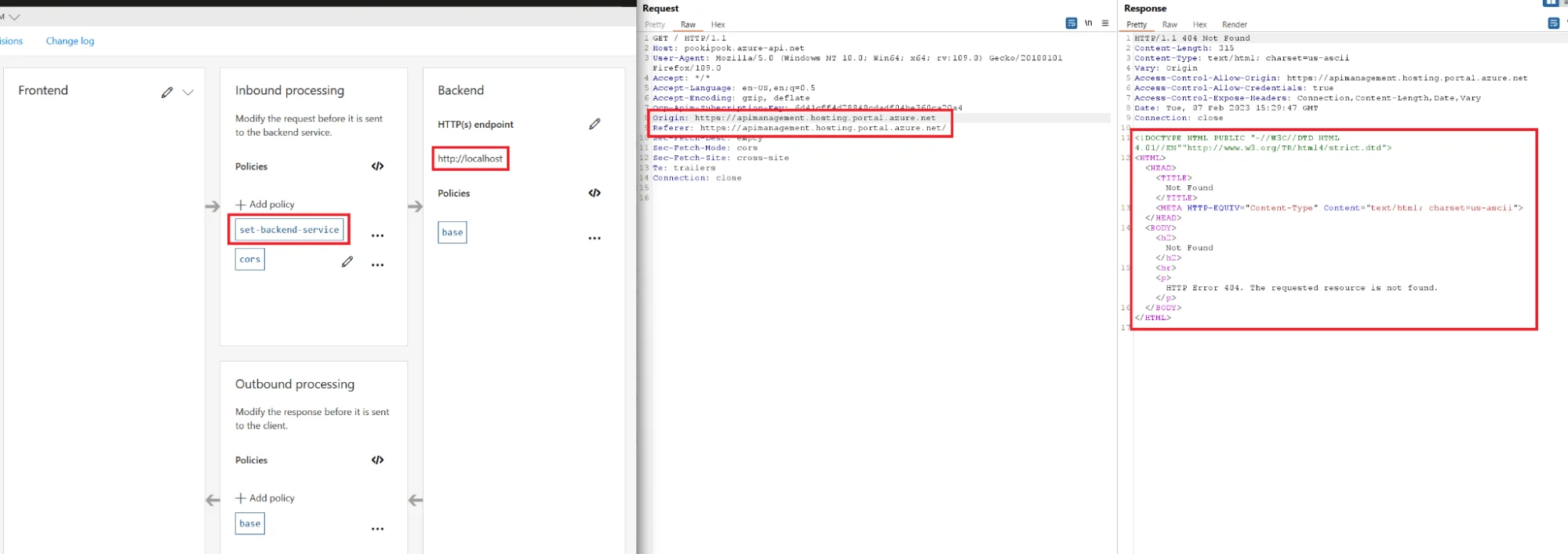
Again the researcher stopped to avoid possible harm. Based on discussion with Microsoft, local APIs that serve sensitive data or allow administration required authentication.
Step 7: path traversal in the developer portal upload
To test the attack locally, the researcher cloned a self-hosted API management instance and successfully traversed and dropped unwanted files in the system.
The usual and intended location of files after upload would be:
C:\Users\Liv\Desktop\api-management-developer-portal\dist\website\content
The default path specified in Azure APIM when uploading files is:
/content/x.png
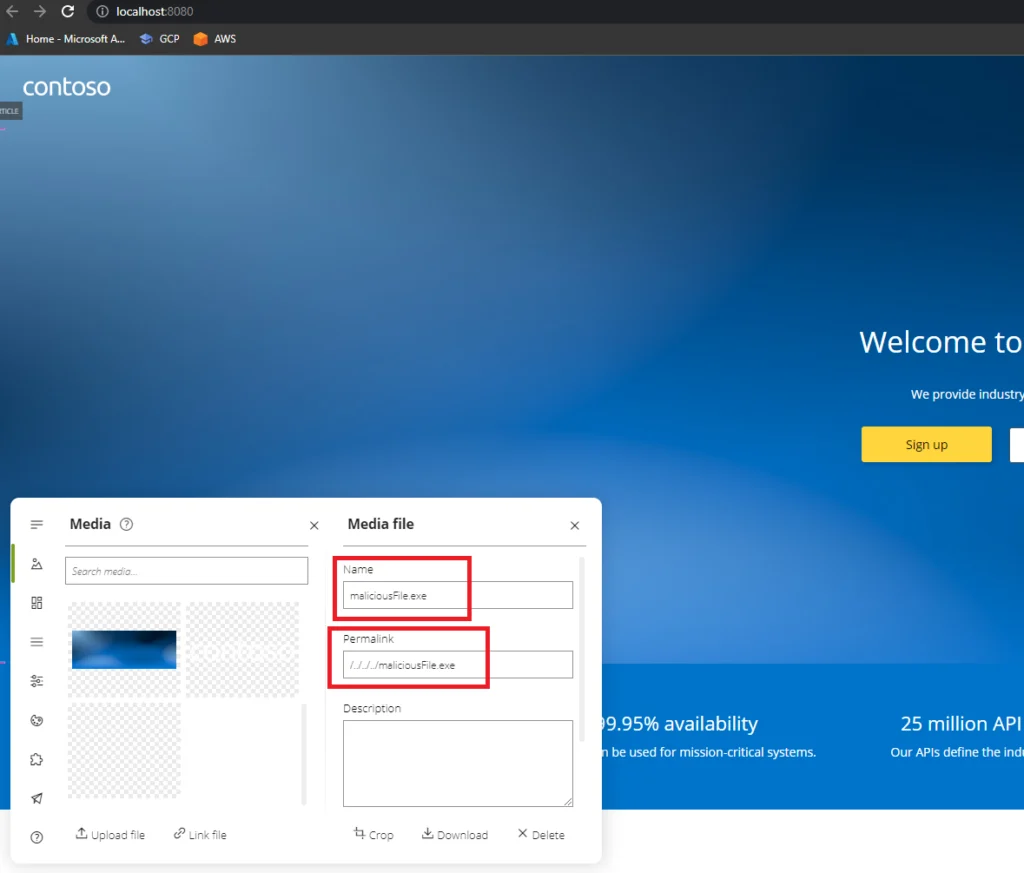
Traversing that path drops a maliciousFile.exe on the Desktop:
C:\Users\Liv\Desktop\api-management-developer-portal\dist\website\../../../maliciousFile.exe
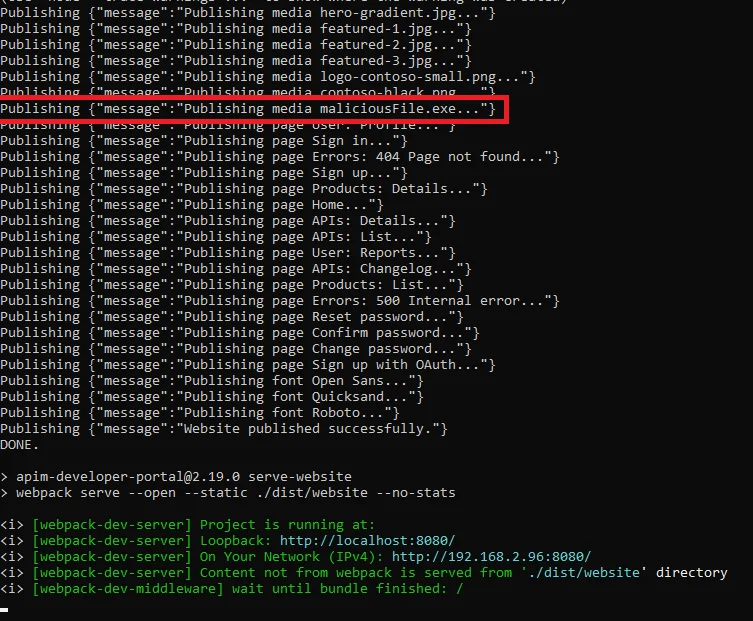
The developer portal is published with the maliciousFile.exe:
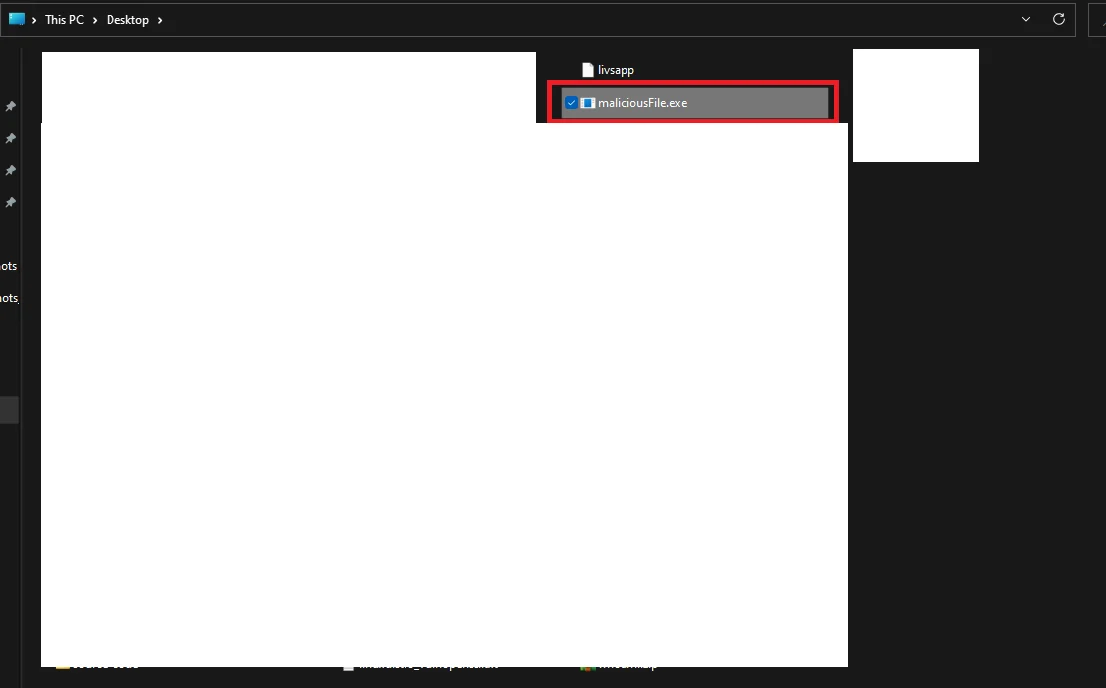
The malicious file is on the desktop of the server, confirming the directory traversal:
Root cause
All three issues come from the same pattern: a user-controlled value is used to build a server-side request or a filesystem path, and the validation applied to it is too narrow.
For the CORS Proxy, the blacklist covered only http://localhost and http://[redacted]. It did not account for alternative representations of the same destination, so a DNS name resolving to [redacted] passed. The port filter was a regex on the string 300 in the Ocp-Apim-Url value, which is a check on the input rather than on the destination actually reached. Because the proxy follows redirects, a URL that passes the check can redirect to a URL that would have failed it. The proxy also forwards the method from Ocp-Apim-Method and forwards custom headers to the target, which widens what the SSRF can do once it lands.
For the hosting proxy, the set-backend-service policy takes its base-url from configuration the API owner controls, and the inbound processing proxy then requests that URL. There is no restriction preventing that URL from pointing at internal locations such as http://localhost.
For the developer portal, Azure did not validate the file type or the path of uploaded files. The upload path is user-supplied, so ../ sequences escape the intended content directory and land anywhere the process can write.
Impact
By abusing the SSRF vulnerabilities, attackers could send requests from the service's CORS Proxy and from the hosting proxy itself, access internal Azure assets, deny service and bypass web application firewalls. The CORS Proxy SSRF gave a full SSRF with a reflected response, a chosen HTTP method and custom headers, and reached internal services on ports 30001, 30004, 30005 and 30006, including the authenticated developer portal view, Azure's Management API, Kudu and the unpublished developer site. The hosting proxy SSRF reached an internal HTTP port 80. In both cases the researcher stopped early to avoid harm, and per discussion with Microsoft, local APIs serving sensitive data or allowing administration required authentication.
With the file upload path traversal, attackers could upload malicious files to Azure's hosted internal workload and to self-hosted developer portals. Because the file type and path were not validated, an authenticated user could upload malicious files to the developer portal server and possibly execute code on it using DLL hijacking, iisnode config swapping or any other relevant attack vector. The self-hosting feature means the finding affects not only Azure itself but also end-users who deployed the developer portal themselves.
Fix
All three vulnerabilities were fully patched by MSRC, and the researcher thanks MSRC for their cooperation, including a call to make sure the vulnerabilities had been fully remediated. The report does not describe the specific code changes. The first vulnerability also carries a lesson the researcher draws out: never assume a fixed vulnerability will not recur, since the bypass defeated the fix Microsoft had deployed for the earlier report of the same CORS Proxy issue. The second underscores caution with proxies, and the third highlights how sensitive API portals are when it comes to malicious file uploads.
Variants to test
- Blacklist bypass with alternative host representations. Where a server blocks
localhostand[redacted], try DNS names that resolve to loopback, plus octal, decimal and hexadecimal IP forms and different CIDRs. A positive result is a response from the internal target instead of a 403. - Redirect-based filter bypass. Host a redirect on an external server you control and point the vulnerable parameter at it, with the redirect aimed at the internal destination. A positive result is the proxy following the redirect and returning the internal response, as happened with
http://localhost:30005/testandhttp://localhost:30001. - String-based port filters. If a filter rejects values containing a particular substring such as
300, check whether the check applies to the input rather than the final destination, and whether a redirect or an alternative encoding reaches the blocked port. A positive result is a response from a port the filter was meant to protect. - Method and header control through the SSRF. Where the method comes from a header such as
Ocp-Apim-Methodand headers are forwarded, try verbs and headers of your choosing against the internal target. A positive result is the internal service acting on your method or headers. - Policy-driven backend URLs. In any API gateway with a policy that sets a backend URL from configuration, point it at
http://localhostor another internal address. A positive result is the gateway fetching the internal location. - Upload path traversal. In an authenticated file upload, replace the intended path with
../sequences, as in the report's/content/x.pngbecoming a path that lands outsidecontent. A positive result is the file appearing outside the intended directory, for example on the Desktop of the server. - Self-hosted deployments. Reproduce findings against a self-hosted clone of the product, as the researcher did with the developer portal, to confirm behaviour without touching production.
Hunting notes
This kind of bug tends to hide in features that fetch a URL on the user's behalf: schema import, webhook configuration, policy-driven backend URLs, and any proxy that exists to add or modify headers. The signals during recon are parameters and headers that carry a URL or host, especially ones with names like Ocp-Apim-Url and Ocp-Apim-Method, and error responses such as 403 that reveal a filter rather than a hard block. A filter that fires on specific ports is itself a signal that something important listens there. On the upload side, look for authenticated file upload features where the destination path is supplied or influenced by the user, and for self-hosting options that extend the impact to customers running the product themselves.
What happened, in plain words
A security research team found three separate weaknesses in a Microsoft cloud product called Azure API Management. Two of them let an attacker make Microsoft's own servers send requests to places the attacker should not be able to reach. The third let a logged-in user upload a file that lands outside the folder it was meant to go into, potentially on the server's own desktop.
All three were reported to Microsoft, which fixed them. The report explains how each one worked, step by step, and that is what this article walks through, slowly, assuming you have never done security work before.
Before the details, a few ideas you will meet again and again.
What is an API? An API (application programming interface) is the way one piece of software asks another piece of software to do something. Think of a restaurant: you do not walk into the kitchen and cook; you tell the waiter what you want, the waiter takes your order to the kitchen, and the kitchen sends food back. The menu is the API: a fixed list of things you can ask for, and the format in which you ask. Your browser, a mobile app or another company's server can all be the customer talking to the waiter.
What is a server? A computer somewhere that answers requests. When you open a website, your browser sends a request to a server, and the server sends back a page. Servers often sit behind other servers that pass requests along.
What is a proxy? A proxy is a middleman. Instead of your request going straight to the destination, it goes to the proxy, and the proxy forwards it on your behalf. Like asking a colleague to phone a supplier for you: the supplier sees your colleague's call, not yours. Proxies are useful because they can add or change things along the way, such as labels on the request.
What is a header? When a browser or a program sends a request, it attaches small labelled pieces of information called headers. Think of an envelope: the address is on the front, but you can also write notes on it, like "fragile" or "this side up". Headers carry notes like what type of content is being sent, or who is asking. Some headers are standard; some are invented by a particular product.
What is server-side request forgery (SSRF)? Normally, when you type a web address, your own computer fetches it. SSRF is when you trick a server into fetching an address for you. That matters because servers can often reach things your computer cannot: internal machines, private admin pages, services that only trust requests coming from inside the building. The everyday comparison: you are not allowed into the staff-only back room, but you can ask a member of staff to go in and bring something out for you. If the staff member does not check who is asking or where they are going, you get access you should never have had.
What is a blacklist? A list of things that are forbidden. A server might keep a list of addresses it refuses to fetch. The weakness of a blacklist is that it only blocks what someone thought of; if the same destination can be written in another way, the list is bypassed.
What is a port? One server can run many services at once, and each is reached on a numbered channel called a port. Think of a large office building with one street address but many numbered rooms. Port 80 is the usual room for ordinary web traffic; other numbers host other services. If you know the room number, you can knock on a specific door.
What is a redirect? When you ask a server for something, it can answer "not here, go to this other address instead". Your browser then automatically asks the new address. That automatic follow-up is a redirect, and it is central to the second half of the first bug.
What is a regular expression (regex)? A pattern used to check text. For example, a rule could say "reject any input that contains the characters 300". It is a way of describing what text looks like, so a program can test whether a piece of text matches.
What is a path traversal? Files on a computer live in folders inside folders, and their location is written as a path, like C:\Users\Liv\Desktop\notes. In a path, the two dots .. mean "go up one folder". If a program lets you supply part of a path and does not check it, you can use .. to climb out of the folder you were supposed to stay in and write files somewhere else. Like being told to put a parcel in the mail room, but writing "mail room, up two floors, third door on the left" on the label.
What is a developer portal? A website that a company sets up to show other developers how to use its APIs: documentation, examples, images. Azure API Management offers one, and companies can either use Azure's hosted copy or run it themselves (self-hosting).
Now the three findings.
The product and the three issues
Azure API Management is a Microsoft service for creating, managing, securing and analysing APIs. It is a central place where an organisation publishes its APIs to outside developers, to partners and to its own staff. The research covered three separate problems in it:
- An SSRF in the service's CORS Proxy, reachable through a feature that imports a schema from a URL.
- An SSRF in the hosting proxy, reachable through an API configuration setting called
set-backend-service. - An unrestricted file upload with a path traversal in the developer portal.
The first two were reached by writing web addresses in unusual formats that slipped past the checks. The third lived in the developer portal's upload feature.
What you need to follow along
For the third issue the researcher cloned a self-hosted copy of the developer portal to test locally:
https://github.com/Azure/api-management-developer-portal
This is a public code repository: the source code of the developer portal, which anyone can download and run on their own machine. Running a copy locally means you can experiment without touching anyone's live system.
Finding 1: the CORS Proxy
What a schema is, and why importing one is interesting
API Management lets organisations define schemas: descriptions of the shape of the data that travels through an API. If an API expects a customer record with a name and an address, the schema says so, and both sides can check that what they send and receive fits. Schemas can be created and managed through the Azure API Management portal (the web interface) or the REST API (a way for programs to talk to the service directly).
Azure also offers "Import from URL": instead of typing a schema in by hand, the customer supplies a web address, and the Azure API Management CORS Proxy fetches the schema from that address by sending it an HTTP request.
The picture shows the schema import screen where a URL is supplied, and the note that the CORS Proxy then retrieves the schema from that URL.
Stop and think about what that means. You give a server an address, and the server goes and fetches it. That is exactly the shape of SSRF: a server making a request on your behalf. If the server does not carefully check where it is being sent, you can point it at internal things.
What the CORS Proxy is for
Web browsers have a safety rule that stops a page from one website quietly reading data from another website. That rule is called CORS, and it is enforced by the browser. The CORS Proxy exists to allow seamless cross-domain communication by intercepting, modifying and adding CORS headers, in other words by adding the right notes to requests so the browser's rule is satisfied. It is a middleman whose whole job is to relay requests and adjust their headers.
The request that caught the researcher's eye
The service sends those schema requests through the CORS Proxy at apimanagement-cors-proxy-prd.azure-api.net. Two headers stand out in the request: Ocp-Apim-Method and Ocp-Apim-Url.
The picture shows the request the API management service sends through the CORS Proxy, with those two headers visible.
In plain words: Ocp-Apim-Url is the note saying which address to fetch, and Ocp-Apim-Method is the note saying what kind of request to make (fetch a page, submit a form, and so on). Both are supplied as part of the request, which means both are worth poking at. The obvious question was whether manipulating the Ocp-Apim-Url value could reach internal resources.
Step 1: the first attempt, and the wall
The first basic payload was http://localhost in the Ocp-Apim-Url value. localhost is a special name that every computer uses for itself: it means "this machine, right here". Asking a server to fetch http://localhost is asking it to talk to itself, which is the simplest SSRF test there is.
The CORS Proxy returned a 403 Forbidden. A 403 is the web's way of saying "I understood you, and no". That indicated a defence mechanism against SSRF.
The picture shows the 403 Forbidden response to the http://localhost attempt.
After a few test cases the researcher established that the server has a blacklist containing:
http://localhost
http://[redacted]
Line by line: the first line is the name form of "this machine". The second is the same thing written as a number, [redacted], which is the numeric address every computer uses for itself. Both were blocked. The server was checking the address you supplied against a list of forbidden ones.
Step 2: getting around the blacklist with a name
A blacklist only blocks the spellings someone thought of. Many URL formatting bypasses defeat such a blacklist: octal, decimal and hexadecimal IP representations, different CIDRs and more. Those are different ways of writing the same numeric address, like writing a phone number with or without spaces and country codes; the phone system still connects you to the same person.
The researcher chose a different trick: a DNS name that resolves to localhost, localtest.me. DNS is the internet's phone book: it turns names into numbers. localtest.me is a public name whose phone book entry deliberately points at [redacted], the machine itself. The CORS Proxy resolves localtest.me to [redacted] and returns the desired response.
The picture shows the CORS Proxy resolving localtest.me to [redacted] and returning the response from the internal target.
Why this worked: the blacklist compared the text you typed against two forbidden strings. localtest.me is not one of those strings, so it passed the check. Only afterwards did the server look the name up and discover it led to the very place it meant to protect. The check was on the spelling, not on the destination.
That produced a full SSRF with a reflected response on the CORS Proxy. "Reflected" means the answer from the internal target comes back to you through the proxy, so you can read it. Because the method is taken from the Ocp-Apim-Method HTTP header, the SSRF can be sent with a chosen HTTP verb or method. Custom headers can also be sent simply by adding them to the request, since the CORS Proxy proxies the HTTP headers to the target server. In everyday terms: you are not limited to knocking politely on the door; you can choose how to knock and what note to slip under it.
Step 3: the port filter, and getting around it with a redirect
While trying to access other ports, the researcher hit another 403 Forbidden. The 403 came back only when trying to access these ports:
300
3000
30000
Line by line: these are three numbered doors in the building. Each attempt to reach one of them was refused. A non-existent port such as 300000000 also returned 403 Forbidden. That last detail is the clue: a door that does not exist cannot refuse you, so the refusal must be coming from a check on the text of your request, not from the destination.
From this the researcher inferred that a regex checks whether the Ocp-Apim-Url header value contains the string 300. If a regex exists specifically for those ports, some important services must be listening on them. The regex works on the input from the Ocp-Apim-Url value, so the check can be bypassed by supplying a valid external server under the researcher's control and having it redirect the CORS Proxy to the desired internal SSRF location, for example http://localhost:30001.
Why that works: the filter inspects the address you hand over. If that address is an ordinary external server you own, it contains no forbidden text, so it passes. The proxy then fetches your server, your server answers "go to this other address instead", and the proxy follows the redirect automatically. The second address was never checked, because the check happened before the redirect. It is like being searched at the front door, then taking a lift inside the building to a floor you were never allowed on.
With the redirect bypass, the following internal ports were reachable:
| Port | Service |
|---|---|
| 30001 | Authenticated view of the developer portal |
| 30004 | Azure's Management API |
| 30005 | Azure's Kudu API management |
| 30006 | Unpublished developer site (unauthenticated) |
In plain words: 30001 is the developer portal as seen by someone who is logged in. 30004 is Azure's own management interface, the control panel for the service. 30005 is Kudu, which is a tool for managing and deploying code on a web server. 30006 is a developer site that has not been published yet. All of these are internal, and none of them should be reachable from the outside.
Step 4: reaching Kudu on port 30005
With the redirect server placed in the Ocp-Apim-Url input, the CORS Proxy followed the redirect to http://localhost:30005/test. The redirect server:
The picture shows the small redirect server the researcher set up, whose only job is to answer with a redirect pointing at the internal address.
Request and response:
The picture shows the request sent to the CORS Proxy and the response that came back after the redirect was followed.
This reached the internal Kudu service.
The picture shows the response from the internal Kudu service, confirming it was reached.
Kudu is the deployment and management service for web apps. Reaching it from outside is significant because it is a tool for putting code onto a server.
Step 5: reaching the developer portal on port 30001
The same technique was applied to port 30001. Request and response:
The picture shows the request and the response from the authenticated developer portal view on port 30001.
At this point the researcher stopped investigating to avoid possible harm to internal services and infrastructure. That is a deliberate choice: once you have proved you can get in, continuing to poke around risks breaking something real.
Finding 2: the hosting proxy
How API configuration is laid out
When configuring an API, users configure frontend, backend, inbound and outbound processing.
The picture shows the configuration screen with those four stages.
In plain words: a request arrives at the frontend (what the outside world talks to), passes through inbound processing (rules applied on the way in), goes to the backend (the real service that does the work), and the answer passes through outbound processing (rules applied on the way out). It is like a postal sorting office: letters come in, get sorted by rules, are delivered, and replies come back through the same rules.
The interesting part is inbound processing. The set-backend-service policy dynamically configures the backend service URL for an API, taking the value from its base-url parameter. That lets the backend URL be changed in the policy rather than by editing the API configuration directly.
The picture shows the set-backend-service policy with its base-url parameter.
Why that is interesting: the policy decides where requests are sent. If you can set that value, you can decide where the service sends its requests, and that is the SSRF shape again.
Who actually applies the policies
Something has to apply those request modifications according to the policies set in inbound and outbound processing, and the researcher assumed a proxy sits in that path. Researching the functionality showed the policies were set with the API Management proxy https://apimanagement.hosting.portal.azure.net/ in inbound and outbound processing. A request from the frontend the user specifies goes to the inbound processing proxy and then to the specified backend.
So the chain is: your request, the frontend, the inbound processing proxy, the backend. The middle link is a proxy that fetches whatever the policy tells it to fetch.
Step 6: pointing the backend at localhost
SSRF can be exploited by abusing the set-backend-service policy and setting it to the desired SSRF location, for example http://localhost.
The picture shows the policy configured so that the backend URL points at http://localhost.
Because the researcher controlled the frontend and inbound processing policies, the SSRF could be sent with an HTTP verb or method and custom headers of the researcher's choosing. An internal HTTP port 80 was accessed as a proof of concept:
The picture shows the request and the response from the internal service on port 80.
Port 80 is the standard door for ordinary web traffic, so reaching it internally means reaching a web service that was only meant to be used from inside.
Again the researcher stopped to avoid possible harm. Based on discussion with Microsoft, local APIs that serve sensitive data or allow administration required authentication. In other words, the door opened, but the rooms behind it asked for a key; the finding still mattered because the door should not have opened at all.
Finding 3: the developer portal upload
What the upload feature does
The developer portal's authenticated mode lets users upload static files and images to display on their dedicated portal. Static files are things like pictures, style sheets and documents that the site serves as they are. The self-hosting feature also drew attention because it expands the impact of any vulnerability: a finding affects not only Azure itself but also end-users who have deployed the developer portal themselves.
The picture illustrates the self-hosting option and the fact that the same code runs on customers' own servers.
That is worth pausing on. If a bug exists in code that Microsoft runs, Microsoft can fix it in one place. If the same code is also handed out for customers to run themselves, the bug exists on every one of those servers too, and each customer has to update.
Where uploaded files go
On a portal "publish", files are uploaded to a dedicated Azure blob and to the developer portal filesystem, which is inaccessible to Azure users and hosted by Azure. A blob is simply a storage container in the cloud for files. Users reach the files through the developer portal under the specified path, by default under:
/content/x.png.
Line by line: /content/ is the folder, x.png is the file name, and the dot at the end is punctuation from the sentence, not part of the path. So by default an uploaded picture called x.png is served from the content folder of the portal.
Azure did not validate the file type or the path of uploaded files, which is what made the upload interesting. Validation means checking: is this really an image, and is the destination really inside the folder it should be? Neither check was made.
Step 7: climbing out of the folder
To test the attack locally, the researcher cloned a self-hosted API management instance and successfully traversed and dropped unwanted files in the system.
The usual and intended location of files after upload would be:
C:\Users\Liv\Desktop\api-management-developer-portal\dist\website\content
Line by line: this is a folder path on a Windows machine. C:\ is the main drive, Users\Liv\Desktop is a folder on a desktop, then the project folder, then dist\website\content, which is the content folder of the built website. This is where uploads are supposed to land.
The default path specified in Azure APIM when uploading files is:
/content/x.png
Line by line: the folder the portal is told to use, and the file name within it. Nothing here says "stay inside this folder".
Traversing that path drops a maliciousFile.exe on the Desktop:
C:\Users\Liv\Desktop\api-management-developer-portal\dist\website\../../../maliciousFile.exe
Line by line: the path starts in the intended content folder, then .. goes up one folder, a second .. goes up again, a third .. goes up once more, and the file name is written there. Three steps up from content lands on the Desktop, well outside the website folder. The .exe ending means it is a Windows program, not a picture. The server accepted the path and wrote the file where it was told.
The picture shows the upload with the traversing path.
The developer portal is published with the maliciousFile.exe:
The picture shows the published portal including the uploaded file.
The malicious file is on the desktop of the server, confirming the directory traversal:
The picture shows the file sitting on the server's desktop, outside the folder it should have been confined to.
Why this matters beyond a misplaced file: an authenticated user could upload malicious files to the developer portal server and possibly execute code on it using DLL hijacking, iisnode config swapping or any other relevant attack vector. In plain words, getting a file onto a server is often the first step to getting a program to run on it, because servers load files from their own disk and sometimes trust what they find there. The report says "possibly" because it demonstrated the file placement, not code execution.
Why all three happened
All three issues come from the same pattern: a user-controlled value is used to build a server-side request or a filesystem path, and the validation applied to it is too narrow.
For the CORS Proxy, the blacklist covered only http://localhost and http://[redacted]. It did not account for alternative representations of the same destination, so a DNS name resolving to [redacted] passed. The port filter was a regex on the string 300 in the Ocp-Apim-Url value, which is a check on the input rather than on the destination actually reached. Because the proxy follows redirects, a URL that passes the check can redirect to a URL that would have failed it. The proxy also forwards the method from Ocp-Apim-Method and forwards custom headers to the target, which widens what the SSRF can do once it lands.
For the hosting proxy, the set-backend-service policy takes its base-url from configuration the API owner controls, and the inbound processing proxy then requests that URL. There is no restriction preventing that URL from pointing at internal locations such as http://localhost.
For the developer portal, Azure did not validate the file type or the path of uploaded files. The upload path is user-supplied, so ../ sequences escape the intended content directory and land anywhere the process can write.
The common thread: checking the text of what someone typed is not the same as checking where it actually leads.
What an attacker could have done
By abusing the SSRF vulnerabilities, attackers could send requests from the service's CORS Proxy and from the hosting proxy itself, access internal Azure assets, deny service and bypass web application firewalls. A web application firewall is a filter that inspects incoming traffic; requests that originate from inside the service look like trusted internal traffic and can slip past it.
The CORS Proxy SSRF gave a full SSRF with a reflected response, a chosen HTTP method and custom headers, and reached internal services on ports 30001, 30004, 30005 and 30006, including the authenticated developer portal view, Azure's Management API, Kudu and the unpublished developer site. The hosting proxy SSRF reached an internal HTTP port 80. In both cases the researcher stopped early to avoid harm, and per discussion with Microsoft, local APIs serving sensitive data or allowing administration required authentication.
With the file upload path traversal, attackers could upload malicious files to Azure's hosted internal workload and to self-hosted developer portals. Because the file type and path were not validated, an authenticated user could upload malicious files to the developer portal server and possibly execute code on it using DLL hijacking, iisnode config swapping or any other relevant attack vector. The self-hosting feature means the finding affects not only Azure itself but also end-users who deployed the developer portal themselves.
The fix
All three vulnerabilities were fully patched by MSRC, Microsoft's Security Response Center, the team that handles reported security problems. The researcher thanks MSRC for their cooperation, including a call to make sure the vulnerabilities had been fully remediated. The report does not describe the specific code changes.
The first vulnerability also carries a lesson the researcher draws out: never assume a fixed vulnerability will not recur, since the bypass defeated the fix Microsoft had deployed for the earlier report of the same CORS Proxy issue. The second underscores caution with proxies, and the third highlights how sensitive API portals are when it comes to malicious file uploads.
Things worth trying if you want to look for similar bugs
- Blacklist bypass with alternative host representations. Where a server blocks
localhostand[redacted], try DNS names that resolve to loopback, plus octal, decimal and hexadecimal IP forms and different CIDRs. A positive result is a response from the internal target instead of a 403. - Redirect-based filter bypass. Host a redirect on an external server you control and point the vulnerable parameter at it, with the redirect aimed at the internal destination. A positive result is the proxy following the redirect and returning the internal response, as happened with
http://localhost:30005/testandhttp://localhost:30001. - String-based port filters. If a filter rejects values containing a particular substring such as
300, check whether the check applies to the input rather than the final destination, and whether a redirect or an alternative encoding reaches the blocked port. A positive result is a response from a port the filter was meant to protect. - Method and header control through the SSRF. Where the method comes from a header such as
Ocp-Apim-Methodand headers are forwarded, try verbs and headers of your choosing against the internal target. A positive result is the internal service acting on your method or headers. - Policy-driven backend URLs. In any API gateway with a policy that sets a backend URL from configuration, point it at
http://localhostor another internal address. A positive result is the gateway fetching the internal location. - Upload path traversal. In an authenticated file upload, replace the intended path with
../sequences, as in the report's/content/x.pngbecoming a path that lands outsidecontent. A positive result is the file appearing outside the intended directory, for example on the Desktop of the server. - Self-hosted deployments. Reproduce findings against a self-hosted clone of the product, as the researcher did with the developer portal, to confirm behaviour without touching production.
Where this kind of bug tends to hide
This kind of bug tends to hide in features that fetch a URL on the user's behalf: schema import, webhook configuration, policy-driven backend URLs, and any proxy that exists to add or modify headers. A webhook is a feature where one system automatically calls another when something happens, which means it also fetches an address you supply.
The signals during recon are parameters and headers that carry a URL or host, especially ones with names like Ocp-Apim-Url and Ocp-Apim-Method, and error responses such as 403 that reveal a filter rather than a hard block. A filter that fires on specific ports is itself a signal that something important listens there.
On the upload side, look for authenticated file upload features where the destination path is supplied or influenced by the user, and for self-hosting options that extend the impact to customers running the product themselves.
Glossary
- API: a fixed menu of requests one piece of software can make to another, and the format for making them.
- API Management: a Microsoft cloud service for creating, publishing, securing and analysing APIs in one place.
- Backend: the real service that does the work behind an API, as opposed to the frontend the outside world talks to.
- Blacklist: a list of forbidden values; it only blocks what someone thought to include.
- Blob: a storage container in the cloud for files.
- CIDR: a way of writing a range of numeric addresses.
- CORS: a browser safety rule that stops one website quietly reading data from another; the CORS Proxy adds headers to satisfy it.
- CORS Proxy: a middleman server that relays requests and adds or modifies CORS headers.
- Developer portal: a website that documents and showcases a company's APIs to other developers.
- DNS: the internet's phone book, turning names into numeric addresses.
- DLL hijacking: tricking a program into loading a malicious library file instead of the real one.
- Frontend: the part of an API setup that the outside world connects to.
- Header: a small labelled note attached to a request or response, such as which address to fetch or what type of content is sent.
- Hosting proxy: the proxy that applies API policies and forwards requests to the configured backend.
- HTTP method (verb): the kind of request being made, such as fetching a page or submitting data.
- iisnode config swapping: replacing a configuration file used by the iisnode hosting component so that different code runs.
- Inbound processing: rules applied to a request on its way in, before it reaches the backend.
- Kudu: a tool for managing and deploying code on a web server.
- localhost / [redacted]: names a computer uses for itself.
- MSRC: Microsoft Security Response Center, the team that handles reported security problems.
- Outbound processing: rules applied to a response on its way back out.
- Path traversal: using
..in a file path to climb out of the intended folder. - Payload: the specific input an attacker sends to try to trigger a bug.
- Port: a numbered channel on a server, letting one machine host many services.
- Proxy: a middleman that forwards requests on your behalf.
- Redirect: a server's answer telling the client to go to a different address instead, which the client follows automatically.
- Regex (regular expression): a pattern used to test whether text has a certain shape.
- REST API: a way for programs to talk to a service directly over the web, rather than through a web page.
- Schema: a description of the shape of data, used to check that what is sent and received fits.
- Self-hosting: running a copy of a product on your own servers instead of using the vendor's hosted version.
- set-backend-service: an API Management policy that sets the backend URL from a parameter called
base-url. - SSRF (server-side request forgery): tricking a server into fetching an address of your choosing, including internal ones you cannot reach yourself.
- Static files: files such as images and style sheets served to visitors exactly as stored.
- Validation: checking that input is acceptable, for example that a file is really an image and its destination is really inside the allowed folder.
- Web application firewall: a filter that inspects incoming web traffic and blocks suspicious requests.
- 403 Forbidden: the web's answer meaning the request was understood and refused.