Sometimes a Bucket Tells You More Than It Should
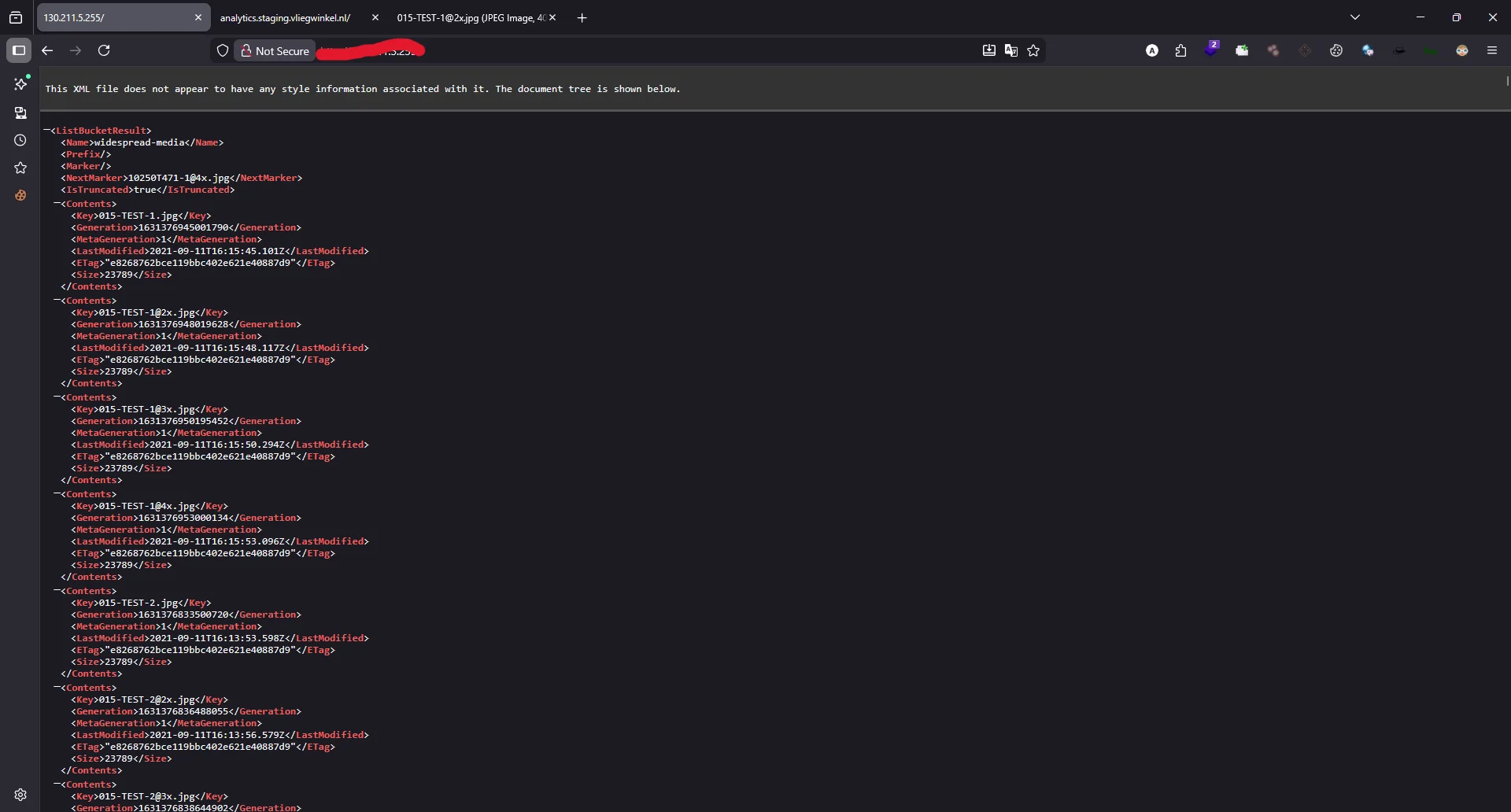
A cloud storage bucket on a staging subdomain returned an unauthenticated XML listing of its contents, exposing object names, upload timestamps, file sizes and metadata. An attacker could enumerate the bucket and open the listed images directly in a browser without logging in.

medium.com
Published on medium.com
Bug Bounty
The full write-up lives on its author's site
It belongs to its author, so we link to it rather than copy it. The other two tabs are our own rewrites, checked against it.
Context
During a regular bug-hunting session, the researcher was exploring a staging environment of a travel platform. Staging environments are interesting because they often mirror production closely enough to be useful for developers, and sometimes they are also a little less strict when it comes to security. That gap between staging and production is where this finding sits.
The feature involved is not an application endpoint in the usual sense. While browsing one of the application's subdomains, the researcher found that the server responded with an XML document instead of a normal webpage. On closer inspection it was not just XML: it was a storage bucket listing.
Setup
The report describes no accounts, roles, tooling or versions. The only precondition was access to a subdomain of the staging environment, reached through ordinary browsing. No authentication was used at any point, and none was required.
Finding it
Browsing a subdomain of the staging environment, the researcher expected a normal webpage and instead received an XML document. At first it looked harmless, but the content was a listing of a cloud storage bucket. The response was served without any authentication and exposed information about the files the bucket contained:
- Object names
- Upload timestamps
- File sizes
- Metadata associated with stored objects
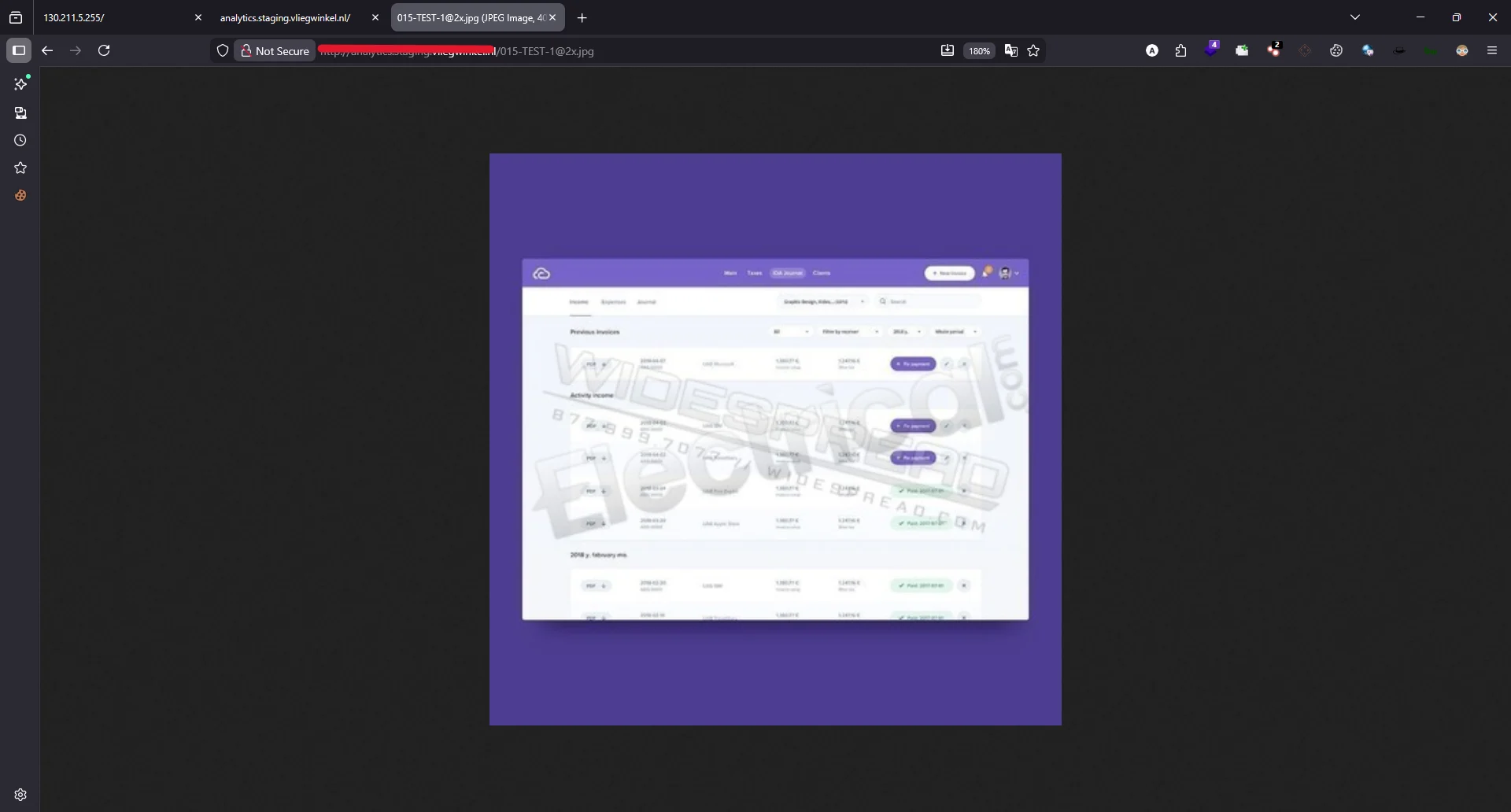
The listed image objects could also be opened directly in the browser, with no login and no authentication, just a direct request. The report includes two images at this point.
Exploitation
Step 1: Request the subdomain
The researcher browsed one of the application's subdomains in the normal way. The report does not give the hostname or the exact URL.
Step 2: Read the XML response
Instead of a webpage, the server returned an XML document that turned out to be a storage bucket listing. The listing disclosed object names, upload timestamps, file sizes and metadata for the stored objects, all without authentication.
Step 3: Open a listed object directly
Because the listed image objects were publicly readable, requesting one directly in the browser returned the file. No login and no authentication were involved: just a direct request. The report does not include the request or the object URL.
Root cause
The bucket was left open so that anyone could list its contents and read the listed objects. The report frames this as a cloud misconfiguration rather than a flaw in application code: a single permission can change an entire storage bucket from private to public. It does not identify the specific permission or policy that was set, so the exact configuration mistake is not stated.
Impact
Even where the exposed objects are not sensitive, allowing anyone to enumerate the contents gives an attacker valuable reconnaissance. Visibility into the bucket reveals:
- File naming conventions
- Storage structure
- Deployment patterns
- Publicly accessible assets
That is information which was never meant to be part of the application's public interface. The report is careful about the limits: this was not about bypassing authentication, because there was no authentication to bypass. It was simply a bucket exposing more information than intended. The report does not describe any further use of the disclosed objects.
Fix
The lesson it draws is that security is not only about encrypting data, but also about making sure only the right people can discover it in the first place, which points at restricting who may list the bucket and read its objects.
Variants to test
Status
The report records the submission as a duplicate.
What happened, in plain words
A security researcher was spending some time looking for bugs, the way some people spend an evening browsing the internet. This time the target was a travel platform, and specifically its staging environment.
A staging environment is a copy of a website or app that a company keeps for testing. Developers use it to try out changes before those changes go live to real customers. Think of it like a rehearsal room: the same play, the same set, but not the performance the public sees. Because it is a rehearsal room, companies sometimes leave the doors a little less locked than they would in the real theatre. That is exactly the kind of gap this finding sits in.
While browsing one of the application's subdomains, the researcher expected a normal webpage and got something else: an XML document. XML is a way of writing data in text form, using tags in angle brackets, a bit like a very strict shopping list. What the researcher found inside was not just any data. It was a listing of a cloud storage bucket.
A cloud storage bucket is a container for files that lives on a cloud provider's servers, the way a folder on your computer holds files. Companies use buckets to store images, documents, backups and other assets. Normally a bucket is private, and only the company's own systems can see what is inside. Here, the bucket was open: anyone could ask for the list of files, and anyone could open the listed images directly in a browser, with no login and no password.
The researcher reported it, and the report records the submission as a duplicate, meaning someone else had already reported the same issue.
The setup
The report describes no accounts, no roles, no special tools and no software versions. The only thing needed to find this was a browser and access to a subdomain of the staging environment. No authentication was used at any point, and none was required.
That last point matters for a beginner. Most of the time, when you visit a website and see your own data, it is because you logged in and the site recognises you. Here, nobody was recognised, and the site still handed over information. The finding is not about breaking a login. It is about a login never being asked for in the first place.
Finding it
Step 1: Request the subdomain
The researcher browsed one of the application's subdomains in the normal way, by typing or following a link in a browser. A subdomain is a part of a larger domain name: if the main site is example.com, then staging.example.com or images.example.com are subdomains. Companies often put different services on different subdomains, and those services can have different levels of protection.
The report does not give the hostname or the exact URL, so there is nothing more specific to show here.
Why take this step? Because staging environments are where companies test, and testing environments are where security settings are most likely to be looser than in production. Production is the live site that real customers use. If you want to find a door left open, you check the building that is still being worked on.
Step 2: Read the XML response
Instead of a webpage, the server returned an XML document. A server is the computer that answers your browser's request; the response is whatever it sends back. Usually that response is HTML, the language webpages are written in, which your browser turns into a page with text and pictures. This time the response was XML, a data format rather than a page format.
At first it looked harmless. But on closer inspection, the XML was a storage bucket listing. In other words, the server had answered a normal browsing request with a full inventory of the files in a cloud storage bucket.
The listing exposed information about the files the bucket contained:
- Object names
- Upload timestamps
- File sizes
- Metadata associated with stored objects
In cloud storage, an object is simply a stored file, and metadata is data about that file, such as when it was created or what type it is. So the response told anyone who looked which files existed, when they were uploaded, how big they were, and some details about each one.
Why does this matter even before opening any file? Because a list of names is information in itself. It tells you how the company names things, how it organises storage, and what kinds of files exist. That is useful to an attacker even if every single file turns out to be boring.
Step 3: Open a listed object directly
The listed image objects could also be opened directly in the browser. No login. No authentication. Just a direct request.
A direct request means the browser asked for one specific file by its address, rather than asking for a page that happens to contain it. If the bucket listing is like an index card in a library, a direct request is walking to the shelf and pulling out the exact book. Here, the shelf was open to everyone.
The report includes two images at this point.
Why take this step? Because a listing proves the names exist, but opening a file proves the files themselves are readable by anyone. The two together are what make the exposure complete: you can see what is there, and you can take it.
The report does not include the request or the object URL, so there is no code to show for this step.
Why it happened
The bucket was left open so that anyone could list its contents and read the listed objects. The report frames this as a cloud misconfiguration rather than a flaw in application code. A misconfiguration means a setting was chosen, or left at its default, in a way that opens something up. It is not a bug in the programming; it is a switch in the wrong position.
The report's own comparison is useful: a single permission can change an entire storage bucket from private to public. Think of a permission as a rule about who is allowed to do what. One rule, set the wrong way, and the whole container becomes visible to the world.
The report does not identify the specific permission or policy that was set, so the exact configuration mistake is not stated.
What an attacker could do with it
Even where the exposed objects are not sensitive, allowing anyone to enumerate the contents gives an attacker valuable reconnaissance. To enumerate means to list things one by one, and reconnaissance is the information-gathering phase before any attack, like studying a building's floor plan before deciding where to go.
Visibility into the bucket reveals:
- File naming conventions
- Storage structure
- Deployment patterns
- Publicly accessible assets
Naming conventions are the patterns a company uses for file names. Storage structure is how folders and files are arranged. Deployment patterns are clues about how and when the company releases things, which timestamps can hint at. Publicly accessible assets are the files anyone can already reach.
That is information which was never meant to be part of the application's public interface. The public interface is the part of a system the outside world is supposed to see, like the shop front. A bucket listing is more like the stockroom inventory pinned to the window.
The report is careful about the limits. This was not about bypassing authentication, because there was no authentication to bypass. Bypassing would mean getting past a lock; here there was no lock on the door. It was simply a bucket exposing more information than intended. The report does not describe any further use of the disclosed objects.
The fix
The lesson it draws is that security is not only about encrypting data, but also about making sure only the right people can discover it in the first place. Encryption means scrambling data so only someone with the right key can read it. Discovery is a separate question: who is even allowed to know the file exists. The report's point is that both matter, and that restricting who may list the bucket and read its objects is where the attention belongs.
Other places to look for the same thing
Status
The report records the submission as a duplicate. In bug bounty programmes, a duplicate means the same issue was reported by someone else first, so the later report is closed as a repeat rather than treated as a new finding.
Glossary
- Authentication: the process of proving who you are, usually by logging in. Here, none was asked for.
- Browser: the program you use to visit websites, such as Chrome or Firefox.
- Bucket: a container for files in cloud storage, similar to a folder on your computer.
- Bug bounty: a programme where companies reward people for reporting security problems to them.
- Cloud storage: files kept on a provider's servers rather than on your own machine.
- Credentials: anything that proves your identity, such as a username and password.
- Deployment patterns: clues about how and when a company releases changes, which timestamps can reveal.
- Direct request: asking the server for one specific file by its address, rather than for a page that contains it.
- Duplicate: a report of an issue that someone else has already reported.
- Encryption: scrambling data so that only someone with the right key can read it.
- Enumerate: to list items one by one.
- HTML: the language webpages are written in, which browsers turn into visible pages.
- Metadata: data about a file, such as its type or creation time.
- Misconfiguration: a setting left in a way that opens something up, rather than a mistake in the code itself.
- Object: a single stored file in cloud storage.
- Path: the part of a web address after the domain name, such as
/images/. - Permission: a rule about who is allowed to do what with a resource.
- Production: the live version of a site that real customers use.
- Public interface: the part of a system the outside world is meant to see.
- Reconnaissance: gathering information about a target before attacking it.
- Response body: the content a server sends back, as opposed to the page the browser draws from it.
- Server: the computer that answers your browser's requests.
- Staging environment: a copy of a site kept for testing changes before they go live.
- Subdomain: a part of a larger domain name, such as
staging.example.comunderexample.com. - XML: a text format for structured data, using tags in angle brackets.



