An Introduction to Our View
A Splunk instance was installed without change control and had authentication disabled, allowing an attacker to upload a malicious app that executed a reverse shell as SYSTEM. The attacker could then gain full control of the server and escalate privileges.

medium.com
Published on medium.com
What better way to start our technical series blog than with equating technical issues with deep core fundamental ones? We pride ourselves on dismantling the status quo surrounding how issues are perceived within the organizations that we work with.
The full write-up lives on its author's site
It belongs to its author, so we link to it rather than copy it. The other two tabs are our own rewrites, checked against it.
Context
Splunk is an application used to search, monitor and analyse logs and big data of all shapes and sizes. To support those functions it ships with an underlying script execution feature. If that feature is left unchecked, it can become a threat actor's entry point. A common application that defaults to port 8000 is Splunk, and the walkthrough below is based on a real-world assessment the Vartai team performed some time ago, during a network discovery scan looking for specific and known web service ports.
In that instance a privileged user violated the information security policy and installed Splunk without going through change control. The installed version of Splunk required no authentication, and some of Splunk's functions allow for execution of scripts on both Windows and Unix type operating systems. The Splunk service itself was running in the context of the powerful NT AUTHORITY\SYSTEM account, which allowed the assessors to obtain a connection on the victim machine as a privileged system shell.
The article frames this as an example of unintentional, seemingly innocent lapses in asset management and change control, and it returns to that theme after the technical steps.
Setup
The work is done from a Kali Linux installation. The assessors create a working directory and clone a Splunk reverse shell package that they have tested in their lab and whose code they have reviewed. The script functions on both Windows and Linux machines; the demonstration is on Windows.
- Create a new directory
toolswith themkdircommand. - Copy the Splunk reverse shell script into the working folder.
- Clone the repository:
root@kali:~/tools# git clone https://github.com/vartai-security/reverse_shell_splunk.git
The repository is described as a simple Splunk package for obtaining reverse shells on both Windows and most *nix systems.
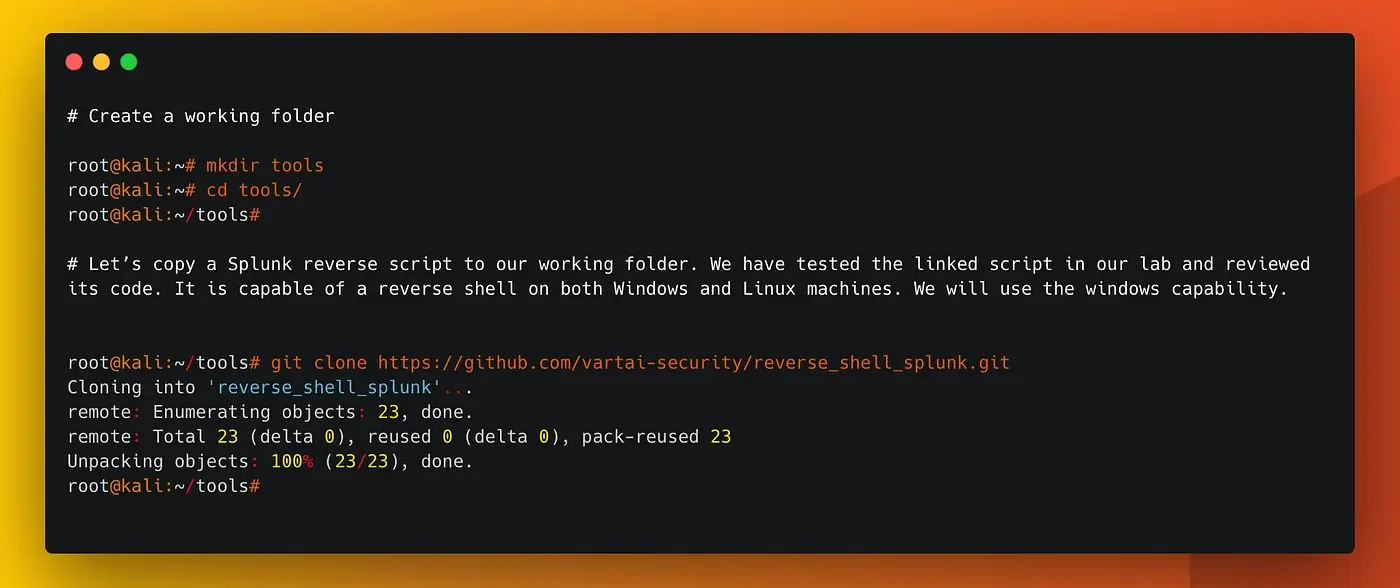
The screenshot shows the workspace being set up and the reverse shell script being obtained.
Finding it
During a network discovery scan the team encountered a service hosted on port 8000. Splunk commonly defaults to that port. The installation they found was not password protected. Some versions of Splunk switch off authentication after a trial period: after this, the program turns off authentication and the Splunk console becomes accessible for all to use, including for misuse.
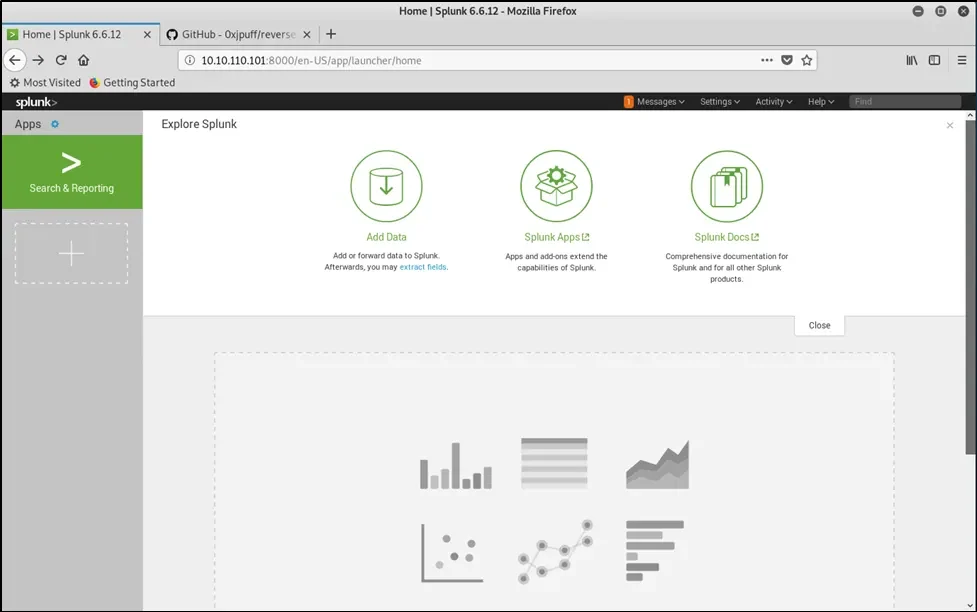
The image shows the Splunk console, commonly available on an enterprise network.
Exploitation
Step 1: Edit the reverse shell files
Using a preferred text editor in Kali, insert the attacking IP and preferred port in the /root/tools/reverse_shell_splunk/run.ps1 file. In the example, the victim machine will connect back to IP [redacted] on port 8555.
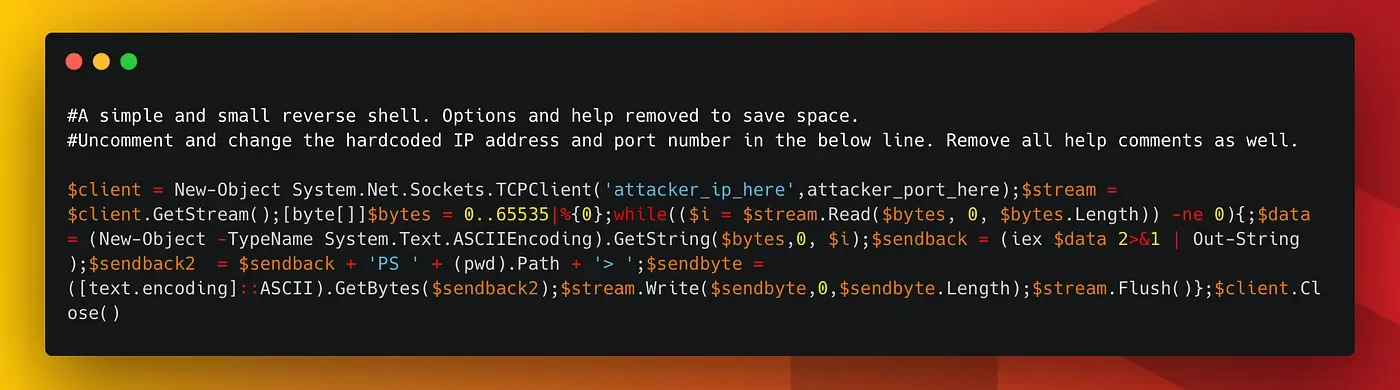
The screenshot shows the script being edited to target the chosen victim port and IP address.
Step 2: Package the Splunk app
After the edits to run.ps1, package the directory containing it so that the Splunk console can understand it. The tar command packages the directory into a file denoted by the .spl extension:
tar -cvzf reverse_sell_splunk.spl reverse_shell_splunk
Step 3: Start a listener
Start a reverse shell listener on the chosen port:
nc -nlvp 8555
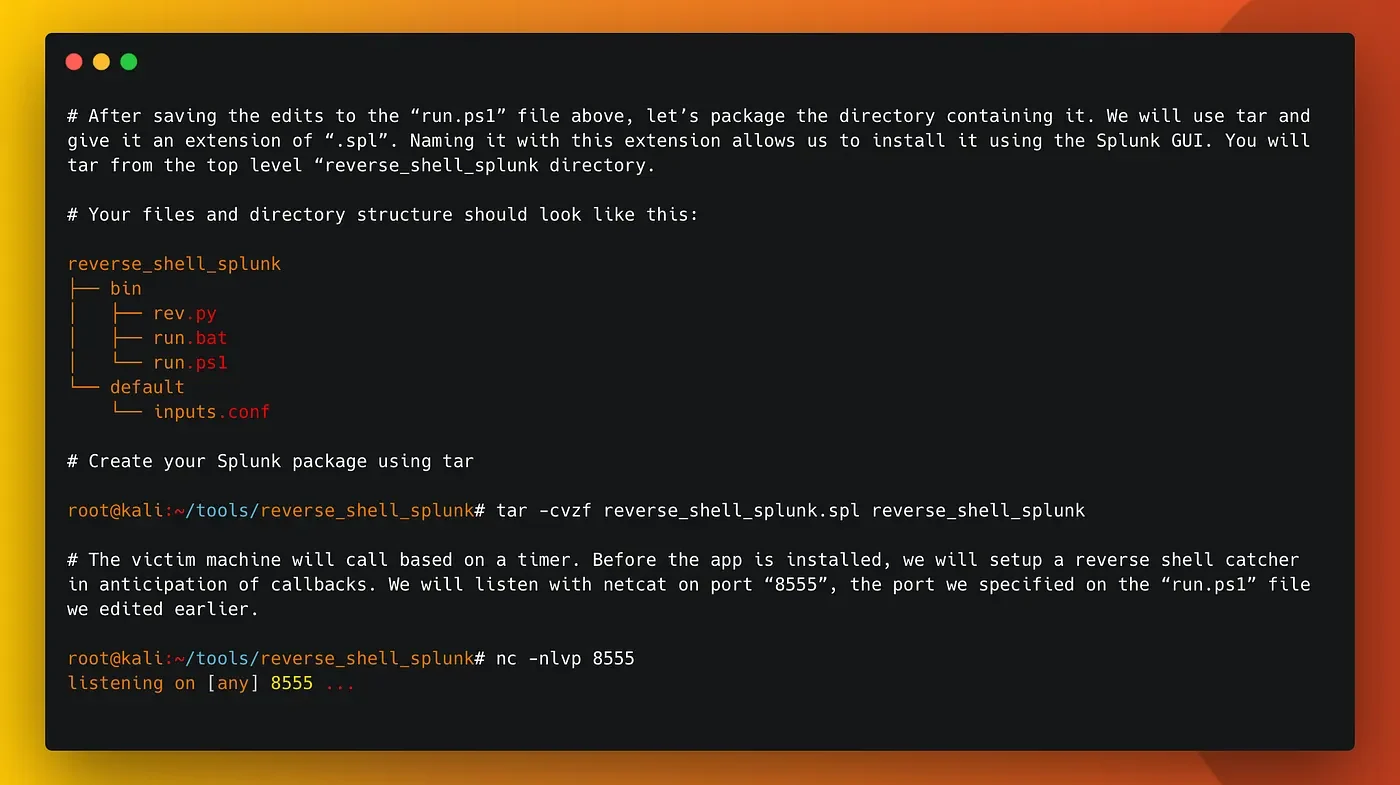
The image shows the packaging step that produces the .spl file.
Step 4: Install the app through the console
With the package built, install it into the Splunk console so that it can be executed and a shell obtained on the installation.
- Click the "Gear" icon on the top left to action the menu to upload a new file.
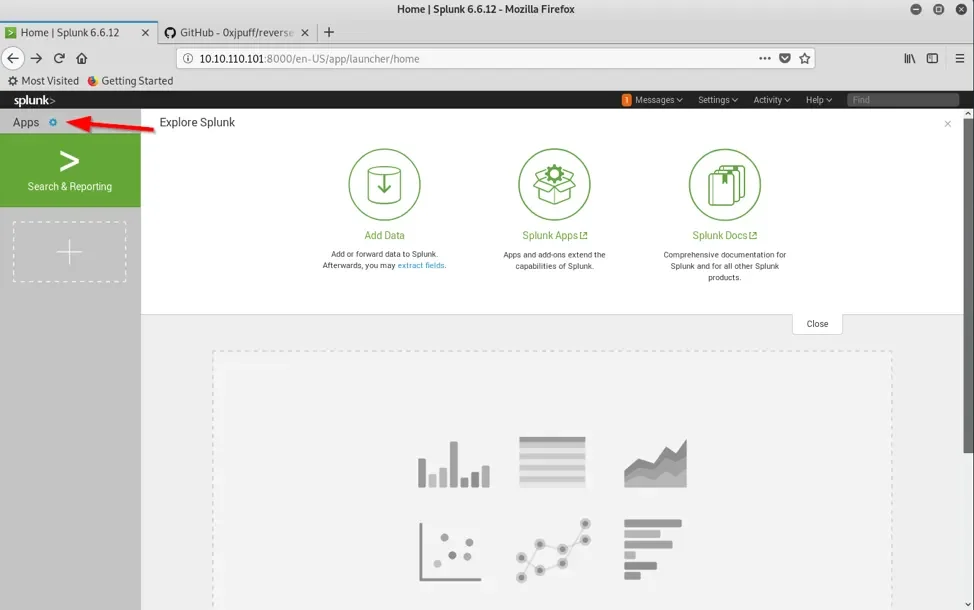
The screenshot shows the Splunk Apps action menu being accessed.
- Click "install app from file".
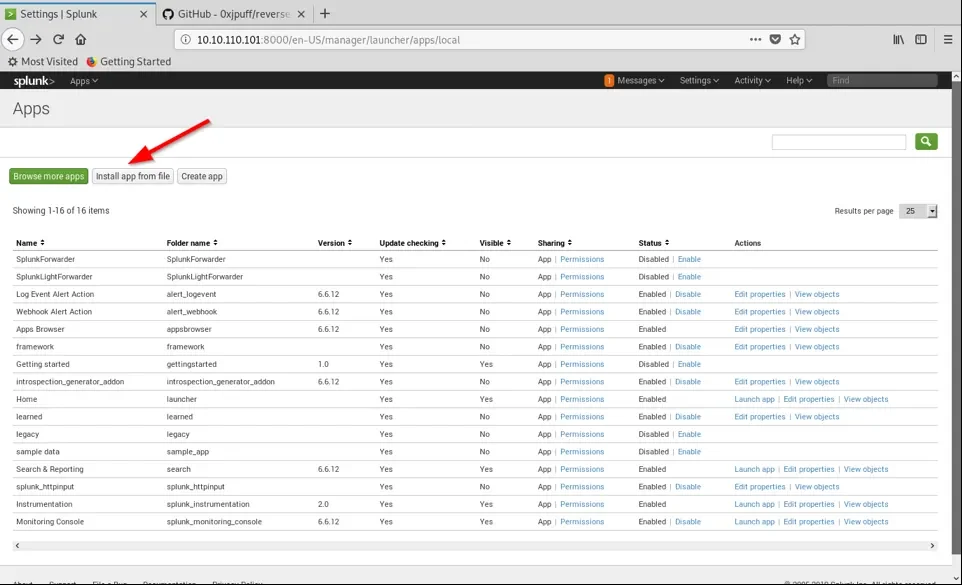
The screenshot shows browsing to the newly created Splunk package containing the reverse shell.
- Browse and select the
reverse_shell_splunk.splpackage created earlier and select "upload".
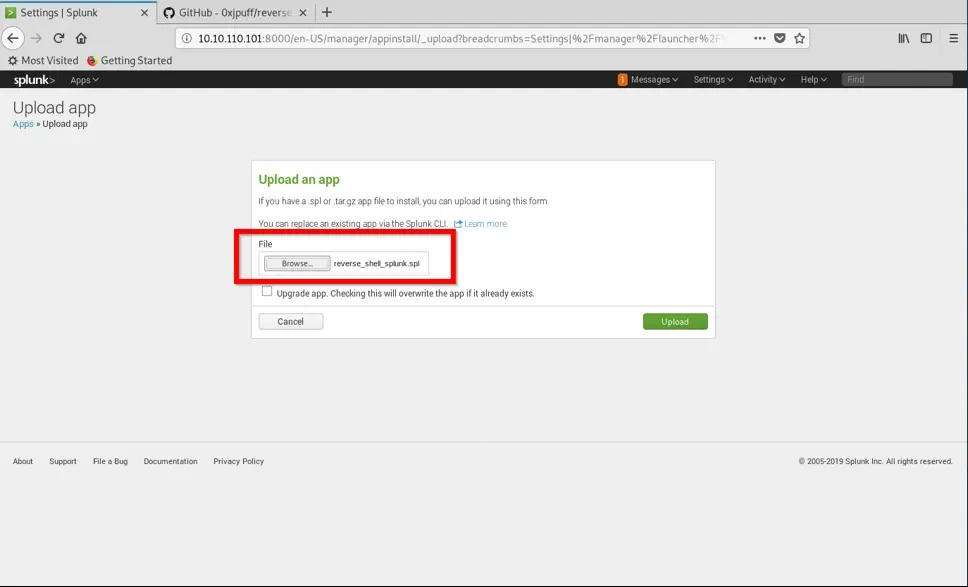
The screenshot shows the package being selected and uploaded.
Step 5: Catch the shell
With the listener running, wait for Splunk to connect back using the uploaded app. Because the assessors had authority to upload a new application, the Splunk console trusts that there is no evil intention and executes the application code contained within the package without thinking twice.
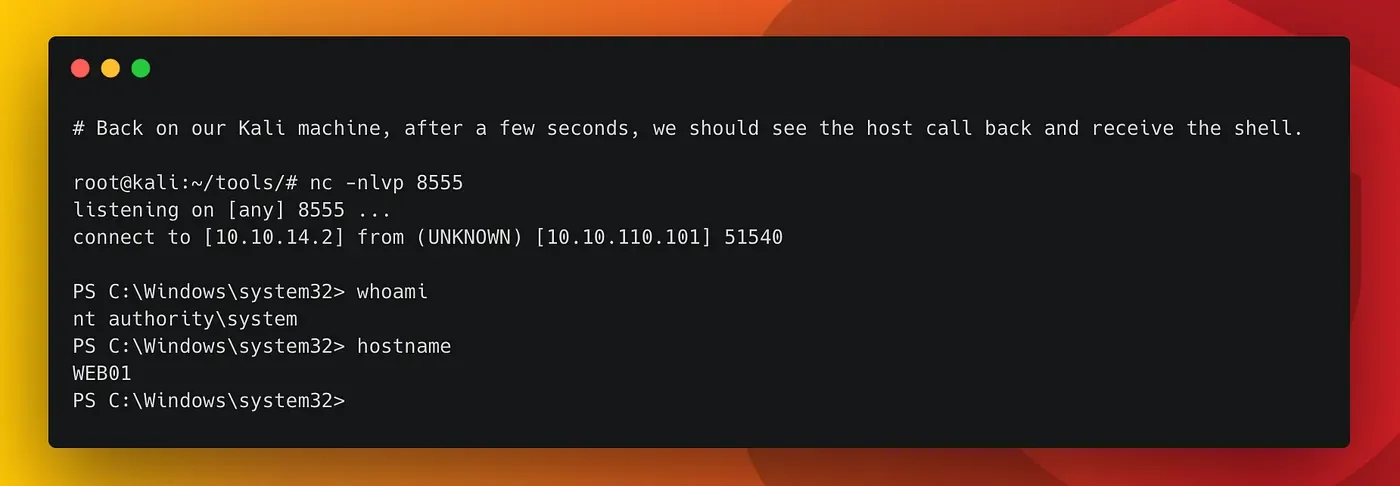
The screenshot shows the listener waiting for the Splunk app to connect to the attack machine.
An NT AUTHORITY\SYSTEM shell was achieved. From that point the team was able to further escalate privileges to enterprise administrator during the engagement.
Root cause
The immediate cause is a Splunk installation that required no authentication, reachable on port 8000, combined with the product's script execution feature and the fact that the service ran as NT AUTHORITY\SYSTEM. The console accepts uploaded applications and executes their code, so an unauthenticated visitor who can reach the console can run code as the service account.
Behind that sit process failures. A privileged user installed Splunk outside change control, so the installation never entered the defined SDLC process and never had a chance of being discovered, let alone remediated. Asset management was performed only at the IP address and hostname level: the system was on an inventory somewhere, and IT staff thought they were doing their job, but the inventory did not track ports, protocols, services and applications. The client had a formal process to validate and approve changes they knew about, which produced a false sense of security and a narrow definition of "change". The lack of integration between change identification and the validated SDLC process meant the rogue installation lived outside every check. Network and application discovery at the port, service and application level would have surfaced the Splunk installation and prevented the compromise.
Impact
An attacker who can reach an unauthenticated Splunk console can upload an application and have its code executed by the service. Where the service runs as NT AUTHORITY\SYSTEM, as here, that yields a privileged system shell on the underlying server. In this engagement the team then escalated further to enterprise administrator. The precondition is an installation that is reachable and not password protected, which the article attributes to a trial-period behaviour in some versions of Splunk and to an installation made outside change control. The article notes that scenarios like these are common and may have one or more contributing factors.
Fix
The article does not describe a remediation applied to the client. It argues that fixing the host, URL or software package named on a report is not enough, and that each finding should drive a root cause analysis across the Risk Management Framework. Concretely, the controls it points to are:
- Asset management that tracks assets at the port, service, protocol and application level, not just IP addresses and hostnames, using the metadata associated with each asset as validated inputs for configuration management, logging, auditing, patch management, flaw remediation, vulnerability management, change control and administrative access.
- Change management with enough granularity to detect new ports, protocols, services and applications against the baseline, using network and application discovery tools.
- Integration between the change identification process and the validated SDLC process, so that changes outside the approved process are found.
Variants to test
- Scan for Splunk on its default port 8000 and check whether the console loads without a login prompt. A positive result is a console reachable with no credentials.
- Check installations that may have passed a trial period, since some versions switch off authentication after it. A positive result is a console that was previously protected and is now open.
- Attempt to upload a packaged application through the Apps menu on any reachable console. A positive result is the package being accepted and its code executing, for example a callback to a listener you control.
- Identify the account the Splunk service runs under. A positive result is a shell in a highly privileged context such as
NT AUTHORITY\SYSTEM. - Compare the discovered service against the asset inventory at port, protocol, service and application level. A positive result is an installation that exists on the network but not in the inventory, which is the change-control gap this case turned on.
What happened, in plain words
A company had a server on its network running a program called Splunk. Splunk is a tool that collects, searches and analyses log files and other large sets of data. To do its job, Splunk includes a feature that can run scripts, which are small programs. That feature is useful when it is controlled, but if anyone can reach the Splunk console without logging in, that same feature lets a stranger run their own code on the server.
In this case a privileged user installed Splunk without following the company's normal approval process for changes. The installed version did not ask for a password. The Splunk service was running under a very powerful Windows account called NT AUTHORITY\SYSTEM, which is the account Windows itself uses for core system tasks. The assessors found the service during a scan of the network, uploaded a small application of their own through the Splunk console, and that application connected back to them, giving them a privileged command shell on the server. From there they escalated further to enterprise administrator.
The rest of the article is about why this was possible and what a company should learn from it. The technical steps below are the walkthrough of how the assessors did it, written for someone who has never done this before.
Some words you will meet
Before the steps, a few ideas explained from zero, because the walkthrough uses them constantly.
- A port is a numbered door on a computer. One computer can run many services at once, and each service listens on its own door number. Web pages normally arrive through port 80 or 443. Splunk commonly uses port 8000 by default, which means if you install it and change nothing, it will be reachable on that door.
- A service is a program that waits for connections on a port and does something useful when one arrives. A web server is a service. Splunk is a service.
- A console is the web page a service gives you so you can manage it from a browser. You type the server's address and port into your browser, and instead of a public website you get the program's own control panel.
- Authentication means proving who you are, usually with a username and password. A console with authentication turned off lets anyone who can reach it in, with no proof of identity at all.
- A reverse shell is a way of getting command-line control of another computer. Normally you connect to a machine and type commands into it. In a reverse shell, the target machine makes the connection out to you, and you type commands down that connection. It is called reverse because the direction is flipped. A useful comparison: instead of you walking to a stranger's house and knocking, the stranger is persuaded to walk to your house and wait by your door, and then does whatever you ask through the letterbox.
- A listener is the program on your own machine that sits waiting for that incoming connection. Until the target connects, the listener just waits.
- Kali Linux is an operating system built for security testing. It comes with many of the tools used below already installed. The assessors work from a Kali machine and attack the Splunk server over the network.
taris a standard command-line tool that bundles files and folders into a single archive file, a bit like putting several documents into one zip file. Splunk accepts applications packaged this way with a.splextension.nc(netcat) is a small utility that can open network connections. Here it is used as the listener that waits for the reverse shell.NT AUTHORITY\SYSTEMis the most powerful local account on a Windows machine. Programs running as SYSTEM can do almost anything on that computer. Getting a shell as SYSTEM means you already have full control of the machine.
Finding the service
During a network discovery scan, which is an automated sweep of a range of addresses looking for services that answer on known ports, the team found a service hosted on port 8000. Splunk commonly defaults to that port, so a service answering there is worth a look.
The installation they found was not password protected. The article notes that some versions of Splunk switch off authentication after a trial period: after this, the program turns off authentication and the Splunk console becomes accessible for all to use, including for misuse. In other words, a console that was protected during a trial can become open later without anyone deliberately changing a setting.
The image shows the Splunk console, commonly available on an enterprise network.
Why this step matters: everything that follows depends on reaching the console with no login. If the console had asked for a password, the assessors would have had to stop here or find another way in.
Setting up the attack workspace
The work is done from a Kali Linux installation. The assessors create a working directory and clone a Splunk reverse shell package that they have tested in their lab and whose code they have reviewed. Cloning means copying a project from a code hosting site onto your own machine, so you have your own local copy to edit.
The script functions on both Windows and Linux machines; the demonstration is on Windows.
- Create a new directory
toolswith themkdircommand. A directory is just a folder. Keeping the work in one folder makes it easy to find and to package later. - Copy the Splunk reverse shell script into the working folder.
- Clone the repository:
root@kali:~/tools# git clone https://github.com/vartai-security/reverse_shell_splunk.git
Line by line:
root@kali:~/tools#is the shell prompt. It tells you the current user isroot(the administrator account on this Linux machine), the machine is calledkali, and the current folder is~/tools, where~means the home folder. The#marks the end of the prompt; you do not type it.git cloneis the command that copies a repository, which is a project stored with its full history, from a remote address to your machine.https://github.com/vartai-security/reverse_shell_splunk.gitis the address of the repository being copied. The.gitat the end is the conventional suffix for a Git repository address.
The repository is described as a simple Splunk package for obtaining reverse shells on both Windows and most *nix systems.
The screenshot shows the workspace being set up and the reverse shell script being obtained.
Why this step matters: the assessors are not writing an exploit from scratch. They are using a prepared package whose code they have already reviewed, which keeps the demonstration focused on the Splunk configuration problem rather than on the code itself.
Step 1: Edit the reverse shell files
Using a preferred text editor in Kali, insert the attacking IP and preferred port in the /root/tools/reverse_shell_splunk/run.ps1 file. In the example, the victim machine will connect back to IP [redacted] on port 8555.
A text editor is a program for changing plain text files, like Notepad on Windows. The file run.ps1 is a PowerShell script, which is a list of instructions Windows can run. The .ps1 ending tells Windows it is a PowerShell script.
Two values are being set inside that file:
- The attacking IP,
[redacted], is the address of the assessors' own Kali machine. The target needs to know where to connect back to. - The port,
8555, is the door number on the assessors' machine that the connection should arrive at. It is a chosen number, not a standard one; any free port would do, as long as the listener later waits on the same one.
The screenshot shows the script being edited to target the chosen victim port and IP address.
Why this step matters: a reverse shell has to know where home is. Without the right address and port in the script, the target would connect to nowhere, or to the wrong place, and the listener would wait forever.
Step 2: Package the Splunk app
After the edits to run.ps1, package the directory containing it so that the Splunk console can understand it. The tar command packages the directory into a file denoted by the .spl extension:
tar -cvzf reverse_sell_splunk.spl reverse_shell_splunk
Line by line:
taris the archiving tool.-cmeans create a new archive.-vmeans verbose: print each file name as it is added, so you can see progress.-zmeans compress the archive, making the resulting file smaller.-fmeans the next word is the name of the archive file to write.reverse_sell_splunk.splis the output file name. Note the spelling in the command as published:sell, notshell. The name is just a label; what matters for Splunk is the.splending.reverse_shell_splunkis the folder being packaged.
The image shows the packaging step that produces the .spl file.
Why this step matters: Splunk does not accept a loose folder of files through its console. It accepts an application package, and the .spl extension is how it recognises one. Packaging is the step that turns the edited script into something the console will take.
Step 3: Start a listener
Start a reverse shell listener on the chosen port:
nc -nlvp 8555
Line by line:
ncis netcat, the small networking utility.-nmeans do not look up names: work with numeric addresses only, which avoids slow name lookups.-lmeans listen: wait for an incoming connection instead of making an outgoing one.-vmeans verbose: print details about what happens.-p 8555means listen on port8555, the same port written into the script in step 1.
Why this step matters: the listener must already be waiting before the target connects. If the target calls back first and nobody is listening, the connection is refused and the attempt fails. The port number here and the port number in run.ps1 must match exactly.
Step 4: Install the app through the console
With the package built, install it into the Splunk console so that it can be executed and a shell obtained on the installation. This is done entirely in the browser, through the console found earlier.
- Click the "Gear" icon on the top left to action the menu to upload a new file.
The screenshot shows the Splunk Apps action menu being accessed.
- Click "install app from file".
The screenshot shows browsing to the newly created Splunk package containing the reverse shell.
- Browse and select the
reverse_shell_splunk.splpackage created earlier and select "upload".
The screenshot shows the package being selected and uploaded.
Why this step matters: Splunk's application system is designed to let administrators add features. It is a normal, intended function. The problem is not that the feature exists, but that the console let someone with no credentials use it. The assessors are not breaking the application system; they are using it as designed, on a console that should never have been open.
Step 5: Catch the shell
With the listener running, wait for Splunk to connect back using the uploaded app. Because the assessors had authority to upload a new application, the Splunk console trusts that there is no evil intention and executes the application code contained within the package without thinking twice.
That sentence is the heart of the issue. Splunk treats an uploaded application as something an administrator deliberately chose to install, so it runs the application's code. It has no way to tell a legitimate administrator from an unauthenticated visitor who reached an open console.
The screenshot shows the listener waiting for the Splunk app to connect to the attack machine.
An NT AUTHORITY\SYSTEM shell was achieved. From that point the team was able to further escalate privileges to enterprise administrator during the engagement.
Escalating privileges means moving from one level of access to a higher one. A SYSTEM shell is already very powerful on that one machine. The article does not describe the steps of that later escalation.
Why it worked: the root cause
The immediate cause is a Splunk installation that required no authentication, reachable on port 8000, combined with the product's script execution feature and the fact that the service ran as NT AUTHORITY\SYSTEM. The console accepts uploaded applications and executes their code, so an unauthenticated visitor who can reach the console can run code as the service account.
Behind that sit process failures. A privileged user installed Splunk outside change control, so the installation never entered the defined SDLC process and never had a chance of being discovered, let alone remediated. SDLC stands for Software Development Lifecycle: the formal process a company uses to approve, test and track changes to its systems. A change made outside it is invisible to every check the company has.
Asset management was performed only at the IP address and hostname level. The system was on an inventory somewhere, and IT staff thought they were doing their job, but the inventory did not track ports, protocols, services and applications. An inventory that lists a server's address but not what is running on it is like a building register that lists street addresses but not which flats have gas boilers.
The client had a formal process to validate and approve changes they knew about, which produced a false sense of security and a narrow definition of "change". The lack of integration between change identification and the validated SDLC process meant the rogue installation lived outside every check. Network and application discovery at the port, service and application level would have surfaced the Splunk installation and prevented the compromise.
What the impact was
An attacker who can reach an unauthenticated Splunk console can upload an application and have its code executed by the service. Where the service runs as NT AUTHORITY\SYSTEM, as here, that yields a privileged system shell on the underlying server. In this engagement the team then escalated further to enterprise administrator.
The precondition is an installation that is reachable and not password protected, which the article attributes to a trial-period behaviour in some versions of Splunk and to an installation made outside change control. The article notes that scenarios like these are common and may have one or more contributing factors.
What the article says about fixing it
The article does not describe a remediation applied to the client. It argues that fixing the host, URL or software package named on a report is not enough, and that each finding should drive a root cause analysis across the Risk Management Framework. The Risk Management Framework is the overall set of processes a company uses to identify, assess and reduce risk.
Concretely, the controls it points to are:
- Asset management that tracks assets at the port, service, protocol and application level, not just IP addresses and hostnames, using the metadata associated with each asset as validated inputs for configuration management, logging, auditing, patch management, flaw remediation, vulnerability management, change control and administrative access. Metadata here means the extra facts recorded about each asset, such as which ports are open and which software is running.
- Change management with enough granularity to detect new ports, protocols, services and applications against the baseline, using network and application discovery tools. A baseline is the recorded normal state of the network, against which later scans are compared.
- Integration between the change identification process and the validated SDLC process, so that changes outside the approved process are found.
Checks you can repeat
These are the same checks the walkthrough performs, phrased as things to look for.
- Scan for Splunk on its default port 8000 and check whether the console loads without a login prompt. A positive result is a console reachable with no credentials.
- Check installations that may have passed a trial period, since some versions switch off authentication after it. A positive result is a console that was previously protected and is now open.
- Attempt to upload a packaged application through the Apps menu on any reachable console. A positive result is the package being accepted and its code executing, for example a callback to a listener you control.
- Identify the account the Splunk service runs under. A positive result is a shell in a highly privileged context such as
NT AUTHORITY\SYSTEM. - Compare the discovered service against the asset inventory at port, protocol, service and application level. A positive result is an installation that exists on the network but not in the inventory, which is the change-control gap this case turned on.
Glossary
- Asset: anything on the network worth protecting. In this article the word is used at the level of ports, services and applications, not just machines.
- Asset management: the process of tracking, correlating and documenting what exists on the network, including what runs on each machine.
- Authentication: proving who you are, usually with a username and password.
- Baseline: the recorded normal state of a network or system, used as a comparison point for later changes.
- Change control: the formal process for approving and recording changes to systems before they are made.
- Console: the web page a service provides for managing it from a browser.
- Directory: a folder on a computer.
- Enterprise administrator: a highly privileged Windows role with control over the wider Windows environment, beyond a single machine.
- Escalation (privilege escalation): moving from a lower level of access to a higher one.
- Git: a tool for copying and tracking versions of a project stored in a repository.
- Kali Linux: an operating system built for security testing, supplied with many testing tools.
- Listener: a program that waits for an incoming network connection.
- Metadata: the extra facts recorded about an asset, such as open ports and installed software.
nc(netcat): a small command-line utility for opening and listening on network connections.NT AUTHORITY\SYSTEM: the most powerful local account on a Windows machine, used by the operating system itself.- Package (Splunk app): a bundled application that Splunk can install, here a
.splarchive. - Port: a numbered door on a computer through which a particular service receives connections.
- PowerShell: a scripting language and shell built into Windows; scripts use the
.ps1extension. - Protocol: the agreed rules two computers follow when they talk, such as HTTP for web pages.
- Repository: a project stored with its history, which can be copied with
git clone. - Reverse shell: a connection in which the target machine connects out to the attacker, who then types commands down that connection.
- Risk Management Framework (RMF): the overall set of processes a company uses to identify, assess and reduce risk.
- Root cause analysis: working out the underlying reason a problem happened, rather than only fixing the visible symptom.
- Script: a small program, usually a list of instructions in a text file.
- SDLC (Software Development Lifecycle): the formal process a company uses to approve, test and track changes to its systems.
- Service: a program that waits on a port and does something useful when a connection arrives.
- Shell: a command-line interface where you type instructions for a computer to run.
tar: a command-line tool that bundles files and folders into a single archive file.- Trial period: a limited time during which software runs before a licence is required; in some Splunk versions this can end with authentication being switched off.
- Vulnerability: a weakness that lets someone use a system in a way its owner did not intend.



