Spring AI — SpEL Injection Leading to Remote Code Execution (CVE-2026–22738)
Spring AI's SimpleVectorStore builds a SpEL filter expression by concatenating user-controlled filterKey and filterValue, then evaluates it with a powerful StandardEvaluationContext. An attacker who can reach an exposed search endpoint could inject SpEL that accesses Java classes and potentially execute operating-system commands.
 Published on medium.com
Cve
The full write-up lives on its author's site
It belongs to its author, so we link to it rather than copy it. The other two tabs are our own rewrites, checked against it.
Context
Spring AI is a Java framework that lets developers add AI features to Spring Boot applications without building the plumbing from scratch. It connects an application to LLM providers such as OpenAI and Ollama, and it is used to build chatbots, document search and AI assistants. The first stable version was released in May 2025.
The component at the centre of this write-up is SimpleVectorStore, which stores and retrieves the information an AI application needs. Applications commonly expose a search over that store through an HTTP endpoint that accepts a metadata filter. In the test application the search functionality is exposed as:
GET /search?filterKey=country&filterValue=US&query=hello
The parameters mean:
filterKey: the metadata field used for filteringfilterValue: the value the application should matchquery: the actual search term
In plain terms the request asks: search for hello, but only return documents where the country metadata is US.
On 26 March 2026 a vulnerability designated CVE-2026-22738 was disclosed in Spring AI, affecting SimpleVectorStore. It carries a CVSS score of 9.8 out of 10, rated Critical. There is no fixed endpoint such as /api/cve-2026-22738; Spring AI does not automatically expose a URL for the flaw. The vulnerable endpoint depends entirely on how the developer exposes the SimpleVectorStore functionality. An application could, for example, expose it as /api/search, /api/documents/search or /api/vector-search. In the test application it is /search.
Setup
The work was done in a lab environment against a test application that exposes the search functionality described above. The researcher built a custom Python script, myexploit.py, rather than using a pre-built exploit, and also tested the same request directly with curl. Both approaches reached the same vulnerable code path:
myexploit.py ↓Crafted HTTP Request ↓/search ↓SpEL Evaluation ↓Remote Code Execution
curl ↓Crafted HTTP Request ↓/search ↓SpEL Evaluation ↓Remote Code Execution
No account, role or credential is described as a precondition. The report's framing is that an attacker may not need a username, password or a victim to click a link: if the vulnerable functionality is exposed to the internet, a specially crafted HTTP request may be enough.
Finding it
The starting point is the data flow. When the application receives the search request it creates a SearchRequest and passes the search operation to SimpleVectorStore. The simplified flow is:
GET /search ↓filterKey=countryfilterValue=USquery=hello ↓SearchRequest ↓SimpleVectorStore ↓FilterExpressionEvaluator ↓SpEL ↓Search Results
The normal use case turns the filter information into an expression that checks document metadata, for example:
#metadata['country'] == 'US'
which means: check whether the document's country metadata is equal to US.
The problem starts when attacker-controlled input is allowed to influence the expression that SpEL eventually evaluates. The vulnerable logic can be represented in simplified form as:
String spel = "#metadata['" + filterKey + "'] == '" + filterValue + "'";
With normal input:
filterKey = countryfilterValue = US
the resulting expression is the intended #metadata['country'] == 'US'. But part of the expression is built from user-controlled input, and the resulting expression is handled by SimpleVectorStoreFilterExpressionEvaluator.
That is where the evaluation context matters. SpEL uses an evaluation context to decide what an expression is allowed to access and execute. The report puts it simply: the evaluation context defines how much power the expression has.
| Context | What it allows | Suitable for |
|---|---|---|
StandardEvaluationContext |
Powerful operations such as method calls and access to Java types | Trusted input |
SimpleEvaluationContext |
Restricted property and data access | Untrusted input |
StandardEvaluationContext provides considerably more functionality, including the SpEL T(...) operator. For example:
T(java.lang.System)
allows an expression to refer to the Java System class, and:
T(java.lang.Runtime)
refers to the Java Runtime class. T(...) is not a vulnerability by itself; it is a SpEL feature for referring to a Java type. The security problem appears when an attacker can influence an expression evaluated with a powerful context. Runtime is particularly important because it provides functionality that can interact with the underlying operating system, which is how the issue can move from input manipulation to expression evaluation and potentially to remote code execution:
Attacker-controlled input ↓SpEL expression ↓Powerful evaluation context ↓Access to Java functionality ↓Potential OS-level execution
The real problem is not T(...) alone. It is the combination of untrusted input and a powerful SpEL evaluation context.
Attack surface
An application is interesting from a security perspective when it accepts user-controlled filter information and passes it into the SearchRequest used by SimpleVectorStore:
HTTP Request ↓User-controlled filter input ↓SearchRequest ↓SimpleVectorStore ↓Filter Expression ↓SpEL Evaluation
In the test application the important parameter is filterKey. The endpoint name is not what makes the application vulnerable; another application could expose the same functionality through a completely different URL. What matters is the data flow from the HTTP request to the expression evaluator.
filterKey matters not simply because it controls the metadata field, but because attacker-controlled input is allowed to become part of an expression later evaluated by SpEL. The difference is:
Normal:User input → Data
Vulnerable:User input → Expression → JVM evaluation
Once attacker-controlled input reaches a powerful expression evaluator, the attacker may be able to access functionality that was never intended to be exposed through a normal search parameter.
Related history
This type of issue is not new in the Spring ecosystem. In 2022, CVE-2022-22963 affected Spring Cloud Function and involved attacker-controlled input being evaluated as a SpEL expression using a powerful evaluation context. The lesson is the same: expression languages are powerful, but they become dangerous when untrusted input is allowed to control what gets evaluated. Developers should be especially careful when expression languages are used with values coming from HTTP parameters, headers, API requests or other user-controlled sources. This issue should not be confused with Spring4Shell (CVE-2022-22965), which is a different vulnerability and does not follow this same SpEL-injection pattern.
MITRE ATT&CK mapping
Exploitation of an exposed vulnerable application maps to T1190, Exploit Public-Facing Application: the attacker first identifies an application exposed to the network and then attempts to exploit the vulnerable functionality.
Internet ↓Exposed Spring AI Application ↓Search Endpoint ↓CVE-2026-22738
If successful exploitation results in command execution on a Linux system, the activity may also relate to T1059.004, Unix Shell. The overall path:
Find exposed application ↓Identify vulnerable search functionality ↓Send attacker-controlled input ↓Input reaches SpEL evaluation ↓Potential code execution ↓Potential server compromise
The takeaway is that the vulnerability is not the existence of a /search endpoint. The real problem is that untrusted input from the application can reach a powerful expression evaluator inside the JVM.
Exploitation
After understanding the vulnerable code path, the researcher verified whether the issue could actually be exploited in the lab environment, using two methods that reach the same code path.
Step 1: Send the payload through filterKey with myexploit.py
The custom Python script generates and sends the crafted request. It sends the malicious value through the filterKey parameter of the /search endpoint, the same parameter identified earlier as reaching the SpEL expression.

Figure 1 shows the custom myexploit.py created to reproduce CVE-2026-22738. The report does not reproduce the script's contents.
Step 2: Confirm command execution
After running the script, the vulnerable application processed the supplied expression and the controlled test resulted in operating-system-level command execution.
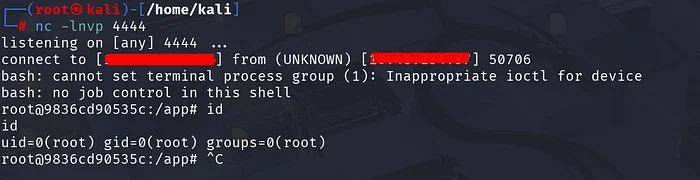
Figure 2 shows the controlled RCE confirmation after executing the custom Python script in the lab environment. This confirmed that the vulnerability was not limited to generating an error response: the attacker-controlled input could reach the underlying command-execution functionality.
Step 3: Reproduce with a direct curl request
The same vulnerability was then reproduced without Python. The crafted request was sent directly to the /search endpoint with curl, carrying the malicious expression inside the URL-encoded filterKey parameter. The report does not expand the payload, on the grounds that the request flow matters more than copying the complete command.
The command returned:
which corresponds to:
HTTP/1.1 500 Internal Server Error
A 500 response may look like the request simply failed, but here it was a useful indicator that the application had processed the supplied input. It is important to remember that the 500 response alone does not prove remote code execution.

Figure 3 shows the direct curl request sent to the vulnerable endpoint and the resulting 500 response.
Step 4: Confirm execution for the curl path
The 500 response was not the final proof of RCE. The actual confirmation came from the controlled execution result obtained in the lab.
Figure 4 shows the controlled RCE confirmation after sending the crafted request directly with curl.
Root cause
The application builds a SpEL expression by string concatenation, splicing the user-supplied filterKey (and filterValue) directly into the expression text:
String spel = "#metadata['" + filterKey + "'] == '" + filterValue + "'";
The resulting expression is then evaluated by SimpleVectorStoreFilterExpressionEvaluator. The mistake is twofold: user input is treated as part of the expression rather than as data, and the expression is evaluated with a context powerful enough to expose Java types through T(...), including java.lang.Runtime, which can interact with the operating system. With a restricted context such as SimpleEvaluationContext, the same injection would be limited to property and data access; with StandardEvaluationContext, method calls and Java type access are available. The report presents the vulnerable logic in simplified form and does not state which context the affected code actually configured.
The report stresses that the 500 is not proof of anything by itself; only the controlled execution result confirmed the issue.
Impact
If the vulnerable functionality is exposed to the internet, an attacker could send a specially crafted HTTP request and potentially execute commands on the server, without a username, password or any action by a victim. Depending on the application's permissions and environment, a successful attacker could potentially access sensitive information, modify files, steal credentials, or even take control of the server. The report consistently hedges this as potential impact conditional on exposure and on the permissions and environment of the application.
Fix
The report does not describe a patch or configuration change made to the affected code. The guidance it gives is to avoid letting untrusted input control what an expression language evaluates, and to be careful whenever expression languages are used with values from HTTP parameters, headers, API requests or other user-controlled sources.
Variants to test
- Other parameters of the same filter. The report identifies
filterKeyas the parameter that reaches the expression, but the concatenation also includesfilterValue. - Other endpoints exposing
SimpleVectorStore. The URL is application-defined, so look for search, document search or vector search routes that accept metadata filters. A positive result is the same data flow: request parameter toSearchRequesttoSimpleVectorStoreto SpEL evaluation. - Other SpEL sinks in Spring applications. The CVE-2022-22963 pattern shows the same class of bug elsewhere in the ecosystem.
- Error-based probing. Treat this only as a signal that input reaches the evaluator, and confirm exploitation separately with a controlled execution result.
What happened, in plain words
Imagine a library where you can ask the librarian a question: "show me every book about gardening". The librarian is helpful, but the librarian also follows instructions written on the slip of paper you hand over. Normally you write a subject on the slip. One day someone writes, instead of a subject, a set of instructions that tells the librarian to go and unlock the back door. The librarian cannot tell the difference between a subject and an instruction, because both arrive on the same slip of paper.
That is roughly what happened in a piece of software called Spring AI. A search feature accepted a filter from the person making the request, and instead of treating that filter purely as a value to compare against, the application pasted it into a small program that it then ran. Because the small program had a lot of power, a crafted filter could potentially make the server run commands. This is called remote code execution, and the flaw was given the identifier CVE-2026-22738.
Below I walk through the whole story from zero: what Spring AI is, what the search feature does, why the filter was dangerous, how the researcher confirmed it in a lab, and what developers should take away. No prior security knowledge is assumed.
Background: what Spring AI is and what it does
Spring AI is a framework for the Java programming language. A framework is a collection of ready-made building blocks that developers assemble into an application, a bit like a box of pre-cut furniture parts instead of raw timber. Spring AI's particular job is to let a developer add artificial intelligence features to an application without writing all the connecting code themselves.
Concretely, Spring AI connects an application to AI services such as OpenAI and Ollama, and to other providers of large language models. A large language model, or LLM, is the kind of system behind chat assistants: you give it text, it gives you text back. With Spring AI, developers build things like AI chatbots, document search and AI assistants. The first stable version was released in May 2025.
One of the building blocks inside Spring AI is called SimpleVectorStore. A vector store is a place where an AI application keeps the information it needs to look things up later. The name comes from the way AI systems represent text: as long lists of numbers called vectors, so that similar meanings end up close together. You do not need the maths to follow this article. What matters is that SimpleVectorStore is a storage component, and that applications let users search inside it.
The search feature and the request that started it all
Applications commonly expose a search over that store through an HTTP endpoint that accepts a metadata filter. Let us unpack those words.
An HTTP endpoint is simply a web address that an application answers. When you type an address into your browser and press Enter, your browser sends an HTTP request to a server, and the server sends back a response. An endpoint is the specific address on the server that handles that request. If a website is a building, an endpoint is a particular service window in that building.
Metadata is data about data. In a document store, the document itself might be a page of text, and its metadata might be the country it relates to, the date it was written, or the author. A metadata filter is a condition that says: only return documents whose metadata matches this.
In the test application used for this research, the search functionality is exposed as:
GET /search?filterKey=country&filterValue=US&query=hello
Line by line, in plain words:
GETis the type of HTTP request used to ask for something. It is the same kind of request your browser sends when you open a page./searchis the endpoint, the service window that handles searches.- The
?marks the start of the parameters, the extra details attached to the request. filterKey=countrysays which metadata field to filter on. Here, the field iscountry.filterValue=USsays what value that field should match. Here, the value isUS.query=hellois the actual search term, the word the user is looking for.- The
&characters separate one parameter from the next.
So the request asks: search for hello, but only return documents where the country metadata is US. Nothing about that looks unusual. It is the sort of request a normal search box would produce.
The vulnerability and its severity
On 26 March 2026 a vulnerability designated CVE-2026-22738 was disclosed in Spring AI, affecting SimpleVectorStore. A CVE is a public catalogue number for a known security flaw, so that everyone discussing it refers to the same thing. It carries a CVSS score of 9.8 out of 10, rated Critical. CVSS is a standard scoring system for how serious a vulnerability is; 10 is the maximum, and 9.8 is near the top.
Why so serious? The report's framing is that an attacker may not need a username, password or a victim to click a link. If the vulnerable functionality is exposed to the internet, a specially crafted HTTP request may be enough. In other words, the attacker does not have to trick a person; they talk directly to the server.
There is no fixed endpoint such as /api/cve-2026-22738. Spring AI does not automatically expose a URL for the flaw. The vulnerable endpoint depends entirely on how the developer exposes the SimpleVectorStore functionality. An application could, for example, expose it as /api/search, /api/documents/search or /api/vector-search. In the test application it is /search. This is an important point for anyone hunting for the flaw: the address is chosen by the developer, so you cannot simply memorise one URL.
Setup: how the research was done
The work was done in a lab environment against a test application that exposes the search functionality described above. A lab environment means a controlled, isolated copy of an application, set up for testing, so that experiments do not touch real users or real data.
The researcher built a custom Python script, myexploit.py, rather than using a pre-built exploit, and also tested the same request directly with curl. Python is a general-purpose programming language, often used for small automation scripts. curl is a command-line tool that sends HTTP requests and prints the responses; it is the text-only equivalent of typing an address into a browser. An exploit is the concrete input or tool that abuses a vulnerability.
Both approaches reached the same vulnerable code path:
myexploit.py ↓Crafted HTTP Request ↓/search ↓SpEL Evaluation ↓Remote Code Execution
Read the arrows as "leads to". The script produces a crafted HTTP request, the request goes to the /search endpoint, the endpoint performs SpEL evaluation, and that evaluation results in remote code execution. SpEL is explained shortly; for now, think of it as a small expression language that the application uses internally.
curl ↓Crafted HTTP Request ↓/search ↓SpEL Evaluation ↓Remote Code Execution
The second diagram is the same chain with curl as the starting point instead of the Python script. Two different tools, one identical path through the application.
No account, role or credential is described as a precondition. A credential is anything that proves who you are, such as a password or a session cookie. A session cookie is a small piece of data your browser stores after you log in, so the server recognises you on the next request. The point here is that none of that was needed.
Finding it: following the data
The starting point is the data flow, meaning the journey a piece of input takes through the application. When the application receives the search request it creates a SearchRequest and passes the search operation to SimpleVectorStore. A SearchRequest is simply an internal object, a bundle of data, that carries the search details from one part of the code to another. The simplified flow is:
GET /search ↓filterKey=countryfilterValue=USquery=hello ↓SearchRequest ↓SimpleVectorStore ↓FilterExpressionEvaluator ↓SpEL ↓Search Results
Line by line:
GET /searchis the incoming request.- The next line lists the parameters that came with it:
filterKey=country,filterValue=USandquery=hello. SearchRequestis the internal object built from those parameters.SimpleVectorStorereceives the search operation.FilterExpressionEvaluatoris the part that turns the filter into something the store can check. An evaluator is a component that reads an expression and works out its result.SpELis the expression language doing the actual evaluation.Search Resultsis what would normally come back to the user.
The normal use case turns the filter information into an expression that checks document metadata, for example:
#metadata['country'] == 'US'
This is a tiny expression, and it reads almost like English: look up the country entry in the document's metadata, and check whether it is equal to US. The == means "is equal to". The #metadata part refers to the metadata of the document being examined.
The problem starts when attacker-controlled input is allowed to influence the expression that SpEL eventually evaluates. The vulnerable logic can be represented in simplified form as:
String spel = "#metadata['" + filterKey + "'] == '" + filterValue + "'";
This is a line of Java-like code, and it is worth slowing down for, because it is the heart of the bug. String spel declares a piece of text, a string, named spel. The = assigns it a value. The value is built by gluing pieces together with +, which in this context means "join these texts end to end". The pieces are:
- the literal text
#metadata[' - whatever the user supplied as
filterKey - the literal text
'] == ' - whatever the user supplied as
filterValue - the literal text
'
So the application is not comparing the user's input against something. It is copying the user's input into the middle of a program. That is the difference between a librarian reading a subject from your slip and a librarian copying your slip into their instruction manual.
With normal input:
filterKey = countryfilterValue = US
the resulting expression is the intended #metadata['country'] == 'US'. But part of the expression is built from user-controlled input, and the resulting expression is handled by SimpleVectorStoreFilterExpressionEvaluator. That is where the evaluation context matters.
Evaluation contexts: how much power an expression has
SpEL uses an evaluation context to decide what an expression is allowed to access and execute. The report puts it simply: the evaluation context defines how much power the expression has. A useful comparison is a bank clerk with different levels of authority. One clerk can only look up an account balance. Another can move money, open new accounts and change settings. The same request form, handed to the second clerk, can do far more damage.
| Context | What it allows | Suitable for |
|---|---|---|
StandardEvaluationContext |
Powerful operations such as method calls and access to Java types | Trusted input |
SimpleEvaluationContext |
Restricted property and data access | Untrusted input |
Trusted input means data the application itself produced or fully controls. Untrusted input means data that arrives from outside, such as a value typed into a search box. The table is the whole lesson in two rows: powerful context for trusted data, restricted context for untrusted data.
StandardEvaluationContext provides considerably more functionality, including the SpEL T(...) operator. For example:
T(java.lang.System)
allows an expression to refer to the Java System class, and:
T(java.lang.Runtime)
refers to the Java Runtime class. A class, in Java, is a blueprint for a piece of functionality. System and Runtime are built-in Java classes that deal with the machine the program runs on. T(...) is not a vulnerability by itself; it is a SpEL feature for referring to a Java type. The security problem appears when an attacker can influence an expression evaluated with a powerful context.
Runtime is particularly important because it provides functionality that can interact with the underlying operating system, which is how the issue can move from input manipulation to expression evaluation and potentially to remote code execution:
Attacker-controlled input ↓SpEL expression ↓Powerful evaluation context ↓Access to Java functionality ↓Potential OS-level execution
Read it as a chain: the attacker's input becomes part of a SpEL expression, that expression is evaluated with a powerful context, the context allows access to Java functionality, and that functionality can reach the operating system. The real problem is not T(...) alone. It is the combination of untrusted input and a powerful SpEL evaluation context.
Attack surface: when is an application actually at risk?
An application is interesting from a security perspective when it accepts user-controlled filter information and passes it into the SearchRequest used by SimpleVectorStore:
HTTP Request ↓User-controlled filter input ↓SearchRequest ↓SimpleVectorStore ↓Filter Expression ↓SpEL Evaluation
Each arrow is a handover. The HTTP request carries filter input the user controls; that input goes into a SearchRequest; the request reaches SimpleVectorStore; a filter expression is built; and SpEL evaluates it. If any link in that chain is missing, the flaw cannot be reached through that route.
In the test application the important parameter is filterKey. The endpoint name is not what makes the application vulnerable; another application could expose the same functionality through a completely different URL. What matters is the data flow from the HTTP request to the expression evaluator.
filterKey matters not simply because it controls the metadata field, but because attacker-controlled input is allowed to become part of an expression later evaluated by SpEL. The difference is:
Normal:User input → Data
Vulnerable:User input → Expression → JVM evaluation
In the normal case, the user's input is treated as data: a value to compare against. In the vulnerable case, the user's input becomes part of the expression itself, and the expression is evaluated by the JVM. The JVM, or Java Virtual Machine, is the program that runs Java code. Once attacker-controlled input reaches a powerful expression evaluator, the attacker may be able to access functionality that was never intended to be exposed through a normal search parameter.
Related history: this pattern has appeared before
This type of issue is not new in the Spring ecosystem. In 2022, CVE-2022-22963 affected Spring Cloud Function and involved attacker-controlled input being evaluated as a SpEL expression using a powerful evaluation context. Spring Cloud Function is another Spring project, for running small pieces of code as functions. The lesson is the same: expression languages are powerful, but they become dangerous when untrusted input is allowed to control what gets evaluated. Developers should be especially careful when expression languages are used with values coming from HTTP parameters, headers, API requests or other user-controlled sources. A header is extra information sent alongside an HTTP request, such as the browser type or a cookie.
This issue should not be confused with Spring4Shell (CVE-2022-22965), which is a different vulnerability and does not follow this same SpEL-injection pattern. Two flaws in the same family of software are not the same flaw.
Mapping the attack to MITRE ATT&CK
MITRE ATT&CK is a public catalogue of attacker techniques, used by defenders to describe what an attack looks like in a common language. Exploitation of an exposed vulnerable application maps to T1190, Exploit Public-Facing Application: the attacker first identifies an application exposed to the network and then attempts to exploit the vulnerable functionality.
Internet ↓Exposed Spring AI Application ↓Search Endpoint ↓CVE-2026-22738
The internet reaches an exposed Spring AI application, which offers a search endpoint, which carries the flaw. If successful exploitation results in command execution on a Linux system, the activity may also relate to T1059.004, Unix Shell. A shell is the text interface where commands are typed; on Linux it is the standard way to run programs. The overall path:
Find exposed application ↓Identify vulnerable search functionality ↓Send attacker-controlled input ↓Input reaches SpEL evaluation ↓Potential code execution ↓Potential server compromise
Six steps, each depending on the one before. The takeaway is that the vulnerability is not the existence of a /search endpoint. The real problem is that untrusted input from the application can reach a powerful expression evaluator inside the JVM.
Reproducing the vulnerability
After understanding the vulnerable code path, the researcher verified whether the issue could actually be exploited in the lab environment, using two methods that reach the same code path. Reproducing a vulnerability means making it happen on purpose in a controlled setting, to prove it is real and to understand it.
Step 1: Send the payload through filterKey with myexploit.py
The custom Python script generates and sends the crafted request. It sends the malicious value through the filterKey parameter of the /search endpoint, the same parameter identified earlier as reaching the SpEL expression. A payload, in security language, is the part of the input that does the damage.
Figure 1 shows the custom myexploit.py created to reproduce CVE-2026-22738. The report does not reproduce the script's contents.
Step 2: Confirm command execution
After running the script, the vulnerable application processed the supplied expression and the controlled test resulted in operating-system-level command execution. Operating-system-level means the command ran on the machine itself, not merely inside the application's own logic.
Figure 2 shows the controlled RCE confirmation after executing the custom Python script in the lab environment. This confirmed that the vulnerability was not limited to generating an error response: the attacker-controlled input could reach the underlying command-execution functionality.
Step 3: Reproduce with a direct curl request
The same vulnerability was then reproduced without Python. The crafted request was sent directly to the /search endpoint with curl, carrying the malicious expression inside the URL-encoded filterKey parameter. URL-encoded means special characters are replaced with codes such as %20 for a space, so the value can travel safely inside a web address. The report does not expand the payload, on the grounds that the request flow matters more than copying the complete command.
The command returned:
which corresponds to:
HTTP/1.1 500 Internal Server Error
A status code is a three-digit number a server sends back to say how the request went. 200 means fine, 404 means not found, and 500 means the server hit an error while handling the request. A 500 response may look like the request simply failed, but here it was a useful indicator that the application had processed the supplied input. It is important to remember that the 500 response alone does not prove remote code execution.
Figure 3 shows the direct curl request sent to the vulnerable endpoint and the resulting 500 response.
Step 4: Confirm execution for the curl path
The 500 response was not the final proof of RCE. The actual confirmation came from the controlled execution result obtained in the lab.
Figure 4 shows the controlled RCE confirmation after sending the crafted request directly with curl.
Root cause
The application builds a SpEL expression by string concatenation, splicing the user-supplied filterKey (and filterValue) directly into the expression text:
String spel = "#metadata['" + filterKey + "'] == '" + filterValue + "'";
String concatenation means joining text pieces end to end, like taping words together to form a sentence. The resulting expression is then evaluated by SimpleVectorStoreFilterExpressionEvaluator. The mistake is twofold: user input is treated as part of the expression rather than as data, and the expression is evaluated with a context powerful enough to expose Java types through T(...), including java.lang.Runtime, which can interact with the operating system. With a restricted context such as SimpleEvaluationContext, the same injection would be limited to property and data access; with StandardEvaluationContext, method calls and Java type access are available. The report presents the vulnerable logic in simplified form and does not state which context the affected code actually configured.
The report stresses that the 500 is not proof of anything by itself; only the controlled execution result confirmed the issue.
Impact
If the vulnerable functionality is exposed to the internet, an attacker could send a specially crafted HTTP request and potentially execute commands on the server, without a username, password or any action by a victim. Depending on the application's permissions and environment, a successful attacker could potentially access sensitive information, modify files, steal credentials, or even take control of the server. The report consistently hedges this as potential impact conditional on exposure and on the permissions and environment of the application.
Fix
The report does not describe a patch or configuration change made to the affected code. The guidance it gives is to avoid letting untrusted input control what an expression language evaluates, and to be careful whenever expression languages are used with values from HTTP parameters, headers, API requests or other user-controlled sources.
Variants to test
- Other parameters of the same filter. The report identifies
filterKeyas the parameter that reaches the expression, but the concatenation also includesfilterValue. - Other endpoints exposing
SimpleVectorStore. The URL is application-defined, so look for search, document search or vector search routes that accept metadata filters. A positive result is the same data flow: request parameter toSearchRequesttoSimpleVectorStoreto SpEL evaluation. - Other SpEL sinks in Spring applications. The CVE-2022-22963 pattern shows the same class of bug elsewhere in the ecosystem. A sink, in this context, is a place where data ends up being used in a dangerous way.
- Error-based probing. Treat this only as a signal that input reaches the evaluator, and confirm exploitation separately with a controlled execution result.
Glossary
- API: a defined way for one piece of software to talk to another, like a service counter with agreed questions and answers.
- Attack surface: all the places where an outsider can send input into an application.
- Class: in Java, a blueprint that defines a piece of functionality.
- Concatenation: joining pieces of text end to end to form one longer text.
- Credential: anything that proves identity, such as a password or a session cookie.
- CVE: a public catalogue number for a known security vulnerability.
- CVSS: a standard scoring system for the severity of a vulnerability, from 0 to 10.
- curl: a command-line tool that sends HTTP requests and prints the responses.
- Endpoint: a specific web address on a server that handles a particular kind of request.
- Evaluator: a component that reads an expression and works out its result.
- Exploit: the concrete input or tool that abuses a vulnerability.
- Framework: a collection of ready-made building blocks developers assemble into an application.
- GET: the HTTP request type used to ask for something, such as a page or a search result.
- Header: extra information sent alongside an HTTP request, such as browser type or a cookie.
- HTTP: the protocol browsers and servers use to exchange requests and responses.
- JVM (Java Virtual Machine): the program that runs Java code.
- Lab environment: an isolated copy of an application set up for safe testing.
- Large language model (LLM): the kind of AI system behind chat assistants, which takes text in and gives text back.
- Metadata: data about data, such as the country or date attached to a document.
- MITRE ATT&CK: a public catalogue of attacker techniques used to describe attacks in a common language.
- Payload: the part of an input that does the damage.
- Python: a general-purpose programming language often used for small automation scripts.
- Remote code execution (RCE): making a remote server run commands of your choosing.
- Session cookie: a small piece of data a browser stores after login so the server recognises the user later.
- Shell: the text interface where commands are typed, standard on Linux.
- Sink: a place where data ends up being used in a dangerous way.
- SpEL: Spring Expression Language, a small expression language used inside Spring applications.
- Spring AI: a Java framework for adding AI features to Spring Boot applications.
- Spring Boot: a Spring project that makes it quick to build standalone Java applications.
- Spring Cloud Function: a Spring project for running small pieces of code as functions.
- Status code: a three-digit number a server returns to say how a request went, such as 200 or 500.
- String: a piece of text in programming.
- Trusted input: data the application itself produced or fully controls.
- Untrusted input: data that arrives from outside, such as a value typed into a search box.
- URL-encoded: special characters replaced with codes such as
%20so a value can travel safely in a web address. - Vector store: a storage component where an AI application keeps information it needs to look up later.
- Vulnerability: a weakness in software that an attacker can abuse.




