SQL Wildcard DoS - Hang Till Death
A file upload feature stored the filename in a database and later used it in a SQL LIKE query without escaping wildcard characters. An attacker could upload a file with a filename containing many wildcard patterns, causing the database to perform an expensive search and making the application unresponsive.
 Published on shahjerry33.medium.com
SQL Wildcard DoS is about forcing the database to carry out CPU-intensive queries by using several wildcards. This vulnerability generally exists in search functionalities of web applications or in the functionalities where the data gets stored for e.g. searches, comments, image names, messages etc.
The full write-up lives on its author's site
It belongs to its author, so we link to it rather than copy it. The other two tabs are our own rewrites, checked against it.
Context
This write-up describes a SQL wildcard denial of service found in a program's file upload feature. The researcher does not name the program or the application. The feature normally lets a user upload a file, and the uploaded file's name is stored in the database and later reflected on the page where uploaded files are listed.
The weakness class recorded for the report is DoS and file upload. The report was still in the Triage state when it was written, and the program was working on a fix.
SQL wildcards are special characters used in SQL queries to represent one or more characters in a string. The report lists the two most common ones:
%(percent sign): represents any number of characters, including zero characters._(underscore): represents a single character.
For example, the query SELECT * FROM customers WHERE customer_name LIKE 'J%' returns all customers whose name starts with the letter J.
Setup
The report does not describe accounts, roles, versions or a specific toolchain beyond an intercepting proxy with a Repeater-style function. The precondition is that the application stores user-supplied input, here a filename, in a database.
Finding it
The researcher's reasoning is that a LIKE pattern built from many wildcards forces the database to do a lot of matching work. When the payload is injected into an input field, the database parses the query and tries to match the pattern specified by the wildcard characters. In the case of the payload used here, the query tries to match any string that starts with "n", followed by any character except "n", followed by "y", followed by any character except "j", and so on.
If the database has a large number of records, the query can take a long time to execute, leading to a slow response time or a complete DoS. The researcher adds that the payload can be modified to target specific database tables, making the attack more effective.
The report illustrates the idea with a hypothetical vulnerable application that lets users search for products by name and uses an SQL query to retrieve the products from the database:
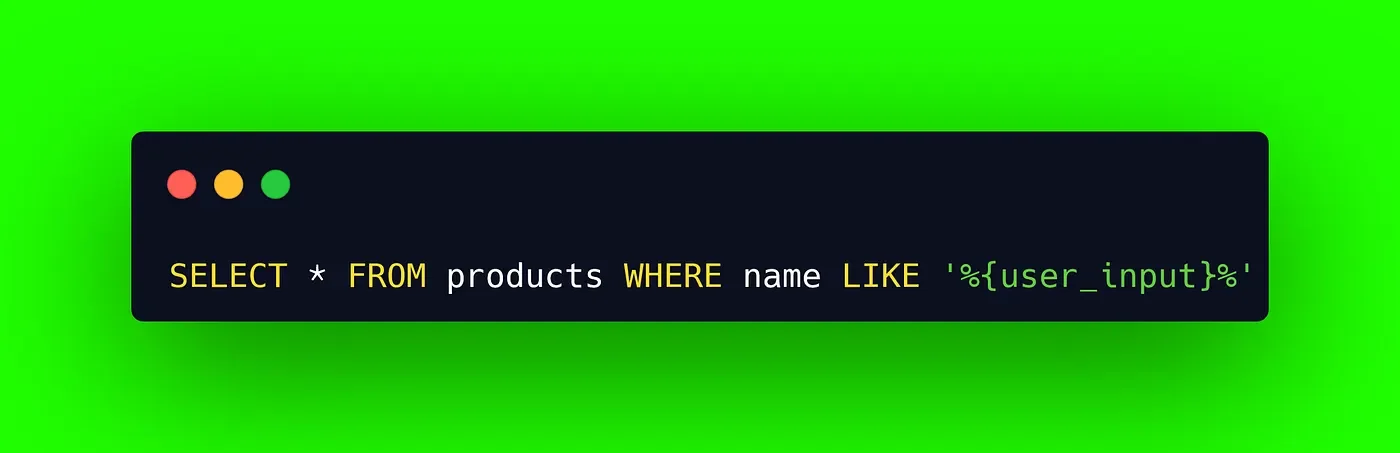
An attacker can inject the payload into the search field and submit the form. The SQL query generated by the application will then be:
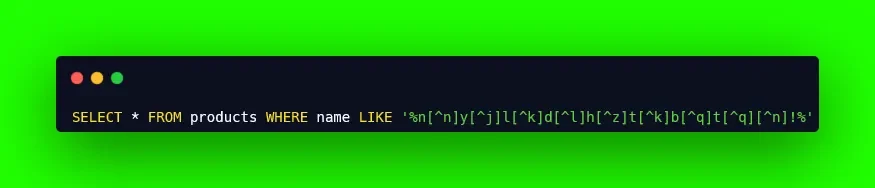
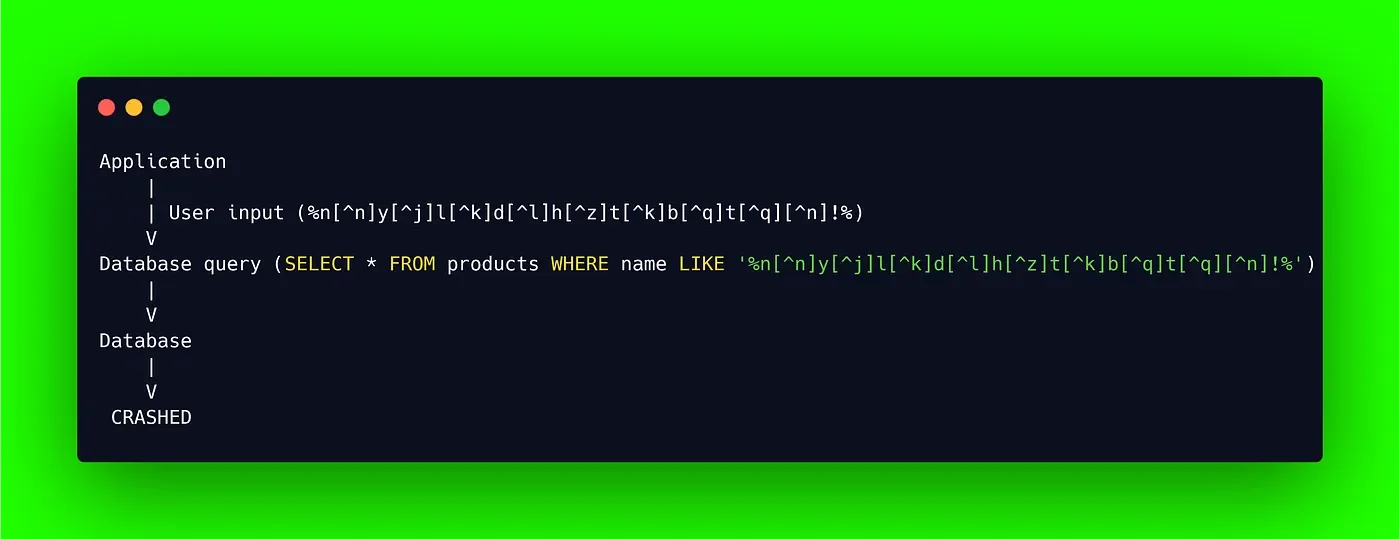
The attack is represented as follows:
Exploitation
Step 1: reach the upload feature
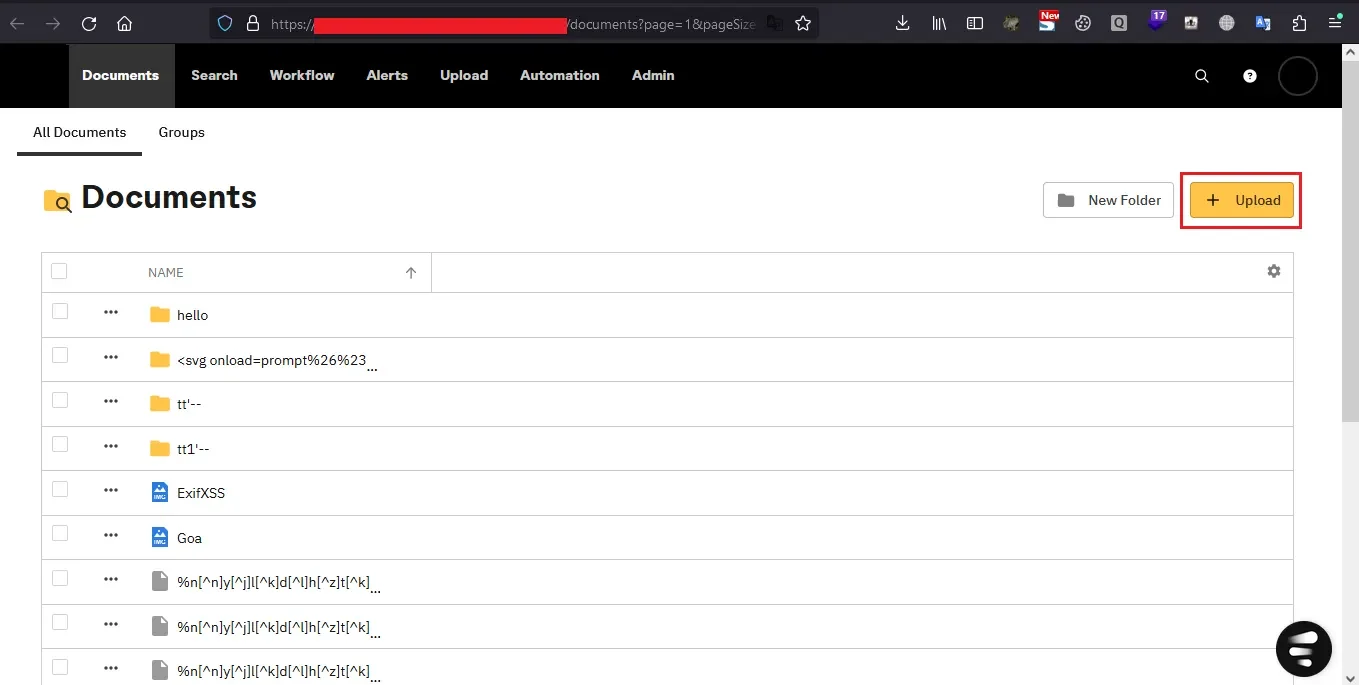
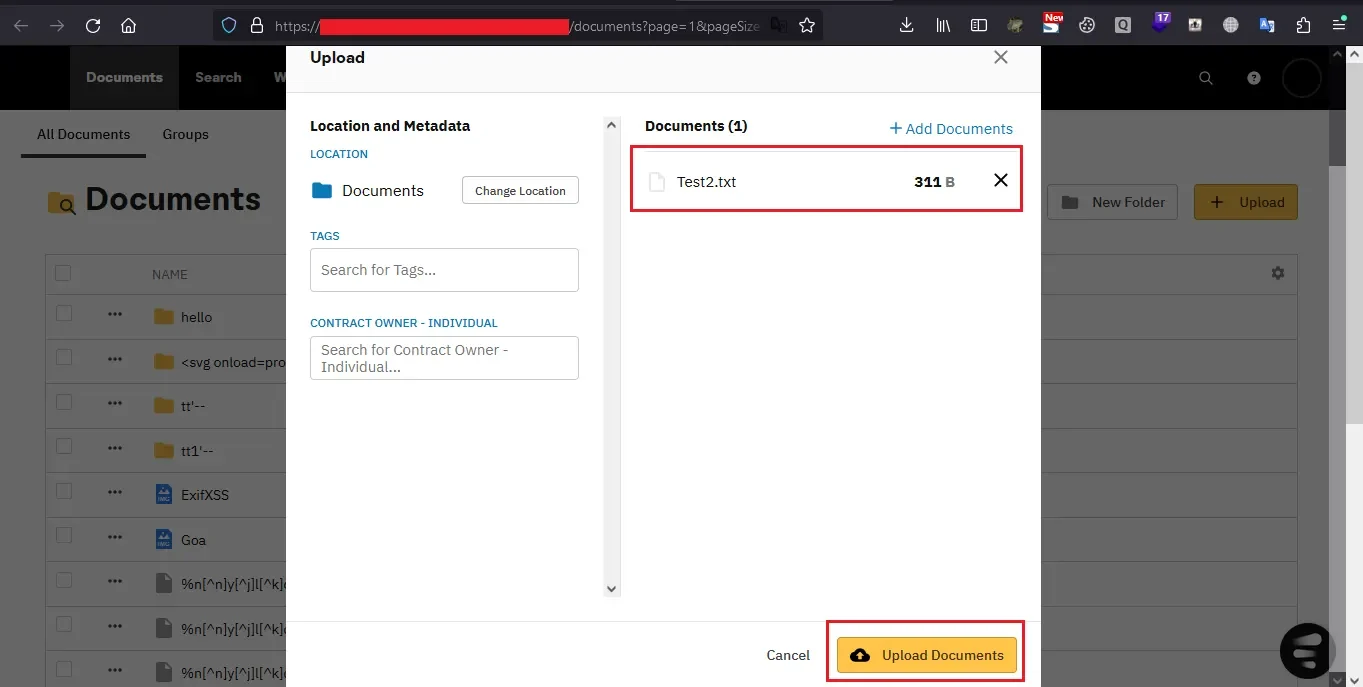
The researcher went to the file upload feature.
Step 2: upload a normal file
A normal text file was uploaded with the name Test2.txt.
Step 3: capture the request and measure a baseline
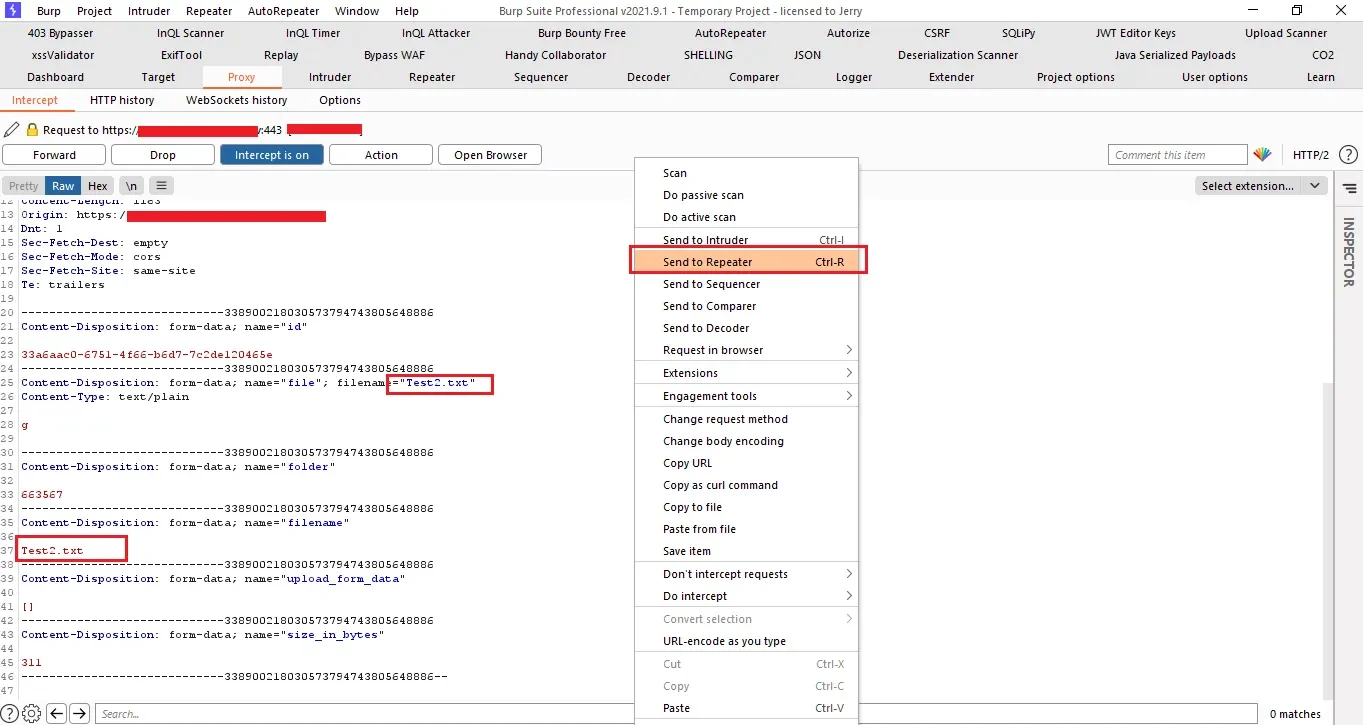
The request was intercepted and sent to Repeater to check a normal response time.
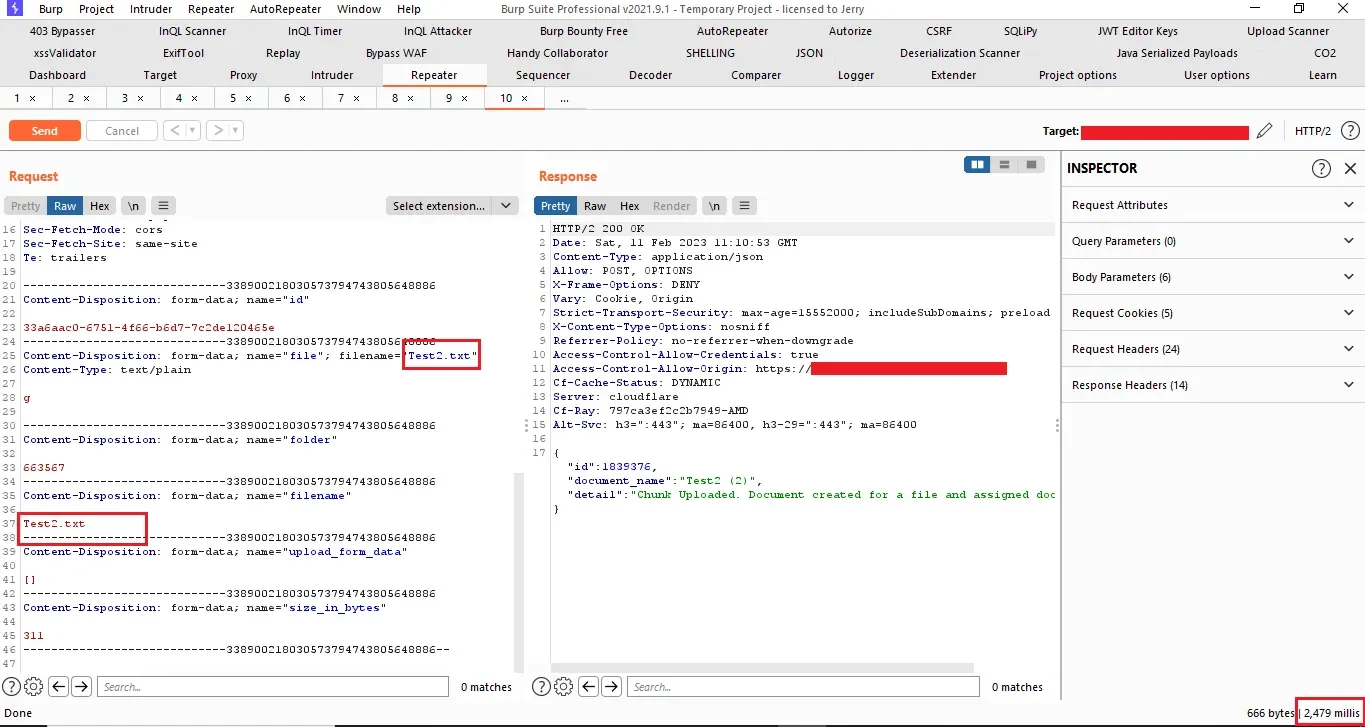
The baseline response time was 2479 milliseconds.
Step 4: replace the filename with the payload
The filename was changed to the SQL wildcard DoS payload with a .txt extension:
%n[^n]y[^j]l[^k]d[^l]h[^z]t[^k]b[^q]t[^q][^n]!%.txt
The response time was then checked again.
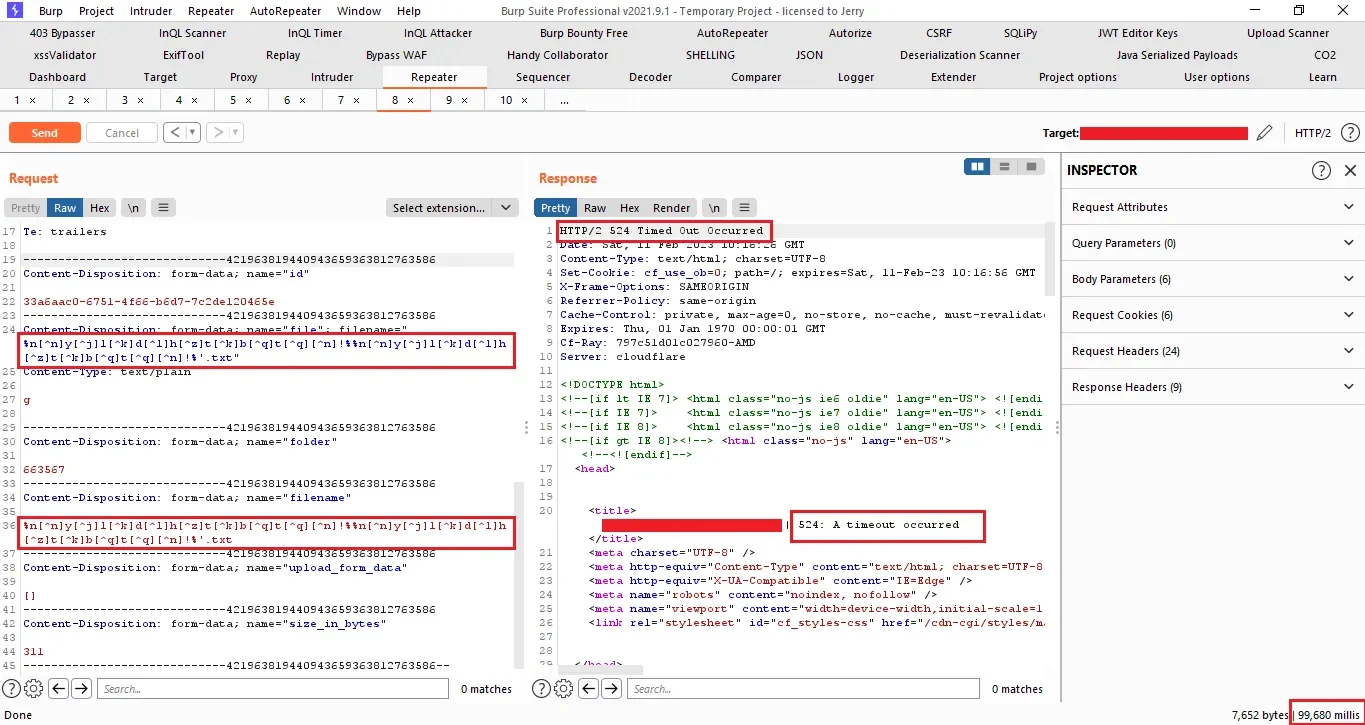
The response time rose to 99680 milliseconds.
Step 5: confirm the effect on the application
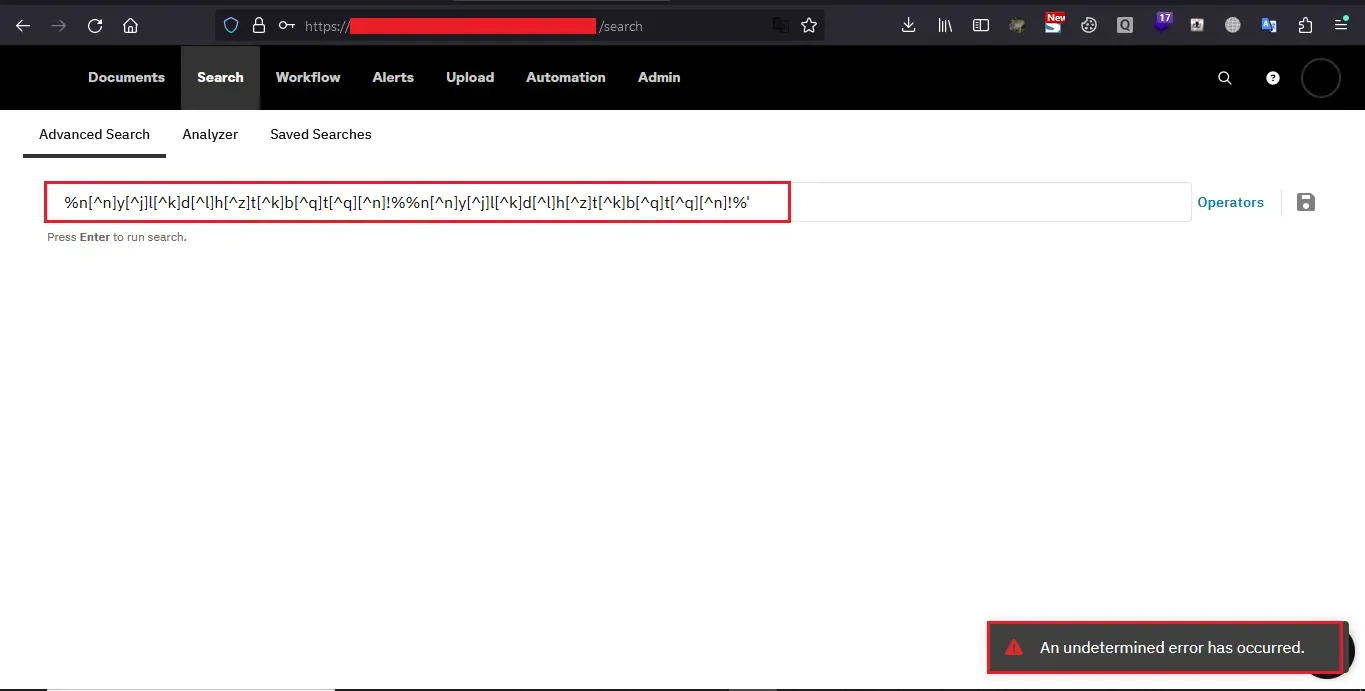
The researcher visited the page where the files were being uploaded, and the page was not available.
Root cause
The researcher's opinion is that the payload, injected as a filename, was stored in the database. That made the database execute a time-consuming search operation which used the system's resources and caused it to become unresponsive.
Impact
An attacker can make the page unresponsive to other users by simply injecting the payload. Sometimes the whole application becomes unresponsive if a single database is being used, because the payload is stored.
The report adds a note: if the attack is self, there will be no impact, for example when the error only affects you and not other users.
The report gives a calculated CVSS vector and score:
CVSS:3.1/AV:N/AC:L/PR:N/UI:N/S:U/C:N/I:N/A:H
Score: 7.5 (High).
Fix
To prevent SQL wildcard denial of service, an application should use prepared statements or parameterized queries to ensure that user input is properly sanitised and validated before being used in an SQL query.

Variants to test
The report lists sample payloads that can be tried in the same kind of input:
'%_[^!_%/%a?F%_D)_(F%)_%([)({}%){()}£$&N%_)$*£()$*R"_)][%](%[x])%a][$*"£$-9]_%''%64_[^!_%65/%aa?F%64_D)_(F%64)_%36([)({}%33){()}£$&N%55_)$*£()$*R"_)][%55](%66[x])%ba][$*"£$-9]_%54'(the report says this one bypasses mod-security)_[r/a)_ _(r/b)_ _(r-d)_%n[^n]y[^j]l[^k]d[^l]h[^z]t[^k]b[^q]t[^q][^n]!%%_[aaaaaaaaaaaaaaaaaaaaaaaaaaaaaaaaaaaaaaaaa[! -z]@$!_%
A positive result is the same pattern seen here: a baseline response time from a benign value, then a much larger response time, and finally the listing page or the application becoming unavailable. The report's own note applies: if only your own session is affected, there is no impact.
What happened, in plain words
A security researcher found a way to make a website stop working, not by breaking into it, but by giving it a piece of text that was so awkward to process that the site's database got stuck. The trick was hidden inside the name of a file the researcher uploaded. The site saved that name in its database, and the database spent so long on a search that the page became unavailable; sometimes the whole application becomes unresponsive if a single database is used.
The kind of attack is called a denial of service, often shortened to DoS. Think of it like a shop assistant asked to find a customer whose name starts with "n", then "n followed by anything except n", then "y", then "anything except j", and so on. Each extra condition makes the assistant check more and more combinations. If the shop has thousands of customer records, the assistant never gets to serve the next person in the queue. The shop is not robbed; it is simply too busy to help anyone.
The researcher does not name the program or the application. The report was still in the Triage state when it was written, which means the program's security team had received it and was reviewing it, and they were working on a fix.
The basics you need first
Before the details make sense, here are a few everyday ideas.
A database is a structured store of information, like a very large, very organised spreadsheet. A website keeps things there: user accounts, product listings, comments, and in this case the names of uploaded files. Software asks the database questions using a language called SQL (Structured Query Language). A question like "give me every customer whose name starts with J" is written as an SQL statement.
A web application is the software running on a server that responds to what you do in your browser: when you click a button or submit a form, your browser sends a request to the application, and the application replies with a page. The application is the middle layer between you and the database.
A file upload feature is the part of a site that lets you send a file from your computer to the server, for example a profile picture or a document. The server usually saves the file somewhere and records details about it, such as its name, in the database.
An intercepting proxy is a tool that sits between your browser and the website. Normally your browser talks directly to the site; with a proxy, every request passes through the tool first, so you can read it, pause it, and change it before it goes on. Repeater is a common feature of such tools: it lets you take one captured request and send it again and again, with small edits, while showing you the server's response and how long it took. This is useful because you can compare a normal request with a tampered one under the same conditions.
Response time is simply how long the server takes to answer. A short time means the server handled the request quickly; a very long time means it was struggling.
A wildcard is a symbol that stands for "anything here". In SQL there are two common ones:
%(percent sign): represents any number of characters, including zero characters._(underscore): represents a single character.
For example, the query SELECT * FROM customers WHERE customer_name LIKE 'J%' returns all customers whose name starts with the letter J. The word LIKE tells the database to do a pattern match rather than an exact comparison, and % is the "anything after this" part.
The idea behind the attack
The researcher's reasoning is that a LIKE pattern built from many wildcards forces the database to do a lot of matching work. When the payload is placed into an input field, the database parses the query and tries to match the pattern specified by the wildcard characters. In the case of the payload used here, the query tries to match any string that starts with "n", followed by any character except "n", followed by "y", followed by any character except "j", and so on.
Each of those conditions narrows the search in a way the database has to check against every record. If the database has a large number of records, the query can take a long time to execute, leading to a slow response time or a complete DoS. The researcher adds that the payload can be modified to target specific database tables, making the attack more effective.
The report illustrates the idea with a hypothetical vulnerable application that lets users search for products by name and uses an SQL query to retrieve the products from the database:
This image shows the kind of SQL query such an application would run. The important part is that the query uses LIKE with a pattern, which is exactly the mechanism the attack abuses.
An attacker can inject the payload into the search field and submit the form. The SQL query generated by the application will then be:
This image shows the same query after the payload has been placed into the search field: the pattern the database is asked to match is now the long wildcard string, so the matching work grows enormously.
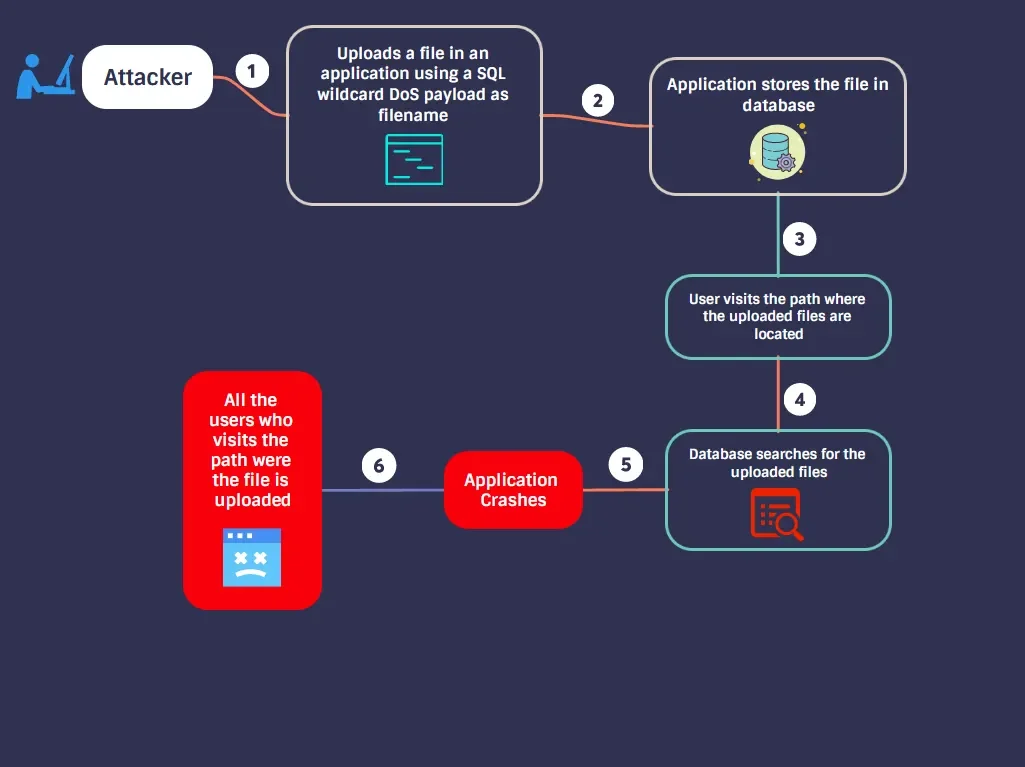
The attack is represented as follows:
This image represents the outcome: the application has crashed under the load of the expensive query.
How the researcher found it
The steps below are exactly what was done.
Step 1: reach the upload feature
The researcher went to the file upload feature.
This image shows the upload page. The point of this step is to identify a place where the site accepts text from the user (here, a filename) and stores it. Any such place is a candidate, because whatever is stored may later be used in a database query.
Step 2: upload a normal file
A normal text file was uploaded with the name Test2.txt.
This image shows the ordinary text file. The purpose is to establish a harmless baseline: a file with a plain, unremarkable name, so that the next measurements have something normal to compare against.
Step 3: capture the request and measure a baseline
The request was intercepted and sent to Repeater to check a normal response time.
This image shows the captured request inside the proxy tool. Intercepting it means the researcher can see exactly what the browser sent, including the filename, and can resend it with changes.
The baseline response time was 2479 milliseconds. That is roughly two and a half seconds. It is the "before" number: whatever happens next, this is what a normal request costs the server.
Step 4: replace the filename with the payload
The filename was changed to the SQL wildcard DoS payload with a .txt extension:
%n[^n]y[^j]l[^k]d[^l]h[^z]t[^k]b[^q]t[^q][^n]!%.txt
This is the whole attack in one line. The part before .txt is the wildcard pattern. The pattern asks the database to match a long sequence of "this character, then anything except that character", which is very expensive to evaluate against many records.
The response time was then checked again.
The response time rose to 99680 milliseconds. That is about 99.7 seconds, roughly forty times the baseline. The server was still answering, but only after a very long struggle, which is the signature of this kind of attack.
Step 5: confirm the effect on the application
The researcher visited the page where the files were being uploaded, and the page was not available.
This image shows the application crash: the listing page could no longer be loaded.
This image shows a timeout. A timeout is what your browser reports when it gives up waiting for a reply. The page where the files were being uploaded was not available.
Why it happened
The researcher's opinion is that the payload, injected as a filename, was stored in the database. That made the database execute a time-consuming search operation which used the system's resources and caused it to become unresponsive. The report does not show the query or the code that builds it, so the exact construction is not documented; the mechanism described is a LIKE pattern assembled from user input without treating wildcard characters as data.
In plain terms: the site treated the filename as if it were part of the search instruction, instead of as a piece of text to be looked up literally. When a filename contains characters that mean something special to the database, those characters change the meaning of the query. The crafted characters change the meaning of the query, and the effect is to make the query so slow that the service stops responding.
Impact
An attacker can make the page unresponsive to other users by simply injecting the payload. Sometimes the whole application becomes unresponsive if a single database is being used, because the payload is stored. The payload is stored in the database, which is why a single database can make the whole application unresponsive.
The report adds a note: if the attack is self, there will be no impact, for example when the error only affects you and not other users. In other words, if the only thing that slows down or breaks is your own session, there is nothing to report, because no one else is harmed.
This image shows the researcher's insights on the impact, including that caveat about self-only effects.
The report gives a calculated CVSS vector and score:
CVSS:3.1/AV:N/AC:L/PR:N/UI:N/S:U/C:N/I:N/A:H
Score: 7.5 (High).
CVSS is a standard way of scoring how serious a vulnerability is. The vector is a compact code describing the conditions. Reading it left to right: the attack can be carried out over the network (AV:N), with low complexity (AC:L), without any privileges (PR:N), and without user interaction (UI:N). The scope is unchanged (S:U), meaning the impact stays within the vulnerable component. There is no confidentiality impact (C:N) and no integrity impact (I:N), because no data is read or altered. The availability impact is high (A:H), because the service can be made unavailable. The resulting score is 7.5, which the report labels High.
Fix
To prevent SQL wildcard denial of service, an application should use prepared statements or parameterized queries to ensure that user input is properly sanitised and validated before being used in an SQL query.
Prepared statements (also called parameterized queries) are a way of sending a query to the database where the instruction and the data are kept separate. The database is told "run this query, and here is the value to plug in", so a value containing % or _ is treated as literal text rather than as part of the pattern. Sanitising means cleaning input so dangerous characters lose their special meaning; validating means checking that input is of the expected shape, for example that a filename contains only allowed characters.
This image illustrates the mitigation: keeping user input out of the query's structure so wildcard characters cannot change what the database does.
Variants to test
The report lists sample payloads that can be tried in the same kind of input:
'%_[^!_%/%a?F%_D)_(F%)_%([)({}%){()}£$&N%_)$*£()$*R"_)][%](%[x])%a][$*"£$-9]_%''%64_[^!_%65/%aa?F%64_D)_(F%64)_%36([)({}%33){()}£$&N%55_)$*£()$*R"_)][%55](%66[x])%ba][$*"£$-9]_%54'(the report says this one bypasses mod-security)_[r/a)_ _(r/b)_ _(r-d)_%n[^n]y[^j]l[^k]d[^l]h[^z]t[^k]b[^q]t[^q][^n]!%%_[aaaaaaaaaaaaaaaaaaaaaaaaaaaaaaaaaaaaaaaaa[! -z]@$!_%
These are variations on the same theme: long strings full of wildcard characters and character classes, designed to make the database work hard. The second one is noted as bypassing mod-security, a web application firewall that tries to block suspicious requests.
A positive result is the same pattern seen here: a baseline response time from a benign value, then a much larger response time, and finally the listing page or the application becoming unavailable. The report's own note applies: if only your own session is affected, there is no impact.
Glossary
- API: a defined way for one piece of software to ask another for something, like a menu of requests a program accepts.
- Application: the software on a server that handles your requests and builds the pages you see.
- Baseline: a normal measurement taken before a test, used for comparison.
- Cookie: a small piece of data a site stores in your browser so it can recognise you on later requests.
- CVSS: a standard scoring system for the severity of a security vulnerability.
- Database: an organised store of data that software can query.
- Denial of service (DoS): making a service unavailable to its users, usually by exhausting its resources.
- File upload feature: the part of a site that accepts files from your computer and stores them on the server.
- Filename: the name of a file, which a site may store and display.
- Intercepting proxy: a tool placed between your browser and a website that lets you view and modify requests.
- LIKE: an SQL keyword that performs pattern matching rather than exact comparison.
- mod-security: a web application firewall that inspects requests and blocks ones it considers malicious.
- Parameterized query: a database query where the instruction and the user-supplied values are sent separately, so values cannot change the query's meaning.
- Payload: the crafted piece of input an attacker sends to trigger a vulnerability.
- Prepared statement: another name for a parameterized query.
- Repeater: a proxy tool feature that resends a captured request, optionally modified, and shows the response and timing.
- Response time: how long a server takes to answer a request.
- Sanitise: clean input so special characters cannot be interpreted as instructions.
- SQL: the language used to ask questions of a database.
- SQL injection: a vulnerability where user input is treated as part of an SQL instruction.
- Timeout: what happens when a browser or client gives up waiting for a reply.
- Triage: the stage where a security team reviews a submitted report and decides what to do.
- Validate: check that input has the expected form before using it.
- Wildcard: a symbol, such as
%or_, that stands for other characters in a pattern.



