SSRF on a Headless Browser Becomes Critical!
The application's dashboard export to PDF/PNG used a headless Chromium browser that rendered user-supplied iframe objects, allowing an attacker to make the server load arbitrary external pages (SSRF). By nesting an iframe, the attacker reached the internal Chrome DevTools endpoint on localhost:9222, listed active tabs, and extracted session tokens from their URLs, enabling account takeover of any user who exported a dashboard.
 Published on medium.com
When I’m frustrated and I haven’t found bugs for a long time, I like to write about my found bugs. This time, I’m going to talk about my first critical vulnerability.
The full write-up lives on its author's site
It belongs to its author, so we link to it rather than copy it. The other two tabs are our own rewrites, checked against it.
Context
The target was a private program on Intigriti, referred to in the report as REDACTED. The application lets users build dashboards made of images, videos and dynamic graphics that pull in external data. A dashboard is created, edited with those items, saved, and then exported to PDF or PNG.
The dashboard relies on JavaScript to retrieve its JSON structure from an endpoint the report calls /JSONDATA. That JSON describes each item in the dashboard, for example:
{ "title":"Hello", "items":[ { "type":"imageobject", "url":"https://brrrr", }, { "type":"graphic-type", "data":"", "row":"" },... ]}
The same data can be modified by sending a request to the same API endpoint with the same format, and a dashboard can contain multiple data types with multiple parameters. The export to PDF or PNG is the part that matters here: the PDF metadata showed a backend browser produced it.
Setup
The report does not describe any particular account, role or tooling beyond a browser and a server the researcher controlled to receive callbacks.
Finding it
A common way to turn a page into a PDF is a headless browser, meaning a browser without a user interface that loads a webpage and can be used to automate web tasks. To confirm that this was the mechanism, the researcher exported a dashboard to PDF and extracted the PDF metadata.
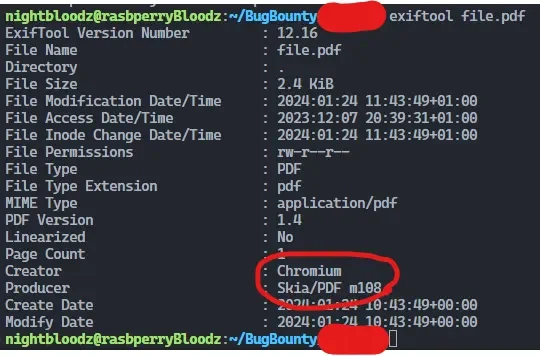
The metadata showed the PDF had been created with Chromium. That means a browser runs in the backend: if HTML can be injected into what that browser loads, the server can be made to fetch attacker-controlled content, which is SSRF, the class of bug where a server-side application is caused to make requests to an unintended location.
Initial attempts at multiple injections and XSS did not produce anything. The researcher then went through every part of the dashboard and every data type. The JSON above showed types such as imageobject, videoobject, graphics and others, all reachable through the UI. To enumerate all possible types, the researcher opened the application's JavaScript. A useful approach for lazily loaded JavaScript is to search for strings or endpoints; searching for imageobject turned up a JSON listing all possible object types, including imageobject with a URL parameter.
Reviewing that code revealed another type, iframeobject.
Exploitation
Step 1: inject an iframe object
The dashboard JSON was edited to add an iframeobject pointing at an attacker URL:
{ "title":"Hello", "items":[ { "type":"iframeobject", "url":"https://attacker" },... ]}
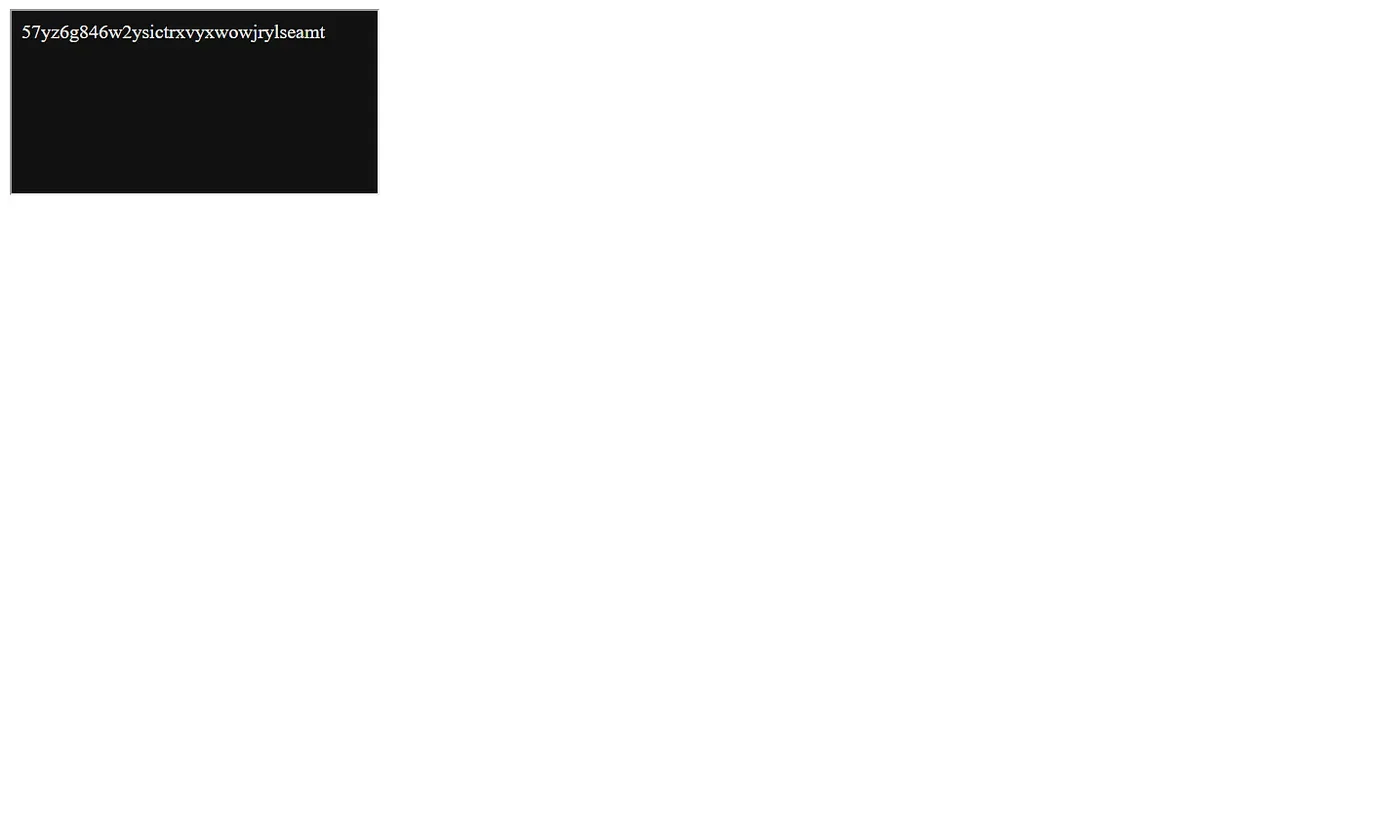
The dashboard rendered the attacker page inside an iframe.
Step 2: export and confirm the SSRF
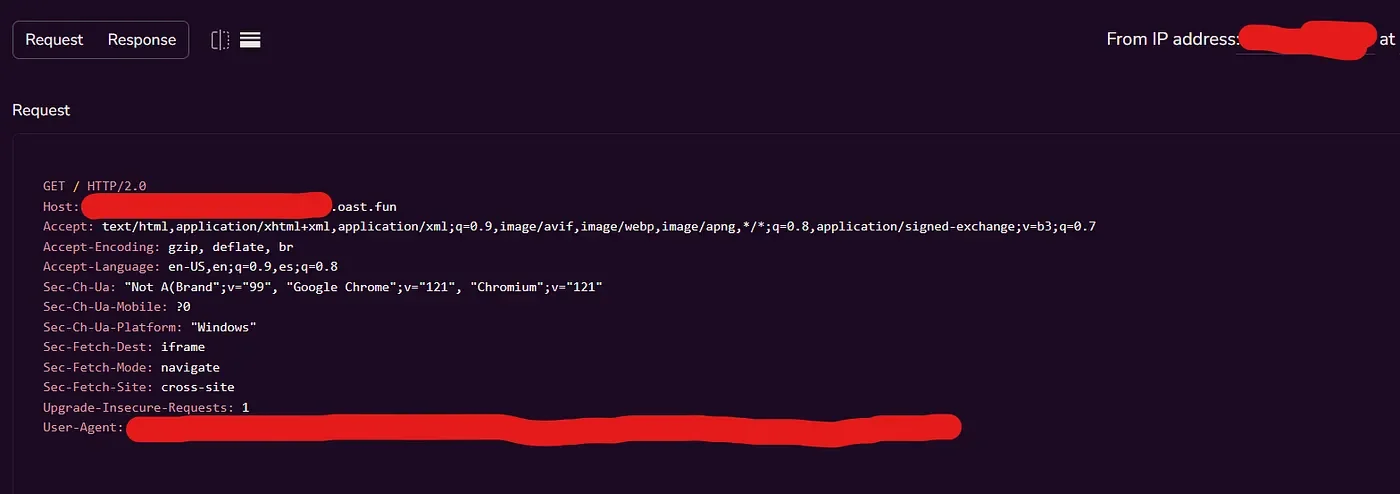
With the iframe in place, the researcher exported the dashboard. The attacker server received a callback, confirming that the backend browser had fetched the attacker URL. The SSRF loaded the attacker page inside the generated PDF.
Step 3: work around the URL filter
Pointing the iframe URL at [redacted] or localhost did not work: the URL parameter required HTTPS and did not allow internal IPs. Redirections, octal bypasses and many other techniques to load internal resources were tried without success.
The way through came from the observation that the browser was loading attacker HTML inside an iframe. If the attacker controls the HTML, that HTML can contain another iframe, this time pointing at an internal resource. The attacker HTML used for this is shown in the report:
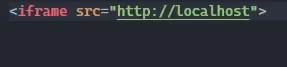
This worked and loaded the internal view of the application login page.
Step 4: scan the internal network and reach the browser API
With an internal-loading primitive available, the researcher scanned the internal network and found an open port on localhost:9222, the port where the headless browser API receives requests. Searching for endpoints showed that /json lists all active browser tabs.
A new PDF was exported with that endpoint loaded, and the PDF contained all the URLs of the active browser tabs.
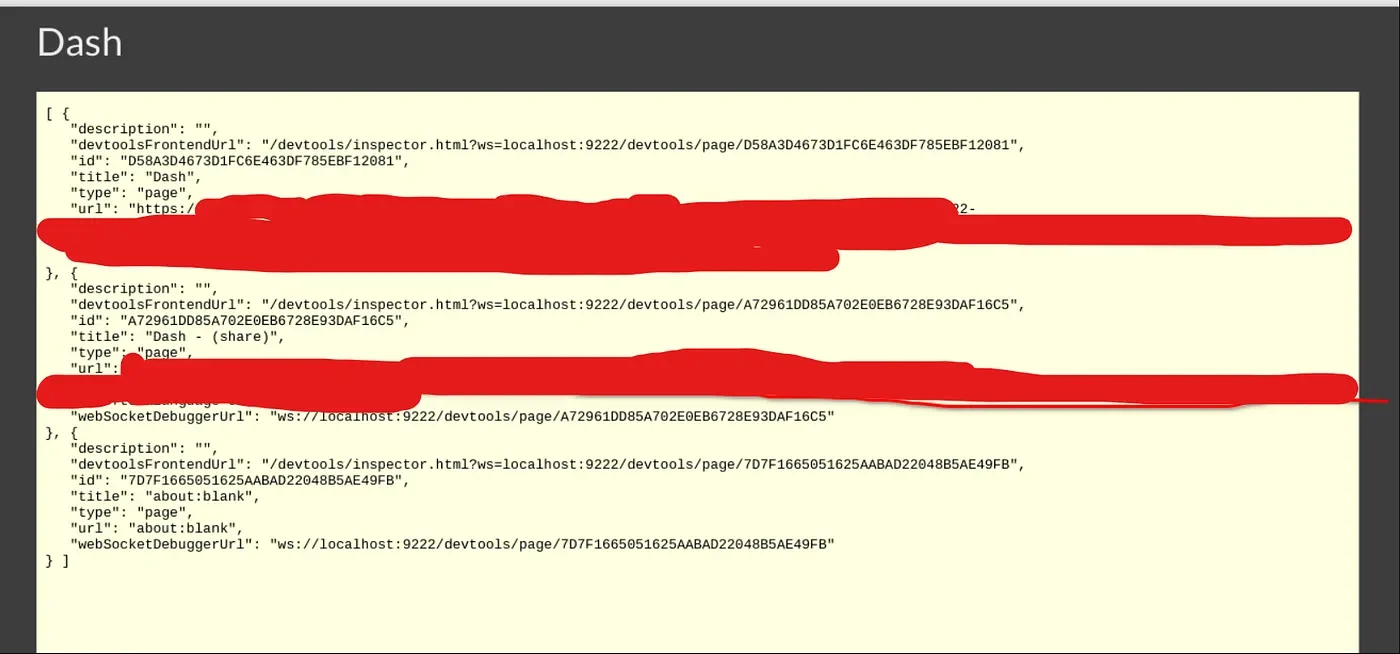
Those URLs contained the user session token used to retrieve the dashboard.
Root cause
The dashboard model accepts an iframeobject type whose url is loaded by the server-side headless browser during PDF and PNG export. The export therefore acts as a server-side fetcher for arbitrary attacker-supplied URLs. The URL parameter required HTTPS and did not allow internal IPs, but the browser still loaded attacker HTML inside an iframe. Once the browser loaded attacker-controlled HTML, any iframe inside that HTML was resolved by the browser itself, outside the reach of the URL check, which is what allowed the internal login page and then localhost:9222 to be reached. The headless browser's debugging API on port 9222 was reachable and exposed /json, which lists all active browser tabs.
Impact
The SSRF allowed the researcher to load internal resources into the exported PDF, including the internal login page and the headless browser API. Because /json returned the URLs of active browser tabs and those URLs contained the session token used to retrieve the dashboard, an attacker could take over the account of any user who generates a PDF or PNG.
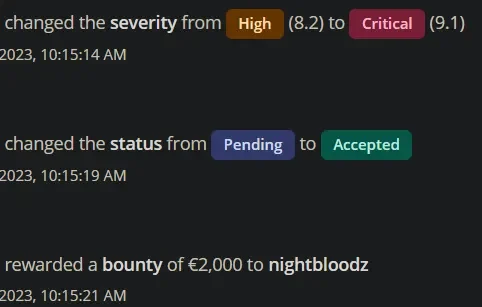
The vulnerability was reported and triaged and awarded in less than 48 hours, rated Critical (9.1) with a €2,000 bounty.
Fix
The report does not describe the fix that was applied. Based on the root cause, the export path should not load arbitrary URLs from dashboard content: the iframeobject type should be removed from what the export renderer accepts, or the renderer should refuse to load any URL that is not on an allowlist, and it should not follow nested frames into internal addresses. The headless browser's debugging API on port 9222 should not be reachable from the rendering context, and session tokens should not be exposed in tab URLs.
Variants to test
- Enumerate every object type in the client JavaScript by searching for known type strings such as
imageobject, then try each type with an attacker URL in the dashboard JSON. A positive result is a callback on your server when the dashboard is exported. - If the top-level URL is filtered to HTTPS and public IPs, host HTML on an allowed host that contains an iframe pointing at an internal address. A positive result is the internal page appearing in the exported PDF.
- Scan internal ports from inside the rendered HTML, looking for a headless browser debugging API such as
localhost:9222, and request/json. A positive result is a list of active tabs and their URLs in the PDF. - Check whether the tab URLs returned by
/jsoncontain session tokens or other credentials. A positive result is a token you can replay to access another user's dashboard. - Try the same nested-iframe technique against other export formats (PNG as well as PDF) and against any other server-side rendering feature that accepts user-supplied URLs.
What happened, in plain words
A security researcher found a serious bug in a website that lets people build dashboards. A dashboard is a page where you arrange pictures, videos and charts, a bit like making a poster on your computer and then printing it. The website had a button that turned your dashboard into a PDF file or a PNG image, so you could save or share it.
The PDF metadata showed the file was created with Chromium, meaning a hidden web browser was involved. The researcher found a way to make that hidden browser visit a web address of their choosing. That kind of bug is called SSRF. It got worse: the hidden browser had a control service on port 9222, and its /json endpoint listed the URLs of active browser tabs, which contained the user session token. With those codes, an attacker could take over other people's accounts.
The researcher reported it, and it was rated Critical (9.1) and paid €2,000, all in less than 48 hours.
This article walks through the whole thing from the beginning, assuming you have never done security work before. Every term is explained the first time it appears, and there is a glossary at the end.
The target
The bug was found on a private program on Intigriti. Intigriti is a platform where companies invite researchers to test their systems and pay for the problems they find. A private program means only invited researchers can take part. The report calls the company REDACTED, which just means the real name is hidden.
The application lets users build dashboards made of images, videos and dynamic graphics that pull in external data. "Dynamic graphics" means charts that update from data stored somewhere else, for example numbers fetched from another website.
The normal flow of the product is:
- Create a dashboard.
- Edit it with some images, videos and graphics with data.
- Save it.
- Export it to PDF or PNG.
A dashboard example looked like this:
The dashboard relies on JavaScript to retrieve its JSON structure from an endpoint the report calls /JSONDATA. Two words to unpack there. An endpoint is simply a web address on a server that a program can ask for something, like a counter in a shop where you hand over a request and get something back. JSON is a text format for describing data using curly brackets, colons and commas, a bit like a very strict shopping list. The browser asks /JSONDATA for the list of items in the dashboard, and then draws each item on the screen.
That JSON describes each item in the dashboard, for example:
{ "title":"Hello", "items":[ { "type":"imageobject", "url":"https://brrrr", }, { "type":"graphic-type", "data":"", "row":"" },... ]}
Line by line:
{opens the whole description, and the matching}at the end closes it."title":"Hello"gives the dashboard a name, here "Hello"."items":[starts a list of items. The square brackets[and]mean "a list of things".- The first item is
"type":"imageobject"with"url":"https://brrrr". In plain words: "this item is a picture, and the picture is at this web address". The addresshttps://brrrris a placeholder in the report, not a real site. - The second item is
"type":"graphic-type"with emptydataandrowfields. In plain words: "this item is a chart, and here is the data and the row it belongs to". ...means the list continues with more items that the report does not show.
The same data can be modified by sending a request to the same API endpoint with the same format. An API is the part of a website built for programs rather than people: instead of clicking buttons, a program sends a request directly and gets data back. Think of a restaurant: the dining room is the website you see, the kitchen hatch is the API, and the JSON is the order slip. If you can write your own order slip, you can ask for things the menu does not offer.
A dashboard can contain multiple data types with multiple parameters. A parameter is one named value inside a request, like url or type above.
The export to PDF or PNG is the part that matters here: the PDF metadata showed a backend browser produced it. Server side means it happens on the company's computers, not on yours. Your browser sends the dashboard to the server, the server produces the file, and sends it back.
Setup
The report does not describe any particular account, role or tooling beyond a browser and a server the researcher controlled to receive callbacks. A callback here means a message the target's server sends to a server you own when it visits your address, like leaving a note in your own letterbox to prove someone came to the door.
Finding it
A common way to turn a page into a PDF is a headless browser, meaning a browser without a user interface that loads a webpage and can be used to automate web tasks. Picture a browser with no window, no tabs and no mouse: it just loads pages and does what a program tells it to.
To confirm that this was the mechanism, the researcher exported a dashboard to PDF and extracted the PDF metadata. Metadata is information about a file rather than its contents, like the note on the back of a photograph saying which camera took it.
The metadata showed the PDF had been created with Chromium. Chromium is the open-source browser engine behind Google Chrome, so seeing its name tells you a real browser produced the file. That means a browser runs in the backend: if HTML can be injected into what that browser loads, the server can be made to fetch attacker-controlled content. HTML is the language web pages are written in. Inject means slipping your own content into a place the application did not intend.
That is SSRF, the class of bug where a server-side application is caused to make requests to an unintended location. A vulnerability class is a family of bugs that share the same underlying mistake, the way "broken lock" covers many kinds of burglary. A simple comparison: you ask a hotel receptionist to fetch a parcel from the post office, but you write the address yourself, so you send them to a room they should never enter.
Initial attempts at multiple injections and XSS did not produce anything. XSS, cross-site scripting, is when an attacker gets their own code to run inside another user's browser. None of those attempts worked here.
The researcher then went through every part of the dashboard and every data type. The JSON above showed types such as imageobject, videoobject, graphics and others, all reachable through the UI. UI means user interface, the buttons and menus you click.
To enumerate all possible types, the researcher opened the application's JavaScript. JavaScript is the programming language that runs inside web pages and makes them interactive. Enumerate means to list everything of a kind, one by one. A useful approach for lazily loaded JavaScript is to search for strings or endpoints. Lazily loaded means the code is not all sent at once; parts arrive only when needed, so you have to go looking for them. Searching for imageobject turned up a JSON listing all possible object types, including imageobject with a URL parameter.
Reviewing that code revealed another type, iframeobject. An iframe is a window inside a web page that shows another web page, like a picture frame hanging on a wall that contains a smaller painting.
Exploitation
Step 1: inject an iframe object
The dashboard JSON was edited to add an iframeobject pointing at an attacker URL:
{ "title":"Hello", "items":[ { "type":"iframeobject", "url":"https://attacker" },... ]}
Line by line:
{opens the dashboard description."title":"Hello"names the dashboard "Hello", same as before."items":[starts the list of items.- The single item shown is
"type":"iframeobject"with"url":"https://attacker". In plain words: "this item is a frame, and the frame shows the page at this address".https://attackeris a placeholder for a server the researcher controls. ...means more items could follow, and the closing brackets finish the description.
The dashboard rendered the attacker page inside an iframe.
Why this step: the researcher had found a type of item the product could draw, and wanted to know whether the server would fetch whatever address was put in it. If the page appears, the server is fetching your address.
Step 2: export and confirm the SSRF
With the iframe in place, the researcher exported the dashboard. The attacker server received a callback, confirming that the backend browser had fetched the attacker URL. The SSRF loaded the attacker page inside the generated PDF.
Why this step: seeing your own page in the dashboard only proves your browser drew it. Exporting proves the company's server went and fetched it, because the callback arrives from their machine and your page ends up inside the PDF they produced.
Step 3: work around the URL filter
Pointing the iframe URL at [redacted] or localhost did not work: the URL parameter required HTTPS and did not allow internal IPs. Two terms here. [redacted] and localhost both mean "this same computer", the machine you are already on. HTTPS is the secure, encrypted version of the web protocol, the one with the padlock. An IP address is the numeric address of a machine on a network, like a street number. A filter is a check that rejects input it does not like.
Redirections, octal bypasses and many other techniques to load internal resources were tried without success. A redirection is when one web address sends you on to another. An octal bypass means writing a number in a different counting system to slip past a check, the way writing "ten" as "12" might confuse someone expecting ordinary numbers.
The way through came from the observation that the browser was loading attacker HTML inside an iframe. If the attacker controls the HTML, that HTML can contain another iframe, this time pointing at an internal resource. The attacker HTML used for this is shown in the report:
Why this step: the filter only checked the address typed into the dashboard. It did not check what the page at that address then did. A page you control can contain its own frame pointing anywhere, and the browser will happily load it. The comparison is a doorman who checks your invitation at the front door but not the people you bring in through the side entrance.
This worked and loaded the internal view of the application login page.
Step 4: scan the internal network and reach the browser API
With an internal-loading primitive available, the researcher scanned the internal network and found an open port on localhost:9222, the port where the headless browser API receives requests. A port is a numbered doorway on a machine; different services listen on different numbers. Scanning means trying many doorways to see which ones are open.
Searching for endpoints showed that /json lists all active browser tabs. A tab here is one page open in the headless browser.
A new PDF was exported with that endpoint loaded, and the PDF contained all the URLs of the active browser tabs.
Those URLs contained the user session token used to retrieve the dashboard. A session token is a long random string a website gives you after you log in, so it knows who you are on each later request. It works like a cloakroom ticket: whoever holds the ticket gets the coat, no questions asked. If someone else copies your ticket, they can collect your coat.
Why this step: the researcher now had a way to make the server fetch internal addresses. The next question was what useful things sit on those internal addresses. The browser's own control service turned out to be one of them, and it hands out a list of open tabs with their full addresses, tokens included.
Root cause
The dashboard model accepts an iframeobject type whose url is loaded by the server-side headless browser during PDF and PNG export. The export therefore acts as a server-side fetcher for arbitrary attacker-supplied URLs. A fetcher is anything that goes and retrieves a web address on your behalf.
The URL parameter required HTTPS and did not allow internal IPs, but the browser still loaded attacker HTML inside an iframe. Validation is checking input against rules before using it. Once the browser loaded attacker-controlled HTML, any iframe inside that HTML was resolved by the browser itself, outside the reach of the URL check, which is what allowed the internal login page and then localhost:9222 to be reached.
The headless browser's debugging API on port 9222 was reachable and exposed /json, which lists all active browser tabs. A debugging API is a control interface meant for developers to inspect and drive a program; it should never be reachable by untrusted content.
Impact
Impact means what damage the bug actually allows. The SSRF allowed the researcher to load internal resources into the exported PDF, including the internal login page and the headless browser API. Because /json returned the URLs of active browser tabs and those URLs contained the session token used to retrieve the dashboard, an attacker could take over the account of any user who generates a PDF or PNG. Account takeover means logging in as someone else without their password.
The vulnerability was reported and triaged and awarded in less than 48 hours, rated Critical (9.1) with a €2,000 bounty. Triaged means the company confirmed the report was real and worth working on. A bounty is the money paid for a valid report. The 9.1 is a severity score, where higher means more dangerous.
Fix
Based on the root cause, the export path should not load arbitrary URLs from dashboard content: the iframeobject type should be removed from what the export renderer accepts, or the renderer should refuse to load any URL that is not on an allowlist, and it should not follow nested frames into internal addresses. An allowlist is a list of things that are permitted, with everything else refused. The headless browser's debugging API on port 9222 should not be reachable from the rendering context, and session tokens should not be exposed in tab URLs.
Variants to test
If you want to look for the same kind of bug yourself, these are the directions the report points to. A variant is the same mistake appearing in a slightly different place.
- Enumerate every object type in the client JavaScript by searching for known type strings such as
imageobject, then try each type with an attacker URL in the dashboard JSON. A positive result is a callback on your server when the dashboard is exported. - If the top-level URL is filtered to HTTPS and public IPs, host HTML on an allowed host that contains an iframe pointing at an internal address. A positive result is the internal page appearing in the exported PDF.
- Scan internal ports from inside the rendered HTML, looking for a headless browser debugging API such as
localhost:9222, and request/json. A positive result is a list of active tabs and their URLs in the PDF. - Check whether the tab URLs returned by
/jsoncontain session tokens or other credentials. A positive result is a token you can replay to access another user's dashboard. Replay means using a captured token again yourself. - Try the same nested-iframe technique against other export formats (PNG as well as PDF) and against any other server-side rendering feature that accepts user-supplied URLs.
Glossary
- Account takeover: logging in as another user without knowing their password, usually by stealing their session token.
- Allowlist: a list of permitted values; anything not on the list is refused.
- API: the part of a service built for programs to talk to, rather than for people clicking buttons.
- Backend: the computers and software behind a website that users do not see.
- Bounty: money paid to a researcher for a valid security report.
- Callback: a request the target's server makes to a server you control, used as proof that it visited your address.
- Chromium: the open-source browser engine behind Google Chrome, often used for headless browsing.
- Client side: happening in the user's own browser rather than on the company's servers.
- Dashboard: a page that arranges pictures, videos and charts in one view.
- Debugging API: a control interface for inspecting and driving a program, meant for developers only.
- Endpoint: a web address on a server that returns data or performs an action when requested.
- Enumerate: to list every item of a kind, one by one.
- Fetcher: anything that goes and retrieves a web address on someone's behalf.
- Filter: a check that rejects input it does not like.
- Headless browser: a browser with no visible window, driven by a program to load pages automatically.
- HTML: the language web pages are written in.
- HTTPS: the encrypted version of the web protocol, shown by a padlock in the address bar.
- Iframe: a window inside a web page that displays another web page.
- Impact: what damage a bug actually allows.
- Inject: to slip your own content into a place the application did not intend.
- IP address: the numeric address of a machine on a network.
- JavaScript: the programming language that runs inside web pages to make them interactive.
- JSON: a text format for describing data with curly brackets, square brackets, names and values.
- Lazily loaded: code that is fetched only when needed, not all at once.
- localhost / [redacted]: names for "this same computer".
- Metadata: information about a file rather than its contents, such as which program created it.
- Octal bypass: writing a number in base eight to slip past a check expecting ordinary digits.
- Parameter: one named value inside a request, such as
urlortype. - Port: a numbered doorway on a machine where a particular service listens.
- Redirection: when one web address sends the visitor on to another.
- Replay: using a captured token again yourself to act as its owner.
- Scanning: trying many addresses or ports to see which ones respond.
- Server side: happening on the company's computers rather than in your browser.
- Session token: a long random string given after login that identifies you on later requests; whoever holds it is treated as you.
- SSRF: server-side request forgery, a bug where the server can be made to send requests to a location the attacker chooses.
- Tab: one open page inside a browser.
- Triaged: confirmed by the company as a real and relevant report.
- UI: user interface, the buttons and menus a person clicks.
- Validation: checking input against rules before using it.
- Variant: the same underlying mistake appearing in a different place.
- Vulnerability class: a family of bugs that share the same underlying mistake.
- XSS: cross-site scripting, getting your own code to run inside another user's browser.



