The power of Client-Side Path Traversal: How I found and escalated 2 bugs through “../”
The application's frontend JavaScript fetched resources using a UUID from the URL without sanitising path traversal sequences, allowing an attacker to control the GET or POST request path. This enabled CSRF on all POST endpoints and escalated a self-XSS to a stored XSS affecting any user who opened a crafted link.
 Published on medium.com
Hi, some time ago I found a very well known application that I used quite a lot when I was in high school, it is a private program in Intigriti so I can’t disclose information about the company, but I will call it REDACTED.
The full write-up lives on its author's site
It belongs to its author, so we link to it rather than copy it. The other two tabs are our own rewrites, checked against it.
Context
The target was a well known application that the researcher had used heavily in high school. It was run as a private programme on Intigriti, so the company cannot be named; the write-up calls it REDACTED and uses redacted.com throughout. The application has courses, invitations, a story creator and a publishing workflow. The features that matter here are:
- A resource viewer that loads a resource by UUID from a separate resources host.
- An invitation acceptance page that turns a click into an authenticated POST.
- A story creator with private drafts and a public published version.
The researcher's starting point was not a specific feature but a general walkthrough of the application: using it as a normal user, going through every accessible function and poking at each one without going down rabbit holes.
Setup
No special tooling, accounts or versions are described. The work was done against the live private programme.
Finding it
The first result was an IDOR, which the programme closed as accepted risk. The researcher quotes the standard definition:
Insecure direct object references (IDOR) is a web application security vulnerability that occurs when an application exposes internal object identifiers, such as database keys or file paths, to users without proper access controls.
That IDOR became the key to the later bugs. The flow looked like this:
- The user visits
https://redacted.com/example/7ce9f641-e29a-4d01-bea1-2b83924d8358. - The JavaScript on that page fetches a resource using the UUID from the URL:
https://resources.redacted.com/resources/7ce9f641-e29a-4d01-bea1-2b83924d8358. - That resource path had an IDOR on the UUID, so any user could reach that specific route.
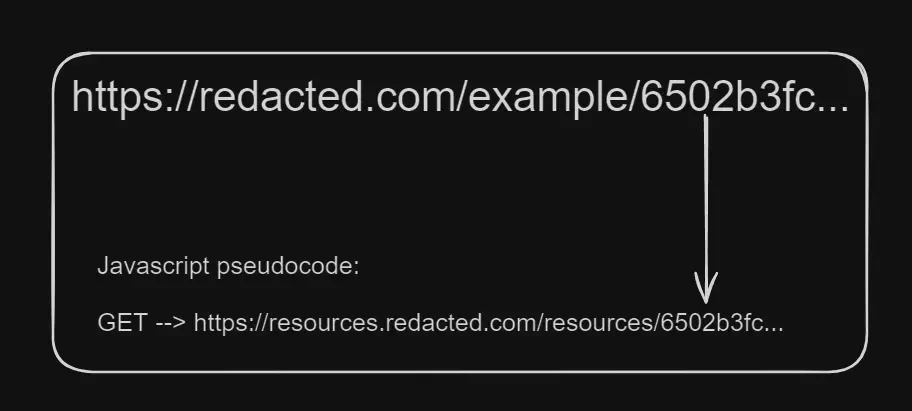
While trying other identifiers, the researcher found that ..%2f could be used to control the route of the resource fetched by JavaScript. An example:
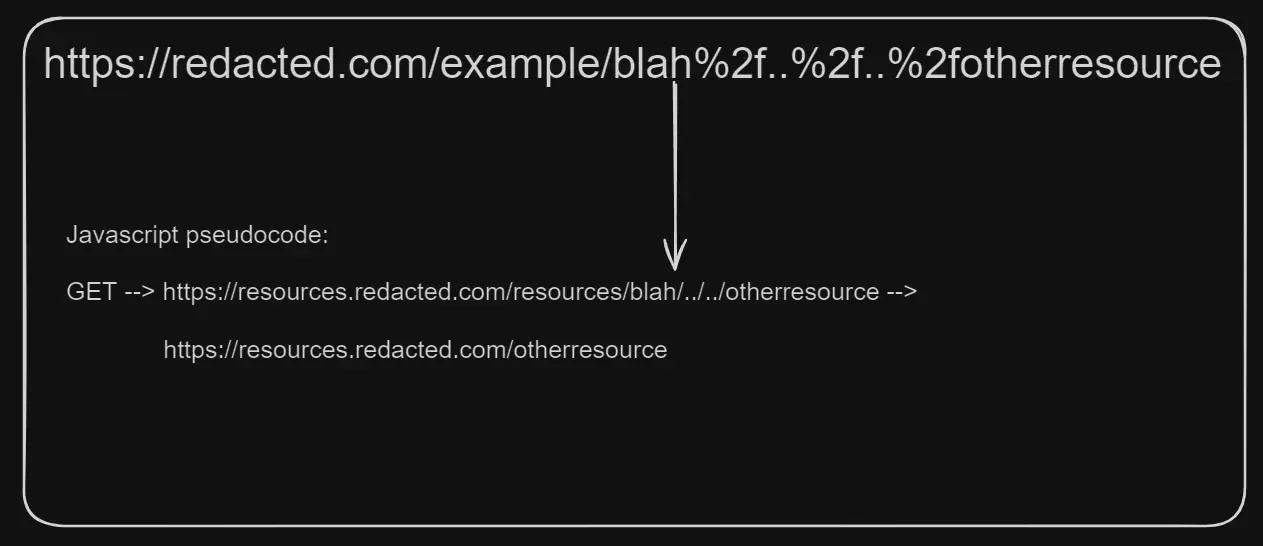
In the researcher's words this is a CSRF, because the GET route that the frontend JavaScript fetches can be controlled:
An attacker uses CSRF (Cross Site Request Forgery) to force users to make malicious authenticated requests.
On its own there is no security impact in that context, but it is worth recording small bugs because the same pattern may exist elsewhere in the application. That is exactly what happened next.
Exploitation
Step 1: the same traversal in the invitation flow
The traversal was present in a large part of the application's routes. The interesting one was accepting an invitation, which worked like this:
- The user visits
https://redacted.com/accept-invitation?userId=6502b3fc-22dd-4f16-a883-36d825aa8ca0&name=Nightbloodz&invitationId=e04cd1f5-e876-4d12-a4e8-9d7e05db0b0b. - A new page loads with a button labelled "Accept Invitation".
- Clicking the button sends a POST request to
https://redacted.com/invite/e04cd1f5-e876-4d12-a4e8-9d7e05db0b0b/accept, built from the supplied UUID.
Putting ..%2f in the ?invitationId= parameter means the URL can be sent to any user and the button will send an authenticated POST request to any endpoint on the domain. That is CSRF on all POST routes. An example of the attack:
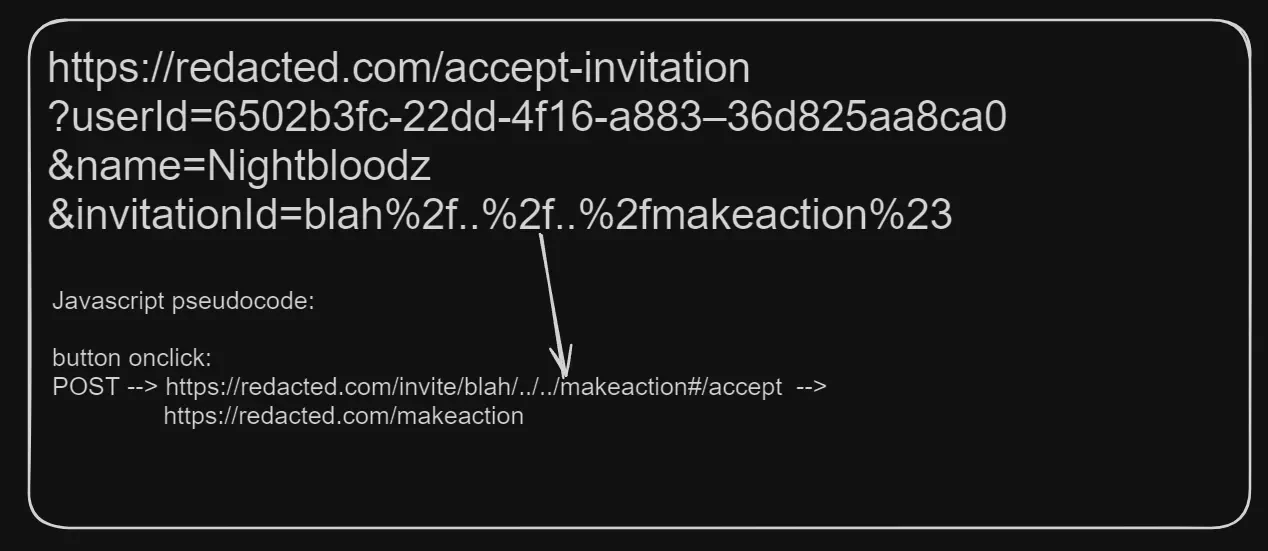
Step 2: choosing POST endpoints with impact
The researcher then looked for POST endpoints where a forced request would harm the victim. The final proof of concept:
- The victim clicks the invitation link and clicks "Accept invitation".
- An authenticated POST request is sent to one of the routes chosen by the attacker:
/logout, to log the user out/course/courseID/publish, to publish an existing draft/course/courseID/share/userid, to share a private course or resource with the attacker/course/courseID/delete, to delete a course or resource
There were many more low impact routes of the same kind.
Step 3: a self-XSS in the story creator
Using the same client-side path traversal, the researcher escalated a self-XSS. The story creator worked like this:
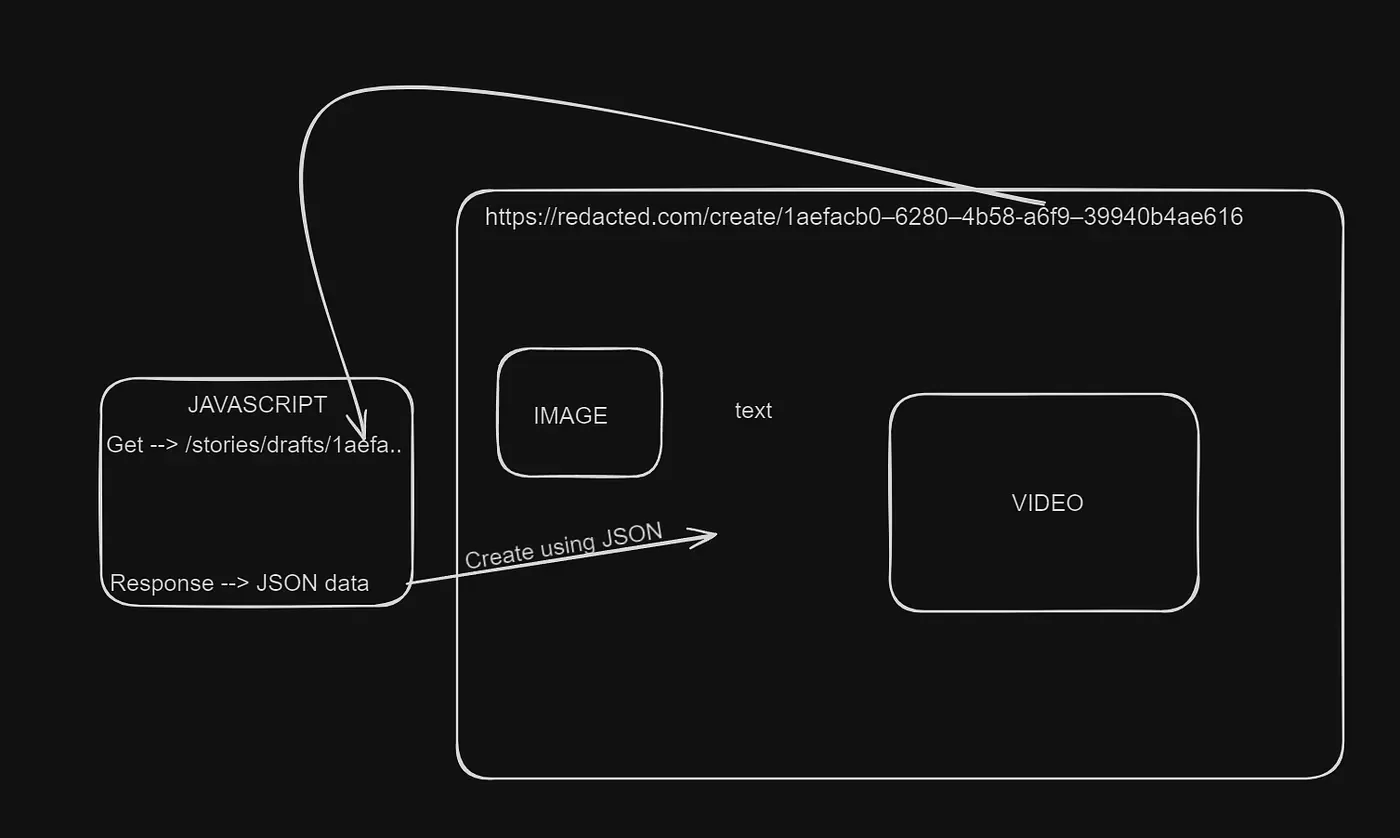
- A story draft is created. The draft is an editable collage where images, videos or text can be placed, reachable at
https://redacted.com/create/1aefacb0-6280-4b58-a6f9-39940b4ae616. - On that URL the JavaScript fetches
https://redacted.com/stories/drafts/1aefacb0-6280-4b58-a6f9-39940b4ae616using the draft UUID, which only the owner can access. The response is a JSON document with all the draft information, used to draw the story in the frontend:
[
  {
    "type":"image",
    "url":"https://image.com/image.jpg"
  },
  {
    "type":"video",
    "url":"https://video.com/video"
  },
  {
    "type":"text",
    "text":"text"
  },...]
- The draft can be published, and any user can then read the same data at
https://redacted.com/stories/1aefacb0-6280-4b58-a6f9-39940b4ae616/public.
While editing the draft, an error response revealed an extra object type. Sending this JSON to change the draft:
[
  {
    "type":"thistypedoesnotexist"
  }]
returned:
{"error":"thistypedoesnotexist type doesn't exist, use video, image, text or iframe."}
So an iframe object could be created in the draft, and its full URL was under the attacker's control. That allows javascript:alert() to trigger XSS, and JavaScript code can read the session token, which leads to account takeover. Editing the draft with:
[
  {
    "type":"iframe",
    "url":"javascript:alert()"
  }]
resulted in XSS:
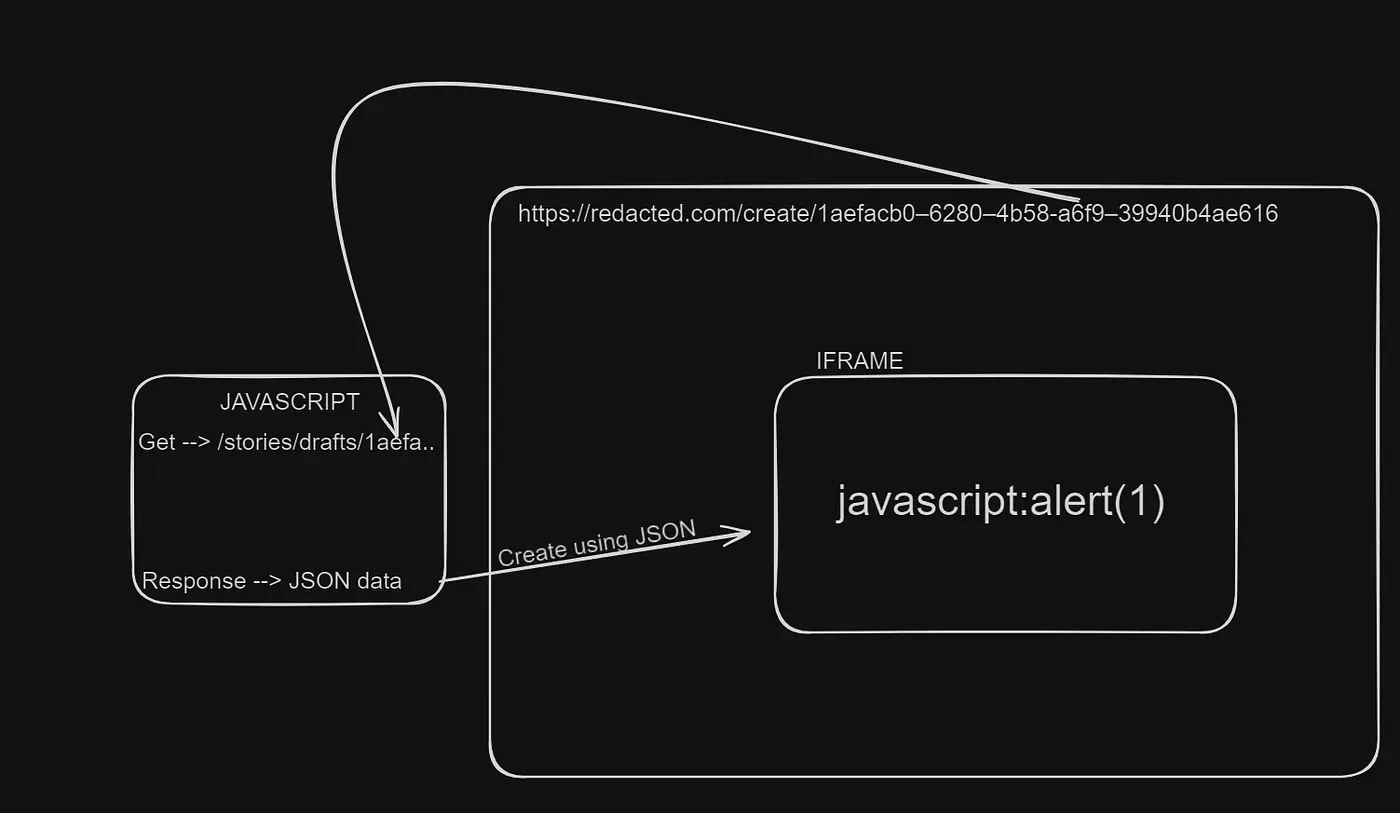
Step 4: from self-XSS to XSS against any user
The limitation is that only the draft owner can trigger that XSS, so it cannot affect anyone else. The researcher tried the published version of the story instead of the draft: the iframe object was present in the public JSON data, but the iframe was not rendered in the public story.
The JavaScript resource fetching in this workflow was similar to the accept invitation flow and was vulnerable to client-side path traversal. The objective became to make the frontend load the public story JSON instead of the draft JSON, so that any user would receive the story data and trigger the XSS.
/stories/drafts/1aefacb0-6280-4b58-a6f9-39940b4ae616is inaccessible to other users but contains the same information as/stories/1aefacb0-6280-4b58-a6f9-39940b4ae616/public.- The draft functionality was vulnerable to client-side path traversal, so injecting the public JSON route into the URL makes the JavaScript load the desired JSON.
Draft URL without the injection, as loaded by another user:
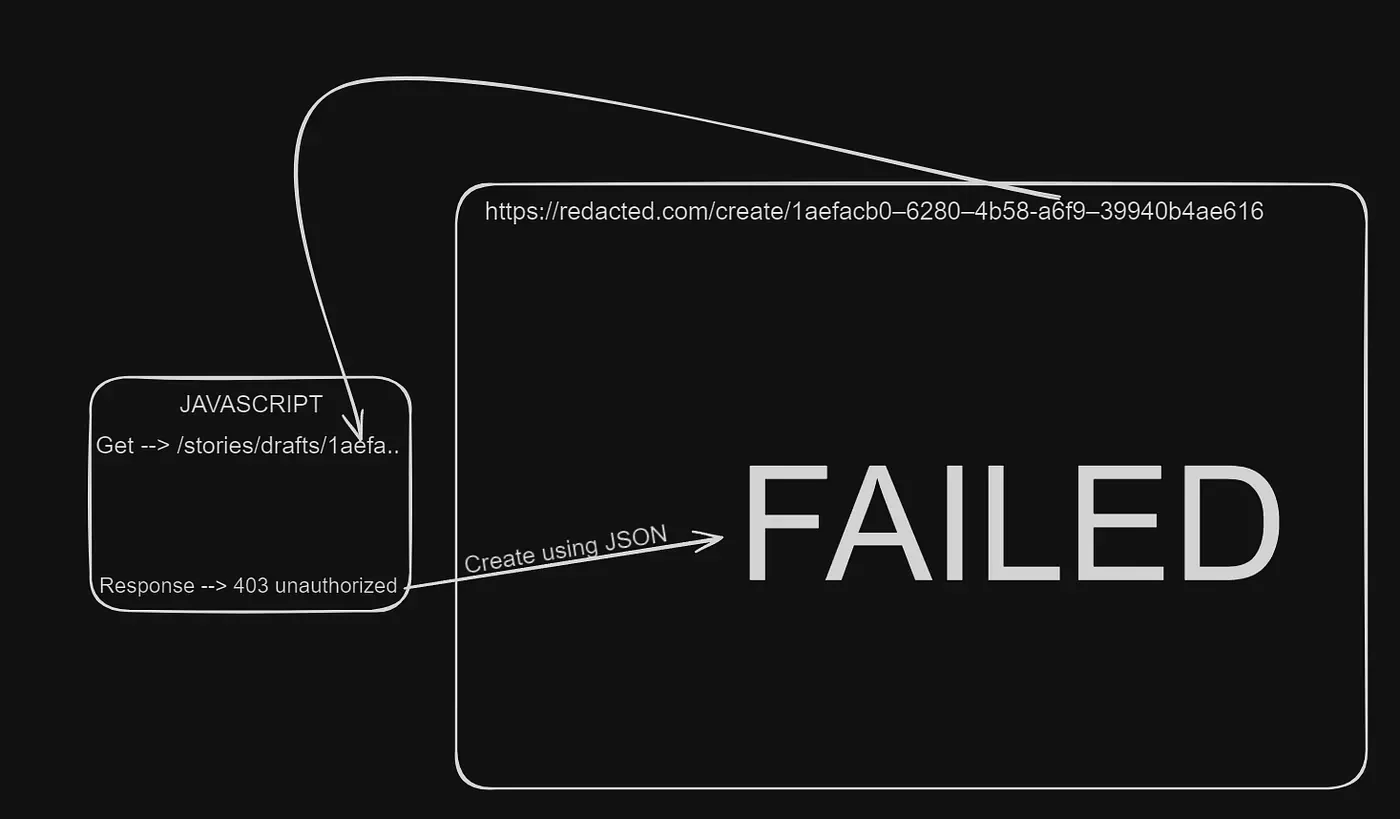
Draft URL with the injection, as loaded by another user:
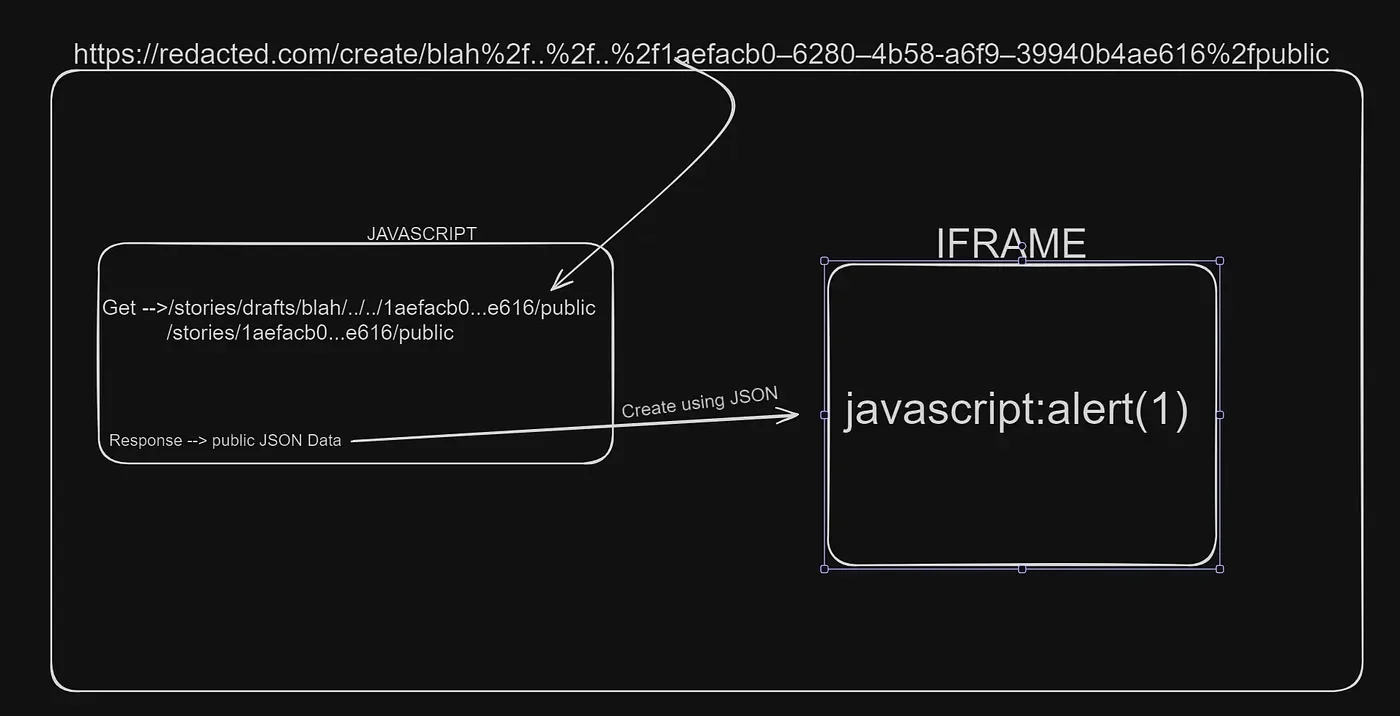
With that injection, any user who loads the crafted URL is affected by the XSS, and the researcher could take over their account with JavaScript, reading only their session token from memory storage.
Root cause
The underlying mistake is that the frontend builds the URL of a resource it fetches from an identifier taken from the page URL, and the identifier is not constrained to a single path segment. Encoded slashes and dot segments (..%2f) survive into the constructed request path, so the attacker controls which route on the same origin is fetched. The frontend then fetches a route the attacker chose, which is why the same primitive becomes CSRF when the fetched route is a POST, and XSS when the fetched route returns attacker-controlled JSON that the frontend renders. including an iframe whose url accepts a javascript: scheme.
The report does not describe any server-side validation or client-side sanitisation that was supposed to stop this, so the specific defence that failed is not stated.
Impact
Two distinct impacts were demonstrated:
- CSRF on all POST routes of the domain, delivered through an invitation link the victim has to click and then confirm with the "Accept Invitation" button. The concrete effects shown are logging the victim out, publishing an existing draft, sharing a private course or resource with the attacker, and deleting a course or resource, plus many other low impact routes.
- Account takeover through XSS affecting any user who loads the crafted
/create/...URL, by extracting the session token from memory storage.
The programme rated the account takeover as MEDIUM (6.1) severity. The researcher disagreed, noting that the triager accepted that severity when asked for a correction, and that the company took almost two months to evaluate the CSRF report.


Fix
The report does not say what the company changed. Based on the described behaviour, the fixes would be to normalise and validate the identifier taken from the URL so that it cannot contain encoded slashes or dot segments, and to restrict the iframe url to safe schemes rather than accepting javascript:.
Variants to test
- Look for frontend code that takes an identifier from the page URL and interpolates it into a fetch path. Replace the identifier with
..%2fsequences and see whether the request goes to a different route on the same origin. A positive result is a request to a path you chose rather than the expected resource path. - Apply the same test to flows where a click produces an authenticated POST, such as invitation acceptance, confirmation dialogues and share buttons. A positive result is a POST arriving at an endpoint you selected through the parameter.
- Enumerate POST endpoints that change state (logout, publish, share, delete) and check whether a forced request from a victim produces the effect. A positive result is the state change happening without the victim intending it.
- In editors that accept structured JSON, send an unknown
typevalue and read the error message. A positive result is an error that lists the accepted types, revealing objects such asiframethat are not exposed in the UI. - Where an object accepts a URL, try
javascript:and check whether it executes. A positive result is script execution in the application origin. - Compare the private draft route with the public published route for the same object. If the public route returns the same data, try to make the frontend load the public route through traversal so that other users render attacker-controlled content. A positive result is another user triggering the payload from a URL you send them.
What happened, in plain words
A security researcher spent some time on a learning website that he had used a lot in high school. The site runs a bug bounty programme on Intigriti, which is a platform where companies invite researchers to look for security problems and pay them for reporting them. Because the programme is private, the company cannot be named, so the write-up calls it REDACTED and uses redacted.com wherever a real address would appear.
The site is a web application. It has courses, invitations to join things, a story creator where you build a collage of images, videos and text, and a publishing step that makes a story public. Those four features are where everything in this article happens.
The researcher did not start with a clever idea. He started by using the site like a normal person: clicking through every screen he could reach, trying each button, and poking at each feature a little without getting lost in one place for too long. That habit of walking the whole application first is what led to everything else.
What he found, in order, was:
- A bug where one user could reach another user's resource just by knowing its identifier. The company closed it as an accepted risk.
- A way to make the site's own JavaScript fetch a different address than the one it intended, by putting
..%2finto a value taken from the page URL. - The same trick in the invitation flow, which turned it into a way to make a logged-in victim send requests they never meant to send.
- The same trick again in the story creator, which turned a harmless "only I can trigger this" script bug into one that hits any user who opens a link.
Before going further, a few ideas need explaining, because the rest of the article leans on them.
What a URL is. A URL is the address of something on the web, like https://redacted.com/example/abc. The part after the domain, here /example/abc, is called the path. Think of the domain as a building and the path as the room number inside it.
What JavaScript is. JavaScript is the programming language that runs inside your browser. When you open a page, the page's JavaScript can do things on your behalf: fetch data from the server, draw the page, react to clicks. Crucially, it runs with your logged-in identity, because the browser attaches your session automatically.
What a session and a session token are. When you log in, the server gives your browser a secret string called a session token (often stored in a cookie or in the browser's memory storage). Your browser sends it with every request so the server knows it is you. Anyone who steals that token can act as you without knowing your password. That is why stealing it is called account takeover.
What an API is. An API is the set of addresses a website's frontend uses to talk to its backend. Instead of full web pages, these addresses usually return raw data, often in a format called JSON. Think of a restaurant: the menu is the API, the kitchen is the server, and the waiter carrying your order back and forth is the JavaScript in your browser.
What JSON is. JSON is a plain text way of writing structured data, using curly braces {} for objects and square brackets [] for lists. A story draft, for example, might be a list of pieces, each with a type and some content.
What an IDOR is. IDOR stands for Insecure Direct Object Reference. It means the application lets you reach an object (a file, a record, a resource) just by knowing its identifier, without checking that the object belongs to you. The everyday comparison: a hotel where room keys are numbered 101, 102, 103 and the reception never checks whether you are the guest of room 103 before handing you the key.
What path traversal is. In a file path, .. means "go up one folder". So folder/../other really means other. If a program builds an address by gluing a value you control onto a fixed prefix, and you can sneak .. in, you can make it walk out of the intended place and land somewhere else. %2f is just the URL-encoded form of the slash /, used so the slash survives inside a value instead of being treated as a separator. When this happens in the browser's JavaScript rather than on the server, it is called client-side path traversal.
What CSRF is. CSRF stands for Cross-Site Request Forgery. It means tricking a logged-in user's browser into sending a request the user did not intend. Because the browser attaches the session automatically, the server sees a perfectly valid request from a real user. The everyday comparison: someone hands you a form to sign at the door, you sign it thinking it is a guest book, and it turns out to be a cheque.
What XSS is. XSS stands for Cross-Site Scripting. It means getting your own JavaScript to run inside someone else's browser, in the context of the target website. Once your code runs there, it can read what the site's own code can read, including the session token. A self-XSS is the weak version: the script only runs for the person who typed it, so it harms nobody else. Turning a self-XSS into a real XSS means finding a way to make other people load the payload.
With those ideas in hand, here is the story in order.
Setup
The write-up does not describe any special tools, accounts or software versions. The work was done against the live private programme.
Everything here depends on the victim's browser quietly attaching their session to requests that the site's own JavaScript makes. If the victim is not logged in, there is no session to abuse.
Finding it
The first thing the researcher found was an IDOR. The company looked at it and closed it as accepted risk, meaning they knew about it and chose not to fix it. The researcher quotes the standard definition so the reader knows what the term means:
Insecure direct object references (IDOR) is a web application security vulnerability that occurs when an application exposes internal object identifiers, such as database keys or file paths, to users without proper access controls.
That IDOR turned out to be the key to the later bugs, because it showed exactly where the application takes an identifier from the URL and uses it to fetch something. The flow looked like this:
- The user visits
https://redacted.com/example/7ce9f641-e29a-4d01-bea1-2b83924d8358. - The JavaScript on that page fetches a resource using the UUID from the URL:
https://resources.redacted.com/resources/7ce9f641-e29a-4d01-bea1-2b83924d8358. - That resource path had an IDOR on the UUID, so any user could reach that specific route.
A UUID is a long random-looking identifier, like 7ce9f641-e29a-4d01-bea1-2b83924d8358. It is meant to be hard to guess, but here the point is not guessing: the point is that once you have one, the server does not check whether it is yours.
Step by step: the address you type in your browser ends in an identifier. The page's JavaScript reads that identifier out of the address bar and uses it to build a second address on a different host, resources.redacted.com, to fetch the actual file. Because the server on that second host never checks ownership, anyone holding the identifier can fetch the file. That is the IDOR.
While trying other identifiers in that same place, the researcher found that ..%2f could be used to control the route of the resource fetched by JavaScript. An example:
What this means in plain words: instead of putting a normal identifier in the address, you put a value containing ..%2f. The JavaScript glues that value onto its fixed prefix and asks the server for the result. Because .. means "go up a level" and %2f is an encoded slash, the resulting address walks out of the intended folder and lands on a route of your choosing. The browser does exactly what it was told; the mistake is that it was told using a value the attacker controls.
In the researcher's words this is a CSRF, because the GET route that the frontend JavaScript fetches can be controlled:
An attacker uses CSRF (Cross Site Request Forgery) to force users to make malicious authenticated requests.
A GET request is the ordinary kind your browser makes when you open a page or load an image: it asks for something and does not change anything on the server. A POST request is the kind used to submit a form or press a button that changes something. The distinction matters later, because a GET that only reads data is usually harmless, while a POST that changes data is where the damage is.
On its own, in this context, there is no security impact: the attacker can make the victim's browser fetch a page, but nothing bad happens yet. The researcher still wrote it down, because small bugs are worth recording: the same pattern may exist elsewhere in the application, and there it may matter. That is exactly what happened next.
Exploitation
Step 1: the same traversal in the invitation flow
The traversal was present in a large part of the application's routes. The interesting one was accepting an invitation, which worked like this:
- The user visits
https://redacted.com/accept-invitation?userId=6502b3fc-22dd-4f16-a883-36d825aa8ca0&name=Nightbloodz&invitationId=e04cd1f5-e876-4d12-a4e8-9d7e05db0b0b. - A new page loads with a button labelled "Accept Invitation".
- Clicking the button sends a POST request to
https://redacted.com/invite/e04cd1f5-e876-4d12-a4e8-9d7e05db0b0b/accept, built from the supplied UUID.
A few things to unpack. The part after the ? is called the query string: it is a list of name=value pairs, here userId, name and invitationId. The page reads those values and uses them to build the address it will POST to when the button is clicked. So the invitationId value is not just displayed; it becomes part of the address the browser will send a request to.
Putting ..%2f in the ?invitationId= parameter means the URL can be sent to any user and the button will send an authenticated POST request to any endpoint on the domain. That is CSRF on all POST routes. An example of the attack:
In plain words: the attacker crafts an invitation link whose invitationId value contains ..%2f sequences. When the victim opens the link, they see a normal-looking page with an "Accept Invitation" button. When they click it, the page's JavaScript builds a POST address using the tampered value, and because of the ..%2f the address points at a completely different endpoint on the same site. The browser attaches the victim's session automatically, so the server sees a legitimate request from the victim. The victim never intended to send it. That is the whole trick.
Step 2: choosing POST endpoints with impact
Having a way to make a victim send any POST is only useful if some POST does something worth doing. So the researcher went looking for POST endpoints where a forced request would harm the victim. The final proof of concept:
- The victim clicks the invitation link and clicks "Accept invitation".
- An authenticated POST request is sent to one of the routes chosen by the attacker:
/logout, to log the user out/course/courseID/publish, to publish an existing draft/course/courseID/share/userid, to share a private course or resource with the attacker/course/courseID/delete, to delete a course or resource
There were many more low impact routes of the same kind.
Why each of these matters: logging the victim out is annoying but harmless. Publishing a draft makes private work public without consent. Sharing a private course with the attacker hands over content the victim meant to keep private. Deleting a course destroys data. None of these require the attacker to know the victim's password; they only require the victim to click one button on a page the attacker sent them.
Step 3: a self-XSS in the story creator
Using the same client-side path traversal, the researcher escalated a self-XSS. The story creator worked like this:
- A story draft is created. The draft is an editable collage where images, videos or text can be placed, reachable at
https://redacted.com/create/1aefacb0-6280-4b58-a6f9-39940b4ae616. - On that URL the JavaScript fetches
https://redacted.com/stories/drafts/1aefacb0-6280-4b58-a6f9-39940b4ae616using the draft UUID, which only the owner can access. The response is a JSON document with all the draft information, used to draw the story in the frontend:
[
  {
    "type":"image",
    "url":"https://image.com/image.jpg"
  },
  {
    "type":"video",
    "url":"https://video.com/video"
  },
  {
    "type":"text",
    "text":"text"
  },...]
Line by line: the outer square brackets [ and ] mean "this is a list". Each { ... } inside is one item in the list. The first item has "type":"image" and a "url" pointing at an image; the second has "type":"video" and a "url" pointing at a video; the third has "type":"text" and a "text" field holding the words to show. The ... at the end means "and so on for the rest of the items". The frontend reads this list and draws each item on the page according to its type. So the JSON is effectively a set of instructions for the page: draw an image here, a video there, some text there.
- The draft can be published, and any user can then read the same data at
https://redacted.com/stories/1aefacb0-6280-4b58-a6f9-39940b4ae616/public.
While editing the draft, an error response revealed an extra object type. Sending this JSON to change the draft:
[
  {
    "type":"thistypedoesnotexist"
  }]
returned:
{"error":"thistypedoesnotexist type doesn't exist, use video, image, text or iframe."}
What happened here: the researcher deliberately sent a nonsense type value to see what the server would say. The server's error message listed the types it accepts: video, image, text, and iframe. An iframe is a way to embed another web page inside the current page, like a small window showing a different site. Error messages that list what is allowed are a classic way to discover hidden features.
So an iframe object could be created in the draft, and its full URL was under the attacker's control. That allows javascript:alert() to trigger XSS, and JavaScript code can read the session token, which leads to account takeover. Editing the draft with:
[
  {
    "type":"iframe",
    "url":"javascript:alert()"
  }]
resulted in XSS:
Line by line: this JSON tells the story creator to add one item whose type is iframe and whose url is javascript:alert(). Normally a URL starts with https:// and points at a page. But javascript: is a special scheme that means "run the code that follows as JavaScript". So instead of loading a page into the iframe, the browser runs alert(), which pops up a dialog box. That is the harmless demonstration. The same trick with real code would read the session token from memory storage and send it to the attacker, which is account takeover.
The catch is that this only works for the person who owns the draft. The researcher could make his own browser run his own code, which harms nobody. That is why it is called a self-XSS.
Step 4: from self-XSS to XSS against any user
The limitation is that only the draft owner can trigger that XSS, so it cannot affect anyone else. The researcher tried the published version of the story instead of the draft: the iframe object was present in the public JSON data, but the iframe was not rendered in the public story. In other words, the public page received the iframe instruction but ignored it, so the payload did not fire there.
The JavaScript resource fetching in this workflow was similar to the accept invitation flow and was vulnerable to client-side path traversal. The objective became to make the frontend load the public story JSON instead of the draft JSON, so that any user would receive the story data and trigger the XSS.
/stories/drafts/1aefacb0-6280-4b58-a6f9-39940b4ae616is inaccessible to other users but contains the same information as/stories/1aefacb0-6280-4b58-a6f9-39940b4ae616/public.- The draft functionality was vulnerable to client-side path traversal, so injecting the public JSON route into the URL makes the JavaScript load the desired JSON.
Draft URL without the injection, as loaded by another user:
Draft URL with the injection, as loaded by another user:
Line by line: the first address is the normal one. The page's JavaScript reads the identifier at the end and fetches the private draft JSON, which only the owner can read. The second address replaces the identifier with blah%2f..%2f..%2f1aefacb0-6280-4b58-a6f9-39940b4ae616%2fpublic. When the JavaScript glues this onto its fixed prefix, the ..%2f pieces walk up out of the drafts folder and the trailing %2fpublic lands on the public version of the same story. So the frontend ends up fetching the public JSON, which any user is allowed to read, and that JSON contains the iframe with the javascript: URL. The victim's browser then renders it and runs the attacker's code.
With that injection, any user who loads the crafted URL is affected by the XSS, and the researcher could take over their account with JavaScript, reading only their session token from memory storage.
That is the escalation in one sentence: the same traversal trick that was harmless in the resource viewer and dangerous in the invitation flow turns a self-only script bug into one that hits anyone who clicks a link.
Root cause
The underlying mistake is that the frontend builds the URL of a resource it fetches from an identifier taken from the page URL, and the identifier is not constrained to a single path segment. Encoded slashes and dot segments (..%2f) survive into the constructed request path, so the attacker controls which route on the same origin is fetched. The server side then treats the request as a normal authenticated request from the victim, which is why the same primitive becomes CSRF when the fetched route is a POST, and becomes stored XSS when the fetched route returns attacker-controlled JSON that the frontend renders, including an iframe whose url accepts a javascript: scheme.
In everyday terms: the application trusted a value that came from the user, and used it to decide where to go. Because the browser carries the user's session automatically, "where to go" became "what the user's account will do".
The report does not describe any server-side validation or client-side sanitisation that was supposed to stop this, so the specific defence that failed is not stated. Likely the identifier was interpolated into a path without normalisation or an allowlist, and the iframe URL was not restricted to safe schemes.
Impact
Two distinct impacts were demonstrated:
- CSRF on all POST routes of the domain, delivered through an invitation link the victim has to click and then confirm with the "Accept Invitation" button. The concrete effects shown are logging the victim out, publishing an existing draft, sharing a private course or resource with the attacker, and deleting a course or resource, plus many other low impact routes.
- Account takeover through XSS affecting any user who loads the crafted
/create/...URL, by extracting the session token from memory storage.
The programme rated the account takeover as MEDIUM (6.1) severity. The researcher disagreed, noting that the triager accepted that severity when asked for a correction, and that the company took almost two months to evaluate the CSRF report.
A triager is the person at the bug bounty platform who reads a report first, checks it is valid and assigns a severity. Severity scales like CVSS turn a bug into a number so programmes can decide how much to pay; a higher number means a worse bug. The researcher's complaint is that account takeover was scored as medium and paid little, even though the programme supposedly values PII disclosure.
Fix
Based on the described behaviour, the fixes would be to normalise and validate the identifier taken from the URL so that it cannot contain encoded slashes or dot segments, and to restrict the iframe url to safe schemes rather than accepting javascript:.
In plain words: before using a value from the URL to build another address, clean it up and check it looks like a single identifier, not a path. And when accepting a URL for an iframe, only allow schemes like https:, never javascript:.
Variants to test
If you want to look for the same kind of bug yourself, here is the same checklist in beginner terms. Each item says what to do and what a positive result looks like.
- Look for frontend code that takes an identifier from the page URL and interpolates it into a fetch path. Replace the identifier with
..%2fsequences and see whether the request goes to a different route on the same origin. A positive result is a request to a path you chose rather than the expected resource path. - Apply the same test to flows where a click produces an authenticated POST, such as invitation acceptance, confirmation dialogues and share buttons. A positive result is a POST arriving at an endpoint you selected through the parameter.
- Enumerate POST endpoints that change state (logout, publish, share, delete) and check whether a forced request from a victim produces the effect. A positive result is the state change happening without the victim intending it.
- In editors that accept structured JSON, send an unknown
typevalue and read the error message. A positive result is an error that lists the accepted types, revealing objects such asiframethat are not exposed in the UI. - Where an object accepts a URL, try
javascript:and check whether it executes. A positive result is script execution in the application origin. - Compare the private draft route with the public published route for the same object. If the public route returns the same data, try to make the frontend load the public route through traversal so that other users render attacker-controlled content. A positive result is another user triggering the payload from a URL you send them.
Glossary
- API: the set of addresses a website's frontend uses to talk to its backend, usually returning raw data rather than full pages.
- Accepted risk: a decision by the company to leave a known bug unfixed, usually because they judge the cost of fixing it higher than the risk.
- Account takeover: an attacker gaining control of someone else's account, typically by stealing their session token.
- Bug bounty programme: a scheme where a company invites researchers to find security problems and pays them for valid reports.
- Client-side: happening in the user's browser rather than on the server.
- Client-side path traversal: using
..sequences in a value the browser's JavaScript uses to build an address, so the browser fetches a different route than intended. - CSRF (Cross-Site Request Forgery): tricking a logged-in user's browser into sending a request the user did not intend, with the browser attaching the session automatically.
- CVSS: a scoring system that turns the severity of a vulnerability into a number.
- Endpoint: a specific address on a server that accepts requests, such as
/logoutor/course/courseID/delete. - GET: an ordinary request that asks for something and does not change anything on the server.
- IDOR (Insecure Direct Object Reference): a bug where an object can be reached just by knowing its identifier, without checking that it belongs to you.
- iframe: an HTML element that embeds another web page inside the current page.
- Intigriti: a bug bounty platform where companies run programmes and researchers submit reports.
- JavaScript: the programming language that runs inside your browser and can fetch data, draw pages and react to clicks on your behalf.
- JSON: a plain text format for structured data, using
{}for objects and[]for lists. - Path: the part of a URL after the domain, such as
/example/abc. - POST: a request used to submit data or press a button that changes something on the server.
- Query string: the part of a URL after the
?, made ofname=valuepairs. - Self-XSS: a script bug that only runs for the person who typed the payload, so it harms nobody else.
- Session: the state of being logged in, maintained by a token the browser sends with every request.
- Session token: the secret string that proves to the server who you are; stealing it allows account takeover.
- Severity: a rating of how bad a vulnerability is, often expressed as a CVSS number.
- Triager: the person at a bug bounty platform who first reads a report, checks it is valid and assigns a severity.
- UUID: a long random-looking identifier, such as
7ce9f641-e29a-4d01-bea1-2b83924d8358. - XSS (Cross-Site Scripting): getting your own JavaScript to run inside someone else's browser in the context of the target website.
..: in a file path, means "go up one folder".%2f: the URL-encoded form of the slash/, used so a slash survives inside a value instead of being treated as a separator.javascript:: a URL scheme that means "run the code that follows as JavaScript" instead of loading a page.



