SSRF Vulnerability on Major Gaming Company
A content-fetching endpoint accepted a full URL in place of a filename, allowing the server to make requests to arbitrary internal addresses. The attacker confirmed this by reaching the cloud metadata service and retrieving instance metadata.

Bug Bounty
The full write-up lives on its author's site
It belongs to its author, so we link to it rather than copy it. The other two tabs are our own rewrites, checked against it.
Context
The target is a content service belonging to a gaming company. It fetches files through an API endpoint built around a module ID, a version number and a filename. That kind of feature, a fetch-by-reference, is the classic shape of a server-side request forgery bug: the interesting question is never whether it works for the intended resource, but what happens when you point it somewhere the developers never intended.
The report frames this as a confirmed case rather than a hypothetical. Wiz's published benchmark data lists this exact challenge as Content SSRF, an AWS IMDS SSRF taken from a real hack that Nagli carried out against a gaming company, and it paid out $27,500. Wiz later ran AI agents against the same challenge, and more than one solved it for under ten dollars in compute.
Setup
The researcher worked against the site itself, with Caido running in the background to capture everything passing through the browser.
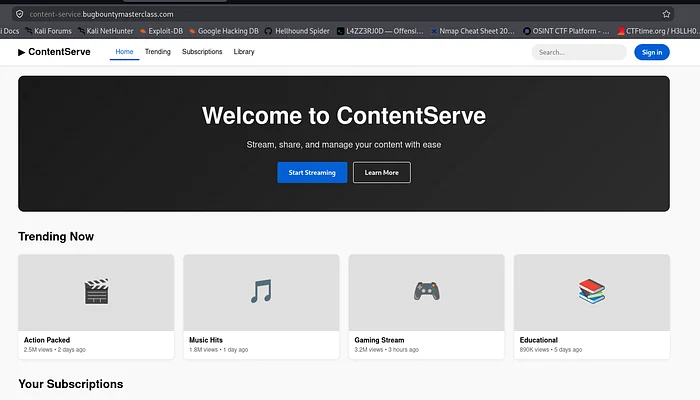
No accounts, roles or special preconditions are described beyond that: a browser, Caido, and the site's own UI and console.
Finding it
Nothing useful came out of interacting with the UI directly. The page source told a different story: a script was firing off requests to fetch content in the background. That only became visible once Caido was watched catching the traffic in real time.
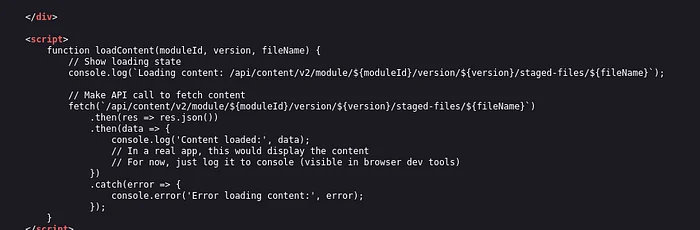
The background fetch was pulling a specific file through an API endpoint built around three things: a module ID, a version number, and a filename. That raised the obvious question. What happens if the filename parameter is not actually limited to real files sitting on the server?
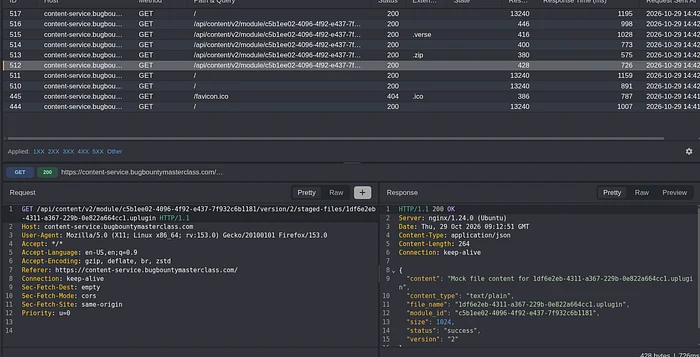
Because the whole fetch happened client-side, with only a success message logged quietly in the background rather than anything rendered on the page, calling the endpoint directly from the browser console was the fastest way to test it without fighting the UI.
Exploitation
Step 1: replace the filename with a hostname
The general lesson the researcher draws out is worth stating before the payloads: whenever you see an endpoint fetching a file by name, do not just try other filenames, try handing it a full URL instead and see whether it still obliges. The first probe put localhost where the filename normally went.
localhost
It answered. A fake-looking auth token came back with the response, along with a header dump confirming that the server was genuinely making an internal request on its own behalf rather than echoing something back. The token itself did not lead anywhere further; it was decorative rather than a real way in.

Step 2: aim at the metadata service
If the endpoint was willing to reach localhost without blinking, the test worth running next was the cloud metadata endpoint.
[redacted]
Pointed at that address instead, the endpoint fetched it too, with no hesitation and no filtering on where the URL parameter was allowed to point. That confirmed a full SSRF into the instance's own metadata service.

That is the whole bug, start to finish: a file-fetching feature that never checked whether what it was fetching was a file at all.
Root cause
The endpoint accepted a hostname or IP address where a filename was expected and fetched it, so the value was not limited to real files on the server. Once a full URL, or a bare host such as localhost or [redacted], was accepted in that position, the server made the request on its own behalf, from inside the network, with whatever reach the instance had.
The report describes no filtering on where the URL parameter was allowed to point, and nothing blocked the link-local metadata address. The report does not describe any other defence that was present and bypassed.
Impact
An attacker who can reach the endpoint can make the server issue requests to destinations of their choosing, including internal services and the cloud metadata service. In this case the metadata service was reached, which on AWS is the usual route to instance credentials and configuration. The report does not show what was retrieved from the metadata service beyond confirming the fetch succeeded, and the auth token returned by the localhost probe is described as decorative rather than a real way in.
The conditions are simply that the endpoint is reachable and that the filename parameter is passed through to the fetch unfiltered.
Fix
The change that follows from the root cause is to stop treating the parameter as a URL: resolve the requested name against a fixed set of permitted files, or validate it against an allowlist of hosts, schemes and paths, and block link-local and internal address ranges at the point where the request is made.
Variants to test
- Any endpoint that takes a filename, path or resource name and fetches it. Replace the value with
localhostand look for a response body, headers or timing that shows the server made the request itself. - The same parameter with
[redacted]in place of the filename. A positive result is the metadata service answering, which confirms the request left the application and reached the instance's own link-local address. - Endpoints where the fetch happens client-side but is logged rather than rendered. Call them directly from the browser console, as here, so the UI does not hide the result.
- Watch the page source and the proxy for background scripts that fetch content. A request built from a module ID, a version number and a filename is a good candidate for this class of bug.
Nagli's own line on this one, quoted in the brief, was that finding something like this is harder than exploiting it once you have found it. Working through the lab made that obvious in practice: the entire technical move was one URL swapped in where a filename was expected. The real skill was the instinct to try it instead of assuming a fetch-by-filename endpoint was exactly what it looked like.
What happened, in plain words
A gaming company runs a content service. It fetches files through an API endpoint built around a module ID, a version number and a filename. Features like this are often called fetch-by-reference: instead of storing every file itself, the service is told "go get this thing from over there" and it does.
That convenience is also the classic shape of a bug class called server-side request forgery, usually shortened to SSRF. The name sounds intimidating, but the idea is easy. Normally, when your browser asks for a web address, your computer makes the request. In SSRF, you trick the server into making the request for you, to an address of your choosing. The interesting question is never whether the feature works for the resource it was built for. The interesting question is what happens when you point it somewhere the developers never intended.
This write-up is about exactly that. A researcher found that a file-fetching feature would happily fetch things that were not files at all, including an address that only exists inside the company's own network. That is the whole bug, start to finish.
The report also gives some background. Wiz, a security company, publishes benchmark data for training challenges, and it lists this exact challenge as Content SSRF, an AWS IMDS SSRF taken from a real hack that a researcher called Nagli carried out against a gaming company. That hack paid out $27,500. Wiz later ran AI agents against the same challenge, and more than one solved it for under ten dollars in compute. Whether that says the bug class is very learnable, or that the models got lucky, is left open.
A few of those terms deserve a plain definition before we go further, because the rest of the article leans on them.
- A URL is a web address, like the thing you type into your browser's address bar. It has a scheme (
httporhttps), a host (the machine's name or number), and usually a path to a particular resource. - An API (application programming interface) is a way for one piece of software to talk to another. Instead of a page designed for a human to look at, an API is a set of addresses that return raw data. When a website loads something in the background, it is usually calling an API.
- Client-side means the work happens in your browser, on your computer. Server-side means it happens on the company's machine, far away. The distinction matters enormously here: an SSRF is only interesting when the request is made server-side, because that is when the server's own network position gets used.
- localhost is a special hostname that always means "this very machine". If your laptop talks to
localhost, it is talking to itself. If a server talks tolocalhost, it is talking to itself too, and that is a very different place from the public internet. - A token is a short string of characters that acts like a temporary pass. You show it to a service to prove you were allowed in. It is not a password, but it works a bit like a ticket.
- Headers are the small pieces of extra information that travel with every web request and response: what kind of content is being sent, what server answered, and so on. They are like the label on a parcel rather than the parcel itself.
- Cloud metadata is a small service that cloud providers run on every virtual machine. It tells the machine about itself: its identity, its configuration, and often temporary credentials. It is reachable only from inside, at a fixed address, and that is exactly why attackers want to reach it.
Setting up
The researcher worked against the site itself, with a tool called Caido running in the background. Caido is a proxy: it sits between your browser and the internet and records every request and response that passes through. Think of it as a security camera pointed at the road between your browser and the website. You browse normally, and the camera keeps a log of everything.
No accounts, roles or special preconditions are described beyond that. The setup was a browser, Caido, and the site's own user interface and browser console. The browser console is a panel built into every browser where you can type commands and see messages the page logs. It is normally hidden; you open it with the developer tools.
Finding it
The first step was simply to use the site. Nothing useful came out of clicking around the user interface directly. That is a common experience: the visible page looks ordinary, and the interesting behaviour is happening behind it.
The page source told a different story. Page source is the raw text of the page, the instructions the browser was given before it drew anything on screen. Reading it revealed a script that was firing off requests to fetch content in the background. A script is a small program that runs inside the page. This one was quietly asking the server for things while the user looked at something else.
That only became visible once Caido was watched catching the traffic in real time. This is the reason for running a proxy in the first place: background requests never appear in the address bar, so without a recorder you would never know they happened.
The background fetch was pulling a specific file through an API endpoint built around three things: a module ID, a version number, and a filename. An endpoint is one specific address on an API, the way a particular counter in a building is one specific place you go to ask for one specific thing. Here the endpoint took three pieces of information and used them to decide which file to fetch.
That raised the obvious question. What happens if the filename parameter is not actually limited to real files sitting on the server? A parameter is one of the pieces of information you hand to an endpoint, like the fields in a form. The developers presumably expected a name like logo.png. The researcher wanted to know what the endpoint would do with something that was not a name at all.
Because the whole fetch happened client-side, with only a success message logged quietly in the background rather than anything rendered on the page, calling the endpoint directly from the browser console was the fastest way to test it without fighting the UI. In plain terms: the page did not show the result, it only wrote a line into the console saying it worked. So instead of clicking buttons and hoping, the researcher typed the request by hand into the console and read the answer directly. This is a standard move: when the interface hides the result, go around the interface.
Exploitation
Step 1: replace the filename with a hostname
Before the payloads, here is the general lesson the researcher draws out, and it is worth remembering well past this one challenge. Whenever you see an endpoint fetching a file by name, do not just try other filenames. Try handing it a full URL instead, and see whether it still obliges.
The first probe put localhost where the filename normally went.
localhost
Line by line, there is only one line, and it is the whole payload. Normally this position would hold something like report.pdf, a name of a file on the server. Here it holds localhost, which is not a filename at all: it is a hostname, the name of a machine. The test is whether the endpoint notices the difference. If it treats the value as a filename, nothing happens. If it treats the value as an address to fetch from, the server will try to talk to itself.
It answered. A fake-looking auth token came back with the response, along with a header dump confirming that the server was genuinely making an internal request on its own behalf rather than echoing something back. In other words, the server did not just repeat the input back; it went and made a request, and the response headers were the evidence that a real internal conversation had taken place.
The token itself did not lead anywhere further. It was decorative rather than a real way in. That is worth noting honestly: not every interesting-looking string is a vulnerability on its own. The important finding was the behaviour, not the token.
Step 2: aim at the metadata service
If the endpoint was willing to reach localhost without blinking, the test worth running next was the cloud metadata endpoint. The reasoning is straightforward. Reaching localhost proves the server will make requests to addresses you choose. The metadata service is the most valuable address inside a cloud machine, so it is the natural next question.
[redacted]
Again, one line, and again it sits where a filename would normally go. [redacted] is a special IP address. IP addresses are the numeric form of a hostname: every machine on a network has one. The range starting 169.254 is reserved for link-local addresses, which are only meaningful on the local network segment and are never routed across the internet. Cloud providers use this particular address for their metadata service, which is why it appears in SSRF write-ups so often.
Pointed at that address instead, the endpoint fetched it too, with no hesitation and no filtering on where the URL parameter was allowed to point. Filtering here means checking the value against a list of allowed destinations and refusing anything else. There was none. That confirmed a full SSRF into the instance's own metadata service.
That is the whole bug, start to finish: a file-fetching feature that never checked whether what it was fetching was a file at all.
Root cause
The filename parameter was trusted as a filename. The endpoint accepted a hostname or IP address where a filename was expected and fetched it, so the value was not limited to real files on the server. Validating means checking that a value is the kind of thing you expect before using it. Here, nobody checked.
Once a full URL, or a bare host such as localhost or [redacted], was accepted in that position, the server made the request on its own behalf, from inside the network, with whatever reach the instance had. That last part is the heart of SSRF. The server sits inside the company's network, behind the firewall, next to things the public cannot reach. When you make it fetch on your behalf, you borrow its position.
The report describes no filtering on where the URL parameter was allowed to point, and nothing blocked the link-local metadata address. An allowlist is the opposite of a blocklist: instead of listing what is forbidden, you list what is permitted and refuse everything else. The report does not describe any other defence that was present and bypassed.
Impact
An attacker who can reach the endpoint can make the server issue requests to destinations of their choosing, including internal services and the cloud metadata service. In this case the metadata service was reached, which on AWS is the usual route to instance credentials and configuration. Credentials are the keys that prove an application is allowed to use cloud resources; if an attacker gets them, they can often act as the application itself.
The report does not show what was retrieved from the metadata service beyond confirming the fetch succeeded, and the auth token returned by the localhost probe is described as decorative rather than a real way in. So the confirmed impact is the ability to make the server reach internal destinations, with the metadata service demonstrably among them.
The conditions are simply that the endpoint is reachable and that the filename parameter is passed through to the fetch unfiltered.
Fix
The change that follows from the root cause is to stop treating the parameter as a URL: resolve the requested name against a fixed set of permitted files, or validate it against an allowlist of hosts, schemes and paths, and block link-local and internal address ranges at the point where the request is made.
In everyday terms: if the feature is meant to hand out files from a shelf, then look the name up on the shelf. Do not treat the name as directions to somewhere else in the building.
Variants to test
- Any endpoint that takes a filename, path or resource name and fetches it. Replace the value with
localhostand look for a response body, headers or timing that shows the server made the request itself. - The same parameter with
[redacted]in place of the filename. A positive result is the metadata service answering, which confirms the request left the application and reached the instance's own link-local address. - Endpoints where the fetch happens client-side but is logged rather than rendered. Call them directly from the browser console, as here, so the UI does not hide the result.
- Watch the page source and the proxy for background scripts that fetch content. A request built from a module ID, a version number and a filename is a good candidate for this class of bug.
Nagli's own line on this one, quoted in the brief, was that finding something like this is harder than exploiting it once you have found it. Working through the challenge made that obvious in practice: the entire technical move was one URL swapped in where a filename was expected. The real skill was the instinct to try it instead of assuming a fetch-by-filename endpoint was exactly what it looked like.
Glossary
- API: a set of addresses that one piece of software uses to talk to another, usually returning raw data rather than a page for a human.
- API endpoint: one specific address on an API, built to answer one specific kind of request.
- Allowlist: a list of things that are permitted, with everything else refused.
- AWS: Amazon Web Services, a cloud provider that rents out virtual machines and other computing resources.
- AWS IMDS: the AWS Instance Metadata Service, a small service reachable from inside a cloud machine that reports the machine's identity, configuration and often temporary credentials.
- Browser console: a panel in the browser's developer tools where you can type commands and read messages logged by the page.
- Caido: a proxy tool that sits between your browser and the internet and records every request and response.
- Client-side: happening in your browser, on your own computer.
- Cloud metadata: information a cloud provider exposes to each virtual machine about itself, including credentials; reachable only from inside.
- Credentials: the keys or secrets that prove an application is allowed to use a resource.
- Endpoint: see API endpoint.
- Fetch-by-reference: a feature where a service is given an address and goes and retrieves whatever is there, rather than storing the content itself.
- Filtering: checking a value against rules and refusing it if it does not match.
- Headers: small pieces of extra information sent with every web request and response, describing the content and the server.
- Hostname: the human-readable name of a machine on a network, such as
localhostor a website's domain. - IP address: the numeric form of a hostname, identifying a machine on a network.
- Link-local address: an address in the
169.254.x.xrange that is only meaningful on the local network segment and is never routed across the internet. - localhost: a special hostname that always refers to the machine making the request, so a server using it talks to itself.
- Module ID: an identifier for a piece of software or content, used here as one of the three values the endpoint was built around.
- Parameter: one of the pieces of information you supply to an endpoint, like a field in a form.
- Page source: the raw text of a web page, before the browser draws it on screen.
- Proxy: a tool that sits between your browser and the internet, forwarding traffic and recording it.
- Script: a small program that runs inside a web page.
- Server-side: happening on the company's machine rather than in your browser.
- SSRF (server-side request forgery): a bug where an attacker makes a server issue requests to an address of the attacker's choosing, borrowing the server's position inside the network.
- Token: a short string that acts as a temporary pass, shown to a service to prove you were allowed in.
- URL: a web address, made of a scheme, a host and usually a path to a resource.
- Validating: checking that a value is the kind of thing you expect before using it.
- Version number: a number identifying which release of something is being used, here one of the three values the endpoint was built around.



