Stored Cross-User XSS via Double-Decode Sanitizer Bypass in Reaction Notifications
A project management platform rendered reaction notifications by decoding a hex reaction code into HTML entities, sanitising the result with DOMPurify, then decoding entities again before assigning to innerHTML. Any workspace member could store a crafted reaction that executed JavaScript in another member's browser when they opened their notifications.

Stored Xss
The full write-up lives on its author's site
It belongs to its author, so we link to it rather than copy it. The other two tabs are our own rewrites, checked against it.
Context
The target was a project management platform with a comment reaction feature. Members of a workspace can react to each other's comments, and the platform notifies the comment author about the reaction. The notification shows who reacted, the emoji, and the comment text, for example "A reacted 😀 to your comment: [comment text]".
The finding is a stored cross-user XSS: a crafted reaction value executes arbitrary JavaScript in another workspace member's browser when that member opens their notifications. The author is Youssefashraf50 (Joashraf), and the report was filed in September 2026 and closed as a duplicate.
Setup
The report describes static analysis of the platform's JavaScript bundle. The preconditions are minimal:
- An authenticated account that is a member of a workspace, at the lowest privilege level.
- At least one other member in the same workspace, whose comment the attacker can react to.
- The victim only needs to open their notification panel.
No versions, endpoints, parameters or headers are given in the report.
Finding it
While reading the JavaScript bundle, the researcher searched for dangerous rendering patterns, specifically:
dangerouslySetInnerHTML={{__html: someVariable}}
The notification renderer was found doing something like this:
const reactionEmoji = dme(metadata.reactionCodes); const commentText = metadata.commentText;
const rendered = sanitizeAndDecode( `${reactionEmoji} to your comment: ${commentText}`);
element.innerHTML = rendered;
Two things stood out. First, dme() decodes the reaction code into a string. Second, the result goes through sanitise, then decode, then innerHTML. That ordering is the whole bug: the sanitizer runs on text that is still encoded, and the decode that turns it into live markup happens afterwards.
Exploitation
Step 1: understand the decoder
The vulnerable function is:
function dme(e) { if (!e || e.length === 0) return ``; let t = e[0].value.split(`-`); let n = []; t.forEach(e => n.push(`0x${e}`)); try { return String.fromCodePoint(…n) } catch { return `` } }
It takes reactionCodes[0].value, splits it on -, prefixes each part with 0x, and converts the resulting hex codepoints to characters with String.fromCodePoint. Normal input such as "1f600" becomes 😀.
Step 2: craft a reaction value that decodes to encoded HTML
Instead of a single codepoint, the attacker supplies a dash-separated list of hex codepoints spelling out an HTML entity-encoded payload:
26-6c-74-3b-69-6d-67-20-73-72-63-3d-78-20-6f-6e-65-72-72-6f-72-3d-61-6c-65-72-74-28-31-29-3e
That decodes to:
<img src=x onerror=alert(1)>
At this point the string is still entity-encoded, so it reads as text rather than markup.
Step 3: the double-decode chain
The report walks through the rendering pipeline:
- The attacker sends the malicious reaction value:
value = "26–6c-74–3b-69–6d-67…". dme()decodes the hex to characters:<img src=x onerror=alert(1)>, which looks like text, not markup.- DOMPurify sanitizes. Because the input contains
<and not a literal<, DOMPurify sees text, not an HTML tag. The result is unchanged:<img src=x onerror=alert(1)>. replaceCharacters()decodes the entities:<becomes<and>becomes>. The result is<img src=x onerror=alert(1)>, now real markup.innerHTMLrenders it. The browser parses it as HTML,onerrorfires, and the JavaScript executes.
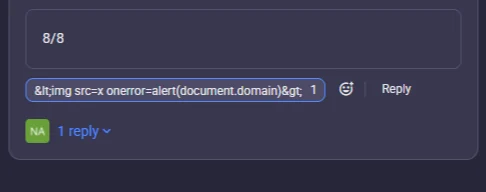
The screenshot shows the final stage of the chain: the entity decode producing real markup and innerHTML turning it into an executing onerror handler.
Why DOMPurify did not stop it
DOMPurify was not broken. It sanitised exactly what it was given, which was harmless text. The problem is that a second decode ran after sanitisation and converted that harmless text into live HTML. The report calls this the classic sanitise-then-decode pattern.
Root cause
The report identifies two root causes working together.
- Missing server-side validation. The reaction value field accepted arbitrary hex strings with no allowlist enforcement. A valid reaction should only accept predefined emoji codepoints.
- Decode after sanitise. The rendering pipeline applied DOMPurify first and decoded HTML entities afterwards. Decoding must happen before sanitisation, never after.
Impact
- Attacker role: any workspace member, at the lowest privilege.
- Victim: any other workspace member.
- Victim interaction: opening notifications, nothing more.
- Impact: JavaScript execution in the victim's browser.
Any authenticated member could target any other member, including admins and owners, without the victim doing anything beyond opening the notification panel. The report does not describe what actions the executed JavaScript could take.
Fix
The report gives both client-side and server-side recommendations. The unsafe pattern it shows is:
const sanitized = DOMPurify.sanitize(input);const decoded = decodeEntities(sanitized);element.innerHTML = decoded;
Two safe alternatives are offered. The simplest is to avoid HTML rendering entirely:
element.textContent = input;
The other is to decode first and sanitise the decoded result:
const decoded = decodeEntities(input);const sanitized = DOMPurify.sanitize(decoded);element.innerHTML = sanitized;
On the server side, reaction values should be validated against a strict allowlist of supported emoji codepoints before storing 😀.
Variants to test
- Other decoders after sanitisation. Look for any helper that runs after DOMPurify and transforms the string, such as entity decoders, URL decoders, Unicode unescapers or template renderers. A positive result is a payload that survives sanitisation unchanged and becomes markup or script after the later transform.
- Numeric or hex encodings in fields that are converted to characters. Reaction codes, emoji pickers, icon names and similar fields that map codes to characters are good candidates. A positive result is a field that accepts an arbitrary codepoint list and renders the output as HTML.
- Sanitise-then-decode in notification and preview renderers. Notifications, activity feeds and link previews often combine user data with formatting. A positive result is a stored payload that fires when another user opens the panel.
- Missing allowlists on enumerated values. Any field that should only hold a fixed set of values but accepts free-form input. A positive result is a stored value that reaches a sink unchanged.
Timeline
- Discovery: September 2026
- Reported: September 2026
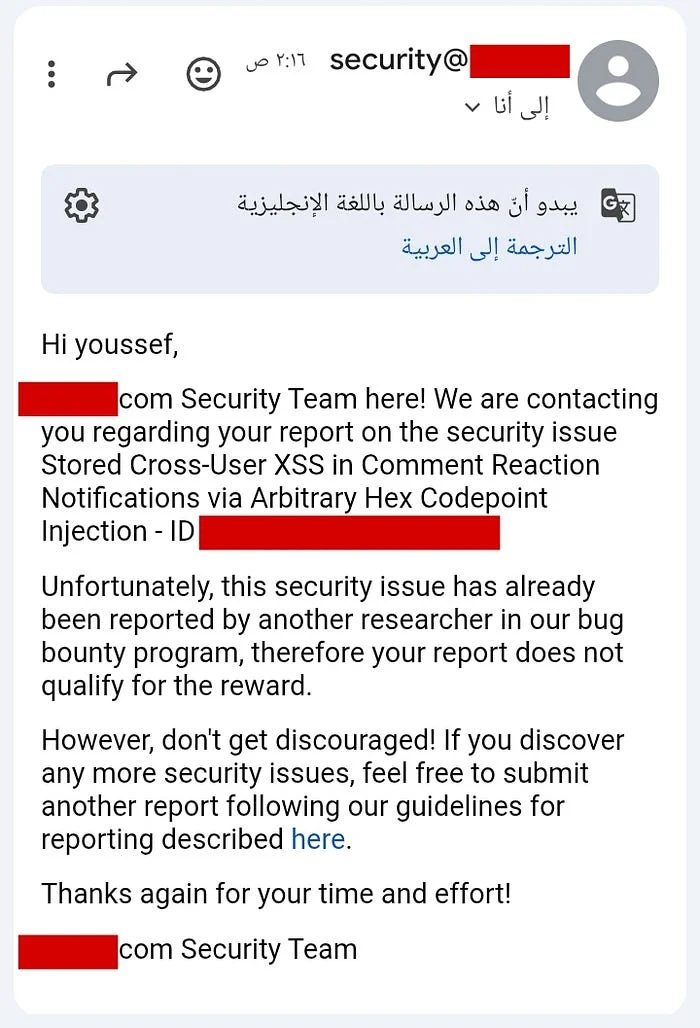
- Response: Duplicate
What happened, in plain words
A security researcher was testing a project management platform, the kind of website where a team keeps its tasks, notes and discussions in one shared space called a workspace. Each workspace has members, and members can comment on things and react to each other's comments with emoji, the little smiley faces like 😀.
When someone reacts to your comment, the platform sends you a notification. You open your notifications panel and see a line such as "A reacted 😀 to your comment: [comment text]". That line is built by the website's own code, in your browser, out of pieces of data that other people supplied.
The researcher found that one of those pieces, the reaction itself, was not checked properly. By sending a specially crafted reaction value, an attacker could make that notification line contain hidden instructions that the browser would run as a small program. This kind of attack is called cross-site scripting, or XSS for short. Because the malicious value is saved on the server and then shown to other people later, it is called stored XSS, and because it travels from one user to another inside the same workspace, cross-user XSS.
The victim does not have to click a link or download anything. Opening the notifications panel is enough. The attacker only needs to be an ordinary member of the workspace, the lowest level of permission, and the victim can be anyone else in that workspace, including an administrator or the owner.
The interesting part is not the XSS itself but how it slipped past the platform's defences. The platform used a well-known cleaning tool called DOMPurify, which is designed to strip dangerous HTML out of text before it is displayed. DOMPurify did its job correctly. The problem was that, after DOMPurify had finished, the platform decoded the text a second time, and that second decode turned harmless-looking text back into live HTML. The report calls this a double-decode sanitizer bypass, or a sanitise-then-decode pattern.
The report was written by Youssefashraf50, who publishes as Joashraf, filed in September 2026, and closed as a duplicate.
The pieces you need to know
Before walking through the finding, here are the basic ideas it relies on. None of them require any security background.
HTML is the language web pages are written in. It is made of tags in angle brackets, like <img> for an image or <b> for bold text. When your browser receives HTML, it reads the tags and draws the page. Text between tags is shown as text; tags themselves are instructions.
JavaScript is the programming language that runs inside web pages. It can do things like respond to clicks, fetch data, and read what is on the page. It is also what an XSS attack gets the browser to run.
XSS (cross-site scripting) means tricking a website into putting an attacker's JavaScript into a page that another person views, so that the other person's browser runs it. Think of it as slipping a written instruction into a letter that someone else will read aloud: the reader follows the instruction because it looks like part of the letter.
Stored XSS is XSS where the malicious value is saved on the server first (in a database, for example) and served to victims later. It is worse than the alternative, reflected XSS, because the attacker does not need to lure each victim to a special link; the payload sits there waiting.
A notification is a message the platform shows you about something that happened, such as a reaction to your comment. Notifications are usually shown in a panel you open from the top of the page.
A reaction is the emoji response you attach to a comment. Internally, platforms do not store the picture of a smiley face; they store a code that identifies which emoji it is. For 😀 the code used here is 1f600, which is a hexadecimal (base 16) number from the Unicode standard, the big catalogue that assigns a number to every character and emoji in the world.
Hexadecimal is just a way of writing numbers using digits 0 to 9 and letters a to f. Computers use it a lot because it maps neatly onto bytes. 1f600 in hex is the number 128512 in ordinary decimal, and Unicode says that number is the grinning face emoji.
An HTML entity is a way of writing a character in HTML without using the character itself. < means the less-than sign <, and > means the greater-than sign >. Entities exist so that you can put a literal < on a page as visible text without the browser thinking it starts a tag. Decoding an entity means turning < back into <.
A sanitizer is a piece of software that inspects a chunk of HTML and removes anything dangerous before the page displays it. DOMPurify is a popular JavaScript sanitizer. Think of it as a security guard at a door who checks bags: it can only check what is in the bag it is handed.
innerHTML is a property of an element on a web page. Assigning a string to it tells the browser: treat this string as HTML and build the page from it. It is the classic dangerous sink, meaning the place where attacker-controlled text finally gets interpreted as code or markup.
textContent is the safe sibling of innerHTML. Assigning a string to it tells the browser: show this string as plain text, tags and all, without interpreting anything. If you set textContent to <b>hi</b>, the user literally sees <b>hi</b>.
A JavaScript bundle is the file, or set of files, containing all of a website's JavaScript that your browser downloads. Reading it is called static analysis: you examine the code without running the site's features, the way you might read a recipe before cooking.
An allowlist is a list of values that are permitted, with everything else rejected. The opposite, a denylist, lists what is forbidden. Allowlists are generally safer because it is easier to enumerate everything that should be allowed than everything that should not.
A duplicate in bug bounty terms means the report describes a vulnerability the programme has already received. Bug bounty programmes are schemes where companies pay researchers for reporting security problems; a duplicate usually earns little or nothing.
The setup
The report describes no special tools. The researcher read the platform's JavaScript bundle. The only requirements were:
- An ordinary account that is a member of a workspace, at the lowest privilege level.
- At least one other member in the same workspace, whose comment the attacker can react to.
- The victim only needs to open their notification panel.
The report does not give versions, endpoints or headers.
Finding it
While reading the JavaScript bundle, the researcher searched for dangerous rendering patterns. The pattern being hunted was this one:
dangerouslySetInnerHTML={{__html: someVariable}}
Line by line: dangerouslySetInnerHTML is a property used in React, a popular JavaScript library for building user interfaces. Its name is a warning in itself: it tells React to take a string and insert it into the page as raw HTML, bypassing React's usual habit of escaping everything. The {{__html: someVariable}} part is an object with one key, __html, whose value is the string to insert. If someVariable contains anything an attacker controls, that content becomes live HTML. The researcher was looking for this because it is one of the most common ways XSS gets into a modern web app.
The notification renderer was found doing something like this:
const reactionEmoji = dme(metadata.reactionCodes); const commentText = metadata.commentText;
Line by line: const reactionEmoji = dme(metadata.reactionCodes) creates a constant named reactionEmoji and fills it by calling a function called dme on metadata.reactionCodes. The metadata object holds extra data attached to the notification, and reactionCodes is the stored reaction code. const commentText = metadata.commentText does the same for the comment's text. So this line pulls two pieces of data out of the notification: the emoji and the comment.
const rendered = sanitizeAndDecode( `${reactionEmoji} to your comment: ${commentText}`);
Line by line: this builds a sentence by gluing the emoji, the words " to your comment: ", and the comment text together. The backtick syntax with ${...} is JavaScript's way of inserting a variable into a string. The whole sentence is then passed to a function called sanitizeAndDecode, and the result is stored in rendered. The name of that function is the giveaway: it sanitizes and then decodes, in that order.
element.innerHTML = rendered;
Line by line: element is the piece of the page where the notification is displayed, and assigning to its innerHTML tells the browser to interpret rendered as HTML. This is the sink, the final place where the string becomes markup.
Two things stood out. First, dme() decodes the reaction code into a string, so the emoji is not a fixed picture but something computed from stored data. Second, the result goes through sanitise, then decode, then innerHTML. That ordering is the whole bug: the sanitizer runs on text that is still encoded, and the decode that turns it into live markup happens afterwards.
Exploitation
Step 1: understand the decoder
The vulnerable function is:
function dme(e) { if (!e || e.length === 0) return ``; let t = e[0].value.split(`-`); let n = []; t.forEach(e => n.push(`0x${e}`)); try { return String.fromCodePoint(…n) } catch { return `` } }
Line by line:
function dme(e) {declares a function nameddmethat takes one argument,e, which here is the list of reaction codes.if (!e || e.length === 0) return ``;is a guard: if there is no input, or the list is empty, return an empty string. The double backticks are an empty template string.let t = e[0].value.split(-);takes the first reaction code, reads itsvalue, and splits that value on the hyphen character into an array of pieces. So"1f600"becomes["1f600"], and"26-6c-74"becomes["26", "6c", "74"].let n = [];creates an empty array to collect the converted numbers.t.forEach(e => n.push(0x${e}));loops over each piece and pushes ontona string made of0xfollowed by the piece.0xis JavaScript's prefix for a hexadecimal number, so"26"becomes the string"0x26".try { return String.fromCodePoint(…n) }converts the collected hex numbers into actual characters and returns them.String.fromCodePointis a built-in JavaScript function that takes one or more Unicode numbers and gives back the characters they represent. The…nspreads the array so each element is passed as a separate argument.catch { return `` }means: if anything goes wrong, for example an invalid number, return an empty string instead of crashing.
So the function takes reactionCodes[0].value, splits it on -, prefixes each part with 0x, and converts the resulting hex codepoints to characters. Normal input such as "1f600" becomes 😀.
Step 2: craft a reaction value that decodes to encoded HTML
Instead of a single codepoint, the attacker supplies a dash-separated list of hex codepoints spelling out an HTML entity-encoded payload:
26-6c-74-3b-69-6d-67-20-73-72-63-3d-78-20-6f-6e-65-72-72-6f-72-3d-61-6c-65-72-74-28-31-29-3e
Each hyphen-separated group is the hexadecimal Unicode number of one character. Reading them in order: 26 is &, 6c is l, 74 is t, 3b is ;, and so on. The whole list spells out the characters of an entity-encoded image tag. That decodes to:
<img src=x onerror=alert(1)>
Line by line: < is the entity for <, img is the image tag name, src=x says the image's source is a file called x (which does not exist), onerror=alert(1) is an event handler that runs the JavaScript alert(1) if the image fails to load, and > is the entity for >. Because the angle brackets are written as entities, this string is not yet markup: a browser reading it would show it as text. That is the point. It is a payload in disguise.
At this point the string is still entity-encoded, so it reads as text rather than markup.
Step 3: the double-decode chain
The report walks through the rendering pipeline:
- The attacker sends the malicious reaction value:
value = "26–6c-74–3b-69–6d-67…". dme()decodes the hex to characters:<img src=x onerror=alert(1)>, which looks like text, not markup.- DOMPurify sanitizes. Because the input contains
<and not a literal<, DOMPurify sees text, not an HTML tag. The result is unchanged:<img src=x onerror=alert(1)>. replaceCharacters()decodes the entities:<becomes<and>becomes>. The result is<img src=x onerror=alert(1)>, now real markup.innerHTMLrenders it. The browser parses it as HTML,onerrorfires, and the JavaScript executes.
The screenshot shows the final stage of the chain: the entity decode producing real markup and innerHTML turning it into an executing onerror handler.
To put the chain in everyday terms: the attacker posts a sealed envelope containing a written instruction. The security guard (DOMPurify) inspects the envelope, sees only paper and harmless writing, and lets it through. Then, after the guard has gone, someone else opens the envelope and reads the instruction out as if it were part of the letter. The guard was never wrong; the guard was simply asked to check the wrong stage.
Why DOMPurify did not stop it
DOMPurify was not broken. It sanitised exactly what it was given, which was harmless text. The problem is that a second decode ran after sanitisation and converted that harmless text into live HTML. The report calls this the classic sanitise-then-decode pattern.
Root cause
The report identifies two root causes working together.
- Missing server-side validation. The reaction value field accepted arbitrary hex strings with no allowlist enforcement. A valid reaction should only accept predefined emoji codepoints. In other words, the server should have checked that the value was one of the emoji codes it actually supports, and rejected anything else. It did not, so the attacker's long list of hex numbers was stored like any other reaction.
- Decode after sanitise. The rendering pipeline applied DOMPurify first and decoded HTML entities afterwards. Decoding must happen before sanitisation, never after. If you decode first, the sanitizer sees the real markup and can remove it. If you decode afterwards, the sanitizer has already done its work on a disguise.
Impact
- Attacker role: any workspace member, at the lowest privilege.
- Victim: any other workspace member.
- Victim interaction: opening notifications, nothing more.
- Impact: JavaScript execution in the victim's browser.
Any authenticated member could target any other member, including admins and owners, without the victim doing anything beyond opening the notification panel. The report does not describe what actions the executed JavaScript could take beyond running in the victim's session.
Why does running JavaScript in someone else's browser matter? Because that JavaScript runs as if it were the website itself, in the victim's browser. The report stops at saying the code executes; it does not spell out further consequences.
Fix
The report gives both client-side and server-side recommendations. The unsafe pattern it shows is:
const sanitized = DOMPurify.sanitize(input);const decoded = decodeEntities(sanitized);element.innerHTML = decoded;
Line by line: the first statement cleans input with DOMPurify and stores the result in sanitized. The second statement decodes HTML entities in that cleaned result and stores it in decoded. The third statement puts decoded into the page as HTML. The order is the flaw: the decode happens after the clean, so anything the decode creates was never checked.
Two safe alternatives are offered. The simplest is to avoid HTML rendering entirely:
element.textContent = input;
Line by line: this assigns the raw input to textContent, which means the browser shows it as plain text. Any tags in it appear as visible characters rather than being interpreted. Nothing can execute. This is the safest option whenever the content does not genuinely need formatting.
The other is to decode first and sanitise the decoded result:
const decoded = decodeEntities(input);const sanitized = DOMPurify.sanitize(decoded);element.innerHTML = sanitized;
Line by line: the first statement decodes the entities in the input, so any hidden markup becomes real markup. The second statement runs DOMPurify on that real markup, so the sanitizer now sees the actual tags and can strip the dangerous ones. The third statement inserts the cleaned result. Here the sanitizer is the last thing to touch the string before it reaches the page, which is the property you want.
On the server side, reaction values should be validated against a strict allowlist of supported emoji codepoints before storing 😀. In plain terms: the server should keep a list of the emoji codes it supports, check every incoming reaction against that list, and reject anything not on it. Then the malicious hex list would never be saved in the first place, and the client-side bug would have nothing to work with.
Variants to test
- Other decoders after sanitisation. Look for any helper that runs after DOMPurify and transforms the string, such as entity decoders, URL decoders, Unicode unescapers or template renderers. A positive result is a payload that survives sanitisation unchanged and becomes markup or script after the later transform.
- Numeric or hex encodings in fields that are converted to characters. Reaction codes, emoji pickers, icon names and similar fields that map codes to characters are good candidates. A positive result is a field that accepts an arbitrary codepoint list and renders the output as HTML.
- Sanitise-then-decode in notification and preview renderers. Notifications, activity feeds and link previews often combine user data with formatting. A positive result is a stored payload that fires when another user opens the panel.
- Missing allowlists on enumerated values. Any field that should only hold a fixed set of values but accepts free-form input. A positive result is a stored value that reaches a sink unchanged.
Timeline
- Discovery: September 2026
- Reported: September 2026
- Response: Duplicate
Glossary
- Allowlist: a list of values that are permitted, with everything else rejected.
- Bug bounty programme: a scheme where a company rewards researchers for reporting security problems to it.
- Cross-user XSS: XSS where the malicious value is stored by one user and executed in another user's browser.
- Decode: to turn an encoded representation, such as an HTML entity or a hex number, back into the character it stands for.
- DOMPurify: a popular JavaScript library that removes dangerous HTML from a string before it is displayed.
- Duplicate: a bug report describing an issue the programme has already received.
- Emoji codepoint: the number from the Unicode standard that identifies a particular emoji, often written in hexadecimal, such as
1f600for 😀. - Hexadecimal: a way of writing numbers using digits 0 to 9 and letters a to f, common in computing.
- HTML: the language web pages are written in, made of tags in angle brackets.
- HTML entity: a written stand-in for a character, such as
<for<and>for>. innerHTML: a property that tells the browser to interpret a string as HTML and build the page from it.- JavaScript: the programming language that runs inside web pages.
- JavaScript bundle: the file or files containing a website's JavaScript, downloaded by the browser.
- Notification: a message the platform shows a user about something that happened, such as a reaction to their comment.
- Reaction: an emoji response attached to a comment, stored internally as a code rather than a picture.
- Sanitizer: software that inspects HTML and removes anything dangerous before display.
- Sanitise-then-decode: an unsafe pattern where a string is cleaned first and decoded afterwards, so the decode can recreate markup the sanitizer never saw.
- Sink: the place in code where attacker-controlled text is finally interpreted as markup or code.
- Static analysis: examining code by reading it, without running the features it implements.
- Stored XSS: XSS where the malicious value is saved on the server and served to victims later.
textContent: a property that tells the browser to show a string as plain text, without interpreting any tags.- Unicode: the standard catalogue that assigns a number to every character and emoji.
- Workspace: a shared space on a project management platform where a team keeps its tasks, notes and discussions.
- XSS (cross-site scripting): an attack that gets an attacker's JavaScript to run in another person's browser through a website.



