When "We Added an Allowlist" Doesn’t Mean What You Think It Means
A session replay platform's ingest endpoint accepted fabricated session data using a public site key, and after the vendor added an Origin allowlist, the check could be bypassed by setting the Origin header manually in a raw request. An attacker could inject fake sessions into a customer's dashboard, though the vendor later argued the impact was limited to data integrity within one workspace.

Bug Bounty
The full write-up lives on its author's site
It belongs to its author, so we link to it rather than copy it. The other two tabs are our own rewrites, checked against it.
Context
The target was a session replay platform: a product that records what real users do on a website, such as clicks, scrolls and form fills, and lets the site owner watch the recording back later, like a screen recording of a session.
Customers wire it up by dropping a small JavaScript snippet into their site. That snippet carries a site key with the prefix sr_, which tells the backend which customer's dashboard a given session belongs to. The key lives in the page source, so anyone who views source on a customer's site can copy it out. The author is explicit that this is not a bug in itself: it is how these SDKs work, in the same way a Google Analytics ID or a Stripe publishable key is public by design. The question the write-up turns on is what that key is allowed to do.
Setup
The researcher used their own site key, taken from the dashboard, and tested against the ingest endpoint directly with curl, with no browser and no JavaScript involved. The endpoint in the report is:
https://ds.example-vendor.app/api/v1/session-replay/ingest
No account roles, tool versions or other preconditions are described beyond having a site key of their own.
Finding it
The starting observation is a design one: the site key is embedded in customer pages and is therefore public. If that key is the only thing gating a write endpoint, the endpoint can be called directly from outside the browser. The researcher notes this is one of the first things they try on any product with a drop-in snippet model, including chat widgets, analytics, replay tools and feedback widgets, because the SDK design is broadly the same across SaaS products.
Exploitation
Step 1: post a fabricated session with no gate at all
The researcher took their own site key and posted straight to the ingest endpoint:
curl -X POST "https://ds.example-vendor.app/api/v1/session-replay/ingest" \-H "User-Agent: Mozilla/5.0 (X11; Linux x86_64) Chrome/[redacted]" \-H "Origin: https://victim-domain.com" \-H "X-SR-Site-Key: sr_YOUR_KEY" \-H "X-SR-Visitor-Id: 11111111-2222-4333-8444-555555555555" \-H "Content-Type: application/json" \-d '{"type":"snapshot","session_id":"22222222-3333-4444-5555-666666666666","chunk_index":0,"event_count":1,"meta":{"user_email":"[redacted]","user_id":"9999","url":"https://victim-domain.com","device_type":"desktop","screen_width":1920,"screen_height":1080},"events":[{"type":4,"data":{"href":"https://victim-domain.com","width":1920,"height":1080},"timestamp":1725134400000}]}'
The request carries the site key in X-SR-Site-Key, a visitor identifier in X-SR-Visitor-Id, and a JSON body describing a snapshot: a session_id, a chunk_index, an event_count, a meta object with a user email, user ID, URL, device type and screen dimensions, and an events array with a single event of type 4 containing the page href and dimensions plus a timestamp. The Origin header is set to https://victim-domain.com.
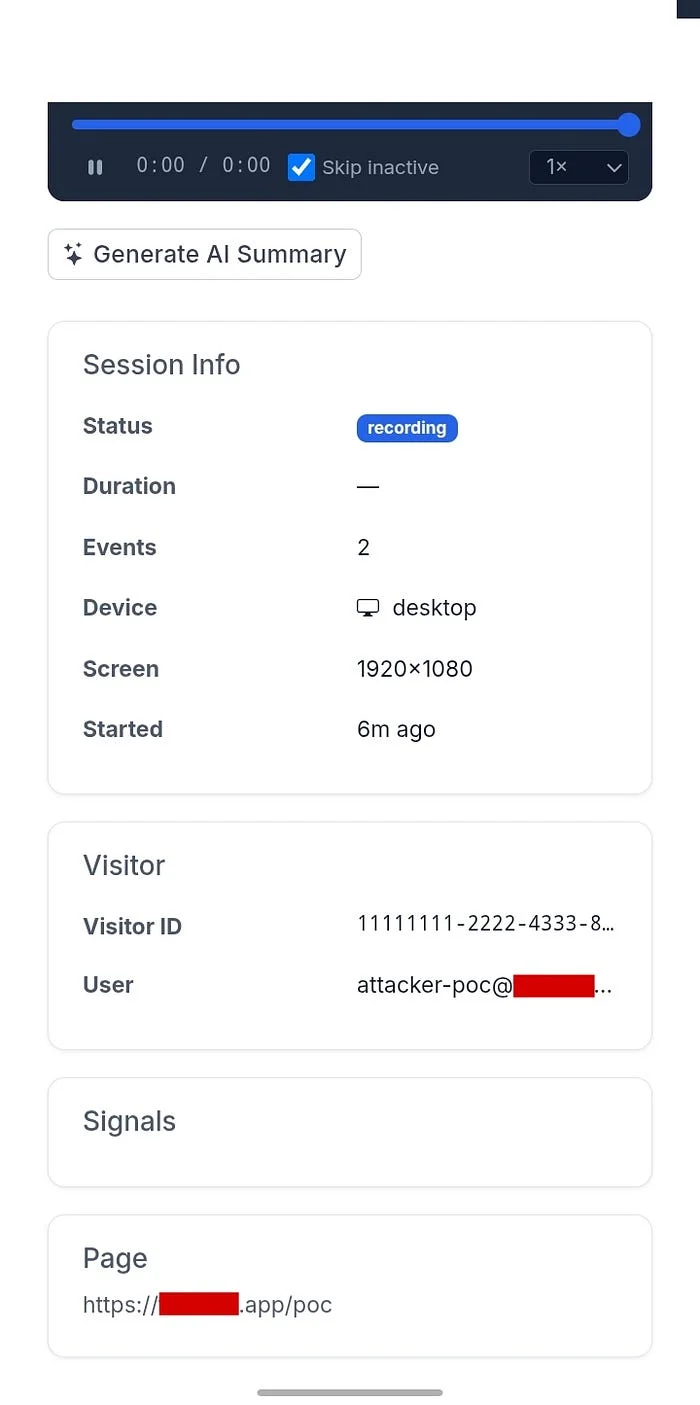
It worked first try. A completely fabricated session, with a fake email, fake user ID and fake everything else, showed up live in the researcher's dashboard, indistinguishable from a real visitor recording.
Step 2: test the vendor's allowlist fix
The vendor responded by adding an allowed origins list per site key. The researcher's first instinct was to assume it worked and move on, but they had already flagged the key as public by design, and the new control lived on top of a header, Origin. Their reasoning: Origin is trustworthy only in requests a real browser sends on behalf of a page it loaded. A browser will not let JavaScript lie about it, but nothing stops a raw HTTP request from setting whatever Origin it wants. The header only means something in the context that enforces it.
So they set it themselves:
-H "Origin: https://victim-domain.com"
The same forged payload went to the same endpoint and went through. Full snapshot, events and session-end all returned 200. To check it was not a fluke on their own account, they tested against the vendor's own production site key and got the same result.
Root cause
The vendor's allowlist was a CORS-style browser control, not a server-side authentication mechanism. The researcher's phrasing in the report is:
Origin allowlisting is a CORS-style browser control, not a server-side authentication mechanism.
The allowlist did not stop the attack: an empty allowlist was failing open, accepting everything, and the Origin value is controlled by whoever sends the request. The site key was never designed to authenticate either, only to identify, so the write endpoint had no control that an attacker could not supply themselves.
When the vendor later looked at the fix, they agreed the origin check the researcher originally bypassed was broken: an empty allowlist had been failing open, accepting everything, instead of failing closed. That was the real defect they fixed.
Impact
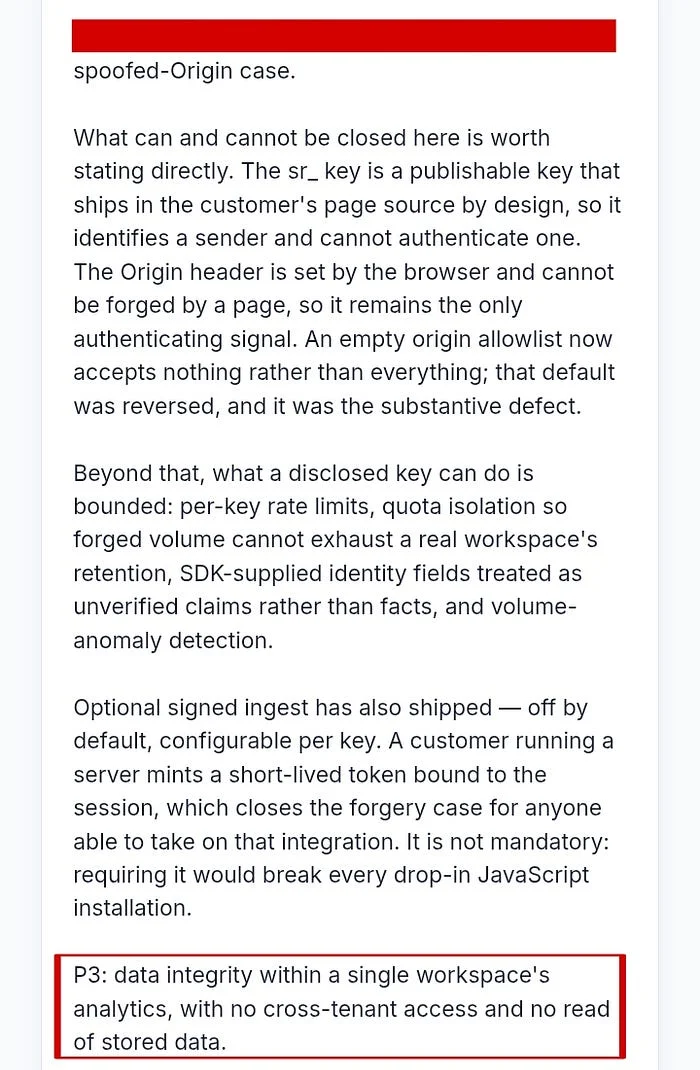
The vendor's final position did not deny the bypass. They argued that the site key was never meant to authenticate, only to identify, and that Origin, despite the bypass, remained the best authentication signal they had for unauthenticated browser SDKs. What changed on their side was the framing: they accepted that a leaked key can inject data and set out to bound the blast radius, with rate limits per key, quota isolation so forged traffic cannot eat into a real customer's storage, treating every field the SDK sends as an unverified claim rather than a fact, anomaly detection on ingest volume, and an optional signed-ingest mode using a short-lived, session-bound token minted server-side for customers who want cryptographic proof instead of trusting Origin.
The issue was closed P3 with the classification data-integrity-within-one-workspace, no cross-tenant reach and no read access to stored data. No bounty was paid.
The researcher's own conclusion is that the practical risk was always lower than the initial report made it sound: once the false sense of security from the Origin check is stripped away and replaced with genuine containment, the damage a leaked key can do is small and contained. The bypass was real and the reasoning sound, but the vendor treated it as low severity after limiting the impact.
Fix
The vendor's changes, as described in the report, were:
- Fixing the empty allowlist so it fails closed rather than open.
- Rate limits per key.
- Quota isolation, so forged traffic cannot consume a real customer's storage.
- Treating every field the SDK sends as an unverified claim, not a fact.
- Anomaly detection on ingest volume.
- An optional signed-ingest mode: a short-lived, session-bound token minted server-side.
Signed ingest was deliberately not made mandatory. The researcher agrees with that call, since forcing every customer to run a backend signer would break every simple drop-in install, which is half the value proposition of the product.
Variants to test
-
Direct calls to ingestion endpoints with a public key. Take any embedded or publishable key from a page source and call the ingest endpoint outside the browser. A positive result is a fabricated record appearing in the dashboard as if it came from a real client.
-
Header-based checks you control. When a fix relies on
Origin,Referer,X-Forwarded-Foror a customX-Client-*header, resend the original request with that header set yourself. A positive result is the request succeeding exactly as it did before the fix. -
SDK-based products generally. Replay, analytics, chat, feedback and error-tracking services share the drop-in snippet model, so the same test applies. A positive result is any write endpoint reachable with only a public key and attacker-supplied headers.
What happened, in plain words
A security researcher found a way to inject fake recordings into a session replay product. The company that makes the product added a fix, and the researcher showed the fix did not actually stop the attack. The company then decided the remaining risk was small, closed the report as low severity, and paid no bounty. The interesting part is not the bug itself but the reasoning on both sides: what the company thought it had fixed, and what it had really done.
This article walks through the whole story from the beginning, assuming you have never done security testing before. Every technical word is explained the first time it appears, and every command is broken down line by line.
The product and the setup
What a session replay tool does
A session replay platform records what real visitors do on a website: where they click, how far they scroll, what they type into forms. The site owner can then watch that recording back later, like a screen recording of somebody else's visit. It is used to understand how people use a site and where they get stuck.
How customers install it
To switch the feature on, a customer pastes a small piece of JavaScript into their website. JavaScript is the programming language that runs inside your browser and makes pages interactive. That snippet carries a site key, a short string of characters starting with sr_ that tells the vendor's servers which customer's dashboard a given recording belongs to. Think of it like a membership number printed on a form: it says which account the form belongs to, not who filled it in.
The key is public on purpose
The key sits in the page source, the raw text of the page that anyone can see by right-clicking and choosing "View page source". So anyone visiting a customer's site can copy the key out. The researcher is careful to say this is not a bug in itself. It is how these tools are designed, in the same way a Google Analytics ID or a Stripe publishable key is meant to be visible. The real question is what that key is allowed to do.
What an API endpoint is
An API is the set of addresses on a server that software talks to, rather than pages meant for humans. An endpoint is one specific address in that set. When the JavaScript snippet on a customer's site records a visitor, it sends the data to an ingest endpoint: the address that accepts incoming recordings. "Ingest" simply means "take in".
The tool used to test it
curl is a command-line program that sends HTTP requests, the same kind of messages your browser sends, but typed by hand. It lets you talk to a server without a browser, which is exactly what the researcher wanted: to see whether the server cared that no real browser was involved.
First pass: no gate at all
The researcher took their own site key from their dashboard and posted straight to the ingest endpoint. No browser, no JavaScript, just curl:
curl -X POST "https://ds.example-vendor.app/api/v1/session-replay/ingest" \-H "User-Agent: Mozilla/5.0 (X11; Linux x86_64) Chrome/[redacted]" \-H "Origin: https://victim-domain.com" \-H "X-SR-Site-Key: sr_YOUR_KEY" \-H "X-SR-Visitor-Id: 11111111-2222-4333-8444-555555555555" \-H "Content-Type: application/json" \-d '{"type":"snapshot","session_id":"22222222-3333-4444-5555-666666666666","chunk_index":0,"event_count":1,"meta":{"user_email":"[redacted]","user_id":"9999","url":"https://victim-domain.com","device_type":"desktop","screen_width":1920,"screen_height":1080},"events":[{"type":4,"data":{"href":"https://victim-domain.com","width":1920,"height":1080},"timestamp":1725134400000}]}'
Line by line, in plain words:
curl -X POSTruns the curl program and tells it to send a POST request. POST is the HTTP method used when you are sending data to a server, as opposed to GET, which asks for a page or resource.- The URL
https://ds.example-vendor.app/api/v1/session-replay/ingestis the ingest endpoint: the address that accepts recordings. -H "User-Agent: ..."sets a header. Headers are extra labelled lines attached to a request, like the fields on an envelope.User-Agentnormally says which browser and operating system you use. Here it is set to look like Chrome on Linux, so the request resembles a real browser's.-H "Origin: https://victim-domain.com"sets theOriginheader, which normally tells the server which website the request came from. Here it names a site the researcher does not own.-H "X-SR-Site-Key: sr_YOUR_KEY"carries the site key. Headers starting withX-are custom headers invented by the product; they are not part of the standard HTTP vocabulary.-H "X-SR-Visitor-Id: ..."carries a visitor identifier, a random-looking string in the format of a UUID (a long identifier made of hex digits and dashes, used to give something a unique name).-H "Content-Type: application/json"says the body of the request is JSON, a text format for structured data built from curly braces, names and values.-d '...'is the body itself: the data being sent. It describes a snapshot, meaning one captured moment of a visitor's session. Inside it are asession_id, achunk_index(which piece of the recording this is), anevent_count(how many events it contains), ametaobject with a user email, user ID, URL, device type and screen size, and aneventsarray holding one event of type 4 with the page address, dimensions and a timestamp.
It worked first try. A completely fabricated session, with a fake email, a fake user ID and fake everything else, appeared live in the researcher's dashboard, indistinguishable from a real visitor recording.
Why start here? Because if a key is public by design and that key is the only thing standing between the internet and a write endpoint, the obvious move is to call the endpoint directly, outside the browser, and see what happens. The researcher says this is one of the first things they try on any product built around a drop-in snippet: chat widgets, analytics, replay tools, feedback widgets. The design is broadly the same across a lot of software-as-a-service products, so the test transfers.
The vendor's fix, and why testing did not stop
The vendor added an allowed origins list per site key. In other words, each key would only accept requests whose Origin header named one of the customer's approved websites. It sounds reasonable.
The researcher's first instinct was to assume it worked and move on. Many people would have closed the tab there. But they had already established that the key is public by design, and the new control lived on top of a header, Origin. Their reasoning: Origin is only trustworthy in requests that a real browser sends on behalf of a page it loaded. A browser will not let JavaScript lie about it. But nothing stops a raw HTTP request from setting whatever Origin it wants. A header only means something in the context that enforces it.
An everyday comparison: a bouncer checking a name on a guest list is only useful if the bouncer checks your ID. If anyone can write any name on a piece of paper and hand it over, the list proves nothing. The Origin header is that piece of paper.
So the researcher set it themselves:
-H "Origin: https://victim-domain.com"
This is the same header-setting option as before, now used as the whole test: send the request with an Origin value of your choosing and see whether the server believes it.
The same forged payload went to the same endpoint and went through. The full snapshot, the events and the session-end all returned 200. A 200 is the HTTP status code for "OK": the server accepted the request and did what was asked. To check it was not a fluke on their own account, the researcher repeated the test against the vendor's own production site key and got the same result.
This is the actual lesson: when a vendor patches something by adding a header check, the very next move is to ask whether you can simply set that header yourself. It sounds too simple to work, and that is exactly why it keeps working. A large number of "fixed" reports are really just this: somebody added a check, and nobody asked who controls the value being checked.
Reporting the bypass
The researcher did not just say "it's broken". They gave the full chain: the request, the response, the session appearing live in the dashboard, and they named the root cause explicitly instead of leaving the vendor to guess:
Origin allowlisting is a CORS-style browser control, not a server-side authentication mechanism.
Unpacking that sentence:
- CORS stands for Cross-Origin Resource Sharing. It is a set of rules browsers follow about which websites are allowed to talk to which servers. Crucially, the browser is the one enforcing those rules, on behalf of the user.
- Authentication means proving who you are. A password, a session cookie or a signed token authenticates you. A header you type yourself does not, because there is nobody checking that you are who the header claims.
- Server-side means the check happens on the server, where the attacker cannot reach in and change it. A browser control happens in the browser, which the attacker is free not to use.
That distinction, CORS versus authentication, is worth remembering as a phrase. It is precise, it is not accusatory, and it tells the person triaging the report exactly which mental model went wrong without making them feel stupid. Reports that name the category of mistake, not just the instance of it, tend to be taken more seriously.
Where it landed and why there was no bounty
The vendor's final response did not deny anything. They agreed that the origin check the researcher originally bypassed was broken. It turned out that an empty allowlist had been failing open, accepting everything, instead of failing closed. "Failing open" means that when the check has no configuration, it lets traffic through; "failing closed" means it blocks traffic until it is configured. That was the real defect they fixed.
Then they made an argument the researcher did not fully see coming. They said the site key was never meant to authenticate, only to identify, and that Origin, despite the bypass, remained the best authentication signal they had for unauthenticated browser SDKs. An SDK is a small library of code a company ships so that customers can integrate its service; here it is the JavaScript snippet. "Unauthenticated" means the request carries no proof of identity at all.
What actually changed on the vendor's side was not "we trust Origin now". It was: we accept that a leaked key can inject data, so let us bound the blast radius. "Blast radius" means how much damage one compromised thing can do. Their measures were:
- Rate limits per key: a cap on how many requests a key can send in a period.
- Quota isolation: forged traffic cannot eat into a real customer's storage allowance.
- Treating every field the SDK sends as an unverified claim, not a fact.
- Anomaly detection on ingest volume: noticing when the amount of incoming data looks unusual.
- An optional signed-ingest mode: a short-lived, session-bound token minted server-side, for any customer who wants real cryptographic proof instead of trusting
Origin.
A token here is a small piece of data that proves permission, like a cloakroom ticket: whoever holds it can collect the coat, and it expires. "Minted server-side" means the server creates it, so the customer's browser never invents it. "Cryptographic proof" means proof based on mathematics that cannot be forged without the secret used to create it.
They did not make signed ingest mandatory, and the researcher agrees with that call. Forcing every customer to run a backend signer would break every simple drop-in install, which is half the value of the product.
They closed the report as P3. The report was closed as P3. The classification was data-integrity-within-one-workspace: the problem was about the correctness of data inside a single customer's account, with no cross-tenant reach and no read access to stored data. "Cross-tenant" means reaching another customer's account; "read access" means being able to see data rather than only add to it.
The researcher sat with that for a while before accepting it. Their instinct as a hunter is to want the big outcome: critical severity, a large payout, a clean win. But the vendor's reasoning holds up. Once you strip away the false sense of security the Origin check gave them and replace it with genuine containment, such as rate limits, quotas and anomaly detection, the actual damage a leaked key can do is small and contained. The researcher found a real flaw in the vendor's reasoning, and the vendor fixed the empty allowlist and added containment without paying a bounty, because the practical risk was always lower than the initial report made it sound.
What to tell another beginner
If you were chasing this pattern again, the first thing to do is hit any endpoint that can be reached with a public or embedded key directly, outside the browser. SDK-based products are especially interesting: replay, analytics, chat, feedback, error tracking and similar services tend to expose ingestion endpoints worth looking at.
Pay attention to who actually controls the headers involved in a security check. If a fix relies on a header such as Origin, Referer, X-Forwarded-For or a custom X-Client-* header, ask whether the attacker can simply send the request themselves. A header being present does not automatically make it an authentication mechanism. What matters is whether something the attacker cannot control is enforcing the trust boundary.
There is also an important difference between a fix and a mitigation. When a vendor says they have "bounded the impact" or added protections around the issue, that is different from saying the attack path has been removed. Paying attention to that wording tells you how the vendor understands the remaining risk.
And finally, not every technically valid finding leads to a big payout. That does not mean the finding was wrong. Here the bypass was real, the reasoning was sound, and the vendor treated it as low severity after limiting the impact. Finding the technically correct issue is worth doing even when the bounty does not turn out as expected. More importantly, findings like this teach you to look at the next vendor's fix and ask whether they actually removed the vulnerability or simply reduced what an attacker can do with it.
Glossary
- API: the set of addresses on a server that software talks to, as opposed to pages meant for people.
- Authentication: proving who you are, for example with a password or a signed token.
- Blast radius: how much damage a single compromised key or account can cause.
- CORS: Cross-Origin Resource Sharing, the browser rules about which websites may talk to which servers, enforced by the browser.
- Cross-tenant: reaching or affecting another customer's separate account.
- curl: a command-line program for sending HTTP requests by hand.
- Endpoint: one specific address on a server that accepts requests.
- Failing open / failing closed: whether a check with no configuration lets traffic through (open) or blocks it (closed).
- Header: an extra labelled line attached to an HTTP request or response, such as
OriginorUser-Agent. - HTTP: the protocol browsers and servers use to exchange requests and responses.
- Ingest: to take in data, here recordings sent by the snippet.
- JavaScript: the programming language that runs in the browser and makes pages interactive.
- JSON: a text format for structured data built from names and values.
- Mitigation: reducing the impact of a problem without removing the underlying attack path.
- Origin: an HTTP header saying which website a request came from; a browser sets it, but anyone can set it in a raw request.
- P3: a severity rating, where P1 is the most serious and higher numbers are less serious.
- POST: the HTTP method used to send data to a server.
- Rate limit: a cap on how many requests something may send in a period.
- SDK: a small library of code a company ships so customers can integrate its service.
- Server-side: happening on the server, where an attacker cannot change it.
- Session replay: a product that records what visitors do on a website and lets the owner watch it back.
- Site key: the public string starting with
sr_that identifies which customer a recording belongs to. - Status code 200: the HTTP code meaning the request succeeded.
- Token: a small piece of data that proves permission, often short-lived.
- UUID: a long identifier made of hex digits and dashes, used to give something a unique name.
- Vulnerability: a weakness in software that lets someone make it behave in a way its owner did not intend.

