Stored XSS in medical reports
The medical reports feature stored the report title and details without escaping, so an image tag with an error handler ran as script. Anyone who opened the report would execute the attacker's code in their own session.

medium.com
Published on medium.com
Xss Attack
The full write-up lives on its author's site
It belongs to its author, so we link to it rather than copy it. The other two tabs are our own rewrites, checked against it.
Context
The target is a medical reports feature inside a web application. The feature stores a report title and report details and then displays them back to users: the title appears in a dashboard list of reports, and the full report is shown in a report viewer when someone opens it. The write-up does not name the product, the organisation or the program behind the finding.
The bug is a stored cross-site scripting (XSS) issue in the report title field. The application saved the title without validation or escaping and rendered it raw in two places, so script supplied in the title ran in the browser of anyone who viewed the report.
Setup
The write-up does not describe any accounts, roles, tools or versions. The only precondition it establishes is access to the medical reports feature and the ability to create or edit a report title. No interception proxy, browser version or payload-delivery mechanism is mentioned.
Finding it
The researcher approached the feature with the standard rule that user input must never be trusted. The concern was that the moment an application accepts raw data from a user without validation or sanitisation, the door is open to injection.
While testing the medical reports feature, the researcher typed a simple image tag directly into the report title field. The application accepted the title and the details completely unpunished and unescaped, storing them raw in the system. That is the point where the input stopped being text in a database and became something that would be interpreted later.
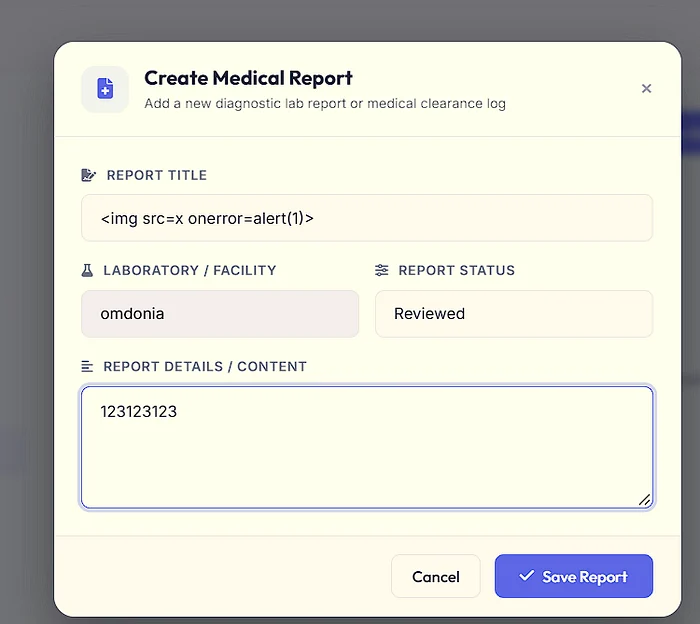
The screenshot shows the report title field accepting an image tag that carries an onerror handler.
Exploitation
Step 1: Put the payload in the report title
The researcher entered an image tag with an onerror handler into the report title field of the medical reports feature. The write-up shows the payload in the screenshot above rather than as text. What the report does state is that the tag was accepted and stored without escaping.
Step 2: Observe where the stored value is rendered
The payload was rendered raw in two locations:
- Inside the dashboard list of reports.
- Directly within the report viewer.

Because the title is echoed unescaped in the dashboard list, the payload is rendered there as well as in the report viewer.
Step 3: Open the report
Every time a user opened the report, the payload executed in their browser. The write-up describes the payload as executing right in front of the victim's eyes rather than sitting inert in the page.
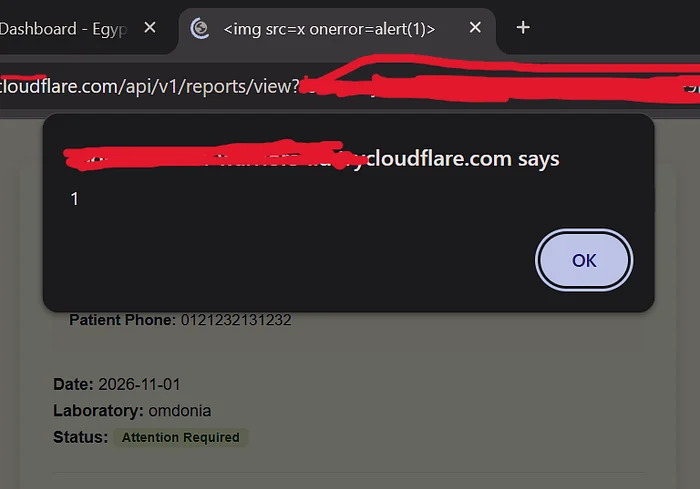
The screenshot shows the payload executing when the report is opened.
Root cause
The application stored the report title and details raw and rendered them without escaping in both the dashboard list and the report viewer. There is no output encoding at the point of display, so the browser parses whatever markup the title contains as HTML rather than as text.
Impact
The write-up frames the impact around three consequences:
- Session hijacking. Stored XSS runs inside the victim's active session, so an attacker can act with the victim's authenticated context rather than merely causing a visual nuisance.
- Data theft and tampering. An attacker can silently act as the victim, read sensitive page data, or modify medical reports.
- Chaining with other bugs. Combined with potential IDOR vulnerabilities in report access, a malicious report link could be weaponised and sent directly to target users, scaling the attack.
The execution condition is that a victim opens the affected report.
Fix
The control that addresses this class of bug is output encoding: the report title should be HTML-escaped wherever it is rendered, in the dashboard list and in the report viewer alike, so that markup in the title is displayed as text. Server-side validation or sanitisation of the title on input would add a second layer, and a restrictive Content Security Policy would limit the damage from any encoding gap that remains.
Variants to test
- Other free-text fields on the same object. A positive result is the same raw rendering in a list view and a detail view.
- Other list views. A positive result is the payload appearing unescaped in a context outside the report page.
- Attribute contexts. A positive result is the handler firing from that context.
- Stored values rendered to other roles. A positive result is execution in the higher-privileged session.
- Chaining with access-control flaws. Test whether a report can be opened by a user who should not have access to it. A positive result is unauthorised access to a report that also carries a stored payload.
What happened, in plain words
A web application had a feature for medical reports. A user could give a report a title and some details, and the application saved them. Later, the title was shown in a list of reports on a dashboard, and the whole report was shown in a viewer when someone opened it.
The problem was that the application saved the title exactly as typed and then put it back into the page without any cleaning. If the title contained something that a browser treats as code rather than as text, the browser would run that code. The researcher typed an image tag with an onerror handler into the title field, and the application stored it and displayed it raw in both the dashboard list and the report viewer. Every time someone opened the report, the code ran in that person's browser.
This kind of bug is called stored cross-site scripting, or stored XSS. "Stored" means the malicious input is saved on the server and served to other people later, rather than being reflected back only to the person who sent it. "Cross-site scripting" means an attacker gets their own code to run inside someone else's session on the site.
A useful everyday comparison: imagine a noticeboard where anyone can pin a note, and the person who runs the board copies each note word for word onto a big public display. If someone pins a note that says "shout this out loud", the display will do exactly that, because nobody checks whether a note is a message or an instruction. The application here did the same with the report title: it treated whatever was in the title as part of the page's instructions, not as plain text.
The discovery: trusting user input is a dangerous game
The write-up opens with a rule that security testers repeat to themselves: never trust user input. The idea is simple. Anything that arrives from a user, whether typed into a form, sent by a browser or included in a URL, could be anything at all. An application that accepts that data and uses it without checking it is opening the door to injection, where the user's data is interpreted as instructions by some part of the system.
When testing the medical reports feature, the researcher typed a simple image tag directly into the report title field. The application accepted the title and the details completely unpunished and unescaped, and stored them raw in the system.
The screenshot shows the report title field accepting an image tag that carries an onerror handler. In other words, the field took the markup as-is and saved it.
At that moment the researcher realised this was not just text going into a database. It was something that would be interpreted later, when the page was displayed. The write-up calls it a ticking time bomb: harmless-looking while stored, active the moment it is rendered.
Where it lived
The stored value was rendered raw in two places:
- Inside the dashboard list of reports.
- Directly within the report viewer.
Because the title is echoed unescaped in the dashboard list, the payload is rendered there as well as in the report viewer.
The impact
Every single time an unsuspecting user or victim opened the report, the payload did not just sit there: it executed right in front of their eyes.
The screenshot shows the payload executing when the report is opened.
The write-up frames the impact around three consequences:
- Session hijacking. Stored XSS runs inside the victim's active session, so an attacker can act with the victim's authenticated context rather than merely causing a visual nuisance. To unpack that: when you log in to a site, the site gives your browser a small piece of data, often called a session cookie or token, which it sends with every request so the server knows who you are. If an attacker's code runs in your browser while you are logged in, it can act as you, because the browser attaches your credentials to whatever the code asks it to do. The attacker is not playing a prank; they are wearing the victim's digital mask.
- Data theft and tampering. An attacker can silently act as the victim, read sensitive page data, or maliciously modify medical reports. In a medical context, that means the confidentiality and integrity of health records are at stake, not just the appearance of a page.
- Chaining vulnerabilities. Combined with potential IDOR vulnerabilities in report access, a malicious report link can be weaponised and sent directly to target users, scaling the attack effortlessly. IDOR stands for insecure direct object reference: it is the flaw where a site lets you open a record just by knowing or guessing its identifier, without checking that the record belongs to you. If that flaw exists alongside the stored XSS, an attacker can point victims at a report that carries the payload and reach people who would not otherwise see it.
The execution condition is that a victim opens the affected report. The write-up does not give a count of affected users, a severity rating or a CVSS score.
Root cause
The application stored the report title and details raw and rendered them without escaping in both the dashboard list and the report viewer. There is no output encoding at the point of display, so the browser parses whatever markup the title contains as HTML rather than as text.
Output encoding means converting characters that have a special meaning in HTML, such as < and >, into a form the browser displays as text instead of treating as the start or end of a tag. If the title were encoded on output, a tag typed into the field would appear on screen as visible characters, and the browser would never run it.
The write-up does not describe any server-side validation, sanitisation library, Content Security Policy or other control that would have blocked the tag, so the likely explanation is that none was applied to this field. Server-side validation means checking input on the server before saving it. Sanitisation means cleaning input so that dangerous parts are removed or neutralised. A Content Security Policy is a set of rules a site sends to the browser saying which sources of code are allowed to run; a restrictive policy can stop injected code even when encoding is missed.
Why it matters: the real-world danger
The write-up's three impact points are worth restating in everyday terms, because they explain why a single unescaped field is treated seriously.
- Session hijacking. The code runs with the victim's logged-in identity. Whatever the victim is allowed to do, the code can attempt to do, using the victim's browser as the vehicle.
- Data theft and tampering. The code can read what the page shows the victim and can send requests that change records. In a medical reports feature, that means reading or altering health information.
- Chaining vulnerabilities. A stored payload plus a way to make victims open the right report equals a delivery mechanism. The attacker does not need to compromise each victim individually; they need one report and a link.
Fix
The control that addresses this class of bug is output encoding: the report title should be HTML-escaped wherever it is rendered, in the dashboard list and in the report viewer alike, so that markup in the title is displayed as text. Server-side validation or sanitisation of the title on input would add a second layer, and a restrictive Content Security Policy would limit the damage from any encoding gap that remains.
A comparison: output encoding is like a museum putting every visitor's note behind glass. The note is still there and still readable, but nobody can press its buttons. Validation on input is like checking the note at the door; useful, but it should never be the only defence, because there are many ways to get text into a system.
Variants to test
- Other free-text fields on the same object. A positive result is the same raw rendering in a list view and a detail view. The reasoning: if the title field was missed, its neighbours on the same form may have been missed too.
- Other list views. A positive result is the payload appearing unescaped in a context outside the report page. The reasoning: a value can be safe on one screen and unsafe on another, because each screen builds its output differently.
- Attribute contexts. A positive result is the handler firing from that context. The reasoning: escaping that is correct for text between tags is not automatically correct inside an attribute, so a different context needs a different check.
- Stored values rendered to other roles. A positive result is execution in the higher-privileged session. The reasoning: stored XSS becomes more serious when the person who views the payload has more power than the person who planted it.
- Chaining with access-control flaws. Test whether a report can be opened by a user who should not have access to it. A positive result is unauthorised access to a report that also carries a stored payload. The reasoning: this is the IDOR combination described in the impact section, and it is what turns a stored payload into something that can be aimed at chosen victims.
Glossary
- XSS (cross-site scripting): a bug where an attacker's code runs in another user's browser as part of a trusted website.
- Stored XSS: XSS where the malicious input is saved on the server and served to later visitors, rather than reflected back only to the sender.
- Payload: the piece of input an attacker uses to trigger a bug, here an image tag with an
onerrorhandler. - Image tag: an HTML element, written
<img ...>, that tells the browser to load a picture. onerrorhandler: an attribute on an image tag that names code to run if the image fails to load. It is a common way to get code to run without needing a real image.- HTML: the language browsers use to describe the structure of a page, made of tags such as
<img>and text between them. - Markup: text written in a markup language such as HTML, including its tags.
- Tag: a piece of HTML syntax, such as
<img>, that the browser interprets rather than displays. - Attribute: a name and value written inside a tag, such as the handler on an image tag.
- Input: any data a user sends to an application, whether typed into a form or included in a request.
- Validation: checking input against rules before accepting or saving it.
- Sanitisation: cleaning input so that dangerous parts are removed or neutralised.
- Escaping / output encoding: converting special characters into a safe form so the browser displays them as text instead of interpreting them as markup.
- Rendering: the process of turning stored data into what the browser displays on screen.
- Raw rendering: putting stored data into the page without escaping it first.
- Dashboard: a summary screen, here the list of reports.
- Report viewer: the screen that shows a single full report.
- Session: the period during which a site treats your browser as a logged-in user.
- Session cookie / token: the small piece of data your browser sends with requests so the server knows which session a request belongs to.
- Session hijacking: using a victim's active session to act as them.
- Authenticated context: the identity and permissions a request carries because the user is logged in.
- IDOR (insecure direct object reference): a flaw where a site lets you open a record by its identifier without checking that you are allowed to see it.
- Chaining: combining two or more bugs so that together they do more than either alone.
- Content Security Policy (CSP): rules a site sends to the browser stating which sources of code may run, used to limit the damage of injected code.
- CVSS: a scoring system for rating the severity of a vulnerability.
- Severity rating: a label, such as low or high, describing how serious a vulnerability is.



