Stored XSS in Yahoo
A stored cross-site scripting flaw existed in the comment feature on Yahoo's news site, where user-supplied input was not properly sanitised. An attacker could inject script that executes in the browser of anyone viewing the comment, as demonstrated by a popup alert.

medium.com
Published on medium.com
Bug Bounty
The full write-up lives on its author's site
It belongs to its author, so we link to it rather than copy it. The other two tabs are our own rewrites, checked against it.
Context
Yahoo's news section, at https://www.yahoo.com/news, included a commenting feature that let visitors post comments on news articles. The researcher, Shahzada Al Shahriar Khan, found that the comment field did not neutralise HTML markup, so a comment could carry a script that ran in the browser of anyone who viewed it. That makes it a stored cross-site scripting (XSS) issue: the payload is saved server-side and executes later, for other users, rather than only in the submitter's own session.
The write-up does not describe the comment widget's implementation, the server-side stack, or which users see comments. It only shows the public page and the comment box.
Setup
No special tooling, accounts or roles are described. The researcher worked against the public news page and its comment form. The only precondition visible in the report is that a comment can be submitted on an article page.
Finding it
The researcher does not describe how the comment field was first noticed. The write-up goes straight to reproduction.
Exploitation
Step 1: open the comment form
Go to the news page:
https://www.yahoo.com/news
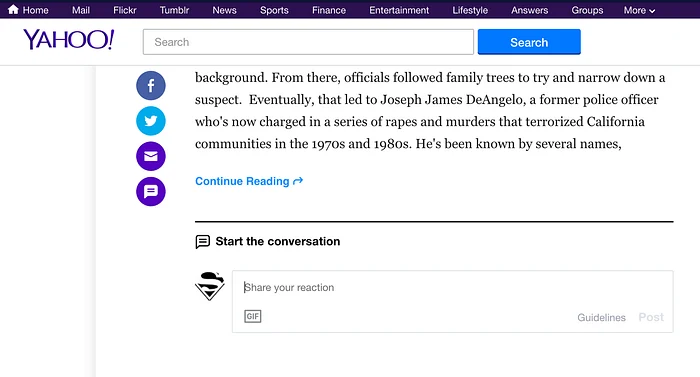
The report places a screenshot at this step.
Step 2: submit an encoded image payload
Comment this payload:
"><img src=x onerror=confirm(1);>
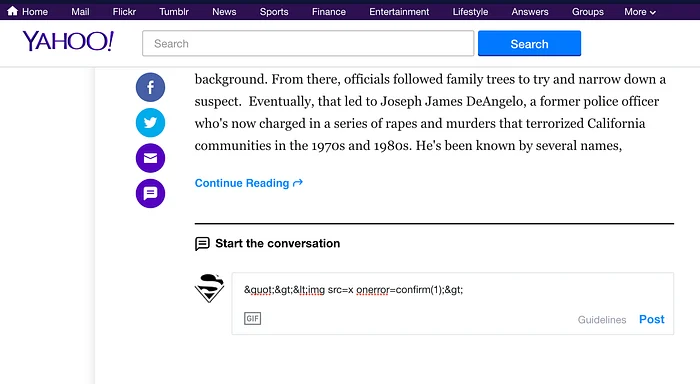
The payload uses HTML entities for the quote and angle brackets. " and > decode to " and > once the comment is rendered, which lets the value break out of whatever attribute or context the comment is placed in. <img src=x onerror=confirm(1);> then becomes a real <img> tag whose src points at a non-existent resource, x. When that load fails, the onerror handler fires and calls confirm(1). The browser decodes the entities when it renders the stored comment, turning them into live markup.
Step 3: observe execution
After the comment is stored and the page is viewed, the confirm(1) dialog appears.
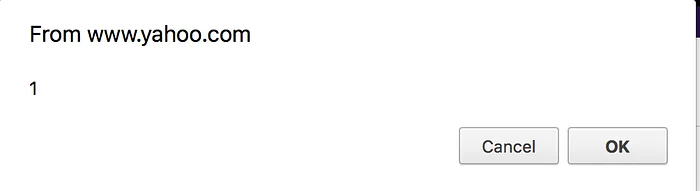
The report places a screenshot after the confirm(1) popup.
Step 4: a payload with attacker-controlled text
The researcher then tried a second payload that lets the attacker put text into the dialog:
<img src=x onerror=prompt(1337)>

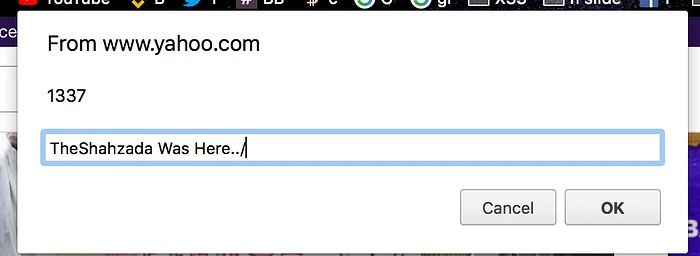
This uses the same entity-encoded <img> with a failing src, but the handler calls prompt(1337) instead of confirm(1). The report places screenshots at this step. The report also references a video proof of concept but does not include it in the text.
Root cause
The report does not analyse the server-side code. What the payloads demonstrate is that the comment content is stored and later rendered into the page without adequate output encoding: entity-encoded markup is decoded by the browser into live HTML, and the resulting <img> element's event handler executes. Whether the missing control was output encoding, input validation, or both is not stated.
Impact
A stored XSS in a public comment field runs in the browser of users who view the affected comment, in the context of the Yahoo origin. The report does not enumerate specific consequences such as session theft or account actions; it demonstrates script execution only, through confirm(1) and prompt(1337). The practical impact depends on who views the comment and what the Yahoo origin exposes to script, which the write-up does not discuss.
Fix
It records only that the bug was resolved on 06/04/2018. The general remedy for this class of issue is to encode comment content on output so that entity-encoded markup is rendered as text rather than parsed as HTML, and to avoid relying on blocklists of literal characters.
Timeline
| Date | Event |
|---|---|
| 31/03/2018 | Initial report |
| 01/04/2018 | HackerOne staff asked for 'Needs more info.' |
| 01/04/2018 | More info submitted |
| 04/04/2018 | Triaged and a $300 initial bounty rewarded |
| 06/04/2018 | Bug resolved |
| 11/04/2018 | $1700 bounty rewarded (total $2000) |
Variants to test
- Entity-encoded event handlers in other user-content fields (profiles, reviews, messages). A positive result is a dialog or other script effect appearing when another user views the stored content.
- Other HTML elements with automatic handlers, such as
<svg onload=...>or<body onload=...>, submitted in the same encoded form. A positive result is the handler firing on page load without user interaction. - Attribute-context breakouts, where the comment is placed inside an attribute: submit an encoded quote followed by an event handler and observe whether the attribute is closed and the handler attached.
- Double-encoding tests: send entities that decode once on input and again on output, and check whether the second decode produces live markup.
- Stored payloads in fields that are later rendered in administrative or moderation views, where the audience differs from the public page. A positive result is execution in a privileged user's session.
What happened, in plain words
Yahoo has a news section at https://www.yahoo.com/news. Like many news sites, it let readers post comments under articles. A researcher named Shahzada Al Shahriar Khan tried typing some unusual text into that comment box, and found that the site did not clean it up properly. Instead of showing the text as plain words, the site saved it and later handed it to every visitor's browser as if it were part of the page itself. The browser then did what the text told it to do, which included showing a pop-up dialog.
This kind of bug is called stored cross-site scripting, usually shortened to stored XSS. To understand the name, split it up:
- Scripting means running small programs inside a web page. Every page you visit runs JavaScript, the language browsers use to make pages interactive. That is normal and useful.
- Cross-site means the program did not come from the site's own developers. It came from another person, in this case a commenter, and it runs as if it belonged to the site.
- Stored means the harmful text is saved on the server first. It does not just affect the person who typed it. It sits in the site's database and is shown to other people later, so it can fire in their browsers too.
A simple comparison: imagine a noticeboard in a building where anyone can pin a note. If the building manager reads each note aloud exactly as written, a prankster could pin a note saying "shout FIRE" and the manager would shout it. The note was stored on the board, and the effect happens for everyone who comes to listen. Stored XSS is the same idea, with a comment box instead of a noticeboard and a browser instead of a manager.
The write-up does not describe how the comment feature is built, what software runs on Yahoo's servers, or exactly which visitors see comments. It only shows the public page and the comment box.
Setup
The report describes no special tools, no accounts and no special permissions. The researcher used the public news page and its comment form, the same things any reader can use. The only thing needed to try this is the ability to submit a comment on an article page.
Finding it
The write-up does not say how the researcher first noticed the comment field was suspicious. It jumps straight to the steps to reproduce.
Exploitation
Step 1: open the comment form
The first step is to visit the news page:
https://www.yahoo.com/news
This is a URL, the address you type into a browser's address bar. Opening it loads Yahoo's news section, which is where the comment interface lives. The researcher went there to find a place where a visitor can type text that the site will keep.
The report places a screenshot at this step.
Step 2: submit an encoded image payload
The next step is to post this text as a comment:
"><img src=x onerror=confirm(1);>
This line looks like gibberish, so it is worth going through it piece by piece.
"is an HTML entity. An entity is a short code that stands for a character which would otherwise be awkward to write."stands for the double quote character". Browsers understand a whole set of these codes.>is the entity for the greater-than sign>.<is the entity for the less-than sign<.- So the beginning,
"><, is a disguised way of writing">followed by<. The quote and the closing angle bracket are there to end whatever piece of HTML the comment is being placed inside, and the opening angle bracket starts a brand new HTML tag. <img ...>is an HTML tag for displaying an image. A tag is an instruction to the browser, written between angle brackets.src=xtells the browser where the image file is. Here it points atx, which is not a real address, so the image will fail to load.onerror=confirm(1);is an event handler. HTML lets you attach small snippets of JavaScript to elements, to run when something happens.onerrormeans "when this element fails to load, run the following".confirm(1)is a built-in browser function that shows a small dialog box with an OK and a Cancel button, displaying the value1.
Put together: the browser decodes the entities into real characters, sees a broken image, the image fails to load, the failure triggers the onerror handler, and the handler calls confirm(1). A dialog appears.
The entities are decoded by the browser when it renders the page, so the markup becomes live.
Step 3: observe execution
Once the comment is saved and the page is viewed, the confirm(1) dialog appears.
The report places a screenshot after the confirm(1) popup.
Step 4: a payload with attacker-controlled text
The researcher then tried a second payload that lets the attacker put their own text into the dialog:
<img src=x onerror=prompt(1337)>
This works the same way as the first one, with two differences:
- The whole tag is written in entities:
<and>stand for<and>. The browser decodes them into a real image tag. - The handler calls
prompt(1337)instead ofconfirm(1).promptis another built-in browser function. It shows a dialog with a text box where the visitor can type something, and it displays the value1337as a default. The number1337is just a value the researcher chose; it has no special meaning here.
So this payload shows that an attacker can write text into the popup box.
The report places screenshots at this step. The report also mentions a video proof of concept but does not include it in the text.
Root cause
The report does not analyse the server-side code, so we cannot say exactly which line was at fault. What the two payloads demonstrate is that the comment content is stored and later placed into the page without adequate output encoding. Output encoding means converting any special characters in user content into harmless equivalents before putting them into the page, so the browser shows them as text rather than treating them as instructions. Here, entity-encoded markup was decoded by the browser into live HTML, and the resulting image element's event handler ran.
Whether the missing control was output encoding, input validation, or both is not stated in the report.
Impact
A stored XSS in a public comment field runs in the browser of users who view the affected comment, in the context of the Yahoo origin. "Origin" here means the site's identity as the browser sees it: the combination of protocol, domain and port. Code running in that context is treated as if Yahoo itself had written it, so it can do anything the page is allowed to do.
The report does not list specific consequences such as stealing a session or performing account actions. It demonstrates script execution only, through confirm(1) and prompt(1337). The practical impact depends on who views the comment and what the Yahoo origin exposes to script, which the write-up does not discuss.
Fix
It records only that the bug was resolved on 06/04/2018. The general remedy for this class of issue is to encode comment content on output so that entity-encoded markup is rendered as text rather than parsed as HTML, and to avoid relying on blocklists of literal characters. A blocklist is a list of things to forbid; it is fragile because there is always another way to write the same thing, as the entities here show.
Timeline
| Date | Event |
|---|---|
| 31/03/2018 | Initial report |
| 01/04/2018 | HackerOne staff asked for 'Needs more info.' |
| 01/04/2018 | More info submitted |
| 04/04/2018 | Triaged and a $300 initial bounty rewarded |
| 06/04/2018 | Bug resolved |
| 11/04/2018 | $1700 bounty rewarded (total $2000) |
A bug bounty is a programme where a company pays people for reporting security problems responsibly instead of exploiting them. HackerOne is a platform that runs such programmes. Triaged means the report was reviewed and accepted as a genuine issue. A bounty is the payment for the report.
Variants to test
These are follow-up ideas in the same spirit, for anyone testing a similar comment feature:
- Entity-encoded event handlers in other user-content fields (profiles, reviews, messages). A positive result is a dialog or other script effect appearing when another user views the stored content.
- Other HTML elements with automatic handlers, such as
<svg onload=...>or<body onload=...>, submitted in the same encoded form. A positive result is the handler firing on page load without user interaction. - Attribute-context breakouts, where the comment is placed inside an attribute: submit an encoded quote followed by an event handler and observe whether the attribute is closed and the handler attached.
- Double-encoding tests: send entities that decode once on input and again on output, and check whether the second decode produces live markup.
- Stored payloads in fields that are later rendered in administrative or moderation views, where the audience differs from the public page. A positive result is execution in a privileged user's session.
Glossary
- XSS (cross-site scripting): a bug where a site lets someone else's text run as code in a visitor's browser.
- Stored XSS: XSS where the harmful text is saved on the server and shown to other people later.
- Payload: the piece of text or code an attacker submits to trigger a bug.
- HTML: the language used to describe the structure of a web page, made of tags in angle brackets.
- HTML entity: a short code such as
<or"that stands for a character, decoded by the browser when the page is shown. - Tag: an instruction in HTML, written between angle brackets, such as
<img>. - Attribute: a setting inside a tag, such as
src=xon an image tag. - Event handler: a small piece of JavaScript attached to an element that runs when something happens, such as
onerrorwhen an image fails to load. - JavaScript: the programming language browsers run to make pages interactive.
confirm(): a built-in browser function that shows a dialog with OK and Cancel.prompt(): a built-in browser function that shows a dialog with a text box.- Output encoding: converting special characters in user content into harmless equivalents before placing them in a page.
- Input validation: checking or cleaning what a user submits before accepting it.
- Blocklist: a list of forbidden values or characters, which is easy to bypass.
- Origin: the combination of protocol, domain and port that identifies a site to the browser.
- Bug bounty: a programme that pays people for reporting security problems responsibly.
- HackerOne: a platform that hosts bug bounty programmes.
- Triaged: reviewed and accepted as a genuine issue.
- Bounty: the payment made for a valid report.
- PoC (proof of concept): a demonstration that a bug is real, such as a screenshot or video.



